
Note: This article contains affiliate links. If you click on these links and make a purchase, we may earn a small commission at no extra cost to you. This helps support our research and content. Read our full affiliate disclosure here.
Choosing the right AI Security Camera matters because modern cameras do more than record footage. They filter motion events, prioritize human and vehicle activity, and hand you actionable alerts that save time and reduce nuisance notifications. If you expect dependable detection, clear video, and straightforward setup, picking a well-reviewed model will make daily monitoring far less tedious. This guide shortlists the top AI Security Cameras across common home setups and evaluates them on detection accuracy, installation, video quality, and smart features. Read on for what each camera does well and which capabilities matter most for your use case.
Top Picks at a Glance
| Best Overall The best all-around choice for most situations | REOLINK OMVI 3i WiFi |  |
| Best Quality Built to a higher standard if you want something more solid | eufyCam S4 4-Cam Kit | 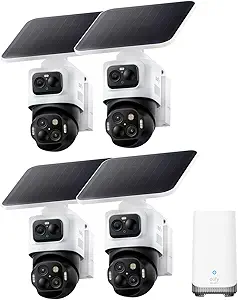 |
| Best Value The sweet spot between price and what you get | eufy SoloCam S340 |  |
| Best Budget The cheapest option that still gets the job done reliably | HITELLARCAM CB54 2K Security Camera |  |
| Top Rated A top-rated pick with lots of positive feedback | CINMOORE Window Camera CM-BC22EU |  |
| Most Popular A crowd favorite that many people choose with confidence | Wyze Cam v4 |  |
| Best Seller A high-volume bestseller chosen again and again | Tapo C615F KIT Floodlight Camera |  |
REOLINK OMVI 3i WiFi

| Video Capture Resolution | 4k |
|---|---|
| Night Vision Range | 100 feet |
| Waterproof Rating | IP66 |
| Flash Memory Supported Size Maximum | 512 GB |
| Connectivity Protocol | Wi-Fi 6+2.4/5GHz Wi-Fi |
The REOLINK OMVI 3i WiFi is an outdoor triple-lens dome camera built to cover wide areas with a panoramic upper lens and a 4K pan-tilt lower module that rotates for detailed tracking. In practice you mount it on a wall or ceiling, plug into power, and use the Reolink app or client to view the 180 degree panoramic feed alongside the PTZ view, tap to direct the PTZ, or let SyncTrack and Auto Tracking follow subjects automatically. Local AI handles person, vehicle, and animal detection plus perimeter zones and AI video search without monthly subscription, and dual-band Wi‑Fi 6 helps keep streams smooth. It records continuously to local storage (microSD, NVR, or Home Hub) with H.265 compression to save space, and the IP66 rating means it stands up to rain and dust. Expect a somewhat involved initial setup for firmware and app updates to enable all features, and its power requirement means you need an outlet nearby rather than battery operation.
Best for: Buyers who want an all‑around outdoor camera with wide-area coverage, automatic subject tracking, and strong local AI capabilities without ongoing fees.
Less Ideal for: People who need battery-powered or completely wireless outdoor cameras, or those who want a plug-and-play camera with no firmware or app maintenance.
- Triple-lens design: panoramic 180° view plus a 4K PTZ camera for full 360° coverage and close-up detail
- Local AI detection and AI video search run on-device so no subscription is required
- Dual-band Wi‑Fi 6 support for more reliable wireless streaming
- Multiple local recording options including microSD (up to 512 GB), Reolink NVR or Home Hub for continuous 24/7 recording
- Weatherproof IP66 build suitable for outdoor installation and two‑way audio for remote communication
- Requires a wired power connection so it is not suitable for battery-only installations
- Some advanced features require firmware and app updates and may need a compatible Reolink hub or NVR for full functionality
Verdict: Choose the OMVI 3i WiFi if you want a single outdoor camera that blends panoramic coverage, 4K PTZ tracking, and local AI search without subscription costs.
eufyCam S4 4-Cam Kit
| Video Capture Resolution | 4K + Dual 2K |
|---|---|
| Frame Rate | 15 frames per second |
| Power Source | Battery Powered |
| Night Vision Range | 32.8 feet |
| Built-In Media | 16GB eMMC, Up to 16TB |
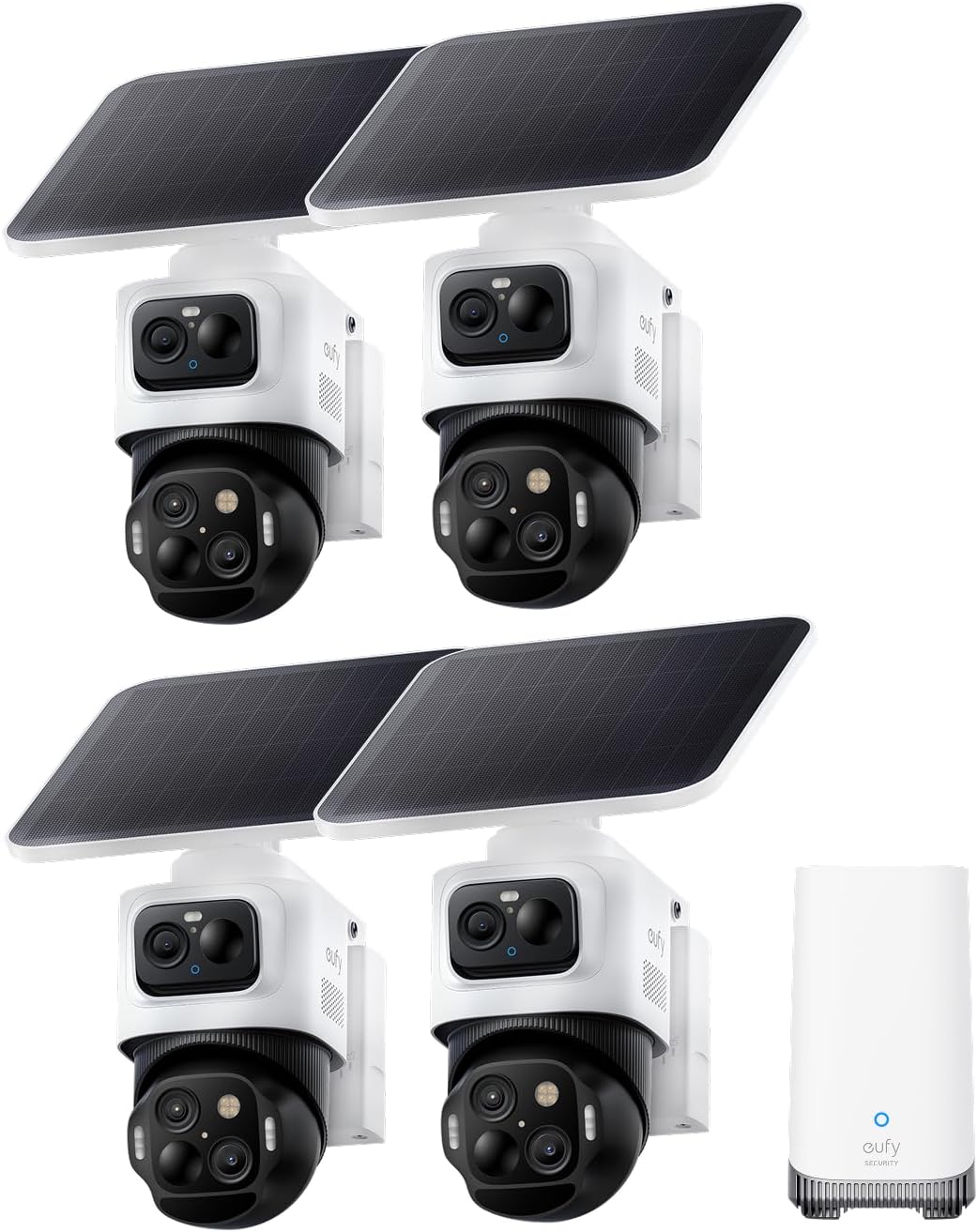
The eufyCam S4 4-Cam Kit combines a hybrid triple-lens bullet-PTZ design and a HomeBase S380 hub to deliver wide-area coverage plus targeted close-ups without constant wiring or subscription fees. Each camera pairs a 4K wide bullet lens with a lower 2K PTZ lens so the system captures full-scene views while the PTZ locks, auto-frames and zooms up to long range; cameras also hand off targets across zones when linked to the HomeBase. The kit includes detachable 5.5W solar panels and rechargeable batteries for largely wire-free placement, and HomeBase stores footage locally on built-in eMMC (expandable) with on-device AI to reduce false alerts. Radar and PIR motion detection, color night vision spotlights, and an integrated siren/light provide active deterrence. Expect 15 fps 4K+2K recording and H.264 MP4 clips, which are efficient but not the highest frame rate for ultra-smooth motion. Setup is straightforward for an outdoor system, though optimal solar orientation and occasional battery swaps are necessary for uninterrupted off-grid use.
Best for: Buyers who prioritize high-detail AI tracking and robust perimeter coverage and want a powerful, local-storage system that minimizes subscriptions and uses solar for flexible placement.
Less Ideal for: People who need the highest frame rates for fast action capture or those who prefer cloud-first services and fully managed subscription monitoring.
- Hybrid triple-lens bullet-PTZ design provides simultaneous wide views and zoomed close-ups from one device
- HomeBase S380 local storage with on-device AI reduces cloud dependency and subscription costs
- Detachable 5.5W solar panels enable largely wire-free outdoor placement
- Radar plus PIR sensors and spotlights with siren offer precise detection and active deterrence
- Expandable local storage supports large retention when paired with a drive
- Frame rate is limited to 15 fps which can make fast motion less smooth
- Full cross-camera features require the HomeBase S380 for best performance
Verdict: If you want AI-driven, subscription-free perimeter security with combined wide-angle and PTZ close-ups plus solar-powered placement, this kit delivers powerful local tracking and storage.
eufy SoloCam S340

| Video Capture Resolution | 3K |
|---|---|
| Effective Video Resolution | 2160 |
| Field Of View | 135 degrees |
| Power Source | Solar Powered, battery powered |
| Memory Storage Capacity | 128 GB |
The eufy SoloCam S340 is an outdoor, battery-backed dome camera designed to provide broad, high-resolution coverage without a subscription. It combines a 3K primary capture plus a secondary lens and up to 8× hybrid zoom to deliver clear detail for doors, driveways, and yards, while the pan-and-tilt mechanism lets a single unit cover nearly 360 degrees to eliminate blind spots. A removable solar panel and a 10,000 mAh battery mean extended runtime and reduced maintenance, and the camera stores footage locally on built-in 8 GB with support for larger local storage via the eufy ecosystem. AI-driven detection and motion tracking help the camera follow subjects and cut down on false alerts, and color night vision plus a spotlight improve nighttime identification. Because it is battery-first, the S340 is not intended for continuous 24/7 recording; installation is quick and wireless but relies on good Wi‑Fi and sunlight for optimal solar charging. For buyers who want an all-in-one, low-maintenance AI camera without monthly fees, the S340 balances coverage and image quality well.
Best for: Buyers who prioritize a low-maintenance, single-camera solution that maximizes coverage and image clarity while avoiding monthly fees and frequent charging.
Less Ideal for: Users who need constant 24/7 recording, enterprise-grade surveillance, or who lack reliable sunlight or Wi‑Fi at the camera location.
- High-resolution 3K dual-lens capture with up to 8× hybrid zoom for detailed footage.
- Pan-and-tilt design provides near 360° coverage from one mounting point to reduce blind spots.
- Removable solar panel paired with a 10,000 mAh battery for long run times and lower upkeep.
- AI detection and motion tracking reduce false alarms and automatically follow moving subjects.
- Built-in local storage (8 GB) lets you keep footage without a subscription.
- Not capable of 24/7 continuous recording on battery power.
- Night vision range is modest compared with some hardwired models.
- Full functionality and enhanced AI features require connection to eufy HomeBase for advanced recognition.
Verdict: Choose the SoloCam S340 if you want a single, solar-augmented AI camera that delivers wide 3K coverage and smart tracking without a subscription.
HITELLARCAM CB54 2K Security Camera

| Video Capture Resolution | 2k (2304) |
|---|---|
| Frame Rate | 30 frames per second |
| Night Vision Range | 8 meters |
| Power Source | Battery Powered |
| Water Resistance Level | Waterproof (IP66) |
The HITELLARCAM CB54 is a wireless outdoor bullet camera designed for simple home security without constant wiring or complex setup. It records in 2K (2304) resolution at 30 fps, uses an integrated spotlight for full-color night video, and sends instant motion alerts to a companion app while offering two-way audio for remote communication. The camera supports dual-band Wi‑Fi (2.4GHz and 5GHz) to reduce connection drops and can store clips to free cloud storage or a local microSD card. Its rechargeable 5200 mAh battery and power-saving modes are advertised to last weeks or months depending on activity, and the IP66-rated ABS enclosure handles rain and outdoor conditions. Practical limits include reliance on battery life under frequent motion triggers and cloud plan quality differences between free and paid tiers, and occasional setup quirks are possible with app or Wi‑Fi variations. For buyers wanting an affordable, feature-rich wireless camera that emphasizes easy installation and daytime-quality night footage, the CB54 delivers solid value.
Best for: Buyers on a tight budget who want a wireless, easy-to-install outdoor camera with good daytime and color-night image quality and flexible storage options.
Less Ideal for: Users who need continuous 24/7 high-quality recording in heavy-traffic areas or who require an always-on wired power solution should consider wired models or systems designed for constant recording.
- 2K UHD video and 30 fps provide clear daytime and zoomed-in footage.
- Built-in spotlight enables full-color night vision rather than monochrome IR images.
- Supports both free cloud storage and local microSD storage for flexible backup options.
- Dual-band Wi‑Fi compatibility (2.4GHz and 5GHz) helps maintain a stable connection.
- Rechargeable 5200 mAh battery enables wire-free installation and long runtime in low-activity settings.
- Battery runtime will drop with heavy motion triggers or continuous recording.
- Free cloud plan limits video quality unless you upgrade to a paid plan.
- App and Wi‑Fi setup can vary by network, potentially needing troubleshooting.
Verdict: A budget-friendly wireless outdoor camera that delivers 2K video and color night vision with flexible cloud or SD storage, making it a strong choice for affordable home security.
CINMOORE Window Camera CM-BC22EU
| Video Capture Resolution | 2.5K/4MP |
|---|---|
| Power Source | 5000mAh Battery; Wired Power |
| Wireless Technology | 2.4Ghz Wi-Fi |
| Night Vision | Color Night Vision |
| Mount Type | Window Mount; Glass Mount |
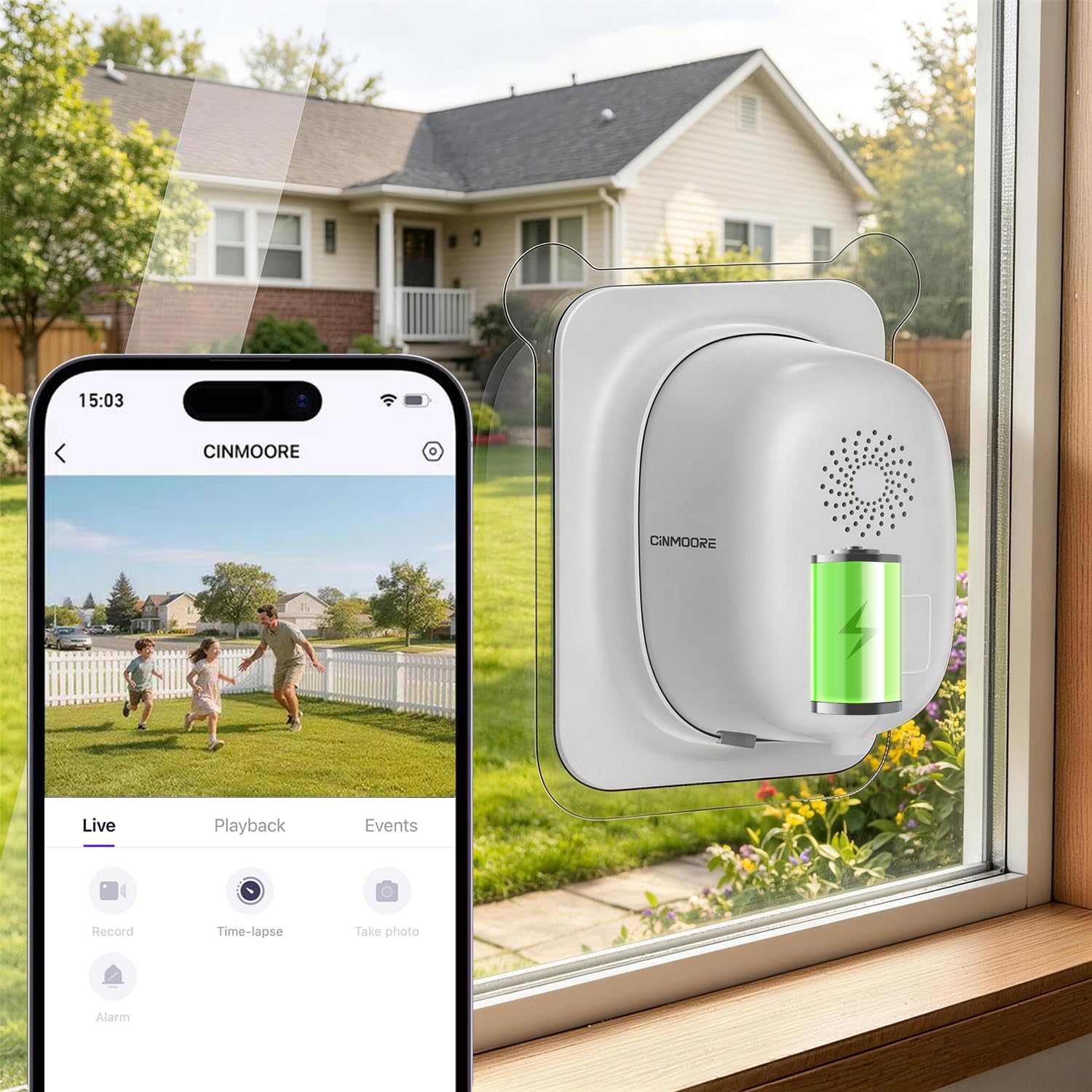
The CINMOORE Window Camera is a glass-mounted security camera designed for drill-free installation on indoor windows to watch the outside. It captures 2.5K/4MP video with an anti-glare lens and color night vision, and it can run on the built-in 5000mAh battery for intermittent wireless use or be plugged in for continuous 24/7 recording. Setup is straightforward through the CINMOORE app over 2.4 GHz Wi‑Fi, and the device supports local microSD recording plus optional cloud storage. Notable features include free on-device AI alerts for humans, vehicles, and pets, configurable activity zones, and two-way full-duplex audio for remote communication. The camera does not pan or tilt and uses a fixed wide-angle lens, so coverage is static; also, cloud recording is a paid option and an SD card is required for local continuous storage. For buyers who prioritize straightforward window surveillance with strong AI detection and flexible power options, this camera provides dependable, privacy-friendly monitoring without invasive installation.
Best for: Homeowners or renters who want a reliable, non-invasive window surveillance camera that prioritizes strong on-device AI alerts and flexible power options to maintain continuous monitoring without drilling.
Less Ideal for: Users who need wide area coverage or active tracking since the camera cannot pan or rotate, or buyers who require free cloud backup included out of the box.
- 2.5K/4MP resolution with anti-glare lens gives clearer daytime and night color footage
- Built-in 5000mAh battery plus wired power option for flexible continuous or wireless use
- On-device AI detection for humans, vehicles, and pets with instant mobile alerts
- Drill-free window stick-on installation preserves glass and hides the camera from outside
- Supports local microSD storage (8GB–512GB) so you can record without mandatory cloud subscription
- Fixed wide-angle lens with no pan/tilt means a limited, unadjustable field of view
- Cloud video storage requires a paid subscription for offsite backups
Verdict: Choose this window camera when you need dependable, drill-free exterior monitoring with strong local AI alerts and flexible battery or wired power.
Wyze Cam v4

| Video Capture Resolution | 2k (2560×1440) |
|---|---|
| Viewing Angle | 120 degrees |
| Night Vision | Color night vision with 72‑lumen spotlight |
| Waterproof Rating | IP65 |
| Storage | microSD up to 512 GB |
The Wyze Cam v4 is a budget-minded indoor/outdoor security camera built around a 2.5K QHD sensor and a 120 degree field of view for clear detail at entryways and driveways. In everyday use it streams live video to the Wyze app, sends motion alerts, and can record continuously to a microSD card or save motion clips; setup is Bluetooth-assisted and it connects to 2.4 GHz Wi‑Fi. Notable features include enhanced color night vision driven by a Starlight sensor and a 72‑lumen motion spotlight, two‑way audio for real‑time talk/listen, and an onboard 99 dB siren for active deterrence. The camera is IP65 weather resistant so it can be mounted outdoors with the included magnetic/freestanding mount options. Limitations to keep in mind are a 20 fps frame rate which can produce less-smooth motion than higher-frame cameras and the need for a strong local Wi‑Fi signal for reliable live view; advanced person/vehicle/package labeling requires the optional cloud plan for full AI detection features. For buyers who want high detail and local recording without mandatory subscription fees, Wyze Cam v4 delivers strong value.
Best for: Buyers who want an affordable, detail-oriented AI-capable camera that can record locally and be used outdoors without committing to a cloud subscription, and who value social proof and reliability when choosing a mainstream security brand.
Less Ideal for: Users who need ultra-smooth high-frame-rate video for fast action or who require full advanced AI person/license-plate recognition without any extra subscription features.
- 2.5K QHD resolution and 120° field of view for clear facial and package detail
- Enhanced color night vision plus a 72‑lumen motion-activated spotlight for usable color footage in low light
- IP65 weather resistance for year-round outdoor mounting
- Local recording to microSD (up to 512 GB) so no subscription is required
- Built-in two‑way audio, a 99 dB siren, and app alerts provide active deterrence and monitoring
- Frame rate is 20 fps which can make fast motion look less smooth than higher‑fps cameras
- On-device AI labeling (people, packages, vehicles) is limited without the optional paid cloud plan
Verdict: Wyze Cam v4 is the best low-cost AI-capable indoor/outdoor camera here for buyers who want high-resolution, color night vision and local recording without a required subscription.
Tapo C615F KIT Floodlight Camera

| Video Capture Resolution | 2K 3MP |
|---|---|
| Battery Power | 10400 milliamp_hours |
| Power Source | Solar/Battery Powered |
| Waterproof Rating | IP65 |
| Night Vision Range | 32.8 feet |
The Tapo C615F KIT combines a 2K pan/tilt camera with an integrated 800-lumen floodlight and an included solar panel so you can mount it where wiring is impractical. In daily use it detects people, pets, and vehicles with subscription-free AI filters, sends app alerts, and can automatically pan and track a subject across nearly 360 degrees. You can speak through two-way audio, trigger a 97 dB siren and alarm lights, and save footage to a microSD card or to the optional cloud plan. The rechargeable 10,400 mAh battery and solar panel mean long stretches between charges in normal conditions, and an IP65 rating keeps the unit weather resistant. Notable limitations are that solar charging only works above certain temperatures and extreme usage reduces battery life, and the camera relies on 2.4 GHz Wi-Fi which may limit network choices. For buyers who want robust, low-maintenance outdoor coverage with practical AI alerts, this kit delivers reliable, wide-area monitoring without mandatory subscription fees.
Best for: Buyers who prioritize dependable, low-maintenance outdoor security and want wide-area coverage with smart alerts and optional local storage without committing to a subscription.
Less Ideal for: People who need wired, always-on PoE or 5 GHz network compatibility or those who expect factory-level continuous recording without considering battery and sunlight constraints.
- Pan/tilt mechanics plus 360° AI tracking provide broad coverage and subject follow-up
- Built-in 800-lumen dimmable floodlight delivers color night view and motion-activated illumination
- Includes 10,400 mAh battery and solar panel for extended, wire-free operation
- Subscription-free AI detection with person/vehicle/pet filtering reduces false alerts
- Local microSD storage plus optional cloud backup gives flexible recording choices
- Requires 2.4 GHz Wi-Fi only, which can be limiting on modern dual-band networks
- Solar charging and battery performance are affected by temperature and heavy use
Verdict: Choose the Tapo C615F KIT if you want wide‑area, battery-plus-solar outdoor surveillance with smart, subscription-free AI alerts and flexible local storage.
Choosing the Right AI Security Camera: Key Factors to Consider
Detection Accuracy
How reliably a camera identifies people, vehicles, pets, and other objects determines how useful alerts are. High detection accuracy reduces false alarms and ensures you only get notifications that matter. Accuracy depends on on-device processing, cloud-based models, sensor quality, and configurable sensitivity settings.
Consider whether the camera offers object classification beyond simple motion, whether it supports activity zones to ignore roads or trees, and how easy it is to tune thresholds. For properties with frequent passerby traffic, better classification will keep alerts meaningful without constant intervention.
Video Quality and Night Vision
Video clarity affects evidence value and everyday monitoring. Look at resolution, bitrates, compression format, and whether the camera maintains color or useful grayscale detail at night. Good infrared performance and low-light processing deliver clearer captures when illumination is limited.
Higher resolution helps identify faces and plates at distance, but also increases storage and bandwidth needs. Check whether the camera supports adaptive streaming so quality scales with network conditions while preserving critical detail during events.
Installation and Power Options
How you power and mount a camera influences placement flexibility. Wired PoE or mains-powered models offer continuous operation, while battery-powered cameras allow placement where wiring is not feasible. Installation complexity covers mounting hardware, routing power, and any required hub or bridge.
Consider whether you need professional installation, the availability of clear mounting templates, and whether the camera's form factor fits the intended mounting height and angle. Also evaluate weatherproof ratings if the device will be outdoors.
Connectivity and Integration
A camera's network behavior affects latency, reliability, and compatibility with existing smart-home systems. Options include Wi-Fi, Power over Ethernet, or proprietary radio links that require a base station. Integration with general-purpose platforms and voice assistants can simplify automation and centralized viewing.
Assess whether the camera supports local LAN access or requires cloud-only operation, the supported codecs for streaming, and whether it can push events to your preferred hub. Robust firmware update mechanisms and open APIs may also be important for long-term use.
Storage, Retention, and Privacy
Decide between local storage and cloud recording based on privacy preferences and internet reliability. Local storage avoids sending all footage offsite but may be vulnerable if the camera is tampered with. Cloud services often add convenience such as longer retention and easier sharing, but they introduce subscription costs and data-privacy considerations.
Look for cameras that allow encrypted storage, granular sharing controls, and clear retention policies. Also check whether recorded clips and metadata can be exported if you need to hand evidence to authorities.
Smart Alerts and Usability
The usefulness of AI features depends on how alerts are presented and managed. Look for cameras that let you set activity schedules, define detection zones, and tune sensitivity by object type. Options to batch notifications or silence them during specified hours improve daily usability.
Also consider the mobile app experience for reviewing clips, the speed of event delivery, and whether the system groups related events to reduce notification fatigue. Customizable notification rules let you prioritize only the events you care about.
Understanding On-Device Versus Cloud AI
AI detection can run on the camera itself or in the cloud, and each approach has tradeoffs. On-device processing reduces latency, keeps more data local for privacy, and continues working when internet access is limited. Cloud processing can use larger models and receive regular updates, sometimes improving detection over time.
When choosing, balance privacy and responsiveness against potential accuracy improvements from cloud models. If low latency alerts and privacy are priorities, favor cameras with robust on-device classification and local settings for sensitivity and zones.
- On-device: lower latency, more private, works offline for critical detections
- Cloud-based: often higher classification accuracy and regular model updates
- Hybrid systems: process basic detections locally, send refined analysis to cloud
Placement Tips for Better Detection
Proper mounting and field-of-view planning minimize false positives and maximize useful captures. Mount cameras at a height that reduces occlusion but still captures faces and license plates when needed. Avoid pointing cameras directly at streets with constant traffic unless you restrict detection zones.
Consider sun position and nighttime light sources, which can create glare or deep shadows and hinder detection. Test a candidate placement for several days to confirm that alerts and recordings match expectations.
- Aim for an angle that captures faces rather than just the top of heads
- Use activity zones to exclude sidewalks or tree lines
- Avoid direct backlighting and aim for even, diffuse illumination when possible
Balancing Resolution, Bandwidth, and Storage
Higher-resolution video produces clearer evidence but consumes more network bandwidth and storage. Many camera systems offer adjustable recording profiles so you can keep high resolution for motion-triggered clips while streaming lower-resolution live video.
If your home network has limited upload capacity, prioritize event-based high-resolution recording and set lower continuous-stream bitrates. Also confirm how long event clips are retained and whether storage scales with your needs.
- Use adaptive streaming to save bandwidth during idle viewing
- Keep high-resolution settings for event clips only if retention is essential
- Check supported codecs for efficient compression such as H.265
Managing Notifications and Reducing False Alarms
A key benefit of AI Security Cameras is fewer false alarms when settings are tuned properly. Use activity zones, object-type filters, and sensitivity adjustments to limit alerts to important events. Some systems let you create schedules or modes so notifications vary by time of day.
Review how the system summarizes multiple events. Grouped notifications and short preview clips reduce distraction compared with a flood of individual messages for the same passing subject.
- Create separate profiles for daytime and nighttime behavior
- Whitelist or blacklist specific areas within the camera's view
- Prefer systems that let you batch or mute low-priority alerts
Security, Firmware, and Update Practices
Camera firmware and account security directly affect long-term reliability and privacy. Choose systems with a clear update policy and secure delivery of firmware. Two-factor account authentication and unique device credentials lower the risk of unauthorized access.
Regularly check for firmware releases and apply updates promptly. If a camera supports local management, verify how updates are delivered and whether you can control timing to avoid disrupting monitoring during critical periods.
- Enable two-factor authentication on accounts
- Subscribe to firmware notifications and schedule updates during low-use hours
- Prefer encrypted connections and local network access options when available
How We Chose the Best AI Security Camera
We focused on practical, real-world performance measures that matter when you rely on an AI Security Camera day after day. Our selection process prioritized detection reliability for people and vehicles, the clarity and bitrate of recorded video, and how easy the cameras are to install and integrate into a home network. We also weighed local versus cloud processing options, privacy controls, and notification granularity so you can limit nuisance alerts. Excluded items were cameras that lacked AI-based object detection or had no clear documentation of detection performance, and units that required uncommon hub hardware not typical for residential setups. The list favors devices that offer transparent settings for sensitivity and activity zones, provide robust night performance, and support common power and connectivity methods. Battery life, firmware update frequency, and data security features were also important filters in choosing candidates for this roundup.
Our full evaluation process is outlined in our review methodology.
FAQ
Do AI Security Cameras need constant internet to work?
It depends on the model. Some cameras perform basic detection locally and can operate with limited connectivity, while others rely on cloud processing and need internet for full functionality. Check whether local recording and on-device alerts are supported if you need offline resilience.
How do I reduce false alarms from wildlife or cars?
Use activity zones, object-type filters, and sensitivity adjustments to exclude areas with frequent animal or traffic movement. Scheduling alerts for times when nuisance events are common also helps cut down on unnecessary notifications.
Is cloud storage necessary for evidence retention?
Cloud storage is convenient for offsite retention and easy sharing, but local storage can be sufficient if it is secure and redundant. Consider a hybrid approach if you want the reliability of offsite backup without sending all footage to the cloud continuously.
Can I view camera footage without a subscription?
Many cameras allow local live viewing and event downloads without a subscription, but advanced features like extended cloud retention or enhanced AI analysis often require a paid plan. Verify which core features are available without recurring fees before deciding.
What should I look for in night vision performance?
Look for low-light color processing, effective infrared range relative to the area you need covered, and options to reduce glare from nearby lights. Cameras that maintain usable detail at night will be more valuable for evidence and identification.
Final Verdict
Prioritize detection accuracy, reliable video quality, and installation options that match your property when choosing an AI Security Camera. Balance on-device versus cloud processing according to your privacy and latency needs, and plan placements and notification rules to minimize false alarms. Focus on cameras that let you tune detection zones, offer robust update practices, and support the storage method you prefer. With those tradeoffs managed, you can pick a camera that delivers meaningful alerts and dependable monitoring for your home.