
Note: This article contains affiliate links. If you click on these links and make a purchase, we may earn a small commission at no extra cost to you. This helps support our research and content. Read our full affiliate disclosure here.
If you need round-the-clock surveillance for a home or small business, selecting the right CCTV DVR security camera can make the difference between an unclear clip and usable evidence. You want dependable recording, clear daytime and nighttime images, and straightforward storage so footage is available when you need it. This guide spotlights six shortlisted options that excel at those essentials. Below we break down how each pick performs on core attributes like video quality, low-light performance, and recording reliability so you can pick the system that fits your site and monitoring needs.
Top Picks at a Glance
| Best Overall The best all-around choice for most situations | TIGERSECU 8-Channel DVR 2TB |  |
| Best Value The sweet spot between price and what you get | ZOSI 8CH 3K Lite DVR System |  |
| Best Budget The cheapest option that still gets the job done reliably | Lapetus 4-Channel 5-in-1 DVR LT-6704NS |  |
| Top Rated A top-rated pick with lots of positive feedback | Aiwixen 4CH DVR Security System |  |
| Most Popular A crowd favorite that many people choose with confidence | ANNKE 8-Channel 3K Lite DVR |  |
| Best Seller A high-volume bestseller chosen again and again | ANNKE 8CH DVR + 8 Cameras |  |
TIGERSECU 8-Channel DVR 2TB

| Number of Channels | 8 |
|---|---|
| Hard-Drive Size | 2 TB |
| Memory Storage Capacity | 16 TB |
| Video Input | AHD, CVBS, HDCVI, HDTVI, IP |
| Audio Input | Microphone (4 channels) |
This TIGERSECU 8-channel DVR is a hybrid recorder designed for small homes or businesses that need reliable local recording and remote monitoring without monthly fees. It accepts 2MP and 5MP TVI, AHD, CVI, CVBS and compatible IP cameras and records up to eight video channels while providing four audio inputs for capture where cameras include microphones or external mics are connected. The unit includes a pre-installed 2TB surveillance HDD and claims up to 16TB total storage, motion detection zones to reduce false alerts, RS485 PTZ control, and multiple monitor outputs (HD, VGA, CVBS). Setup is aided by the bundled remote and USB mouse, and the TIGERSECU app and CMS let you view live and playback remotely. Practical benefits include local archive control, app-based alerts, and an intelligent heat-sink cooling design to keep the DVR quiet. Limits to consider are no native 4K/8MP support and motion detection not supported for IP cameras, so pairing and camera selection matter for full functionality.
Best for: Buyers who want an affordable, no-subscription DVR that centralizes footage from mixed analog and compatible IP cameras and prioritizes local storage and app-based remote access.
Less Ideal for: Users who need native 4K/8MP recording, advanced analytics that distinguish object types, or a system built exclusively around high-resolution IP cameras.
- Hybrid 6-in-1 compatibility with TVI, AHD, CVI, CVBS and IP cameras for flexible camera choices
- Pre-installed 2TB surveillance-grade HDD with up to 16TB supported for local continuous recording
- Four audio input channels plus RS485 PTZ control for audio capture and motorized camera control
- Remote viewing and push alerts via TIGERSECU app and desktop CMS without subscription fees
- Quiet operation enabled by heat-sink cooling technology
- Does not support 4K/8MP cameras
- Motion detection is not available for connected IP cameras
Verdict: Choose this DVR if you want a budget-friendly hybrid recorder that stores footage locally and offers remote viewing without monthly fees.
ZOSI 8CH 3K Lite DVR System

| Connectivity Technology | Wired |
|---|---|
| Video Capture Resolution | 1080p |
| Number of Channels | 8 |
| Memory Storage Capacity | 1 TB |
| Night Vision Range | 80 feet |
The ZOSI 8CH 3K Lite DVR system is a wired surveillance package intended for continuous local recording and remote viewing via the ZOSI Smart app. It combines an H.265+ 8-channel DVR with four fixed-lens bullet cameras that deliver 1080p-like clarity, infrared night vision up to about 80 feet in full darkness, and IP66 weather resistance for outdoor use. The recorder uses H.265+ compression to extend storage time and includes a 1TB security-grade drive out of the box, plus USB export and HDMI/VGA monitor outputs for local playback. AI human and vehicle detection reduces false motion alerts, and customizable detection zones help focus monitoring where it matters. Setup requires running BNC coax and power cables to each camera, so installation needs basic wiring or professional help. Cameras lack onboard audio and the system is not wireless, so remote viewing depends on internet setup and the vendor app. For buyers who prioritize local control, long continuous recording, and fewer false alarms, this system covers the essentials at a practical level.
Best for: Buyers who want a no-subscription, locally recorded surveillance setup that prioritizes reliable 24/7 recording and fewer false alerts and who are comfortable with running wired connections or hiring simple installation help.
Less Ideal for: People who need a wireless or battery-operated camera solution, built-in audio, or frequent, on-the-fly camera repositioning and zooming from the app.
- H.265+ compression for longer local recording on the included 1TB drive
- AI human/vehicle detection and customizable zones to reduce false alerts
- IP66 weatherproof cameras with up to 80 ft night vision for outdoor reliability
- Supports local HDMI/VGA monitoring plus remote viewing via mobile/PC apps
- Wired BNC and power connections require cable runs and more installation effort
- Cameras do not record audio and have fixed lenses with no optical zoom
Verdict: A practical wired DVR kit that delivers long local recording, weatherproof night-capable cameras, and AI detection to cut false alerts for buyers who want reliable, subscription-free surveillance.
Lapetus 4-Channel 5-in-1 DVR LT-6704NS
| Number of Channels | 4 |
|---|---|
| Video Input | AHD, CVBS, HDCVI, HDTVI, IP |
| Connectivity Technology | HDMI, VGA |
| Media Format Digital Video | HDD |
| Audio Input | BNC |
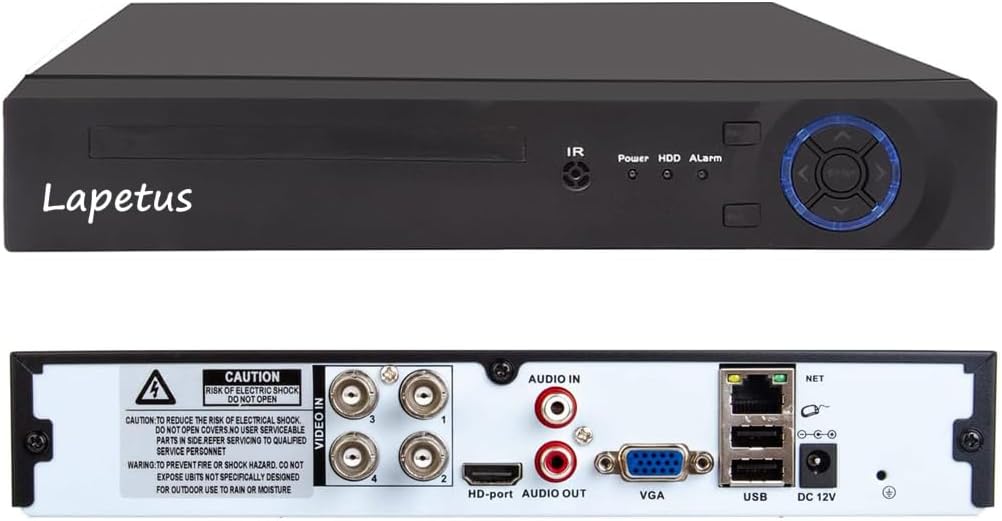
The Lapetus LT-6704NS is an entry-level 4-channel DVR that lets you mix older analog and newer HD camera types or add wired IP cameras via a network switch. It records in H.264 with dual-stream output to HDMI or VGA and uses motion detection to reduce HDD usage, but you must supply and install your own hard drive. Setup supports simple P2P remote viewing through the XMEYE app and a QR-scan workflow for viewing on phones or PCs. The unit is practical for upgrading an existing surveillance system because it accepts TVI, CVI, AHD, and CVBS signals so you can reuse legacy cameras while moving to HD. It does not support wireless IP cameras without extra hardware, and using wired IP cameras requires switching DVR modes and a network switch. For budget installations the LT-6704NS provides core DVR features and flexible camera compatibility, but expect to add a hard drive and possibly a switch or Wi-Fi module for certain IP setups.
Best for: Buyers building or upgrading a low-cost home or small business CCTV system who want flexible compatibility with existing analog cameras and a simple remote-view setup.
Less Ideal for: Users who need out-of-the-box wireless camera support or a preinstalled HDD solution should look at systems that include Wi‑Fi cameras or built-in storage.
- Supports five camera signal types (AHD, TVI, CVI, CVBS, wired IP) for mixing old and new cameras
- Dual HDMI and VGA outputs let you connect to common monitors or TVs
- Motion-detection recording reduces required storage and captures events
- Simple P2P remote access via XMEYE app for smartphone and PC viewing
- Hard drive not included so you must buy and install storage separately
- No native support for wireless IP cameras without additional modules or equipment
Verdict: A budget-friendly 4-channel DVR that lets you reuse analog cameras and add wired IP cameras for basic HD recording and remote viewing.
Aiwixen 4CH DVR Security System

| Connectivity Technology | Wired |
|---|---|
| Video Capture Resolution | 1080p |
| Number of Channels | 4 |
| Memory Storage Capacity | 512 GB |
| Night Vision Range | 100 feet |
This wired Aiwixen kit pairs a 4-channel DVR with four 1080p fixed-lens cameras and a preinstalled 512GB HDD so you can run continuous 24/7 recording without monthly fees. The cameras connect via BNC coax and 60 ft power/video cables for stable, interference-free feeds suitable for outdoor mounting thanks to IP68 waterproofing and rust-resistant housings. Night vision and a built-in IR cut deliver usable black-and-white imagery after dark, and the DVR offers HDMI/VGA output for local monitoring plus remote access through the free TSEYE app when the unit is on your network. Motion detection with adjustable zones helps cut down false alerts and the DVR supports event, scheduled, and manual recording modes. Limitations to consider are the lack of onboard audio from the included cameras and the wired setup that requires cable routing and a power source for each camera, which adds installation time compared with wireless systems. For buyers prioritizing stable, always-on recording and clear day/night video, this kit delivers reliable core surveillance without subscription fees.
Best for: Buyers who want a dependable, always-on local recording system with stable wired connections and minimal ongoing costs for home or small business surveillance.
Less Ideal for: People who need wireless plug-and-play cameras or integrated audio capture should consider other systems that provide those features out of the box.
- Preinstalled 512GB HDD enables 24/7 local recording with no monthly fees.
- Wired BNC connections provide stable, interference-resistant video feeds.
- IP68-rated cameras suitable for outdoor use and harsh conditions.
- Adjustable motion detection zones reduce false alarms and enable event-triggered recording.
- Remote viewing via free app plus HDMI/VGA local monitoring options.
- Cameras do not record audio because they lack built-in microphones.
- Wired installation requires running power/video cables to each camera, increasing setup time.
Verdict: Choose this wired DVR kit if you want a stable, subscription-free surveillance setup that records continuously and withstands outdoor conditions.
ANNKE 8-Channel 3K Lite DVR

| Number of Channels | 8 |
|---|---|
| Memory Storage Capacity | 10 TB |
| Media Format Digital Video | H.265+, H.264 |
| Video Input | AHD, CVI, CVBS, IP Input |
| Connectivity Technology | HDMI, USB, VGA |
This ANNKE 8-channel 3K Lite DVR is a hybrid 5-in-1 recorder for CCTV systems that handles analog inputs (AHD, CVI, TVI, CVBS) plus two IP cameras, and it does not include a hard drive. It uses H.265+ encoding to reduce file sizes and extend recording time, and a dedicated SATA port lets you add a 2.5" or 3.5" drive up to 10TB. The unit offers built-in RCA audio, HDMI and VGA output for local monitoring, automatic overwrite when storage is full, and ANNKE Vision remote access via smartphone, tablet or browser. Notable real-world benefits include reduced storage needs thanks to H.265+, fewer false motion alerts with AI human/vehicle detection, and the ability to record locally without internet. Limitations to plan for are the lack of a bundled HDD, which means extra cost and installation, and only two IP camera channels if you need more network cameras. The device is designed with multi-language menus and basic encryption for privacy, making it suitable for home or small business surveillance setups that want a balance of modern codecs and hybrid camera support.
Best for: Buyers who want a proven, flexible DVR for a mixed analog/IP camera setup and who prioritize reliable recordings and reduced false alerts over an out-of-the-box bundled system.
Less Ideal for: Users who need an all-IP, high-channel-count NVR solution or those who want a turnkey kit with preinstalled storage and cameras included.
- Supports 5-in-1 hybrid inputs so analog and IP cameras can be mixed
- H.265+ video compression cuts storage needs and extends recording time
- Supports up to 10TB SATA hard drive for large local storage
- AI human and vehicle detection reduces false motion alerts
- Local monitoring works without internet and offers HDMI/VGA outputs
- No hard drive included so buyers must purchase and install storage separately
- Only two IP camera channels, limiting scalability for all-IP systems
Verdict: Choose this ANNKE DVR if you need a hybrid 8-channel recorder that saves storage with H.265+ and adds smarter motion alerts via human/vehicle detection.
ANNKE 8CH DVR + 8 Cameras

| Connectivity Technology | Wired |
|---|---|
| Video Capture Resolution | 1080p |
| Number of Channels | 8 |
| Memory Storage Capacity | 1 TB |
| Other Special Features of the Product | Human Detection, Vehicle Detection |
This ANNKE kit is a complete wired CCTV solution for homeowners who want continuous local recording and basic AI alerts. The package includes an 8-channel DVR with a 1 TB HDD and eight 1080p bullet cameras with dual-light color night vision and IP67 weatherproofing, so it records day and night and withstands outdoor conditions. The DVR supports H.265+ compression to save storage and offers live viewing at 1080p@30fps and recording at 1080p@15fps, plus AI human and vehicle detection that cuts down obvious false alerts and speeds up event searches. Setup requires running BNC and power cables to each camera, and the system works without internet for local recording while offering remote access via the ANNKE app when online. Limitations include analog/BNC wiring rather than PoE plug-and-play and the included cameras are 1080p while the DVR advertises 3K-lite compatibility for higher-resolution cameras if you upgrade later.
Best for: Buyers who want a reliable, locally recording wired CCTV system with simple AI alerts and weatherproof cameras for whole-home coverage without depending solely on cloud services.
Less Ideal for: Anyone who prefers wireless, PoE, or ultra-high-resolution plug-and-play cameras or who cannot run cables around the property should consider other system types.
- Complete 8-camera kit with DVR and preinstalled 1 TB HDD for out-of-box continuous recording
- AI human and vehicle detection reduces false motion alerts and simplifies searches
- Dual-light color night vision plus IR gives usable color footage at night and up to 100 ft B&W range
- H.265+ compression extends recording time while using less bandwidth
- IP67-rated cameras suitable for outdoor installation
- Requires running BNC and separate power cabling to each camera which increases installation work
- Cameras are 1080p while DVR supports higher-resolution cameras if you want to upgrade later
Verdict: A dependable, full 8-camera wired kit that delivers local 24/7 recording and practical AI alerts for risk-averse homeowners who prioritize reliable, weatherproof surveillance.
Choosing the Right CCTV DVR Security Camera: Key Factors to Consider
Recording Reliability
Consistent, gap-free recording is the core function of any DVR-based CCTV system. You should check how the DVR handles continuous versus motion-triggered recording, whether it overwrites old footage automatically, and how it recovers from power outages. Systems that include watchdog features or reliable time stamping reduce the risk of unusable video during critical events.
Reliability affects how long you can retain footage and how likely you are to have usable clips when reviewing events. For locations with intermittent power or network instability, prioritize DVRs with robust stability features and proven recovery behavior.
Video Quality and Low-Light Performance
Image clarity determines whether a recording is actionable. Evaluate the effective resolution at typical viewing distances and the camera's low-light behavior. Many CCTV DVR cameras use IR illumination for night viewing; check whether the IR range matches the camera placement and whether the system switches cleanly between modes.
Compression codecs and how the DVR processes incoming streams also affect perceived quality. Excessive compression can blur details, so consider systems that offer configurable bitrates or quality presets to balance storage and clarity.
Storage Capacity and Playback Features
Storage determines retention time and how often you must archive footage. Look at supported hard-drive sizes, whether the DVR accepts multiple drives or offers loop recording, and how easy it is to export clips. Playback features such as timeline scrubbing, event tagging, motion search, and multi-channel simultaneous playback affect how quickly you can find relevant footage.
If you need long retention windows, choose systems with larger drive support or efficient compression options. Understand how the unit manages overwrites and whether it preserves flagged events automatically.
Installation and Cabling
CCTV DVR systems often require low-voltage power and video cabling to each camera. Account for cable runs, feed-through points, and whether the system supports Power over Coax or requires separate power. Ease of installation affects labor and the feasibility of mounting positions. Also evaluate whether the DVR provides clear channel labeling and straightforward configuration menus.
Good installation planning reduces troubleshooting later. Confirm camera field-of-view, mounting hardware needs, and whether you will need additional conduit or weatherproof connectors for outdoor runs.
Connectivity and Remote Access
Remote viewing and off-site access are common needs for homeowners and small businesses. Check how the DVR handles network setup, dynamic IP issues, and whether it requires third-party services for remote connectivity. Systems that offer direct, secure remote access via standard protocols or built-in apps provide more flexibility.
Consider the security of remote access options and whether firmware supports encrypted connections. Reliable remote connectivity makes it easier to monitor events in real time and to download footage when away from the premises.
Build Quality and Environmental Protection
Outdoor cameras must withstand moisture, dust, and temperature swings. Check for ingress protection ratings and the robustness of mounting hardware. Cameras intended for exposed locations benefit from corrosion-resistant housings and secure cable anchoring.
Durability reduces maintenance and replacement frequency. For harsh climates, prefer sealed housings and components rated for a wider temperature range to ensure long-term reliability.
Placement Strategies for Effective Coverage
Effective camera placement is as important as camera capability. Start by mapping high-value zones such as entry points, driveways, and common walk paths. Position cameras to capture face-level details where identification is likely to be needed, and angle them to minimize direct glare from lights or the sun.
For wide areas, use overlapping fields of view to avoid blind spots while keeping each camera focused on a primary sector. When mounting outdoors, place cameras under eaves or use small hoods to reduce rain and sun exposure affecting the lens.
- Prioritize entrances, cash-handling areas, and vulnerable ground-floor windows
- Place cameras 8 to 12 feet high for a balance of coverage and identification
- Use overlapping coverage for parking areas and long walks
Optimizing Motion Detection and Recording Schedules
Motion detection reduces unnecessary footage and conserves storage, but false triggers can clog your archive. Fine-tune motion zones and sensitivity to focus on human movement paths and exclude trees, busy roads, or reflections. Some DVRs allow schedule-based recording to focus retention on peak hours.
Combining scheduled continuous recording for critical hours with motion-triggered recording at other times gives a practical balance between coverage and storage needs. Test settings during different parts of the day to refine sensitivity and avoid frequent false positives.
- Define custom motion zones to exclude irrelevant areas
- Lower sensitivity for long-range views where small movements are expected
- Use schedules to preserve continuous recording during high-risk windows
Maintaining and Testing Your DVR System
Regular maintenance keeps a CCTV DVR system dependable. Schedule periodic checks of recording timestamps, drive health, and firmware updates to maintain compatibility and security. Test playback and export routines so you know exactly how to retrieve footage quickly.
Inspect camera mounts, lenses, and housings for dirt, condensation, or loose fittings. Replace cabling that shows wear and verify power supplies and backup options. A simple monthly test of motion alerts and remote access can reveal problems before they affect coverage.
- Verify NVR/DVR clock accuracy and time zone settings monthly
- Run a quick export test to ensure clip retrieval workflows are functional
- Check hard-drive S.M.A.R.T. status and replace drives approaching failure
Balancing Resolution and Storage
Higher resolution provides more detail but consumes more storage and bandwidth. Decide the resolution based on distance to the subject and the level of detail required. For entranceways and license plate capture, prioritize higher resolution; for general perimeter monitoring, moderate resolution suffices.
Adjust bitrate and record-only-on-event settings as needed to extend retention. Many systems support variable bitrates that reduce data during low-activity periods while preserving bitrate peaks for important events.
- Use higher resolution for identification points, lower for general coverage
- Consider variable or adaptive bitrate settings to maximize retention
- Match camera resolution to the DVR's recording and playback capabilities
Securing Your System Against Tampering
Physical and network security both matter. Physically secure the DVR in a locked cabinet or closet and conceal cabling to make tampering harder. Use tamper-detection mounts or place cameras high enough to be out of reach when practical.
On the network side, change default credentials, apply firmware updates, and disable unused services. Use network segmentation for surveillance gear when possible to limit exposure to other devices on the same network.
- Store DVRs in locked, ventilated enclosures
- Replace default passwords and enable strong authentication
- Keep firmware current and disable unnecessary remote services
How We Chose the Best CCTV DVR Security Camera
We focused on practical recording systems that deliver consistent footage and easy retrieval for home and small-business surveillance. Our selection filters emphasized recorded-video reliability, image clarity across lighting conditions, storage flexibility, and on-site durability. We prioritized units with robust DVR functionality such as scheduled and motion-triggered recording, clear codec support, and straightforward archive/export options. Network and connectivity stability mattered because dropped streams or unreliable time stamps undermine usefulness. We also considered physical build and ingress protection for units intended for outdoor placement. We excluded devices that rely solely on cloud-only storage, consumer-only Wi-Fi cameras without DVR compatibility, or systems lacking clear documentation about recording modes and retention. The final candidates represent systems that perform well on the concrete criteria buyers care about: continuous recording reliability, daytime and nighttime image legibility, storage and playback controls, ease of installation and maintenance, and durability for intended mounting locations.
Our full evaluation process is outlined in our review methodology.
FAQ
How long will footage stay on a DVR before it is overwritten?
Retention depends on drive size, number of cameras, resolution, and bitrate. Most DVRs loop-record and overwrite the oldest footage when storage is full. To extend retention, reduce resolution or bitrate, add larger drives, or configure event-flagging to preserve important clips.
Can I view DVR footage remotely over my home internet?
Many DVRs support remote viewing through direct network access or built-in apps. Remote access depends on your router, network configuration, and the DVR's supported protocols. Securely configure authentication and consider network segmentation to limit exposure.
What is the difference between continuous and motion-triggered recording?
Continuous recording captures all incoming video streams nonstop, ensuring no gaps but using more storage. Motion-triggered recording records only when movement is detected, saving space but requiring reliable motion settings to avoid missed events or false triggers.
Do DVR cameras work at night and in low light?
Many CCTV DVR cameras use infrared illumination for night vision or sensors optimized for low-light performance. Night effectiveness depends on IR range, camera sensitivity, and any ambient lighting. Check the listed low-light specs and test placement to ensure usable nighttime images.
How do I protect my DVR system from power outages?
Use an uninterruptible power supply for the DVR and network equipment to maintain recording during short outages. For longer outages, plan for emergency power or off-site backups and ensure the DVR's clock and file integrity recover correctly after power is restored.
Final Verdict
For CCTV DVR security cameras, prioritize recording reliability and image clarity for the specific areas you need to monitor. Balance resolution against storage capacity and use motion zones and schedules to conserve drive space without sacrificing coverage. Durability and secure remote access are also key tradeoffs. Focus on systems that provide straightforward playback and export tools, reliable time-stamped recording, and configurations that match your mounting and retention needs. With those priorities, you can choose a DVR-based camera solution that delivers consistent, usable surveillance footage.