
Note: This article contains affiliate links. If you click on these links and make a purchase, we may earn a small commission at no extra cost to you. This helps support our research and content. Read our full affiliate disclosure here.
Picking the right DIY security camera system for home matters because a reliable system reduces blind spots, deters intruders, and gives you quick access to footage when you need it. You want hardware that pairs good daytime and night video, straightforward setup, and dependable remote viewing without complicated wiring or constant maintenance. This guide shortlists the top DIY security camera systems for home use and explains the practical tradeoffs to help you pick one that fits your house, internet, and privacy preferences. Read on for the key evaluation points we used and a snapshot of how each system performs.
Top Picks at a Glance
| Best Overall The best all-around choice for most situations | ANNKE 8CH DVR 8-Cam Kit |  |
| Best Quality Built to a higher standard if you want something more solid | REOLINK RLK8-520D4 5MP System |  |
| Best Value The sweet spot between price and what you get | Gianteye 2K Solar Wi‑Fi Camera |  |
| Top Rated A top-rated pick with lots of positive feedback | Blink Outdoor 4 5‑Camera Kit |  |
| Most Popular A crowd favorite that many people choose with confidence | AOQEE C1 2-Pack Security Cameras |  |
ANNKE 8CH DVR 8-Cam Kit

| Connectivity Technology | Wired |
|---|---|
| Video Capture Resolution | 1080p |
| Number of Channels | 8 |
| Memory Storage Capacity | 1 TB |
| Night Vision Range | 100 feet |
This ANNKE kit bundles an 8-channel DVR with a preinstalled 1TB hard drive and eight wired 1080p bullet cameras to provide continuous local recording and remote viewing. It is typically installed around a house perimeter and connected via the included BNC and power cabling to give 24/7 footage even when the internet is down. Notable features include AI human and vehicle detection to reduce false alerts, H.265+ compression to save storage and bandwidth, and a dual-light design that switches between color night vision and infrared to capture clearer nighttime detail. The DVR supports multiple inputs and outputs including HDMI and VGA for local live view, and the system can be shared with family members through the ANNKE app. Limitations include the need to run cables for each camera and basic fixed lenses with an 82.2 degree viewing angle that limit coverage per camera, and while the DVR accepts up to 10TB drives, onsite storage means you must manage retention yourself rather than relying on cloud backups.
Best for: Buyers who want a reliable, locally recording DIY home system with comprehensive coverage and smarter alerts without relying on cloud subscriptions.
Less Ideal for: Users who need a completely wireless setup, plug-and-play battery cameras, or those who prefer cloud-only storage and minimal wiring work.
- Complete 8-camera system with DVR and 1TB drive included for immediate 24/7 recording
- AI human and vehicle detection reduces nuisance alerts and speeds up event search
- H.265+ compression extends recording time and lowers bandwidth use
- Dual-light cameras provide color night vision plus IR for improved low-light detail
- Works without internet for local recording and offers remote viewing via the app when connected
- Requires running wired connections to each camera which increases installation effort
- Fixed lenses and approx 82° field of view may require additional cameras to cover wide areas
- No built-in cloud backup — recordings are stored locally on the DVR unless you add external solutions
Verdict: A full wired 8-camera kit that delivers dependable local recording, AI alerting, and color night vision for homeowners who want a capable DIY surveillance system without ongoing cloud fees.
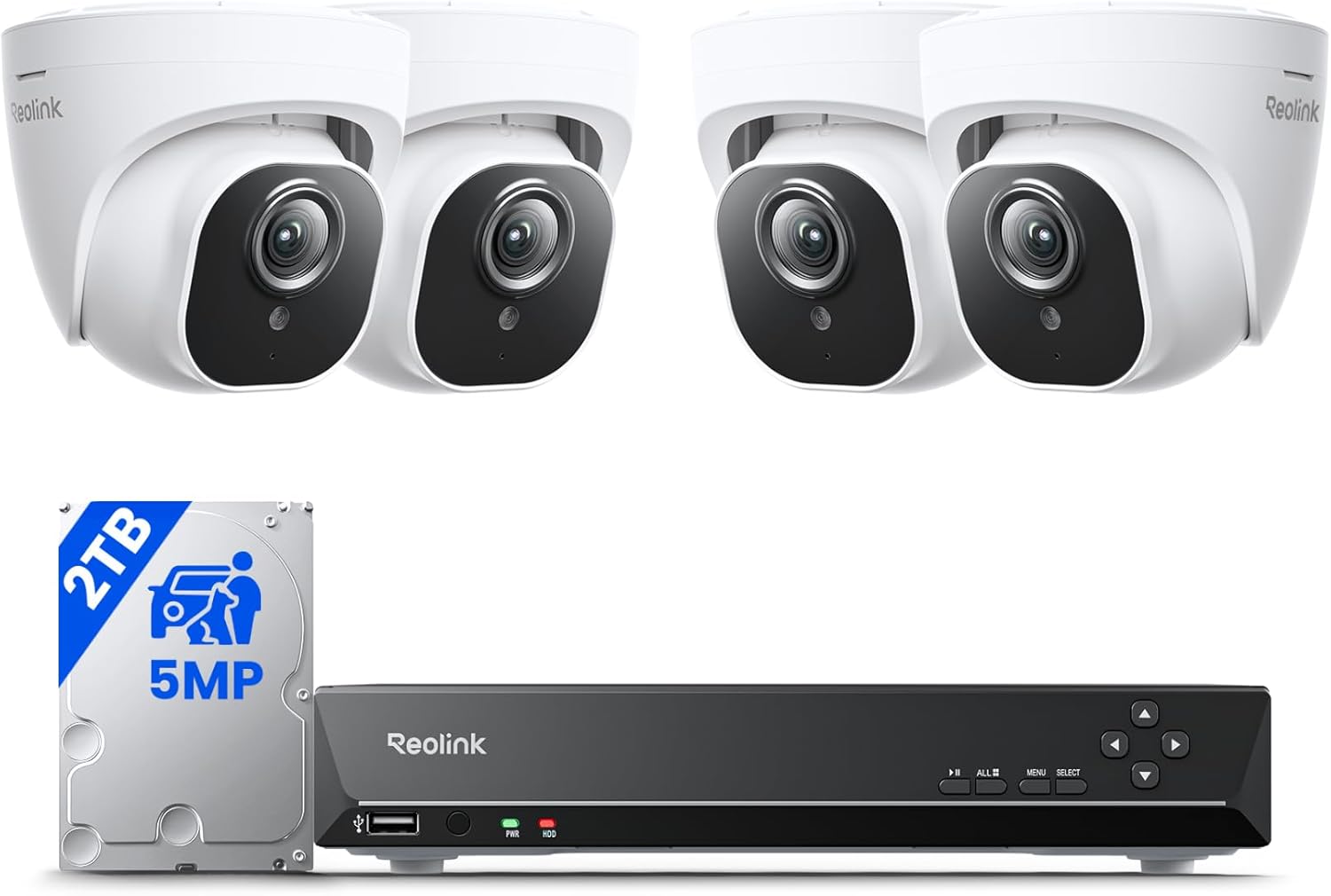
REOLINK RLK8-520D4 5MP System
| Video Capture Resolution | 5MP (2560 × 1920) |
|---|---|
| Number of Channels | 8 |
| Memory Storage Capacity | 2 TB |
| Frame Rate | 25fps |
| Night Vision Range | 100 feet |
This REOLINK kit pairs an 8-channel PoE NVR with four 5MP fixed-lens dome cameras to deliver high-resolution, 24/7 local recording for a DIY home install. Cameras connect over PoE so they receive power and network over a single cable, making installation straightforward for typical outdoor and indoor coverage; included 18m cables and a preinstalled 2TB HDD let you start recording right away. Image quality is strong at 2560 × 1920 and 25fps, with IR night vision reaching roughly 100 feet and an 80 degree horizontal field of view for clear perimeter monitoring. Smart person/vehicle/pet detection and customizable motion zones reduce nuisance alerts, and the NVR outputs video via HDMI and supports remote viewing on iOS, Android, Windows and Mac. Limitations to note are the system is designed to work only with Reolink cameras and the fixed 4.0 mm lens means no optical zoom or very wide fisheye views, so placement matters for coverage. For buyers who want reliable wired performance and local storage without subscription fees, this kit is a solid practical choice.
Best for: Buyers who prioritize high-resolution, always-on wired performance and want a DIY setup with local storage and advanced detection to reduce false alarms.
Less Ideal for: Users who need interchangeable third-party cameras, motorized zoom, or ultra-wide/variable field coverage from each camera should consider other options.
- 5MP resolution at 25fps for detailed daytime and nighttime footage
- PoE cameras simplify installation by combining power and data over one cable
- Includes preinstalled 2TB HDD and necessary cables for immediate local recording
- Smart person, vehicle, and pet detection with customizable motion zones to cut false alerts
- System only supports Reolink cameras so you cannot mix brands
- Cameras have fixed 4.0 mm lenses so no optical zoom or variable fields of view
Verdict: Choose this kit when you want a high-resolution, plug-and-play wired system with local 24/7 recording and smart detection for reliable DIY home security.
Gianteye 2K Solar Wi‑Fi Camera

| Video Capture Resolution | 2k |
|---|---|
| Night Vision Range | 328 feet |
| Power Source | Solar Powered |
| Connectivity Protocol | Wi‑Fi |
This Gianteye camera is designed for DIY outdoor security setups where run‑and‑hide wiring is not an option. It combines a detachable solar panel and internal battery for mostly maintenance‑free, wire‑free operation, and connects over 2.4GHz or 5GHz Wi‑Fi so you can place it where coverage is best. The 2K sensor and built‑in spotlight enable color night vision on motion events, and the pan/tilt control lets you sweep a full 360° view from the app. AI human detection and PIR help cut down false alerts, and two‑way audio lets you speak with visitors or delivery drivers. Recordings can save to a microSD card or optional cloud storage without a forced subscription. Expect real benefits for perimeter monitoring and package protection, but plan for periodic sun exposure for reliable solar charging and make sure your Wi‑Fi reaches the mounted location for smooth live viewing and PTZ control.
Best for: Buyers who want a DIY, low‑maintenance outdoor camera that avoids running power cables and prioritizes clear night detail and wide coverage for perimeter monitoring.
Less Ideal for: People who lack reliable outdoor Wi‑Fi coverage at mounting locations or who need continuous, guaranteed recording without relying on sun exposure should consider hardwired or mains‑powered systems instead.
- True wireless installation with detachable solar panel and internal battery for continuous outdoor use
- 2K resolution plus spotlight color night vision for clearer detail after dark
- 360° pan‑tilt control for wide coverage from a single camera
- Dual‑band Wi‑Fi (2.4GHz and 5GHz) for flexible placement and better streaming
- AI human detection and PIR sensors reduce false motion alerts
- MicroSD card not included so local recording requires an extra purchase
- Solar charging depends on daily sunlight exposure for long‑term maintenance-free operation
Verdict: A practical, wire‑free outdoor camera for DIY installers who want 2K color night vision and full PTZ coverage without running power cables.
Blink Outdoor 4 5‑Camera Kit

| Cameras included | 5 cameras |
|---|---|
| Video resolution | 1080p HD |
| Battery type | AA lithium (included) |
| Local backup | Sync Module 2 via USB drive |
The Blink Outdoor 4 5‑camera kit is a DIY-focused wireless security package designed for simple outdoor monitoring. Each camera delivers 1080p HD live view, infrared night vision, and two-way audio so you can see and speak with visitors from the Blink app, and enhanced dual-zone motion detection reduces irrelevant alerts. Cameras are powered by included AA lithium batteries and Blink quotes up to two years of battery life under typical use, which reduces maintenance compared with wired setups. The kit includes a Sync Module 2 for local backup via a USB drive and an optional cloud subscription for storing clips and person detection features. Setup is quick and app-driven, and Alexa integration lets you view streams on Echo Show devices. Limitations to note are that advanced features like person detection require a paid subscription and very active environments or heavy motion can shorten battery life and fill storage more quickly than expected.
Best for: Buyers who want a low-maintenance, DIY outdoor security system that is quick to install and emphasizes reliable, long-running wireless operation with local backup options.
Less Ideal for: Users who need fully subscription-free advanced analytics or those who prefer always-on wired power and PoE camera systems for continuous high-activity monitoring.
- 1080p HD video with infrared night vision for clear day and night monitoring
- Two-year battery life with included AA lithium batteries reduces frequent maintenance
- Enhanced dual-zone motion detection lowers false alerts and targets important areas
- Sync Module 2 enables local USB backup in addition to optional cloud storage
- Easy app setup and Alexa compatibility for hands-free viewing
- Person detection and some advanced features require a paid subscription
- Battery life will vary and can be significantly shorter in high-activity installations
Verdict: Choose this kit if you want a straightforward, low-maintenance DIY outdoor camera system with long battery life and local backup capability.
AOQEE C1 2-Pack Security Cameras

| Video Capture Resolution | 3MP |
|---|---|
| Effective Video Resolution | 1296 |
| Field Of View | 105 degrees |
| Night Vision Range | 32 feet |
| Memory Storage Capacity | 128 GB |
The AOQEE C1 2-pack is a budget-friendly wired Wi-Fi surveillance kit meant for basic home monitoring both inside and outside. Each bullet-style camera records 2K (3MP) video with a 105 degree field of view, supports color night vision via an integrated white light, and offers two-way audio for talking to family or deterring visitors. Setup is typical for consumer IP cams: plug the cameras into power, connect them to a 2.4GHz network through the AOQEE app, and mount on a wall or ceiling using the included hardware. Motion detection alerts, custom detection zones, a built-in siren and optional spotlight help reduce false alarms and improve response. Video is saved locally to a TF card (up to 128 GB) or to cloud subscription storage, and the cameras work with Alexa for viewing on Echo Show devices. Limitations include a 2.4GHz-only Wi-Fi requirement, corded power (not battery), and manual focus with digital zoom rather than an optical lens, so fine framing and placement may need adjustment. For social-proof minded buyers the product has a strong review count and practical features for straightforward DIY home monitoring.
Best for: Buyers who want a high-review, easy-to-install DIY camera pair for general home monitoring and care about evidence-quality daytime video and practical alert features.
Less Ideal for: Users who need cordless or battery-powered cameras, multi-band Wi-Fi support, or motorized/optical zoom for long-distance identification.
- 2K (3MP) video with 105 degree field of view for clearer daytime footage
- Color night vision with white light and night color mode for usable nighttime images
- Two-way audio plus built-in siren and spotlight for interaction and deterrence
- Supports local TF card storage (up to 128 GB) and optional cloud backup
- IP65 waterproof rating for outdoor installation
- Connects only to 2.4GHz Wi-Fi and requires constant power, so placement depends on outlets and router band
- Manual focus and digital zoom limit fine detail compared with motorized or optical zoom cameras
Verdict: A well-reviewed, no-frills wired 2K camera kit that delivers clear daytime video, usable color night vision, and straightforward local or cloud recording for DIY home security.
Choosing the Right DIY Security Camera Systems for Home: Key Factors to Consider
Video Resolution and Night Performance
Higher resolution provides clearer footage for identifying faces and license plates, but it also increases bandwidth and storage needs. For most homes, 1080p is a practical baseline; 2K or higher can help capture finer detail at greater distances.
Night performance is equally important because many incidents occur after dark. Look for cameras with strong low-light sensors, infrared illumination that reaches the areas you need covered, and good noise handling. Motion-triggered clips in low light should still render usable detail rather than grainy blobs.
Installation Complexity
DIY systems vary widely in installation effort. Wireless battery cameras minimize wiring but require periodic recharging or battery swaps. Hardwired or PoE options need cable runs but reduce upkeep and avoid interrupted recording from dead batteries.
Consider mounting surfaces, whether you can route power inside walls, and how many cameras you plan to install. Evaluate whether the system provides clear setup guidance, included mounting hardware, and whether tools or extra parts are commonly needed.
Connectivity and Network Requirements
A camera is only as useful as its network connection. Systems that rely on Wi-Fi need good signal strength where each camera is installed. Check the recommended router specs and whether dual-band or 5 GHz-only operation is supported, since 5 GHz has less range.
Some DIY systems use local base stations to reduce Wi-Fi load. Consider whether your home's broadband upload speed can support simultaneous camera streams, especially if you plan to view multiple feeds remotely or record continuous video.
Storage Options and Data Privacy
Storage choices affect both cost and privacy. Cloud subscriptions offer convenient offsite backups and event indexing, but they introduce ongoing fees and cloud account security concerns. Local storage via microSD cards, NVRs, or local servers keeps footage on-site and reduces monthly costs but requires you to manage backups and drive health.
Privacy controls and encryption are important. Look for systems that allow you to disable cloud uploads, set who can access live feeds, and update firmware securely. Understand retention settings so old footage does not accumulate unnoticed.
Power Source and Battery Life
Battery-powered cameras are the easiest to install but differ widely in real-world battery life depending on motion activity, temperature, and recording settings. Lower-power modes and scheduled recording can extend life.
Wired power, PoE, or solar options reduce maintenance but require planning during installation. Factor in whether a constant power feed is available where you want to mount each camera and whether weatherproofing around power connections is needed.
Field of View and Mounting Versatility
The camera's field of view determines how much area each unit covers. A wider angle captures more scene but can distort distance perception and reduce detail for subjects at the edge. Narrower lenses give better detail at specific choke points like doorways.
Mounting versatility includes adjustable mounts, tilt and pan options, and hardware for different surfaces. Consider whether the system supports corner mounts, pole mounts, or flush wall installs to get the best sightlines with fewer cameras.
Deciding Between Battery and Wired Cameras
Battery cameras offer fast, drill-free installs and are ideal for renters or temporary monitoring. They let you place cameras where wiring would be impractical, and many modern battery units deliver multiple months of standby life if configured conservatively.
Wired cameras or PoE setups remove the recharge factor and often support continuous recording with greater reliability. They are better for long-term coverage of entry points and busy driveways, but plan for cable routing and weatherproof connections during installation.
- Battery: low installation effort, periodic recharging, good for flexible placement
- Wired/PoE: continuous power, better for long-term fixed coverage, requires cabling
- Hybrid: some systems blend battery cameras with a wired base station to balance convenience and uptime
Balancing Cloud Convenience With Local Control
Cloud storage simplifies access to clips and often adds features like smart event tags and offsite backups. However, it usually comes with subscription fees and requires trust in the provider's account security.
Local storage keeps footage on your premises and can be more private and cost-effective long term, but it requires you to manage drive capacity and backups. Look for systems that let you choose both storage methods.
- Cloud: easy access, remote backups, subscription costs
- Local: on-site control, lower ongoing cost, requires maintenance
- Hybrid setups: configurable so critical incidents are saved to cloud while routine footage stays local
Placement Strategies to Minimize False Alerts
False motion alerts waste attention and battery life. Position cameras to avoid busy streets, tree canopies, or areas with repetitive motion. Use motion zone settings and sensitivity adjustment when available.
Angle cameras to capture human-scale movement rather than distant motion caused by cars. When possible, pair a wide-field camera for situational awareness with a narrower view for identification at entry points.
- Avoid facing cameras directly at reflective surfaces or moving foliage
- Use masking/zoning tools in the app to exclude irrelevant areas
- Set reasonable sensitivity and notification schedules to reduce nuisance alerts
Network Planning for Reliable Remote Viewing
Map each camera's location against Wi-Fi coverage before installation. Use mesh extenders or wired backhaul to improve reliability for cameras at the far edges of your property. Ensure your router can handle multiple simultaneous streams if you plan continuous recording.
Consider whether the system supports a local base station to offload video from Wi-Fi and whether your home upload speed can sustain the desired number of concurrent remote streams.
- Test signal strength and throughput where cameras will mount
- Prefer 2.4 GHz in long-range installs unless the system supports robust 5 GHz range
- Segment cameras on a dedicated VLAN or guest SSID for security-conscious setups
Maintenance and Long-Term Reliability
Factor in firmware update processes and how easy it is to check camera health in the app. Regular updates fix security issues and improve features, so systems with clear update workflows reduce long-term risk.
Check how the system reports battery status, storage capacity, and connection quality so you can proactively maintain coverage. Good diagnostics lengthen reliable operation and reduce surprise downtime.
- Look for automatic firmware updates and clear update logs
- Prefer systems that report device health and storage usage
- Plan a seasonal check for mounts, seals, and power connections
How We Chose the Best DIY Security Camera Systems for Home
We focused on real-world usability and reliability when selecting DIY security camera systems for home. Key evaluation criteria included video clarity and low-light performance to ensure footage is useful for identification, and installation simplicity to limit the need for professional help or complex wiring. We also prioritized connectivity and app reliability, because remote live view and notifications are central to a DIY approach. Storage options and privacy controls were evaluated to balance convenience with data security. Power and mounting flexibility were considered to fit varied home layouts. We excluded systems that require mandatory professional setup, proprietary cloud-only access with no local storage option, or hardware that lacks secure firmware update paths. The final shortlist represents systems that meet a baseline of image quality, manageable installation, robust connectivity, reasonable storage choices, and clear privacy features.
Our full evaluation process is outlined in our review methodology.
FAQ
Do DIY security camera systems for home require a professional installer?
Often no. Many DIY systems are designed for homeowner installation, with step-by-step apps and included mounts. However, hardwired or PoE setups may require drilling and cable routing that some users prefer a professional to handle.
Can I use local storage instead of paying for cloud subscriptions?
Usually yes. Several DIY systems support microSD cards, local NVRs, or network storage. Local storage avoids recurring fees but requires you to manage backups, drive health, and potential offsite redundancy.
How much upload bandwidth do cameras need for remote viewing?
It depends on resolution and frame rate. A single 1080p stream typically needs a few megabits per second. Multiply that by the number of simultaneous streams and leave headroom for other household internet use to avoid buffering or dropped connections.
Are battery-powered cameras reliable in cold weather?
Battery performance usually declines in cold temperatures, so expected run time can drop. Look for systems rated for lower temperatures or consider wired power or solar options for cold climates to maintain consistent operation.
Will cameras record during a power or internet outage?
That depends on the system and power source. Battery-powered cameras can keep recording during outages if they have local storage. Wired cameras without battery backup typically stop recording unless the local NVR has power redundancy. Internet outages may prevent remote access even if local recording continues.
Final Verdict
When choosing a DIY security camera system for home, prioritize the features that match how you will use it. If you need flexible placement and minimal installation, battery cameras with good battery life and robust motion controls make sense. If continuous coverage and low maintenance are more important, wired or PoE systems with local storage are a better fit. Balance video quality, storage method, network capacity, and privacy controls to match your home layout and security goals. With those tradeoffs in mind, select the system that delivers the right mix of clarity, uptime, and manageability for your property.