
Note: This article contains affiliate links. If you click on these links and make a purchase, we may earn a small commission at no extra cost to you. This helps support our research and content. Read our full affiliate disclosure here.
Picking the right security camera for a small business matters more than you might think. The right system can deter theft, document incidents, and give you remote visibility of a storefront, office, or warehouse without creating extra work. This guide shortlists seven top-rated security camera options tailored to small-business needs. We evaluate image quality, network reliability, storage options, and install flexibility so you can match a camera to your site, staffing, and budget. Read on to compare the types of cameras and features that matter most for everyday business security.
Top Picks at a Glance
| Best Overall The best all-around choice for most situations | REOLINK RLK8-410B4-5MP Security System |  |
| Best Quality Built to a higher standard if you want something more solid | REOLINK RLC-1224A 12MP Dome Camera |  |
| Best Value The sweet spot between price and what you get | ANNKE 8CH DVR 8-Camera Kit |  |
| Best Budget The cheapest option that still gets the job done reliably | TP-Link Tapo C100 Indoor Camera |  |
| Top Rated A top-rated pick with lots of positive feedback | Ring Indoor Cam |  |
| Most Popular A crowd favorite that many people choose with confidence | Ring Outdoor Cam (Stick Up Cam) Battery |  |
| Best Seller A high-volume bestseller chosen again and again | Blink Mini 2K+ (2-Camera Kit) |  |
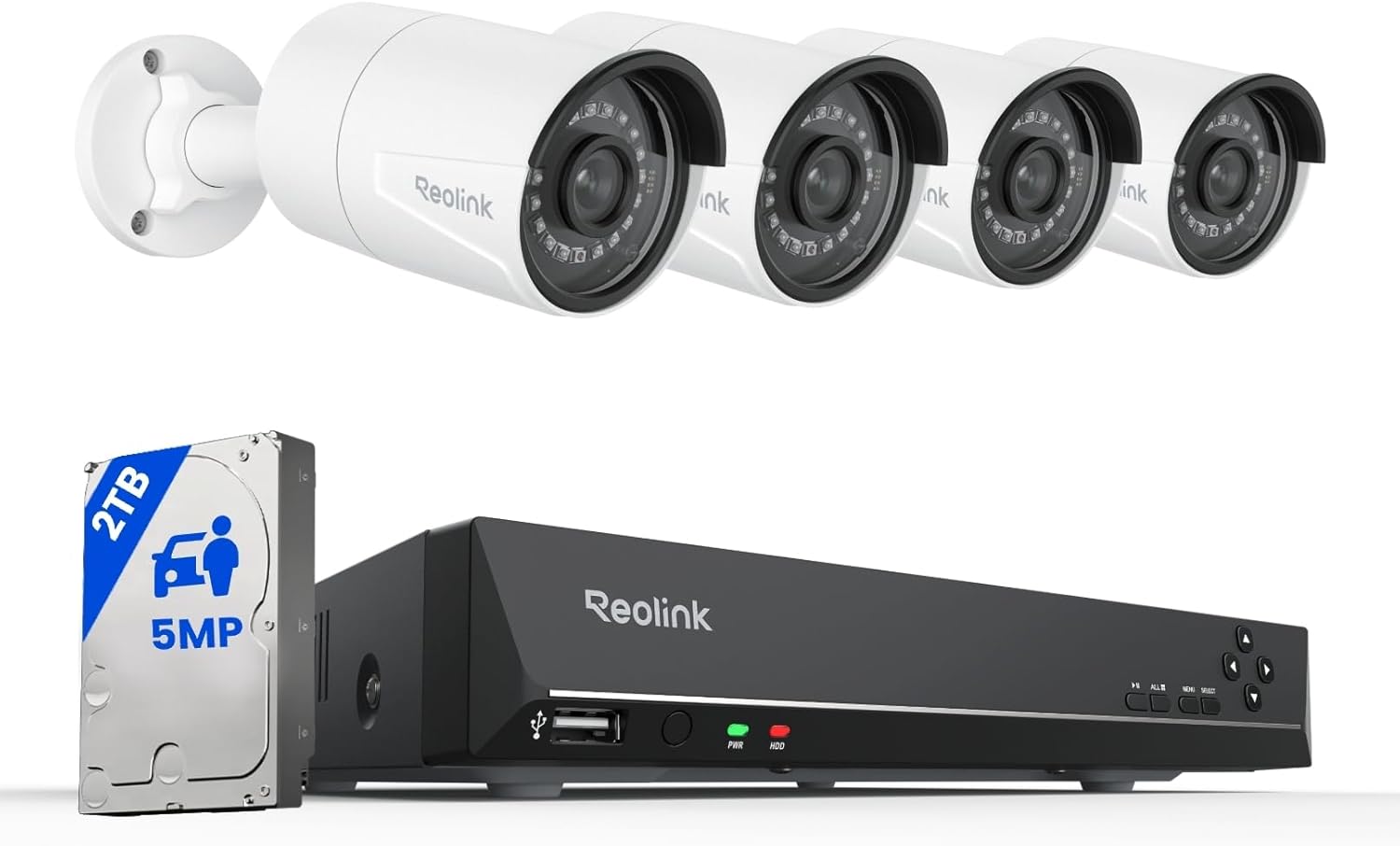
REOLINK RLK8-410B4-5MP Security System
| Number of Channels | 8 |
|---|---|
| Video Capture Resolution | 5MP (2560×1920)@25fps |
| Memory Storage Capacity | 2 TB (preinstalled) |
| Night Vision Range | 100 feet |
| Compression Format | H.265, H.264 |
The REOLINK RLK8-410B4-5MP is a plug-and-play PoE security system aimed at steady, 24/7 monitoring for small sites. It bundles an 8-channel NVR with a preinstalled 2TB hard drive and four 5MP fixed-lens PoE dome cameras that deliver 5MP video at 25fps and night vision to about 100 feet. Setup is straightforward: each camera connects to the NVR with a single Ethernet cable for power and data, which simplifies wiring and keeps the connection stable even if the internet goes down. Smart person/vehicle/pet detection reduces false alerts and the NVR supports scheduled or continuous recording with H.265/H.264 compression to maximize storage. The system supports remote viewing via apps and up to 12 simultaneous device connections. Important constraints are that the NVR is designed to work only with Reolink cameras and third-party cameras are not recommended, and expandable storage requires specific external drives and power. For a small business wanting reliable local recording, clear daytime and nighttime footage, and fewer nuisance alerts, this kit covers the essentials without complex networking work.
Best for: Small business owners who want a reliable, local-recording surveillance solution that is simple to install and reduces false alerts without needing complex network setup.
Less Ideal for: Sites that need open compatibility with third-party cameras or advanced multi-vendor integrations should consider other NVRs that support ONVIF/RTSP from multiple brands.
- 5MP cameras provide higher-than-1080p detail for clearer identification.
- PoE connection carries power and data on one cable for simple DIY installation.
- Preinstalled 2TB HDD enables days of local continuous recording out of the box.
- Smart person/vehicle/animal detection reduces false motion alerts.
- Supports H.265 compression and remote viewing from mobile and desktop devices.
- NVR is only fully compatible with Reolink cameras, limiting third-party expansion.
- Preinstalled storage may fill quickly depending on retention settings and bitrate.
Verdict: Choose this kit if you need a straightforward PoE system that delivers high-resolution day/night footage and reliable local recording for a small business.
REOLINK RLC-1224A 12MP Dome Camera

| Video Capture Resolution | 12MP (4512×2512) at 20fps |
|---|---|
| Video Compression Format | H.265 |
| Power Source | Power over Ethernet (IEEE 802.3af) |
| Night Vision | Color night vision with 700 lm spotlight |
| Storage | microSD up to 512GB |
The REOLINK RLC-1224A is a professional-grade PoE dome camera that captures 12MP video at 20fps and streams efficiently using H.265, making it suitable for continuous monitoring of small business exteriors. It connects over Power over Ethernet so a single cable handles power and network, which simplifies installation and delivers a stable wired feed for 24/7 recording to an NVR or local microSD card. The built-in 700-lumen spotlight produces color night video for clearer identification after dark, and the camera offers person, vehicle, and pet detection with adjustable motion zones to reduce false alarms. Two-way audio lets staff check in or warn off intruders remotely through the Reolink app or client, and IP67 metal housing stands up to harsh outdoor conditions. Expect large file sizes from 12MP footage despite H.265 compression, and it requires a PoE network or injector and ideally a Reolink NVR for best long-term storage; third-party NVR support is limited. For performance-focused small business setups this camera delivers high-resolution, reliable wired video and smart alerts.
Best for: Small business owners who prioritize image clarity and reliable wired recording for outdoor perimeter monitoring and want advanced detection to cut down false alerts.
Less Ideal for: Owners who need a plug-and-play cloud subscription system or who cannot provide PoE power and prefer battery or Wi-Fi cameras instead.
- Very high 12MP resolution for detailed coverage and identification.
- Color night vision with a 700-lumen spotlight improves nighttime evidence and deterrence.
- PoE connectivity provides stable power and network over a single cable for 24/7 operation.
- Smart person/vehicle/pet detection with configurable motion zones reduces nuisance alerts.
- IP67 metal housing suitable for outdoor, all-weather installations.
- 12MP footage produces large files that need significant storage even with H.265 compression.
- Limited support for third-party NVRs; best compatibility is with Reolink NVRs after firmware updates.
Verdict: Choose the RLC-1224A when you need highest-clarity PoE outdoor video with color night vision and smart detection for small business perimeter security.
ANNKE 8CH DVR 8-Camera Kit

| Connectivity Technology | Wired |
|---|---|
| Video Capture Resolution | 1080p |
| Number of Channels | 8 |
| Memory Storage Capacity | 1 TB |
| Other Special Features of the Product | Human Detection, Vehicle Detection |
This ANNKE 8-channel kit pairs a DVR with eight wired 1080p bullet cameras to deliver continuous, on-site surveillance for small business locations. The DVR includes a preinstalled 1TB hard drive and supports H.265+ recording to extend retention while reducing bandwidth, and it records locally so footage continues even without Internet access. Cameras are IP67 weatherproof and use dual lights for color night vision up to roughly 66 feet or IR up to 100 feet, which helps with round-the-clock exterior coverage. AI human and vehicle detection reduces false alarms and the vendor app supports remote live view, playback and shared access for multiple users. Setup requires running BNC and power cabling to each camera which is more work than wireless options but gives a reliable wired connection. The system records at 1080p@30fps live and stores event or schedule-based recordings, though the included cameras are 1080p rather than the DVR's 3K-capable mode so true 3K footage is not supplied out of the box.
Best for: Small business operators who want a reliable, locally recording wired system with AI alerts and color night vision and who are comfortable with running cables for a stable installation.
Less Ideal for: Businesses that need a quick wireless setup or plug-and-play cloud-only systems, or those who require true 3K footage immediately without swapping cameras.
- Complete wired kit with eight cameras and preinstalled 1TB HDD for out-of-the-box recording
- AI human and vehicle detection reduces false alerts and speeds event searching
- Dual-light cameras provide full-color night vision plus IR for longer-range B&W night views
- H.265+ compression saves storage and bandwidth for longer retention
- IP67-rated cameras built for outdoor use
- Requires running BNC and separate power cabling to each camera, increasing installation effort
- Included cameras are 1080p, so the DVR's 3K capability is not utilized without higher-resolution cameras
Verdict: A dependable wired 8-camera system for small businesses that want local recording, AI detection, and color night vision without relying on cloud services.
TP-Link Tapo C100 Indoor Camera

| Video Capture Resolution | 1080p |
|---|---|
| Wireless Technology | 2.4GHz Wi‑Fi |
| Field Of View | 110 degrees |
| Night Vision Range | 30 feet |
| Storage | microSD up to 512 GB / Cloud option |
The Tapo C100 is a basic indoor security camera designed for continuous monitoring or motion‑triggered recording around a small business. It streams 1080p video over 2.4 GHz Wi‑Fi and sends push notifications when motion, a person, or baby crying is detected, and you can view live footage in the Tapo app or via Alexa and Google Assistant. The camera supports two‑way audio with a built‑in siren for remote interaction and deterrence, and infrared night vision rated to about 30 feet gives usable images after dark. Storage is flexible: record locally to a microSD card (supported up to 512 GB) or subscribe to Tapo Care for cloud history. Setup is straightforward via the app and the device supports RTSP/ONVIF for integration with an NVR. Limitations to keep in mind are a modest 15 fps frame rate and reliance on 2.4 GHz Wi‑Fi only, which can affect responsiveness on congested networks, and the camera is intended for indoor use only.
Best for: Small business owners who need an inexpensive, easy‑to‑deploy indoor camera for basic monitoring, motion alerts, and occasional two‑way interaction without complex infrastructure.
Less Ideal for: Businesses that require outdoor weatherproof cameras, high‑frame‑rate footage for fast action capture, or enterprise‑grade wired network integrations should consider more robust models.
- 1080p HD video for clear indoor monitoring
- Two‑way audio plus built‑in siren for remote communication and deterrence
- Night vision up to 30 feet for low‑light coverage
- Local microSD storage up to 512 GB plus optional cloud subscription
- Works with Alexa and Google Assistant and supports RTSP/ONVIF integration
- Only connects on 2.4 GHz Wi‑Fi which can be slower or crowded
- Frame rate is 15 fps, not ideal for very fast motion capture
Verdict: A budget‑friendly indoor camera that delivers reliable 1080p monitoring, night vision, and app alerts for small businesses that need simple, affordable surveillance.
Ring Indoor Cam

| Video resolution | 1080p HD |
|---|---|
| Night vision | Color Night Vision |
| Power | Plug-in |
| Motion capture | Advanced Pre-Roll |
The Ring Indoor Cam is a compact plug-in security camera designed for continuous indoor monitoring in homes or small businesses. It captures 1080p HD video, offers color night vision, and provides Live View for on-demand monitoring; the flexible swivel mount lets you place it on a shelf or attach it high on a wall. Advanced Pre-Roll records a few seconds before motion events so you see more context around activity, and real-time motion alerts help you respond quickly. The manual privacy cover and simple swivel control make it easy to disable video and audio when needed, and Alexa integration allows hands-free announcements or streaming to compatible Echo Show devices. Key practical limitations are that many cloud features and event history require a separate Ring Protect subscription, and the camera is plug-in only so it needs a nearby outlet. For small business owners wanting straightforward indoor coverage and smart alerts, this camera delivers reliable core performance with easy setup and placement options.
Best for: Small business owners who prioritize consistent, easy-to-manage indoor surveillance and quick motion alerts to monitor activity in common areas or storefronts.
Less Ideal for: Businesses that need off-grid or outdoor coverage or those wanting full event history without paying for a subscription should consider other options.
- 1080p HD video with Live View for clear, on-demand monitoring
- Color night vision for useful low-light footage
- Advanced Pre-Roll captures a few seconds before motion events for better context
- Manual privacy cover to quickly disable camera and microphone
- Flexible swivel mount and plug-in power make placement simple
- Key cloud features and event history require a separate subscription
- Requires a nearby outlet since it is not battery powered
Verdict: A simple, reliable indoor camera that gives clear 1080p monitoring and smart motion previews ideal for small business indoor surveillance.
Ring Outdoor Cam (Stick Up Cam) Battery

| Power source | Rechargeable battery |
|---|---|
| Connectivity | Wi-Fi |
| Features | Live View, Two-Way Talk, Color Night Vision, Motion Alerts |
| Mounting | Wall or flat surface with included bracket |
The Ring Outdoor Cam (Stick Up Cam) Battery is a flexible, weather-resistant security camera designed for outdoor or versatile placement where wired power is inconvenient. It connects to Wi-Fi, accepts a rechargeable battery pack, and provides Live View, two-way talk, and color night vision so you can see and communicate with visitors or personnel in real time through the Ring app. The included mounting bracket lets you place it on flat surfaces or mount to a wall, and you can add extra Ring cameras to cover multiple angles across a small business property. Motion alerts and activity history require the Ring app and, for video review beyond Live View, a compatible Ring Protect subscription. Integration with Alexa enables voice-activated viewing and smart notifications. Expect straightforward setup and reliable basic monitoring, but note that continuous cloud recording and advanced timeline features need a subscription and the camera depends on battery charge unless hardwired with optional accessories.
Best for: Small business owners who need a simple, weatherproof camera they can place without running power and who value app-based live monitoring and Alexa integration for routine security checks.
Less Ideal for: Businesses that require continuous local recording, long-term footage retention without a subscription, or enterprise-grade analytics should consider wired or professional systems instead.
- Weather-resistant design for outdoor placement
- Rechargeable battery lets you install without wiring
- Live View plus two-way talk for real-time monitoring and communication
- Color night vision improves low-light identification
- Works with Alexa for voice-activated viewing and alerts
- Cloud video review and longer clip storage require a paid Ring Protect subscription
- Depends on battery charge unless you install optional wired power accessories
Verdict: A flexible, battery-powered outdoor camera that gives small businesses easy app-based monitoring and two-way communication without running power.
Blink Mini 2K+ (2-Camera Kit)

| Video resolution | 2K |
|---|---|
| Includes | Two cameras, two mounts, two USB cables, two power adapters |
| Zoom | Up to 4x |
| Compatibility | Works with Alexa |
The Blink Mini 2K+ kit provides a straightforward, plug-in option for small-business indoor monitoring where simplicity and clear video matter. Each camera records at 2K resolution with up to 4x zoom and improved audio with noise cancellation, which helps identify faces and conversations at short to medium range. Setup is quick using the included power adapters and mounts, and two-way talk lets staff communicate through the camera when needed. Motion detection with optional person and vehicle detection raises alert accuracy when paired with Blink's subscription service, and the cameras integrate with Alexa for voice interactions. Practical limits for business use include the need for a Blink subscription to unlock cloud storage and advanced detection, and the kit is designed for indoor use unless you buy a separate weather-resistant adapter. For risk-averse buyers this kit is appealing for its easy install, clear footage, and predictable cloud workflow, but plan for subscription or local storage strategies for long-term evidence retention.
Best for: Small-business operators who prioritize easy installation, reliable indoor coverage, and clear video/audio for everyday monitoring and staff/customer interactions.
Less Ideal for: Businesses that need outdoor-ready cameras or long-term, subscription-free local storage of surveillance footage should look at other models built for those needs.
- 2K video resolution for clearer detail than 1080p
- Improved audio with noise cancellation for clearer two-way talk
- Plug-and-play setup with included mounts, cables, and adapters
- Works with Alexa and can act as a chime for compatible Blink doorbells
- Cloud storage and advanced detection features require a paid Blink subscription
- Not weatherproof out of the box for outdoor placement without an extra adapter
Verdict: A low-effort indoor surveillance kit that delivers sharper 2K footage and clear two-way audio, ideal for small businesses that want reliable, easy-to-manage monitoring.
Choosing the Right Security Camera for Small Businesses: Key Factors to Consider
Image Quality and Low-Light Performance
Clear daytime footage and usable low-light images make it possible to identify people, vehicles, and actions. Higher resolution helps with zooming in on details, but sensor size and processing determine low-light clarity. Consider cameras with good low-light sensitivity or built-in infrared illumination if your business has poorly lit entrances or after-hours activity.
Noise reduction and motion-triggered high-resolution capture are useful for creating evidence-grade clips without continuously consuming bandwidth and storage. If you need to read license plates or identify faces at a distance, prioritize optics and sensor performance over headline megapixel counts.
Network Reliability and Bandwidth Usage
Small businesses often share a single ISP connection across sales systems, phones, and security devices. A camera that offers efficient compression, adjustable frame rates, and scheduled recording reduces network congestion while preserving important footage. Cameras that support both wired Ethernet and dual-band Wi-Fi give more installation flexibility and resilience.
Look for robust connection options and settings that allow you to cap upload quality during business hours. Features like local failover recording or edge storage protect against brief internet outages and ensure continuous capture until connectivity is restored.
Storage Options and Retention Policies
How footage is stored affects cost, access, and compliance. Local storage on an SD card or network video recorder keeps video on-site and avoids recurring cloud fees, but it creates a single point of failure if the device is destroyed or stolen. Cloud storage offers off-site redundancy and easier remote access but usually involves ongoing subscription costs.
Evaluate retention needs based on incident response policies and any legal or insurance requirements. Choose cameras that offer flexible retention settings, motion-only recording, and easy export options so you can keep necessary clips without excessive long-term storage bills.
Installation and Mounting Flexibility
Different business spaces require different mounting solutions. A storefront with exposed brick, a drop-ceiling office, and a warehouse with high racking each present unique challenges. Cameras with multiple mounting brackets, adjustable angle ranges, and PoE support simplify placement and reduce the need for additional power outlets.
Consider whether you need professional installation or can use a DIY setup to save on upfront costs. Removable mounts, tamper-resistant housings, and conduit-friendly cable paths help protect devices in accessible or exposed locations.
Alerting, Remote Management, and User Access
Receiving timely and relevant alerts is central to using cameras as an operational tool. Look for motion zones, sensitivity tuning, and person or vehicle detection to reduce false positives. Reliable push notifications and multi-user access let owners, managers, and security staff respond appropriately.
Consider administration features such as role-based access, audit logs, and easy export of clips for law enforcement. Systems that allow temporary guest access are useful when third-party contractors need short-term viewing rights.
Choosing Between Wired and Wireless Cameras
Wired cameras using Power over Ethernet offer steady bandwidth and power through a single cable, which is valuable in environments where reliability matters most. They are less subject to Wi-Fi interference and usually support higher sustained bitrates for clearer continuous recording. However, installation can be more invasive and may require conduit or a punch into ceilings and walls.
- Wired PoE: Best for fixed, long-term installations with consistent power and bandwidth.
- Wi-Fi: Easiest to install where running cable is impractical or temporary monitoring is needed.
- Hybrid setups: Use wired cameras for critical areas and wireless units for secondary coverage.
Placement Strategies for Small Business Spaces
Placement determines whether a camera can capture usable evidence. For entrances and exits, position cameras high enough to see faces while avoiding extreme backlighting from doors or windows. Overhead vantage points covering transaction counters reduce blind spots and capture both the customer and employee interactions. In warehouses, angle cameras to monitor aisles and loading docks rather than directly down long rows where occlusion is likely.
- Cover choke points like doors, cash registers, and delivery bays first.
- Avoid pointing cameras directly into bright windows which can silhouette subjects.
- Use overlapping coverage for critical zones so a single malfunction does not leave gaps.
Managing False Alarms and Motion Tuning
False alerts drain attention and can make staff ignore legitimate warnings. Use motion zones to limit detection to relevant areas, and tune sensitivity to ignore routine movement such as HVAC-driven curtains or nearby traffic visible through windows. Advanced systems let you set scheduling so alerts are active only during closed hours or low-staff periods.
- Define motion zones around doors and counters, not open sidewalks.
- Enable person or vehicle detection if available to reduce animal and shadow triggers.
- Use scheduled recording for predictable activity patterns to minimize unnecessary clips.
Privacy, Signage, and Local Regulations
Small businesses must balance security with privacy obligations. Check local regulations on video surveillance, audio recording, and retention periods. Post visible signage to notify customers and staff that surveillance is in use; that may be a legal requirement in some jurisdictions and is often recommended as a best practice for deterrence and transparency. Avoid placing cameras where privacy expectations are high, such as restrooms or private offices used for sensitive conversations. When in doubt, consult local guidance or legal counsel about audio capture and public-facing video.
- Follow local rules on notice, consent, and retention.
- Disable audio recording unless you have a clear lawful basis to use it.
- Store exported footage securely and limit access to authorized personnel.
How We Chose the Best Security Camera for Small Businesses
We focused on features and design choices that directly affect small-business security operations. First, image quality and low-light performance were required so cameras can capture usable evidence day and night. Second, network reliability and bandwidth management mattered because many small sites rely on a single business internet connection and need consistent remote access. Third, storage flexibility was evaluated, including local recording, cloud plans, and retention controls so businesses can balance cost with record-keeping requirements. Fourth, installation and mounting options were considered to limit the need for specialized installers and to accommodate both indoor and outdoor placements. Finally, management and alerting features were assessed to ensure owners and managers can receive useful notifications without excessive false alarms. We excluded consumer-only hobby cameras lacking business-grade networking or support. We also filtered out products that do not offer at least one practical storage option or that require proprietary hardware inaccessible to typical small-business setups. The resulting selections prioritize reliability, clarity, and manageable total cost of ownership.
Our full evaluation process is outlined in our review methodology.
FAQ
How much resolution do I need for a small business camera?
Resolution depends on distance and evidence needs. For general monitoring, 1080p is usually sufficient. If you need to read license plates or capture fine facial detail at a distance, choose higher-resolution sensors and ensure good lighting.
Can I use Wi-Fi cameras if my business has a single router?
Yes, but plan for bandwidth and reliability. Use dual-band devices, limit continuous high-bitrate streams, and consider wired PoE for critical zones. If you must use Wi-Fi, place access points close to cameras or add a dedicated access point to reduce interference.
How long should I keep recorded footage?
Retention depends on incident risk and legal or insurance requirements. Many small businesses keep 14 to 30 days of footage for routine operations, while higher-risk locations may retain longer. Use motion-based recording to reduce storage needs while preserving important events.
Do security cameras need professional installation?
Not always. Some models are designed for DIY installation with simple mounts and wireless setups. Complex sites, PoE wiring, or tamper-resistant installations typically benefit from professional installers to ensure optimal coverage and code compliance.
Will cameras work during power outages?
Cameras need power to record. For short outages, uninterruptible power supplies can keep critical cameras and network equipment running. For extended outages, on-site local storage preserves footage until power returns, but off-site cloud backups provide redundancy against device damage or theft.
Final Verdict
Prioritize reliable footage and dependable connections when choosing a security camera for a small business. Balance image quality against bandwidth and storage costs, and place devices to cover choke points and transaction areas first. Manage alerts and privacy settings so staff receive useful notifications without being overwhelmed. Focus on the features that match your site: wired PoE for highest reliability, flexible storage for compliance needs, and motion filtering to reduce false alarms. With those tradeoffs in mind, you can confidently select a camera that secures your business and fits your operational workflow.