
Note: This article contains affiliate links. If you click on these links and make a purchase, we may earn a small commission at no extra cost to you. This helps support our research and content. Read our full affiliate disclosure here.
If you want a vacuum cleaner that reliably maps your home and cleans efficiently, choosing the right mapping-capable model matters. A unit with accurate mapping reduces missed areas, avoids repetitive passes, and lets you create room-level schedules and no-go zones. This guide presents our shortlist of the top mapping-capable vacuum cleaners, each selected for navigation accuracy, cleaning performance, and practical usability. Below you will find the leading options, plus the decision criteria we used to vet them and tips for using mapping features effectively. Use the evaluation notes to match a model to the layout and cleaning habits in your home.
Top Picks at a Glance
| Best Overall The best all-around choice for most situations | iRobot Roomba Plus 405 Combo |  |
| Best Quality Built to a higher standard if you want something more solid | dreame D30 Ultra Robot Vacuum |  |
| Best Value The sweet spot between price and what you get | roborock Q7 L5 Robot Vacuum |  |
| Best Budget The cheapest option that still gets the job done reliably | ILIFE A30s Robot Vacuum |  |
| Top Rated A top-rated pick with lots of positive feedback | iMartine D16S MAX Robot Vacuum |  |
| Most Popular A crowd favorite that many people choose with confidence | Shark Matrix Clean AV2511AE |  |
| Best Seller A high-volume bestseller chosen again and again | roborock Q10 S5+ Robot Vacuum |  |
iRobot Roomba Plus 405 Combo
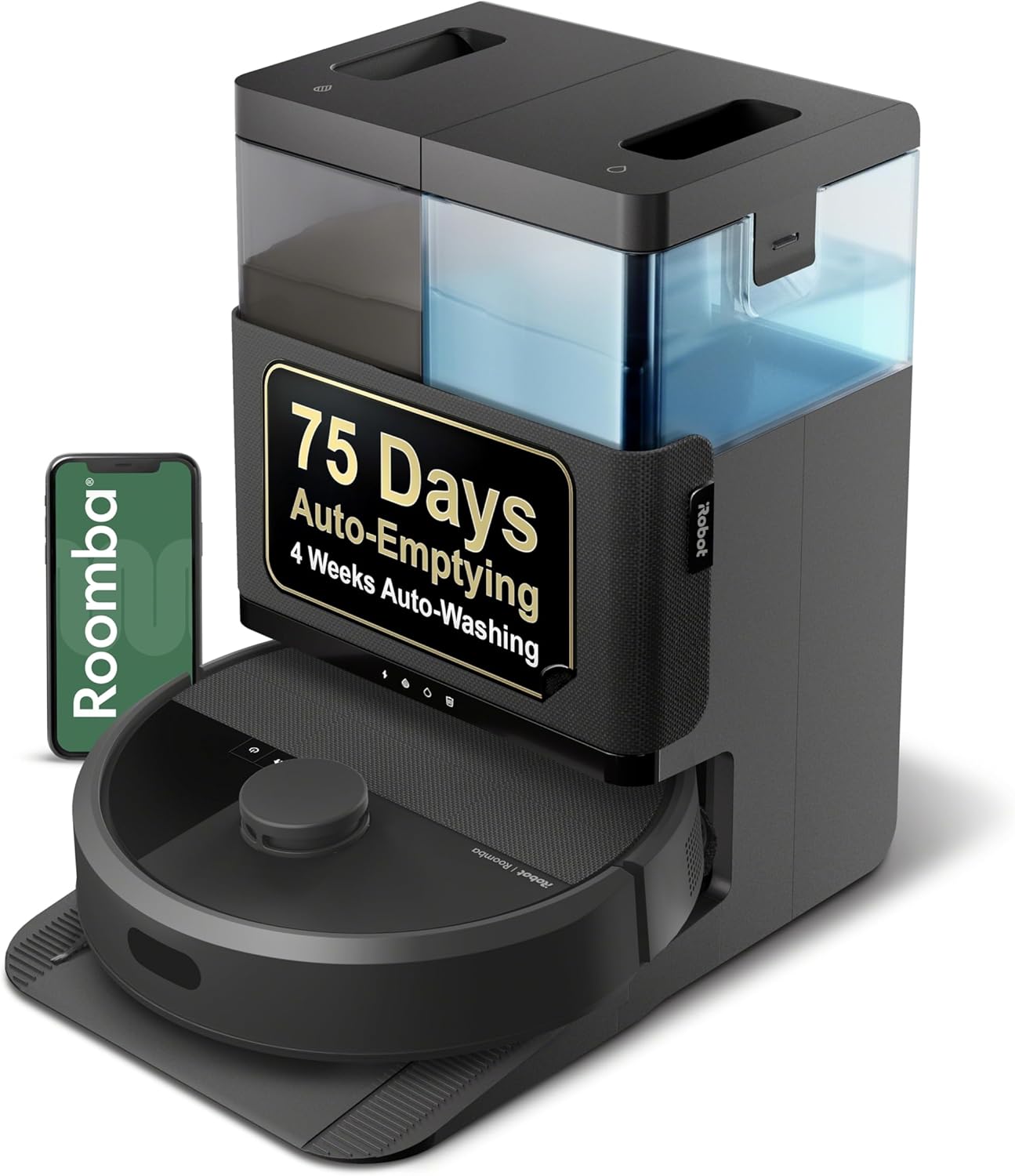
| Battery Life | 120 minutes |
|---|---|
| Capacity | 0.5 liters |
| Power Source | Battery Powered |
| Filter Type | Cartridge |
| Control Method | App, Push Button, Voice |
The Roomba Plus 405 Combo is a mapped robot vacuum and mop designed for routine whole-home cleaning with minimal hands-on maintenance. It uses ClearView LiDAR to build accurate maps and offers app, voice, or onboard controls to schedule vacuum-only, mop-only, or combo cycles. Dual spinning mop pads and SmartScrub provide stronger scrubbing action for stuck-on grime while the vacuum delivers increased suction and a multi-surface rubber brush for edge and pet-hair cleanup. The included AutoWash dock automatically empties debris for up to 75 days and rinses and dries mop pads after runs, which cuts down on post-cleaning chores. You can customize suction levels, set keep-out and clean zones, and save up to four maps for multi-level homes. Trade-offs are typical for combo robots: mop capacity is limited compared with a standalone mop system and the unit still needs periodic filter and brush maintenance, plus dock water tanks require occasional refilling and rinsing. For buyers wanting mapped navigation and low-maintenance vacuum-plus-mop capability, this model balances smart features and convenience.
Best for: Buyers who want a mapped robot that handles both vacuuming and mopping with strong automation and minimal daily upkeep, prioritizing convenience and reliable navigation.
Less Ideal for: Homes that need heavy-duty, continuous mopping or very large water capacity per cycle should consider dedicated mopping systems instead.
- Accurate ClearView LiDAR mapping with saved maps and room-by-room control
- Dual spinning mop pads plus SmartScrub for deeper scrubbing on hard floors
- AutoWash dock that auto-empties debris and washes and dries mop pads
- Multiple control options: app, voice assistants, and onboard buttons
- Adjustable suction levels and custom cleaning zones for targeted cleaning
- Mop water capacity and pad size are modest compared with dedicated mopping devices
- Requires periodic maintenance of filters, brushes, and dock tanks to keep performance optimal
Verdict: Choose the Roomba Plus 405 Combo if you want mapped navigation plus hands-off vacuuming and mopping with an AutoWash dock that cuts routine maintenance.
dreame D30 Ultra Robot Vacuum

| Suction | 25,000Pa |
|---|---|
| Battery Life | 230 minutes |
| Capacity | 3.2 liters |
| Control Method | App, Voice |
| Filter Type | Sponge |
The dreame D30 Ultra is a mapped robot vacuum and mop designed for heavy-duty floor care in homes with mixed surfaces and pets. It uses 25,000Pa Vormax suction plus a TriCut detangling brush to pull up embedded dirt and long hair while ultrasonic carpet recognition and suction-boost modes let it switch behavior on carpets. MopExtend RoboSwing and DuoScrub dual rotary mops provide scrubbing pressure and can extend into edges and under low furniture, and the AceClean DryBoard in the dock washes and dries the mop pads during auto-empty cycles for lower maintenance. Multi-level mapping, obstacle avoidance, app and voice control, and a 230-minute run time let it cover large areas with scheduled, zone, and no-go customization. Trade-offs are its relatively large dock and machine weight, which make placement less flexible, and the product requires 2.4 GHz Wi-Fi for smart features and US power specifications. For buyers prioritizing mapping accuracy, suction, and hands-off mop care, the D30 Ultra delivers strong real-world cleaning performance.
Best for: Buyers who want a high-performance mapped robot that emphasizes suction power, reliable pet-hair handling, and automated mop maintenance for large or multiroom homes.
Less Ideal for: People seeking a lightweight, ultra-compact robot for small apartments or those who need 5 GHz Wi-Fi support or international voltage compatibility.
- Very strong 25,000Pa suction for deep cleaning on hard floors and carpets
- TriCut detangling brush reduces hair wrap and eases pet-hair pickup
- MopExtend and DuoScrub mops provide edge cleaning and scrubbing for stubborn stains
- Self-cleaning AceClean DryBoard washes and dries mop pads during auto-empty cycles
- Long 230-minute runtime and multi-level mapping with app/voice control for large homes
- Large dock and relatively heavy machine reduce placement flexibility and make handling less convenient
- Requires 2.4 GHz Wi-Fi and is specified for US power, limiting some network or regional setups
Verdict: If you want a mapped robot that prioritizes raw suction, tangle-free pet hair pickup, and nearly hands-off mop cleaning, the D30 Ultra is a top practical choice.
roborock Q7 L5 Robot Vacuum

| Suction | 8,000 Pa |
|---|---|
| Navigation | LiDAR |
| Battery life | 150 minutes |
| Water tank capacity | 270 ml |
| Filter type | Washable |
The roborock Q7 L5 is a LiDAR-guided robot vacuum that vacuums and mops in a single run, using an integrated 270 ml water tank and up to 8,000 Pa suction to handle dust and pet hair on hard floors and low‑pile carpet. It maps rooms with multi-floor support and quick mapping so you can set scheduled cleans, no-go zones, and targeted room runs from the Roborock app or with voice assistants. Practical features include a dual anti-tangle brush system that reduces hair wrap, carpet boost that increases suction where needed, washable filters, and a child lock. For hardwood floors the precise navigation and along-floor-direction cleaning reduce repeated passes and the electronic water control offers three water levels to avoid over-wetting. Limitations to note are the combined dustbin/water-tank design which means you cannot refill water without handling the combo unit, and the robot requires a 2.4 GHz Wi‑Fi connection for full app features.
Best for: Buyers who prioritize reliable, predictable cleaning on hardwood and want a robot that follows precise maps, runs on a schedule, and minimizes hair-related maintenance.
Less Ideal for: People who need separate, large-capacity water or dust tanks for long runs without handling the unit frequently or who cannot provide a 2.4 GHz Wi‑Fi network.
- LiDAR mapping and multi-floor mapping for accurate, efficient coverage
- Strong 8,000 Pa suction with carpet boost for better pickup of dust and pet hair
- Dual anti-tangle brushes minimize hair wrap and maintenance
- Electronic water tank with three water levels lets you control mop moisture
- App control plus Alexa and Google Home compatibility for scheduled, hands-free operation
- Integrated dustbin and water tank is a single combo part, which adds steps when refilling or emptying
- Requires 2.4 GHz Wi‑Fi for app connectivity, which may need router changes for some homes
Verdict: A strong‑suction, LiDAR‑mapped vacuum‑and‑mop that reliably cleans hardwood with low hair maintenance and smart app controls.
ILIFE A30s Robot Vacuum

| Max Suction | 10000 Pa |
|---|---|
| Battery Life | 150 minutes |
| Dustbin Capacity | 450 ml |
| Navigation | LiDAR (SLAM) |
| Control | App, Remote, Voice (Alexa/Google) |
The ILIFE A30s is a mapping robot vacuum that uses LiDAR navigation and SLAM to build home maps and follow efficient cleaning routes while you control it from the ILIFE Clean app, remote, or voice assistant. It offers up to 10,000 Pa suction with selectable power levels and a dual anti-tangle brush that helps pull pet hair from carpets and hard floors; carpet boost and spot mode let you target dirtier areas. The app supports scheduling, no-go zones, virtual walls and room-specific runs, and the unit returns to its dock to recharge automatically for longer jobs. Runtime is long enough for typical apartment or small-home coverage and the 450 ml dustbin reduces how often you need to empty it. Expect noticeable noise at higher power and no mopping capability since this model vacuums only, but for the price it delivers mapping, smart controls, and solid suction in a compact package suitable for pet households.
Best for: Buyers who want a budget-friendly robot that actually maps their home and offers smart scheduling and voice control without paying for premium flagship models.
Less Ideal for: If you need a robot that also mops or you prioritize near-silent operation, look at combo or quieter premium models instead.
- LiDAR navigation with SLAM for reliable mapping and efficient paths
- Strong maximum suction (up to 10,000 Pa) for carpets and pet hair
- App, remote, and voice control with no-go zones and room scheduling
- Dual anti-tangle brush designed to reduce hair wrap
- Large 450 ml dustbin reduces emptying frequency
- No mopping function — vacuum only
- Noise can be noticeable at higher suction settings
Verdict: If you want affordable LiDAR mapping, strong suction, and full smart controls for pet-friendly cleaning, the A30s delivers the best value for the price.
iMartine D16S MAX Robot Vacuum

| Suction | Up to 18000Pa |
|---|---|
| Battery Life | 180 minutes |
| Dust Collector Capacity (base) | 2.5 liters |
| Onboard Dustbin Capacity | 220 ml |
| Map Storage | Up to 5 floor maps |
The iMartine D16S MAX combines laser mapping, strong suction, and a bagless self-emptying base to handle daily cleaning with minimal intervention. It uses 360° LiDAR to build accurate floor maps and can store up to five separate maps, which makes it straightforward to move between levels and have the robot resume the correct layout. The on-board vacuum and mop work together: vacuuming with four suction levels up to 18000Pa and mopping with a 150ml electronic water tank that offers three flow settings for controlled damp mopping. After each run the robot automatically dumps its 220ml onboard bin into the 2.5L base container so you avoid frequent bin handling and bag purchases. Control is via the Tuya/Smart Life app or voice assistants, letting you schedule, set no-go zones, and adjust power and water flow. Practical limits include a relatively small mop tank for prolonged mopping cycles and the need for a 2.4GHz Wi-Fi network for smart features, but the long 180-minute runtime and reliable LiDAR mapping make it a low-maintenance option for mapped cleaning routines.
Best for: Buyers who prioritize dependable, low-maintenance daily cleaning with accurate mapping and long runtimes so the robot can be left to maintain multi-floor homes with minimal oversight.
Less Ideal for: People who need heavy continuous mopping of large areas without refilling or those who avoid Wi-Fi–dependent smart features should consider other solutions.
- LiDAR-based 360° mapping with up to five saved floor maps for consistent navigation across levels
- Bagless 2.5L self-emptying base reduces how often you handle debris and eliminates disposable bags
- High maximum suction (up to 18000Pa) plus four adjustable power levels for carpets and hard floors
- Long 180-minute battery life with auto-resume so large homes get completed without manual restarts
- Mop water tank capacity is modest (150ml) which limits continuous mopping area per run
- Smart features require 2.4GHz Wi-Fi and app setup, which adds complexity for users who prefer simple local control
Verdict: Choose the D16S MAX if you want reliable LiDAR mapping and a bagless self-emptying base that minimizes hands-on maintenance for mapped cleaning routines.
Shark Matrix Clean AV2511AE

| Battery Life | 120 minutes |
|---|---|
| Capacity | 0.27 gallons |
| Filter Type | Cartridge |
| Power Source | Battery Powered |
| Compatible Devices | Amazon Alexa, Google Assistant |
The Shark Matrix Clean AV2511AE is a robot vacuum and mop built for hands-off whole-home cleaning. It uses 360° LiDAR home mapping so you can map rooms, schedule targeted runs, and let the robot follow a precision Matrix Clean grid pattern that makes multiple passes over messes for more consistent coverage. The unit combines strong suction, a self-cleaning brushroll, and sonic mopping to handle carpets and hard floors while the bagless self-empty base stores up to 60 days of debris without bags. App and voice control are supported for remote scheduling and room-specific cleaning. Practical benefits include reduced daily maintenance, better edge and corner pickup thanks to CleanEdge, and pet-hair performance designed for homes with animals. Important limitations are its overall system size and weight from the included XL base, and reliance on the base for the full 60-day convenience since the onboard dust capacity is modest, so very large homes may still require occasional emptying or more frequent battery recharge cycles during long cleanings.
Best for: Buyers who prioritize reliable mapped cleaning with minimal daily intervention and want proven performance for pet hair and whole-home schedules backed by wide user adoption.
Less Ideal for: People with very small living spaces who prefer a compact dock footprint or users who need ultra-long single-run battery life without recharging stops.
- LiDAR-based 360° mapping for accurate room maps and targeted cleanings
- Matrix Clean grid pattern that makes multiple passes for more thorough coverage
- Bagless self-empty base holds up to 60 days of debris for low-maintenance operation
- Self-cleaning brushroll and pet-focused design that helps remove embedded hair
- App and voice control with room scheduling and customizable cleaning modes
- Onboard dust capacity is small so base access is needed for extended hands-off use
- Large XL self-empty base increases the unit footprint and may be bulky in tight spaces
Verdict: Choose the Shark Matrix Clean AV2511AE when you want mapped, low-maintenance whole-home cleaning with a 60-day self-empty solution and strong pet-hair performance.
roborock Q10 S5+ Robot Vacuum

| Maximum Suction | 10,000Pa |
|---|---|
| Capacity | 2.7 liters |
| Battery Life | 150 minutes |
| Filter Type | Washable |
| Compatible Devices | Amazon Echo, Google Home, Smartphones |
The roborock Q10 S5+ is a mapped robot vacuum and mop intended to run largely hands-free for weeks at a time. It uses 360° LiDAR to build detailed multi-level maps you can edit in the app, and ReactiveTech structured-light obstacle avoidance to reduce bumps and snags. With a 2.7 L auto-empty dock and app-configurable emptying modes the system supports extended maintenance-free operation, and Roborock's VibraRise 2.0 mopping module provides high-frequency scrubbing plus automatic lift on carpets. In practical use the Q10 S5+ is good for daily floor care in homes with pets: powerful suction clears embedded hair and the dual anti-tangle brushes help reduce brush maintenance. You can schedule cleanings, set no-go zones, and use voice commands through smart speakers. Expect about 150 minutes runtime between charges and washable filters for reuse. Trade-offs include a relatively loud reported noise level and the need for 2.4 GHz Wi‑Fi for full app features, and advanced navigation benefits depend on careful map setup and occasional dock servicing.
Best for: Buyers who want a low-intervention mapping robot that reliably cleans multiple floors and minimizes hands-on maintenance while supporting smart scheduling and zone control.
Less Ideal for: People who need an ultra-quiet vacuum for noise-sensitive environments or who cannot provide a stable 2.4 GHz Wi‑Fi connection should consider alternatives.
- LiDAR-based 360° mapping with multi-level map support for precise room-by-room cleaning
- Large 2.7 L self-emptying dock that reduces how often you handle dust
- High 10,000 Pa suction for lifting embedded dirt and pet hair
- VibraRise 2.0 sonic mopping with auto-lift to avoid wetting carpets
- App control plus voice assistant compatibility for scheduled, zone, and mode control
- Reported noise level is relatively high during operation
- Full app features require 2.4 GHz Wi‑Fi and occasional dock maintenance
Verdict: Choose the Q10 S5+ if you want detailed LiDAR mapping plus a large self-emptying dock for long stretches of mostly hands-free, multi-floor cleaning.
Choosing the Right Vacuum Cleaner with Mapping: Key Factors to Consider
Mapping Accuracy And Consistency
How precisely a vacuum maps your home affects route planning and how reliably it returns to missed spots. Accurate mapping creates consistent floor plans you can trust for room-specific schedules and for drawing virtual no-go areas.
In practice, look for systems that use lidar or advanced visual SLAM rather than purely reactive sensor navigation. Consistent mapping also means fewer duplicate runs and quicker cleaning sessions because the robot follows efficient, repeatable paths.
Cleaning Coverage And Floor-Type Performance
A mapped route is only useful if the vacuum actually picks up dirt across all intended surfaces. Assess how the machine handles transitions between hardwood, tile, and carpet, and whether suction modes or brush settings change automatically.
Coverage also includes edge and corner cleaning. Even with good maps, some designs miss edges or require manual intervention. Prefer vacuums with adjustable cleaning heads or side brushes that maintain contact at thresholds and along baseboards.
Battery Capacity And Intelligent Recharge
Battery life determines how much mapped area a single run can cover and whether the vacuum needs to return to base mid-clean. For larger homes, a robot that can recharge and resume automatically is essential to complete mapped jobs without user supervision.
Consider both runtime and how the machine manages mid-job interruptions. Good systems record progress in the map so resumed runs do not re-clean finished areas unnecessarily, keeping overall runtime efficient.
App Features And Map Editing
The usefulness of mapping depends heavily on the app experience. Look for apps that let you edit maps, name rooms, set multiple no-go zones, draw targeted clean areas, and create room-based schedules. Intuitive controls reduce friction when adapting the map to furniture changes or seasonal layouts.
Also check whether maps persist across runs and updates, and whether multiple floor maps are supported if you have stairs or multiple levels. Simple, reliable map management saves time and prevents accidental restrictions.
Obstacle Handling And Localization
How a vacuum perceives and handles obstacles affects whether mapped routes remain valid over time. Good obstacle handling means the robot can localize itself within the saved map even when furniture is moved slightly, and either navigate around new obstacles or flag them for user review.
Robots that frequently get stuck or that fail to update the map when layout changes occur will reduce the practical value of mapping features, requiring more manual intervention.
Maintenance And Consumable Access
Mapping-capable vacuums add software complexity, but hardware upkeep remains important. Evaluate how easy it is to access the dustbin, replace filters, clear brush rolls, and swap side brushes. Frequent maintenance tasks should be quick to perform without tools.
Consider the availability and cost of consumables in your area and whether the design reduces hair wrap on rollers. Easy maintenance keeps the mapping experience smooth because a well-maintained machine performs more predictably within a saved map.
How Mapping Improves Routine Cleaning
Mapping turns a robot vacuum from a random cleaner into a scheduled floor manager. By creating a persistent floor plan, the vacuum follows efficient paths, reducing overlap and shortening run times. This matters most when you want predictable cleaning windows and consistent coverage across rooms.
Accurate maps also let you do more with simple commands. Instead of instructing a whole-house clean, you can target specific rooms or draw a small clean zone under a table. That granularity saves battery life and keeps high-traffic areas cleaner between full runs.
- Room-level schedules for targeted cleaning
- No-go zones to protect fragile zones or pet areas
- Quick spot cleaning using saved map coordinates
Setting Up Your First Map
Prepare the home by removing small obstacles and temporarily moving lightweight objects that might confuse sensors. Place the charging base in a central, unobstructed location and run an initial mapping pass during daylight so visual systems have consistent lighting.
After the first run, use the app to review the draft map. Rename rooms, merge or split areas if the robot misidentified spaces, and draw no-go zones where the vacuum should not enter. Saving a cleaned-up map makes subsequent runs more reliable.
- Clear cables and small toys from floors
- Place the dock in a central spot with room to maneuver
- Review and edit the map before creating schedules
Managing Multiple Floors And Map Storage
If your home has multiple levels, check whether the vacuum supports multiple saved maps. Properly managed multi-floor support keeps each level's layout accurate and lets you switch contexts when moving the robot between floors. Without separate maps, the vacuum may misroute or fail to resume as expected.
When moving the robot between floors, some models require a manual map reset while others can detect the change. Plan to store chargers on each floor or to move the dock with the robot if the model requires it.
- Verify multi-floor map support before relying on cross-floor use
- Keep backup docks or be prepared to reposition the base as needed
Common Mapping Problems And Fixes
Occasional mapping glitches are normal. If the robot adds duplicate rooms or fails to recognize an area after furniture rearrangement, run a remapping or use the app's map editing tools to merge or delete erroneous regions. Ensure sensors are clean and free of dust that can degrade visual or lidar performance.
If the vacuum frequently gets stuck in the same spot, mark that area as a no-go zone or physically change the obstacle layout. For intermittent localization errors, a full map reset and a fresh mapping pass can resolve persistent drift issues.
- Clean sensors regularly to prevent drift
- Use no-go zones for recurrent trouble spots
- Remap after significant furniture changes
Privacy And Network Considerations
Mapping vacuums store floor plans and may transmit map data to cloud services for advanced features. Review the privacy settings in the app and decide whether to enable cloud backups, account linking, or voice integrations. Local map storage is preferable if you have strict privacy needs.
Ensure your home network is secure and that firmware updates are applied regularly. Updates often include improvements to mapping algorithms and bug fixes that can enhance reliability without changing hardware.
- Review app permissions and cloud backup settings
- Keep firmware updated for mapping improvements
- Prefer local control if privacy is a priority
How We Chose the Best Vacuum Cleaner with Mapping
We prioritized mapping performance and real-world cleaning effectiveness when building this list. Key evaluation criteria included mapping accuracy and reliability, which determines how well the vacuum creates and updates floor plans and follows planned routes. Cleaning coverage and suction consistency were assessed to ensure mapped paths translate to actual soil pickup across floor types. Battery life and recharge behavior were considered because mapping features are only useful if the robot can finish or intelligently resume runs. App controls and map editing capabilities were evaluated for flexibility in naming rooms, setting no-go zones, and scheduling. Finally, maintenance and consumables accessibility were judged to keep ongoing ownership straightforward. We excluded units that rely solely on random or purely sensor-based navigation without persistent mapping or models lacking basic app-based map editing. We also filtered out machines with unreliable battery management that frequently failed to finish mapped jobs. The result is a set of vacuums that demonstrate dependable mapping, practical cleaning coverage, and usable software features buyers need in daily home maintenance.
Our full evaluation process is outlined in our review methodology.
FAQ
How accurate are mapping vacuums in small or irregular rooms?
Accuracy varies by sensor type and algorithm. Many mapping vacuums handle small or irregular rooms well if the room has enough distinguishing features. For best results, run an initial mapping pass with minimal obstacles and edit the map to correct any misidentified spaces.
Will mapping vacuums remember furniture moves?
Most mapping systems adapt to small furniture changes and will update their internal map over time. Significant rearrangements may require a remap or manual edits in the app to maintain reliable navigation.
Can I restrict a mapped vacuum from entering certain areas?
Yes. Modern mapping apps typically let you draw no-go zones, set virtual walls, or restrict room access. These tools are useful for protecting pet bowls, delicate decorations, or rooms you want cleaned less often.
Do mapping features use more battery than random navigation?
Mapping itself uses minimal power, but creating an initial map may take longer than a single quick clean. Once mapped, mapped routes tend to be more efficient and can reduce overall run time and battery usage for regular cleans.
How often should I remap my home?
Remap after major layout changes or seasonal furniture rearrangements. Routine maintenance, like weekly cleaning and occasional map edits, is usually sufficient for homes with stable layouts.
Final Verdict
Focus on mapping accuracy, cleaning coverage, and app usability when choosing a vacuum cleaner with mapping. Tradeoffs are common: models with very advanced mapping may require more initial setup and occasional map maintenance, while simpler systems can be easier to use but less precise. Prioritize the features that match your home size and layout, such as strong multi-floor support for multi-level homes or long battery runtime for larger areas. Ultimately, pick a mapping-capable vacuum that balances reliable navigation with consistent cleaning performance and straightforward upkeep so you spend less time managing the device and more time enjoying cleaner floors.