
Note: This article contains affiliate links. If you click on these links and make a purchase, we may earn a small commission at no extra cost to you. This helps support our research and content. Read our full affiliate disclosure here.
Picking the right wireless barcode scanner affects everyday productivity across retail, warehousing, and light industrial settings. A scanner that misses codes or drops its connection costs time and creates inventory errors. This guide shortlists the top options so you can focus on features that matter for real-world use: scanning accuracy, connectivity range, battery endurance, and ruggedness. Each pick is chosen for specific workflows and will be evaluated against practical decision criteria buyers actually rely on. Scroll on for the top choices and what each scanner type is best at.
Top Picks at a Glance
| Best Overall The best all-around choice for most situations | NETUM NT-1228BC Bluetooth Barcode Scanner |  |
| Best Quality Built to a higher standard if you want something more solid | Zebra DS2278-SR Wireless Imager |  |
| Best Value The sweet spot between price and what you get | Tera Barcode Scanner 5100 |  |
| Best Budget The cheapest option that still gets the job done reliably | Helett HT20 Wireless Barcode Scanner |  |
| Top Rated A top-rated pick with lots of positive feedback | Inateck BCST-70 Barcode Scanner |  |
| Most Popular A crowd favorite that many people choose with confidence | NADAMOO Wireless Barcode Scanner Bur3003 |  |
| Best Seller A high-volume bestseller chosen again and again | Tera D5100 Barcode Scanner |  |
NETUM NT-1228BC Bluetooth Barcode Scanner

| Compatible Devices | Desktop, Laptop, Smartphone, Tablet |
|---|---|
| Power Source | Corded Electric |
| Connectivity Technology | Bluetooth, USB Cable, wireless |
| Number of Batteries | 1 Lithium Metal (included) |
The NETUM NT-1228BC is a flexible handheld scanner made for mixed wireless and wired workflows. It connects via Bluetooth (HID/SPP/BLE), a 2.4 GHz wireless link or USB and decodes 1D and stacked barcodes from paper or screens using a high-resolution CCD sensor. You can use it as a trigger gun for point-of-sale scanning, set it to continuous or auto-sensing modes for hands-free desk use, or put it into storage mode to record up to 100,000 barcodes when disconnected. The rechargeable 2600 mAh battery supports heavy daily use with long standby between charges, and programmable options let you add prefixes/suffixes, remove characters, or change terminators to match your software. Practical limits include its focus on 1D/staked codes rather than full 2D feature parity across all devices, and a note that a few POS systems are not supported. For a small business, library, or warehouse needing reliable, multi-mode scanning and large offline storage, this scanner is a solid, versatile choice.
Best for: Buyers who want a dependable, adaptable scanner that can switch between Bluetooth, 2.4G wireless and USB and handle both live and offline scanning in retail, library, or light warehouse settings.
Less Ideal for: Organizations that need guaranteed compatibility with niche POS platforms or require full-featured 2D/QR enterprise scanning support without testing first should consider other models.
- Multiple connection modes: Bluetooth HID/SPP/BLE, 2.4G wireless and wired USB for flexible deployment.
- High-resolution CCD sensor that reliably reads 1D and stacked barcodes from paper or screens, even when worn or tight.
- Three scanning modes plus a large offline storage buffer (up to 100,000 barcodes) for disconnected or mobile use.
- Programmable prefixes, suffixes and terminators let the scanner integrate with different host systems.
- Some POS systems are not compatible, so check specific software before buying.
- Specification list emphasizes 1D/staked barcode capability rather than broad 2D/QR system support across every host.
Verdict: A versatile wireless handheld scanner that balances reliable 1D decoding, multiple connection modes and large offline storage for mixed retail or library workflows.
Zebra DS2278-SR Wireless Imager

| Connectivity Technology | Bluetooth, USB Cable |
|---|---|
| Power Source | Battery Powered, Usb Cable |
| Number of Batteries | 1 Lithium Ion (included) |
| Compatible Devices | Desktop, Laptop |
The Zebra DS2278-SR is a performance-focused wireless imager that reads both 1D and 2D barcodes with point-and-shoot simplicity. Packaged as a kit with a cradle, rechargeable battery, and a heavy-duty shielded USB cable, it is designed for fast checkout and high-volume scanning where reliability matters. The imager offers omni-directional scanning and a wide read range, letting users capture barcodes from close up to about 14.5 inches without precise alignment. Zebra's Wi-Fi Friendly Mode reduces interference in busy WLAN environments and the scanner can be managed from Windows, Android, or iOS devices to tweak beeper, LED, and symbology settings. Typical uses include retail POS, inventory counting, and receiving stations where uptime and first-pass read rates are priorities. The unit is ready to use out of the box with sensible defaults, but enterprises that need advanced customization will appreciate the ability to control settings remotely. The main compromise is that this is a purpose-built commercial device, so it is heavier and more rugged than consumer handhelds and aimed at workflow reliability rather than minimalist design.
Best for: Buyers who prioritize reliable, high-throughput scanning in retail or warehouse workflows and need a ready-to-deploy wireless imager with easy device management.
Less Ideal for: Casual users looking for a lightweight, minimalist scanner for occasional home use should consider simpler consumer models instead.
- Omni-directional 1D/2D scanning for fast first-pass reads
- Wide scanning range up to about 14.5 inches for flexible positioning
- Includes cradle, rechargeable battery, and shielded USB cable for ready deployment
- Wi-Fi Friendly Mode minimizes Bluetooth interference in busy wireless environments
- Designed as a commercial-grade device so it is bulkier than consumer scanners
Verdict: Choose the DS2278-SR when you need a rugged, ready-to-run wireless imager that delivers fast, reliable 1D/2D scanning for high-volume retail or warehouse environments.
Tera Barcode Scanner 5100

| Connectivity Technology | 2.4G Wireless, USB Cable |
|---|---|
| Power Source | Battery Powered |
| Number of Batteries | 1 Lithium Polymer (included) |
| Scan Rate | 300 seconds |
The Tera 5100 is a straightforward 1D barcode scanner designed for desk or light retail use where mobility and simple setup matter. It connects via a plug-and-play USB receiver for wireless 2.4GHz operation or directly with a USB cable, and its rechargeable lithium polymer battery plus on-device battery level indicator make it easy to keep running through a shift. The scanner offers manual trigger and continuous scanning modes, plus selectable upload modes (storage or instant upload) to fit different workflows. Practical touches include adjustable volume, multi-language keyboard mapping, and an anti-shock silicone cover with IP54 dust protection for more durable everyday handling. Limitations are clear: it only reads 1D paper barcodes and cannot scan 2D/QR codes or barcodes on digital screens, so it is not suitable where QR scanning or mobile screen capture is required. For straightforward inventory, POS, or shipping stations that rely on printed 1D codes, the 5100 delivers reliable, no-fuss performance at a modest feature set.
Best for: Buyers who need a dependable, easy-to-configure scanner for printed 1D barcodes and prioritize battery life, simple wireless setup, and durability over advanced scanning formats.
Less Ideal for: Businesses that require QR or 2D scanning, frequent reads from mobile screens, or enterprise-grade centralized device management should look for a 2D-capable or higher-end model.
- 2.4GHz wireless plus USB wired plug-and-play connection for flexible setup
- Rechargeable lithium polymer battery with visible battery level indicator
- Durable build with anti-shock silicone cover and IP54 dust protection
- Selectable scan/upload modes and adjustable volume for workflow customization
- Only supports 1D barcodes and cannot read 2D/QR codes or barcodes on screens
Verdict: Choose the Tera 5100 if you want a durable, plug-and-play wireless scanner that reliably handles printed 1D barcode workflows with long battery life.
Helett HT20 Wireless Barcode Scanner

| Compatible Devices | Tablet, Smartphone, Desktop, Laptop, POS |
|---|---|
| Connectivity Technology | USB, Proprietary Wireless |
| Number of Batteries | 1 Lithium Ion battery (included) |
| Real Angle of View | 30 degrees |
The Helett HT20 is a budget-friendly 2D and 1D barcode scanner that works wired via USB or wirelessly over a proprietary 2.4GHz receiver (not Bluetooth). It reads common 1D and 2D formats including QR and PDF417 from paper labels and phone screens, and can capture poorly printed or scratched codes. The unit includes a 2200mAh rechargeable battery that the listing says supports about 12 hours of continuous scanning and charges in roughly three hours, plus offline storage for up to 1.5 million barcode records to sync later. Setup is plug-and-play with no driver required for typical POS, tablet, or laptop use, and the ABS housing with a silicone sleeve improves durability in everyday handling. Trade-offs for the price include reliance on a proprietary wireless receiver instead of Bluetooth, potential limits on range compared with enterprise radios, and fewer advanced management features you would find on higher-end industrial scanners.
Best for: Shoppers looking for an inexpensive, reliable scanner to add wireless scanning to a small shop, market stall, or home office where ease of setup and long battery life matter more than advanced fleet management.
Less Ideal for: Large warehouses or businesses that need Bluetooth integration, long-range scanning, or centralized device management should choose a higher-end industrial scanner instead.
- Supports both 1D and 2D codes including QR and PDF417 for broad label compatibility
- Wired USB or 2.4GHz wireless operation with plug-and-play setup for quick deployment
- Large 2200mAh battery enabling long run time and relatively fast recharge
- Offline storage mode that can retain a large number of scans when away from the receiver
- Durable ABS housing with silicone sleeve improves drop resistance in typical retail use
- Uses a proprietary 2.4GHz receiver rather than Bluetooth, which may limit connectivity options
- Fewer enterprise management and range features compared with higher-end commercial scanners
Verdict: A cost-conscious wireless-ready 2D/1D scanner that delivers broad barcode compatibility and long battery life for small businesses and solo operators.
Inateck BCST-70 Barcode Scanner

| Connectivity Technology | Bluetooth, USB Cable |
|---|---|
| Power Source | Battery Powered |
| Number of Batteries | 1 Lithium Ion (included) |
| Working Range | 35m transmission / up to 115 ft range |
| Item Type Name | Bluetooth Wireless Barcode Scanner |
The Inateck BCST-70 is a portable 1D barcode scanner designed for retail, warehouse, and POS tasks where uptime and durability matter. It pairs quickly over Bluetooth or connects by USB and can store scans offline for inventory workflows, with automatic and continuous scanning modes to suit checkout lines or production lines. Notable hardware features include a thick TPU protective shell that improves drop resistance and an ergonomic handle built for frequent use, plus an editable prefix/suffix function and the ability to hide parts of a code for custom data formatting. Battery performance is a highlight: Inateck rates long standby and extended scanning times so the unit can go many shifts between charges, and the listed transmission range supports wireless use across medium-size sales floors. Limitations are that this model is focused on 1D barcodes rather than full 2D support and advanced integrations may require manual configuration for specific POS systems, so setup beyond basic pairing can take extra time for complex environments.
Best for: Buyers who prioritize a durable, always-on scanner for retail counters, stockrooms, or production lines and want a device that minimizes downtime and maintenance.
Less Ideal for: Those who need native 2D/QR scanning or plug-and-play integration with specialized POS software should consider a different model.
- Fast Bluetooth pairing and USB connectivity for flexible deployment
- Rugged TPU exterior and 6ft drop resistance for heavy daily use
- Long battery life with extended standby to minimize recharging downtime
- Multiple scan modes (automatic, continuous, inventory) for different workflows
- Editable prefix/suffix and hiding features for custom data formatting
- Reads 1D barcodes only, not suitable if 2D scanning is required
- Advanced POS integration may need extra configuration for some systems
Verdict: Choose the BCST-70 when you need a rugged, long‑running 1D scanner that stays online through busy retail or warehouse shifts.
NADAMOO Wireless Barcode Scanner Bur3003
| Connectivity Technology | Wireless |
|---|---|
| Power Source | Battery Powered |
| Number of Batteries | 1 Lithium Ion batteries required. |
| Real Angle of View | 42 degrees |
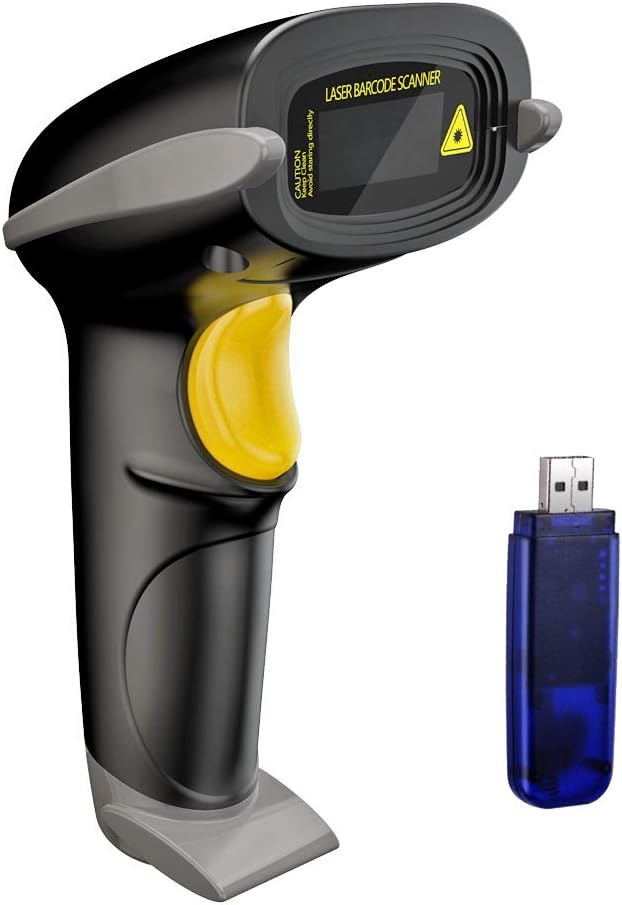
The NADAMOO Bur3003 is a handheld wireless 1D laser scanner designed for retail and light warehouse use where freedom from cabling matters. It pairs to a USB receiver and offers long-distance transmission—advertised up to 328 feet open air and about 100 feet indoors—so you can scan from aisles or loading areas without moving a computer. The unit uses a rechargeable 2600mAh battery intended to last many days in typical scanning workflows and supports instant upload or offline storage of up to 100,000 barcodes for later syncing. It also supports one-to-one and multi-scanner-to-one-receiver pairing and has trigger or continuous auto-scan modes for different tasks. Practical benefits include reduced cable clutter, flexible placement around a checkout or warehouse, and the ability to keep scanning when out of range then upload later. Limitations to note are that this model is a 1D laser scanner (not optimized for 2D codes or screen scanning) and true indoor range will be less than the open-air spec, so confirm coverage in your workspace before relying on long-distance claims.
Best for: Buyers who want a dependable cordless scanner for checkout lanes or warehouse aisles and who value proven performance and peer feedback when choosing gear.
Less Ideal for: Users who need native 2D scanning, smartphone screen capture, or guaranteed long-range coverage in RF-congested industrial environments.
- Long-range wireless transmission for reduced cable dependency
- Large rechargeable 2600mAh battery claimed to support extended multi-day use
- Offline storage mode holds up to 100,000 barcodes for later upload
- Supports multi-scanner to single-receiver pairing for shared POS setups
- Only a 1D laser scanner, so it cannot reliably read 2D QR or some phone-displayed barcodes
- Indoor wireless range will be significantly shorter than open-air specifications in real environments
Verdict: Choose the NADAMOO Bur3003 when you need a cordless, rechargeable 1D scanner with strong offline storage and multi-scanner pairing for checkout or light warehouse work.
Tera D5100 Barcode Scanner

| Connectivity Technology | 2.4G Wireless, USB Cable |
|---|---|
| Power Source | Battery Powered |
| Number of Batteries | 1 Lithium Ion (included) |
| Scan Rate | 200 seconds |
| Operating Voltage | 5 volts |
The Tera D5100 is a versatile handheld barcode scanner built for mixed retail and light warehouse use. It reads 1D and 2D barcodes from printed labels and screens, and can operate as a wired USB device or wirelessly via the included 2.4 GHz dongle; setup is plug-and-play with PCs and laptops and no drivers are required. The large 2200mAh battery and onboard battery-level indicator make it easy to keep track of charge for long shifts, and the scanner supports multiple scan modes including manual trigger, continuous, and auto-sense for hands-free workflows. Ergonomic handle shaping and a flat, smooth trigger improve comfort during repetitive scanning, and the anti-shock silicone cover plus IP54 dust protection help it survive everyday knocks. It also supports language keyboard mappings, prefix/suffix customization, and adjustable audio volume. Limitations to note are the lack of Bluetooth support for phones or tablets and that some advanced POS integrations may require configuration to match specific systems.
Best for: Buyers who want a reliable, easy-to-set-up handheld scanner for retail checkout or light warehouse tasks and prefer a durable device with long battery life and clear charge status.
Less Ideal for: Users who need direct Bluetooth pairing with mobile devices or who require immediate out-of-the-box compatibility with specialized tablet-based POS ecosystems.
- Reads both 1D and 2D barcodes from printed labels and device screens
- Dual connection modes: USB wired or 2.4 GHz wireless dongle with long wireless range
- Large 2200mAh battery with visible battery-level indicator for longer use and easier monitoring
- IP54 dust protection and anti-shock silicone cover for better durability in daily use
- Multiple scan modes (manual, continuous, auto-sense) and configurable prefix/suffix/output language
- Does not support Bluetooth, so it cannot pair directly with phones or tablets
- May require configuration for some POS or specialized system integrations
Verdict: Choose the D5100 if you want a durable, easy-to-configure handheld scanner with long battery life and reliable 2.4 GHz wireless or USB connectivity for mainstream retail and light warehouse use.
Choosing the Right Wireless Barcode Scanner: Key Factors to Consider
Symbology Support
Different operations rely on different barcode types. Retail and logistics commonly use 1D barcodes like UPC and Code 128, while some fields use 2D codes such as QR and Data Matrix for denser data. Make sure the scanner supports the symbologies you encounter to avoid unreadable codes and the need for multiple devices.
Symbology support also affects firmware and decode libraries. Devices with broad native support reduce configuration time and are less likely to require workarounds or software updates to handle specific label formats.
Connectivity Options and Range
Wireless scanners typically connect via Bluetooth or dedicated RF dongles. Bluetooth works well for pairing with tablets and phones, while a dedicated 2.4 GHz receiver often offers lower latency and plug-and-play pairing with point-of-sale systems. Evaluate the typical distance workers will operate from the host device and test line-of-sight and obstructed scenarios.
Also consider multi-host support if you need a scanner to pair with multiple devices. The stability of the wireless link under interference from Wi-Fi or other equipment is a real-world factor that affects consistent performance.
Battery Runtime and Recharge Method
Battery life directly impacts uptime. Long runtime lets staff complete full shifts without swapping or recharging, while hot-swap batteries or quick-charging docks reduce interruptions. Check manufacturer runtime estimates under continuous scanning and typical mixed-use patterns.
Charging convenience matters too. Cradle chargers, charging bays, and USB-C charging all have operational pros and cons. A scanner that charges in a shared dock is simpler to manage than one requiring individual cables for every unit.
Physical Durability and IP Protection
Scanners in warehouses and retail face drops, knocks, and occasional spills. Higher drop ratings and an IP ingress protection rating help ensure devices keep working after mishaps. Durable housings lower replacement frequency and total cost of ownership for busy operations.
If your environment includes dusty aisles or occasional moisture, prioritize models with solid sealing and tested impact resistance. Durable devices often include replaceable parts such as windows and triggers to extend service life.
Ergonomics and Use Comfort
Staff use scanners for hours at a time in many workflows. Weight, grip shape, and button placement influence speed and comfort. Lighter, well-balanced units reduce fatigue for repetitive scanning tasks, while a textured grip helps prevent drops.
Consider whether a pistol-grip form factor, cradle-mounted presentation mode, or an ambidextrous design fits your workflow. Accessories like wrist straps and holsters can also improve comfort and reduce accidental damage.
Integration and Configuration
How a scanner integrates with your existing systems determines how smoothly it will be adopted. Look for compatibility with the host devices and the ability to configure prefix/suffix options, data formatting, and keyboard emulation or virtual COM modes.
Easy configuration via barcode programming, software utilities, or mobile apps speeds deployment. Also check for firmware update mechanisms and documentation quality to simplify long-term maintenance.
Common Wireless Connection Types
Wireless barcode scanners connect to hosts in two primary ways: Bluetooth and dedicated RF dongles. Bluetooth is broadly compatible with smartphones, tablets, and laptops. It is convenient for mobile point of sale and handheld computing platforms that already support Bluetooth input devices.
Dedicated RF dongles operate on a 2.4 GHz link and are often packaged with scanners intended for fixed point-of-sale or back-office systems. These dongles typically deliver lower latency and simpler pairing for environments where a single host must reliably receive scans from multiple scanners.
- Bluetooth: good for mobile devices and multi-host setups, may need reconnection across OS updates
- RF dongle: plug-and-play, predictable latency, often better in RF-noisy environments
- USB-C charging and docking: improves uptime and centralizes charging
Handheld Vs Presentation Scanners
Handheld models are designed for on-the-go scanning, with pistol grips and triggers that suit walking staff and quick single-item reads. Presentation scanners sit on a stand and read items presented to them, which is efficient at fixed checkouts where hands-free scanning speeds throughput.
Choosing between the two depends on workflow. For constant mobility and stock-taking, handheld scanners are the natural choice. For cashier lanes and packing stations, a presentation unit or a hybrid that supports both modes can boost transaction speed.
- Handheld: versatile and portable, best for picks and cycle counts
- Presentation: optimal for stationary checkout and high-volume scans
- Hybrid units: offer the flexibility to switch between handheld and hands-free modes
Managing Multiple Scanners and Host Devices
In multiuser environments you may need several scanners paired to a single host or several hosts. Look for devices that support multi-host pairing or easy reconnection workflows to minimize downtime when users switch stations. Centralized charging docks and inventory tags for each scanner simplify asset tracking.
Consider how your software receives and timestamps scans. Some systems accept raw keyboard input while others prefer serial or SDK-based integrations. Confirm how the scanner will feed data into your point-of-sale or inventory software before committing to a deployment strategy.
- Multi-host pairing: saves reconfiguration when devices move between hosts
- Centralized charging and asset tagging: simplifies fleet management
- SDKs and enterprise management tools: helpful for large deployments
Maintaining Peak Performance
Routine maintenance keeps scanners reading accurately. Clean the scan window regularly with appropriate, non-abrasive materials to remove dust and smudges. Inspect connectors and cradles for wear and ensure charging contacts are free of corrosion.
Monitor firmware updates from the manufacturer to access decoding improvements and bug fixes. Train staff on proper scanning technique and storage practices, such as using holsters and wrist straps to reduce accidental drops.
- Clean windows and contacts regularly
- Check firmware and apply updates when available
- Provide basic handling training to reduce damage
Accessories That Improve Workflow
Accessories can make a significant difference in scanner uptime and usability. Common add-ons include multi-bay chargers, vehicle mounts, presentation stands, holsters, and spare batteries. Choosing the right accessories can tailor a standard scanner to a specific workflow and reduce friction for users.
Think about deployment scale. Multi-bay chargers are efficient for fleets, vehicle mounts are essential for mobile inventory teams, and spare batteries are invaluable for long shifts without access to charging docks.
- Multi-bay chargers for fleet environments
- Presentation stands for fixed checkout lanes
- Holsters and straps to protect handheld units
How We Chose the Best Wireless Barcode Scanner
To build the list we applied practical, category-specific filters that matter for buyers who need dependable wireless barcode scanners in daily operations. We prioritized scanning accuracy across common symbologies because precise reads reduce manual entry and speed transactions. Connectivity and wireless range were weighted heavily to reflect real-world layouts where workers move between aisles or across floors. Battery life and charging options were next, since long runtimes and quick recharge cycles minimize downtime. Durability and ingress protection were included to ensure units hold up under drops, spills, and heavy handling. Finally, ergonomics and mounting/stand options were considered for staff comfort and workflow integration. We excluded entry-level handhelds that only offer short-range or single-scan reliability issues, and we filtered out devices lacking support for common symbologies and connection modes. The resulting selections emphasize compatibility with standard barcode types, dependable wireless links, serviceable batteries, and build quality suitable for commercial use.
Our full evaluation process is outlined in our review methodology.
FAQ
What barcode types should a wireless scanner support for retail use?
Retail typically relies on common 1D codes like UPC and EAN plus some 2D codes for coupons or loyalty programs. Choose a scanner that explicitly lists support for UPC/EAN and common 2D symbologies if you encounter those formats.
How far can I expect a wireless scanner to work from its host?
Range depends on connection type and environment. Bluetooth line-of-sight ranges are often around 30 feet, while RF dongle systems can extend beyond that under ideal conditions. Walls, shelving, and RF interference reduce effective range.
Is it better to get a scanner with a removable battery?
Removable batteries allow hot-swaps and can keep devices running through long shifts. Non-removable batteries can still offer long runtimes but require charging downtime. Consider how easily you can access chargers and spare batteries in your workflow.
Can wireless scanners pair with multiple devices?
Some scanners support multi-host pairing or quick re-pairing modes. This varies by model and firmware. If your staff move between devices frequently, prioritize scanners that advertise multi-host support or easy reconnection.
How should I maintain the scanner to ensure reliable reads?
Keep the scan window clean and inspect the housing for damage regularly. Use recommended cleaning materials, apply firmware updates when available, and train staff on proper handling to reduce drops and impact-related failures.
Final Verdict
Focus on the few factors that will influence day-to-day operations: decoding support for the barcodes you use, a wireless link that covers your workspace reliably, and battery life that matches shift patterns. Balance durability and ergonomics against feature needs like hands-free presentation or multi-host pairing. By prioritizing the criteria outlined above you can select a wireless barcode scanner that minimizes downtime and fits cleanly into your workflow.