
Note: This article contains affiliate links. If you click on these links and make a purchase, we may earn a small commission at no extra cost to you. This helps support our research and content. Read our full affiliate disclosure here.
Picking the right wireless security camera matters because a single device often serves as your first line of detection and evidence. You want clear daytime and nighttime video, consistent connection to your home network, and motion alerts that actually matter. This guide shortlists the top wireless security cameras available and explains the practical tradeoffs buyers face. We evaluated each option for real-world usability, from video clarity and low-light performance to motion detection accuracy and storage flexibility. Read on to find the right balance of features for your home setup and monitoring needs.
Top Picks at a Glance
| Best Overall The best all-around choice for most situations | Blink Outdoor 2K+ 5‑Camera Kit |  |
| Best Quality Built to a higher standard if you want something more solid | eufy SoloCam E42 4-Cam Kit | 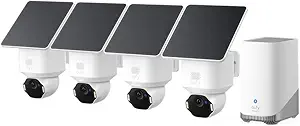 |
| Best Value The sweet spot between price and what you get | WYZE Cam v4 |  |
| Best Budget The cheapest option that still gets the job done reliably | TP-Link Tapo C100 1080p |  |
| Top Rated A top-rated pick with lots of positive feedback | Ring Outdoor Cam (Stick Up Cam) |  |
| Most Popular A crowd favorite that many people choose with confidence | Blink Outdoor 4 5-Cam System |  |
| Best Seller A high-volume bestseller chosen again and again | Tapo C211 Pan/Tilt Camera (2-Pack) |  |
Blink Outdoor 2K+ 5‑Camera Kit

| Video resolution | 2K |
|---|---|
| Connectivity | Wireless (Sync Module Core) |
| Weather resistance | IP65 |
| Included cameras | 5 cameras |
The Blink Outdoor 2K+ 5‑camera kit is a wireless, battery-powered system designed for straightforward outdoor monitoring without hardwiring. Each camera captures sharper 2K video and offers color vision in low light before switching to infrared, which helps identify faces and small details around driveways and entryways. Two-way audio with noise cancellation lets you communicate clearly with visitors, and the 4x digital zoom helps verify deliveries or vehicle details. The cameras are weather-resistant to IP65 standards and come with mounting kits for quick installation, while included AA Energizer lithium batteries and a Sync Module Core promise up to two years of operation under typical use. Smart person and vehicle detection require an optional subscription, so notifications can be limited unless you enroll. The system is convenient for users who want easy setup and long battery life, but advanced cloud features and continuous local recording options are tied to the Blink ecosystem and subscription plan.
Best for: Buyers who want a fuss-free outdoor system with long battery life and better-than-1080p video for general home security and simple DIY installation.
Less Ideal for: Users who need professional-grade analytics, continuous local recording, or subscription-free advanced notifications should consider alternatives with those built-in capabilities.
- 2K video resolution for clearer detail than 1080p cameras
- Color vision in low light improves identification before IR mode
- Long two-year battery life with included AA Energizer lithium batteries
- Weather-resistant IP65 design suitable for outdoor use
- Includes Sync Module Core and five mounting kits for quick setup
- Advanced person and vehicle detection require a paid Blink subscription
Verdict: A simple, battery-powered 5‑camera system that delivers clearer 2K outdoor video and multi-year battery life for straightforward home monitoring.
eufy SoloCam E42 4-Cam Kit

| Power Source | Battery Powered |
|---|---|
| Battery Power | 55.98 watt-hours |
| Video Capture Resolution | 4k |
| Connectivity Protocol | Wi-Fi |
| Built-In Media | HomeBase 3 with 16GB (expandable) |
The eufy SoloCam E42 4-Cam Kit is a performance-focused outdoor security package built around 4K cameras that combine SolarPlus 2.0 charging, AI motion detection, and pan/tilt tracking to deliver continuous monitoring with minimal maintenance. In typical use the cameras mount to exterior walls, remain wire-free via built-in batteries and solar panels, and connect over Wi‑Fi to the included HomeBase 3 for local storage and 24/7 recording. Notable features include true 4K resolution with license-plate clarity at short range, BionicMind AI for person/vehicle/face recognition and cross-camera tracking, and an instant deterrence system with strobe lights and a siren. Practical benefits are long runtime with two hours of direct sun reportedly sufficient to keep units charged, on-device AI that reduces false alerts, and the option to keep footage private without mandatory cloud subscriptions. Important limitations are reliance on a stable Wi‑Fi connection for remote alerts and smart integrations, the need to install or expand HomeBase storage for large 24/7 archives, and potential placement constraints where direct sunlight is limited for solar recharge.
Best for: Buyers who prioritize image quality and autonomous detection want a high-performance, low-maintenance outdoor system that keeps footage locally and minimizes subscription costs.
Less Ideal for: People with poor Wi‑Fi outdoors, properties with little sunlight for solar charging, or those who prefer cloud-only storage and remote vendor backups should consider other solutions.
- True 4K video for fine detail and clearer identification at distance
- SolarPlus 2.0 and battery power reduce wiring and maintenance
- On-device AI tracking and cross-camera awareness cut down false alarms
- HomeBase 3 local storage option supports continuous recording and no monthly fee
- Integrated strobe light and siren provide immediate deterrence
- Full 24/7 recording and large archive require HomeBase storage expansion
- Performance depends on good Wi‑Fi coverage for live view and notifications
- Solar charging effectiveness is reduced in consistently shaded installations
Verdict: Choose the SoloCam E42 kit if you want a solar-powered, 4K outdoor system with strong on-device AI and local recording for subscription-free, high-performance security.
WYZE Cam v4

| Video Capture Resolution | 2k |
|---|---|
| Night Vision Range | 100 feet |
| Wireless Technology | Bluetooth, Wi-Fi |
| Flash Memory Supported Size Maximum | 512 GB |
| Waterproof Rating | IP65 |
The WYZE Cam v4 is a budget-focused indoor/outdoor security camera that records 2.5K QHD video and adds practical deterrence features for everyday home monitoring. It mounts magnetically or on a wall and connects to 2.4 GHz Wi-Fi, delivering a 120° field of view, autofocus, and digital zoom for porch, driveway, or yard coverage. The standout is Enhanced Color Night Vision driven by a Starlight sensor plus a 72-lumen motion-activated spotlight that yields usable color footage in low light and a 100 dB siren for active deterrence. On-device AI helps filter alerts into people, pets, packages, and vehicles, and you can store footage locally to a microSD card up to 512 GB without a subscription. Two-way audio and smart home integrations with Alexa, Google Assistant, and IFTTT make routine checks and automations easy. Trade-offs are reliance on 2.4 GHz Wi-Fi only and a modest 20 fps frame rate, so extremely fast action may look a bit choppy; reading distant license plates at night is not guaranteed. For buyers who want capable, subscription-optional outdoor-capable cameras, this is a practical choice.
Best for: Buyers who want an affordable, no-subscription-capable camera for practical perimeter and porch monitoring that emphasizes clear daytime and low-light color video and easy smart-home integration.
Less Ideal for: Users who need professional-grade surveillance with 5 GHz Wi-Fi support, high-frame-rate footage for fast action, or guaranteed long-range license plate recognition.
- 2.5K QHD video with 120° field of view for clearer facial and package detail compared with 1080p cameras
- Enhanced color night vision plus 72-lumen motion-activated spotlight for usable color footage in low light
- Local microSD recording up to 512 GB so continuous recording is possible without a subscription
- On-device AI classification and configurable activity zones reduce false alerts
- IP65 weather resistance and magnetic/wall mounting for flexible indoor or outdoor placement
- Connects only to 2.4 GHz Wi-Fi which can limit placement relative to router
- 20 fps frame rate may produce less-smooth video during fast motion
Verdict: A cost-effective indoor/outdoor camera that delivers higher-resolution daytime and color night footage with local recording so you can avoid monthly fees.
TP-Link Tapo C100 1080p

| Video Capture Resolution | 1080p |
|---|---|
| Wireless Technology | 2.4GHz Wi‑Fi |
| Field Of View | 110 degrees |
| Night Vision Range | 30 feet |
| Storage | microSD up to 512 GB / cloud option |
The Tapo C100 is a compact indoor Wi‑Fi camera that records 1080p video and sends motion or sound alerts to your phone. It is typically wall‑mounted or placed on a shelf to monitor a room, nursery, or pet area and uses the Tapo app for live view, two‑way talk, scheduling, and multi‑camera grids. Key features include 1080p HD capture, night vision up to about 30 feet, two‑way audio with a built‑in siren, and options for local microSD storage or cloud backup via subscription. Setup is straightforward on 2.4 GHz networks and the camera integrates with voice assistants for viewing on a smart display. Practical benefits are clear: reliable day/night footage, remote communication with family or pets, and motion notifications that reduce the need to watch video constantly. Limitations to note are a modest 15 fps frame rate which can affect smoothness for fast motion, requirement for a 2.4 GHz Wi‑Fi connection, and reliance on local power rather than battery operation, so placement must be near an outlet.
Best for: Buyers who want an affordable, simple-to-use indoor camera for basic home monitoring, baby/pet checks, or room security and who prioritize clear day/night video and easy app access.
Less Ideal for: Users needing high‑frame‑rate or outdoor/battery cameras, or those who require advanced analytics and professional monitoring should look elsewhere.
- 1080p HD video for clear indoor monitoring
- Night vision up to 30 feet for low‑light coverage
- Two‑way audio plus siren for interaction and deterrence
- Supports local microSD storage and cloud backup option
- Easy setup and Tapo app with multi‑camera viewing
- 15 fps frame rate can produce less‑smooth motion for fast activity
- Requires 2.4 GHz Wi‑Fi and a wired power connection
Verdict: A budget‑friendly indoor camera that delivers reliable 1080p day/night monitoring with two‑way audio and simple local or cloud storage.
Ring Outdoor Cam (Stick Up Cam)

| Power | Battery-powered |
|---|---|
| Features | Live View, Two-Way Talk, Motion Alerts |
| Night vision | Color Night Vision |
| Connectivity | Wi-Fi |
| Compatibility | Works with Alexa |
The Ring Outdoor Cam (Stick Up Cam) is a battery-powered security camera intended for outdoor placement but usable almost anywhere you need a wireless camera. It connects to Wi-Fi and provides Live View, two-way talk, motion alerts, and color night vision so you can see and speak with visitors or investigate activity in real time through the Ring app. The camera mounts on a flat surface or wall with the included bracket and uses a rechargeable battery pack for cordless installation; additional ceiling or specialty mounts are available separately. Integration with Alexa enables hands-free viewing and custom alerts on compatible Echo devices, and recorded clips and intelligent alerts are available with an optional Ring Protect subscription. Expect straightforward setup and flexible placement, but note that advanced features like cloud storage require a paid plan and battery operation means you will occasionally recharge the pack depending on activity and settings.
Best for: Buyers who prioritize a dependable, easy-to-install wireless outdoor camera for regular home monitoring and want reliable live access and basic smart-home integration.
Less Ideal for: Users who need continuous local recording without cloud dependency or those who want a fully wired, zero-maintenance camera that never requires recharging.
- Battery-powered for cordless placement and easy installation
- Weather-resistant design suitable for outdoor use
- Live View with two-way talk for real-time monitoring and interaction
- Color night vision improves nighttime visibility compared with IR-only cameras
- Works with Alexa for hands-free viewing and alerts
- Cloud recording and some intelligent alerts require a Ring Protect subscription
- Battery operation means periodic recharging based on usage
Verdict: A reliable, battery-powered outdoor camera that delivers flexible wireless placement, live two-way monitoring, and Alexa integration for straightforward home security.
Blink Outdoor 4 5-Cam System

| Resolution | 1080p HD |
|---|---|
| Night vision | Infrared |
| Power | AA lithium batteries (included) |
| Included | Five cameras and Sync Module 2 |
The Blink Outdoor 4 5-camera kit provides a straightforward, mostly wire-free way to add outdoor coverage around a home. Each camera streams 1080p HD live view, uses infrared for night vision, and includes two-way audio so you can listen and speak through the Blink app or compatible Echo Show device. Setup is simple: the cameras pair with the included Sync Module 2 and run on AA lithium batteries that Blink rates for up to two years, which reduces the need for frequent maintenance. Enhanced dual-zone motion detection and optional person detection (with a subscription) help cut down on irrelevant alerts, and you can store clips in the cloud or locally via the Sync Module with a USB drive. The system is designed for basic home monitoring rather than professional-grade surveillance, so advanced analytics and unlimited free cloud storage are not included without a subscription. Overall, it is a practical, low-hassle option for homeowners who want easy installation and long battery life from a recognized consumer security brand.
Best for: Buyers who prioritize easy, mostly wireless installation and long battery life and who want a reputable, user-friendly consumer system for everyday outdoor monitoring.
Less Ideal for: Users who need enterprise-level analytics, continuous high-capacity cloud recording, or professional-grade cameras for high-security sites should look at more advanced systems.
- Wireless design with included Sync Module 2 enables quick, cable-free installation
- Up to two-year battery life on included AA lithium cells reduces maintenance
- 1080p HD video with infrared night vision and two-way audio for day/night monitoring
- Dual-zone enhanced motion detection and optional person detection to lower false alerts
- Supports local backup via Sync Module 2 plus cloud storage options
- Advanced person detection requires an optional subscription
- Not designed as a professional-grade surveillance system with unlimited free cloud storage
Verdict: A low-hassle, battery-powered five-camera kit that delivers reliable 1080p outdoor monitoring for homeowners who want easy setup and long runtime.
Tapo C211 Pan/Tilt Camera (2-Pack)

| Video Capture Resolution | 2k |
|---|---|
| Night Vision | Night Color |
| Connectivity Protocol | Wi-Fi |
| Power Source | Corded Electric |
| Memory Storage Capacity | 512 GB |
The Tapo C211 pair delivers flexible indoor coverage with 360° horizontal and 114° vertical pan/tilt control and 2K video for clearer detail than typical 1080p models. You use the cameras through the Tapo app over 2.4 GHz Wi‑Fi to watch live feeds, receive instant motion or person alerts, and talk through built‑in two‑way audio; the cameras also offer baby crying detection and a siren for on‑demand deterrence. Storage is flexible: record continuously to a microSD card up to 512 GB or subscribe to cloud recording for longer history and extra features. Setup is straightforward with wall mounts and the app, and compatibility with Alexa and Google Assistant makes it easy to view streams on smart displays. Practical limitations include reliance on 2.4 GHz Wi‑Fi and corded power, so placement needs a nearby outlet, and advanced cloud features require a subscription. For buyers who prioritize dependable, easy home monitoring, these cameras strike a sensible balance of image quality, pan/tilt coverage, and simple app controls.
Best for: A buyer who wants reliable, easy-to-use indoor cameras with wide coverage and clear 2K video for everyday home monitoring and family or pet checks.
Less Ideal for: Someone who needs truly wireless/battery cameras for outdoor placement or who cannot provide a stable 2.4 GHz Wi‑Fi connection.
- 2K resolution for clearer detail compared with 1080p cameras
- Wide pan/tilt range (360° horizontal, 114° vertical) covers an entire room
- Flexible storage: local microSD support up to 512 GB plus optional cloud service
- Two‑way audio, built‑in siren, and baby crying detection for active monitoring
- Works with Alexa and Google Assistant for viewing on smart displays
- Requires a nearby power outlet since cameras are corded
- Connects only on 2.4 GHz Wi‑Fi which can limit placement in some networks
Verdict: Choose the Tapo C211 2‑pack if you want dependable indoor coverage with pan/tilt control and sharper 2K video in a straightforward, app‑driven system.
Choosing the Right Wireless Security Camera: Key Factors to Consider
Video Resolution and Low-Light Performance
Higher resolution makes it easier to identify faces, license plates, and other details. In practice, 1080p is a useful minimum for most homes while 2K or higher helps when you need clearer evidence from farther away.
Low-light sensitivity and infrared illumination determine how useful night footage is. Cameras with larger sensors or better night modes produce clearer, less noisy images after dark. Consider the typical lighting around mounting locations and whether you need color night vision or basic black-and-white IR imaging.
Motion Detection and Smart Alerts
Good motion detection distinguishes relevant movement from background activity like swaying branches or pets. Look for adjustable sensitivity, configurable detection zones, and person or vehicle detection options to reduce false positives.
How alerts are delivered also matters. Real-time push notifications with quick preview clips let you triage events faster. Check whether the camera supports scheduling and filtering to avoid alerts during predictable activity windows.
Connectivity and Network Reliability
Wireless cameras depend on stable Wi-Fi to stream and upload video. Signal strength and bandwidth determine whether footage records consistently or drops out during important events. Evaluate expected range from your router and consider whether you need a camera that supports 2.4 GHz, 5 GHz, or both.
Some cameras offer local backup or mesh-compatible operation to mitigate flaky Wi-Fi. If your home has many connected devices, look for cameras designed to handle congested networks and provide consistent upload performance.
Storage Options and Privacy Controls
Storage choices affect how long you keep footage and who can access it. Cloud subscriptions offer convenience and off-site redundancy, while local storage via memory card or network video recorder gives more control and often lower long-term costs.
Privacy features such as end-to-end encryption, account-level access control, and the ability to locally store or export footage are important if you want tight control over recorded video. Consider how easy it is to manage clips and how transparent retention policies are.
Power Source and Installation Flexibility
Wireless cameras may be battery-powered, solar-assisted, or require wired power. Battery models are easiest to place but need regular charging or swapping unless paired with a solar option. Wired power gives continuous operation but requires routing cable or using nearby outlets.
Mounting options and included hardware impact where you can install a camera. Look for adjustable mounts, weatherproofing ratings for outdoor use, and straightforward mounting instructions to minimize installation time.
Integration and Ecosystem Compatibility
Integration with your existing smart home ecosystem can streamline notifications and automation. Some cameras offer native support for voice assistants, smart displays, or home automation hubs, allowing events to trigger routines or display live video on shared screens.
Consider the privacy and control implications of deeper ecosystem integration. Confirm whether integrations are local, cloud-based, or require third-party accounts, and whether automations support the level of granularity you need.
Placement Strategies for Best Coverage
Placement determines how effective a wireless security camera will be at catching meaningful events. For entrances and driveways, aim for an angle that captures faces and license plates at a slight downward tilt rather than straight-on or from below.
For broader areas like yards or back patios, consider overlapping fields of view from multiple cameras to eliminate blind spots. If using a battery camera, mount it within the recommended range of solar panels or in an area where swapping batteries is convenient.
- Mount 8 to 10 feet high for balanced facial recognition and wide coverage.
- Avoid pointing directly into bright light sources to reduce glare and false exposures.
- Use adjustable mounts to fine-tune angle after initial installation.
Managing Bandwidth and Data Usage
High-resolution video consumes more bandwidth and storage. If you have limited upload speed, configure cameras to record at lower bitrates or lower resolution when constant high-detail recording is not necessary.
Many cameras offer event-based recording only, which reduces continuous data transfer by uploading clips only when motion is detected. Use this mode together with optimized motion sensitivity to balance coverage and data use.
- Schedule high-resolution recording for daytime and lower settings at night if bandwidth is constrained.
- Enable clip compression or adjustable bitrate settings if available.
- Monitor your network during the first week after installation to spot congestion issues.
Powering Your Camera: Battery Versus Wired
Battery cameras give flexible placement but require a plan for recharging or replacement. If you choose battery power, check realistic battery life figures and whether the camera supports battery-saving features like motion-triggered recording or short clip lengths.
Wired cameras avoid downtime but need an accessible power source or discreet cable runs. Consider professional routing if you want a clean, tamper-resistant installation.
- For high-traffic areas choose wired power for continuous coverage.
- Use solar panels as a supplement for outdoor battery cameras to extend maintenance intervals.
- Rotate spare batteries seasonally when temperatures reduce battery efficiency.
Local Storage and Incident Management
Local storage keeps footage under your control and can be faster to retrieve than cloud clips. Look for cameras that allow easy export of footage or integration with local network recording devices for consolidated storage.
Establish a routine for labeling and archiving important clips so you can quickly find footage in case of an incident. Regularly verify that recordings are occurring and test playback to confirm usability.
- Use timestamped filenames and short descriptive notes when exporting clips.
- Set automatic retention rules to avoid filling local storage inadvertently.
- Test clip export and playback before relying on the system for security evidence.
Balancing Alerts and Nuisance Notifications
Excessive alerts cause users to ignore notifications, undermining a camera's usefulness. Use detection zones, sensitivity adjustment, and person-only triggers when available to keep alerts relevant.
Pair smart notifications with quick preview clips or thumbnails so you can make a fast decision without opening a full video. This flow helps prioritize responses to genuine events.
- Set quiet hours for noncritical times to suppress unimportant motion alerts.
- Combine motion schedules with zone filtering for areas like busy streets that create frequent false positives.
- Adjust sensitivity after observing a few days of typical activity to tune the system.
How We Chose the Best Wireless Security Camera
We started by focusing on features that directly affect day-to-day monitoring and incident capture. Video resolution and low-light sensitivity were weighted heavily because they determine how usable footage is as evidence. Motion detection accuracy and configurable alert zones were next, since good sensors reduce nuisance notifications and help you focus on real events. Network reliability and ease of setup were included to reflect how these devices perform in typical home Wi-Fi environments. Storage options and cloud subscription flexibility were considered so buyers can choose a retention model that fits privacy and budget preferences. Finally, power approach and mounting versatility were assessed because they influence placement and continuous operation. We excluded devices that lack basic encryption, devices without local or exportable video storage options, and products intended only for specialized commercial deployments. Our selection favors wireless security cameras that balance consistent connectivity, usable footage, and sensible alerting rather than feature-loaded models with poor fundamentals.
Our full evaluation process is outlined in our review methodology.
FAQ
How do I know if my Wi-Fi can support multiple wireless security cameras?
Check your router's upload bandwidth and compare it to the combined expected upload of your cameras at their chosen resolution. Many cameras list recommended upload speeds for different quality settings. If your network struggles, lower bitrate settings, use event-only recording, or reduce simultaneous live streams.
Are battery-powered wireless security cameras reliable for long-term monitoring?
Battery cameras are reliable when their duty cycles match your needs. They are ideal for intermittent monitoring or locations without power, but they require maintenance such as periodic recharging or battery replacement. Solar accessories or spare battery rotation can reduce downtime.
Can I store footage locally instead of using a cloud subscription?
Many wireless security cameras support microSD cards or local network storage to keep footage on-site. Local storage provides more control but requires you to manage backups and retention. Verify that the camera supports export and secure access to local clips.
What should I do if I keep getting false motion alerts?
Adjust motion sensitivity and set detection zones to exclude problem areas like tree lines or busy sidewalks. Enable person detection if available and review the camera's motion schedule so it ignores predictable activity windows.
How important is encryption and account security for these cameras?
Encryption and strong account controls are critical because cameras transmit and store sensitive footage. Use cameras that support secure connections, enable two-factor authentication when available, and keep device firmware up to date to reduce security risks.
Final Verdict
When choosing a wireless security camera, prioritize the features that match how you will use the device. If capturing identifiable detail is critical, favor higher resolution and strong low-light performance. If minimizing interruptions matters more, emphasize motion accuracy, configurable zones, and smart notification controls. Consider network constraints, storage preference, and power strategy as the main tradeoffs. Balance those needs against installation flexibility to pick a camera that delivers reliable monitoring with the least maintenance for your home. With the right priorities, you can select a wireless security camera that provides dependable coverage and useful alerts.