
Note: This article contains affiliate links. If you click on these links and make a purchase, we may earn a small commission at no extra cost to you. This helps support our research and content. Read our full affiliate disclosure here.
Buying a 3D printer on a tight budget means balancing reliability, part quality, and how much time you want to spend on setup and maintenance. For hobbyists, educators, and makers who want functional prints without a large investment, picking the right budget 3D printer matters for project success and ongoing frustration levels. This guide shortlists the top budget 3D printers under $300 and evaluates them on practical criteria like print quality, ease of setup, and reliability for everyday use. Read on to see which options fit particular uses and what to expect from each pick.
Top Picks at a Glance
| Best Overall The best all-around choice for most situations | LONGER LK5 Pro 3D Printer |  |
| Best Quality Built to a higher standard if you want something more solid | Bambu Lab A1 mini |  |
| Best Value The sweet spot between price and what you get | ELEGOO Neptune 3 Pro |  |
| Best Budget The cheapest option that still gets the job done reliably | FDM Mini 3D Printer |  |
| Top Rated A top-rated pick with lots of positive feedback | Creality Ender 3 V3 SE |  |
| Most Popular A crowd favorite that many people choose with confidence | FLASHFORGE Adventurer 5M |  |
| Best Seller A high-volume bestseller chosen again and again | FLASHFORGE Adventurer 5M |  |
LONGER LK5 Pro 3D Printer

| Build volume | 300×300×400mm |
|---|---|
| Pre-assembly | 90% preassembled |
| Driver | TMC2208 silent driver |
| Touchscreen | 4.3-inch color touch screen |
| Bed surface | Lattice glass plate |
The LONGER LK5 Pro is a desktop FDM 3D printer that targets hobbyists who want a larger-than-average build area without a steep assembly burden. It ships about 90% preassembled on a reinforced triangular frame and offers a 300×300×400mm print volume for bigger parts. Practical features include a dual blower cooling kit to reduce stringing, a lattice glass plate for easier removal and flatter bed surface, filament runout detection, and resume-after-power-loss so long prints are protected against interruptions. The controller uses a 4.3-inch color touch screen and the open-source motherboard with TMC drivers keeps motor noise low and allows firmware tinkering. For printing under $300 this model packs a lot of useful reliability and convenience touches, though it still requires basic calibration and occasional adjustments familiar to budget large-format printers. Secondary accessories like a BLTouch are supported but not included, and more advanced users may want to upgrade components for the highest precision work.
Best for: Buyers who want the biggest printable parts they can get for the money and prefer a printer that is ready to run quickly with practical reliability features.
Less Ideal for: If you need out-of-box industrial-level precision, full auto bed leveling, or a turnkey solution for production-quality parts, look at higher-end models instead.
- Large 300×300×400mm build volume for bigger prints
- Mostly preassembled with reinforced triangular structure for quicker setup and improved stability
- Filament runout sensor and resume-after-power-loss protect long prints
- 4.3-inch full-color touch screen and silent TMC driver for easier, quieter operation
- Requires user calibration and occasional tweaks to reach best print quality
- Higher-end precision and auto bed leveling are not included and need upgrades
Verdict: The LK5 Pro delivers the largest usable build volume and practical reliability features available in a sub-$300 3D printer, making it the best pick for balanced buyers who want big prints without a long assembly process.
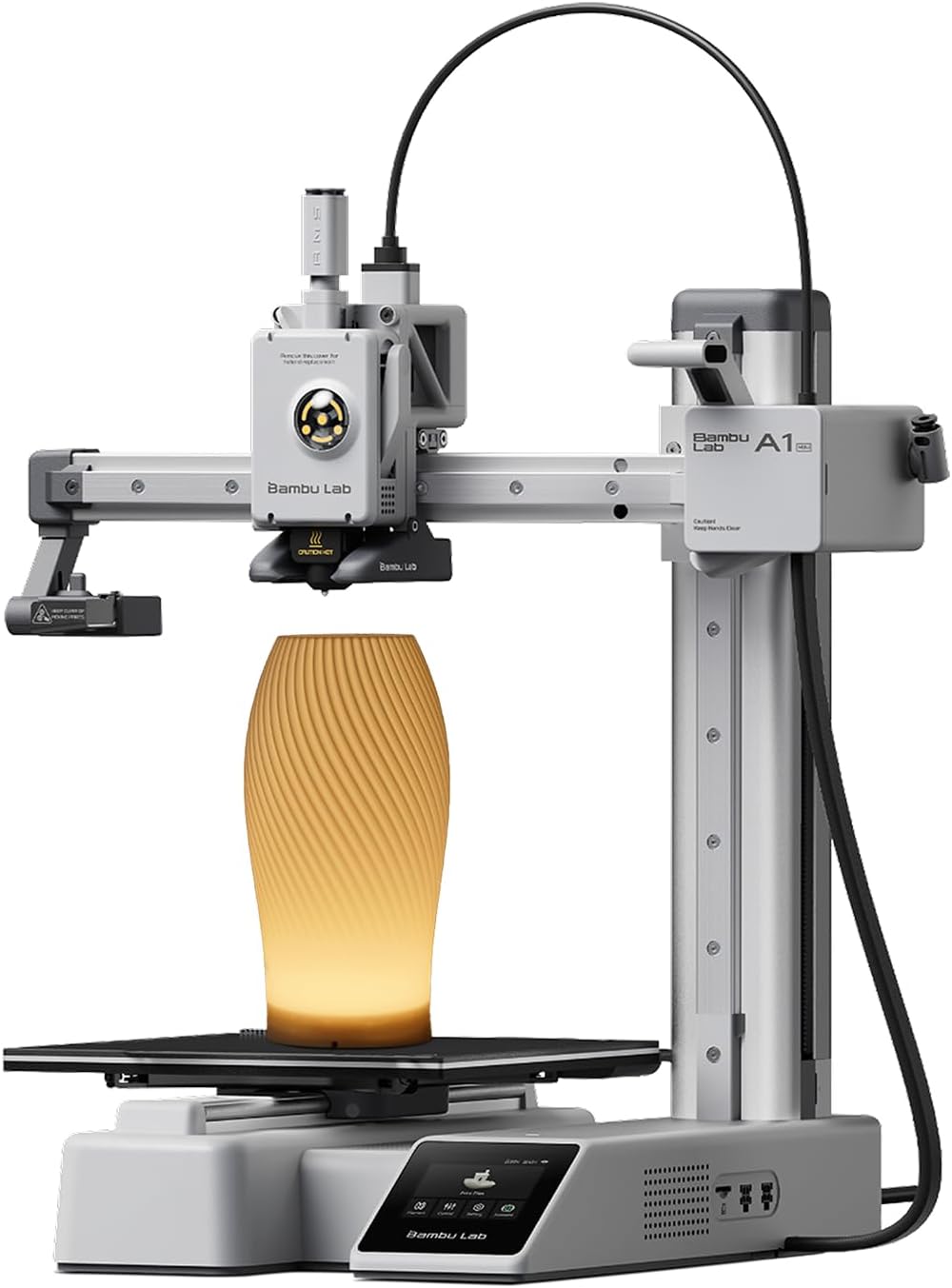
Bambu Lab A1 mini
| Item model number | PF002-M-EU |
|---|---|
| Item Weight | 12.1 pounds |
| Date First Available | February 28, 2026 |
| Customer Reviews | 4.4 out of 5 stars |
The Bambu Lab A1 mini ships as a beginner-friendly, compact desktop 3D printer plus an LED lamp kit so you can print decorative light projects right away. Setup and full-auto calibration are aimed at first-time users, and the printer integrates with Bambu's MakerWorld library and Handy app for ready-to-print models and remote management. In practice the A1 mini targets speed and repeatability: the platform supports high printing speeds with active flow rate compensation to maintain extrusion consistency, and its quoted noise level under 48 dB keeps it unobtrusive in a home or small studio. The included lamp kit is a nice creative bonus for hobby projects or quick gifts. Limits to consider are the small build volume compared with larger machines and a focus on PLA/PETG-class filaments rather than heavy engineering materials, so this is not intended for large production runs or advanced materials testing. For performance-minded buyers on a budget it delivers snappy, reliable prints in a compact package with a smooth workflow for everyday projects.
Best for: Buyers who want a high-performing, compact 3D printer under $300 that prioritizes speed, dependable print quality, and an easy, app-driven workflow for hobby and small project use.
Less Ideal for: Users who need large build volume, industrial throughput, or frequent printing with specialty high-temperature engineering filaments should consider larger or more industrial-focused machines.
- Fast print speeds with active flow rate compensation for more consistent extrusion
- Full-auto calibration and plug-and-play setup reduce time spent on tuning
- Quiet operation (reported ≤48 dB) suitable for home or small studio use
- Includes LED lamp kit that enables creative printed lighting projects
- Small build volume limits larger parts and batch printing
- Primarily optimized for common filaments, not heavy engineering materials
Verdict: If you want a compact, fast, and easy-to-use printer under $300 that delivers reliable everyday prints and a smooth app-driven workflow, the A1 mini is a top pick.
ELEGOO Neptune 3 Pro

| Build volume | 225×225×280 mm |
|---|---|
| Extruder type | Dual-gear direct drive |
| Filament diameter | 1.75 mm |
| Noise level | 47 dB |
The ELEGOO Neptune 3 Pro is a ready-to-run FDM printer aimed at hobbyists and makers who want reliable, everyday printing without a steep learning curve. It ships with most main parts pre-assembled and a toolkit so you can be printing in minutes on the 225×225×280 mm build plate. The dual-gear direct drive extruder with stainless steel gears and a titanium throat is designed to feed flexible and standard filaments consistently, while a widened heat sink and front cooling fan help reduce clogs. The 36-point one-click auto bed leveling, filament runout sensor, and power-loss resume make longer prints much less nerve-wracking. Motion is handled by an STM32 board, silent stepper motors, and dual Z lead screws for stable layer registration at quieter noise levels. Practical touches like a removable PEI magnetic platform and smart resume simplify post-print removal and recovery. The printer is not a fully enclosed, high-temp workstation, so printing large ABS or specialty engineering materials will still require ventilation and extra tuning, but for PLA, PETG, TPU and everyday projects it balances ease of use and dependable hardware in an affordable package.
Best for: Buyers looking to maximize print reliability and uptime on everyday projects who want a mostly preassembled machine that minimizes setup and interruptions.
Less Ideal for: People who need an enclosed, high-temperature production printer for frequent ABS, nylon, or other demanding engineering materials should consider fully enclosed models instead.
- 36-point auto bed leveling reduces manual calibration and improves first-layer consistency
- Dual-gear direct drive extruder with stainless steel gears supports flexible filaments and lowers clog risk
- Filament runout sensor and power-loss resume protect long prints from interruptions
- Removable PEI magnetic build plate makes part removal and bed prep straightforward
- Silent stepper motors and dual Z lead screws deliver quieter, stable motion
- Open-frame design and cooling make high-temperature or heavily warping materials harder to print reliably
Verdict: A practical, mostly preassembled 3D printer that prioritizes reliable daily printing and fewer failed jobs for hobbyists and makers on a budget.
FDM Mini 3D Printer

| Build volume | 100 x 100 x 100 mm |
|---|---|
| Supported filament | 1.75mm PLA, TPU |
| Nozzle | All-metal |
| Layer resolution | 0.05 mm |
This compact FDM mini 3D printer targets first-time makers who want a low-cost, low-friction entry into printing. It ships fully assembled and prints from G-code files on a memory card, so you can avoid slicing software while learning basics. The all-metal nozzle and fast-heating hotend reach PLA-safe temperatures quickly and support 1.75mm PLA and TPU, with layer resolution claims down to 0.05mm for finer detail on small parts. The 100×100×100mm build area keeps the machine footprint small and limits projects to miniature prints, but that same small size makes it easy to fit on a desk or classroom table. Controls are simple push-button keys for loading filament and starting or stopping prints, which reduces the setup curve but also limits advanced control and on-the-fly tuning. The frame uses ABS parts for durability, though the compact design and modest feature set mean experienced users will find it basic. For its price and scope it is a practical, easy-to-use starter printer for hobbyists, educators, and anyone wanting an affordable way to learn 3D printing fundamentals.
Best for: Buyers who want the cheapest practical way to learn 3D printing and prefer a ready-to-run machine with straightforward controls for classroom or hobby use.
Less Ideal for: Users who need larger build volume, advanced control, or professional-grade features for complex or production prints should consider a more capable machine.
- Fully assembled and simple card-based workflow for plug-and-play setup
- All-metal nozzle with rapid heating that reaches PLA temps in about 5 minutes
- Supports 1.75mm PLA and TPU filaments and fine layer resolution to 0.05mm
- Very small footprint and enclosed compact build volume suitable for desks or classrooms
- Small 100×100×100mm build area restricts print size to miniatures
- Basic push-button controls limit advanced tuning and convenience features
Verdict: A budget-friendly, fully assembled starter 3D printer that gets beginners printing quickly in a very small footprint.
Creality Ender 3 V3 SE

| Max print speed | 250 mm/s |
|---|---|
| Extruder type | Sprite direct extruder |
| Auto leveling | CR Touch with strain sensor |
| Mainboard | 32-bit silent mainboard |
| Build plate | PC spring steel flexible plate |
The Creality Ender 3 V3 SE is an entry-to-mid-level FDM printer built to get users printing quickly while maintaining good surface quality. It prints up to 250 mm/s with high acceleration settings for faster job completion and uses a CR Touch auto-leveling sensor plus a strain sensor for auto Z offset to simplify first-layer setup. The Sprite direct extruder handles PLA, PETG, and flexible TPU reliably and the machine includes one-tap auto filament load and unload for straightforward filament changes. Structural stability comes from a dual Z-axis with a timing-belt sync and twin Y-axis linear shafts, which reduce wobble on taller prints. A 32-bit silent mainboard and improved stepper drivers keep noise and vibration down during long prints, and the flexible PC spring steel build plate makes part removal easier. Expect a propped-up beginner experience rather than industrial accuracy: high-speed printing can require tuning for best surface finish, and larger or highly detailed prints may need slower speeds to avoid artifacts. The unit is compact and quick to assemble, making it practical for hobbyists focused on dependable everyday use.
Best for: Buyers who prioritize a consistently reliable, easy-to-start printer for everyday prototyping and hobby projects and value features that reduce setup headaches.
Less Ideal for: Users who need industrial-level precision, very large build volumes, or out-of-the-box perfect surface finish for detailed professional parts should look at higher-end machines.
- Fast top speed (up to 250 mm/s) shortens print times for prototyping and simple models
- CR Touch auto-leveling and strain-sensor Z offset make first-layer setup easier for beginners
- Sprite direct extruder supports a range of filaments including TPU for flexible prints
- Dual Z-axis and reinforced Y-axis shafts improve stability and reduce Z-wobble on taller parts
- 32-bit silent mainboard and stepper drivers reduce noise during prints
- High-speed printing may need tuning and slower speeds for fine detail or best surface finish
- Build volume and rigidity are modest compared with larger, more expensive machines
Verdict: Choose the Ender 3 V3 SE if you want a dependable, beginner-friendly printer that speeds through everyday prints while minimizing setup fuss.
FLASHFORGE Adventurer 5M

| Build Size | 220 x 220 x 220 mm |
|---|---|
| Nozzle Dimension | 0.4mm (0.25/0.6/0.8 optional) |
| Leveling Method | Full-Auto One-Click Leveling |
| Travel Speed and Acceleration | 600mm/s and 20,000mm/s² |
| Connectivity | Wi-Fi; Ethernet; USB; Cloud |
The Adventurer 5M is a compact CoreXY 3D printer designed to make reliable desktop printing accessible to both beginners and experienced users. It uses a full-auto one-click leveling system so first-layer calibration is largely automatic, and patent quick-detach nozzles in multiple diameters let you switch between fine-detail and high-speed prints without tools. The CoreXY all-metal motion frame and dual-texture PEI bed support higher travel speeds (advertised up to 600 mm/s) and good surface adhesion, while power-loss resume and a flexible magnetic PEI plate simplify part removal and recovery from interruptions. Built-in Wi-Fi, Ethernet, USB and cloud support plus a companion app enable remote job sending and real-time monitoring. Practical limitations include a relatively small 220 x 220 x 220 mm build volume compared with larger hobby printers and a user-reported learning curve for dialing in multi-material prints despite wide filament compatibility. For buyers focused on fast, fuss-minimized printing in a benchtop footprint, the Adventurer 5M delivers an attractive balance of speed and convenience at this price tier.
Best for: Buyers who want a fast, feature-rich benchtop 3D printer that minimizes manual leveling and supports remote printing workflows while relying on peer feedback to confirm real-world reliability.
Less Ideal for: People who need large-format printing capacity or who prefer extremely simple, out-of-the-box printers with minimal tuning and setup.
- Automatic one-click leveling reduces setup time and simplifies first-layer calibration.
- Quick-detach nozzles (0.25/0.4/0.6/0.8 mm) allow fast swaps between precision and high-flow printing.
- CoreXY metal motion structure supports higher travel speeds and stable motion.
- Flexible dual-texture PEI plate and power-loss resume make print removal and recovery easier.
- Multiple connectivity options and remote monitoring via app/cloud streamline workflow.
- Build volume is limited to 220 x 220 x 220 mm, which constrains larger projects.
- High advertised travel speeds may require tuning to maintain consistent print quality.
Verdict: If you want a compact, fast desktop 3D printer under $300 that automates leveling and supports remote workflows, the Adventurer 5M is a strong, feature-packed choice.
FLASHFORGE Adventurer 5M

| Build Volume | 220 x 220 x 220 mm |
|---|---|
| Max Nozzle Temperature | 280°C |
| Structure | All-metal Core XY |
| Platform | Double-sided PEI platform |
| Travel Speed | 600 mm/s |
The FLASHFORGE Adventurer 5M is a CoreXY desktop 3D printer designed for faster prototyping while keeping setup simple. It uses one-button automatic bed leveling and a removable double-sided PEI platform to make first-layer adhesion and part removal straightforward, and a 280°C direct-drive extruder accepts common filaments like PLA, ABS, PETG and TPU. The printer emphasizes speed with a claimed 600 mm/s travel rate and high acceleration for shorter print cycles, plus quick nozzle swaps and a fast warm-up to working temperature. Practical benefits include a rigid all-metal CoreXY frame for better dimensional stability, multiple nozzle sizes for tuned detail or throughput, and mobile app monitoring for remote job oversight. Limits to expect at this price are that very high-speed settings may require tuning and premium filaments or engineering materials could need the enclosed kit or extra cooling management; fine surface finish on intricate parts may still require slower print profiles. For buyers wanting a faster, easy-to-start machine under $300, the Adventurer 5M balances speed and convenience but benefits from some user calibration for best results.
Best for: Buyers who want a beginner-friendly desktop printer that prioritizes faster print cycles and easy setup, and who prefer a relatively plug-and-play experience with mobile monitoring.
Less Ideal for: Users who need the absolute finest surface finish out of the box for intricate models or who require high-temperature industrial materials without adding an enclosure and upgrades.
- One-button automatic bed leveling simplifies setup and improves first-layer consistency
- CoreXY all-metal structure provides stable motion for faster, more precise prints
- 280°C direct-drive extruder supports a wide range of filaments including PLA, ABS and PETG
- Double-sided PEI platform enables easy part removal and good adhesion
- Mobile app monitoring lets you watch prints and control the printer remotely
- Top-rated high-speed performance requires tuning and may not deliver best surface finish without slower profiles
- Advanced engineering materials or very large prints may need the optional enclosure or additional cooling management
Verdict: A user-friendly CoreXY printer that delivers faster desktop printing and easy setup, making it a solid choice for mainstream buyers seeking speed and convenience under $300.
Choosing the Right 3D Printer: Key Factors to Consider
Print Quality and Resolution
Print quality defines how well a 3D printer captures fine details and smooth surfaces. Look at achievable layer heights, typical tolerances, and whether the machine can reliably print small features without excessive ringing or stringing.
A printer that advertises low minimum layer heights may still need careful tuning to reach those numbers. Consider how much post-processing you are willing to do and whether your projects demand tight dimensional accuracy or only functional prototype shapes.
Ease of Setup and Assembly
How much assembly and calibration a printer requires impacts how quickly you can start printing. Machines that come mostly assembled with clear instructions lower the barrier for new users, while kit-style options may save money but demand mechanical skill and tools.
Also consider the clarity of first-print workflows, whether pre-sliced sample files are included, and how straightforward bed leveling and filament loading are. A simpler initial experience reduces frustration and shortens the learning curve.
Build Volume and Workspace Fit
Build volume determines the maximum object size you can print without splitting parts. For hobby projects and parts for home use, a moderate build plate lets you print useful items while keeping the machine compact.
Also check the printer's physical footprint and whether it fits your workspace. Larger build volumes often mean bigger enclosures and more heat output, which matters if you plan to run long prints in a small room.
Materials Compatibility
Budget printers commonly handle PLA and PETG reliably, but if you plan to print flexible, high-temperature, or engineering filaments, verify the extruder and hot end capabilities. An all-metal hot end and a heated bed expand material options and reduce clogging risk with higher-temperature filaments.
Consider whether the printer supports common filament diameters and if upgrades are straightforward. Material versatility affects the range of projects you can undertake without additional hardware changes.
Bed Adhesion and Leveling System
Good bed adhesion prevents early print failures and reduces wasted time and filament. Look for reliable bed-surface options and whether automatic or assisted leveling is available at this price point.
Manual leveling is common on budget models, so ease of access to adjustment screws and the availability of leveling aids matter. A stable bed surface that resists warping will deliver steadier first layers and higher overall yield.
Community, Documentation, and Support
A strong user community and clear documentation shorten troubleshooting and upgrade paths. At lower price points, community-driven guides, firmware profiles, and replacement parts are often the best resources for solving problems.
Check that basic manuals, clear wiring or part diagrams, and active forums or groups exist. Good support resources reduce downtime and make it easier to learn advanced tuning when you want better results.
What You Can Expect From Budget 3D Printers
Under $300 printers can produce surprisingly useful parts for hobby projects, jigs, and cosmetic prototypes. Expect competent PLA prints out of the box, with reasonable surface finish and dimensional consistency after basic tuning.
However, budget machines often need patience. You should anticipate some manual calibration, occasional part upgrades, and learning to dial in slicer settings for better results. For many users, the trade-off of lower purchase cost for extra setup time is acceptable.
- Good for learning, prototyping, and small production runs
- Usually handles PLA and PETG; specialty materials may need upgrades
- May require tweaks for optimal dimensional accuracy
Getting the Best Results From a Low-Cost Printer
Spend time calibrating the first layer and fine-tuning retraction and temperature settings in your slicer. Small adjustments to nozzle temperature or print speed often yield visible improvements in surface finish and bridging.
Upgrade simple consumables first, such as a better build surface or a quality glass plate. These changes improve adhesion and flatness without major mechanical modifications.
- Calibrate first-layer height with a single-layer test
- Tune retraction to reduce stringing
- Use brim or raft temporarily to improve adhesion on tricky parts
Maintenance and Common Wear Parts
Budget 3D printers rely on a few consumable parts that commonly need attention: nozzle, PTFE liner, belts, and the build surface. Plan for periodic replacement and keep spares on hand to avoid long downtime.
Regularly check belt tension, pulley set screws, and Z-axis leadscrew lubrication. Simple preventive maintenance keeps prints consistent and extends the machine's usable life.
- Replace nozzles when flow becomes inconsistent
- Re-tension belts if you see layer shifting
- Keep the bed clean and check for warping
Choosing Filament for Reliable Results
Start with a mid-range PLA from a reputable source to learn printer behavior. PLA is forgiving, requires no heated enclosure, and helps isolate mechanical or slicer issues from material problems.
When you move to PETG or flexible filaments, reduce print speeds and increase retraction settings where appropriate. Check whether your printer's hot end and extruder configuration are compatible with the material you want to use before committing to long prints.
- Use PLA for calibration and detailed prints
- Switch to PETG for stronger, more heat-resistant parts
- Lower speeds for flexible filaments to avoid jams
Upgrades That Deliver the Biggest Improvements
Simple upgrades often provide disproportionate benefits. A stable glass bed or a spring steel sheet improves first-layer adhesion and surface finish. Better nozzles and all-metal hot ends increase material compatibility and reduce clogging.
If your printer lacks automated leveling, add a bed-leveling sensor or use mesh bed leveling in your firmware. These changes reduce the time spent re-leveling and increase first-print success rates.
- Glass or spring steel build surface
- Higher-quality nozzle or all-metal hot end
- Bed-leveling sensor or firmware-based mesh leveling
How We Chose the Best 3D Printer
We focused on devices that consistently deliver usable prints within the under $300 price constraint and that are readily suitable for first-time buyers or hobbyists. Our selection filters prioritized machines with stable frame designs, reliable motion systems, and community or manufacturer resources that make setup and troubleshooting easier. We excluded kits that require extensive machining or specialist tools, and models that lack basic safety or calibration features. Evaluation centered on measurable and user-relevant dimensions: print quality at common layer heights, ease of assembly and first-print setup, hardware reliability and build stability, and the availability of firmware or slicing profiles that simplify printing. We also considered bed adhesion and leveling systems because they strongly affect first-print success. Where applicable, we checked user-reported uptime and common failure modes to avoid picks that need frequent repairs. These criteria guided the shortlist and ensured picks work well for everyday hobby and light prototyping use.
Our full evaluation process is outlined in our review methodology.
FAQ
Can I get good prints from a 3D printer under $300?
Yes. You can achieve useful, well-detailed PLA prints with proper calibration and tuning. Expect to spend time on setup and occasional maintenance to get consistent results.
What materials will these budget printers handle?
Most will handle PLA reliably and many can print PETG with a heated bed. Printing high-temperature engineering plastics or flexible filaments may require hot end or extruder upgrades.
How much assembly is usually required?
Assembly varies by model. Some units arrive mostly assembled and need only a few fasteners and calibration steps, while kit-style options require more mechanical work and alignment.
How important is bed leveling on budget machines?
Very important. Proper bed leveling is critical to first-layer adhesion and overall print success. Models with assisted or automatic leveling reduce the time spent tuning and help avoid failed prints.
What maintenance should I plan for?
Expect routine checks of belt tension, nozzle condition, and bed surface cleanliness. Replace consumables like nozzles and PTFE liners as they wear, and lubricate moving parts per the manual.
Final Verdict
For hobbyists and makers on a tight budget, a 3D printer under $300 can be a practical tool when you prioritize printability, ease of setup, and reliable bed adhesion. Accept that these machines may require more hands-on calibration and occasional upgrades to broaden material compatibility. Focus your choice on the dimensions that matter most to you, such as build volume, initial setup experience, and community support, and you can confidently pick a model that delivers useful parts without overspending.