
Note: This article contains affiliate links. If you click on these links and make a purchase, we may earn a small commission at no extra cost to you. This helps support our research and content. Read our full affiliate disclosure here.
When you need sharper detail for identifying faces, license plates, or fine scene elements, opting for a 4K Wi-Fi security camera makes a noticeable difference. You want dependable video that streams cleanly to your phone, solid low-light performance, and straightforward network setup so the system actually gets used. This guide summarizes the top shortlisted 4K Wi-Fi security cameras for home monitoring. We focused on options that balance true 4K imaging, robust night vision, motion detection, and easy app-based controls. Below we explain what mattered in our selection and walk through practical considerations to help you pick the right camera for your layout and priorities.
Top Picks at a Glance
| Best Overall The best all-around choice for most situations | eufy SoloCam E42 4K | 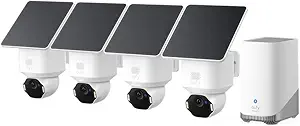 |
| Best Quality Built to a higher standard if you want something more solid | Arlo Ultra 3 (3-Cam) |  |
| Best Value The sweet spot between price and what you get | REOLINK Argus PT Ultra |  |
| Best Budget The cheapest option that still gets the job done reliably | Anona Pano 4K Indoor Camera |  |
| Top Rated A top-rated pick with lots of positive feedback | eufy Security Indoor Cam S350 |  |
| Best Seller A high-volume bestseller chosen again and again | Tapo MagCam 4K C460 KIT |  |
eufy SoloCam E42 4K

| Power Source | Battery Powered |
|---|---|
| Battery Power | 55.98 watt-hours |
| Video Capture Resolution | 4k |
| Connectivity Protocol | Wi-Fi |
The eufy SoloCam E42 is an outdoor 4K dome camera designed for continuous home surveillance with low ongoing costs. It records true 4K video, applies AI-powered detection and auto-tracking for people and vehicles, and can zoom and track incidents across its wide field of view. The kit includes HomeBase 3 for local storage and supports expandable storage up to large HDD sizes, while SolarPlus 2.0 lets the cameras recharge from sunlight for extended, low-maintenance operation. Built-in deterrence features include strobe lights and a siren for active threat response, and two-way audio lets you communicate when needed. Setup is wireless over Wi-Fi and the camera supports smart assistant integration. Limitations to note are that continuous 24/7 recording requires direct power or HomeBase configuration and that a microSD card is not included for standalone use; extreme low-light performance and battery runtime will depend on placement and sun exposure. For buyers wanting high-resolution, AI-enabled outdoor coverage without subscription fees, the SoloCam E42 delivers a capable, mostly self-sufficient package.
Best for: Buyers who want high-resolution, smart outdoor coverage with local storage and low recurring costs and who prefer a kit that minimizes maintenance through solar charging.
Less Ideal for: People needing a battery-only camera with guaranteed 24/7 recording out of the box or users who require cloud subscription features as part of their workflow.
- True 4K video capture for detailed footage and readable license plates at short range
- SolarPlus 2.0 support enables solar charging for reduced maintenance
- Built-in AI detection and auto-tracking reduce false alerts and follow events
- Includes HomeBase 3 with onboard storage and support for large expandable drives
- Integrated deterrence with strobe lights and siren plus two-way audio
- 24/7 continuous recording needs direct power or HomeBase setup rather than battery-only
- MicroSD card not included for local camera storage in router mode
Verdict: Choose the SoloCam E42 if you want a 4K, AI-tracking outdoor camera kit with local storage and solar charging to reduce upkeep and avoid subscription fees.
Arlo Ultra 3 (3-Cam)

| Video Capture Resolution | 2160 |
|---|---|
| Field Of View | 180 degrees |
| Power Source | Battery Powered |
| Waterproof Rating | IP65 |
| Night Vision Range | 25 feet |
The Arlo Ultra 3 (3rd Gen) kit is a performance-focused outdoor security system built around 4K HDR capture and an ultra-wide 180° field of view. It records MP4 video, offers digital zoom and auto-tracking, and streams live to phones and tablets over Wi‑Fi via the included SmartHub. The cameras are battery powered and wire-free for flexible placement, and practical on-camera tools include a built-in spotlight, two-way audio with noise canceling, an integrated siren, and color night vision for clearer low-light detail. SmartHub connectivity supports 2.4 and 5 GHz bands and the system integrates with Alexa, Google Assistant, IFTTT, and SmartThings. Important considerations: advanced AI detections, longer cloud history, and emergency response require the Arlo Secure subscription after the trial, and true 24/7 cloud recording depends on plan and local setup choices. Battery life is improved versus prior models but will still require recharge or swaps in active locations. For buyers seeking top-tier image quality, wide coverage, and robust smart features, this is a strong option; budget buyers who want unlimited free cloud storage should plan accordingly.
Best for: Buyers who prioritize the best possible image quality and wide coverage for outdoor surveillance and want smart features like AI detections and emergency response integrated into a wireless system.
Less Ideal for: Shoppers who need free, long-term cloud storage or never want to manage rechargeable batteries should consider alternatives with local continuous recording or hardwired power.
- True 4K HDR video with wide 180° field of view for detailed, expansive coverage
- Wire-free battery design and SmartHub make placement flexible without wiring
- Built-in spotlight, two-way audio with noise reduction, and integrated siren add active deterrence options
- Color night vision and digital zoom/auto-tracking improve identification in low light
- Works with major smart home platforms and offers app-based custom detections and emergency response
- Key AI features and extended cloud history require a paid Arlo Secure subscription after the trial
- Battery operation means periodic recharging or swapping in high-activity locations
Verdict: Choose the Arlo Ultra 3 kit if you want top-tier 4K HDR clarity and ultra-wide outdoor coverage with advanced smart detection features.
REOLINK Argus PT Ultra

| Video Capture Resolution | 4k |
|---|---|
| Night Vision Range | 33 feet |
| Power Source | Solar Powered |
| Video Encoding | H.265 |
| Flash Memory Supported Size Maximum | 512 GB |
The REOLINK Argus PT Ultra is a battery-powered outdoor PTZ camera that delivers 4K (8MP) live video with 355° pan and 140° tilt for near-complete coverage and auto-tracking of moving subjects. It is typically mounted on a wall or ceiling and paired with the included detachable solar panel so the camera can run without frequent manual charging; Reolink claims minimal sunlight is needed to maintain power. The camera records H.265 MP4 footage to a microSD card (up to 512 GB) or to a Reolink Home Hub, and offers smart person/vehicle/animal detection with spotlight, siren, and app alerts for on-the-go monitoring. Notable practical benefits are the dual-band Wi‑Fi support for more stable connections, built-in local recording that avoids subscription fees, and color night vision that improves low-light detail. Important limitations are the 15 fps frame rate at 4K, which reduces smoothness for fast motion, and the camera does not support continuous recording on battery power, so long continuous captures require a different power approach or a hub solution.
Best for: Buyers who prioritize high-resolution coverage and low ongoing costs and want a mostly maintenance-free outdoor camera that can run on solar power and store footage locally for privacy-conscious monitoring.
Less Ideal for: Users who need continuous 24/7 recording or the smoothest possible high-frame-rate video for fast-action scenes should consider wired or hub-powered options instead.
- True 4K (8MP) resolution for detailed captures
- 355° pan and 140° tilt with auto-tracking for near 360° coverage
- Detachable solar panel and USB-C charging for extended, cable-free operation
- Local storage to microSD (up to 512 GB) and Home Hub support with no subscription fees
- Color night vision and built-in spotlight improve identification at night
- 4K video records at 15 frames per second which can look less fluid for fast motion
- Battery model does not support continuous recording without alternate power or a hub
Verdict: Choose the Argus PT Ultra if you want a 4K, solar-powered PTZ outdoor camera with local storage and smart detection for low-maintenance, high-detail home surveillance.
Anona Pano 4K Indoor Camera

| Video Capture Resolution | 4k |
|---|---|
| Effective Still Resolution | 8 mp |
| Frame Rate | 15 frames per second |
| Flash Memory Supported Size Maximum | 512 GB |
| Night Vision Range | 30 feet |
The Anona Pano is an affordable 4K indoor dome camera built for whole-room coverage and simple app-based monitoring. It pans 360 degrees and tilts 110 degrees so a single freestanding unit can monitor most living spaces, and the 8x zoom plus autofocus helps pull distant detail closer. AI detection flags people, pets and baby crying in the app and the camera supports auto-tracking of motion. Connectivity is modern with dual-band Wi‑Fi 6 and H.265 video encoding, and you can store clips locally on a microSD card up to 512 GB or use the vendor cloud. Two-way audio and infrared night vision extend everyday usefulness for pet check-ins and baby monitoring. Expect 4K recording at a modest 15 fps, which captures detail but is less fluid than higher-frame alternatives, and the camera is corded so it needs a nearby outlet. The Pano packs features you usually find at higher price points, making it a practical pick when budget and wide coverage are the priority.
Best for: Buyers who want the highest possible resolution and full-room coverage on a tight budget and who prioritize clear still detail and AI alerts over ultra-smooth high-frame video.
Less Ideal for: Users who need battery-powered or fully wireless outdoor placement or who require high-frame-rate video for fast-motion monitoring.
- True 4K (8MP) capture with 8x zoom and autofocus for readable detail
- 360° pan and 110° tilt with auto-tracking for single-camera room coverage
- Dual-band Wi‑Fi 6 and H.265 encoding for more reliable streaming and efficient storage
- AI detection for people, pets and baby crying with push notifications
- Supports local microSD storage up to 512 GB plus optional encrypted cloud backup
- Maximum frame rate is 15 fps, so motion can appear less smooth than higher-frame cameras
- Corded power requirement limits placement away from outlets
Verdict: A budget-friendly 4K pan-tilt camera that delivers wide single-camera coverage and detailed AI-assisted monitoring for homes and pet or baby monitoring needs.
eufy Security Indoor Cam S350

| Video Capture Resolution | 4k |
|---|---|
| Frame Rate | 30 frames per second |
| Optical Zoom | 8 |
| Night Vision Range | 32 feet |
| Power Source | Plug in |
The eufy Indoor Cam S350 combines a wide 4K lens and a 2K telephoto lens to deliver simultaneous room overview plus zoomed detail on a single screen, making it useful for baby monitoring, pet checks, and eldercare. It pans and tilts for true 360 degree coverage, supports 8× hybrid zoom for reading small details across a room, and includes AI-based human, pet, and cry detection to cut down on false alerts. Night color vision and two IR LEDs extend usable monitoring to about 32 feet in the dark, and recordings can be stored locally on a microSD card or HomeBase S380 so you avoid ongoing subscription fees. The camera is mains powered and connects via dual‑band Wi‑Fi with WPA3 for stable links. On the downside, HomeKit is not supported and microSD cards are sold separately, so you'll need to provision local storage yourself; the camera also requires a continuous power outlet. For buyers who want reliable, no‑subscription 4K monitoring with comprehensive room coverage and good detection intelligence, the S350 delivers practical, privacy‑focused performance.
Best for: Buyers who prioritize dependable, privacy‑focused indoor monitoring and want high‑resolution footage plus smart detection without ongoing subscription fees.
Less Ideal for: Users who need HomeKit integration or those who want battery‑powered cameras for flexible, wire‑free placement.
- True 4K plus secondary telephoto lens for simultaneous wide and zoomed views
- 360° pan and tilt coverage with preset patrol points and auto‑tracking
- AI detection for humans, pets, crying, and motion to reduce false alerts
- Local storage options with no mandatory subscription and WPA3 dual‑band Wi‑Fi for secure connection
- Night color vision and IR support up to about 32 feet for usable low‑light monitoring
- No HomeKit support limits integration with Apple-centric smart home setups
- MicroSD card not included, so local recording requires separate purchase
Verdict: Choose the S350 if you want subscription‑free 4K monitoring with full‑room 360° coverage, strong zoomed detail, and dependable AI alerts.
Tapo MagCam 4K C460 KIT

| Video Capture Resolution | 4K 8MP |
|---|---|
| Power Source | Battery Powered |
| Battery Power | 10000 milliamp_hours |
| Connectivity Protocol | Wi-Fi |
| Waterproof Rating | IP65 |
The Tapo MagCam 4K (C460 KIT) is a weatherproof outdoor security camera designed for continuous monitoring without a wired power source. It records at 4K (8MP) and offers features buyers expect from higher-end systems: dual-band Wi‑Fi, starlight color night vision with spotlights, 18x digital zoom, two-way audio, and local microSD or optional cloud storage. The included 10,000 mAh battery and monocrystalline solar panel aim to keep the camera topped up; TP-Link claims long battery life under typical use and the solar panel can maintain the charge with modest sun exposure. On-device AI classifies people, vehicles, and pets to reduce false alerts and the magnetic mount plus 13 ft cable make placement flexible. Useful extras include an anti-theft alarm, privacy lock for local recordings, and 24/7 interval capture mode when continuous frames are needed. Limits to note are reliance on Wi‑Fi for live streaming and alerts, potential variability in real-world solar charging depending on sunlight and temperature, and the 15 fps max streaming rate at 4K which trades frame rate for resolution. For buyers who prioritize clear daytime detail, reliable detection, and low-maintenance power, this covers the essentials well.
Best for: Buyers who want high-resolution outdoor surveillance with minimal wiring and a focus on dependable detection and low-maintenance power management.
Less Ideal for: Users who need ultra-smooth high-frame-rate video for fast action sports or those without stable Wi‑Fi or consistent sun exposure for solar charging should consider other solutions.
- True 4K (8MP) video for detailed daytime images and clearer identification
- Built-in AI for people, vehicle, and pet detection to reduce false alerts
- Large 10,000 mAh battery plus included solar panel for extended, low-maintenance operation
- Supports local microSD storage and optional cloud backup for flexible recording choices
- Weatherproof IP65/IP66-rated design with magnetic mount and long cable for flexible outdoor placement
- 4K streaming at up to 15 fps reduces smoothness compared with lower-resolution high-frame-rate cameras
- Solar charging performance depends heavily on sunlight and ambient temperature
- Continued operation depends on a reliable Wi‑Fi connection for live view and alerts
Verdict: If you want a wire-free outdoor camera that delivers 4K detail with smart on-device detection and long battery life topped by a solar panel, this is a strong, low-maintenance choice.
Choosing the Right 4K Wi-Fi Security Camera: Key Factors to Consider
True 4K Resolution and Bitrate
Higher pixel count only helps if the sensor, lens, and bitrate support meaningful detail. Cameras that simply upsample to 4K without a native 4K sensor or sufficient bitrate will not provide the clarity needed to read small text or pick out facial features. When evaluating cameras, check whether the manufacturer lists native sensor resolution, the optical format, and peak video bitrate.
Also consider the effect on your home network and storage. 4K streams consume more bandwidth and storage than 1080p. If you plan continuous recording, ensure your router and storage plan can handle sustained 4K bitrates without frequent dropped frames.
Low-Light Performance and Night Vision
Most security events occur at night or in dim conditions, so effective low-light performance is critical. Look for cameras with large sensor pixels, good sensitivity (low lux), or color night modes that retain color at low light levels. Infrared illumination helps for total darkness, but IR can wash out fine detail at close range, so balanced IR implementation is important.
Consider the practical range of the night vision and whether the camera supports auto exposure and noise reduction that preserve detail. Cameras that maintain facial detail and contrast under streetlamp or porch light conditions will be more useful than those that only produce grainy black-and-white footage.
Network Compatibility and Streaming Reliability
A 4K Wi-Fi security camera places significant demands on your wireless network. Check supported Wi-Fi bands and protocol versions, and whether the camera supports 5 GHz operation to reduce interference. Reliable firmware and robust reconnection behavior matter because dropped streams or long reconnection delays undermine real-time alerts.
Placement relative to your router, the presence of Wi-Fi extenders or mesh systems, and interference from other devices will influence performance. Consider conducting a Wi-Fi survey or testing signal strength at the intended mount points before finalizing a purchase to avoid coverage gaps.
Motion Detection, Alerts, and Smart Filtering
Motion detection accuracy directly affects how useful the camera is day to day. Overly sensitive systems generate too many false alerts, while under-sensitive systems miss events. Look for cameras that offer configurable motion zones, object or person detection, and adjustable sensitivity levels to reduce nuisance notifications.
Some cameras provide onboard analytics to filter animals, vehicles, or people. Decide which types of alerts you need and ensure the camera's detection options match your expectations for alert granularity and false-positive control.
Storage Options and Data Privacy
Storage strategy affects cost, privacy, and reliability. Local storage on microSD or NAS gives you direct control over footage and avoids recurring cloud fees, but it may be vulnerable if the camera is stolen. Cloud storage provides off-device backups and easier remote access, though it usually involves subscription fees and privacy tradeoffs.
Check retention limits, upload bandwidth requirements for cloud plans, and whether the camera supports simultaneous local and cloud recording. Also confirm encryption standards for both local and cloud storage to protect footage from unauthorized access.
Weather Resistance and Mounting Flexibility
If you plan to place the camera outdoors, weather resistance is a necessity. Look for IP ratings that suit your climate and features like corrosion-resistant mounting hardware and operating temperature ranges. Cameras designed for sheltered porches may not hold up in exposed coastal or freezing environments.
Mounting options and field of view matter for placement. Consider whether the camera supports tilt, pan, or flexible mounts, and ensure the lens field of view matches the coverage you need. A wide-angle lens covers more area but can make distant details smaller, so plan camera count and placement accordingly.
Balancing Bandwidth and Recording Needs
Decide whether you will record continuously or trigger on motion. Continuous 4K recording consumes substantial bandwidth and storage, which can quickly overwhelm consumer-grade NAS or cloud plans. Triggered recording reduces storage needs but depends on accurate motion detection.
If your network has limited upload capacity, consider cameras that offer efficient H.265 or adaptive bitrate streaming and configurable frame rates. Lowering frames per second during inactive periods preserves detail in important events while reducing overall data use.
- Use H.265 where available to lower storage without sacrificing much detail.
- Set sensible frame rates for 4K; 15–20 fps often balances smoothness and file size.
- Consider a hybrid approach: low-bitrate continuous plus high-bitrate clips for events.
Mounting Tips for Optimal Identification
Place cameras to capture faces and license plates at a 30- to 45-degree angle rather than directly overhead. Mounting height, distance, and angle dramatically influence the level of usable detail in a 4K image.
Avoid putting cameras too far away and relying solely on resolution; optical distance reduces effective pixels on small targets. Use multiple cameras for wide areas rather than a single distant 4K camera to maintain readable detail.
- Aim for 8–20 feet mounting height depending on the coverage area.
- Use weatherproof junction boxes for outdoor power runs to protect connections.
- Test angles with daytime and nighttime checks before finalizing mounts.
Power Options and Cable Planning
Power delivery affects placement flexibility. PoE provides reliable power and network over one cable and simplifies installation for many outdoor setups. Battery-powered 4K cameras offer flexible placement but typically compromise on continuous high-bitrate recording and require periodic recharging.
Plan cable runs, conduit, and power sources ahead of time. If using Wi-Fi-only models, ensure stable power and strong signal at the camera location, and consider protective housings for exposed wiring.
- Choose PoE for permanent, high-availability outdoor installations.
- Consider battery models for temporary or hard-to-wire locations with occasional recording.
- Label and document cable runs for easier maintenance and troubleshooting.
App Ecosystem and Integration
The mobile and web apps determine ease of setup, alert handling, and playback. Evaluate whether the camera's app offers straightforward live view switching, clip trimming, and export functions. Some ecosystems also integrate with smart home platforms for automation and notifications.
Check whether the camera supports multiple user accounts with granular permissions if you plan to grant access to family members or service providers.
- Look for apps with clear playback scrubbers and clip export features.
- Confirm multi-user access and permission controls if required.
- Check integration options with automation systems if you want triggers tied to other devices.
Legal and Privacy Considerations
Camera placement and recording laws vary by location. Avoid pointing cameras into neighbors' private spaces and be aware of local regulations regarding audio recording and notification requirements. Even in domestic settings, respecting privacy reduces conflict and potential legal exposure.
Consider how long you retain footage and who has access. Use strong passwords, two-factor authentication, and up-to-date firmware to reduce the risk of unauthorized access to your camera feeds.
- Avoid capturing areas where people have a reasonable expectation of privacy.
- Use encrypted storage and enable two-factor authentication on accounts.
- Keep firmware updated to mitigate known security vulnerabilities.
How We Chose the Best 4K Wi-Fi Security Camera
We prioritized objective, buyer-focused criteria that affect daily use of 4K Wi-Fi security cameras. Image resolution and bitrate were a top filter because true 4K capture matters only when sensors and streaming support the increased detail. Night performance and IR/low-light sensitivity were essential since many security events happen in low light. Network reliability and streaming latency were assessed because high-resolution video stresses home Wi-Fi and can render a camera unusable if buffering or frequent drops occur. Storage options were another focus, covering local microSD, NAS compatibility, and cloud plans to reflect different privacy and cost preferences. Ease of installation, app controls, and motion detection accuracy rounded out the criteria because they determine whether the camera is practical for everyday use. We excluded devices that advertise 4K but use heavy interpolation without matching sensor or bitrate specifications. We also excluded cameras that lack basic weather resistance for outdoor use or that rely on proprietary, closed systems with no local storage option. The chosen evaluation dimensions that determined inclusion are listed below and align with the per-product scoring metrics.
Our full evaluation process is outlined in our review methodology.
FAQ
Do I need 4K resolution for home security?
It depends. 4K helps with fine detail like license plates or distant faces, but for many indoor or short-range outdoor uses, 1080p may suffice and uses far less storage and bandwidth.
Will 4K video work on my home Wi-Fi?
Often yes, if your router and network have sufficient bandwidth and the camera supports efficient codecs. Placing the camera on 5 GHz where possible and using H.265 reduces bandwidth strain.
Is local storage safer than cloud storage?
Local storage gives you direct control and avoids recurring fees, but it can be lost if the camera is stolen. Cloud storage provides offsite backups but involves ongoing costs and a reliance on the vendor's security practices.
How far can a 4K camera reliably identify a face or plate?
Identification range depends on lens, sensor, and mounting. In practice, readable detail often falls off well before the camera's maximum viewing distance, so closer placement or multiple cameras usually yields better results.
Do battery-powered 4K cameras perform as well as wired ones?
Battery models prioritize low power use, so they often reduce frame rates or use motion-triggered high-bitrate bursts rather than continuous 4K streaming. Wired or PoE cameras are better for continuous, high-resolution recording.
Final Verdict
Prioritize the features that most directly affect your ability to capture and access useful footage: true 4K capture with adequate bitrate, reliable night performance, and a network setup that supports high-resolution streaming. Balance storage choices against privacy and ongoing costs, and plan camera placement to maximize readable detail rather than relying on resolution alone. By focusing on these tradeoffs, you can choose a 4K Wi-Fi security camera that meets your need for sharp evidence-grade footage while remaining practical for everyday use.