
Note: This article contains affiliate links. If you click on these links and make a purchase, we may earn a small commission at no extra cost to you. This helps support our research and content. Read our full affiliate disclosure here.
If you need an affordable CCTV security camera for home on a budget, picking the right unit makes a big difference in everyday safety and peace of mind. A good budget camera should deliver clear daytime and nighttime images, reliable motion alerts, and straightforward installation so you actually use it after setup. This guide covers seven shortlisted cameras that balance image quality, installation simplicity, and basic smart features to protect typical living spaces. Below we explain the evaluation criteria and decision tradeoffs to help you choose the right budget CCTV for your house or apartment, then walk through practical considerations for mounting, powering, and maintaining your system.
Top Picks at a Glance
| Best Overall The best all-around choice for most situations | VORGUT 4-Camera Wired Security Kit |  |
| Best Quality Built to a higher standard if you want something more solid | ANNKE 8CH 3K Lite Security Kit |  |
| Best Value The sweet spot between price and what you get | ZOSI 1080P Bullet Camera 4-Pack |  |
| Best Budget The cheapest option that still gets the job done reliably | VIMTAG Outdoor Pan/Tilt 2.5K |  |
| Top Rated A top-rated pick with lots of positive feedback | SensForge Indoor Pan-Tilt Camera SF-C2 |  |
| Most Popular A crowd favorite that many people choose with confidence | LaView LV-PWF1 4-Pack Indoor Cameras |  |
| Best Seller A high-volume bestseller chosen again and again | TP-Link Tapo C100 Indoor Camera |  |
VORGUT 4-Camera Wired Security Kit

| Connectivity Technology | Wired |
|---|---|
| Video Capture Resolution | 3MP |
| Number of Channels | 4 |
| Memory Storage Capacity | 500 GB |
| Night Vision Range | 80 feet |
This VORGUT wired security kit pairs four 3MP outdoor cameras with a 4-channel AHD DVR that includes a pre-installed 500 GB HDD, so you get continuous local recording without a subscription. Setup is straightforward: run the included BNC cables from each camera to the DVR, power the cameras, and connect the DVR to a monitor by HDMI or VGA; optional Ethernet connection enables remote viewing via the free app. The cameras offer infrared night vision up to about 80 feet and IP66-rated metal housings for reliable outdoor use, while the system supports person detection to cut down false alerts. Because it uses analog AHD over coax, you get low latency, stable video and simple DIY installation, but you will need to route cables and provide power to each camera which takes more effort than wireless options. The DVR uses H.264+ compression and supports scheduled or motion-triggered recording, and the kit is suited for homeowners who want budget-friendly, always-on surveillance with direct DVR storage and smartphone access.
Best for: Homeowners who want a cost-conscious, reliable wired surveillance system with local recording and remote viewing and who are comfortable with some DIY cable routing and installation.
Less Ideal for: Buyers who need totally wireless installation, ultra high-resolution IP/4K footage, or a zero-wiring plug-and-play setup.
- Pre-installed 500 GB HDD enables continuous local recording without monthly fees
- 3MP cameras with infrared provide clear day/night footage and about 80 ft night range
- IP66 metal housings suitable for outdoor use and harsh weather
- Person detection and smart playback reduce false alarms and speed event review
- Wired BNC setup requires running coax and power to each camera, which increases installation time
- Analog AHD limits resolution compared with native IP/4K systems
Verdict: A budget-focused wired 4-camera kit that delivers reliable 24/7 local recording and remote app access for homeowners who prioritize dependable, subscription-free surveillance.
ANNKE 8CH 3K Lite Security Kit

| Connectivity Technology | Wired |
|---|---|
| Video Capture Resolution | 3K |
| Number of Channels | 8 |
| Memory Storage Capacity | 1 TB |
| Other Special Features of the Product | Human Detection |
This ANNKE 8-channel 3K Lite kit is a budget-focused wired CCTV system built for reliable 24/7 recording and basic AI detection. It ships with a DVR preloaded with a 1TB HDD, four 2MP bullet cameras, power splitters, BNC cables and an HDMI cable so you can set up local recording without subscriptions. The DVR supports H.265+ compression to reduce storage use, records true 1080P and can accept higher-resolution cameras at lower frame rates, and the ANNKE Vision app provides remote viewing, sharing and smart human/vehicle search in recorded footage. The cameras use a dual-light design for both color night vision and IR black-and-white mode, are IP67-rated for outdoors and offer roughly 100 ft IR range reported by the manufacturer. For buyers who prioritize clear continuous recording and practical AI alerts on a tight budget, this system delivers core performance, though installers should plan for wired runs and understand the DVR records locally if the network is down. The package omits advanced cloud features and relies on analog/BNC connections rather than full PoE IP wiring, which keeps cost down but limits some modern network flexibility.
Best for: Buyers who want a performance-minded, do-it-yourself home CCTV solution that emphasizes continuous local recording, efficient storage, and useful AI alerts without recurring fees.
Less Ideal for: Users who need fully networked PoE IP cameras, cloud-first storage with subscription features, or a wireless plug-and-play setup should look elsewhere.
- Complete kit with DVR, 1TB HDD and four cameras for immediate installation
- H.265+ video compression reduces storage and bandwidth use
- AI human and vehicle detection plus smart searching speeds up review of events
- Dual-light cameras provide color night vision and IP67 weatherproofing
- Works locally without internet so recording continues even if network is down
- Wired BNC analog connections require running coax and power, which increases installation work
- Cameras are 2MP/1080P for recording despite marketing references to 3K capability in some modes
- No built-in cloud subscription; remote features depend on app and network setup
Verdict: A cost-conscious, performance-oriented wired DVR kit that delivers continuous local recording, H.265+ efficiency and AI human/vehicle alerts for homeowners who want reliable surveillance without monthly fees.
ZOSI 1080P Bullet Camera 4-Pack

| Video Capture Resolution | 1080p |
|---|---|
| Night Vision Range | 80 feet |
| Waterproof Rating | IP66 |
| Connectivity Protocol | BNC |
| Video Capture Format | TVI/AHD/CVI |
The ZOSI 4-pack delivers straightforward, wired surveillance for buyers who need basic, reliable coverage without smart-home complexity. Each aluminum-cased bullet camera records in 1080p TVI/AHD/CVI formats and uses a 3.6mm lens with CMOS sensor to capture clear daytime footage, while 24 IR LEDs provide color night vision up to about 80 feet. These cameras are IP66-rated for outdoor use and include BNC cables, a power supply and a power-splitter for easier wiring. They are best used as an add-on or entry-level system tied to a compatible DVR rather than a standalone Wi-Fi solution. Setup requires running cable to a DVR and mounting the 3-axis brackets, so installation is more labor-intensive than wireless cameras but yields a stable, low-latency feed with no subscription. Limitations: no built-in recorder or PoE, no onboard smart detection beyond motion alerts, and they rely on a DVR for remote viewing and storage, so buyers should budget for a compatible recorder if needed.
Best for: Buyers who prioritize reliable, low-cost wired surveillance and want a simple, durable set of cameras to add to or build around a DVR-based system.
Less Ideal for: Users who need plug-and-play wireless cameras, built-in cloud recording, or advanced on-camera analytics and two-way audio should look elsewhere.
- True 1080p TVI capture for clear daytime images
- IP66 weatherproof housing suitable for outdoor installation
- Includes BNC cables, power supply, and splitter for quicker wired setup
- Infrared night vision up to 80 feet for low-light coverage
- Requires a separate DVR to record and view footage
- Wired installation is more work than wireless cameras and needs cable runs
- No built-in advanced analytics or PoE support
Verdict: A cost-conscious, no-frills wired 1080p camera kit that gives dependable outdoor coverage when paired with a DVR.
VIMTAG Outdoor Pan/Tilt 2.5K

| Video Capture Resolution | 1440p |
|---|---|
| Night Vision Range | 65 feet |
| Waterproof Rating | IP66 |
| Flash Memory Supported Size Maximum | 256 GB |
| Zoom Ratio | 8 |
The VIMTAG outdoor pan/tilt camera is a wired dome-style security camera aimed at continuous home monitoring without battery maintenance. It provides remote pan and tilt for 360 degree horizontal coverage and automatic motion tracking to keep moving subjects centered, plus 8x digital zoom for closer inspection. The 2.5K QHD (2560×1440) feed and full-color night vision driven by three IR LEDs and three white spotlights deliver clearer nighttime detail than typical 1080p units. The camera uses dual-band Wi‑Fi (2.4/5 GHz) and works with the Canny Cam app and Alexa for live view and two-way talk, and it includes a built-in siren and spotlight for active deterrence. It records to an SD card (up to 256 GB) or optional low-cost cloud plan, and installation is a simple plug-in with the included mount and power adapter. Trade-offs for budget buyers are that it is corded only and uses digital rather than optical zoom, so very distant details may lose clarity, and advanced cloud features may require a subscription. For the price it packs features commonly found on pricier models and is a solid value for basic outdoor surveillance.
Best for: Buyers who need a full-featured outdoor camera on a tight budget and prioritize clear daytime/nighttime video, wide coverage, and easy app control for everyday home monitoring.
Less Ideal for: People who need battery-powered or solar cameras for remote installs or who require optical zoom and lossless long-range identification should look at other options.
- High 2.5K QHD resolution for sharper video than 1080p cameras
- Pan/tilt 360° coverage with automatic motion tracking reduces blind spots
- Full-color night vision plus IR LEDs and spotlights for clearer nighttime footage
- Dual-band Wi‑Fi and app/Alexa support for easy remote viewing and two-way audio
- Requires plug-in power only and cannot run on battery or solar
- Zoom is digital, so image quality drops when heavily zoomed
Verdict: A budget-friendly wired outdoor dome camera that delivers 2.5K video, 360° pan/tilt coverage, and color night vision, making it a strong value for everyday home surveillance.
SensForge Indoor Pan-Tilt Camera SF-C2
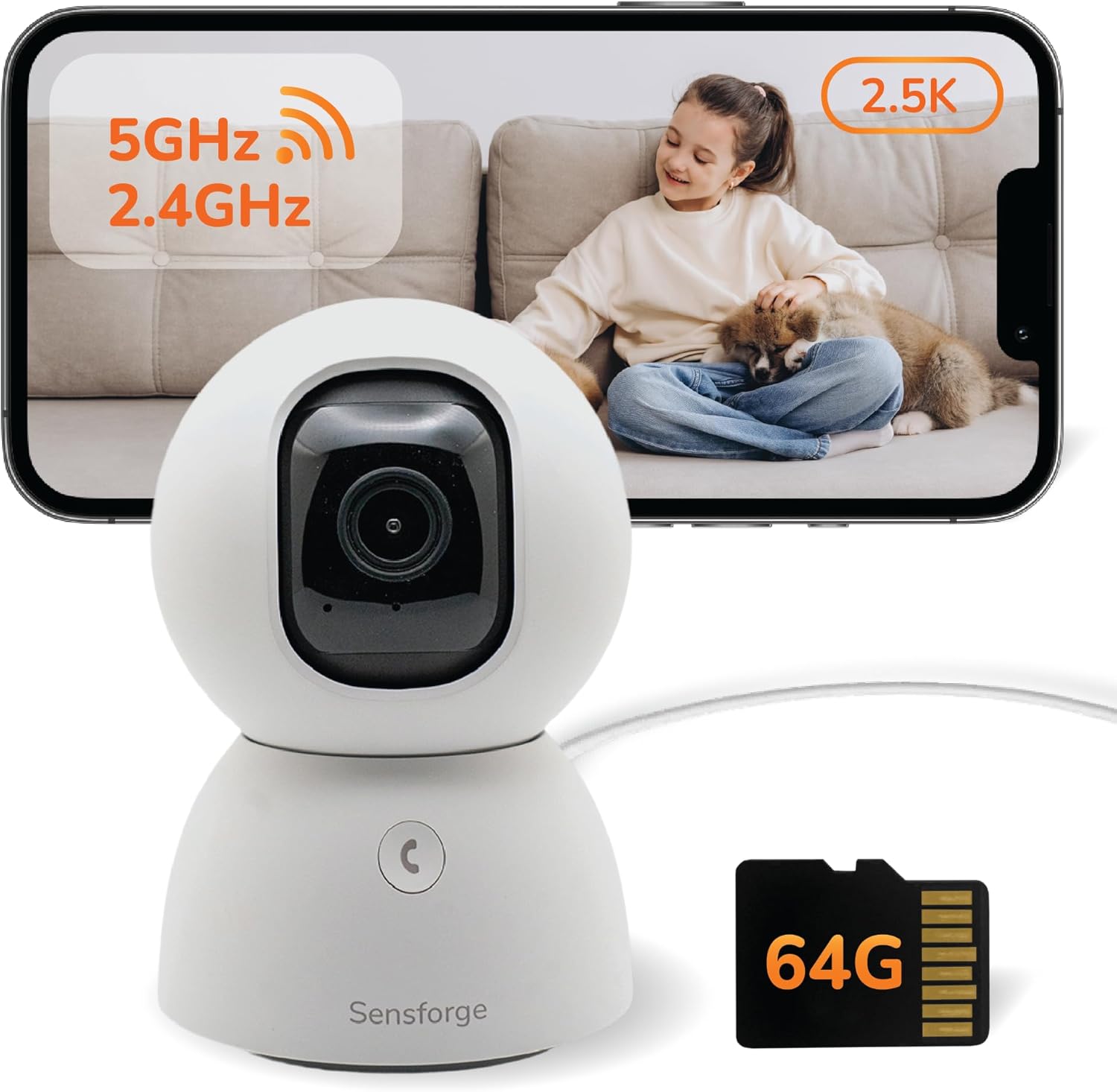
| Video Capture Resolution | 2.5K |
|---|---|
| Night Vision Range | 30 feet |
| Flash Memory Installed Size | 64 GB |
| Connectivity Protocol | Wi-Fi |
| Power Source | Corded Electric |
The SensForge SF-C2 is an affordable indoor pan-tilt dome camera aimed at whole-room monitoring. It captures 2.5K video and can pan 360 degrees and tilt 90 degrees to remove blind spots, while built-in AI differentiates humans and pets to cut down on false alerts. Setup uses dual-band Wi-Fi and the camera supports two-way audio for live conversations; a privacy shutter and preinstalled 64 GB microSD card let you store footage locally without a subscription. Night color vision to about 30 feet and app-based instant notifications make it useful for day and night monitoring. On the downside the unit is corded only and relies on the SensForge app for advanced features, and some users may need to run PTZ calibration if movement feels uneven. For buyers who prioritize straightforward, local recording and reliable detection on a budget, this camera packs a lot of capability for the price.
Best for: Buyers who want dependable, subscription-free indoor monitoring that emphasizes accurate alerts and local recording on a tight budget.
Less Ideal for: People needing battery- or solar-powered placement, outdoor-rated cameras, or those who cannot use the SensForge app in their country.
- High-resolution 2.5K video for clearer detail than standard 1080p cameras
- 360° pan and 90° tilt deliver full-room coverage without additional cameras
- AI human and pet detection reduces false motion alerts
- Preinstalled 64 GB microSD card enables local recording with no subscription
- Dual-band Wi-Fi and two-way audio for stable connection and live interaction
- Requires mains power so it cannot be placed where outlets are unavailable
- Advanced features and setup depend on the SensForge app, which is region-limited
Verdict: A budget-friendly indoor pan-tilt camera that delivers clear 2.5K footage and reliable local recording without subscription fees.
LaView LV-PWF1 4-Pack Indoor Cameras

| Video Capture Resolution | 1080p |
|---|---|
| Night Vision Range | 33 feet |
| Connectivity Technology | Wired |
| Memory Storage Capacity | 128 GB |
| Number of Items | 4 |
This LaView 4‑pack is a budget-focused indoor dome camera kit for basic home monitoring. Each camera captures 1080p (2.1MP) video, connects to a 2.4GHz Wi‑Fi network, and streams live to the LaView app or web portal for remote viewing and sharing. You get motion detection alerts, two‑way audio with noise cancellation, and color night vision up to about 33 feet, which makes it suitable for living rooms, kitchens, nurseries, or home offices. The system supports local recording via microSD (up to 128GB) and offers a 30‑day US cloud trial for clip storage, plus H.264 encoding to keep file sizes manageable. Setup is typical for wired cameras—power and network available where you mount them—and the 84 degree field of view gives reasonable coverage for indoor rooms but not wide panoramic views. Expect the usual limitations of value bundles: 2.4GHz Wi‑Fi only (no 5GHz), wired power required, and basic smart features rather than advanced AI person/vehicle filtering. For a low-cost, multichannel indoor starter kit the LaView set delivers the essentials without premium extras.
Best for: Buyers who want an affordable, multi‑camera indoor system to monitor several rooms and prefer a ready‑to‑use kit with app access and local storage options.
Less Ideal for: Users who need battery‑powered or outdoor cameras, 5GHz Wi‑Fi support, or advanced AI detection features for high‑traffic or outdoor areas.
- Includes four cameras for multi‑room coverage out of the box
- 1080p (2.1MP) video with IR night/color night vision up to 33 feet
- Two‑way audio with noise cancellation for remote communication
- Supports microSD recording up to 128GB plus a 30‑day US cloud trial
- Works with LaView app and web access and supports sharing with multiple users
- Requires wired power at each camera and only supports 2.4GHz Wi‑Fi
- Field of view is moderate at 84 degrees, not ideal for very wide rooms
Verdict: A low‑cost four‑camera indoor kit that covers multiple rooms with 1080p streaming, two‑way audio, and simple local or cloud recording—great for budget home monitoring.
TP-Link Tapo C100 Indoor Camera

| Video Capture Resolution | 1080p |
|---|---|
| Wireless Technology | 2.4GHz Wi-Fi |
| Field Of View | 110 degrees |
| Night Vision Range | 30 feet |
| Storage | microSD up to 512 GB / Cloud |
The Tapo C100 is an affordable indoor security camera that records 1080p video over 2.4 GHz Wi‑Fi and sends motion alerts to your phone. It is typically wall- or shelf-mounted to monitor rooms, nurseries, or entryways and offers two-way audio plus a built-in siren so you can communicate with family or deter unexpected visitors. Night vision reaches up to about 30 feet and the 110 degree field of view captures a broad room area. You can store footage locally on a microSD card (supported up to 512 GB) or subscribe to Tapo Care for cloud history, and the camera works with Alexa and Google Assistant for basic voice viewing. Setup is straightforward through the Tapo app and the unit supports scheduled recording and customizable activity zones to reduce false alerts. Limitations include a 15 fps frame rate which is adequate for general monitoring but not ideal for fast-motion detail, and reliance on 2.4 GHz Wi‑Fi only which may not suit congested networks.
Best for: A cautious buyer who wants a reliable, budget-friendly indoor camera for everyday home monitoring and simple smart home integration without complex setup.
Less Ideal for: Users who need high-frame-rate footage for detailed action capture or who require 5 GHz Wi‑Fi support and enterprise-grade network features.
- 1080p video with 110° field of view for clear wide-room coverage
- Two-way audio plus built-in siren for remote communication and deterrence
- Night vision up to 30 feet for usable low-light monitoring
- Supports local microSD storage up to 512 GB and optional cloud subscription
- Works with Alexa and Google Assistant for voice-enabled viewing
- Frame rate is 15 fps, which can blur fast motion
- Only connects to 2.4 GHz Wi‑Fi, no 5 GHz support
Verdict: A dependable, low-cost indoor camera that covers common home monitoring needs with clear 1080p video, two-way talk, and easy local or cloud storage options.
Choosing the Right CCTV Security Camera for Home on a Budget: Key Factors to Consider
Image Quality and Night Vision
Image clarity determines whether footage is useful for identifying people and events. On-budget cameras vary widely in sensor size, resolution, and compression. Higher-resolution sensors capture more detail but may require more bandwidth and storage. Night vision is equally important because many incidents happen after dark. Look for cameras with true infrared illumination or low-light-optimized sensors rather than systems that only brighten images digitally.
Consider how a camera handles high-contrast scenes too. Wide dynamic range helps retain detail in both bright and dark areas, which is common across doorways and windows. If you plan to use the camera for evidence or identification, prioritize units with consistent night performance and sharp daytime images over extra features you will not use.
Installation, Mounting, and Field of View
Simple mounting and flexible field-of-view options reduce friction and make it more likely you will cover key areas correctly. Cameras with multiple included mounts, adjustable brackets, and clear leveling marks simplify placement. A wider field of view covers more area but can distort distant details; a narrower lens may provide better identification of faces at the cost of coverage.
Think about where you will place the camera and whether you need a weatherproof outdoor mount or an indoor-optimized unit. For renters, features like adhesive mounts or noninvasive mounting kits matter. Also evaluate whether the camera allows angle adjustment after installation so you can fine-tune coverage without re-drilling.
Connectivity and App Experience
Reliable streaming, push notifications, and easy account pairing are essential for daily use. Cameras that drop connection frequently or have slow live view frustrate owners and reduce security usefulness. Check for robust app design, straightforward pairing processes, and clear status indicators for connection health.
Assess whether the camera supports 2.4 GHz and 5 GHz networks if you have a crowded Wi-Fi environment. Some budget cameras only support 2.4 GHz which can limit throughput. Also verify if the vendor's app allows multiple user accounts and limited-access sharing, which can be helpful for family members or caretakers.
Power Options and Weather Resistance
How a camera is powered affects where you can place it and how much maintenance it needs. Hardwired or PoE units offer continuous power with minimal battery worries, but they require more installation work. Battery-powered cameras are easier to install in tricky locations but need regular recharging and often limit high-resolution continuous recording to save battery.
If the camera will be used outdoors, look for weather resistance ratings and materials that stand up to temperature swings and moisture. Even budget outdoor cameras should have ingress protection or clear manufacturer guidance on operating conditions to avoid early failures.
Storage, Privacy, and Data Control
Storage options affect ongoing cost and privacy. Local storage via microSD or network storage gives you direct control of recordings, while cloud plans often add recurring fees and may store footage offsite. Consider whether the camera supports encrypted local storage and whether motion clips are accessible without forced cloud subscriptions.
Privacy controls matter for shared households. Look for cameras that allow private zones, adjustable motion sensitivity, and user permission levels. Transparent data handling policies and the ability to delete or export footage are important for long-term ownership and compliance with local privacy expectations.
Placement Strategies for Maximum Coverage
Position cameras to cover vulnerability points such as entry doors, ground-floor windows, and primary yard approaches. For outdoor cameras, mounting them at 8 to 10 feet typically balances field of view and identification distance. Indoor units placed high in corners can monitor larger rooms while remaining out of reach of tampering.
- Aim cameras to capture faces and license plates at common approach paths rather than broad distant views.
- Avoid pointing cameras directly at bright light sources to reduce glare and loss of detail.
- Use overlapping coverage where possible so multiple cameras capture the same approach from different angles.
Powering Options: Pros and Cons
Choose a power strategy that matches how much installation work you want. Plug-in models are easiest for quick deployment, while battery models offer placement freedom at the cost of recharge cycles. PoE and hardwired options are worth considering if you already have wiring or plan a permanent installation.
- Battery: flexible placement, periodic recharging, often reduced continuous recording.
- Plug-in: simple setup, requires nearby outlet, consistent power.
- PoE/Hardwired: reliable continuous power, professional or DIY wiring required.
Network Tips to Improve Reliability
A stable network is essential for smooth live view and timely alerts. If your Wi-Fi signal is weak at the camera location, consider moving the router, adding a range extender, or using a camera that supports Ethernet. Limiting other high-bandwidth uses during peak hours can also reduce dropped frames and buffering.
- Place cameras within a strong Wi-Fi signal zone or use wired Ethernet when possible.
- Segment camera traffic on a guest or IoT network to isolate it from primary devices.
- Check for firmware updates that may improve connectivity and security.
Managing Motion Alerts and False Positives
Too many false alerts reduces the value of motion notifications and causes alert fatigue. Adjust motion sensitivity, set activity zones, and use scheduled arming to limit triggers during busy times. Some cameras offer person detection or vehicle detection which can reduce irrelevant alerts, though on-budget models may have more limited object-detection capabilities.
- Create activity zones to ignore high-traffic areas like busy streets.
- Lower sensitivity for distant motion or set a higher threshold for triggering clips.
- Use schedules to disable notifications when you are home and likely to cause motion.
Maintenance and Seasonal Considerations
Regular maintenance keeps cameras working reliably. Clean lenses periodically to avoid dirt and insect smears that obscure images. For outdoor cameras, verify seals and mounts before extreme weather seasons and check batteries more frequently in very cold temperatures since capacity falls off with cold. Also test motion triggers and live view on a quarterly basis to confirm recording and notification pathways are functioning. Firmware updates may introduce new features or address security issues, so apply updates after reading release notes to avoid unwanted behavior changes.
- Wipe lenses and remove cobwebs monthly in high-insect areas.
- Inspect mounts and seals before the rainy season or winter.
- Test live view, motion alerts, and recordings quarterly.
How We Chose the Best CCTV Security Camera for Home on a Budget
We focused on practical, measurable factors that matter most when buying a CCTV security camera for home on a budget. Each candidate had to meet minimum image resolution and low-light performance thresholds to ensure footage is useful for identification. We prioritized cameras with clear, documented installation processes and multiple mounting options so homeowners and renters can deploy them without professional help. Connectivity reliability was assessed by examining supported networking options and whether the camera streams consistently on standard home Wi-Fi. We also considered privacy and data handling: candidates needed transparent storage choices, such as local microSD support or clearly stated cloud plans. Power options and durability were included to judge long-term convenience and weather resistance for outdoor use. Units that required proprietary hubs, complex wiring beyond basic power, or lacked basic night vision or motion alerts were excluded. The final list favors balanced devices that perform well across image quality, ease of installation, durability, and ongoing data handling considerations.
Our full evaluation process is outlined in our review methodology.
FAQ
Do I need professional installation for a budget CCTV camera?
Often you do not. Many budget cameras are designed for DIY installation with simple mounts and plug-in power. Hardwired or PoE units may require more advanced wiring skills or a professional if you are not comfortable with electrical work.
Can budget cameras record continuously or only on motion?
That depends on the model and its power strategy. Battery cameras usually rely on motion-triggered recording to conserve energy, while plug-in or wired cameras can often do continuous recording if storage and bandwidth support it.
Is local storage safer than cloud storage?
Local storage gives you direct control over footage and avoids recurring cloud fees, but it can be lost if the device is stolen or damaged. Cloud storage protects recordings offsite but may involve subscription costs and raises privacy considerations.
How do I reduce false motion alerts?
Adjust motion sensitivity, create activity zones, and set schedules to limit alerts during known high-traffic periods. If available, enable person or vehicle detection to filter out irrelevant motion sources.
Will weather affect camera performance?
Yes. Outdoor cameras should have appropriate weather resistance ratings and corrosion-resistant mounts. Extreme temperatures can affect battery life and electronics, so check operating ranges for reliable performance.
Final Verdict
Focus on the balance between usable image quality, reliable connectivity, and installation convenience when choosing a CCTV security camera for home on a budget. Expect tradeoffs: more flexible placement often means more maintenance, and better resolution can increase storage needs. Prioritize night vision, dependable alerts, and clear storage options based on how you intend to use the footage. With those priorities in mind, select a camera that matches your preferred power method and mounting scenario, and tune motion settings to reduce noise. That approach will give you a practical, low-cost system that delivers security and confidence without unnecessary complexity.