
Note: This article contains affiliate links. If you click on these links and make a purchase, we may earn a small commission at no extra cost to you. This helps support our research and content. Read our full affiliate disclosure here.
Picking the right desk fan matters because it affects comfort, concentration, and energy use in the rooms where you spend the most time. A well-chosen Desk Fan can deliver steady airflow without distracting noise, fit the available space on your desk, and run efficiently to avoid higher electricity bills or frequent maintenance. This guide lists the top shortlisted Desk Fans for home and office use and explains the practical tradeoffs you should expect. We evaluate options across noise, airflow, size, and ease of use to help you find the best fit for your workspace. Read on for a concise rundown of what to look for and why each criterion matters.
Top Picks at a Glance
| Best Overall The best all-around choice for most situations | Vornado 133 Compact Air Circulator |  |
| Best Quality Built to a higher standard if you want something more solid | Vornado 460 Small Desk Fan |  |
| Best Value The sweet spot between price and what you get | Amazon Basics Air Circulator Fan |  |
| Best Budget The cheapest option that still gets the job done reliably | TriPole KW37 Mini USB Desk Fan |  |
| Top Rated A top-rated pick with lots of positive feedback | DREO TurboWind Table Fan DR-HAF008S |  |
| Most Popular A crowd favorite that many people choose with confidence | Honeywell TurboForce HT-900 |  |
Vornado 133 Compact Air Circulator

| Number of Speeds | 2 |
|---|---|
| Noise Level | 44 db |
| Wattage | 25 watts |
| Air Flow Capacity | 350 cfm |
| Power Source | Electric |
The Vornado 133 is a compact desk/table fan built to deliver focused circulation without taking up much space. It uses Vornado's Vortex Action with deep-pitched blades and a spiral grille to push air up to about 25 feet, and the head tilts so you can aim airflow vertically or horizontally. Controls are simple: a two-speed dial and a toggle-style switch make it easy to change output quickly. At roughly 25 watts the motor is efficient and the unit claims a noise level around 44 dB on higher settings, so it is suitable for home offices, dorms, and nightstands. The detachable grille makes cleaning straightforward and the plastic construction keeps weight and cost down. Limitations are the lack of more speed settings or advanced controls and its small size means it is best for personal or small-room circulation rather than cooling large spaces. For buyers seeking a compact, reliable circulator that emphasizes steady airflow over fancy features, the 133 performs well.
Best for: Buyers who want a small, dependable desk or bedside circulator that delivers focused airflow with minimal fuss and simple controls.
Less Ideal for: Those needing powerful whole-room cooling, multiple speed presets, or smart/remote features should consider larger or feature-rich alternatives.
- Effective vortex-style airflow for strong directional circulation
- Compact tabletop footprint that fits desks and nightstands
- Adjustable tilt head to target airflow where needed
- Detachable grille for easier cleaning
- Simple, energy-efficient two-speed controls
- Only two speed settings and no advanced controls
- Plastic construction may feel less premium than metal units
Verdict: A compact, no-frills desk circulator that delivers solid directional airflow for personal cooling in small spaces.
Vornado 460 Small Desk Fan

| Power Source | Corded Electric |
|---|---|
| Number of Speeds | 3 |
| Air Flow Capacity | 320 cfm |
| Noise Level | 52 db |
| Wattage | 63 watts |
The Vornado 460 is a small but powerful desk-style air circulator that uses Vornado's vortex design to move air across a room rather than just producing a local breeze. It sits on a tabletop or nightstand and offers three straightforward speed settings controlled by a dial and buttons, plus an adjustable chrome glide bar to aim airflow. In practice the deeper-pitched blades, inlet guide cone, and spiral grill create a coherent column of air that reaches well beyond the unit, making it useful for circulating air in a bedroom, home office, or dorm. The fan is built for steady operation with an AC induction motor and a six-foot cord for flexible placement, and it runs quietly enough for sleeping at lower speeds. Trade-offs are its plastic construction and lack of digital features or oscillation, so if you want a programmable, multi-speed or oscillating desk fan this is more of a pure-performance circulator than a feature-packed smart fan.
Best for: Buyers who prioritize raw airflow and reliable steady performance on a desk or nightstand and want a simple, purpose-built circulator rather than a feature-rich smart fan.
Less Ideal for: People seeking app control, timers, oscillation, or a premium metal build should look at other fan types that focus on convenience or aesthetics.
- Vortex-based circulation moves air up to 70 feet for whole-room airflow
- Three simple speed settings and adjustable tilt for directable airflow
- AC induction motor designed for steady, long-running performance
- Compact tabletop footprint fits nightstands and desks while providing strong airflow
- No oscillation or programmable/digital controls
- Plastic construction may feel less premium than metal alternatives
Verdict: Choose the Vornado 460 when you need a compact desk fan that delivers powerful, no-nonsense whole-room circulation.
Amazon Basics Air Circulator Fan

| Power Source | Corded Electric |
|---|---|
| Number of Speeds | 3 |
| Wattage | 35 watts |
| Noise Level | 60 db |
| Indoor Outdoor Usage | Indoor |
This Amazon Basics air circulator is a small, no-frills table fan designed to move air in bedrooms, home offices, and living areas. It runs on standard 120V power, uses a three-blade plastic impeller and a back-mounted rotary control to offer three speeds for low to high airflow. The head tilts up to 90 degrees so you can aim the breeze where you need it and the unit is light and easy to move between rooms. At 35 watts it is energy efficient compared with larger fans, and the simple rotary switch and push-button control make operation intuitive. Expect typical table-fan noise at higher speeds and basic plastic construction rather than premium materials, but the straightforward design keeps setup and maintenance effortless. For someone who wants dependable spot cooling without extra features, this fan delivers effective airflow in a compact footprint.
Best for: Buyers who prioritize straightforward, portable spot cooling and want a compact, energy-efficient desk fan that is easy to move and operate.
Less Ideal for: People seeking whisper-quiet performance, premium materials, or advanced features like remote control, oscillation, or smart controls should consider higher-end alternatives.
- Compact footprint that fits on desks and small tables
- Adjustable 90-degree tilt for targeted airflow
- Three speed settings for customizable cooling
- Low power draw at 35 watts for energy-efficient operation
- Basic plastic build with no advanced noise reduction
- No timer, remote, or oscillation feature
Verdict: A simple, compact desk air circulator that delivers directed airflow and low energy use for buyers who want reliable spot cooling without extra features.
TriPole KW37 Mini USB Desk Fan

| Power Source | USB Powered |
|---|---|
| Number of Speeds | 3 |
| Noise Level | 25 db |
| Wattage | 4 watts |
| Motor Type | Brushless Motor |
The TriPole KW37 is a small, USB-powered desk fan designed for focused personal cooling at a desk, bedside or while traveling. It runs from a USB-A power source and offers three speed settings controlled by a single push button, with a brushless motor that keeps noise low (about 25 dB) and extends motor life. The fan head tilts and can rotate to aim airflow where you need it, and a wide base with silicone pads helps it stay stable on a surface. Its 4.5-inch diameter blades deliver a noticeable breeze for a mini fan, and the non-removable 4.9-foot cord makes it easy to reach distant USB ports or power banks. Limitations include its reliance on a USB port that supplies sufficient current for the highest speed and the lack of memory or automatic restart after power loss, so settings must be set again after disconnection. The plastic construction keeps it lightweight and affordable but is less robust than larger table fans. For simple, inexpensive personal cooling in small spaces, this fan is an effective choice.
Best for: Buyers who want a low-cost, no-frills personal fan for a desk, bedside or travel use and prioritize quiet operation and plug-and-play convenience over large-room airflow.
Less Ideal for: People needing whole-room cooling, an adjustable-height freestanding fan, or a fan with rechargeable battery and detachable cord should look elsewhere.
- USB-powered so it runs from laptops, power banks, or USB chargers
- Quiet brushless motor with low reported noise (about 25 dB) suitable for work or sleep
- Three speed settings and adjustable tilt let you tailor and direct airflow
- Long 4.9 ft cord increases placement flexibility and stable base with silicone pads reduces vibration
- Highest speed may not work if the USB port supplies less than 0.8 A
- Cord is non-removable which reduces portability for some carry setups
- Small blade diameter limits effective coverage to a personal area rather than a whole room
Verdict: A very affordable, quiet USB desk fan that delivers focused personal airflow with simple plug-and-play convenience.
DREO TurboWind Table Fan DR-HAF008S

| Power Source | Corded Electric |
|---|---|
| Number of Speeds | 9 |
| Noise Level | 20 db |
| Air Flow Capacity | 950 cfm |
| Motor Type | Brushless |
The DREO TurboWind DR-HAF008S is a compact smart table fan built to move a lot of air from a small footprint. With a brushless DC motor it claims up to 950 CFM and 85 ft throw while offering 90° vertical and horizontal oscillation, making it useful for circulating air across a bedroom, home office, or dorm. Controls include an app, voice assistants, remote, and onboard touch so you can schedule runtime or lock controls; the fan also offers nine speeds, six airflow modes, a 12-hour timer and a child lock for worry-free operation. Noise is rated as low as 20 dB on the lowest settings, so it can run overnight without disturbing sleep, and the brushless motor supports energy-efficient continuous use. Trade-offs are its small blade size and plastic build, which keep the unit light but limit raw momentum compared with larger pedestal or box fans, and some advanced features require the app or smart-home setup to access. For a compact desk or bedside unit that prioritizes steady, quiet performance and smart control, this fan covers the essentials well.
Best for: Buyers who want a compact, dependable desk or bedside fan with quiet brushless operation and flexible smart controls for daily use.
Less Ideal for: People needing the highest possible raw airflow or heavy-duty spot cooling for large rooms should consider larger pedestal or box fans instead.
- High claimed airflow (950 CFM) and long air throw for a small tabletop fan
- Brushless DC motor for quieter operation and better energy efficiency
- Multiple control methods including app, voice, remote and touch for flexible use
- Wide 90° vertical and horizontal oscillation improves whole-room circulation
- Nine speeds, six airflow modes, timer and child lock add practical customization
- Plastic construction and small blades limit maximum momentum compared with larger floor fans
- Some smart features depend on app or voice setup rather than being fully accessible offline
Verdict: Choose this DREO table fan when you want a quiet, energy-efficient desk fan that reliably circulates whole-room air with smart controls.
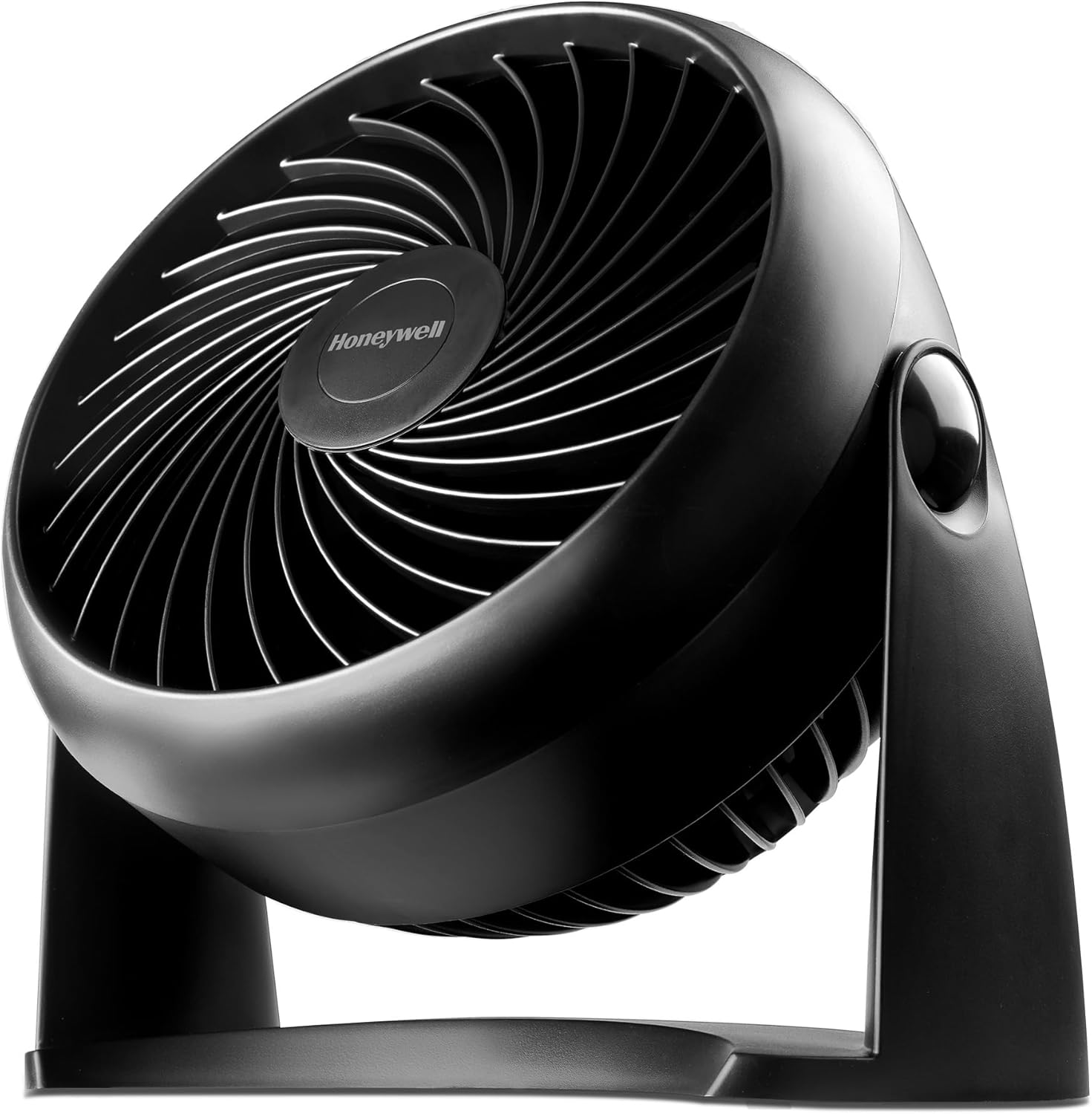
Honeywell TurboForce HT-900
| Power Source | Corded Electric |
|---|---|
| Number of Speeds | 3 |
| Air Flow Capacity | 185 cfm |
| Wattage | 35 watts |
| Motor Type | brushless |
The Honeywell TurboForce HT-900 is a compact tabletop air circulator designed to deliver focused airflow in small to medium rooms. It plugs into standard outlets and offers three push-button speeds and a 90-degree pivoting head so you can aim the stream where you need it at a desk, bedside, or mounted on a wall. The turbo-style aerodynamic design boosts air movement—Honeywell claims usable airflow up to about 25 feet—while a brushless motor and aerodynamic blades keep noise low for office or bedroom use. Controls are simple and manual, which makes the unit straightforward to operate but means there are no timers, remotes, or digital controls. The plastic housing and blades keep the fan lightweight and portable, though that construction is basic compared with higher-end metal models. With 185 cfm airflow and a modest 35-watt draw, it pairs well with air conditioning for energy-saving circulation. If you want a quiet, powerful small desk fan with directable airflow and simple controls, the HT-900 is a practical, no-frills choice.
Best for: Buyers who rely on crowd-tested value and want a compact, quiet desk fan that reliably moves air without extra features, ideal for home offices and bedrooms.
Less Ideal for: People seeking premium build materials, smart controls, or multi-function fans with timers and remotes should consider more feature-rich models.
- Compact and portable for desktop or wall mounting
- Three speeds with a 90-degree pivoting head for directional airflow
- Aerodynamic turbo design delivers strong airflow for its size
- Brushless motor and design tuned for relatively quiet operation
- Low power draw (35 watts) while providing up to 185 cfm
- Basic manual controls with no timer or remote
- Plastic construction feels less durable than metal alternatives
Verdict: A compact, quiet, and proven desk fan that delivers strong directional airflow with simple, reliable controls.
Choosing the Right Desk Fan: Key Factors to Consider
Airflow and Coverage
How much air the fan moves and how it distributes that air across a work area determines how effective the unit will be at cooling you and the immediate surroundings. Look beyond the single high-speed rating and consider whether the fan offers focused directional flow or a wider, more diffused breeze.
Airflow affects the perceived temperature at your desk and whether the fan can circulate air across a room opening or only provide a local cooling effect. If you frequently share space or need to move air toward multiple positions, choose a fan that combines adjustable tilt or oscillation with a design that spreads airflow evenly.
Noise Level
Noise is a primary concern for desk use because excessive sound disrupts focus and calls. Check measured sound output where available, and prefer designs that specify decibel levels at typical speeds.
Different motor types and blade or grille geometries produce different noise signatures. Lower-speed operation and airflow smoothing features can reduce distraction while still delivering adequate cooling. Consider whether the fan offers a quiet or sleep mode for late-night work or conference calls.
Size, Footprint, and Mounting Options
Desk space is often limited, so the fan's base size and overall height matter. A compact footprint frees up workspace but can reduce stability or downward airflow. Taller or pedestal-style desk fans may provide longer throw but require more clearance.
Some desk fans include clip or clamp mounts to attach to shelves or thin desks, while others have weighted bases for tabletop stability. Choose the form factor that matches your workspace constraints and intended placement to avoid wobble or obstruction.
Power Consumption and Motor Durability
Energy use affects both running cost and the unit's heat output. Fans with efficient motors and multiple speed settings let you balance comfort against electricity use. Look for fans that offer a low-power mode for continuous gentle airflow.
Motor construction and bearings influence longevity and maintenance needs. Brushless or DC motors often run cooler and last longer than basic AC motors, reducing the chance of noisy bearings and frequent replacement.
Controls and Usability
Intuitive controls make daily operation frictionless. Physical dials, push buttons, or touch panels should be easy to reach and operate without disrupting your workflow. Remote controls or app-based options add convenience when the fan is mounted or out of reach.
Useful features include multiple speeds, timed shutoff, oscillation settings, and memory functions that restore the last used setting. Consider how easy it is to switch modes quickly during a call or when adjusting to changing ambient temperatures.
Maintenance and Cleanability
Desk fans accumulate dust on blades and grilles, which reduces airflow and can increase noise over time. Choose models with tool-free grille removal or accessible blades to make cleaning fast and safe.
Regular maintenance keeps performance consistent and extends motor life. Consider how easy it is to wipe down surfaces and whether the fan design minimizes dust traps or crevices that are hard to reach.
Placement Strategies for Maximum Comfort
Where you position a Desk Fan has a major impact on its effectiveness. Aim the fan so airflow passes over your shoulders and head rather than blowing directly into your face. Angling upward slightly can help circulate air across the upper torso without creating an uncomfortable direct blast.
If your desk sits near a window or door, use the fan to direct indoor air toward that opening to encourage cross-ventilation. Conversely, avoid placing the fan where it will blow directly at computer equipment or important paper documents to prevent distractions and stray pages.
- Place the fan at or just behind the edge of the desk for even coverage.
- Use a clip-mount to direct airflow from above when desk space is limited.
- Avoid airflow that creates a constant draft on one side of your body to prevent stiffness.
Quiet Operation Tips
To keep background noise low, choose lower fan speeds for steady airflow and reserve higher speeds for short cooling bursts. Fans with variable-speed controls let you fine-tune the balance between cooling power and sound.
If you frequently take calls, test the fan speed near your normal seating position before relying on it during a meeting. Small changes in angle or distance can reduce perceived noise while maintaining cooling.
- Run the fan on low during focused work and increase only when needed.
- Angle the fan away from hard surfaces to reduce reflected sound.
- Consider vibration-damping pads under the base if you notice motor hum transmitted through the desk.
Power Options and Portability
Many Desk Fans run from USB power, wall adapters, or built-in batteries. USB-powered models are convenient for laptop-based setups and use minimal desk space. Battery-powered fans offer portability for moving between rooms or outdoor use, but check how long the battery lasts at different speeds.
AC-powered fans generally offer higher sustained airflow but require an outlet. If you plan to reposition the fan frequently, look for lightweight models with a comfortable handle and a stable base.
- Match the power type to how you use your desk: stationary setups benefit from AC, mobile setups from USB or battery.
- Verify run-time claims for battery models at the speed you plan to use most.
- Use cable management to prevent power cords from cluttering the workspace.
Design and Aesthetics for Workspaces
A desk fan is a visible part of your workspace, so consider its visual impact. Slim, minimalist designs blend into modern desks while retro or statement pieces can add personality. Color, finish, and grille style affect how noticeable the fan is during video calls.
Choose a finish that resists fingerprints and dust buildup if appearance matters. Smaller fans with neutral tones are less distracting, while a compact accent fan can complement a styled office if you prefer an intentional look.
- Prioritize slim profiles for tight workstations.
- Pick neutral colors for a low-visibility appearance on video calls.
- Select metals or matte finishes to hide smudges and dust between cleanings.
When to Consider Oscillation or Multiple Speeds
Oscillation helps distribute airflow across a wider area and is useful in shared desks or when you shift positions frequently. Multiple speed settings let you balance cooling with quiet operation and extend battery life on portable models.
If you mostly sit still, a focused non-oscillating fan with tilt may be preferable because it concentrates airflow directly where you need it. For rotating seating or multi-person desks, choose a unit with reliable oscillation and clear speed increments.
- Oscillation is best for shared spaces and variable seating positions.
- Multiple speeds provide fine control and energy savings.
- Look for smooth, jitter-free oscillation mechanisms to avoid annoying movement noise.
How We Chose the Best Desk Fan
We focused on features that directly affect daily comfort and long-term usability. Primary evaluation criteria included measurable airflow and dispersion patterns, sound output at typical speeds, energy efficiency and motor durability, and usability factors such as controls, adjustability, and ease of cleaning. We also considered footprint and mounting options to ensure the fans suit common desk layouts and personal preferences. We excluded units intended exclusively for outdoor, industrial, or whole-room HVAC replacement because those designs have different performance goals and safety requirements. We prioritized fans whose specifications and user-focused features match typical desk use: low to moderate airflow with directional control, manageable noise levels for work, and straightforward maintenance. Editorial selection emphasized balance: models that perform well across multiple dimensions rather than excelling in only one. We included fans with clear specification data or reliable user-reported performance so the list reflects realistic in-room results and everyday convenience.
Our full evaluation process is outlined in our review methodology.
FAQ
How loud should a desk fan be for office use?
A suitable office-level desk fan typically produces low to moderate noise at everyday speeds, often in the mid-30s to mid-50s decibel range depending on the model and measurement point. Choose a fan with published decibel ratings or test it at your desk to ensure it does not interfere with calls or concentration.
Is a USB-powered Desk Fan powerful enough to cool a workspace?
USB-powered fans can provide effective local cooling for a single person at desk distance, especially at higher speeds or with focused airflow designs. They are less likely to move air across a larger room compared with AC-powered models, so consider your cooling needs and proximity to the fan.
How often should I clean my desk fan?
Cleaning frequency depends on dust levels, but a quick wipe of the grille and blades every two to four weeks keeps airflow efficient and noise low. If you use the fan continuously or in dusty environments, increase cleaning frequency and remove accumulated dust from motor vents carefully.
Are brushless or DC motors worth the extra cost?
Brushless or DC motors usually run quieter and more efficiently than basic AC motors, which can translate to longer service life and lower energy use. Whether they are worth the cost depends on how much you value quiet operation, energy savings, and long-term reliability.
Can a desk fan reduce overall room temperature?
A desk fan does not lower ambient room temperature but improves perceived comfort by increasing air movement across your skin. Fans are most effective at localized cooling for occupants rather than changing the room's thermal balance.
Final Verdict
Focus on the features that matter for your daily routine: enough airflow to cool your usual seating position, low noise for focused work, and a size or mounting style that fits your desk. Balance power and efficiency based on how long and how often you will run the fan. Prioritize quiet, adjustable models if you take calls or work long hours at your desk. If portability or battery operation matters, accept tradeoffs in sustained airflow. Use the factors above to narrow choices and pick the Desk Fan that matches your workspace and usage patterns with confidence.