
Note: This article contains affiliate links. If you click on these links and make a purchase, we may earn a small commission at no extra cost to you. This helps support our research and content. Read our full affiliate disclosure here.
When you need reliable airflow without high running costs, choosing the right fan makes a big difference in home comfort and utility bills. This guide focuses on the best fan deals, highlighting options that deliver strong airflow, sensible energy use, and tolerable noise for everyday rooms. We shortlisted six top picks across common fan types and price points. Below you will find practical evaluations based on airflow performance, energy efficiency, noise, build quality, and feature set to help you pick a fan that suits your space and budget.
Top Picks at a Glance
| Best Overall The best all-around choice for most situations | Levoit Classic 36-inch Tower Fan |  |
| Best Quality Built to a higher standard if you want something more solid | DREO TurboPoly Pedestal Fan DR-HPF008S |  |
| Best Value The sweet spot between price and what you get | Amazon Basics 28" Tower Fan DC1663 |  |
| Best Budget The cheapest option that still gets the job done reliably | Gaiatop USB Desk Fan TF55B |  |
| Top Rated A top-rated pick with lots of positive feedback | DREO DR-HPF013 Pedestal Fan |  |
| Most Popular A crowd favorite that many people choose with confidence | Honeywell TurboForce HT-900 |  |
Levoit Classic 36-inch Tower Fan

| Number of Speeds | 5 |
|---|---|
| Noise Level | 28 db |
| Wattage | 39 watts |
| Air Flow Capacity | 1044 cfm |
| Control Method | Remote |
The Levoit Classic 36-inch tower fan is a slim, floor-mounted unit meant to circulate air across bedrooms and living spaces. It offers five speeds and four modes—Normal, Turbo, Sleep, and Auto—so you can pick anything from a quiet night setting to a short burst of high airflow for quick cooling. The built-in temperature sensor drives the Auto and Turbo behaviors, adjusting fan speed based on room temperature, and the 90 degree oscillation pairs with a high reported airflow to move air through a room rather than just a spot. Controls are available via touchpad or the included remote, and the LED display can be dimmed for sleep mode while a 12-hour timer handles scheduled shutoff. Practical benefits include a compact footprint for tight spaces, easy cleaning via a removable rear grille, and relatively low power draw. Limitations are typical for tower fans: airflow is less focused than a high-velocity pedestal fan for direct cooling, and the unit relies on AC power so it is not portable without an outlet.
Best for: Buyers who want a low-noise, easy-to-use tower fan that balances nighttime comfort, whole-room airflow, and simple controls for everyday home use.
Less Ideal for: If you need a highly focused, high-velocity breeze for spot cooling or a battery-powered portable fan, this model is not the best choice.
- Multiple modes including Auto and Turbo for temperature-responsive airflow
- Quiet operation on low speeds suitable for bedrooms
- Remote control plus touchpad for convenient adjustments
- 90° oscillation and high airflow rating for whole-room circulation
- Removable rear grille for straightforward cleaning
- Airflow is broad rather than highly concentrated so it may not feel as strong at a single spot
- Requires a wall outlet so it is not usable during power outages or without nearby AC power
Verdict: A quiet, feature-rich tower fan that delivers adjustable whole-room airflow and convenient remote control, making it a strong all-around choice for bedrooms and living spaces.
DREO TurboPoly Pedestal Fan DR-HPF008S

| Power Source | dc |
|---|---|
| Number of Speeds | 9 |
| Air Flow Capacity | 1000 cfm |
| Wattage | 24 watts |
| Control Method | App, Remote, Touch |
This DREO TurboPoly pedestal fan is built for moving air around medium rooms efficiently while giving modern smart controls. It uses a quiet DC motor and three blades to produce up to 1000 CFM and reach about 100 feet, with nine speed settings, six modes including Auto and Turbo, and position-based 3D oscillation that combines horizontal and vertical sweep for broader coverage. You can control it with the included remote, the DREO app, or voice assistants, and an RGB light plus adjustable height and tilt add flexibility for bedroom or living-room use. The fan is energy efficient at 24 watts and offers timers and a standby power shutoff for hands-off operation. Limitations include a plastic construction that may feel less premium and a measured noise level around 28 dB which rises on higher speeds, and setup of Wi-Fi and app features takes a few extra minutes. For buyers who prioritize airflow, smart control, and quiet daytime/nighttime use, this fan delivers strong performance without complicated installation.
Best for: Buyers who put raw airflow and smart control first and want a quiet, energy-efficient fan that can circulate air across a whole room with flexible oscillation and remote/app operation.
Less Ideal for: Shoppers seeking a premium all-metal build or a super-compact travel fan should look elsewhere, and those who need an ultra-silent device at maximum power may prefer a different model.
- High airflow up to 1000 CFM for whole-room circulation
- Quiet, energy-efficient DC motor (24 W) with low vibration
- Extensive control options: app, remote, touch, and voice
- Wide multi-axis oscillation (horizontal + vertical) and adjustable height/tilt
- Nine speeds, six modes, Turbo and Auto mode for responsive cooling
- Plastic construction may feel less durable than metal alternatives
- Noise increases noticeably at top speeds
Verdict: If you want strong whole-room airflow with quiet, energy-efficient DC power and flexible smart controls, this DREO pedestal fan is a performance-focused pick.
Amazon Basics 28" Tower Fan DC1663

| Power Source | Corded Electric |
|---|---|
| Number of Speeds | 3 |
| Wattage | 35 watts |
| Special Features | Oscillating |
The Amazon Basics 28" Tower Fan is a no-frills oscillating tower designed to move air in small to medium rooms. It offers three straightforward speed settings controlled by mechanical push buttons on the top, and the fan head oscillates to spread airflow across a room rather than a single spot. With a 35-watt motor and three plastic blades, it runs efficiently without complicated menus or remote controls, making it easy to use for bedroom, living room, or home office cooling. The compact footprint and lightweight design let you place it in corners or next to furniture, and the painted finish keeps the look unobtrusive. Expect steady, audible airflow rather than whisper-quiet operation, and the basic plastic construction means it is functional but not premium-feeling. There are no timers, remote, or app features, so if you want automated schedules or quieter performance you will need a higher-end model. For buyers seeking a straightforward, affordable tower fan that circulates air reliably, this covers the essentials well.
Best for: Buyers looking for an inexpensive, easy-to-use tower fan to provide straightforward room circulation without extra features or complexity.
Less Ideal for: Users who want silent operation, smart controls, timers, or a premium build should consider higher-end models instead.
- Three simple speed settings for easy adjustments
- Oscillating head provides wide airflow coverage across a room
- Low power draw at 35 watts for economical operation
- Compact, lightweight design fits small spaces and is easy to move
- Basic plastic construction feels inexpensive compared with premium fans
- No remote, timer, or advanced quiet mode for overnight use
Verdict: A budget-friendly, easy-to-use oscillating tower fan that delivers reliable room circulation with minimal fuss.
Gaiatop USB Desk Fan TF55B

| Power Source | USB Powered |
|---|---|
| Number of Speeds | 3 |
| Noise Level | 40 db |
| Wattage | 5 watts |
| Motor Type | Brushless |
The Gaiatop USB Desk Fan is a compact personal table fan designed for close-range cooling at a desk, bedside, or in a travel bag. It runs from any USB power source and offers three push-button speed settings that range from a gentle breeze to a stronger airflow driven by a brushless motor; the highest setting reaches about 4.8 m/s. The fan tilts 90 degrees, has a stable rubber-padded base, and the front cover detaches so blades are easy to wipe clean. At roughly 6.5 ounces and with a nearly 5 foot cable, it is simple to move and position without needing installation. Expect modest noise around 40 dB at typical speeds, useful for office or dorm use but not silent. The unit is plastic-bodied and intended for personal spot cooling rather than replacing a room fan. Its USB power and low wattage make it energy-efficient, but it lacks a rechargeable battery or advanced controls like timers or oscillation.
Best for: Buyers looking for an inexpensive, no-frills personal fan to keep at a desk, bedside, or in a dorm who prioritize portability and low operating cost.
Less Ideal for: People who need a rechargeable or battery-powered fan for outdoor use or anyone seeking high-volume room circulation should choose a different model.
- USB-powered for use with laptops, power banks, or USB adapters
- Three distinct speed settings for adjustable personal airflow
- Detachable front cover and simple construction make cleaning easy
- Brushless motor and rubber-padded base reduce vibration and improve durability
- No built-in battery so it must remain connected to USB power
- Small size provides spot cooling only, not whole-room circulation
Verdict: A budget-friendly, portable USB desk fan that delivers adjustable personal cooling and easy maintenance for simple spot-cooling needs.
DREO DR-HPF013 Pedestal Fan

| Power Source | Corded Electric |
|---|---|
| Number of Speeds | 8 |
| Noise Level | 28.2 db |
| Air Flow Capacity | 1000 cfm |
| Motor Type | Brushless |
The DREO DR-HPF013 is a freestanding air circulator built to move a lot of air quietly around a bedroom or living space. It uses a brushless DC motor and a three-blade TurboPoly design to deliver up to about 1000 CFM and a claimed 90 ft throw while running at a low noise floor, and controls include a top touch panel plus an included remote and an 8-hour timer. The fan offers eight distinct speed settings, an Auto mode that adjusts speed based on temperature changes, 90° horizontal oscillation and a 105° manual vertical tilt, and an adjustable height range so you can aim airflow for sleepers, kids or seating areas. Practical touches include a detachable grill and blade for easier cleaning, a mute option to silence beeps, and an aroma pad for optional scenting. Trade-offs are the plastic construction and reliance on remote/touch controls rather than physical dials, and the fan is optimized for indoor circulation rather than outdoor use or heavy-duty industrial cooling. For buyers who want quiet, strong whole-room airflow with simple remote operation, this model covers the basics well.
Best for: Buyers who prioritize a reliable, quiet fan for consistent whole-room airflow and want straightforward remote or touch control with easy maintenance.
Less Ideal for: Those who need a heavy-duty outdoor or industrial fan or prefer metal-bodied appliances and motorized vertical oscillation should consider different options.
- Brushless DC motor for efficient, quiet operation
- High airflow capacity (~1000 CFM) and long throw for whole-room circulation
- Eight speed levels plus Auto mode for fine control
- Remote and touch controls with an 8-hour timer and muteable beeps
- Detachable grill and blade for easier cleaning
- Plastic construction may feel less durable than metal alternatives
- Vertical oscillation tilt is manual rather than motorized
Verdict: Choose this DREO pedestal fan when you want dependable, quiet whole-room circulation with flexible remote control and easy cleaning.
Honeywell TurboForce HT-900
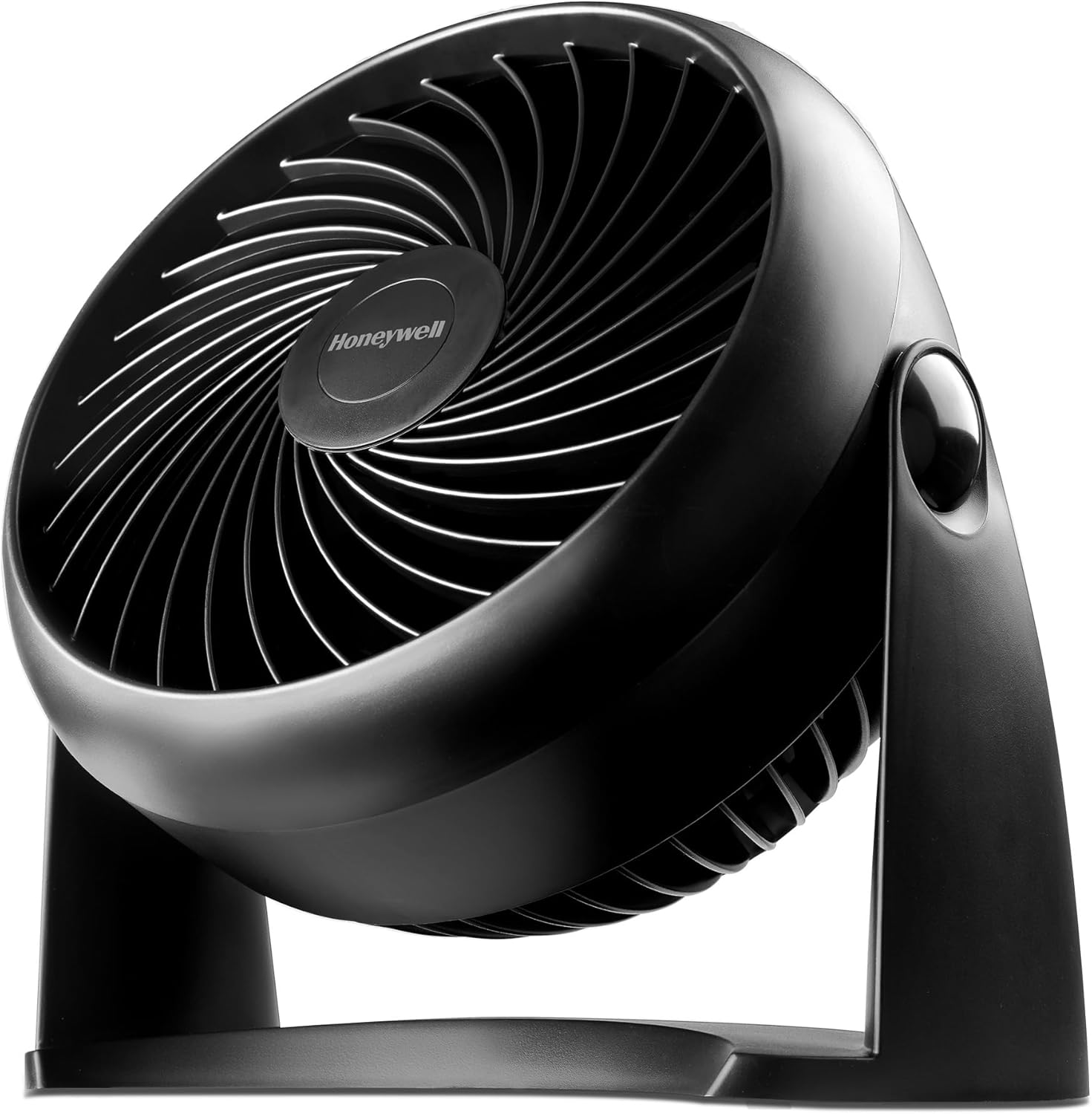
| Power Source | Corded Electric |
|---|---|
| Number of Speeds | 3 |
| Air Flow Capacity | 185 cfm |
| Motor Type | brushless |
| Installation Type | Tabletop or Wall Mount |
The Honeywell TurboForce HT-900 is a small, corded tabletop fan designed to move a surprising amount of air for its size. It uses an aerodynamic turbo blade and a brushless motor to deliver up to 185 cfm across three speeds, and the head pivots 90 degrees so you can aim airflow at a desk, bed, or mounted on a wall. Controls are simple push buttons and the fan runs quietly compared with similar small circulators, making it suitable for bedrooms or home offices. The plastic housing keeps weight low and makes it easy to carry or reposition, and the NEMA 1-15 plug fits standard outlets. Expect straightforward, reliable performance without advanced features like timers, remote control, or oscillation on this model. If you want a compact, no-frills circulator that boosts comfort and helps reduce AC load, this model performs well, though users seeking larger-room coverage or programmable controls will need a different style of fan.
Best for: Buyers who prioritize proven performance and want a compact, quiet desk or bedside fan backed by strong social proof and steady customer satisfaction.
Less Ideal for: Avoid this unit if you need large-room coverage, programmable timers, or smart/remote control features.
- High airflow for size (185 cfm) delivers strong focused breeze
- Three-speed control and 90-degree pivot let you direct airflow where needed
- Brushless motor and design make it relatively quiet in operation
- Lightweight plastic body is easy to move and can be wall-mounted
- No oscillation or remote/timer features
- Plastic construction may feel less premium than metal-bodied fans
Verdict: A compact, reliable tabletop circulator that delivers strong, quiet airflow for small spaces, making it a safe choice when you want proven performance.
Choosing the Right Fan Deals: Key Factors to Consider
Airflow and Coverage
Airflow determines how quickly a fan moves air through a room and is usually measured in cubic feet per minute. Higher airflow helps circulate air in larger rooms and provides a stronger cooling effect, while lower CFM figures can still be effective in small bedrooms or offices.
Consider the room size and desired effect. For whole-room circulation you want higher airflow and often oscillation. For a focused cooling effect at a desk or bedside, a directional personal fan with lower CFM may be sufficient and quieter.
Energy Consumption and Efficiency
A fan's power draw directly affects running costs and how it interacts with your home's energy use. Look at wattage at typical operating speeds and any efficiency features like brushless DC motors or ECO modes. Lower wattage with adequate airflow yields better efficiency.
If you plan to run a fan for long periods, even small differences in wattage add up. Fans with variable-speed controls let you find a balance between comfort and electricity use, and timers or smart scheduling reduce unnecessary run time.
Noise and Acoustic Comfort
Noise level matters when a fan will operate in sleeping areas, workspaces, or living rooms. Decibel ratings provide a baseline, but perceived noisiness also depends on frequency and motor type.
Look for models that list dB levels at measured distances or advertise quiet operation. Features like brushless motors, aerodynamic blade shapes, and vibration-isolating mounts reduce intrusive noise. Consider quieter options for bedrooms and study spaces.
Size, Portability, and Placement Options
Physical size and mounting versatility determine where a fan will be useful. Tower and bladeless designs save floor space and are often more stable, while box, pedestal, and clip fans offer different placement flexibility.
If you move a fan between rooms, weight, grip points, and a compact footprint matter. For permanent placement, check for stable bases or wall/ceiling mounting options. Measure intended locations to ensure the fan will fit and clearances are adequate for safe operation.
Controls, Features, and Usability
Controls influence how easily you can tailor airflow. Look for clear speed steps, remote control or app connectivity, programmable timers, and oscillation settings. Simpler analog controls can be more reliable, while digital interfaces add precision.
Additional features like air-direction adjustment, sleep modes, and maintenance indicators improve day-to-day convenience. Consider whether you want smart-home integration or prefer straightforward manual controls for longer-term reliability.
Build Quality and Safety
Durable construction and safety features affect longevity and household risk. Sturdy housings, impact-resistant blades or blade guards, and firm base designs prevent tipping and damage. Safety certifications and thermal cutoffs reduce fire and motor-failure risk.
Check for corrosion-resistant finishes if the fan will be used in humid spaces. Easy-to-clean grills and removable guards extend service life, while clear manufacturer safety marks indicate compliance with common standards.
Which Fan Type Suits Your Room
Different fan form factors perform best in specific rooms and use cases. Tower and bladeless fans are space-efficient and work well in living rooms or hallways, while pedestal and box fans deliver strong directional airflow for larger open areas. Clip and desktop fans excel for personal cooling at a desk or bedside.
- Tower/bladeless: slim profile, steady circulation, moderate to quiet noise
- Pedestal: adjustable height and strong airflow, good for high ceilings
- Box: high-volume airflow for garages or workshops
- Clip/desk: compact, direct cooling for a single user
Placement Tips to Improve Circulation
Placement greatly affects how effectively a fan moves air. For whole-room circulation, place the fan near a doorway or window to encourage cross-ventilation. In multi-fan setups, orient fans to create a directed airflow path from the coolest air source toward occupied areas.
- Point fans toward occupants for immediate cooling
- Use window fans to push hot air out or draw cooler outside air in during evenings
- Elevate fans to improve circulation or lower them to target floor-level heat
Maintaining Your Fan for Longevity
Regular cleaning and simple maintenance extend a fan's service life and keep noise low. Unplug the fan before removing grills or blades, clean dust from motor housings and vents, and check for loose fasteners. Replace worn parts like knobs or guards promptly to avoid safety hazards.
- Clean grills and blades every few weeks in dusty environments
- Lubricate motors only if the manufacturer specifies it
- Inspect power cords for damage and avoid running fans on frayed cords
Using Fans Efficiently with Home Cooling
Fans cool people, not rooms, by moving air over skin to increase evaporative cooling. Use fans in occupied rooms rather than running them in empty spaces. Combine fans with thermostats or smart controllers to avoid unnecessary operation and reduce overall energy use.
- Turn fans off when rooms are unoccupied or use timers
- Pair fans with air sealing and shading strategies to keep cooled air inside
- Use lower speeds with oscillation for steady comfort and reduced power draw
How We Chose the Best Fan Deals
We prioritized measurable, buyer-relevant criteria that reflect how people actually use fans at home. Key filters included verified airflow ratings or manufacturer airflow figures, tested or reported energy consumption at typical speeds, and measurable noise levels or decibel ranges. We also required durable construction and clear controls, since fans are long-lived appliances that must withstand daily use. Products were excluded if they lacked basic safety certifications, failed to report power consumption, or had consistently poor user feedback on durability or noise. We favored fans with adjustable speeds, oscillation, and timer or remote options because those features improve daily usability. Portability and footprint were scored for small-space use, while mounting flexibility was considered for models meant for larger rooms. These criteria ensure picks work well in realistic home scenarios and align with the scorecard metrics below.
Our full evaluation process is outlined in our review methodology.
FAQ
How much noise is acceptable for a bedroom fan?
Acceptable noise varies by person, but many sleepers prefer fans that operate under about 40 dB at bedside distance. Look for models specified as 'quiet' with listed dB values, and choose lower speeds or white-noise-friendly airflow patterns for sensitive sleepers.
Will a fan lower my home's thermostat temperature?
A fan does not lower air temperature; it improves comfort by moving air across skin. You may feel comfortable at a higher thermostat setting when using a fan, which can reduce cooling energy use indirectly.
How often should I clean my fan?
In normal home environments, clean accessible grills and blades every 4 to 8 weeks to prevent dust buildup. In dusty or pet-heavy homes, increase cleaning frequency to maintain airflow and reduce strain on the motor.
Are brushless motors worth paying extra for?
Brushless DC motors typically offer higher efficiency, lower noise, and longer life. They can be worth the extra cost if you plan to run the fan for long periods or prioritize quiet operation.
Can multiple fans replace an air conditioner?
Multiple fans can improve comfort in specific occupied areas and may reduce the need for central cooling in mild climates. However, they do not remove humidity or lower ambient air temperature like an air conditioner.
Final Verdict
Focus on the match between airflow capability and the size of the space you want to cool, then balance that with noise and energy consumption. Prioritize fans with clear efficiency information and control options that suit how you will use them. If you need all-day operation, favor efficient motors and quieter designs. For intermittent, personal cooling, a compact directional fan may be the best deal. Use the factors above to weigh tradeoffs and choose a fan that meets your comfort needs and running-cost expectations.