
Note: This article contains affiliate links. If you click on these links and make a purchase, we may earn a small commission at no extra cost to you. This helps support our research and content. Read our full affiliate disclosure here.
Picking the right indoor security camera system matters because these devices protect what you value most inside your home. You want dependable video, timely alerts, and a setup that fits your living space so the system actually gets used. This guide looks at seven shortlisted indoor security camera systems selected for typical home needs, from small apartments to multiroom houses. We evaluated each option for image quality, motion detection accuracy, and how straightforward the setup and daily use feel. Read on to compare the systems and find one that balances coverage, privacy controls, and ongoing convenience.
Top Picks at a Glance
| Best Overall The best all-around choice for most situations | eufy Security Indoor Cam E30 |  |
| Best Quality Built to a higher standard if you want something more solid | REOLINK 4K Security System RLK16-800B8 |  |
| Best Value The sweet spot between price and what you get | Tapo Indoor Spot Camera C100 |  |
| Best Budget The cheapest option that still gets the job done reliably | Veise 2K Indoor Camera |  |
| Top Rated A top-rated pick with lots of positive feedback | Ring Indoor Cam 2-Pack |  |
| Most Popular A crowd favorite that many people choose with confidence | ZOSI 8CH 3K Lite Security System |  |
| Best Seller A high-volume bestseller chosen again and again | Wyze Cam Pan v3 |  |
eufy Security Indoor Cam E30

| Video Capture Resolution | 4k |
|---|---|
| Connectivity Protocol | Wi-Fi |
| Power Source | Corded Electric |
| Video Capture Format | MP4 |
The eufy Indoor Cam E30 is a pan-and-tilt dome camera designed for continuous indoor monitoring and two-way interaction. It captures 4K video for detailed daytime footage and offers a 360 degree panoramic view via the app so you can tap to focus on different areas. Built-in on-device AI detects humans, pets and certain sounds and can trigger smart auto-tracking to follow movement, while the integrated spotlight enables color night vision and acts as a deterrent. The camera connects over 2.4 GHz Wi-Fi and is powered by a corded adapter, with local MP4 recording to an SD card or compatibility with eufy HomeBase 3 for centralized storage and no monthly fees. It also works with HomeKit, Alexa and Google Assistant, though HomeKit streams at reduced (1080p) resolution. Practical limits include the lack of 5 GHz Wi-Fi support and the need for a nearby power outlet, and some HomeKit features are constrained by the platform. For buyers wanting clear, subscription-free indoor coverage with smart tracking, the E30 delivers useful automation and crisp images in a compact package.
Best for: Buyers who want a subscription-free indoor camera that blends high-resolution recording, automated AI tracking, and smart-home integration for day-to-day home monitoring and pet or baby checks.
Less Ideal for: People who need battery-powered or 5 GHz Wi-Fi cameras for flexible placement or who require full-resolution HomeKit streaming should consider other options.
- 4K capture for high-detail indoor footage
- 360° pan-and-tilt control with app Quick Focus and panoramic view
- On-device AI detection and auto-tracking for humans and pets
- Built-in spotlight enables color night vision and a visual deterrent
- Local recording support with no required monthly subscription
- Only supports 2.4 GHz Wi-Fi, not 5 GHz
- Requires a wired power connection so placement is limited to near outlets
- HomeKit integration limits resolution to 1080p
Verdict: Choose the E30 if you want a subscription-free, 4K indoor camera with smart on-device AI tracking and color night vision for comprehensive everyday monitoring.
REOLINK 4K Security System RLK16-800B8
| Number of Channels | 16 |
|---|---|
| Video Capture Resolution | 4K 8MP (2560 × 1920) |
| Memory Storage Capacity | 4 TB |
| Night Vision Range | 100 feet |
| Connectivity Technology | Wired |
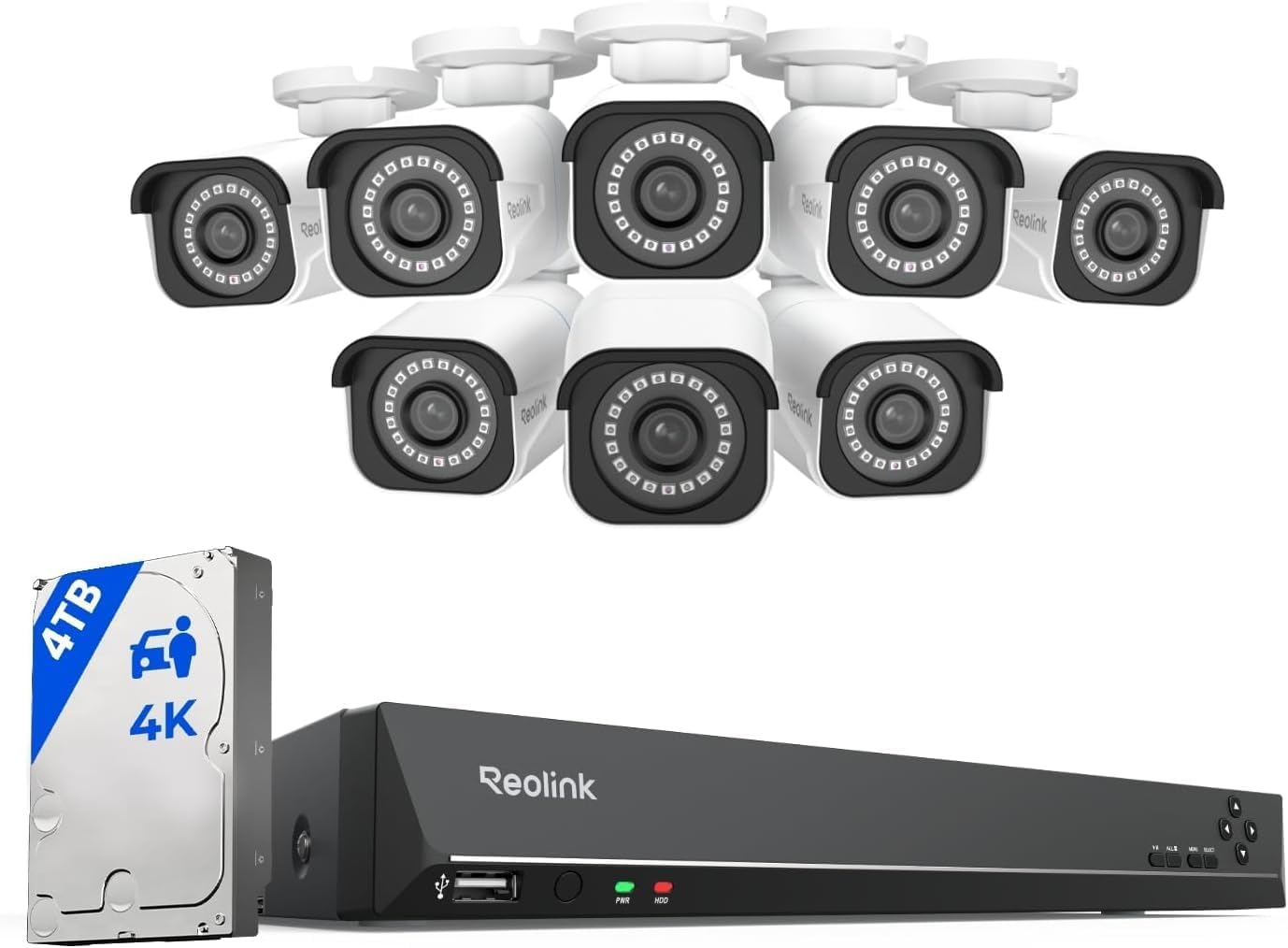
This REOLINK kit is a performance-focused PoE surveillance system built for continuous, local monitoring of larger homes or small businesses. It includes eight 8MP (4K) PoE bullet cameras and a 16-channel NVR with a preinstalled 4TB HDD, so you get detailed daytime and nighttime footage and the capacity for 24/7 recording out of the box. The cameras use H.265 compression, fixed 4.0 mm lenses, and IR LEDs for roughly 100-foot night vision, while the NVR supports HDMI output, USB mouse control, and remote access through Reolink apps on iOS, Android, Windows, and Mac. Smart detection can distinguish people and vehicles to reduce false alerts and push notifications, and PoE wiring simplifies installation by carrying power and video over a single Ethernet cable. Limitations include camera compatibility being restricted to Reolink PoE cameras and no native Alexa or other smart home integration, so expansion outside the Reolink ecosystem is constrained and cloud-dependent features are limited. For buyers prioritizing high-resolution local recording and reliable wired performance, this kit delivers solid capability.
Best for: Buyers who need a wired, high-resolution indoor surveillance setup with reliable local recording and accurate motion detection for monitoring multiple rooms or a larger indoor footprint.
Less Ideal for: People who want open third-party camera compatibility, native smart home voice integration, or a cloud-first, wireless camera solution.
- Eight 8MP (4K) PoE cameras provide high-resolution footage for detailed identification
- Preinstalled 4TB HDD with support up to 16TB enables continuous 24/7 local recording
- Smart person and vehicle detection reduces false motion alerts
- PoE wiring supplies power and video over a single Ethernet cable for simpler installation
- Cameras in the kit only work with Reolink PoE NVRs, preventing third-party camera integration
- No native support for Alexa or other smart home voice assistants
Verdict: Choose this wired REOLINK kit when you want high-resolution 4K local recording and reliable PoE performance across many indoor cameras.
Tapo Indoor Spot Camera C100

| Video Capture Resolution | 1080p |
|---|---|
| Frame Rate | 30 fps |
| Field Of View | 117 degrees |
| Night Vision Range | 30 feet |
| Memory Storage Capacity | 512 GB |
The Tapo C100 is a wired indoor security camera intended for everyday home monitoring. It captures 1080p video at 30 fps with a 117 degree field of view and provides motion alerts, person detection and baby-cry detection via the Tapo app. You can speak through the camera using two-way audio and trigger the built-in siren to deter intruders or interrupt a pet. Night vision extends visibility to roughly 30 to 40 feet, and recordings can be saved locally to a microSD card (up to 512 GB) or to Tapo Care cloud storage. Setup is typical for Wi-Fi cameras: connect to 2.4 GHz Wi-Fi, place or wall-mount the camera and use the app for notifications and live view. Practical touches include privacy zones to block recording of sensitive areas and compatibility with Alexa and Google Assistant for voice viewing. The camera requires continuous power and does not run on batteries, and advanced features like continuous cloud history need a subscription, so budget-conscious buyers should plan for either a large microSD card or the subscription service for longer retention.
Best for: Buyers who want a dependable, app-driven indoor camera for everyday home or pet monitoring and who prioritize clear 1080p video, simple voice integration, and flexible local storage options.
Less Ideal for: People who need battery-powered or truly wireless cameras for remote locations or those who want long cloud retention without considering a subscription or large local storage.
- 1080p HD video and 30 fps for clear daily monitoring
- Baby-cry detection and motion/person alerts reduce false alarms
- Two-way audio plus built-in siren for remote interaction and deterrence
- Local microSD storage up to 512 GB with optional cloud backup
- Privacy zone setting to exclude areas from recording
- Requires continuous wired power so placement depends on an outlet
- Some advanced cloud features require a Tapo Care subscription
Verdict: A practical wired indoor camera that delivers clear 1080p monitoring with smart alerts and flexible local storage for buyers who want reliable, no-frills home surveillance.
Veise 2K Indoor Camera

| Video Capture Resolution | 2k |
|---|---|
| Viewing Angle | 360 degrees |
| Connectivity Protocol | Wi-Fi |
| Flash Memory Supported Size Maximum | 512 GB |
| Power Source | Corded Electric |
The Veise 2K Indoor Camera is a wired pan-and-tilt dome camera designed for home monitoring of rooms, babies, and pets. It records 2K video through an f/1.8 lens and sweeps a full 360 degrees so a single unit can cover an entire room; live view and pan/tilt control are handled in the phone app. AI-powered motion detection can distinguish humans, pets, and crying and will track movement while sending real-time alerts, and you can set custom activity zones to reduce false alarms. Two-way audio lets you speak through the built-in speaker and microphone, and infrared night color vision keeps footage usable in low light. Recording can go to an SD card (supports up to 512 GB per listing) or to cloud storage, with a 180-day trial included. Setup is simple: plug in, scan the QR code, and connect to 2.4 GHz Wi-Fi. Important limitations are that it is corded only and requires a 2.4 GHz network, and advanced cloud features may require subscription after the trial period.
Best for: Shoppers who want capable whole-room monitoring on a tight budget and prefer a single, app-controlled camera to watch a nursery, living room, or pet area without buying multiple fixed cameras.
Less Ideal for: Users who need battery-powered or outdoor cameras or who require 5 GHz Wi‑Fi support and fully subscription-free cloud services.
- 2K resolution with large-aperture lens for clearer daytime footage
- 360° pan and tilt for full-room coverage from one camera
- AI detection and tracking for humans, pets, and crying to reduce unnecessary alerts
- Two-way audio for real-time communication
- Flexible storage: SD card support plus a 180-day cloud trial
- Requires a wired power connection and only supports 2.4 GHz Wi-Fi
- Some cloud features may require paid subscription after the free trial
Verdict: A budget-friendly indoor pan-and-tilt camera that delivers 2K video, AI tracking, and flexible local/cloud recording for whole-room monitoring.
Ring Indoor Cam 2-Pack

| Video resolution | 1080p HD |
|---|---|
| Night vision | Color Night Vision |
| Power | Plug-in |
| Bundle | 2-pack |
The Ring Indoor Cam two-pack provides simple, reliable indoor monitoring with 1080p HD live view and Color Night Vision for clear daytime and low-light footage. Each camera is plug-in and ships with a flexible swivel mount so you can place it on a shelf or install it up high to cover common indoor angles, and the included manual privacy cover lets you quickly disable camera and mic when needed. Motion alerts arrive in real time and can be tailored to reduce nuisance notifications, and the cameras work with Alexa for hands-free viewing on Echo Show devices. For extended review or intelligent event history you will need a Ring Protect subscription, which adds cloud storage and richer alerts. These cameras are best for straightforward indoor monitoring rather than advanced analytics or on-device long-term storage.
Best for: Buyers who prioritize dependable, easy-to-install indoor monitoring and want timely motion alerts with simple smart home integration.
Less Ideal for: Users who need local-only recording or advanced on-device analytics should consider alternatives with onboard storage or more sophisticated processing.
- 1080p HD video with Color Night Vision for clear day and low-light footage
- Flexible swivel mount and plug-in power make placement and repositioning easy
- Manual privacy cover to quickly disable camera and microphone
- Real-time motion alerts with configurable detection zones and Alexa integration
- Cloud video history and advanced alerts require a paid Ring Protect subscription
Verdict: A straightforward, reliable two-camera indoor kit for buyers who want easy setup, clear 1080p live video, and simple smart home alerts.
ZOSI 8CH 3K Lite Security System

| Connectivity Technology | Wired |
|---|---|
| Video Capture Resolution | 1080p |
| Number of Channels | 8 |
| Memory Storage Capacity | 1 TB |
| Night Vision Range | 80 feet |
The ZOSI 8CH 3K Lite Security System is a wired DVR kit aimed at homeowners and small businesses that want local, always-on surveillance without monthly fees. It combines an H.265+ 8-channel DVR with four 1080p weatherproof bullet cameras that use BNC coax to connect to the recorder and a separate power line. In practice the system records continuously to the included 1TB security-grade hard drive, supports HDMI/VGA local monitoring, and lets you view live and playback remotely through the ZOSI Smart app when connected to the internet. Notable features include AI human/vehicle detection to reduce false alerts, configurable detection zones and automatic overwrite for long-term recording, plus color-capable night vision up to 80 feet in darkness. The wired design gives stable 24/7 recording and good weather resistance, but installation requires running power and coax cables and there is no built-in microphone on the cameras. Overall this kit is a straightforward, privacy-friendly option for buyers who prefer local storage and reliable wired performance over cloud subscription setups.
Best for: Buyers who prioritize reliable, always-on local recording and want to avoid ongoing subscription fees, and who are comfortable with a wired installation or hiring someone to run cables.
Less Ideal for: People who need a quick, wireless plug-and-play setup or who require audio capture from each camera should consider other options.
- Includes H.265+ DVR with 1TB security-grade hard drive for extended local recording
- AI human and vehicle detection reduces false motion alerts
- Weatherproof cameras with up to 80 ft night vision for outdoor use
- Supports HDMI/VGA local monitoring and remote viewing via app
- Requires wired power and BNC coax installation which takes more effort than wireless cameras
- Cameras do not include built-in microphones so audio recording is not available
Verdict: Choose this wired DVR kit if you want stable 24/7 local recording with AI detection and no monthly fees.
Wyze Cam Pan v3

| Video Capture Resolution | 1080p |
|---|---|
| Frame Rate | 15fps, 20fps |
| Field Of View | 120 degrees |
| Waterproof Rating | IP65 |
| Power Source | Corded Electric |
The Wyze Cam Pan v3 is a versatile indoor/outdoor security camera that pans 360° and tilts 180° to cover whole rooms, porches, or garages while offering 1080p video with color night vision. It connects to 2.4 GHz Wi‑Fi and is set up through the Wyze mobile app, where you can create four custom waypoints for routine patrols, define motion zones, and receive push alerts. Motion tracking automatically follows the largest moving object and the built‑in speaker and mic enable two‑way talk for checking on pets or greeting visitors. The camera is IP65 rated for weather resistance and works with Alexa and Google Assistant for simple voice integration. Storage is flexible: local recording via microSD (up to 512 GB) or optional cloud clips with a subscription. Limitations to note are modest frame rates (15–20 fps) and digital zoom only, so distant details like license plates may be unclear, and it requires continuous power and a stable 2.4 GHz network for reliable live view.
Best for: Buyers who prioritize dependable, full-room coverage and easy app-based setup and prefer a camera that can be used indoors or in covered outdoor locations without complex installation.
Less Ideal for: People who need high-frame-rate, long-range identification of small details like license plates or who cannot provide continuous power and strong 2.4 GHz Wi‑Fi at the mounting location should look elsewhere.
- 360° horizontal and 180° vertical pan/tilt coverage for near-complete room monitoring
- Color night vision for clearer low-light images than standard IR-only cameras
- IP65 weather resistance suitable for porches and covered outdoor spots
- Two-way audio for real-time communication and built-in motion tracking for hands-off following
- Supports local microSD recording up to 512 GB so you can save video without a subscription
- Frame rate is limited to 15–20 fps which can reduce smoothness in fast action
- Uses digital zoom rather than optical zoom, so zoomed detail degrades at distance
- Requires continuous power and 2.4 GHz Wi‑Fi, so placement depends on outlet and Wi‑Fi strength
Verdict: Choose the Wyze Cam Pan v3 if you want affordable, app‑controlled 360° indoor coverage with color night vision and flexible local storage options.
Choosing the Right Indoor Security Camera Systems: Key Factors to Consider
Image Resolution and Night Performance
Higher resolution makes it easier to identify faces and small details but increases bandwidth and storage needs. Consider whether 1080p is sufficient for your rooms or if you need higher resolution for long-range hallways.
Night performance and infrared or low-light processing are equally important because most incidents occur in low light. Look for systems with reliable night modes that maintain contrast without excessive bloom or noise.
Motion Detection and False Alert Reduction
Accurate motion detection determines how useful alerts are. Systems that rely only on simple pixel-change detection can generate many false alarms from pets, curtains, or shadows.
Prefer solutions that offer person detection, adjustable sensitivity zones, or AI-based filtering. These features help reduce unnecessary notifications while preserving alerts for genuinely important events.
Storage Modes and Privacy Controls
Decide between cloud storage, local storage, or a hybrid approach. Cloud plans simplify offsite access but may require subscriptions and raise privacy questions. Local storage via SD cards or network storage keeps footage on-site but needs proper backup planning.
Also check for granular privacy controls such as scheduled recording, geofencing, and user access levels so you can limit who views footage and when recordings occur.
Setup Complexity and Ongoing Maintenance
A system that is difficult to install or maintain is less likely to stay active. Assess how cameras connect to your network, whether they require a hub, and how user-friendly the mobile app and firmware updates are.
Consider battery versus wired power. Battery cameras offer placement flexibility but need recharge cycles. Wired cameras require more installation work but reduce ongoing upkeep.
Audio Features and Two-Way Communication
Two-way audio lets you speak to visitors or deter intruders remotely. Evaluate microphone sensitivity and speaker clarity to ensure messages are heard.
Check if audio recording is enabled by default and how it is handled in privacy settings. If you plan to use intercom-style features often, prioritize systems with low latency and clear playback.
Coverage, Field of View, and Mounting Options
Field of view affects how many cameras you need to cover a room. Wide-angle lenses reduce blind spots but can distort edges, while narrower lenses require more units.
Look for flexible mounts such as magnetic bases, adjustable brackets, or wall anchors that match your intended placement. Consider whether the system lets you pan, tilt, or digitally zoom from the app for added coverage without extra hardware.
Choosing Between Wired and Wireless Indoor Systems
Wired systems are more reliable for continuous recording because they avoid battery life limitations and typically maintain a stable network connection. They are a good fit for permanent installations where you want minimal day-to-day intervention.
Wireless or battery-powered systems are easier to place and move around. They work well for renters or temporary monitoring needs, but you should plan for regular recharging or battery replacement and possibly weaker signal strength if the camera is far from the router.
- Wired: stable power, lower maintenance, may need professional routing of cables.
- Wireless: flexible placement, easier install, requires battery management.
- Hybrid setups: use wired for high-traffic areas and wireless for temporary coverage.
Balancing Cloud Subscriptions and Local Storage
Cloud subscriptions provide centralized access to motion clips, easy sharing, and offsite backups. They are convenient for homeowners who want minimal setup and automatic archival, but they often involve recurring fees.
Local storage keeps your footage within your home network. With an SD card or network-attached storage, you control retention and access. Be mindful of backup strategies since local storage can be lost if the device is stolen or damaged.
- Cloud pros: offsite backup, easy access, often simpler setup.
- Local pros: no ongoing fees, direct control over footage, privacy advantages.
- Consider hybrid: essential clips uploaded while general footage stays local.
Placement Strategies for Best Coverage
Place cameras to capture high-traffic pathways such as entryways, stairwells, and main living areas. Mount them at head height or slightly above for natural face angles and to reduce occlusion from furniture. Avoid pointing cameras directly at windows to prevent glare and false alerts.
Think in terms of zones: primary coverage for entrances, secondary coverage for large shared rooms, and targeted coverage for valuables. Overlapping fields of view can reduce blind spots but may create redundant clips and higher storage use.
- Mount camera 7 to 8 feet high for balanced face framing.
- Angle slightly downward to capture faces rather than ceilings.
- Use motion zones to focus detection on doorways and walking paths.
App Features That Matter Day to Day
A well-designed app speeds daily interactions. Look for fast live view loading, clear event timelines, and easy clip sharing. Notification customization is critical so you can set quiet hours and priority alerts.
Also evaluate user access controls for family members, the presence of event tagging or timeline search, and reliable push notifications. If you plan to use smart-home integrations, check whether the app supports those connections.
- Essential: fast live view, custom notification settings, event timeline.
- Helpful: user roles, clip sharing, integration with voice assistants or home hubs.
- Nice-to-have: scheduled arm/disarm and geofencing options.
Legal and Privacy Considerations for Indoor Cameras
Even inside your home, be mindful of legal and privacy norms. Avoid placing cameras in private areas such as bathrooms or any space where guests expect privacy. Inform household members and frequent visitors about cameras and access policies.
Consider data handling terms, whether the system encrypts footage, and how easy it is to purge recordings. Choose systems that provide clear controls for disabling recording or blurring sensitive areas within the frame.
- Don't record where privacy is expected, such as bathrooms.
- Check encryption and access controls in the product documentation.
- Use scheduled recording and masking to limit inadvertent captures.
How We Chose the Best Indoor Security Camera Systems
We focused on features and behaviors that matter in real-world indoor monitoring. Key evaluation criteria included image resolution and low-light performance, because clear footage is essential for identification and evidence. We tested motion detection accuracy and false-alert reduction methods to gauge how reliably each system distinguishes people from pets or ambient movement. Network and app setup simplicity was assessed to reflect typical homeowner technical ability, including cloud versus local storage options and account management. Audio quality and two-way talk were evaluated for helpfulness in interactions and deterrence. Finally, privacy controls and data handling options were reviewed to ensure owners can limit recordings and manage access. We excluded outdoor-specific cameras, professional-grade security panels that require contractor installation, and single-purpose baby monitors lacking general security features. The final shortlist favors systems that balance reliable detection, usable mobile apps, straightforward installation, and reasonable data-control options.
Our full evaluation process is outlined in our review methodology.
FAQ
Do indoor security camera systems need a subscription?
Often they include optional cloud subscriptions for extended storage and advanced detection. Basic live view and short-term clips are sometimes available without a plan, but persistent offsite backup usually requires a subscription.
Can indoor cameras work if my internet is down?
Some systems provide local recording that continues without internet, storing footage on an SD card or local server. However, remote access, cloud backup, and push alerts will not function until the network is restored.
Are indoor security cameras safe for families with pets?
Many systems offer pet-friendly detection settings or adjustable motion zones to reduce alerts from animal movement. Choosing a system with person detection or sensitivity controls helps prevent frequent false notifications caused by pets.
How many cameras do I need for a typical home?
It depends on layout and budgets, but most homes are well-served by covering primary entry points and main living areas. Start with cameras at front and back doors and one in the main living room, then add units for long hallways or upstairs corridors as needed.
Can I share camera access with family members?
Yes. Most systems let you create secondary accounts or shared access links with role-based permissions. Review access controls to limit who can view live feeds, download clips, or change system settings.
Final Verdict
Prioritize image clarity, dependable motion filtering, and storage choices that match how you want to access and protect footage. Setup simplicity and clear privacy controls determine whether a system will be used consistently, so favor options that balance strong detection with easy day-to-day management. Focus first on coverage and detection settings that prevent false alerts, then choose storage and app features that fit your comfort level with cloud services. With those tradeoffs in mind, you can confidently pick an indoor security camera system that meets your household's monitoring needs.