
Note: This article contains affiliate links. If you click on these links and make a purchase, we may earn a small commission at no extra cost to you. This helps support our research and content. Read our full affiliate disclosure here.
When you manage a small office, a dependable paper shredder protects confidential information and keeps busy workspaces tidy. Picking the right paper shredder for small offices matters because underpowered or frequently jammed units slow workflow, while overbuilt machines waste space and energy. This guide presents seven shortlisted options that suit small office demands, with emphasis on throughput, security level, and ease of maintenance. We evaluated each entry for daily capacity, jam handling, and noise so you can find a unit that fits your team and work habits. Read on to see which features matter most for typical small-office use.
Top Picks at a Glance
| Best Overall The best all-around choice for most situations | Aurora AU875XA 8-Sheet Shredder |  |
| Best Quality Built to a higher standard if you want something more solid | Fellowes Powershred 79Ci |  |
| Best Value The sweet spot between price and what you get | bonsaii 12-Sheet Cross Cut Shredder C275-A |  |
| Best Budget The cheapest option that still gets the job done reliably | Amazon Basics 8-Sheet Strip Cut Shredder |  |
| Top Rated A top-rated pick with lots of positive feedback | Aurora AU1210MA Micro-Cut Shredder |  |
| Most Popular A crowd favorite that many people choose with confidence | bonsaii Paper Shredder C237-B |  |
| Best Seller A high-volume bestseller chosen again and again | Amazon Basics 8-Sheet Cross Cut Shredder |  |
Aurora AU875XA 8-Sheet Shredder

| Cut Type | Cross Cut |
|---|---|
| Capacity | 3.7 gallons |
| Standard Sheet Capacity | 8 |
| Operation Mode | Automatic |
The Aurora AU875XA is a small, user-friendly cross-cut shredder built for occasional but reliable home or small-office tasks. It shreds up to eight sheets at once into P-3 level cross-cut particles and accepts credit cards, making it useful for routine document and card disposal. The unit runs continuously for about three minutes before needing a cool-down and has thermal overload protection to reduce motor stress. Controls include an auto-start/stop plus reverse and a simple standby/overheat LED so operation is straightforward. The 3.7-gallon pull-out basket with an integrated handle keeps the footprint compact and makes emptying easy. Because it is a basic, plastic-enclosed model, expect modest noise and limited duty cycle compared with heavier commercial machines; it is best for light daily shredding rather than sustained high-volume jobs. Overall, it delivers secure cross-cut shredding in a compact package that is easy to operate and maintain for small office needs.
Best for: Buyers who want a compact, easy-to-use shredder for routine paperwork and occasional credit card destruction in a small office or home office.
Less Ideal for: Organizations that need high-volume, continuous shredding or heavy-duty commercial performance should choose a larger, higher-duty-cycle model.
- P-3 cross-cut shredding that destroys paper and credit cards
- Accepts up to 8 sheets at once for faster small-batch jobs
- Compact 3.7-gallon pull-out basket with handle for easy emptying
- Auto start/stop with reverse and thermal overload protection for safer use
- Short continuous run time (about 3 minutes) limits heavy use
- Plastic enclosure and lightweight build are not intended for sustained office-heavy workloads
Verdict: A compact, easy-to-operate cross-cut shredder that provides secure destruction for everyday small-office paperwork and credit cards.
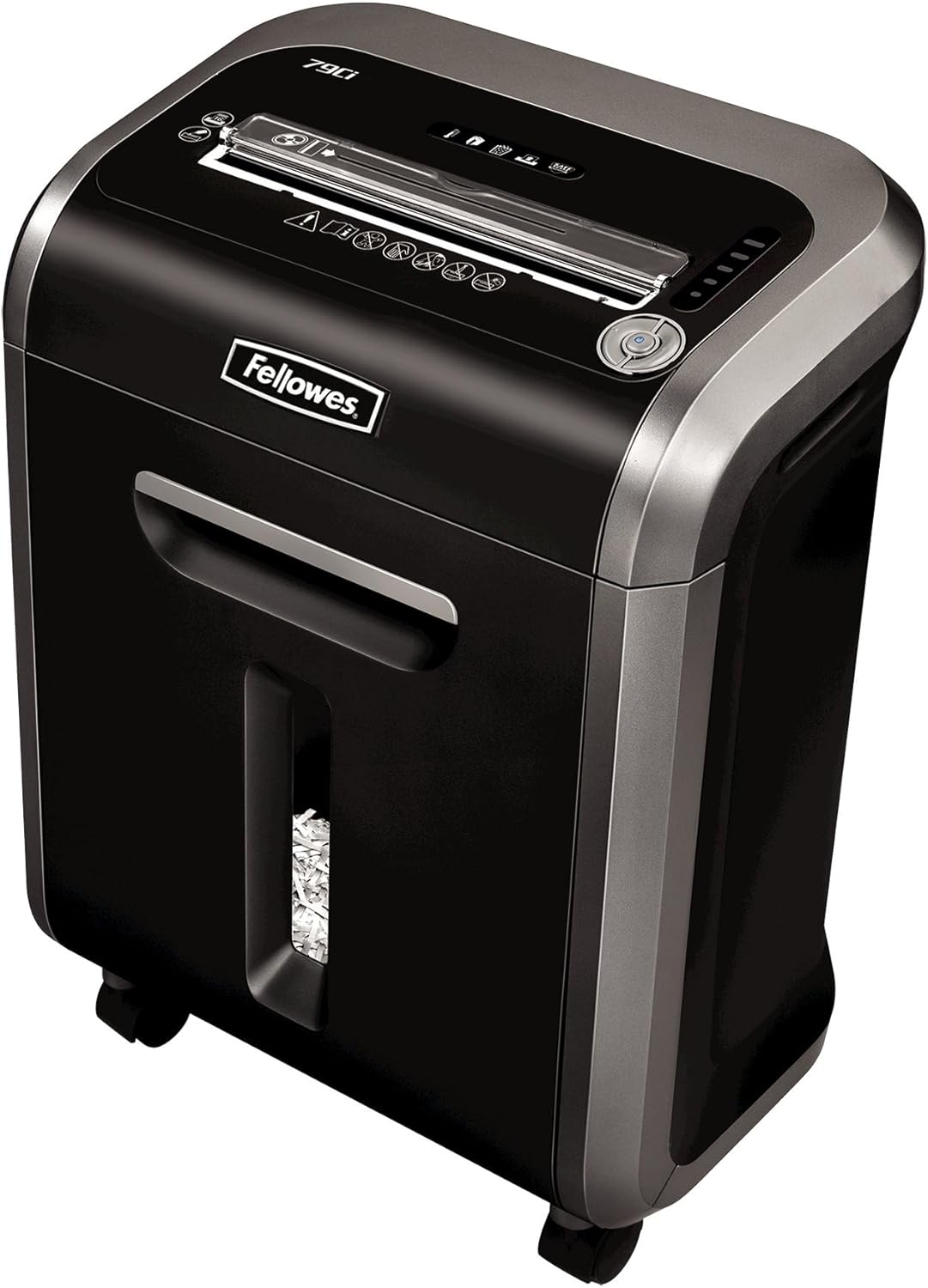
Fellowes Powershred 79Ci
| Cut Type | Cross Cut |
|---|---|
| Standard Sheet Capacity | 16 |
| Power Source | AC adapter or DC power supply |
| Audible Noise | 64 db |
| Capacity | 6 gallons |
The Fellowes Powershred 79Ci is a workhorse designed for small office shredding tasks, cutting up to 16 sheets at once into 5/32 x 1-1/2" cross-cut particles for P-4 level security. It accepts staples, credit cards, paper clips and CDs/DVDs, and the motor can run continuously for about 20 minutes before a cool-down period. Practical features include Fellowes' 100% jam-proof design, SafeSense protection that stops shredding when hands touch the feed, a 6-gallon pull-out bin with an LED full indicator, and relatively quiet operation at 64 dB. The unit runs on AC power and is built with metal and plastic housing, which helps it feel durable in daily office use. On the downside, its 20-minute continuous runtime means very heavy daily loads will need breaks, and the 6-gallon bin requires regular emptying in shared spaces. For teams that need reliable, secure shredding without industrial-level throughput, the 79Ci balances capacity, safety, and anti-jam performance effectively.
Best for: Small office teams or performance-minded users who need secure, reliable shredding at steady throughput and appreciate anti-jam and safety features.
Less Ideal for: Very high-volume shredding environments that require nonstop industrial capacity or a larger waste bin for minimal maintenance.
- Shreds up to 16 sheets per pass into P-4 cross-cut particles for strong document security
- 100% jam-proof design reduces interruptions on mixed-media jobs
- SafeSense technology stops blades when hands touch the feed for added safety
- 6-gallon pull-out bin with LED bin-full indicator makes waste handling straightforward
- 20-minute continuous run time requires cool-down for lengthy shredding sessions
- 6-gallon bin can fill quickly in busy offices, requiring frequent emptying
Verdict: A dependable, jam-resistant cross-cut shredder that delivers secure 16-sheet performance ideal for small office workloads.
bonsaii 12-Sheet Cross Cut Shredder C275-A

| Cut Type | Cross Cut |
|---|---|
| Capacity | 21 liters |
| Standard Sheet Capacity | 12 |
| Operation Mode | Automatic |
The bonsaii C275-A is a straightforward cross-cut shredder built for regular home or small office shredding tasks. It shreds up to 12 sheets at once into P-4 security cross-cut particles and will also accept credit cards, staples, and paper clips. Controls include Auto, Forward, Reverse and Off, plus an auto start/stop and jam-reverse system that help when pages stick. The unit runs continuously for about six minutes before a 40-minute cool-down, so it suits intermittent batch shredding rather than sustained heavy throughput. A transparent pull-out bin with handle makes it easy to see fill level and empty, and built-in overheat protection helps preserve the motor. The machine is compact enough to tuck under a desk but users should avoid feeding tape, plastic film, or similar materials. For a small office focused on document security, it offers dependable P-4 cross-cut performance with simple operation, though its modest run time means larger offices will need a higher-duty model.
Best for: Buyers who want a compact, reliable shredder for routine document cleanup in a small office and prioritize secure cross-cut shredding and simple, low-maintenance operation.
Less Ideal for: Not a good fit for busy departments that need continuous high-volume shredding or for users who need to destroy bulky non-paper items routinely.
- P-4 cross-cut security reduces document recoverability
- 12-sheet feed handles typical small-office batch jobs
- Accepts credit cards, staples and paper clips without pre-removal
- Transparent 5.5 gallon pull-out bin makes fill level obvious and disposal easy
- Auto start/stop plus reverse and jam detection reduce manual clearing
- Short continuous run time (6 minutes) requires long cool-down for sustained heavy use
- Not suitable for shredding tape, plastic film, or other non-paper materials
Verdict: A compact, easy-to-use cross-cut shredder that delivers P-4 level security for routine small-office shredding tasks.
Amazon Basics 8-Sheet Strip Cut Shredder

| Cut Type | Strip Cut |
|---|---|
| Standard Sheet Capacity | 8 |
| Compatible Devices | Credit Cards, CDs/DVDs |
| Operation Mode | Automatic |
This Amazon Basics shredder is a budget-oriented, compact unit intended for light office use. It accepts up to eight 20-pound sheets at once and automatically starts and stops via an Auto mode, making routine desk-side shredding quick and simple. The basketless design fits over most wastebaskets and uses an extendable arm so it can clear larger bins without bulky cabinets. It also has a dedicated slot to destroy one CD, DVD, or credit card at a time and offers thermal overheat protection with a 2.5 minute run / 15 minute cool-down duty cycle to protect the motor. Controls are straightforward with Auto, Off, Forward, and Reverse settings for clearing jams. Expect strip-cut security (0.24 inch strips, P-2 level), which is fine for everyday document disposal but not for highly sensitive material. The short run time and single-disc capacity limit heavy or continuous shredding, but for a small office needing an affordable, space-saving shredder this model covers basic needs reliably.
Best for: Buyers who need an inexpensive, space-saving shredder for routine document disposal in a small office or home workspace and prioritize ease of use and compact footprint.
Less Ideal for: Organizations that must shred large volumes continuously or require high-security cross-cut shredding for sensitive records should choose a heavier duty or higher-security model.
- Basketless, compact design fits over most wastebaskets for space savings
- 8-sheet capacity handles small batch shredding without removing staples
- Dedicated slot for CDs, DVDs and credit cards adds versatility
- Thermal overheat protection and Auto start/stop improve safety and motor longevity
- Simple 4-mode switch with reverse helps clear jams quickly
- Short duty cycle (2.5 minutes on / 15 minutes off) limits continuous use
- Strip-cut (P-2) security is not sufficient for highly confidential documents
Verdict: A compact, no-frills shredder that delivers affordable, easy-to-use paper and disc destruction for small offices with light shredding needs.
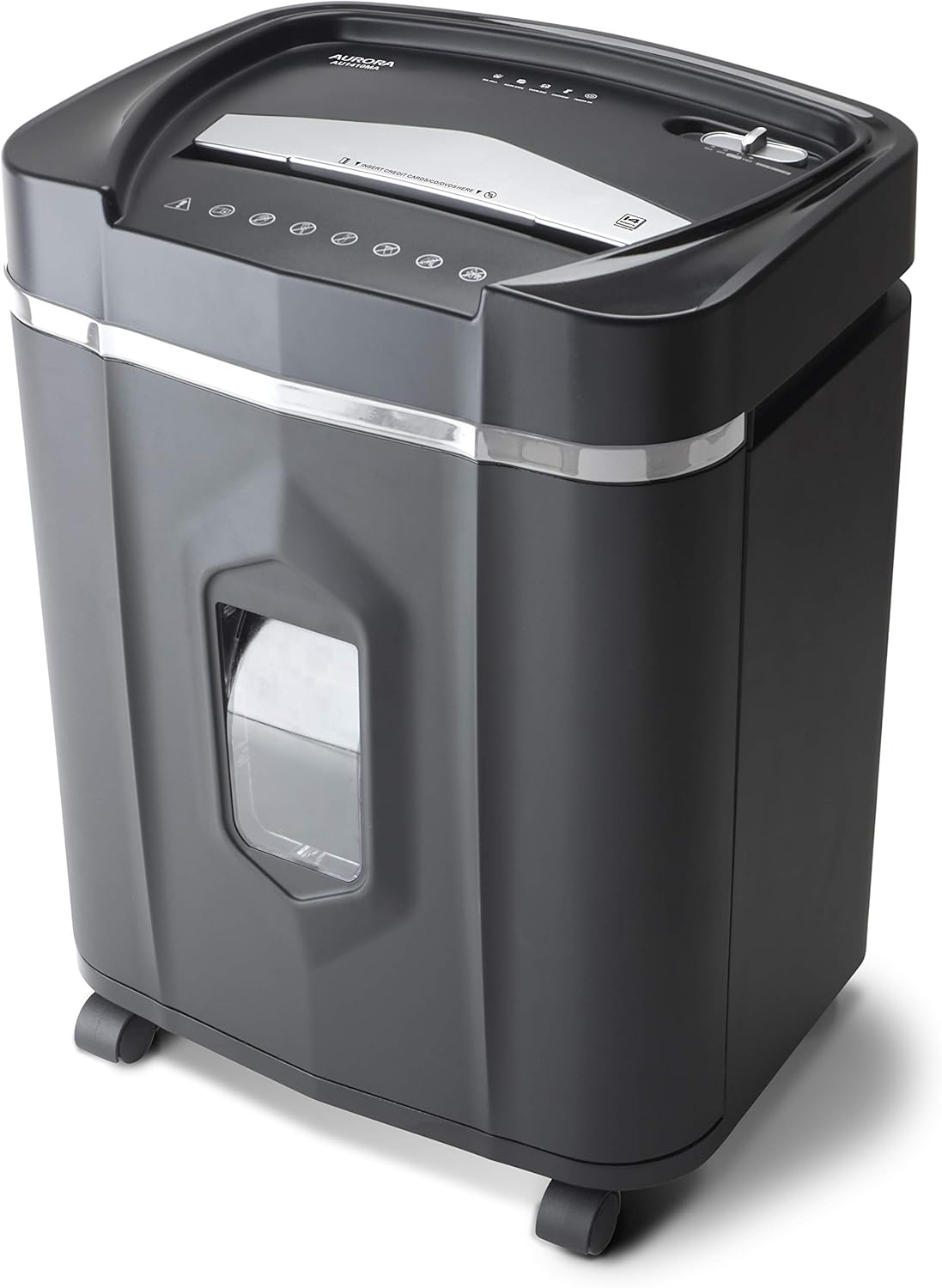
Aurora AU1210MA Micro-Cut Shredder
| Cut Type | Micro Cut |
|---|---|
| Capacity | 5 gallons |
| Standard Sheet Capacity | 12 |
| Operation Mode | Automatic |
| Power Source | AC adapter |
The Aurora AU1210MA is a compact, office-oriented micro-cut shredder built to handle routine document destruction. It accepts up to 12 sheets at once and reduces paper to P-4 level micro-cut particles, and it also takes CDs, DVDs, and credit cards for secure disposal. Practical features aimed at steady use include an anti-jam auto-reverse, LED status indicators for bin full, overheating, and overload, and a 5.0-gallon pullout bin that keeps maintenance straightforward. With a claimed 60 minutes of continuous run time and casters for mobility, it fits small workgroups that need frequent shredding without long cool-downs. Noise is reported to be low, making it suitable for shared office spaces. The unit is powered by AC and offers automatic operation mode but is a mid-level office machine; it is heavier than desktop models and the bin size limits how much shredded material you can store between empties. It is best used as a dependable daily shredder for a small team rather than for heavy industrial throughput.
Best for: Small offices and teams that prioritize reliable, secure daily shredding and need a machine that can handle mixed media with minimal fuss.
Less Ideal for: Large departments or locations with very high-volume shredding needs should choose a higher-capacity commercial unit with a larger waste bin and longer duty cycle.
- Micro-cut P-4 security suitable for sensitive documents
- 12-sheet feed capacity for batch shredding
- Shreds paper, CDs/DVDs, and credit cards
- Anti-jam auto-reverse and LED status lights simplify operation and maintenance
- 60 minutes continuous run time supports frequent use without rapid cool-downs
- 5.0-gallon bin fills relatively quickly for busy offices
- Not intended for heavy commercial shredding workloads
Verdict: A dependable micro-cut shredder that balances secure P-4 shredding and a long continuous run time for small office workloads.
bonsaii Paper Shredder C237-B

| Cut Type | Cross Cut |
|---|---|
| Capacity | 3.4 gallons |
| Standard Sheet Capacity | 6 |
| Operation Mode | Automatic |
The bonsaii C237-B is a small cross-cut shredder intended for light office or home use. It shreds up to six sheets at once into P-4 security particles and will accept staples, small paper clips, and a single credit card, making routine document disposal straightforward. The unit runs in automatic mode with manual forward/reverse controls to clear jams and includes overheat protection that limits continuous use to about four minutes before a 20-minute cool-down. Practical touches include a removable head with a carry handle and a clear-window 3.4 gallon bin for easy emptying, and the machine operates quietly enough for shared spaces. Limitations are its short continuous run time and small bin, which mean it is best for low-volume shredding rather than heavy daily use; larger teams will find the cool-down interval disruptive. For buyers who value simple operation, safety cut-off when the head is lifted, and compact footprint, this model covers core needs without extras like long duty cycles or large-capacity bins.
Best for: Buyers seeking a compact, easy-to-use shredder for light daily paperwork and occasional secure disposal will appreciate this model’s simple operation and safety features backed by broad customer feedback.
Less Ideal for: Not suited for busy small offices or teams that need extended continuous shredding or a larger waste capacity for frequent use.
- P-4 cross-cut security for shredded documents
- Accepts staples, small paper clips and one credit card
- Compact footprint with removable head and clear-view 3.4 gallon bin
- Auto start/stop with manual reverse to help clear jams
- Built-in overheat protection for safer operation
- Short 4-minute continuous run time with a long 20-minute cool-down
Verdict: Choose the bonsaii C237-B if you need a compact, user-friendly cross-cut shredder for low-volume secure shredding in a small office.
Amazon Basics 8-Sheet Cross Cut Shredder

| Cut Type | Cross Cut |
|---|---|
| Capacity | 3.7 gallons |
| Standard Sheet Capacity | 8 |
| Power Source | AC adapter or DC power supply |
| Audible Noise | 70 db |
This Amazon Basics cross-cut shredder is built for light to moderate small-office use and shreds up to eight 20 lb sheets at a time into P-4 level security pieces. It runs for three minutes before a forced 30-minute cool-down and includes auto/on, off, reverse, and forward modes plus LED indicators for power, overload, and overheat so you can manage jams and status quickly. The unit accepts one credit card at a time (not metal cards), staples, and small paper clips, and its 3.7 gallon bin is easy to empty for routine use. Noise is noticeable at about 70 dB during operation, so it is best placed away from open workspaces or used during breaks. The automatic shutoff and overheat protection reduce the risk of damage from extended runs, but the short runtime means you may need to pause when processing larger batches of documents.
Best for: Buyers who prioritize reliable, easy-to-use shredding for routine small-office paperwork and want clear safety and status controls rather than heavy industrial capacity.
Less Ideal for: Teams that need to shred large daily volumes without frequent pauses or those who require whisper-quiet operation in open-plan offices.
- Cross-cut P-4 security shred size suitable for sensitive documents
- Shreds up to 8 sheets of 20 lb paper at once and accepts staples and small paper clips
- Automatic operation with reverse and LED status indicators for easy jam handling
- Built-in overheat protection and automatic shutoff to prevent motor damage
- Short 3 minute continuous runtime requires 30 minute cool-down for heavier jobs
- Audible noise around 70 dB can be disruptive in quiet office areas
Verdict: A straightforward, safety-minded cross-cut shredder that is well suited to risk-averse small offices needing secure, occasional batch shredding.
Choosing the Right Paper Shredder for Small Offices: Key Factors to Consider
Shred Capacity and Throughput
Shred capacity determines how many sheets you can feed at once and how quickly you can process batches. For small offices with multiple users, a higher sheet capacity reduces queuing and keeps task flow smooth. Consider both single-pass sheet ratings and recommended continuous run times to estimate real-world throughput.
Throughput also ties to motor strength and cooling requirements. Machines with short duty cycles may need cool-down periods that interrupt shredding during busy intervals, so choose a shredder whose stated throughput matches your busiest expected sessions.
Security Level and Shred Type
Security level affects what the shred will prevent an attacker from reconstructing. Cross-cut and micro-cut shredders provide much higher security than basic strip-cut models, which matters if your office handles financial, client, or employee data. Check industry standards for P-level or equivalent ratings when strict privacy is required.
Balance security with capacity because higher-security micro-cut units often accept fewer sheets per pass and may require more frequent emptying. Evaluate the type of documents you discard to choose an appropriate shred type.
Jam Resistance and Clearing Features
Frequent jams are the top productivity killer with shared shredders. Jam resistance can come from stronger motors, wider feed slots, or better internal gearing. Equally important are clearing features such as manual reverse, auto-reverse, and accessible cutters that make clearing paper quick and safe.
Also consider how the machine behaves under mixed media. If you plan to shred staples, small clips, or occasional cardboard, look for models rated for those materials and with demonstrated jam-tolerant designs.
Duty Cycle and Motor Cooling
Duty cycle specifies how long the shredder can run before it needs a rest period. Small offices with intermittent shredding may be fine with shorter cycles, but teams that bulk-process documents need higher duty cycles to avoid work interruptions. Motor cooling systems, such as vents and thermal cutoffs, extend continuous use and protect internal components.
Assess your expected daily shredding volume and choose a machine whose duty cycle comfortably exceeds your busiest sessions to prevent overheating and premature wear.
Bin Capacity and Waste Management
Bin size controls how often someone must empty the shredder. Larger bins are convenient for shared spaces but increase the unit footprint. Consider whether a visible window or full-bin indicator is helpful for your office routine to avoid overflow.
Also factor in waste handling logistics. Some units accept removable waste bags or bins that slide out easily for disposal. If you plan to recycle shredded paper, removable or convertible bins make transfer simpler.
Noise Level and Physical Footprint
Noise matters in open-plan small offices. Look for models with lower decibel ratings or quieter operational modes to minimize disruption. Noise can vary with load, so consider real-world noise during typical shredding sessions rather than peak-noise figures alone.
Footprint determines where the shredder fits in your workspace. Compact designs with adequate capacity are best for tight offices, while taller, freestanding models suit rooms with more floor space. Balance size with capacity and noise to find the right compromise for your layout.
How Shred Types Affect Privacy and Workflow
Shred type is the single biggest driver of both privacy and performance tradeoffs. Strip-cut units process more sheets at once and fill bins faster but leave larger pieces that are easier to reconstruct. Cross-cut and micro-cut designs produce smaller fragments for higher security but typically reduce capacity and increase the frequency of bin emptying.
Match shred type to your document sensitivity and daily volume. For routine administrative paperwork, a cross-cut unit often balances security and usability. For highly confidential records, micro-cut provides stronger protection even if it means more frequent emptying.
- Strip-cut: higher throughput, lower security
- Cross-cut: balanced security and capacity
- Micro-cut: maximum privacy, lower sheet capacity
Placement and Installation Tips for Small Offices
Keep the shredder close to regular paperwork collection points to reduce the time staff spends carrying documents across the office. Ensure adequate clearance around vents to avoid overheating and place the unit on a level surface to prevent tipping during use.
If noise is a concern, position the shredder in a low-traffic corner or a small supply room. Consider a dedicated shredding schedule or supervised sessions if a single machine serves multiple people to prevent simultaneous, heavy loads.
- Allow 3 to 6 inches of clearance for ventilation
- Place near trash or recycling containers for efficient disposal
- Avoid direct sunlight and humid areas to protect electronics
Maintaining Cutter Blades and Prolonging Lifespan
Regular maintenance preserves shredding performance and reduces jams. Periodic oiling of cutting heads with compatible lubricants keeps blades turning smoothly and helps prevent overheating. Follow routine intervals suggested by the manufacturer based on usage level.
Inspect feed slots and cutter housings for debris and remove any small bits of paper that accumulate. If you shred staples or small clips occasionally, verify the machine tolerates them and clear any trapped metal promptly to avoid damage.
- Oil cutters every month or after a specified number of use minutes
- Run cleaning cycles where recommended
- Remove loose debris from feed area regularly
Recycling and Disposal of Shredded Paper
Shredded paper is usually recyclable, but local programs differ on acceptable formats and bag types. Check local recycling rules for shredded material collection and whether shredded paper must be bagged separately. Loose shredded paper can be harder to manage at curbside pickup.
Consider consolidating shredded waste into secure bags or bins to simplify transport and protect sensitive fragments. For high volumes, compressing or baling shredded paper before recycling reduces handling and storage needs.
- Confirm local recycling guidelines before disposing
- Use clear or labeled bags if required by your program
- Store shredded paper in a locked container until pick-up if security is a concern
Shared Use Best Practices and Security Policies
Establish simple shredding policies so staff know what to discard and when. Define acceptable items for the shredder, such as paper with staples or small clips, and list prohibited materials like thick binders or non-paper media unless the unit is rated for them.
Institute scheduled shredding times or assign responsible users to prevent overload. Train employees on how to feed paper correctly and how to respond to jams safely using reverse or manual-clearing features.
- Post a short usage guideline near the shredder
- Schedule bulk-shredding windows to manage high volumes
- Designate a responsible person for routine emptying and maintenance
How We Chose the Best Paper Shredder for Small Offices
We focused on attributes that directly affect small-office productivity and data security. Capacity and duty cycle were primary filters, because machines that cannot handle typical daily paper volume create bottlenecks. Shred type and security level were weighted heavily to ensure compliance with common privacy needs. We also prioritized jam resistance and reverse/manual clearing features to minimize downtime during peak shredding sessions. Ease of maintenance, including bin access and waste disposal, factored into selection to keep routine upkeep quick. Noise level and footprint were assessed to ensure units are appropriate for shared workspaces. Excluded items included compact personal shredders rated only for occasional home use and industrial units designed for continuous heavy-duty operation. The final shortlist balances throughput, document security, and long-term reliability for small-office environments.
Our full evaluation process is outlined in our review methodology.
FAQ
How many sheets should a small office shredder handle at once?
That depends on your typical batch size, but many small-office units reliably handle between 8 and 20 sheets per pass. Choose a capacity that matches your busiest sessions to avoid frequent stops and starts.
Can I shred staples and paper clips?
Some small-office shredders tolerate staples and small clips, but not all are rated for metal. Check the unit's specifications and avoid shredding larger binder clips or thick metal fasteners to prevent damage.
How often should I oil the shredder blades?
Frequency depends on usage. For moderate daily use in a small office, oiling monthly or after a few hours of cumulative run time helps maintain performance. Follow the manufacturer's recommended intervals for best results.
Is a micro-cut shredder necessary for compliance?
Micro-cut provides higher protection and is a good choice when handling sensitive personal or financial data. Compliance needs vary, so match the shred level to the privacy requirements of the documents you discard.
What maintenance reduces paper jams?
Regularly oiling the cutters, clearing stray bits from the feed, and avoiding oversized or unsuitable materials will reduce jams. Also select a model with auto-reverse or jam-resistant feeding if your office has mixed loads.
Final Verdict
For small offices, prioritize a shredder that balances adequate sheet capacity, a duty cycle that matches your busiest shredding sessions, and a security level appropriate for the documents you handle. Jam resistance and easy maintenance will keep the device in service and reduce interruptions. Consider bin capacity, noise, and footprint so the unit fits into daily workflows, and adopt simple policies to manage shared use. Selecting a machine with these priorities will help your team clear paper efficiently while protecting sensitive information. Focus on the tradeoffs between capacity and security to choose confidently for your office.