
Note: This article contains affiliate links. If you click on these links and make a purchase, we may earn a small commission at no extra cost to you. This helps support our research and content. Read our full affiliate disclosure here.
If you spend long hours at a desk in a warm room, the right powerful desk fan can make a big difference in comfort and productivity. A high-output fan gives targeted cooling without relying on whole-room air conditioning, and models vary in airflow, noise, and adjustability. This guide covers the top shortlisted powerful desk fans that deliver strong airflow for workspaces. We evaluate each option for airflow performance, acoustic levels, build and adjustability, and everyday usability to help you pick a fan that fits your desk and routines.
Top Picks at a Glance
| Best Overall The best all-around choice for most situations | DREO TurboPoly Table Fan DR-HAF001 |  |
| Best Quality Built to a higher standard if you want something more solid | Rowenta Turbo Silence VU2660 |  |
| Best Value The sweet spot between price and what you get | Amazon Basics Air Circulator Fan FT19-16AB |  |
| Best Budget The cheapest option that still gets the job done reliably | AaoLin USB Desk Fan F08 |  |
| Top Rated A top-rated pick with lots of positive feedback | Vornado MOVIO 6 |  |
| Most Popular A crowd favorite that many people choose with confidence | Honeywell TurboForce HT-900 |  |
DREO TurboPoly Table Fan DR-HAF001

| Power Source | Corded Electric |
|---|---|
| Number of Speeds | 4 |
| Noise Level | 25 db |
| Air Flow Capacity | 900 cfm |
| Wattage | 52 watts |
The DREO TurboPoly Table Fan is an indoor air circulator intended to push large volumes of air across a room while remaining quiet. It uses a brushless motor and aerodynamic blade design to deliver up to 900 CFM and long-range airflow, with 4 speed settings, 120° vertical tilt and 90° horizontal oscillation for directional control. You operate it from a touch panel or included remote, and it has an Auto Mode with a concealed sensor plus an 8-hour timer for hands-off comfort. Measured noise is low at about 25 dB on the quieter settings, making it suitable for bedrooms or offices, and the grille and blades disassemble for cleaning. Expect a 52-watt power draw and a small footprint that sits on tables or desks. The fan is strong for its size but is a tabletop unit rather than a floor or tower fan, so if you need wider coverage in very large open plans you may want a larger floor model; also it is plastic-bodied, so it favors portability over heavy-duty construction.
Best for: Buyers who want a compact but powerful desk or bedside fan that delivers long-range airflow quietly and prefers convenient remote or automatic controls.
Less Ideal for: People seeking a heavy-duty metal fan or a floor/tower unit for whole-house circulation should consider larger standing models instead.
- Very high airflow for a 13-inch table fan (900 CFM) suitable for moving air across rooms
- Brushless motor for efficient, reliable operation
- Quiet operation around 25 dB on low settings for bedroom or office use
- Remote control, touchpad, Auto Mode and 8-hour timer provide convenient hands-free control
- Grille and blades are removable for straightforward cleaning
- Plastic construction may feel less robust than metal alternatives
- Compact tabletop form limits floor-level circulation in very large open areas
Verdict: If you want a quiet yet powerful tabletop air circulator with remote control and long-range airflow, this DREO model is an excellent compact choice.
Rowenta Turbo Silence VU2660

| Number of Speeds | 5 |
|---|---|
| Noise Level | 35 db |
| Air Flow Capacity | 1695 cfm |
| Motor Type | Brushless |
| Wattage | 1500 watts |
The Rowenta Turbo Silence VU2660 is a high-performance table fan built to deliver concentrated cooling with relatively low noise. It uses a 12-inch head with five blades and an electronic control panel to produce up to 1695 cu ft/min of airflow while offering five speeds that include a Turbo boost and a Silent Night mode for near-silent operation. The fan oscillates and tilts to spread air across a room, and a compact remote stores in the handle for convenient control from a distance. Its plastic construction keeps the unit lightweight and easy to carry using the ergonomic handle, and the brushless motor and Type A plug simplify installation and power. Trade-offs include a mainly plastic build rather than metal for long-term ruggedness and a wired power requirement despite a “battery powered” listing in some fields, so placement needs an outlet. For buyers who prioritize raw airflow with quiet operation and easy remote adjustments, this fan hits the mark; if you need a heavy-duty metal fan or battery-only portability, consider other options.
Best for: Buyers who want a powerful, quiet desk or bedroom fan that prioritizes airflow and adjustable speed control for cooling performance rather than premium metal construction.
Less Ideal for: People seeking a fully cordless fan or a heavy-duty metal fan built for workshop or outdoor use should look elsewhere.
- Very high airflow capacity up to 1695 cu ft/min for rapid cooling
- Quiet operation with modes rated around 35 dB for bedroom-friendly use
- Five electronic speeds including Turbo boost and Silent Night for flexible control
- Oscillation and tilt for broad room coverage
- Compact remote with onboard storage for convenient adjustments
- Plastic construction may feel less durable than metal alternatives
- Requires mains power so not suited for cordless use
Verdict: Choose this Rowenta if you want one of the strongest, quietest desk fans for fast, controllable airflow in bedrooms or home offices.
Amazon Basics Air Circulator Fan FT19-16AB

| Power Source | Corded Electric |
|---|---|
| Number of Speeds | 3 |
| Wattage | 35 watts |
| Noise Level | 60 db |
| Indoor Outdoor Usage | Indoor |
This compact Amazon Basics air circulator is a straightforward desk or small-room fan that delivers targeted airflow with minimal fuss. It has a three-speed rotary control and a 90-degree tilt so you can point a focused breeze at a desk, bedside, or kitchen counter. The 35-watt motor provides noticeable cooling for personal spaces while remaining energy efficient, and the lightweight plastic build makes it easy to move between rooms. Setup is simply plugging in the included cord and choosing one of the three power settings; the back-mounted knob is easy to reach but not overly refined. Noise is moderate around the published 60 dB on higher settings, so it is audible in quiet bedrooms but acceptable for home offices or living rooms. The all-plastic construction keeps cost and weight down but limits durability compared with heavier metal fans, and there are no advanced features like oscillation, remote control, or timers. For someone who wants a no-frills, portable desk fan that focuses airflow without extra bells and whistles, this is a practical pick.
Best for: Buyers who prioritize a practical, portable desk fan that delivers focused airflow and low energy use without extra features.
Less Ideal for: Those who need wide-area circulation, quietest-possible operation for bedrooms, or premium build materials should consider larger or higher-end fans instead.
- Compact footprint suitable for desks and small surfaces
- Adjustable 90-degree tilt for directing airflow
- Three intuitive speed settings with a simple rotary control
- Low power draw at 35 watts for energy-efficient operation
- Lightweight and easy to move between rooms
- Plastic construction is less durable than metal alternatives
- No oscillation or advanced controls such as timers or remote
Verdict: A compact, energy-efficient desk circulator that gives focused personal cooling with simple controls for practical everyday use.
AaoLin USB Desk Fan F08

| Power Source | USB Powered |
|---|---|
| Wattage | 5 watts |
| Noise Level | 45 db |
| Number of Blades | 4 |
| Connector Type | USB-A or USB-C |
The AaoLin USB Desk Fan F08 is a small, plug-and-play desktop fan designed to deliver focused airflow at a very low cost. It runs from any USB-A or USB-C power source and uses an upgraded arc-shaped air turbine and a four-blade plastic prop to boost airflow while keeping noise around 45 dB. A stepless knob lets you dial any speed between gentle and strong for work, sleep, or a hot spot on your desk, and its compact footprint and 4.9-foot cable make it easy to move between laptop, power bank, or USB wall adapter. Because it is lightweight plastic with a single-speed motor rating listed as one speed in some places, you should expect less raw power than larger, higher-wattage fans, though the 5-watt motor is efficient for close-range cooling. Its strengths are affordability, simplicity, and quiet operation, while users wanting wide-area circulation, multiple preset modes, or a rechargeable battery will want a different model.
Best for: Buyers looking for an inexpensive, compact desk fan to cool a personal workspace or bedside area who prioritize portability and quiet operation.
Less Ideal for: People who need to move large volumes of air across a room, want built-in battery operation, or require multiple advanced modes should consider more powerful fans.
- USB-powered and compatible with USB-A and USB-C sources for flexible power options
- Stepless speed control lets you fine-tune airflow for close-range cooling
- Compact, lightweight design with a long cable for easy placement and portability
- Quiet operation around 45 dB suitable for office or bedside use
- Low 5-watt motor and small form factor limit its effectiveness for cooling larger rooms
Verdict: AaoLin F08 is the budget pick for quiet, portable close-range desk cooling powered from any USB outlet.
Vornado MOVIO 6

| Number of Speeds | 10 |
|---|---|
| Speed | 469 cfm |
| Power Source | dc |
| Control Method | Touch |
| Recommended Uses For Product | Air Circulation, Cooling, Drying, Ventilating |
The Vornado MOVIO 6 is a small but capable tabletop air circulator designed to move air more dynamically than a typical desk fan. It uses OmniWave multi-axis oscillation to sweep air vertically and horizontally and offers four comfort modes — Whole Room, Cyclic, Sleep, and Breeze — so you can choose steady circulation or a more natural ebb-and-flow. Ten touch-controlled speeds and a 12-hour auto-shutoff timer give precise control over output and runtime, while the energy-efficient DC motor and quiet operation make it suitable for bedrooms and offices. Practical touches include a removable grille and blade for easier cleaning and a control lock to prevent accidental changes. The unit is focused on reliable, continuous airflow in small rooms rather than raw industrial power, so expect strong, targeted circulation but not something built for large open spaces. If long-term dependability is a priority, the MOVIO 6's straightforward controls, proven motor type, and user-serviceable grille make it a sensible, low-maintenance choice.
Best for: Buyers who prioritize consistent, low-maintenance airflow for bedrooms, dorms, or home offices and want precise control and quiet operation.
Less Ideal for: People looking for a high-volume fan to cool large open-plan rooms or outdoor areas should consider larger circulators instead.
- OmniWave multi-axis oscillation provides both vertical and horizontal airflow coverage
- Ten touch-controlled speeds and four comfort modes for precise tuning
- Energy-efficient DC motor designed for quiet, continuous operation
- Removable grille and blade simplify cleaning and maintenance
- Designed for small rooms and desks, so airflow is limited for larger spaces
- Runs on 24V DC which requires its specific power adapter rather than standard AC plug
Verdict: A dependable, quietly powerful small desk circulator that delivers targeted, adjustable airflow with low maintenance for personal spaces.
Honeywell TurboForce HT-900
| Power Source | Corded Electric |
|---|---|
| Number of Speeds | 3 |
| Air Flow Capacity | 185 cfm |
| Wattage | 35 watts |
| Installation Type | Tabletop or Wall Mount |
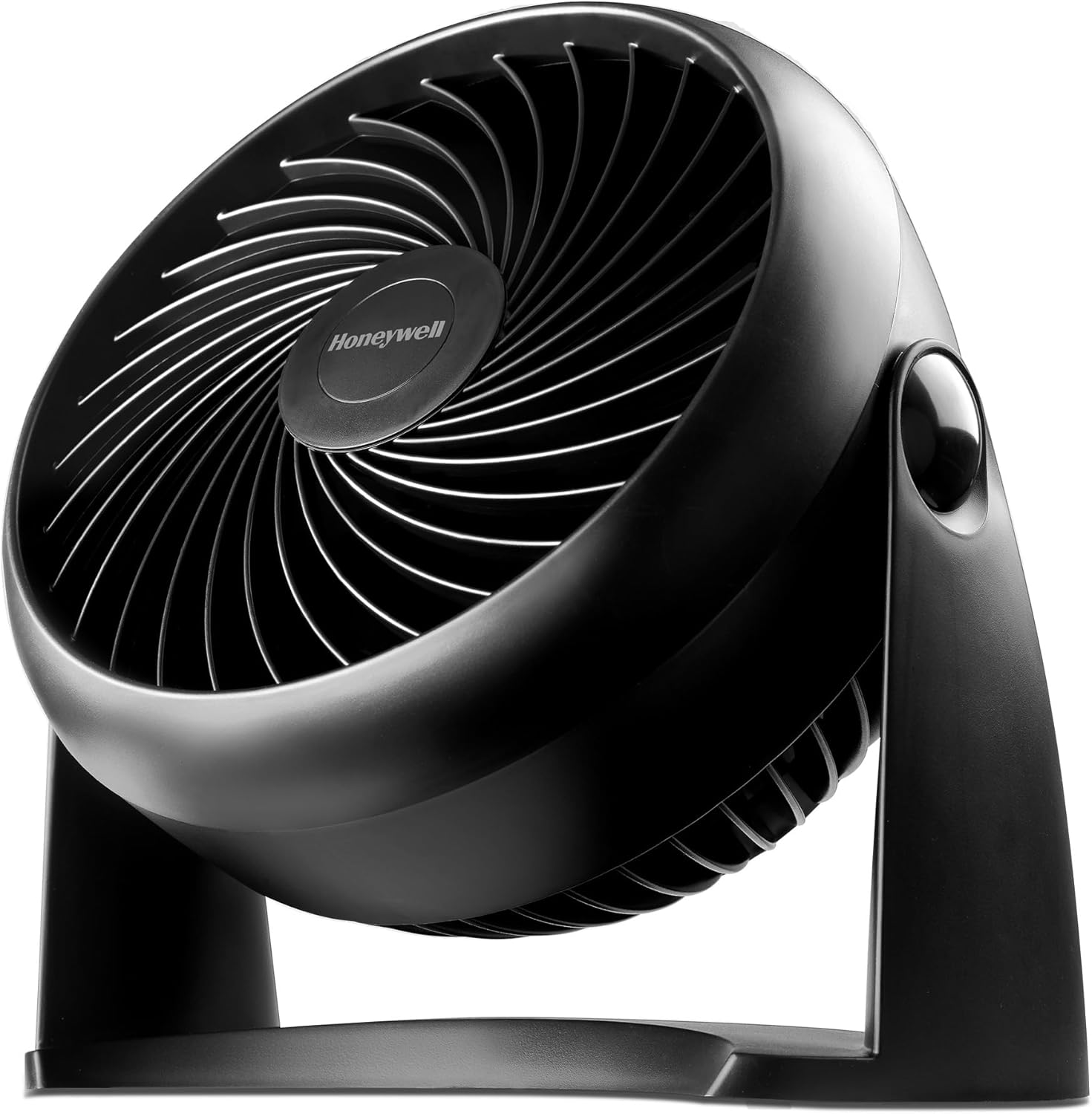
The Honeywell TurboForce HT-900 is a small tabletop air circulator designed to deliver focused airflow for desks, bedrooms, or home offices. It uses an aerodynamic turbo-style housing and a three-blade design driven by a brushless motor to move air efficiently; the manufacturer cites up to 185 cfm and feel-the-power reach of roughly 25 feet. Controls are simple push-button switches for three speeds, and the head pivots 90 degrees so you can angle the stream where you need it. The fan is compact and light, so it can sit on a table, be used on a small floor spot, or be wall-mounted using the built-in installation option. Practical benefits include a quiet operation claim that reduces distraction during sleep or work and low wattage operation for modest energy use. Important limitations are its small footprint and single-direction output, which makes it best for spot cooling and circulation rather than whole-room air movement, and the plastic construction that favors portability over premium durability.
Best for: Buyers who prioritize proven performance and broad user approval and want a simple, powerful desk fan for focused cooling at a workspace or bedside.
Less Ideal for: People seeking a premium-feel metal build or those who need a fan to cool large open rooms should consider larger circulators or tower fans instead.
- Compact and portable for desk or bedside placement
- Aerodynamic TurboForce design delivers strong focused airflow
- Three easily accessible speed settings with 90-degree pivot for directional control
- Brushless motor for efficient operation and quieter running
- Small unit tailored to spot cooling rather than circulating air in large rooms
- Plastic construction may feel less durable than metal alternatives
Verdict: A compact, proven desk fan that delivers strong, quiet spot cooling with simple controls and wide user approval.
Choosing the Right Powerful Desk Fan: Key Factors to Consider
Airflow Output and Coverage
Airflow output determines how effectively a desk fan moves air across your workspace. Higher output is useful when you need to cool multiple zones at a desk or combat a warm room, but raw airflow numbers do not tell the whole story.
Look at how the fan directs air and whether it provides a focused stream or broader circulation. A fan that pushes a concentrated column of air may feel stronger at a single spot, while a wider pattern can cool hands, face, and laptop simultaneously. Consider the distance between the fan and where you sit because output that is strong at 1 foot can be much weaker at 3 feet.
Noise and Acoustic Comfort
Noise level is often the deciding factor for a desktop fan since you will hear it throughout the workday. Fans with higher speed settings usually produce more audible sound, and the tonal quality matters: low-frequency rumble is more distracting than high-frequency white noise for many people.
Check measured decibel ratings if available and how those translate to typical desk tasks like phone calls or focused work. Fans that offer multiple speed steps or a variable control let you balance cooling power and quietness. Also consider whether the fan has vibration isolation where it contacts the desk, because resonance can amplify noise.
Adjustability and Directional Control
How easily you can aim the airflow affects both comfort and effectiveness. Useful adjustability features include a tilting head, wide oscillation, and a pivoting mount so you can point air where you need it most without moving the base.
Some fans include telescoping or height-adjustable stands that let you raise the air stream above objects on the desk. For shared workspaces, oscillation can distribute airflow without constant repositioning. Consider whether adjustments are tool-free and stable at higher angles.
Size, Footprint, and Stability
Desk surface area is limited, so the fan's footprint and weight matter. A compact base with a low center of gravity resists tipping, especially when you adjust the head. Heavier bases or non-slip pads improve stability but increase bulk.
Think about placement options near monitors, laptops, or papers; a tall fan may interfere with screens while a low-profile fan may not clear obstacles. Also evaluate cord routing and whether the fan can be clamped or mounted to save desk space.
Controls, Power, and Connectivity
Controls should match how you use the fan. Physical knobs and buttons are intuitive and easy to adjust, while touch panels or remote controls add convenience. Speed granularity matters: a few coarse steps limit fine tuning, whereas variable-speed control helps find a comfortable balance between airflow and noise.
Power options include traditional AC cords, USB power for low-voltage models, or battery backup for portable use. Consider the power source you have available at your desk and whether the fan supports the voltage or USB standard you use. Energy consumption and any standby power draw are also relevant for continuous use.
Safety Features and Materials
Safety matters on a desk where cables, pens, and hands are nearby. Look for grills that prevent fingers from reaching the blades, rounded edges, and stable electrical connections. Durable materials such as reinforced plastics or metal housings increase longevity and resist warping from prolonged use.
Also consider thermal protection and certifications that indicate basic electrical safety testing. Fans with accessible, easy-to-clean grills reduce dust buildup and maintain airflow efficiency without placing you at risk during maintenance.
How Airflow Is Measured and What It Means
Manufacturers sometimes publish airflow in cubic feet per minute or describe velocity at a set distance. Those numbers are useful starting points but can be misleading without context. The fan's shape, grill design, and blade profile all affect how that airflow feels at a desk.
For practical decision making, consider user-oriented measurements such as perceived cool-down time at typical desk distances and whether the fan produces a focused stream or a gentle breeze. Oscillation, tilt, and speed range change how airflow is delivered across a workspace.
- CFM indicates volume of air moved but not directionality.
- Air velocity at 1 to 3 feet better predicts on-desk cooling.
- Wide-pattern fans are better for shared desks; focused fans are best for single-person cooling.
Balancing Power and Noise in an Office
A powerful fan that creates too much noise can reduce concentration or disrupt calls. Prioritize models with documented noise ratings or user feedback about acoustic character. A slightly lower speed that runs quietly often provides a more consistent comfort level than a noisy high setting.
If your work involves frequent video or phone calls, test the fan at common working distances to judge whether the noise is acceptable. Some fans offer night or quiet modes that reduce pitch and volume while still moving usable amounts of air.
- Look for speed control that allows small increments.
- Vibration-damping feet reduce structure-borne noise.
Placement Tips for Maximum Cooling
Position the fan so it creates a direct path of airflow between you and the device. Angling the fan slightly upward can help the stream pass over obstacles like keyboards and monitors. If you need cooling for multiple people, set oscillation to cover the required arc rather than relying on a single fixed position.
Avoid blocking the intake or placing the fan too close to walls where it will recirculate warm air. For laptop cooling, point the airflow toward vents rather than at the center of the keyboard to assist heat dissipation.
- Place on a stable surface free of clutter.
- Match fan height to seated posture for best effect.
Maintenance and Longevity
Routine maintenance preserves airflow performance and reduces noise from dust buildup. Choose fans with grills that open or are easy to wipe so you can remove dust from blades and motor housing. Regular light cleaning every few weeks is usually sufficient in typical home offices.
Consider the availability of replaceable parts such as filters or motors when long service life is a priority. Fans with sealed bearings or brushless motors tend to last longer and remain quieter over time.
- Unplug before cleaning and follow manufacturer maintenance instructions.
- Inspect power cords periodically for wear and secure connections.
Portability Vs Permanent Placement
Decide whether you need a fan to stay on a desk permanently or one you will move between rooms. Portable models powered by USB or batteries offer flexibility but often have lower peak airflow compared with AC-powered desktop units. If you frequently rearrange your workspace, removable or clamp-style mounts can save space.
Permanent desktop fans typically prioritize maximum output and stability, while portable units balance convenience and compact size. Choose the form factor that aligns with how and where you will use the fan most often.
- Battery-powered fans add mobility but check runtime at high speeds.
- Clamp or clip mounts free up surface area on crowded desks.
How We Chose the Best Powerful Desk Fan
We focused on fans designed specifically for desktop use that can deliver noticeably stronger airflow than standard small fans while remaining suitable for indoor workspaces. Selection prioritized measurable performance attributes and real-world usability rather than brand recognition alone. Key evaluation criteria included airflow output or cubic feet per minute where available, measured noise levels at desk distance, head and tilt adjustability for directing air, and control options such as speed steps or variable fans. We also considered build quality and footprint to ensure the fans fit typical desk setups, plus power and connection type for convenient placement. Excluded from consideration were large floor or industrial fans that are not intended for desktop placement and ultra-compact personal fans with minimal airflow. We avoided products that sacrifice durability or safety features for raw speed. The final list highlights well-rounded desk fans that balance strong, usable airflow with acceptable noise and practical controls.
Our full evaluation process is outlined in our review methodology.
FAQ
How loud is a powerful desk fan at typical desk distance?
Noise varies by model and speed. At typical desk distance, high-speed settings can be noticeably audible, while lower speeds are often quiet enough for conversation. Look for decibel ratings or user feedback to estimate real-world loudness.
Can a powerful desk fan cool an entire small room?
Most desk fans are designed for targeted, close-range cooling rather than whole-room temperature changes. They help you feel cooler at your workspace but will have limited impact on room ambient temperature unless combined with other ventilation strategies.
Is USB power strong enough for a powerful desk fan?
USB-powered fans can be surprisingly effective, but they are typically limited by the USB power standard and may not match AC-powered models on peak airflow. USB is convenient for laptops and flexible setups but check airflow specs to ensure it meets your needs.
How often should I clean a desk fan?
Light cleaning every few weeks is recommended in normal home-office conditions, with more frequent attention if the environment is dusty. Cleaning keeps airflow efficient and reduces motor noise caused by accumulated debris.
Are there safety features I should look for on a desk fan?
Yes. Look for grills that prevent finger access to blades, stable bases or clamp mounts, and secure cord connections. Thermal protection on the motor and basic safety certifications are also useful indicators of a safer product.
Final Verdict
When choosing a powerful desk fan, prioritize the balance between airflow and noise for your specific workspace. Focus on measurable airflow delivery at the distance you sit, adequate adjustability to aim the stream where you need it, and controls that let you fine-tune performance throughout the day. Accept tradeoffs between peak power and acoustic comfort: a slightly less aggressive fan that runs quietly may deliver better sustained comfort for work. Use the evaluation criteria above to select a fan that meets your needs for cooling, stability, and long-term reliability.