
Note: This article contains affiliate links. If you click on these links and make a purchase, we may earn a small commission at no extra cost to you. This helps support our research and content. Read our full affiliate disclosure here.
If you create, archive, or reproduce artwork, choosing the right scanner for artwork affects how faithfully your work is captured. A good art scanner preserves fine line work, subtle gradients, and accurate color without introducing distortion or excessive post-scan correction. This guide summarizes the top shortlisted scanners for artwork and explains the traits that matter most for artists, printmakers, and archivists. Below you will find our top picks across studio and flatbed formats, plus guidance on resolution, color handling, and workflow considerations used to evaluate each option.
Top Picks at a Glance
| Best Overall The best all-around choice for most situations | Epson Perfection V600 Photo Scanner |  |
| Best Quality Built to a higher standard if you want something more solid | Epson Expression 13000XL |  |
| Best Value The sweet spot between price and what you get | Plustek OpticPro A320E |  |
| Best Budget The cheapest option that still gets the job done reliably | MUNBYN Portable Wand Scanner IDS001-BK |  |
| Top Rated A top-rated pick with lots of positive feedback | Plustek ePhoto Z300 Photo Scanner |  |
| Most Popular A crowd favorite that many people choose with confidence | Canon LiDE 400 Scanner |  |
| Best Seller A high-volume bestseller chosen again and again | ScanSnap iX2500 Scanner |  |
Epson Perfection V600 Photo Scanner

| Scanner Type | Photo |
|---|---|
| Connection Type | USB |
| Resolution | 6400 x 9600 dpi |
| Color Depth | 48 bits |
| Optical Sensor Technology | CCD |
The Epson Perfection V600 is a desktop photo scanner aimed at digitizing slides, negatives, medium-format film and standard prints for archiving or enlargements. It uses a CCD sensor and ReadyScan LED light to produce high-resolution scans up to 6400 x 9600 dpi, and the built-in transparency unit accepts mounted slides, strips of 35mm negatives and medium-format film up to 6 x 22 cm. The scanner includes film holders and software tools like DIGITAL ICE for dust and scratch removal plus image enhancement utilities, which help restore faded images and reduce manual editing. Four customizable buttons simplify routine tasks such as creating PDFs or email attachments, and Hi-Speed USB 2.0 provides a straightforward wired connection to a Windows PC. For artwork and photo reproduction this model delivers strong detail and good color depth, though it is a desktop unit that requires physical film holders and a computer workflow rather than standalone batch scanning or wireless transfer. Expect careful handling of film and occasional software adjustments to get the best archival results.
Best for: Artists and hobbyists who need accurate, high-resolution scans of film, slides, and photographic artwork for archiving or making enlargements and who value image restoration tools.
Less Ideal for: Users seeking a wireless or standalone scanner for high-volume office scanning or those who need a pocketable scanner for occasional on-the-go use.
- Very high optical resolution (up to 6400 x 9600 dpi) suitable for enlargements and fine-detail artwork scans
- Built-in transparency unit and included film holders for 35mm slides, negatives and medium-format film
- DIGITAL ICE dust and scratch removal plus bundled image restoration software to simplify cleanup
- ReadyScan LED lighting for faster start-up and lower power use
- Requires a wired USB 2.0 connection and a computer for scanning workflow
- Not designed for high-volume unattended batch scanning
Verdict: Choose the V600 if you want a desktop photo scanner that delivers high-resolution, film-capable scans with built-in film holders and restoration tools for artwork and photographic archiving.
Epson Expression 13000XL
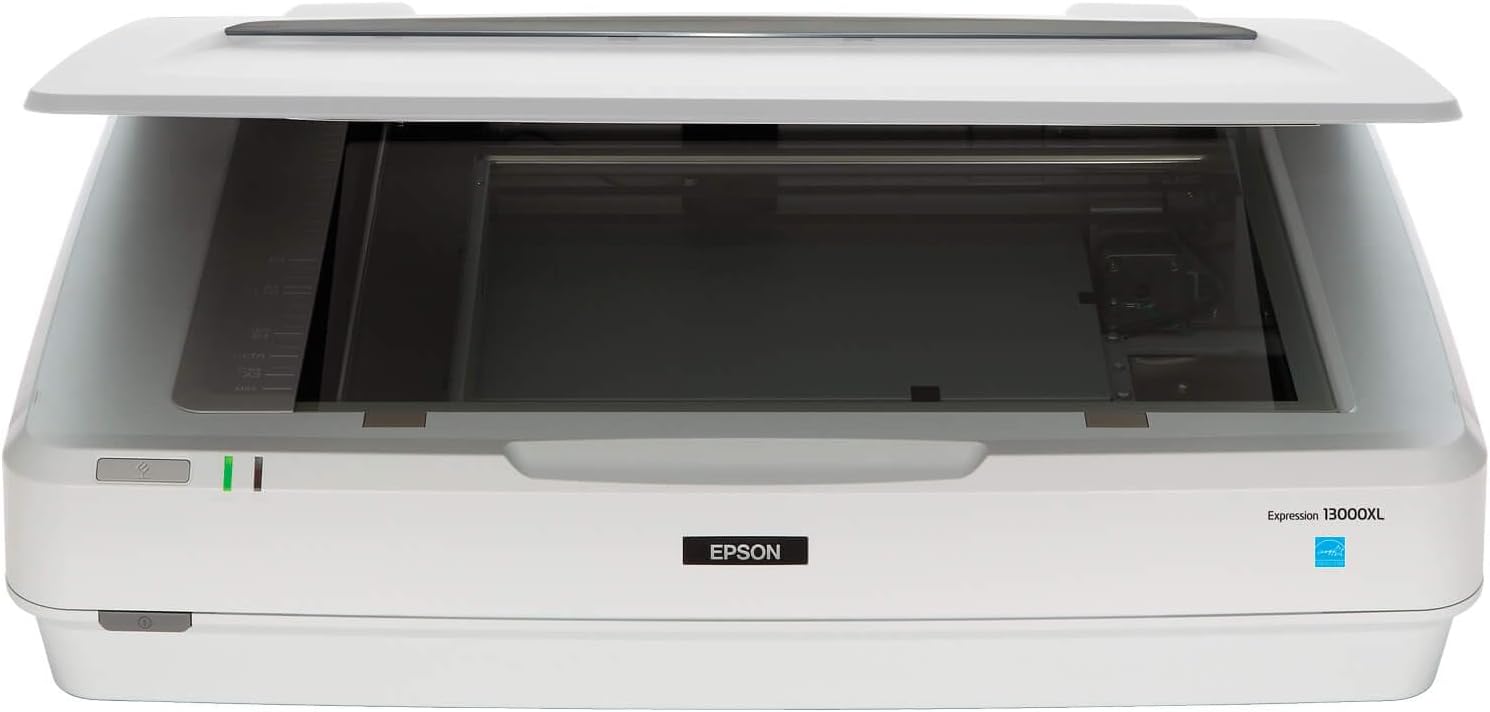
| Scan area | 12.2 x 17.2 in |
|---|---|
| Resolution | 2400 x 4800 dpi |
| Color depth | 48 bits |
| Optical sensor | CCD |
| Light source | LED |
The Epson Expression 13000XL is a pro-grade large-format flatbed scanner built for demanding photo, artwork, and graphics scanning. It captures reflective originals up to 12.2 x 17.2 inches at an effective optical resolution of 2400 x 4800 dpi with 48-bit color depth and a 3.8 Dmax for strong shadow detail. Epson's MatrixCCD sensor and ReadyScan LED illumination aim to produce accurate, consistent color while bundled SilverFast Ai software and Easy Photo Fix help with color restoration, batch scanning, and calibration. Typical use cases include archiving prints, scanning high-detail artwork for reproduction, and batch jobs where consistent color and large scanning area matter. The scanner connects via USB and uses CCD capture, so it favors image quality and dynamic range over speed; at this class of device scans can be slower than sheet-fed scanners and the unit is heavy and takes substantial desktop space. Film scanning requires the optional Transparency Unit. For studios and serious hobbyists who prioritize image fidelity and a large scan bed, this scanner delivers professional results, but casual users may find it larger and more capability than they need.
Best for: Serious photographers, studios, and artists who need archival-quality scans of large prints and artwork and prioritize color accuracy and fine detail over portability.
Less Ideal for: Casual users who scan occasionally, those with limited desktop space, or anyone who needs fast, networked, or portable scanning on the go.
- Large 12.2 x 17.2 inch scan bed for oversize prints and artwork
- High optical resolution (2400 x 4800 dpi) and 48-bit color depth for detailed, color-accurate scans
- CCD sensor and ReadyScan LED deliver strong dynamic range and consistent illumination
- Includes professional SilverFast Ai software and calibration support for archival workflows
- One-touch color restoration and batch scanning streamline recovery of faded photos and high-volume jobs
- Optional accessory required to scan film and transparencies
- Physically large and heavy, requiring a dedicated workspace
- USB connection only, no Ethernet or wireless networking built in
Verdict: Choose the Expression 13000XL when you need a large-bed scanner that prioritizes archival-quality, high-resolution scans and accurate color for artwork and photo reproduction.
Plustek OpticPro A320E

| Scan area | 12" x 17" |
|---|---|
| Optical Sensor Technology | CCD |
| Resolution | 3840×2160 |
| Connection Type | USB |
| Light Source Type | LED |
The Plustek OpticPro A320E is a purpose-built large-format flatbed scanner for artwork, posters, and textured originals up to 12 x 17 inches. It uses a Toshiba CCD sensor and LED illumination to capture wide tonal and color ranges with good depth of field, making it better suited than CIS-based scanners for uneven or textured surfaces. Typical use is digitizing paintings, vintage posters, sketches, and three-dimensional specimens where color fidelity and surface detail matter; batch scanning and DocAction button presets speed repetitive workflows. The scanner claims a 7.8 second color scan at 300 dpi and includes built-in OCR and TWAIN/WIA compatibility for direct scanning into creative or archive software. Practical benefits include accurate color reproduction with low Delta E, stereoscopic detail capture for textured pieces, and straightforward file management to export searchable PDFs or editable text. Limitations to note are an 8 bpp color depth listed (which is lower than some high-end art scanners) and a modest optical resolution spec that may require multiple passes or higher-resolution settings for very large prints intended for fine archival capture.
Best for: Artists, archivists, and hobbyist optimizers who need a reliable, faster way to digitize mid‑to‑large artwork and textured originals with good color accuracy and straightforward file management.
Less Ideal for: Professionals requiring ultra-high bit depth or the absolute highest optical resolution for museum-grade archival capture should consider higher-end specialized scanners or drum scanning services.
- Scans up to 12" x 17" to accommodate A3 and larger artwork.
- Toshiba CCD sensor and LED light produce better depth of field and color accuracy on textured originals.
- Fast recommended scan speed (7.8 seconds at 300 dpi) for quicker batch workflows.
- Built-in OCR and TWAIN/WIA support for direct scanning into editing and archive software.
- Color depth listed as 8 bpp, which is lower than some dedicated fine-art scanners.
- Optical resolution and specs may be limiting for extreme enlargement or high-end archival demands.
Verdict: Choose the A320E when you need a practical, large-format CCD flatbed that captures textured artwork and color-accurate scans without complex workflow overhead.
MUNBYN Portable Wand Scanner IDS001-BK

| Scanner Type | Handheld Scanner |
|---|---|
| Connection Type | Wireless Scan, USB Cord to Connect PC and Transfer |
| Resolution | 900 / 600 / 300 dpi |
| Color Depth | 48 bpp |
| Media Type | Documents |
The MUNBYN IDS001-BK is a lightweight wand scanner designed for quick, on-the-go digitizing of documents and photos up to A4 size. You hold the wand and sweep it down a flat page to produce JPG or PDF files which the scanner stores on the included 16 GB SD card; files are later transferred to a computer via USB. It offers selectable resolutions up to 900 dpi, making it capable of capturing fine detail in photos and artwork copies if you take care during the sweep. The unit runs on two AA batteries so it works without being tethered, but the USB cable is only for file transfer and will not power or charge the scanner. Setup is simple because no drivers are required and the device is recognized like a removable drive. Expect variable results on very large or textured artwork where keeping an even sweep is hard, and color accuracy and edge straightness will not match flatbed or dedicated art scanners, but for budget-friendly, portable digitizing of prints, sketches, and photos this is a practical option.
Best for: Artists or hobbyists wanting an inexpensive, portable way to digitize prints, sketches, and photos for archiving or sharing without needing a desktop flatbed scanner.
Less Ideal for: Professionals who need color-accurate, distortion-free scans of original artwork or large pieces should choose a flatbed or dedicated art scanner instead.
- Portable, battery-powered wand design for scanning anywhere without a power outlet
- Stores scans on included 16 GB SD card for offline capture
- Up to 900 dpi resolution suitable for detailed photo and small artwork scans
- No drivers required; connects to PC as removable storage for simple file transfer
- Handheld sweeping motion can produce uneven edges, distortion, or inconsistent exposure on larger artworks
- AA battery operation means ongoing battery costs and no built-in rechargeable power
- Color fidelity and flatbed-level precision are limited compared with dedicated art or flatbed scanners
Verdict: A low-cost, portable wand scanner that delivers high-resolution scans for hobby artwork and photo archiving when you need mobility over museum-grade accuracy.
Plustek ePhoto Z300 Photo Scanner

| Scanner Type | Document, Photo |
|---|---|
| Connection Type | USB |
| Resolution | 600 dpi x 600 dpi, 300 dpi x 300dpi |
| Optical Sensor Technology | CCD |
| Light Source Type | LED |
The Plustek ePhoto Z300 is a purpose-built photo scanner that scans common photo sizes (3×5 to 8×10) and small documents by feeding images through a gentle roller instead of a flatbed. It uses a CCD sensor with up to 600 dpi optical resolution and automatic crop and deskew so each photo is scanned, enhanced, and ejected in roughly two to five seconds depending on size and resolution. The included software offers auto crop, rotation, color restoration, red-eye removal, batch naming, and options to save multiple file formats or upload directly to cloud and social services. Its roller design is gentler on older, fragile photos than tight document feeders and the CCD sensor preserves color and shadow detail better than many CIS-based feeders. Limitations include a simplex-only feed (no duplex), inability to handle items thicker than about 0.76 mm, and a single-sheet capacity so large projects still require continuous manual feeding rather than an automatic batch hopper. For artwork use, it handles flat photos and small flat paper art well but is not suitable for thick originals or oversized artwork.
Best for: Buyers who prioritize reliable, high-fidelity scans of loose photos and flat paper artwork and want a durable, easy-to-use workflow for large batches of small originals.
Less Ideal for: People who need to scan thick mounts, three-dimensional artwork, oversized sheets, or want an automatic duplex/batch feeder for mixed document sizes.
- CCD optical sensor for better color accuracy and dynamic range than typical CIS feeders
- Very fast single-photo throughput (about 2–5 seconds per photo at 300 dpi) for high-volume digitizing sessions
- Auto crop, deskew, and built-in image restoration tools simplify restoring faded or damaged photos
- Gentle roller feed designed to reduce stress on older or sticky photos
- Works with both Mac and PC and supports common photo sizes and multiple file formats
- Not suitable for thick originals above ~0.76 mm or bound artwork
- Simplex-only feed and single-sheet workflow requires manual feeding for large jobs
- Limited to small- and medium-format originals; oversized artwork cannot be scanned
Verdict: Choose the ePhoto Z300 when you need a fast, reliable photo-focused scanner that preserves color and detail for large runs of loose, flat artwork or photographs.
Canon LiDE 400 Scanner

| Scanner Type | Document, Photo |
|---|---|
| Connection Type | USB |
| Resolution | 4800 dpi |
| Color Depth | 48 bit |
The Canon LiDE 400 is a slim A4 flatbed scanner that delivers up to 4800 dpi optical resolution and 48-bit color depth, making it capable of capturing fine detail from photos, prints, and artwork. It connects over USB-C 3.0 for plug-and-scan simplicity and can be powered directly from the host so no separate power adapter is needed. Five EZ one-touch buttons let you trigger common tasks like Auto Scan, copy, email, and PDF creation, and Canon's Auto Document Fix and Auto Photo Fix help correct common issues such as skew or faded tones. The unit is lightweight and can be used vertically with the included stand to save desk space. For artwork use the high resolution and color depth allow good scans of small to medium prints, although the single-sheet flatbed limits throughput for large batch jobs and the scanner is optimized for A4-size originals rather than large-format art. Image processing can help clean scans but may alter subtle color or texture details compared with raw capture workflows.
Best for: Buyers who want a reliable, easy-to-use flatbed for high-resolution scans of photos, prints, and smaller artwork and who value simplicity and proven results from a familiar brand.
Less Ideal for: Artists or studios needing to scan large-format originals or high-volume batches should consider larger, dedicated photo or drum scanners instead.
- High optical resolution (4800 dpi) suitable for capturing fine detail in photos and small artwork
- 48-bit color depth for richer color gradations
- USB-C 3.0 plug-and-scan with USB-powered operation for a simple desktop setup
- Five one-touch EZ buttons for quick scans, copies, emails, and PDF creation
- Vertical stand option preserves desk space when not scanning
- A4 flatbed limits scanning size for larger artwork pieces
- Single-sheet throughput and lightweight design are not optimized for high-volume scanning workflows
Verdict: A compact, high-resolution flatbed that delivers sharp, color-rich scans of photos and small artwork while keeping setup and operation simple.
ScanSnap iX2500 Scanner

| Resolution | 600 dpi |
|---|---|
| Connection Type | USB, Wi-Fi |
| Standard Sheet Capacity | 100 |
| Scanner Type | Business Card, Document |
The ScanSnap iX2500 is a fast, office-style document scanner aimed at everyday desktop use and light production tasks. It scans duplex at up to 45 pages per minute through a 100-sheet automatic document feeder and connects via USB-C or Wi‑Fi (including Wi‑Fi 6) so you can place it away from a computer or send scans directly to cloud services and mobile devices. A 5-inch touchscreen lets you select profiles and destinations without a PC, and bundled software creates searchable PDFs and editable Office files while applying automatic image cleanup. Practical benefits include reliable, jam-resistant feeding with multi-feed and skew detection, a removable receipt guide for small items, and support for a broad set of devices and cloud destinations. For artwork, the iX2500 handles high-volume flat originals, but its CIS sensor and feeder are optimized for documents and receipts rather than high-fidelity large-format art or delicate originals, so you may need careful handling and color checks for archival or color-critical scans.
Best for: Buyers who want a reliable, easy-to-use scanner for high-volume digitizing and cloud workflows and prefer a stable, low-risk device that handles documents, receipts, and framed prints with straightforward automation.
Less Ideal for: Collectors, fine-art photographers, or artists who need museum-grade color accuracy, very large flatbed scans, or gentle non-feed handling should consider a dedicated flatbed or drum scanner instead.
- Fast duplex scanning at up to 45 pages per minute for high throughput
- 100-sheet automatic feeder reduces manual handling for batch jobs
- Built-in 5" touchscreen for on-device profile selection and cloud sends
- Wi‑Fi 6 and USB-C connectivity allow standalone scanning to devices and cloud services
- Software produces searchable PDFs and editable Word/Excel/PPT files automatically
- CIS optical sensor is designed for documents and may not match drum scanners for color accuracy or large flat art
- Feeder-based design requires care with fragile, oversized, or textured originals to avoid damage
Verdict: If you need a dependable, high-throughput desktop scanner that scans duplex to cloud or device with minimal fuss, the iX2500 is a safe, practical choice.
Choosing the Right Scanner for Artwork: Key Factors to Consider
Optical Resolution and Effective Detail
Optical resolution determines how much fine detail the scanner can capture without interpolation. For artwork with intricate line work, crosshatching, or textured surfaces, higher optical DPI preserves true edge definition and texture. Effective resolution also depends on the sensor optics and the quality of the glass or platen.
Pay attention to the distinction between claimed interpolated DPI and native optical DPI. Interpolation creates larger files but does not add real detail. If you plan to make large prints or archival captures, choose a scanner whose native DPI meets your output needs to avoid relying on software upscaling.
Color Fidelity and Bit Depth
Scanners that record greater bit depth capture smoother tonal transitions and more accurate color gradations. For color-sensitive work such as paintings, prints, or mixed-media pieces, higher bit depth reduces banding and preserves subtle shifts in hue.
Color management features and the ability to use ICC profiles matter for matching scans to displays and printers. Look for scanners with robust color calibration options or support for external profiling to maintain consistency across devices and reproduction workflows.
Dynamic Range and Tonal Reproduction
Dynamic range, often expressed as Dmax, indicates how well the scanner captures shadow and highlight detail. Art media with deep blacks, translucent washes, or glossy highlights benefit from a device with a wide dynamic range to avoid losing detail in extremes.
Better tonal reproduction means less post-scan correction and more faithful archival images. Consider the types of media you scan most often and prioritize dynamic range for works with high contrast or subtle midtone detail.
Maximum Scan Area and Media Handling
The maximum scan area determines the largest artwork you can capture in a single pass. Larger platens are useful for full-sheet scans of prints, posters, or originals, while smaller scanners may require stitching multiple scans for large works.
Also check how the scanner handles thick or delicate originals. A flatbed with a removable lid or adjustable platen gap is easier to use with sculptures, framed pieces, or textured surfaces. Ease of loading and secure registration affect consistency when scanning multiple pieces.
Software Features and File Output
Scanner software influences the efficiency and quality of your workflow. Look for software that offers raw or uncompressed output, bit-depth selection, batch scanning, and precise crop and color controls. Support for standard file formats, 16-bit TIFF output, and direct export to editing software streamlines post-processing.
Good software should also offer color profiling, preview accuracy, and simple correction tools. For professional use, the ability to automate scans and save presets for different media types is particularly valuable.
Build Quality and Reliability
Physical construction affects scan consistency and long-term reliability. A flat and stable platen prevents focus shifts and registration errors, while solid hinges and a durable lid protect fragile originals. Vibration resistance and consistent illumination are important for repeatable results.
Consider serviceability and support for replacement parts if you expect heavy use. A well-built scanner reduces downtime and maintains output quality over years of studio work.
Choosing Between Flatbed and Drum-Style Workflows
Most artists will use flatbed scanners because they accept a variety of media and are simple to operate. Flatbeds are versatile for paper-based work, mixed-media, and framed pieces that sit flat under the glass. They are also generally more affordable and easier to maintain.
For extremely high-resolution archival capture, specialized drum or large-format scanners can offer superior optical detail and tonal range. These systems are typically used by professionals with very specific reproduction needs and controlled studio setups.
- Flatbed: versatile, accepts various media thicknesses, easier setup.
- Drum/Large-format: highest fidelity, requires specialized handling and space.
- For most studio workflows, a high-quality flatbed balances performance and practicality.
Preparing Artwork for Scanning
Clean, dry, and flat originals scan best. Remove dust with a soft brush and flatten curled corners before scanning. For fragile or valuable pieces, use noninvasive handling techniques and consider placing a protective layer between the artwork and the platen glass.
When scanning framed or glazed works, be aware of reflections and glass glare. Adjust lighting, use a matte mask if available, or remove glazing where safe and practical to reduce artifacts.
- Dust and surface particles create spots that are hard to remove later.
- Flatten papers and prints to avoid focus inconsistency across the image.
- Use gloves or clean hands to avoid oils and fingerprints on originals.
Color Management and Profiling
Accurate color reproduction requires consistent color management between the scanner, monitor, and printer. Use ICC profiles when available and calibrate your monitor before critical color work. Many scanners offer built-in profile support or work with external profiling tools for best results.
If true color matching is critical, scan at higher bit depth and save files in formats that preserve color information, such as 16-bit TIFF. Keep a workflow that minimizes conversions between color spaces until final output steps.
- Calibrate your monitor periodically to ensure what you see is accurate.
- Use scanner profiles or create custom ICC profiles for repeatable color.
- Scan in native RGB or linear color spaces when possible, and convert late in the workflow.
File Management and Archival Best Practices
High-resolution scans generate large files, so plan storage and backup strategies. Use lossless formats for archival masters and keep organized naming conventions that record date, media type, and capture settings. Maintain at least one offsite backup for irreplaceable work.
Consider creating two versions: a high-resolution archival master and a smaller, edited copy for online sharing. This preserves the original capture while keeping everyday files manageable.
- Use 16-bit TIFF for archival masters to retain tonal detail.
- Keep a spreadsheet or metadata file with capture details for each artwork.
- Back up scans using a 3-2-1 strategy: three copies on two media types and one offsite.
Working with Textured or Three-Dimensional Pieces
Textured surfaces such as heavy impasto, relief printing, or collaged elements pose a challenge because texture casts shadows and changes apparent color. When scanning these pieces, use raking light in a controlled environment to capture texture separately if needed, or photograph the work for best three-dimensional fidelity.
Some scanners allow for adjustable platen spacing or scanning without pressing the lid to avoid crushing delicate texture. Be mindful of how contact with the glass may alter the appearance of raised elements.
- Test small areas to see how texture registers with your scanner.
- Consider combining a high-resolution scan with a high-quality photo for texture documentation.
- Avoid pressing textured pieces flat unless the piece is designed to be flattened.
How We Chose the Best Scanner for Artwork
We focused on practical, technical criteria that matter when digitizing original artwork. Our evaluation prioritized optical resolution and effective dpi to ensure line work and texture reproduce clearly. Color fidelity and color depth were next, since accurate color reproduction and wide bit depth reduce reliance on corrective editing. We also weighed dynamic range and highlight/shadow handling for media with subtle tonal shifts, such as watercolor and charcoal. Workflow and connectivity matter for studio use, so we assessed software control, native file formats, and tethering options. We considered build quality and platen flatness because warped glass or imprecise registration degrades scans of rigid or textured media. Finally, we looked at practical handling details like maximum scanning area and whether the device supports thick originals or odd sizes. Exclusions: we excluded devices aimed solely at general office use with low optical resolution, scanners with poor color profiling, and units that lack basic artist-oriented controls. The criteria above guided selection, leaving out options that fail to meet minimum technical needs for artwork digitization.
Our full evaluation process is outlined in our review methodology.
FAQ
What resolution do I need to scan artwork for gallery prints?
It depends on the final print size and viewing distance. For gallery-quality prints viewed up close, aim for a native optical resolution that yields at least 300 PPI at the desired print dimensions. Higher native DPI helps when you plan significant enlargement.
Is it better to scan at 16-bit instead of 8-bit?
Often yes. Scanning at 16-bit preserves more tonal information and reduces banding during editing. Use 16-bit for archival masters or color-critical work, and convert to 8-bit for final delivery if file size or compatibility requires it.
How do I reduce glare and reflections when scanning framed art?
Where safe, remove the glazing before scanning. If removal is not possible, use a polarizing filter on the light source or the scanner lid if supported, or adjust ambient light to minimize reflections. Scanning at a slight angle and correcting perspective in software can also help in some cases.
Can I scan thick originals like collages or handmade paper?
Some flatbeds handle thicker originals by allowing extra platen gap or by not pressing the lid fully. Check whether the scanner supports uneven or raised surfaces. For very thick items, high-resolution photography is often a better choice.
How should I store high-resolution scan files?
Use lossless formats such as TIFF for archival masters, and keep multiple backups including an offsite copy. Organize files with consistent naming and maintain metadata about capture settings to make future reprints or edits easier.
Final Verdict
When choosing a scanner for artwork, prioritize optical resolution, color fidelity, and dynamic range according to how you will reproduce or archive your work. Match the maximum scan area and handling features to the sizes and materials you use most often. Balance software capabilities and file output with build quality to ensure reliable, repeatable captures. Invest in a scanner that aligns with your production goals: higher resolution and bit depth for archival and print reproduction, or versatile handling and software for a busy studio. With the right priorities, you can digitize originals accurately while minimizing post-scan correction.