
Note: This article contains affiliate links. If you click on these links and make a purchase, we may earn a small commission at no extra cost to you. This helps support our research and content. Read our full affiliate disclosure here.
Choosing the right scanner for paintings matters when you want faithful reproductions, accurate color, and preserved detail. Whether you digitize canvases for archives, print reproductions, or online portfolios, the scanning tool determines how closely a digital file matches the original artwork. This guide highlights seven shortlisted scanners for paintings that excel at high-resolution capture and color fidelity. We evaluate each pick against imaging, color management, size handling, and usability criteria so you can match a scanner to the scale and workflow of your studio. Read on to see which options best fit different painting types and reproduction goals.
Top Picks at a Glance
| Best Overall The best all-around choice for most situations | Plustek OpticPro A320L |  |
| Best Quality Built to a higher standard if you want something more solid | Epson Expression 13000XL |  |
| Best Value The sweet spot between price and what you get | VIISAN VF3120 A3 Flatbed Scanner |  |
| Best Budget The cheapest option that still gets the job done reliably | Hczrc Portable Handheld Scanner |  |
| Top Rated A top-rated pick with lots of positive feedback | Epson Perfection V850 Pro |  |
| Most Popular A crowd favorite that many people choose with confidence | Canon CanoScan LiDE 400 |  |
| Best Seller A high-volume bestseller chosen again and again | ScanSnap iX2500 Photo Edition |  |
Plustek OpticPro A320L
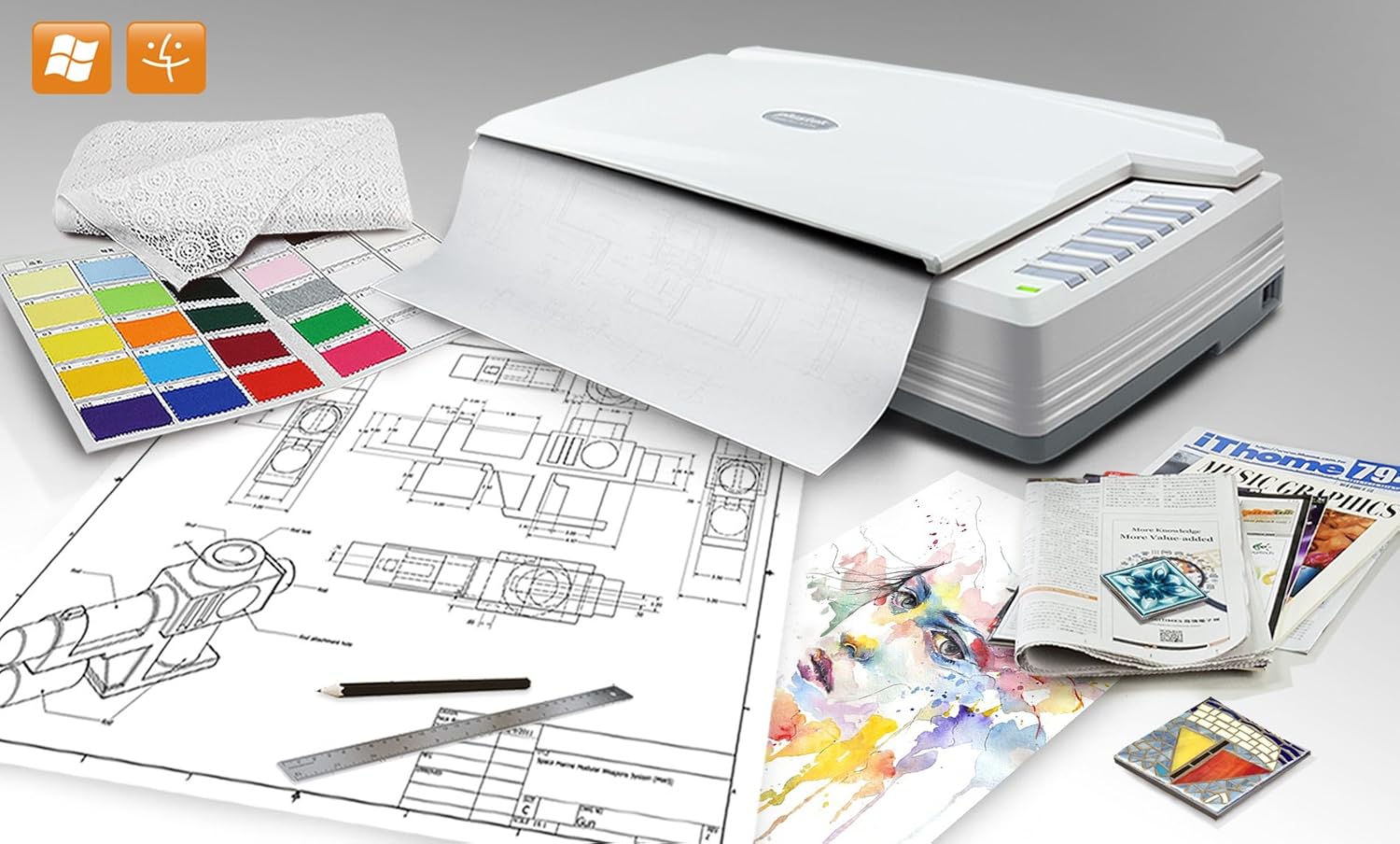
| Optical Resolution | 1600 dpi |
|---|---|
| Scan Area | Up to 12" x 17" (A3) |
| Optical Sensor Technology | CCD |
| Color Depth | 48-bit |
| Connection Type | USB |
The Plustek OpticPro A320L is a large-format flatbed scanner aimed at artists and galleries that need to digitize paintings, prints, and other flat artwork without disassembling frames. It uses a Sony ILX560 CCD sensor and a fixed-focus optical design to deliver up to 1600 dpi optical resolution, higher depth of field, and richer color reproduction than typical CIS-based scanners. Practical features include a generous 12" x 17" scanning area, dual-sided LED illumination for more even lighting at the edges, and TWAIN/WIA/ICA support for integration with common imaging software and OCR/file routing via the Doc Action utility. The CCD and increased depth of field make it better at capturing surface texture such as brushstrokes and layered paint up to about 10 mm above the glass, but very high-resolution scans of full A3 artworks generate very large files that require substantial storage and processing power. The scanner connects over USB and is designed for desktop use in studios or galleries where careful color and detail capture matter more than speed or portability.
Best for: Artists, small galleries, and conservators who need faithful, high-detail scans of paintings and flat artwork for archiving, reproduction, or portfolio work and who prioritize color accuracy and texture capture over speed.
Less Ideal for: Users who need a lightweight, portable scanner for occasional document scanning or those who cannot accommodate the large files and processing requirements of very high-resolution art scans.
- Sony ILX560 CCD sensor for higher color fidelity and lower noise than CIS sensors
- Supports up to 12" x 17" scanning area for larger artworks and prints
- 1600 dpi optical resolution for detailed captures and visible texture
- Higher depth of field captures surface relief like brushstrokes up to about 10 mm from the glass
- TWAIN/WIA/ICA support and Doc Action utilities for easy file routing and OCR
- Very large file sizes at maximum resolution that demand storage and powerful image editors
- Relatively slow scan times for high-resolution color scans compared with smaller document scanners
- Desktop footprint and weight make it less portable for offsite shoots
Verdict: Choose the A320L when you need a large-format, CCD-based flatbed that captures painting texture and accurate color for archival‑quality art scans.
Epson Expression 13000XL
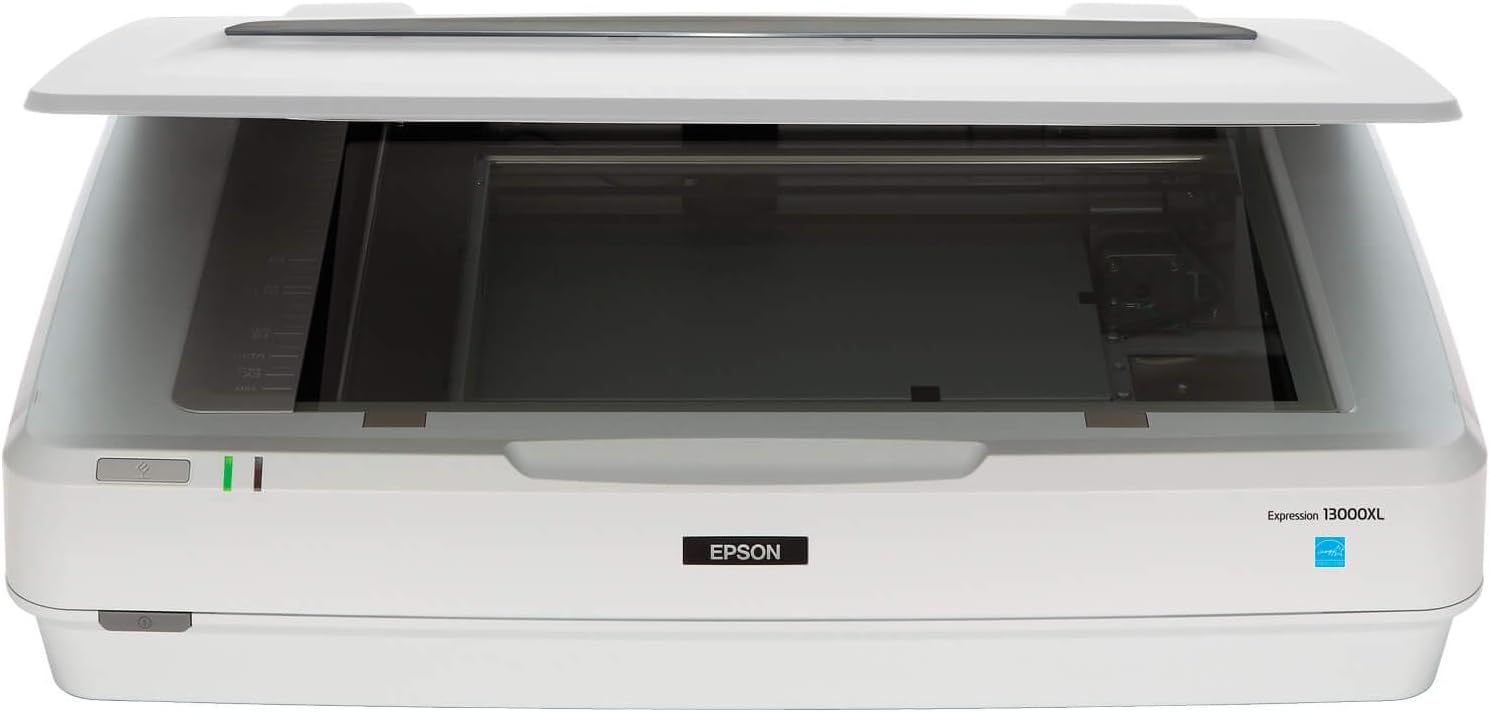
| Resolution | 2400 x 4800 dpi |
|---|---|
| Color Depth | 48 bits |
| Scanner Type | Photo |
| Optical Sensor Technology | CCD |
| Light Source Type | LED |
The Epson Expression 13000XL is a large-format flatbed scanner built for demanding photo archiving and graphic work, offering a 12.2 x 17.2 inch scan bed and up to 2400 x 4800 dpi optical resolution. It uses Epson MatrixCCD and ReadyScan LED technologies with 48-bit color depth and 16-bit grayscale to capture rich color and fine detail, and includes Easy Photo Fix for one-touch color restoration and dust removal. The scanner connects via USB and supports batch scanning workflows and LaserSoft Imaging SilverFast Ai software for advanced image processing and calibration. For paintings and large prints, the wide bed and high optical density (3.8 Dmax) help retain tonal range and color accuracy across large originals, while optional transparency scanning (with a separately sold Transparency Unit) adds versatility for other media. Important practical considerations are its substantial footprint and weight which require a dedicated stable work surface, and the need for a capable workstation and software workflow to manage very large image files.
Best for: Buyers who prioritize image fidelity and archival-quality scans of large artwork and prints and who are prepared to integrate a scanner into a professional workflow.
Less Ideal for: If you need a compact, portable scanner for casual snapshots or have very limited workspace, this unit is not a good fit.
- Large 12.2 x 17.2 inch scan bed accommodates oversized photos and paintings
- High optical resolution (2400 x 4800 dpi) and 48-bit color depth for detailed, color-accurate scans
- CCD sensor and 3.8 Dmax preserve tonal range and shadow detail important for fine art reproduction
- Includes LaserSoft Imaging SilverFast Ai software and calibration targets for professional-grade scanning and color control
- One-touch Easy Photo Fix and batch scanning speed up restoration and high-volume workflows
- Heavy and large footprint requires a dedicated stable workspace
- No built-in transparency unit; film scanning needs an optional accessory
- USB connection only may limit placement flexibility
Verdict: Choose the Expression 13000XL when you need a large-format scanner that delivers archival-quality, color-accurate scans of paintings and prints.
VIISAN VF3120 A3 Flatbed Scanner

| Resolution | 1200 dpi |
|---|---|
| Optical Sensor Technology | CIS |
| Light Source Type | Three-color (RGB) LED |
| Color Depth | 48-bit |
| Connection Type | USB |
The VIISAN VF3120 is an A3 flatbed scanner aimed at digitizing large documents, photos, books, and artwork on a desktop. It uses a CIS sensor with a three-color RGB LED light source and can produce scans up to 1200 x 1200 dpi (Windows with ViiScan software) and 48-bit color depth, which helps capture fine color gradations for prints and flat artwork. The large glass bed accepts items up to nearly 12" x 16.8" and an Auto-Scan mode starts scanning when the lid is closed to speed batch work. It offers TWAIN, WIA and ICA driver support for direct scanning into imaging apps and includes simple one-touch buttons for scan, email, print and PDF creation. Practical caveats: the CIS sensor requires the artwork to lie flat, so it will not handle thick, highly textured canvases or three-dimensional pieces well, and WIA limits dpi to 600 so full 1200 dpi requires the vendor software on supported systems. For flat paintings, photos and archival pages the VF3120 provides a useful balance of large format area and high-resolution color capture at desktop convenience.
Best for: Buyers who want a practical, desktop A3 scanner for flattenable artwork, photos, and archival pages and who prioritize a large scan area and straightforward, efficient workflows.
Less Ideal for: Artists or conservators who need to capture thick, heavily textured, or three-dimensional paintings should look at camera-based or specialized drum/planetary scanners instead.
- Large A3 glass bed accepts items up to 11.98" x 16.8" for oversized documents and prints
- Up to 1200 x 1200 dpi optical resolution with 48-bit color depth for detailed, vivid scans
- LED light source with no warm-up and energy-efficient operation
- Auto-Scan function and one-touch buttons speed continuous scanning workflows
- Supports TWAIN, WIA and ICA drivers for integration with imaging software
- CIS sensor requires artwork to be flat and cannot capture thick or highly textured canvases accurately
- Full 1200 dpi scanning relies on the vendor ViiScan software and is limited by WIA to 600 dpi
Verdict: A cost-conscious A3 flatbed that delivers high-resolution, color-rich scans for flat paintings and prints while streamlining batch scanning with Auto-Scan and one-touch controls.
Hczrc Portable Handheld Scanner

| Resolution | 900 dpi |
|---|---|
| Connection Type | USB |
| Optical Sensor Technology | CIS |
| Light Source Type | LED |
| Media Type | Receipt, Photo, Document |
This compact handheld scanner is built for on-the-go scanning of A4 documents, photos, receipts and book pages without a PC connection. You power it with two AA batteries, slide it over the surface and it saves JPEG or PDF files directly to the included 16GB microSD card (supports up to 32GB). It offers three resolution settings up to 900 dpi, a CIS sensor and LED light source, which helps when capturing flat artwork, photos or text. The unit is plug-and-play for file transfer via USB and includes a cleaning cloth and pocket for travel. Practical benefits include extreme portability, no driver installation, and simple one-button scanning and white-balance calibration. Limits are typical for handheld scanners: you must steady and slide the device to avoid banding or distortion on large flat artwork, the CIS sensor and LED lighting are less accurate than flatbed scanners for color-critical reproduction, and battery operation can be less convenient for long sessions. For quick archiving and travel use it works well, but expect compromises for museum-grade or color-critical painting scans.
Best for: Buyers who need a low-cost, highly portable scanner for quick archival shots, travel documentation, or scanning photos and documents away from a computer.
Less Ideal for: Users seeking museum-quality, color-accurate reproductions of paintings or who need a dedicated flatbed or drum scanner for professional art reproduction.
- Very portable and lightweight for travel or field scanning
- Stores scans directly to microSD card with included 16GB card
- Selectable resolutions up to 900 dpi for higher-detail photo scans
- Plug-and-play USB file transfer without driver installation
- One-button operation and built-in white-balance calibration for quick setup
- Handheld sliding operation can produce banding or distortion on large flat artworks if not kept steady
- CIS sensor and LED lighting are not color-accurate enough for professional art reproduction
Verdict: A budget-friendly, travel-ready handheld scanner that delivers quick, high-resolution scans for snapshots and archives, but not for color-critical painting reproduction.
Epson Perfection V850 Pro

| Scanner Type | Photo |
|---|---|
| Connection Type | USB |
| Resolution | 9600 |
| Color Depth | 48 bits |
| Optical Sensor Technology | CCD |
The Epson Perfection V850 Pro is a pro-grade flatbed photo scanner built to capture high-resolution scans of prints, slides, negatives and medium/large-format film. It uses a dual-lens system and CCD sensor to deliver up to 6400 dpi optical resolution for film and strong color depth, while the 4.0 Dmax helps preserve shadow detail in dense originals. ReadyScan LED lighting eliminates warm-up time and the package includes multiple film holders for batch scanning. Built-in Digital ICE and other restoration tools reduce dust and scratches, which speeds workflow when digitizing older or delicate paintings on film or photos of artwork. Connection is via USB and the scanner supports common imaging workflows on Windows and macOS. The unit is substantial and aimed at studio or archival use rather than casual home scanning, and its size and weight make it less portable; specialized options like a fluid mount are available separately for certain film work. Overall this scanner is focused on image fidelity and reliable, repeatable results for demanding scanning tasks.
Best for: Photographers, archivists, and artists who prioritize faithful, repeatable capture of artwork and film and need a durable studio scanner for long-term archiving.
Less Ideal for: Casual users who only scan occasional documents or small photos and need a compact, portable, or lower-cost consumer scanner.
- High optical resolution up to 6400 dpi for detailed scans of film and artwork reproductions.
- High dynamic range (4.0 Dmax) that preserves deep shadow detail in dense originals.
- Dual-lens system and CCD sensor deliver consistent, factory-quality image capture.
- Includes multiple film holders and Digital ICE technology to remove dust and scratches during scanning.
- ReadyScan LED light source provides fast scans with no warmup time.
- Large and heavy desktop unit that is not convenient to move or store.
- Advanced features and optional accessories like fluid mount add complexity and extra cost.
Verdict: Buy this if you need a reliable, studio-grade photo scanner that delivers high-resolution, archival-quality scans of paintings and film.
Canon CanoScan LiDE 400

| Scanner Type | Document, Photo |
|---|---|
| Connection Type | USB |
| Resolution | 4800 |
| Color Depth | 48-bit |
| Optical Sensor Technology | CIS |
The Canon CanoScan LiDE 400 is a compact flatbed scanner that handles documents and photos with up to 4800 x 4800 dpi optical resolution and 48-bit color depth, making it capable of capturing fine detail and wide color range from prints and photos. It connects and draws power over a single USB Type-C cable for simple setup and has five EZ buttons including auto scan and PDF functions for quick workflows. Built-in image enhancements such as color restore and dust removal can help recover aged prints and reduce small specks, while an 8-second high-speed scan time keeps throughput fast for multiple items. For paintings, the LiDE 400 works best with small to medium flat originals and reproductions where a contact flatbed capture is appropriate, but it cannot digitize thick canvases or textured impasto without careful flattening and may lose some three-dimensional surface detail. Overall it is a practical, easy-to-use scanner for high-resolution flat artwork reproductions, provided the original can be placed face-down on the glass.
Best for: Buyers who want a reliable, higher-resolution flatbed scanner to make faithful digital reproductions of small to medium flat paintings, prints, and photos while valuing straightforward setup and proven user controls.
Less Ideal for: Artists or conservators who need to capture textured, thick, or large-format paintings in one pass should consider specialized overhead or large-format imaging solutions instead.
- High optical resolution (4800 x 4800 dpi) suitable for detailed flat artwork reproductions
- 48-bit color depth preserves wide color range for accurate photo and print scans
- USB Type-C connection supplies data and power with a single cable for simple setup
- Image enhancement features like color restore and dust removal help improve aged or blemished originals
- Fast scan speed (around 8 seconds) for quick digitization of multiple pieces
- Flatbed design requires the artwork to lie flush on the glass and cannot capture texture or thick canvases
- Limited to letter/photo media sizes so larger paintings must be scanned in sections and stitched externally
Verdict: A compact, high-resolution flatbed that delivers detailed, color-rich scans of small to medium flat artworks with simple setup and useful image-restoration tools.
ScanSnap iX2500 Photo Edition

| Connection Type | USB, Wi-Fi |
|---|---|
| Resolution | 600 dpi |
| Color Depth | 24 bits |
| Standard Sheet Capacity | 100 |
| Optical Sensor Technology | CIS |
The ScanSnap iX2500 Photo Edition is built to digitize photo collections and mixed media with speed and minimal fuss. It uses an automatic document feeder that holds up to 100 sheets (or about 36 photos), scans duplex at up to 45 pages per minute, and captures images at up to 600 dpi with a 24-bit color depth. The unit includes photo carrier sheets and software that applies automatic rotation, cropping, color restoration, and red-eye reduction so fragile prints are handled gently and required edits are reduced. On-device controls are simple thanks to a responsive 5" touchscreen, and you can send scans directly to a computer, mobile device, or cloud over USB-C or Wi‑Fi, including Wi‑Fi 6. Practical benefits include fast batch scanning, reliable paper-feed sensors that resist jams, and bundled ScanSnap Home software that creates searchable PDFs and editable Office files. Limitations to note are the CIS sensor type and 600 dpi ceiling, which suit most family photos and medium-resolution artwork but may fall short for very large fine-art reproductions or applications requiring extremely high optical resolution for archival-grade capture.
Best for: Buyers who want a reliable, easy-to-use scanner to digitize family photos, small artworks, and mixed documents quickly with built-in image cleanup and minimal setup fuss.
Less Ideal for: Professionals needing museum-grade, ultra-high-resolution captures for large paintings or color-critical fine-art repros should look at higher-end CCD or drum scanners.
- Includes photo carrier sheets to protect fragile prints during scanning
- Fast batch scanning with a 100-sheet ADF and duplex capability
- Automatic image cleanup (color restoration, auto rotation, cropping, red-eye reduction) reduces manual editing
- Standalone touchscreen controls and Wi‑Fi connectivity let you scan without a PC
- Bundled software creates searchable PDFs and editable Office files
- Maximum optical resolution is 600 dpi, which limits extremely high-detail archival captures
- Uses a CIS sensor rather than higher-end CCD or drum systems for fine art reproduction
Verdict: A fast, user-friendly photo-capable scanner that protects prints and automates image cleanup, ideal for cautious buyers digitizing family photos and small artworks.
Choosing the Right Scanner for Paintings: Key Factors to Consider
Optical Resolution And Detail
Resolution determines how much visible detail is captured from a painting. Higher optical resolution preserves brushwork, fine edges, and subtle transitions without relying on interpolation. For large-format paintings, resolution must scale with reproduction size so printed or zoomed views remain crisp.
Assess how the scanner reports optical resolution versus interpolated numbers. Also consider the optics and sensor type, since lens quality and sensor pixel size influence microdetail capture and sharpness across the scan area.
Color Accuracy And Profiling
Faithful color reproduction is essential for artwork scanning. Look for scanners that support wide color gamuts, 48-bit color depth or raw output, and ICC profiling to align scanner output with your monitor and print workflow.
Also consider whether the included software allows for custom profile application and manual white-balance controls. Built-in color presets are convenient, but real accuracy comes from the ability to create and apply custom profiles with a color target.
Capture Area And Physical Handling
Paintings come in many sizes and thicknesses, and some have texture, varnish, or frames that complicate capture. Choose a scanner with a sufficient maximum capture area for the paintings you intend to digitize, or that supports tiled stitching for larger works.
Consider whether the device scans contact-free or requires surface proximity, how it accommodates uneven surfaces or pronounced impasto, and whether it offers mechanisms to safely handle framed works without risk of abrasion or pressure.
Texture, Glare, And Surface Rendering
Surface sheen, varnish, and impasto can create glare and specular highlights that obscure details. Scanners that capture texture and reflectance differences better reproduce the look of the original painting.
Features such as multiple-angle lighting, polarized capture, or high dynamic range scanning help manage glare and preserve detail in highlights and shadows. If texture fidelity matters, prioritize devices and workflows that render microrelief and subtle shadowing accurately.
File Formats, Workflow, And Output Options
A professional scanning workflow needs flexible file output and fast throughput. Support for TIFF, multi-channel files, high-bit-depth images, and direct raw exports enables post-processing without quality loss.
Also evaluate the scanning software for batch processing, automated naming, built-in color-correction tools, and compatibility with external editing suites. Fast transfer options and reliable file management are important when digitizing many works.
Studio Ergonomics And Ease Of Use
Ergonomics affect speed and the safety of your artwork during scanning. Consider how easy it is to position a painting, whether the scanner requires physical contact, and how simple it is to preview and adjust settings.
Also think about maintenance, calibration routines, and how intuitive the software interface is for repeatable results. A scanner that reduces setup time while protecting delicate surfaces will improve studio productivity.
Preparing Paintings For Scanning
Proper preparation reduces artifacts and protects the artwork during capture. Clean the painting gently to remove dust and particulates using soft brushes or low-lint cloths. Avoid using liquids on sensitive surfaces and remove loose debris carefully to prevent scratches during handling.
- Work in a dust-controlled environment with stable lighting.
- If possible, remove paintings from frames to minimize shadowing, unless the frame is integral to the piece.
- Document the painting condition before scanning to track any changes.
Lighting And Glare Control Techniques
Managing glare and specular highlights is crucial when scanning varnished or glossy surfaces. Use diffuse, even lighting where available, or employ scanners and workflows that capture multiple lighting angles and merge them to reduce highlight clipping. Polarizing filters and cross-polarized setups help eliminate reflected glare and reveal true color and texture.
- Test small sections first to find the best combination of polarization and exposure.
- Use high dynamic range capture when available to retain detail in both shadows and highlights.
- Avoid direct point lighting that creates sharp specular reflections.
Working With Large Or Irregularly Sized Paintings
For paintings that exceed a scanner's single-pass capture area, plan a tiled scanning approach with consistent overlap for stitching. Keep the camera or scanning head perpendicular to the surface to minimize perspective distortion. Use stable mounts and reference markers to ensure alignment across tiles.
- Allow 10 to 20 percent overlap between tiles for reliable stitching.
- Use a tripod or fixed gantry to maintain consistent geometry.
- Calibrate color and exposure for each tile to prevent visible seams.
Post-Scan Color Management Workflow
After capture, apply a color-management workflow that includes profile-based corrections and soft-proofing for the intended output. Start by applying the scanner profile or an ICC created from a target captured under the same lighting. Then perform gentle tonal and color adjustments in a non-destructive editor, and save masters in high-bit-depth formats for archival use.
- Archive original high-bit-depth TIFF files before aggressive edits.
- Use soft-proofing to check how files will appear in print or on-screen.
- Document the profile and workflow used for each scan for future reference.
Archival Storage And File Naming Best Practices
Organize captured files with consistent naming conventions that include artist, title, date, and capture resolution. Store master files in a lossless format and keep at least two redundant backups, one offsite if possible. Include metadata describing capture settings, profile used, and any adjustments applied so future reproductions can be matched to the original scan.
- Embed ICC profiles and descriptive metadata in master files.
- Maintain a versioning system for edited and derivative files.
- Use checksums or verification tools to ensure file integrity during archival.
How We Chose the Best Scanner for Paintings
Our shortlists focus on tools that deliver accurate, high-resolution captures while fitting common studio workflows. We screened scanners for proven high optical resolution and large effective scan area, because paintings demand detail across broad surfaces. Color fidelity was a primary filter: candidates needed strong color management support, wide color-gamut reproduction, or compatibility with external profiling tools. We also considered depth and texture capture ability, including how well devices reproduce brushstrokes and surface sheen. Practical factors were included too. We evaluated physical handling for fragile or framed works, whether non-contact or gentle-contact scanning was possible, and the unit's ability to handle varied substrate thicknesses. Workflow features such as scanning speed, file-format options, and software that supports color correction and ICC profiling were essential. We excluded compact document-only scanners and devices lacking sufficient resolution or color controls for fine-art reproduction. The final list balances technical imaging capability, studio usability, and file-management features. Excluded from consideration were devices built strictly for text documents, photo-only presets that lack raw output options, and scanners with insufficient capture area for common canvas sizes.
Our full evaluation process is outlined in our review methodology.
FAQ
What resolution do I need for reproducing a painting accurately?
It often depends on the intended output size and viewing distance. For fine-art reproduction, aim for high optical resolution that preserves brush detail when printed or zoomed. Many professionals choose capture resolutions that yield at least 300 PPI at the target print size, but texture-heavy works may benefit from even higher capture levels.
How can I reduce glare from varnished or glossy paintings?
Use diffuse or cross-polarized lighting and consider scans that capture multiple lighting angles to merge into a single glare-reduced image. Polarizing filters and controlled lighting geometry help minimize specular highlights without altering color.
Is non-contact scanning necessary for valuable or fragile paintings?
Non-contact scanning reduces physical risk, especially for delicate or highly textured surfaces. If a scanner requires contact, ensure it has protective, soft supports and that operators are trained to handle framed or fragile pieces carefully.
Should I always scan in the largest file format available?
For archival masters, larger, high-bit-depth formats are preferable because they preserve the greatest color and tonal information. However, large files require more storage and processing power, so keep edited or delivery derivatives in optimized formats while maintaining the master files separately.
Can I scan paintings with heavy impasto or three-dimensional texture?
Yes, but expect variations in depth rendering and potential shadowing. Use scanners or camera-based capture systems that can reproduce microrelief and employ angled lighting or multi-angle capture techniques to retrieve texture information accurately.
Final Verdict
Selecting a scanner for paintings comes down to balancing optical resolution, color accuracy, and how the device handles surface texture and size. Prioritize color management and profiling if faithful hue reproduction matters most, and choose a capture method that accommodates the physical characteristics of your paintings. Think through your studio workflow, file output needs, and the largest works you will digitize. With those priorities clear, you can pick a scanner that preserves detail and color while fitting your handling and archival practices.