
Note: This article contains affiliate links. If you click on these links and make a purchase, we may earn a small commission at no extra cost to you. This helps support our research and content. Read our full affiliate disclosure here.
Cooking with a connected display can turn chaotic meal prep into a streamlined, hands-free process. A Smart Display for Cooking serves as a second set of hands that shows recipes, converts measurements, timers your voice can control, and integrates with other kitchen devices. Choosing the right model matters because screen size, touch responsiveness, and voice accuracy affect how quickly you can follow recipes while your hands are messy. This guide shortlists the top Smart Displays for Cooking across typical kitchen needs. We evaluated each option for screen clarity, voice responsiveness, smart home integration, and usability during active cooking. Read on to find the pick that best fits your countertop, cooking style, and kitchen setup.
Top Picks at a Glance
| Best Overall The best all-around choice for most situations | Apolosign 21.5-inch Digital Calendar |  |
| Best Quality Built to a higher standard if you want something more solid | Nethgrow 15.6" Digital Calendar |  |
| Best Budget The cheapest option that still gets the job done reliably | LiviNGPAi 10.1-Inch Digital Calendar |  |
| Top Rated A top-rated pick with lots of positive feedback | Amazon Echo Show 11 |  |
| Most Popular A crowd favorite that many people choose with confidence | Amazon Echo Show 5 (newest model) |  |
Apolosign 21.5-inch Digital Calendar

| Screen size | 21.5-inch |
|---|---|
| Material | ABS |
| Model Number | FA21 |
The Apolosign 21.5-inch Digital Calendar is a wall-mounted touchscreen that combines a family calendar, interactive chore planner, and Android-style smart display. In Calendar Mode it syncs schedules from Google Calendar, iCloud, and Outlook so you can see the weekly plan and shared chores at a glance, and the chore/reward system makes it easy to assign tasks to kids. Switch to Android Mode to run widgets and apps from Google Play, display Google Photos slideshows, or use the built-in Gemini voice assistant to set timers and check recipes hands-free. For the kitchen this means a large, readable screen for step-by-step recipe displays, hands-free voice queries, timers, and a central place for meal plans and grocery lists that sync to mobile devices. The touchscreen has anti-glare clarity and auto-brightness plus a sleep mode for low-light evenings, but as a wall unit it is not portable and depends on a constant power and Wi-Fi connection. Setup is straightforward: plug in, connect to Wi-Fi, and sign into accounts to start syncing and installing apps.
Best for: A practical family cook who wants a fixed kitchen hub to display recipes, run timers, manage meal plans, and share schedules across devices while using voice control.
Less Ideal for: People who need a portable kitchen tablet or an appliance that works offline without internet and account integration should consider other options.
- Large 21.5-inch touchscreen suitable for reading recipes from across the kitchen
- Dual modes for a focused calendar view or full Android apps and widgets
- Google Gemini voice assistant for hands-free timers, reminders, and recipe help
- Syncs with Google Calendar, iCloud, and Outlook so meal plans and grocery lists update across devices
- Photo slideshow and screensaver turn the display into a family memory board when not in use
- Requires wall mounting and constant power so it cannot be moved around the kitchen
- Relies on Wi-Fi and account sign-ins for full functionality, limiting offline use
Verdict: If you want a large wall-mounted kitchen hub that shows recipes, manages meal plans, and accepts hands-free voice commands, this 21.5-inch smart calendar is a strong choice.
Nethgrow 15.6" Digital Calendar
| Resolution | 1080p |
|---|---|
| Connectivity Technology | USB, Wi-Fi |
| Memory Storage Capacity | 32 GB |
| Power Source | Corded Electric |
| Touchscreen | Buttons, Keyboard, Mouse, Touchscreen |
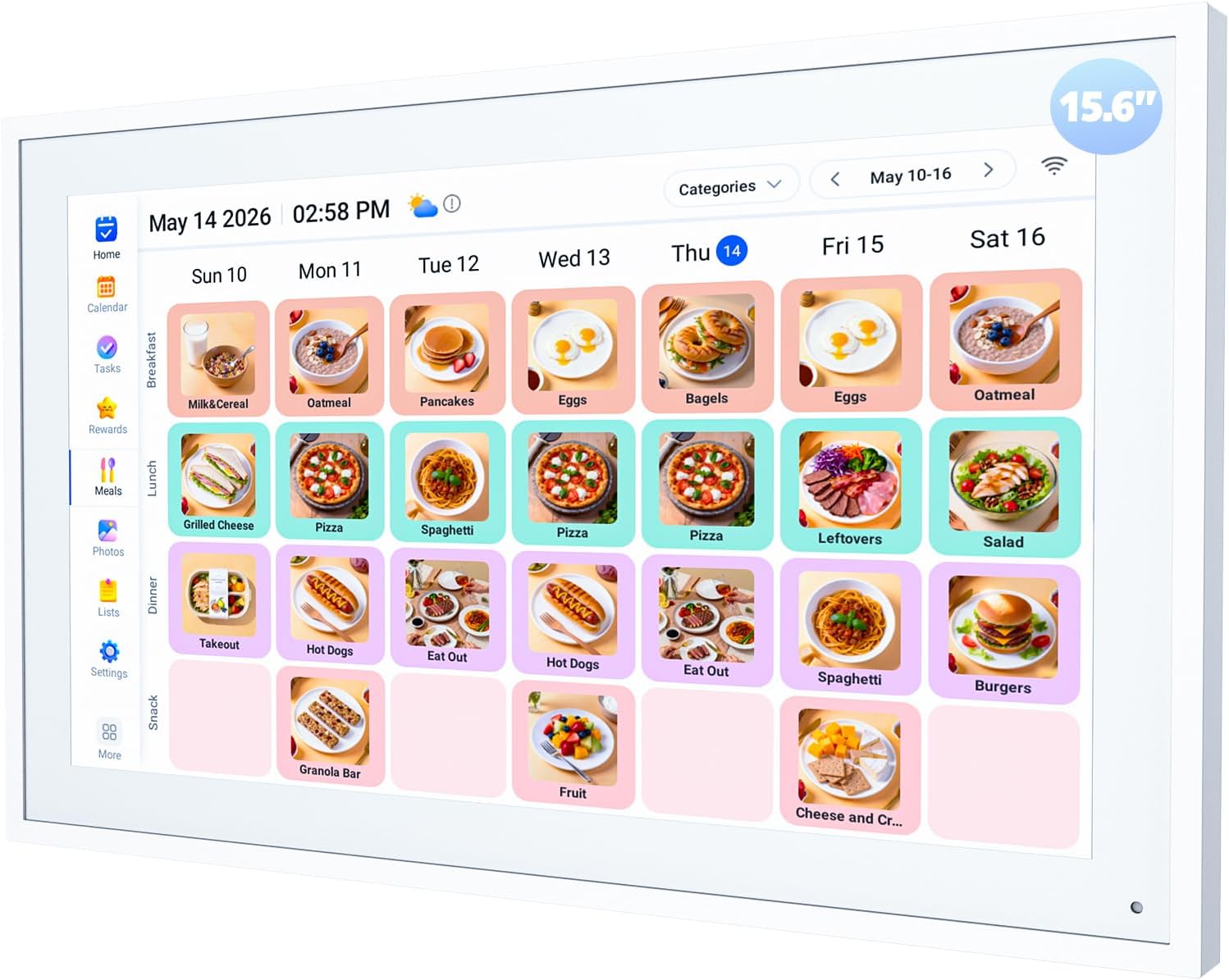
The Nethgrow 15.6" Digital Calendar combines a 1080p IPS touchscreen with built-in apps for calendar sync, chore charts, meal planning, timers and photo/video playback to act as a kitchen command center. You set it on a desk or wall-mount it, connect to 2.4/5 GHz Wi‑Fi, and link your phone via the eCalendar app to auto-sync iCloud, Outlook and Cozi events and push photos to the 32 GB internal storage. The interactive chore and star reward system and grocery lists make it useful for family coordination while the multi-mode timers and sleep/wake schedule are handy during cooking sessions. Practical benefits include clear full-HD viewing for recipes and photos, easy touch control, and no required subscription for core features. Expect occasional app setup friction and the device relies on being plugged in and on your Wi‑Fi for full functionality, so it is not a portable or offline-first tablet replacement.
Best for: Buyers who want a fixed kitchen smart display that centralizes recipes, timers, meal plans and family scheduling in one wall- or countertop-mounted device to streamline cooking and household coordination.
Less Ideal for: People seeking a battery-powered tablet, a general-purpose smart display with voice assistant integration, or a portable device for moving between rooms should look elsewhere.
- 1080p IPS touchscreen for clear recipe and photo viewing
- Auto-sync with iCloud, Outlook and Cozi via Wi‑Fi for up-to-date schedules
- 32 GB internal storage for many photos and videos
- Built-in meal planner, timers and grocery lists tailored to kitchen use
- No subscription required for core calendar and family features
- Requires constant mains power and Wi‑Fi for full functionality
- Setup and account linking can be fiddly for nontechnical users
Verdict: If you want a fixed kitchen hub that shows recipes, runs timers and keeps the family calendar in sync without a subscription, this 15.6" smart calendar is a practical choice.
LiviNGPAi 10.1-Inch Digital Calendar

| Screen size | 10.1 inch |
|---|---|
| Storage | 32GB |
| Wi‑Fi | 2.4G and 5G |
| Calendar compatibility | Google, iCloud, Outlook, Cozi, Yahoo |
This 10.1-inch LiviNGPAi digital calendar acts as a compact smart display for family planning and light media viewing. It connects to 2.4G and 5G Wi‑Fi and pairs with the eCalendar mobile app so you can add events, assign chores, and build weekly meal plans from your phone. The unit syncs with Google, iCloud, Outlook, Cozi and Yahoo calendars, supports color-coded family profiles, and includes a chore-rewards system that helps motivate kids. It also doubles as a digital photo frame with 32GB storage and rotates between landscape and portrait. Practical touches like sleep mode and an optional weather display make it unobtrusive in a kitchen or command center. For cooking use it provides an always-on place to keep recipes, meal schedules and timers visible, but the small 10.1-inch screen limits detailed recipe reading or video-guided cooking compared with larger smart displays. Setup is straightforward but advanced voice or smart-home controls are not highlighted, so expect primarily app-driven interaction.
Best for: Buyers who want an affordable, wall- or counter-mounted smart display to keep meal plans, family schedules and simple recipe references visible and managed from a phone app.
Less Ideal for: Anyone who needs a larger display for step-by-step video recipes, voice-first cooking assistance, or deep smart-home integration should consider a full-size smart display instead.
- Compact 10.1-inch touchscreen fits on kitchen counters or walls without taking much space
- Supports both 2.4G and 5G Wi‑Fi for faster, flexible setup
- Syncs with major calendars (Google, iCloud, Outlook, Cozi, Yahoo) for centralized scheduling
- Built-in 32GB storage doubles as a photo frame and supports portrait or landscape viewing
- Chore chart and meal-planning features encourage family collaboration and task tracking
- 10.1-inch screen can be small for reading full recipes or watching long tutorial videos
- No prominent voice assistant or advanced smart-home control listed, so interaction relies on the app
Verdict: A compact, budget-friendly smart calendar that keeps meal plans and family schedules visible and synced from your phone, ideal for kitchens that need organization more than a full-size cooking display.
Amazon Echo Show 11

| Display | 11-inch Full-HD touchscreen |
|---|---|
| Audio | Spatial audio with enhanced bass |
| Processor | AZ3 Pro chip |
| Camera | Centered auto-framing camera with 3.3x zoom |
The Echo Show 11 is a kitchen-friendly smart display that prioritizes a clear picture and strong sound while keeping everyday voice and touch controls simple. The Full-HD 11-inch screen gives more viewing area for recipes and step-by-step videos, and the spatial audio with boosted bass helps cooking videos and timers carry across a busy room. The centered auto-framing camera with 3.3x zoom makes video calls and quick family check-ins feel natural, and the device supports live view for checking on pets or the oven while away. Built-in smart home controls and Omnisense detection make it straightforward to trigger routines or view security cameras without adding a separate hub. Privacy controls include physical camera and microphone disable options. For users focused on dependable performance, the AZ3 Pro chip and Alexa+ features deliver responsive voice queries and media playback, though the unit relies on Amazon services for many advanced functions and works best in homes that use Alexa ecosystems.
Best for: Home cooks who want a reliable, easy-to-use smart display to follow recipes, stream cooking videos, and control smart kitchen devices with responsive voice and touch controls.
Less Ideal for: People who avoid cloud-dependent voice assistants or prefer a device that is platform-agnostic should consider alternatives outside the Alexa ecosystem.
- Large 11-inch Full-HD display provides more space for recipes and video instructions
- Spatial audio with improved bass and clearer vocals for audible timers and media in busy kitchens
- Centered auto-framing camera with 3.3x zoom for natural video calls and live monitoring
- Built-in smart home control and Omnisense technology to trigger routines without an external hub
- Physical camera and microphone disable controls for privacy
- Depends on Alexa ecosystem and Amazon services for full functionality
Verdict: A dependable, kitchen-ready smart display that pairs a roomy Full-HD screen with strong audio and responsive Alexa features for following recipes and controlling smart appliances.
Amazon Echo Show 5 (newest model)

| Display size | 5.5 inches |
|---|---|
| Camera | 2 MP |
| Privacy controls | Mic/camera off button and camera shutter |
| Audio | Improved bass and clearer vocals |
| Sustainability | Fabric and aluminum from recycled materials |
The Echo Show 5 is a small smart display designed to sit on a kitchen counter and provide quick visual and voice access to recipes, timers, video calls, and smart-home controls. The 5.5-inch screen shows step-by-step recipe instructions, timers, and video content while Alexa handles hands-free searches and conversions, and the built-in speakers deliver deeper bass and clearer vocals than prior generations so audio is easier to hear over typical kitchen noise. The 2 MP camera lets you make video calls or use Drop In to check the house, and a physical camera shutter plus mic/camera off button add privacy control. It can display a rotating photo slideshow when idle and integrates with compatible cameras and video doorbells for monitoring. Limitations include the small screen size that can feel cramped for detailed recipe steps and a basic camera resolution that is not ideal for crisp video at distance. For cooks who want compact counter-side access to voice and visual helpers, the Echo Show 5 is a practical, space-saving choice.
Best for: Home cooks who want a compact, voice-first countertop companion for recipes, timers, and quick video calls and prioritize devices with visible social validation and moderate privacy controls.
Less Ideal for: Users who need a large, tablet-sized display for reading long recipe text or following complex, multi-step videos should consider a larger smart display or tablet instead.
- Compact footprint fits easily on crowded kitchen counters
- 5.5-inch display shows recipe steps, timers, and video content at a glance
- Improved speakers with deeper bass and clearer vocals for audible instructions over kitchen noise
- Built-in camera and Drop In support for video calls and quick check-ins
- Privacy features including a camera shutter and mic/camera off button
- Small screen can make multi-step recipes or detailed videos harder to follow
- 2 MP camera offers only basic video quality at a distance
Verdict: A space-saving smart display that gives cooks quick, hands-free access to recipes, timers, and calls while offering improved sound and basic privacy controls.
Choosing the Right Smart Display for Cooking: Key Factors to Consider
Screen Size and Resolution
A larger, higher-resolution screen makes it easier to read recipes from a distance and follow video demonstrations without stepping away from the stovetop. Higher pixel density keeps ingredient lists and timers legible, while a bigger display reduces the need to squint or move closer when checking steps.
Screen size also affects placement options. A compact display may fit beside appliances on crowded counters, while a larger unit may be more useful if you want visible step-by-step instructions from across the kitchen. Consider sightlines from prep areas and stove zones when selecting screen dimensions.
Voice Recognition Accuracy
Reliable voice control is essential when your hands are messy or occupied. Devices with accurate far-field microphones and solid speech‑to‑text performance let you call up recipes, set timers, and control media without touching the screen.
Also think about how the system handles ambient kitchen noise such as ventilation fans, running water, or clattering pans. Better voice recognition reduces repeated commands and keeps the cooking flow smooth.
Touchscreen Responsiveness and Wet-Hands Use
Touch performance under typical kitchen conditions matters. Some displays respond well to damp or flour-coated fingers, while others require a dry tap or frequent swipes. Responsive touch controls cut down on accidental taps and frustration during quick recipe navigation.
Look for devices with capacitive touch optimized for light moisture or options to control the display with voice or a gesture to minimize contact altogether.
Integration With Timers and Kitchen Devices
Useful smart displays work as a hub for timers, timers linked to specific cook steps, and connections to compatible kitchen appliances. The ability to start or stop a timer, or have timers persist across recipe steps, improves timing accuracy for multi-component meals.
Integration with other devices, like smart plugs or oven controls (when supported), lets you centralize kitchen workflows and reduces the number of standalone apps and remotes to manage.
Durability and Mounting Options
A kitchen display is exposed to steam, spills, and heat. Durable glass and easily cleanable finishes make it more practical for daily use. Consider whether the device can be wall-mounted or tilted so it stays visible but out of the way of splashes.
Mounting flexibility also affects countertop real estate. A device with multiple mounting options or a small footprint helps preserve prep space while keeping the screen accessible.
Privacy, Updates, and App Ecosystem
Privacy controls such as microphone muting and camera covers are important in a shared kitchen environment. Devices that receive regular software updates maintain compatibility with recipe platforms and improve performance over time.
An active app ecosystem that includes popular recipe services, video streaming, and note-taking tools expands the display's usefulness beyond basic timers and voice commands.
Setting Up Your Smart Display in the Kitchen
Placement is the first practical choice: set the display where you can see it from primary prep zones and the stove without blocking airflow or exposing it to direct heat. If counter space is limited, consider wall mounting or a raised shelf to keep the unit visible but protected.
Position the microphone away from loud appliances when possible and point the screen slightly toward where you normally stand. Use a stable stand or mount to avoid accidental knocks while prepping. Finally, run initial voice training and test timers and recipe apps before relying on the device during an important dinner service.
- Place within clear line of sight from stove and prep area
- Keep at least a few inches from heat sources and backsplash
- Use wall mounts or angled stands to reduce splatter risk
Managing Recipes and Meal Planning
Smart displays speed meal planning by letting you search for recipes by voice, save favorites, and step through instructions hands-free. Use recipe apps that allow one-step-at-a-time mode or keep the timer visible on-screen while you advance steps manually.
Organize saved recipes into folders or lists for quick access. When following longer recipes, set multiple timers for different components and label them so you can juggle oven and stovetop tasks efficiently.
- Use one-step or full-screen recipe modes for readability
- Set labeled timers for multi-component recipes
- Save commonly used recipes to lists for quick recall
Cleaning and Maintenance Tips
Wipe screens with a soft microfiber cloth and avoid spraying liquid directly on the device. For greasy splatters, slightly dampen the cloth with a mild cleaner designed for electronic screens. Regularly check vents and ports for flour or crumbs and clean them gently to maintain airflow and audio quality.
If your device has a removable stand or mount, detach it occasionally to clean around the base. Keep microphone and camera covers functional and wipe them gently to avoid degrading sensors.
- Use a microfiber cloth and electronics-safe cleaner
- Avoid direct liquid sprays; clean vents and ports gently
- Detach mounts occasionally to clean the base area
Using Voice Commands Efficiently
Phrase commands clearly and use short, direct prompts for timers, recipe searches, and device controls. If the assistant supports it, learn a few shorthand phrases for common actions like starting a timer for a specific duration or resuming a paused recipe video.
When the kitchen is noisy, move closer to the display or use a brief wake word followed by the command. Consider grouping commands—set timers first, then start media playback—to reduce the need for repeated interactions.
- Use short, specific commands for timers and recipe steps
- Group actions to minimize repeated voice prompts
- Move nearer to the unit during loud kitchen activities
Troubleshooting Common Kitchen Issues
If the display is slow to respond while running multiple apps, close background apps or restart the device to refresh memory and network connections. For persistent voice recognition problems, re-run voice training and check microphone sensitivity settings.
If video playback stutters, verify Wi-Fi strength near the kitchen and move the router or add a range extender if necessary. For unresponsive touch input after spills, power off and dry the screen thoroughly before retrying the interface.
- Restart the device to resolve sluggish performance
- Re-run voice training if recognition degrades
- Check Wi-Fi strength for smooth video streaming
How We Chose the Best Smart Display for Cooking
We shortlisted Smart Displays for Cooking using practical, kitchen-focused filters to ensure each pick is genuinely useful during active meal prep. We prioritized screen clarity and size for easy recipe reading at a glance, and touch and gesture responsiveness for use with wet or flour-dusted hands. Voice accuracy and offline command handling were included to minimize pauses while cooking. Integration with timers, kitchen appliances, and popular recipe services was assessed to determine real-world usefulness. We also considered audio clarity for spoken instructions and video calls, plus mounting and stand options for flexible countertop placement. Excluded items include general-purpose tablets that lack native voice assistant features, and single-function timer devices. We focused on devices that combine visual recipe browsing, reliable voice control, and kitchen-friendly physical design. The criteria we used map to measurable specs and everyday behaviors so readers can match picks to their counters, cooking habits, and smarter kitchen setups.
Our full evaluation process is outlined in our review methodology.
FAQ
Can a smart display replace a printed recipe book?
Often yes. A smart display provides searchable recipes, step-by-step modes, and timers that printed books do not offer. However, printed recipes can be easier to annotate and do not require power or internet.
Will voice commands work with messy hands?
Usually. Good smart displays have far-field microphones designed to pick up commands from across a room, which lets you control timers and recipes without touching the screen. Performance can vary with ambient noise and distance.
How do I keep the display safe from splashes and heat?
Place the display slightly away from direct heat and install it where steam and grease are less likely to reach it. Use angled stands or wall mounts to reduce splash exposure and clean the screen regularly to remove residue.
Do smart displays work with kitchen appliances?
It depends on appliance compatibility and the display's integration options. Many displays can control timers and connected smart plugs or appliances when the kitchen gear supports the same smart home protocols.
What happens if the Wi-Fi goes down while I am cooking?
Some voice commands and local functions may still work, but cloud-dependent features like recipe search and streaming will be limited. Plan for offline backups such as printed recipes or screenshots for critical steps.
Final Verdict
Choosing the right Smart Display for Cooking comes down to prioritizing screen legibility, reliable voice control, and kitchen-friendly physical design. Consider where you will place the unit, how often you need hands-free commands, and whether you need deep integration with timers and other smart kitchen gear. Balance larger screens against counter space and favor devices that offer responsive touch for wet hands or robust voice controls. With the right tradeoffs, a smart display can speed meal prep, reduce mistakes, and keep recipes within easy reach while you cook.