
Note: This article contains affiliate links. If you click on these links and make a purchase, we may earn a small commission at no extra cost to you. This helps support our research and content. Read our full affiliate disclosure here.
Choosing the right smart lock for your main door changes how you secure and use your home every day. The right unit balances robust security, reliable user access, and straightforward installation so you do not trade convenience for protection. This guide highlights the top shortlisted smart locks for main doors, focusing on features that matter for daily entry use, including physical security, credential options, and connectivity. Below you will find our top picks plus clear reasons each type of smart lock might suit different homes and priorities. We also explain our evaluation criteria so you can match a lock to your door and routine.
Top Picks at a Glance
| Best Overall The best all-around choice for most situations | PHILIPS 4200 Series WiFi Smart Lock |  |
| Best Quality Built to a higher standard if you want something more solid | eufy Security Smart Lock C220 |  |
| Best Value The sweet spot between price and what you get | PHILIPS Wi‑Fi Smart Deadbolt DDL242X-1HW |  |
| Best Budget The cheapest option that still gets the job done reliably | TEEHO TE001 Keyless Deadbolt |  |
| Top Rated A top-rated pick with lots of positive feedback | ARPHA WiFi Video Smart Lock D289W |  |
| Most Popular A crowd favorite that many people choose with confidence | TEEHO TE002 Fingerprint Deadbolt |  |
| Best Seller A high-volume bestseller chosen again and again | Wyze Lock Bolt v2 |  |
PHILIPS 4200 Series WiFi Smart Lock

| Connectivity Protocol | Bluetooth, Wi‑Fi |
|---|---|
| Additional Features | Anti‑Drill, Auto‑Lock, Back‑Lit Keypad, Anti‑Peeping Password, Built‑in WiFi, Fingerprint |
| Lock Type | Biometric, Deadbolt, Keypad, WiFi Smart Lock |
| Controller Type | Amazon Alexa, Android, Google Assistant, Push Button, iOS |
| Item Dimensions | 6 x 2.2 x 1.5 inches |
The PHILIPS 4200 Series is a full-feature smart deadbolt intended as a keyed‑less front door upgrade. It connects directly to 2.4 GHz Wi‑Fi so you can lock and unlock, create passcodes, manage fingerprints, and view access history from the Philips Home Access app without a separate hub. The lock supports voice commands via Alexa and Google Assistant, a backlit keypad with anti‑peeping input, and a fingerprint sensor that claims 0.3 second recognition for fast entry. Practical conveniences include auto‑lock timing, one‑time and recurring PINs for guests, silent mode, mechanical backup keys, and a matching handle set so you do not need extra hardware. Expect about six months of battery life with standard alkaline cells and a recommended Wi‑Fi range limit of roughly 33 feet to the router. Limitations to consider are the 2.4 GHz Wi‑Fi requirement and recommended proximity to the router for reliable remote control, plus the need to follow installation orientation instructions for left‑opening doors; batteries are not included. For a main‑door smart lock the 4200 Series balances secure biometric access, app management, and straightforward installation.
Best for: Homeowners who want a secure, flexible main‑door smart lock that combines biometric entry, keypad codes, and cloud app control without adding a hub, prioritizing convenience and guest access management.
Less Ideal for: People with very weak or distant Wi‑Fi at the front door or those who need a lock compatible only with 5 GHz networks should consider alternatives that support different connectivity or include a bridge.
- Built‑in 2.4 GHz Wi‑Fi for remote app control with no hub required
- Multiple access methods: fingerprint, keypad PINs, voice, app, and backup keys
- Fast fingerprint recognition and versatile PIN options including one‑time and recurring codes
- Comes as a complete handle and deadbolt set for an integrated front door upgrade
- Features such as auto‑lock, access history, and silent mode increase day‑to‑day convenience
- Requires 2.4 GHz Wi‑Fi and is recommended to stay within about 33 feet of the router for stable connectivity
- Batteries are not included and the lock specifies alkaline only for optimal operation
Verdict: Pick this PHILIPS 4200 lock when you want a hub‑free, main‑door smart deadbolt that delivers fast fingerprint entry, flexible PIN and guest controls, and full remote management.
eufy Security Smart Lock C220
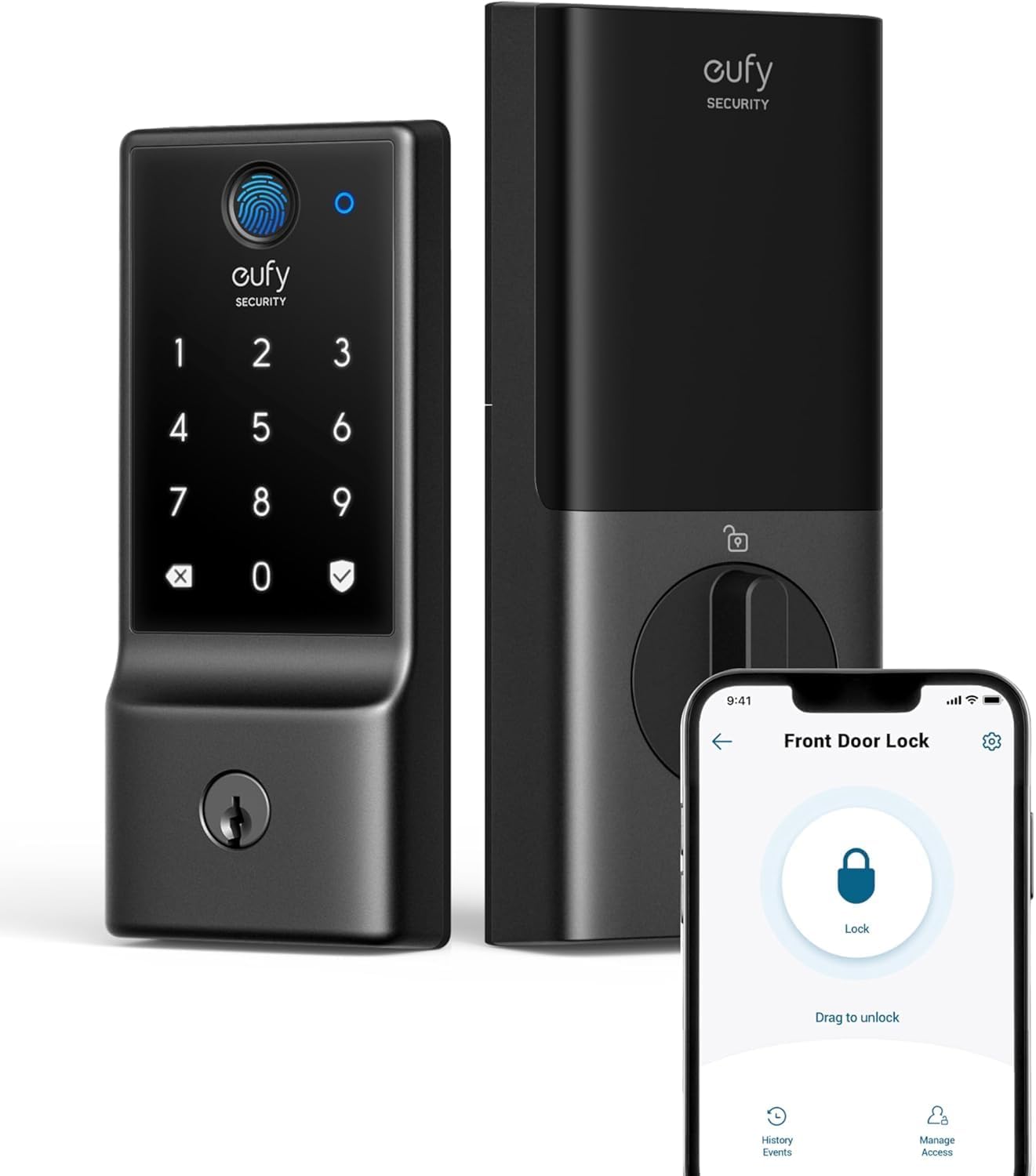
| Additional Features | 6‑way unlocking, 8‑month battery life, built‑in Wi‑Fi |
|---|---|
| Lock Type | Deadbolt |
| Control Method | App, Remote, Touch, Voice |
| Connectivity Protocol | Wi-Fi |
The eufy Security Smart Lock C220 is a feature-packed deadbolt built for everyday front-door security and convenient keyless entry. It supports six unlocking methods including a fast fingerprint sensor with self-learning AI, passcodes, app remote control, voice assistants, and a physical key, and its built-in Wi‑Fi lets you manage the lock remotely without an extra bridge. Setup is straightforward for standard deadbolts and the lock reports activity and sends real-time notifications through the eufy app. Practical benefits include large user capacity for fingerprints and passcodes, an Auto-Lock option, and an IP53-rated exterior for weather resistance. The unit runs on eight AA batteries with an estimated eight-month life under typical use and offers a bottom-access power port for emergency power if the batteries die. Limitations to be aware of are the lack of Apple HomeKit, IFTTT, or Matter support and a BHMA Grade 3 rating that reflects basic commercial-grade durability rather than the top tier for heavy-use commercial doors.
Best for: Buyers who prioritize quick, flexible keyless entry and remote control for a main front door while wanting a robust set of user management and biometric convenience.
Less Ideal for: People who need native HomeKit or Matter integration or who require the highest commercial-grade lock durability for very heavy use.
- Multiple unlocking options including fast fingerprint sensor and app remote control
- Built-in Wi‑Fi for remote management without a separate bridge
- Stores up to 50 fingerprints and 100 passcodes for many users
- Long battery life with 8 AA batteries and emergency external power port
- IP53-rated exterior for resistance to dust and light water exposure
- Not compatible with Apple HomeKit, IFTTT, or Matter
- BHMA Grade 3 durability is lower than Grade 1 commercial-grade locks
Verdict: A convenient, Wi‑Fi smart deadbolt focused on fast biometric entry and remote control for homeowners who want strong everyday performance on a main door.
PHILIPS Wi‑Fi Smart Deadbolt DDL242X-1HW

| Lock Type | Wifi Lock |
|---|---|
| Controller Type | Amazon Alexa, Google Assistant |
| Control Method | App, Remote, Voice |
| Additional Features | Fingerprint, Passcode Unlock, Remote Unlock, Auto‑Lock |
The PHILIPS Wi‑Fi Smart Deadbolt is a front‑door lock that replaces a standard deadbolt and brings remote access plus multiple unlocking methods. It supports fingerprint one‑touch entry, up to 100 custom passcodes including time‑limited and one‑time codes, physical key override, and voice control via Alexa or Google Assistant. Built‑in 2.4 GHz Wi‑Fi removes the need for a separate hub and lets you lock or unlock from anywhere, view access history, and receive real‑time notifications through the app. Practical features include auto‑lock (10 to 180 seconds), away mode to restrict access, low battery alerts, and a backlit touchscreen with anti‑peeping input. Installation is straightforward with only a screwdriver and works on most standard door thicknesses, and the lock is weather resistant and ANSI graded for security. Important limitations are that it only supports 2.4 GHz networks and requires AA alkaline batteries (not included), and it does not include a door sensor so the app cannot report whether the door is physically closed. For someone focused on a secure, flexible main‑door smart lock that is easy to install and manage for family and guests, this model covers the essentials without requiring extra hubs.
Best for: Buyers who want a practical, no‑fuss smart deadbolt for a main entrance that prioritizes ease of installation, flexible access management, and remote control without adding a hub.
Less Ideal for: Homes that require 5 GHz Wi‑Fi support, integrated door‑state sensing, or battery‑free hardwired locks should consider other options.
- Multiple unlock methods: fingerprint, passcode, app, voice and physical key provide flexible access options.
- Built‑in Wi‑Fi lets you control the lock remotely without a separate hub.
- Support for up to 100 custom codes including one‑time and scheduled codes is useful for guests and renters.
- Auto‑lock, away mode, and real‑time notifications improve everyday security and oversight.
- Backlit touchscreen with anti‑peep feature and low battery alerts enhance usability.
- Only compatible with 2.4 GHz Wi‑Fi networks, limiting some modern router setups.
- Requires AA alkaline batteries (not included) so you must keep spares on hand.
- No door sensor included, so the lock cannot report whether the door is physically open or closed.
Verdict: A straightforward, hub‑free smart deadbolt that delivers flexible access methods and remote control for practical main‑door security.
TEEHO TE001 Keyless Deadbolt

| Access Codes | 20 Individual User Codes |
|---|---|
| Waterproof level | IP54 |
| Lock Type | Combination Lock, Deadbolt, Keypad |
| Battery | 4 AA batteries (up to 1 year) |
The TEEHO TE001 is a budget-oriented keypad deadbolt designed for front or back main doors where simple, reliable keyless access is the priority. It uses a backlit keypad for PIN entry, supports up to 20 user codes plus a one-time code for guests, and includes two mechanical backup keys. The lock is IP54 rated for weather resistance and runs on four AA batteries with a low-battery indicator and advertised year-long battery life under normal use. Practical conveniences include adjustable auto-lock timing, one-touch locking by holding a keypad key, anti-peep PIN entry, and a mute mode for quieter operation. Installation is straightforward with a standard 2-1/8 inch bore requirement and fits common door thicknesses. Limitations to consider are the lack of app, Bluetooth, or Wi-Fi connectivity so remote control and logging are not possible, and the lock is ANSI Grade 3 which is adequate but not as robust as higher-grade commercial locks. For buyers focused on a simple, no-frills electronic deadbolt for a main door, this delivers core keypad features at a low price, but it will not replace a smart lock platform with remote access or integrations.
Best for: Buyers who want an affordable, easy-to-install keypad deadbolt for a main door and prioritize straightforward keyless access over smart home integration.
Less Ideal for: Users who need remote control, app integration, activity logs, or higher commercial-grade security should consider feature-rich smart locks instead.
- Supports up to 20 individual user PINs plus a one-time guest code
- IP54 weather resistance for outdoor use
- Backlit keypad with anti-peep input and one-touch locking for convenient everyday use
- Long battery life on four AA cells with a low-battery indicator
- Includes two backup mechanical keys and standard installation hardware
- No wireless connectivity or mobile app for remote access or notifications
- ANSI Grade 3 security level is basic compared with higher-grade commercial locks
Verdict: A practical, low-cost keypad deadbolt that gives straightforward keyless access and weather resistance for main doors without smart-home features.
ARPHA WiFi Video Smart Lock D289W

| Connectivity Protocol | Bluetooth, Wi-Fi |
|---|---|
| Additional Features | App Unlock, Auto-Lock, Camera, Fingerprint, Wifi |
| Lock Type | Biometric, Wifi |
| Material Type | Zinc |
This ARPHA D289W combines a WiFi-enabled deadbolt, 150° wide-angle camera, fingerprint sensor, keypad and remote app control into a single unit intended for front-door security. You can view live video any time in the TUYA app, speak through two-way audio, and remotely unlock for guests or deliveries, while the anti-peep PIN and one-time guest codes add practical access controls. The lock supports voice assistants and Bluetooth for local control, and an adjustable auto-lock timer (0–99 seconds) helps ensure the door relocks after entry. It is weather-resistant to IP54 and rated for a wide temperature range, and the rechargeable 7800mAh battery reduces the need for frequent battery changes. Installation is DIY-friendly for standard doors and the package includes mounting hardware and keys. Expect real-world limitations like the requirement for 2.4 GHz WiFi and dependence on the TUYA ecosystem for remote features, and some buyers may want to verify compatibility with their specific door prep or smart home setup before purchase.
Best for: Buyers who prioritize dependable, always-available front-door monitoring and versatile keyless access methods and want a single device that combines camera, biometric and remote controls.
Less Ideal for: People who need a lock that works on 5 GHz networks or who prefer a vendor-agnostic cloud service should consider other options.
- Integrated 150° camera with 24/7 live view and two-way audio for continuous doorstep monitoring
- Multiple unlock methods including AI fingerprint, keypad with anti-peep PIN, app remote unlock, backup keys and voice control
- Rechargeable 7800mAh battery reduces recurring battery replacements
- Adjustable auto-lock timer and IP54 weather resistance suitable for exterior doors
- Includes mounting hardware and step-by-step guide for DIY installation
- Requires 2.4 GHz WiFi only, so it will not connect on 5 GHz networks
- Depends on the TUYA app ecosystem for remote features and cloud services
Verdict: Choose the ARPHA D289W when you want a reliable, all-in-one front-door smart lock with built-in video and multiple secure access methods for steady day-to-day protection.
TEEHO TE002 Fingerprint Deadbolt

| Access codes | 20 |
|---|---|
| Fingerprints | 20 |
| Waterproof level | IP54 |
| ANSI certification level | Grade 3 |
| Connectivity Protocol | Nonconnected |
The TEEHO TE002 is a hybrid electronic deadbolt that combines fingerprint biometrics, a backlit keypad, and two mechanical keys so you can choose keyless or traditional entry. It stores up to 20 fingerprints and 20 passcodes, supports one-time PINs for guests, and offers adjustable auto-lock (10–99 seconds) plus one-touch locking for quick securing when you leave. The fingerprint reader is fast and uses AI-assisted recognition to claim subsecond reads and adapt over time, and the unit warns of low battery and runs on four AA cells with an estimated 365-day life. Built to be weather resistant (IP54) and ANSI Grade 3 certified, it is aimed at exterior doors and installs in a standard 2-1/8" bore with a screwdriver-only fit. Expect practical features like anti-peep passcodes, wrong-entry lockout, silent and away modes, and clear low-battery alerts, but note this model is nonconnected so it has no remote or app control and depends on battery power for all electronic functions. For buyers who value tactile keypad and fingerprint convenience without smart-home integration, it is a solid, well-rounded choice.
Best for: Buyers who prioritize proven, on-device access methods and clear user feedback—families or rental hosts who want reliable fingerprint and keypad entry with visible social proof of wide usage.
Less Ideal for: People who need remote unlocking, smart-home integrations, or real-time access logs should consider a Wi‑Fi or Bluetooth enabled lock instead.
- Multiple entry methods: fingerprint, keypad codes, one-time PINs and physical keys
- Fast biometric reader with AI learning for quicker, more reliable fingerprint recognition
- Long claimed battery life with low-battery indicator and easy AA battery replacement
- IP54 weather resistance and ANSI Grade 3 certification suitable for exterior use
- Adjustable auto-lock, silent mode, and anti-peep passcode for practical security controls
- No Wi‑Fi or app connectivity so it cannot be controlled or monitored remotely
- Requires battery power for electronic functions and will need periodic AA replacements
Verdict: Choose the TE002 when you want a fast, reliable on-device fingerprint and keypad deadbolt for a main door without needing smart-home connectivity.
Wyze Lock Bolt v2

| Lock Type | Biometric, Deadbolt, Keypad |
|---|---|
| Connectivity Protocol | Wi‑Fi |
| Additional Features | Auto-Lock |
| Included Components | AA Battery x8, Wyze Lock Bolt v2 x1 |
| Weather Resistance | IP53 |
The Wyze Lock Bolt v2 is a full-featured smart deadbolt designed to replace a standard front-door bolt and give you keyless and remote access options. It uses an AI-driven fingerprint scanner that adapts over time for faster unlocks, and also supports keypad codes, the Wyze app via built-in Wi‑Fi, voice control, physical backup keys and USB-C emergency power. Typical use is daily front-door entry: quick fingerprint unlocks for household members, temporary or permanent keypad codes for guests, and remote locking or status checks from the app. Notable features include IP53 weather resistance, BHMA2 durability, tamper alarms, and an estimated eight months of battery life from the included AA cells. The lock is convenient for households that want multiple entry methods and remote control without needing a separate hub, but it does add electronics that require occasional battery replacement and may need app setup and account management for remote features.
Best for: Buyers who prioritize dependable, mainstream smart-home security with simple remote control and multiple entry options for family and guests.
Less Ideal for: People who want a purely mechanical lock with no electronics or who prefer a lock that integrates only through a specific third-party hub ecosystem.
- Fast AI-learning fingerprint unlocks for hands-free entry
- Built-in Wi‑Fi lets you control and check the lock remotely without an extra hub
- Multiple entry options: fingerprint, keypad codes, app, physical key and USB‑C emergency power
- IP53 weather resistance and BHMA2 durability for outdoor front-door use
- Includes batteries and a backup key for immediate installation and emergency access
- Requires app setup and a Wyze account to use remote features
- Electronic components need periodic battery replacement and occasional troubleshooting
Verdict: A reliable, easy-to-use front-door smart deadbolt that combines quick fingerprint access, built‑in Wi‑Fi remote control, and solid weather and durability ratings for mainstream homeowners.
Choosing the Right Smart Lock for Main Doors: Key Factors to Consider
Security Features and Certifications
Main-door locks must resist forced entry and tampering. Look for hardened deadbolt components, anti-drill plates, reinforced strike plates, and designs that minimize exposed screws. Certifications from independent labs, such as ANSI/BHMA ratings, indicate tested strength levels and can help you compare how well locks will perform under physical attack.
Electronic protections matter too. Choose locks that implement industry-standard encryption for wireless communications and support secure authentication methods. Features such as automatic relocking, tamper alarms, and protection against replay or brute-force attacks reduce the chance of unauthorized entry.
Installation Compatibility with Your Door
A smart lock must fit the existing door thickness, backset, and deadbolt hole pattern. Many units are designed to retrofit standard single-cylinder deadbolts and use the interior thumbturn, but some require replacing the entire deadbolt assembly or modifying the door. Check whether the lock supports common backsets (2 3/8-inch and 2 3/4-inch), multiple door thicknesses, and whether an adapter is needed for nonstandard hardware.
Also consider whether you can install the lock yourself with basic tools or will need professional help. Ease of installation affects cost and the time the main entry is out of service. If your door has reinforcement plates, glass sidelights, or unusual trim, verify compatibility before purchase.
Access Methods and User Management
Main-door smart locks should offer flexible, secure ways to grant and revoke access. Typical options include physical keys, touchscreen or keypad PINs, Bluetooth proximity, and remote access via an internet bridge. Evaluate how many unique users or PIN codes the lock supports and whether it provides scheduled access, one-time codes, or temporary guest keys.
Consider the management interface: is it local via Bluetooth, or cloud-based with an app? The user experience for adding and removing codes, viewing access history, and receiving notifications will shape daily convenience and security for households with frequent visitors or service professionals.
Connectivity and Smart Home Integration
Decide how the lock should fit into your wider home setup. Some locks connect directly to phones via Bluetooth, others use Wi-Fi bridges or a separate hub to enable remote locking, voice assistant integration, and automation with other devices. Choose a connectivity profile that matches your needs: Bluetooth-only keeps operation local and may enhance privacy, while Wi-Fi bridges enable remote control and alerts from anywhere.
Also check platform compatibility for voice assistants, smart home ecosystems, or home security systems you already use. Integration can enable routines such as locking on a set timer, disarming alarm panels when you arrive, or opening for approved deliveries.
Power, Battery Life, and Fail-safes
Smart locks run on batteries and need predictable life and clear low-battery warnings. Evaluate typical battery life estimates under normal use, whether the lock uses common AA/AAA batteries, a rechargeable pack, or proprietary cells, and whether it offers external power options for emergencies. Some models include a micro-USB or contact on the exterior for temporary power if batteries die.
Also consider fail-safe behavior: does the lock default to a secure locked state on power loss? Can you still use a physical key, and how does the lock behave if the wireless connection drops? Reliable alerts and straightforward emergency procedures matter for a main entry used daily.
Durability and Weather Resistance
Main doors face temperature swings, humidity, and sun exposure that can affect electronics and mechanical parts. Choose locks rated for outdoor use with weather-resistant housings and sealed keypads. Mechanical components should operate smoothly in varied conditions and resist corrosion.
Long-term durability also depends on build quality and maintenance. Look for finishes that resist wear and parts that are replaceable or serviceable without full replacement of the unit.
Retrofitting Vs Full-Replace Smart Locks
Retrofitting smart locks install around your existing deadbolt and often preserve the exterior hardware and key. These are usually easier to install and minimize changes to the door appearance. Full-replace options swap the entire deadbolt and trim, which can offer stronger integrated security but may require more precise measurements and sometimes professional installation.
When choosing between these approaches consider how much of the original hardware you want to keep, whether you need enhanced physical security, and how comfortable you are with installation tasks. Retrofitted models can be a good choice for renters or those wanting minimal door modification, while full-replace locks are better when you want a single, cohesive locking system.
- Retrofitting: preserves exterior look, simpler DIY fit
- Full-replace: often better integrated security, potential for higher durability
- Check door thickness and backset before deciding
Keyless Access Options and Real-world Use
Keyless methods—keypads, Bluetooth, and mobile keys—offer convenience but behave differently in practice. Keypads are reliable for guests and service providers and work without a phone. Bluetooth proximity can unlock automatically as you approach but depends on phone settings and battery state. Mobile app access adds remote control but usually requires a network bridge or cloud service.
Think through typical daily scenarios: do household members prefer PINs over phones, or do you need temporary codes for cleaners and dog walkers? Choose a lock that matches how your household enters and how comfortable you are managing digital credentials.
- Keypads are phone-independent and simple for recurring guests
- Bluetooth is private and local but tied to mobile devices
- Cloud-based remote access adds convenience but increases reliance on networks
Managing Multiple Users and Access Schedules
For busy households or properties with frequent visitors, the quality of the user-management system matters. Look for locks that let you create named users, assign unique codes, set expiration dates, and view access logs. Clear app interfaces or local admin controls make it faster to onboard and revoke credentials without confusion.
If you need recurring temporary access, such as for cleaning or dog walking, scheduled codes and one-time PINs reduce the need to hand out physical keys. Also consider whether the lock allows different permission levels, such as full admin access versus limited entry only.
- User naming and history logs help with accountability
- Scheduled or one-time codes streamline temporary access
- Admin controls should be easy to use for household managers
Network Bridges and Remote Control
If you want to lock or unlock your main door remotely, most smart locks require an optional Wi-Fi bridge or hub. Bridges extend connectivity while keeping the lock's local radio for day-to-day operation. Consider whether you want always-on remote access and what that means for network exposure and firmware update requirements.
Bridges also enable integrations with third-party systems like home automation hubs or voice assistants. Plan the bridge placement so it maintains a reliable connection to both the lock and your home router without introducing signal blind spots.
- Bridges enable remote control and notifications
- They add another networked device to maintain
- Placement affects reliability of remote commands
Troubleshooting Common Installation Issues
Common installation snags include misaligned strike plates, incorrect backset settings, door thickness conflicts, and interference from decorative escutcheons. Measure carefully and test the deadbolt manually before powering the smart components to ensure smooth operation.
If the latch binds or the bolt rubs the strike when the door closes, even the best smart lock will have trouble. Adjusting the strike plate, planing the door edge, or using supplied spacers often resolves these mechanical problems before programming the electronics.
- Always test mechanical deadbolt action before installation
- Use supplied templates and check backset settings
- Address binding or misalignment before powering up electronics
How We Chose the Best Smart Lock for Main Doors
We prioritized criteria that directly affect safety, day-to-day usability, and long-term reliability for main-door smart locks. Core evaluation factors included security features such as encryption level, tamper resistance, and deadbolt strength; installation compatibility with standard single-cylinder deadbolts and door prep; connectivity and access options, including local keypad, Bluetooth, and optional network bridges; battery life and low-battery alerts; and user management, meaning how easy it is to add, revoke, or schedule credentials. We also considered interoperability with common smart home platforms and whether a lock requires additional hubs. We excluded devices intended only for interior doors, padlocks, or temporary rental solutions that lack robust physical security. Units that rely solely on proprietary, undocumented cloud services or that offer no offline access fallback were given lower priority. Our selection focuses on products that balance attack resistance, convenient access methods, and realistic installation requirements for a main exterior door.
Our full evaluation process is outlined in our review methodology.
FAQ
Can a smart lock for a main door be used with an existing deadbolt?
Often yes. Many smart locks are designed to retrofit an existing single-cylinder deadbolt by replacing the interior assembly while keeping the exterior key cylinder. Verify compatibility with your door thickness and backset and confirm that the retrofit model supports your deadbolt style.
What happens if the smart lock batteries die?
Most smart locks allow the use of a physical key as a backup and provide low-battery alerts. Some models offer an external charging contact or micro-USB port for temporary power so you can operate the lock and replace batteries without being locked out.
Are keypad codes secure for main-door use?
Keypad codes can be secure when combined with strong passcode hygiene, limited code sharing, and scheduled expirations. For higher security, pair keypad use with tamper detection, automatic relocking, and routine code rotation.
Do smart locks require a hub or bridge to work?
It depends. Many locks function locally via keypad or Bluetooth without a hub. Remote access, voice assistant integration, or cloud features typically require an optional Wi-Fi bridge or hub.
How weatherproof should a main-door smart lock be?
Choose a lock with weather-resistant housing and sealed electronics if your main door faces direct sun, rain, or large temperature swings. Durable finishes and corrosion-resistant hardware extend service life in exposed exterior conditions.
Final Verdict
When choosing a smart lock for a main door prioritize robust physical security, clear installation compatibility, and the access methods that match how household members enter and manage guests. Balance the convenience of remote control and integrations against the need for local fallback options and predictable battery behavior. Finally, verify that the lock fits your door dimensions and that you understand emergency procedures before relying on any electronic system.