
Note: This article contains affiliate links. If you click on these links and make a purchase, we may earn a small commission at no extra cost to you. This helps support our research and content. Read our full affiliate disclosure here.
Upgrading to a Wi-Fi smart lock changes how you control and secure home entry. You get remote locking and unlocking, access logs, and easier guest access without juggling physical keys. Choosing the right smart lock matters because connectivity quirks, installation fit, and security features directly affect daily convenience and home safety. This guide shortlists the top Wi-Fi smart locks we recommend for typical homes and apartments. We evaluated connectivity stability, security features, installation flexibility, and user experience to surface the best options. Read on for the criteria we used and practical guidance to match a lock to your door and routines.
Top Picks at a Glance
| Best Overall The best all-around choice for most situations | Schlage Arrive WiFi Deadbolt Camelot | 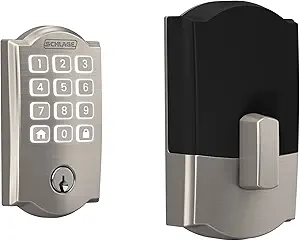 |
| Best Quality Built to a higher standard if you want something more solid | Lockly Visage Zeno Smart Lock |  |
| Best Value The sweet spot between price and what you get | ULTRALOQ Bolt SE Smart Deadbolt |  |
| Top Rated A top-rated pick with lots of positive feedback | GHome Smart KD10SE2 Deadbolt |  |
| Most Popular A crowd favorite that many people choose with confidence | Schlage Encode Wi‑Fi Deadbolt |  |
| Best Seller A high-volume bestseller chosen again and again | Wyze Lock Bolt v2 |  |
Schlage Arrive WiFi Deadbolt Camelot

| Connectivity Protocol | Bluetooth, Wi-Fi |
|---|---|
| Lock Type | Keypad |
| Control Method | Touch |
| Included Components | Installation Hardware, Installation Instructions |
The Schlage Arrive combines a solid mechanical deadbolt with built‑in Wi‑Fi and a push‑button keypad to give a straightforward, secure smart lock experience. It installs with just a screwdriver and runs on 4 AA batteries so codes and schedules remain active during power or network outages while you can still use Bluetooth locally. The Schlage Home app lets you create and schedule up to 250 access codes, view entry history, and receive notifications, and the lock pairs with Alexa, Google Assistant, and Ring for voice and smart‑home automations. Durable, backlit silicone buttons improve usability in low light and the unit carries high BHMA security and durability ratings. Expect a dependable, easy to set up smart deadbolt with broad smart home compatibility, though advanced users may miss deeper home platform integrations or battery‑free options that other designs offer.
Best for: Buyers who want a reliable, easy‑to‑install smart deadbolt that gives remote access and strong, code‑based control without needing extra hubs or complicated setup.
Less Ideal for: If you need a battery‑free lock, enterprise‑grade integration, or highly customized smart home scripting, this lock is not the best choice.
- Built‑in Wi‑Fi lets you lock/unlock and manage access without an external hub
- Supports up to 250 unique access codes and schedules for flexible user management
- Backlit, all‑weather silicone keypad buttons for reliable code entry day or night
- DIY installation with provided hardware and 4 AA batteries, no hardwiring required
- Works with Alexa, Google Assistant, and Ring for voice control and automations
- Battery powered only so you must monitor and replace batteries periodically
- No mention of advanced local integration options beyond popular voice assistants
Verdict: Choose the Schlage Arrive when you want a no‑fuss, secure Wi‑Fi deadbolt with strong code management and easy app control.
Lockly Visage Zeno Smart Lock

| Connectivity Protocol | Wi-Fi |
|---|---|
| Lock Type | Deadbolt |
| Controller Type | Amazon Alexa, Apple HomeKit, Google Assistant |
| Additional Features | Facial Recognition, 0.2s AI Fingerprint, IP65 Waterproof, Type-C Backup Power socket |
| Control Method | App, Remote, Touch, Voice |
The Lockly Visage Zeno is a feature-rich Wi‑Fi smart deadbolt designed for hands-free, secure front door access. It uses onboard facial recognition to detect and unlock as you approach, dual-infrared sensors to reduce spoofing, and a 3D biometric fingerprint sensor that Lockly says recognizes prints in about 0.2 seconds. Built-in Wi‑Fi and the Lockly Home app provide remote unlock, real-time notifications, and guest codes without needing a separate hub, while Apple Home Key, Siri/Google/Alexa support and a PIN Genie keypad add flexible unlock options. Two rechargeable 10,000mAh batteries are included and Lockly rates typical runtime up to six months under normal use, with a type‑C backup power port for emergencies. Practical limits include the need to register biometric and facial profiles during setup and the usual dependency on a stable 2.4GHz Wi‑Fi network for remote features; advanced features also require spending time in the app to configure users and schedules. For buyers who prioritize rapid, varied unlock methods and on-device biometric security, the Visage Zeno delivers a polished, all-in-one experience.
Best for: Buyers who want top-tier, fast biometric access and full remote control for a primary front door and who prioritize responsiveness and multiple convenient unlock methods.
Less Ideal for: People seeking a very simple, no‑setup replacement lock or those with unreliable 2.4GHz Wi‑Fi and limited willingness to configure user profiles and app settings.
- On-device facial recognition for near-instant, hands-free unlocking
- Very fast 3D fingerprint sensor with AI learning and support for many profiles
- Built-in Wi‑Fi for remote lock/unlock and notifications without a hub
- Multiple access methods: Apple Home Key, keypad with PIN Genie, voice assistants, app and physical key
- Includes two rechargeable 10000mAh batteries with USB‑C backup power port
- Full feature set depends on reliable 2.4GHz Wi‑Fi and app setup
- Facial and fingerprint enrollment require initial setup time and user cooperation
Verdict: Choose the Lockly Visage Zeno when you want a Wi‑Fi smart lock that prioritizes ultra‑fast biometrics and versatile, hub‑free remote control.
ULTRALOQ Bolt SE Smart Deadbolt

| Connectivity Protocol | Bluetooth, Matter, Wi-Fi |
|---|---|
| Lock Type | Biometric, Deadbolt, Keypad |
| Additional Features | Auto Lock, App Remote Control, AI-driven Fingerprint Scanner |
| Waterproof Rating | IP65 |
| Included Components | 2 Emergency Keys, Installation Kit, User Guide |
The ULTRALOQ Bolt SE is a full-featured smart deadbolt aimed at replacing a conventional front door lock with keyless options and remote access. It supports fingerprint unlocking (stores up to 50 fingerprints), keypad codes, mechanical keys, and smartphone control via built-in Wi‑Fi or Matter over Thread for integration with Apple Home, Alexa, Google, and other ecosystems. Setup is designed for DIY installation with simple tools and the lock offers features that matter day to day: auto-lock timers, shareable eKeys and passcodes, activity history, and low-battery alerts. Thread-enabled connectivity helps extend battery life up to about 18 months on four AA cells and keeps the lock responsive in a Thread mesh. The fingerprint reader is fast and reported accurate, while the IP65 rating and BHMA certification mean it is suitable for exterior doors. Important limits to note are Matter-over-Thread features require a compatible Thread Border Router and the lock uses 2.4 GHz Wi‑Fi only, so placement relative to your router matters for reliable remote control.
Best for: Buyers who want a practical, flexible upgrade from a keyed deadbolt to a networked smart lock that supports multiple access methods and integrates into major smart home platforms.
Less Ideal for: Users without a compatible Thread border router who need Matter features immediately, or those who rely on 5 GHz-only Wi‑Fi networks and cannot provide 2.4 GHz coverage at the door.
- Multiple entry methods: fingerprint, keypad codes, app, voice, and mechanical keys.
- Built-in Wi‑Fi plus Matter-over-Thread support for broad smart home integration.
- Fast, AI-driven fingerprint reader with high claimed accuracy and capacity for many users.
- Weather-resistant IP65 build and BHMA certification for exterior use and durability.
- Long battery life (thread efficiency) with low-battery alerts to reduce maintenance.
- Matter-over-Thread requires a compatible Thread Border Router to access remote Matter features.
- Supports only 2.4 GHz Wi‑Fi, which may limit placement if your router or extender setup differs.
Verdict: Choose the ULTRALOQ Bolt SE if you want a durable, multi-method smart deadbolt with built-in Wi‑Fi and Matter support that fits into major smart home ecosystems.
GHome Smart KD10SE2 Deadbolt

| Connectivity Protocol | Wi‑Fi (2.4GHz) |
|---|---|
| Lock Type | Deadbolt |
| Control Method | App, Push Button, Touch, Voice |
| Additional Features | Anti‑Peeping Password |
| Included Components | Smart Lock*1 |
The GHome KD10SE2 is a Wi‑Fi smart deadbolt built for everyday front‑door use and short‑term rentals, combining biometric, passcode, app, voice, and mechanical key access. It installs with a screwdriver and requires no hub, letting you manage users, create temporary or one‑time codes, and view access logs from anywhere via the GHome app. The lock uses a rechargeable detachable 10000mAh battery with USB‑C emergency power and reports low battery in the app, and it supports auto‑lock, silent mode, privacy keypad entry, and multi‑user management (up to 100 fingerprints and 100 codes). Notable strengths are fast fingerprint recognition and built‑in Wi‑Fi for true remote control, but buyers should plan for occasional charging and confirm their door prep since advanced features depend on the app and network. The lock is IP53 rated and designed for daily residential use, offering a balance of convenience and security without extra gateways.
Best for: Buyers who prioritize dependable, remoteable access control and want a lock that supports many users, fast fingerprint entry, and app logs for everyday home use or rental management.
Less Ideal for: People who cannot maintain a reliable Wi‑Fi network, prefer purely mechanical or long‑life battery locks, or need a lock that works without any app or cloud integration.
- Built‑in 2.4GHz Wi‑Fi for remote lock/unlock and access logs without a hub
- Fast fingerprint recognition with AI learning and support for up to 100 fingerprints
- Multiple access methods including app, keypad with anti‑peep, voice, and backup mechanical keys
- Detachable rechargeable 10000mAh battery with USB‑C emergency power and low‑battery alerts
- Auto‑lock, silent mode, and multi‑user management suited for homes and rentals
- Requires periodic recharging of the internal battery compared with long‑life disposable batteries
- Full feature set depends on app and Wi‑Fi reliability in your home network
Verdict: Choose this lock for a reliable, feature‑rich Wi‑Fi deadbolt that delivers fast fingerprint access and full remote control without needing a separate hub.
Schlage Encode Wi‑Fi Deadbolt

| Connectivity Protocol | Bluetooth, Wi‑Fi |
|---|---|
| Lock Type | Keypad |
| Controller Type | Amazon Alexa, Google Assistant, Vera |
| Power | 4 AA batteries included |
| Included Components | Installation Hardware, Installation Instructions |
The Schlage Encode Wi‑Fi Deadbolt is a touchscreen keyless deadbolt designed to replace a standard residential deadbolt with minimal tools and fuss. It connects directly to your home Wi‑Fi so you can lock and unlock, create and manage up to 100 access codes, view usage history, and get notifications through the Schlage Home app without needing an extra hub. The lock includes a built‑in alarm to detect forced‑entry attempts, a fingerprint‑resistant touchscreen, and one‑touch locking and configurable auto‑lock timing for convenience. Installation is straightforward — the package includes mounting hardware, strike plate, batteries, and a backup key — and it fits standard doors. Because it runs on four AA batteries, you get months of typical use and low‑battery alerts in the app. The main limitations are dependence on your home Wi‑Fi for remote features and that advanced smart integrations require pairing through the app and compatible voice devices; users who prefer entirely offline mechanical systems or want batteryless operation should consider other options.
Best for: Buyers who prioritize proven security and want a straightforward smart lock that gives remote access, multiple user codes, and audit history backed by a trusted brand.
Less Ideal for: If you need a mechanical lock that never depends on batteries or a smart lock that operates without a Wi‑Fi connection, this product is not the best fit.
- Built‑in Wi‑Fi for remote lock/unlock and notifications without a hub
- Supports up to 100 unique access codes and lock activity history via the Schlage Home app
- Certified high BHMA ratings for security, durability, and finish
- Touchscreen keypad with fingerprint‑resistant surface and one‑touch locking
- Includes batteries, backup key, and full installation hardware for quick DIY setup
- Requires home Wi‑Fi for remote features and relies on battery power
- Advanced voice and smart integrations need setup through the Schlage Home app and compatible assistants
Verdict: Choose the Schlage Encode if you want a secure, brand‑trusted Wi‑Fi smart deadbolt that delivers remote control, robust access management, and easy DIY installation.
Wyze Lock Bolt v2

| Connectivity Protocol | Wi‑Fi |
|---|---|
| Lock Type | Biometric, Deadbolt, Keypad |
| Additional Features | Auto‑Lock |
| Style Name | Fingerprint Smart Lock Bolt v2 |
The Wyze Lock Bolt v2 is a Wi‑Fi smart deadbolt that combines a fast fingerprint scanner, keypad codes, app control, and auto‑lock for everyday front‑door use. Install it like a typical deadbolt and power it with the included eight AA batteries; the fingerprint reader uses AI learning to improve recognition speed and accuracy over time and the tempered glass face resists scratches and smudges. Built‑in Wi‑Fi lets you lock and unlock remotely from the Wyze app and integrate with Wyze doorbells to unlock from a video feed, while voice assistant support adds hands‑free control. You can store up to 50 fingerprints or keypad codes and there are tamper alarms and IP53 weather resistance for tougher outdoor conditions. Practical limitations are that it runs on battery power so you should monitor battery state for reliable remote control, and advanced integrations outside the Wyze ecosystem may be limited compared with some third‑party smart‑home hubs. For buyers who want fast biometric entry with native Wi‑Fi and app management, it offers a feature set focused on convenience and everyday security.
Best for: Buyers who prioritize easy, secure everyday access with biometric convenience and want built‑in Wi‑Fi control without adding a separate hub.
Less Ideal for: Users who need deep third‑party hub integrations or who prefer a wired power solution for uninterrupted remote access.
- Very fast fingerprint unlock with AI learning for improved accuracy
- Built‑in Wi‑Fi for remote control and app management without a separate hub
- Supports up to 50 fingerprints or keypad codes for family and guests
- IP53 weather resistance and tamper alarms for added durability and security
- Runs on AA batteries so remote features depend on battery condition
Verdict: Pick this lock if you want quick, reliable fingerprint entry plus native Wi‑Fi app control for simple, hub‑free smart front‑door security.
Choosing the Right Wi-Fi Smart Lock: Key Factors to Consider
Connectivity and Network Requirements
How a Wi-Fi smart lock connects to your home network determines daily reliability and feature availability. Look for locks that support common home network bands and handle temporary outages gracefully. A lock that drops connection frequently will interrupt remote access, delay status updates, and complicate guest entry.
Consider whether the lock requires a separate bridge or hub to reach the internet. Some locks connect directly to your Wi-Fi router while others route traffic through a proprietary bridge. Direct Wi-Fi connections reduce latency and simplify setup, but a bridge can provide more stable long-range connectivity in larger homes. Verify the expected network range from the lock to your router and plan for placement accordingly.
Security Features and Local Fallbacks
Security is the core purpose of any smart lock, so examine encryption standards, authentication options, and how the device behaves if your internet is down. Prefer locks that use industry-standard encryption for communications and offer multi-factor options such as passcodes plus mobile authentication.
Local fallback matters because you still need to enter when cloud services are unreachable. Check for physical key overrides, local PIN pads, or Bluetooth unlocking that works without the cloud. Also review how the lock manages user codes, temporary access, and audit logs so you can revoke or track access when needed.
Installation Compatibility and Door Fit
A smart lock must physically fit your door and operate smoothly with your existing deadbolt. Measure backset, door thickness, and the mounting footprint before buying. Some locks are designed for single-cylinder deadbolts and may not work with certain trim styles or reinforced plates without modification.
Installation complexity affects whether you need a pro. Many Wi-Fi smart locks are designed for DIY installation with minimal tools, but some require routing wires, drilling, or replacing strike plates. Choose a design that matches your comfort level with home projects and that preserves the door's weather sealing and structural integrity.
Battery Life and Notification Behavior
Wi-Fi radios draw more power than simple Bluetooth locks, so battery life is a practical concern. Look for locks with efficient power management, clear low-battery alerts, and the ability to operate for weeks or months on common batteries. Consider how the lock notifies you about battery status: push notifications, email, or in-app alerts ensure you can replace batteries before a critical failure.
Also evaluate emergency power options. Some locks provide a backup contact point for a 9V battery or offer a mechanical key override. Understanding expected battery lifespan under your usage pattern helps avoid lockouts and unexpected maintenance.
Mobile App and Multi-User Management
The companion app is the control center for a Wi-Fi smart lock. It should make adding and removing users easy, provide clear lock state information, and display access logs. Look for apps that support scheduled access, temporary guest codes, and role-based permissions for family members or service providers.
A well-designed app reduces friction. Check whether it sends timely notifications for lock events, whether access history is retained for a useful period, and how simple it is to recover access if you change phones or accounts. App reliability is as important as the hardware in daily use.
Durability and Weather Resistance
Smart locks are exposed to temperature swings, humidity, and daily handling. Choose a lock with a robust exterior finish and internal components rated for outdoor conditions if it will be on an exterior door. Corrosion-resistant materials and sealed electronics extend service life.
Consider the expected operating temperature range and any additional rubber gaskets or seals designed to protect the lock from precipitation. Durable mechanical parts minimize loose tolerances that can cause sticking or failure over time, especially on doors that see heavy daily traffic.
How Wi-Fi Smart Locks Work
Wi-Fi smart locks connect to your home network to allow remote control, status updates, and cloud-based access management. They combine a motorized deadbolt mechanism with radio hardware and firmware that relay commands from a mobile app or web service.
Many locks also offer local unlocking methods like a keypad or Bluetooth backup. Understanding the interaction between cloud services and local controls clarifies what features depend on an active internet connection and what will still work when the network is down.
- Direct Wi-Fi: connects straight to the router, best for simple installs
- Bridge-based: uses a local hub to extend range and offload radio tasks
- Local unlock: keypad, Bluetooth, or mechanical key for offline access
- Cloud services: enable remote sharing, push alerts, and firmware updates
Preparing Your Door for a Smart Lock
Before installing a Wi-Fi smart lock, inspect your deadbolt and door frame. Confirm the deadbolt type, measure the backset, and check whether the strike plate aligns with the bolt. Small misalignments can cause rubbing or failure to latch.
If your door has decorative trim or deep recesses, verify that the lock's exterior housing will sit flat and that any keypad is reachable. Also check interior clearance so the motor housing does not interfere with trim, handles, or window panes near the lock.
- Measure backset and door thickness
- Check strike plate alignment
- Confirm interior clearance and trim compatibility
- Test existing deadbolt operation and lubrication
Managing Users and Temporary Access
Wi-Fi smart locks shine when you need to grant access without sharing a physical key. Use the app to add household users, assign permission levels, and create time-limited guest codes. Temporary access is especially useful for cleaners, dog walkers, and short-term visitors.
When assigning access, prefer temporary or scheduled credentials for third parties. Regularly audit who has permanent access and revoke codes you no longer need. Many apps also let you set recurring schedules for service personnel to avoid manual code changes.
- Create temporary guest codes for limited access
- Use scheduled access for recurring service visits
- Assign admin roles for household management
- Review access logs periodically for unusual activity
Privacy, Data Storage, and Firmware Updates
Smart lock vendors vary in how they store access logs and telemetry. Prefer vendors that offer clear data retention policies and that keep sensitive logs encrypted. Knowing whether logs are stored locally or in the cloud affects privacy and incident investigation.
Firmware updates deliver security patches and feature improvements. Choose locks from vendors that publish regular update schedules and make the update process straightforward. Timely updates mitigate vulnerabilities as they are discovered.
- Check data retention and encryption practices
- Ensure automatic or easy manual firmware updates
- Understand what telemetry is collected and why
- Confirm ability to export or review access logs
Power Management and Emergency Procedures
Plan for battery replacement and emergency access. Keep spare batteries on hand and set reminders based on realistic battery life for your usage pattern. Understand the lock's low-battery warning method so you are alerted well before a failure.
Identify the emergency override options, such as mechanical keys or external 9V backup terminals. Practice using these fallbacks so that family members or caretakers can regain entry without panic if the primary power system fails.
- Keep spare batteries and track replacement intervals
- Learn mechanical key or external power override steps
- Set app notifications for low battery warnings
- Test fallback procedures with household members
How We Chose the Best Wi-Fi Smart Lock
We prioritized real-world reliability and security when selecting the top Wi-Fi smart locks. Connectivity stability was a primary filter because frequent disconnects defeat the convenience of remote access. We assessed the supported Wi-Fi bands and how the lock maintains a connection to the home network under normal usage. Security features formed a second set of criteria. We looked for strong encryption support, local fallback unlocking methods, audit logging, and robust authentication options rather than gimmicky access modes. Physical durability and tamper resistance were considered to ensure the lock would resist everyday wear and common attack vectors. Installation and compatibility were evaluated for multiple door types and common deadbolt preparations. We favored locks with clear instructions, adjustable mounting, and minimal door modification. Usability and software quality were also critical: mobile app clarity, reliable push notifications, and straightforward multi-user management improved day-to-day experience. Other exclusion filters removed devices that rely solely on proprietary hubs without clear Wi-Fi capability, locks lacking basic tamper or low-battery alerts, and units with poor software update practices. The final picks balance dependable connectivity, security-minded features, straightforward installation, and polished app usability.
Our full evaluation process is outlined in our review methodology.
FAQ
Will a Wi-Fi smart lock still lock if my internet goes out?
Often the local locking mechanism continues to operate without internet because the motor and manual controls are local. Remote features like app-based unlocking or push notifications will be unavailable until connectivity is restored.
Do Wi-Fi smart locks require a hub to work?
It depends on the model. Some locks connect directly to your router over Wi-Fi, while others use a separate bridge to extend range and handle cloud communication. Check the product's network requirements before buying.
How secure are the wireless signals from smart locks?
Security varies, but many locks use standard encryption for communications and support secure authentication methods. Review the lock's stated encryption, update policy, and whether it offers local fallback options to reduce risk.
Can I use a smart lock with an existing deadbolt?
Most Wi-Fi smart locks are designed to replace or retrofit existing deadbolts without changing the exterior hardware. Measure your deadbolt configuration and door thickness to confirm compatibility before purchasing.
How long do batteries typically last in Wi-Fi smart locks?
Battery life depends on radio usage and how often the lock cycles, but you can generally expect weeks to months on common battery types. Look for models with conservative battery estimates and clear low-battery alerts.
Are access logs stored locally or in the cloud?
Storage varies by vendor. Some locks store recent logs locally and sync to the cloud for extended history, while others keep logs primarily in cloud accounts. Review the vendor's privacy policy to understand retention and access.
Final Verdict
When choosing a Wi-Fi smart lock, prioritize connectivity reliability, security features, and installation fit for your door. Expect tradeoffs: direct Wi-Fi offers simpler setups but may strain batteries, while bridge-based systems can improve range at the cost of extra hardware. Focus on clear low-battery alerts, local fallback methods, and an app that makes user management painless. Balance the features you need—remote access, temporary guest codes, and detailed logs—against installation complexity and maintenance demands. With those priorities in mind, you can confidently select a Wi-Fi smart lock that improves convenience without compromising security.