
Note: This article contains affiliate links. If you click on these links and make a purchase, we may earn a small commission at no extra cost to you. This helps support our research and content. Read our full affiliate disclosure here.
If you want to add smart control to lamps, fans, or other home devices without a big investment, choosing the right smart plug matters. A well-chosen budget smart plug delivers dependable scheduling, simple setup, and enough connectivity to integrate with your existing routines. This guide shortlists the top affordable smart plugs that balance reliability, ease of use, and essential features. We evaluated options that target cost-conscious buyers and practical home use, focusing on connection stability, app and voice support, and safety. Read on to see the top picks and the specific criteria we used to assess them.
Top Picks at a Glance
| Best Overall The best all-around choice for most situations | Amazon Basics Smart Plug HPP-A11S |  |
| Best Quality Built to a higher standard if you want something more solid | Leviton Decora Smart Plug D215P | 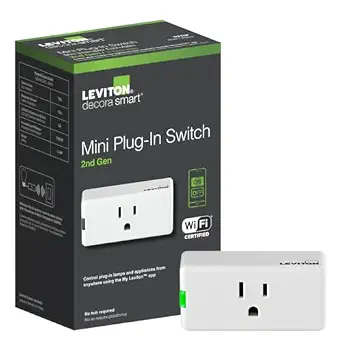 |
| Best Value The sweet spot between price and what you get | Govee Smart Plug H5083 |  |
| Best Budget The cheapest option that still gets the job done reliably | GHome Smart Plug WP3 |  |
| Top Rated A top-rated pick with lots of positive feedback | Amazon Smart Plug |  |
| Most Popular A crowd favorite that many people choose with confidence | Kasa Smart Plug HS103 2-Pack |  |
| Best Seller A high-volume bestseller chosen again and again | Kasa Smart Plug EP10 |  |
Amazon Basics Smart Plug HPP-A11S

| Connector Type | Plug-in |
|---|---|
| Plug Type | Type B |
| Amperage | 15 A |
| Included Components | (1) Amazon Basics Smart Indoor Plug |
This Amazon Basics Smart Plug provides a straightforward way to make ordinary appliances smart using Alexa and the Alexa app. It plugs into a standard Type B outlet and leaves the second socket free thanks to its compact profile, and it supports scheduling, sunrise/sunset rules, and remote on/off control from anywhere. Setup is simple through the Alexa app with no additional hub or third-party apps required, and the 2.4 GHz Wi-Fi support is typical for budget smart plugs. Practical benefits include timed routines for lamps, holiday lights, fans, or small kitchen appliances and voice control with Echo devices. Limitations to be aware of are the Alexa-only ecosystem focus and the standard 15 A rating, which is fine for lights and small appliances but not intended for heavy-duty loads. For buyers wanting a no-frills, reliable smart outlet that integrates directly with Alexa, it is an easy pick; those needing multi-platform smart home compatibility or higher load capacity should look elsewhere.
Best for: Buyers who want an inexpensive, fuss-free way to add Alexa voice control and scheduled automation to lamps and small appliances without adding hubs or extra apps.
Less Ideal for: Users who need cross-platform compatibility with other smart home ecosystems or who plan to control high-draw appliances should consider other options.
- Works directly with Alexa with no hub or third-party apps required
- Compact plug-in design leaves adjacent outlet usable
- Supports scheduling, sunrise/sunset rules, and remote control via the Alexa app
- Simple setup on 2.4 GHz Wi-Fi
- Limited to the Alexa ecosystem rather than universal smart-home platforms
- 15 A rating restricts use to lights and small appliances, not heavy loads
Verdict: A budget-friendly, Alexa-native smart plug that makes lamps and small appliances schedulable and voice controllable with minimal setup.
Leviton Decora Smart Plug D215P

| Current Rating | 15 A |
|---|---|
| Operating Voltage | 120 volts |
| Connectivity Protocol | Matter, Wi-Fi |
| Wattage | 1500 watts |
| Control Method | App, Push Button, Remote, Voice |
The Leviton Decora Smart Plug D215P is a plug‑in on/off switch that connects to 2.4 GHz Wi‑Fi and the My Leviton app to control lamps, holiday lights, electronics, and small appliances from anywhere. Installation is simple: plug it into a standard, AFCI, or GFCI outlet and use the onboard button for local control or the app and voice assistants for remote switching and schedules. It supports My Leviton scenes, firmware updates to enable Matter for local smart home platforms, and optional wire‑free multi‑location control when paired with Leviton's Anywhere Companion switch. Electrical ratings cover common household loads including 15 A general use and up to 1500 W incandescent, with specific limits for LED/CFL and motors noted in the specs. The practical benefits are reliable factory-grade electrical components, broad voice platform support, and scheduling without a hub. Limitations include operation on 2.4 GHz only and the plug form factor can block adjacent outlets depending on placement.
Best for: Buyers who want a reliable, factory-grade smart plug for voice control and robust scheduling without adding a hub and who prioritize compatibility with major smart home ecosystems.
Less Ideal for: People who need dual-band Wi‑Fi devices, very compact flat plugs to preserve both outlet positions, or those who require outlet-level energy monitoring.
- Works with Alexa, Google Assistant, and Apple Siri and supports Matter via firmware update
- No hub required and controlled remotely through the My Leviton app with scheduling and scenes
- Factory-grade electrical ratings for common loads including 15 A general use and 1500 W incandescent
- Optional wire-free multi-location control when paired with Leviton Anywhere Companion switch
- Only connects on 2.4 GHz Wi‑Fi, which may limit network placement
- Plug form factor can obstruct adjacent outlet access in some receptacles
Verdict: A robust, hub‑free smart plug for buyers who want dependable voice and app control plus future Matter support on a budget.
Govee Smart Plug H5083

| Voltage | 120 volts |
|---|---|
| Plug Type | Type B |
| Amperage | 10 A |
| Connection | 2.4 GHz WiFi & Bluetooth |
| Certification | ETL |
The Govee Smart Plug H5083 is a small, single-outlet smart outlet that connects over 2.4 GHz Wi‑Fi or Bluetooth to the Govee Home app and works with Alexa and Google Assistant for voice control. It is typically used to add scheduling, timers, and group control to lamps, fans, and other low-to-moderate load devices so you can automate routines and turn appliances on or off remotely. Notable features include both Wi‑Fi and Bluetooth connectivity for faster pairing and automatic reconnection after outages, ETL certification and built-in overload protection for safer operation, and a compact form factor that minimizes blocking adjacent sockets. Trade-offs are that it is limited to 10 A (1100 W) so it is not suited for high-draw appliances, and it only supports 2.4 GHz Wi‑Fi rather than 5 GHz or Matter interoperability. For straightforward, budget-conscious automation of lights and small devices this plug is a practical, no-hub option.
Best for: Buyers who want an inexpensive, plug-and-play way to automate lights and small appliances and prefer a simple app-based or voice-controlled setup without adding a hub.
Less Ideal for: People who need plugs for high-power devices, require 5 GHz Wi‑Fi or Matter compatibility, or want advanced energy monitoring and pro-level integrations.
- Dual connectivity via 2.4 GHz Wi‑Fi and Bluetooth for reliable pairing and control
- Works with Alexa and Google Assistant for voice commands
- ETL certified with overload protection for safer everyday use
- Compact design that minimizes blocking of adjacent outlets
- Supports scheduling, 24H timer, and group control in the Govee Home app
- Rated for 10 A (1100 W) so not suitable for high-power appliances
Verdict: A budget-friendly, compact smart plug that reliably automates lamps and small appliances with voice control and basic safety protections.
GHome Smart Plug WP3

| Current Rating | 10 A |
|---|---|
| Operating Voltage | 120 volts |
| Wattage | 1200 watts |
| Connectivity Protocol | Bluetooth, Wi-Fi |
| Controller Type | Amazon Alexa, Google Assistant, SmartThings |
The GHome Smart Plug WP3 is a compact plug-in outlet that turns ordinary appliances into remotely controllable devices using a 2.4 GHz Wi‑Fi or Bluetooth connection. You set it up in the GHome, Smart Life, or Tuya app, add schedules, countdowns, random timers or cycle timers, and group multiple plugs for one‑tap control. It supports voice control through Alexa and Google Assistant once the plug is added to the app, and the unit is ETL and FCC listed for basic safety. Practical benefits include remote on/off control for lamps, fans, holiday lights and small appliances plus energy-saving scheduled routines. Limitations to note are the 10 A / 1200 W rating that rules out high-draw devices and the requirement to use a 2.4 GHz network for connections, which may need router adjustments in mixed-band setups. The simple plastic housing and IP40 rating make it suitable for indoor use only.
Best for: Buyers who want an inexpensive, no‑frills smart plug to add basic schedules and voice control to lamps and small appliances without a hub and who prioritize low upfront cost.
Less Ideal for: Users who need to power heavy appliances, require outdoor or waterproof devices, or who must use 5 GHz Wi‑Fi or Matter-certified ecosystem devices.
- Easy app setup with GHome/Smart Life/Tuya and remote on/off control
- Works with Alexa and Google Assistant for hands‑free voice control after app linking
- Full scheduling options including countdown, cycle and random timers for automation and away mode
- ETL and FCC listing for basic certified safety
- Limited to 10 A / 1200 W so not suitable for high‑power appliances
- Only supports 2.4 GHz Wi‑Fi which may require router changes for some networks
Verdict: A budget-friendly indoor smart plug that gives reliable app scheduling and voice control for lamps and other low-power devices.
Amazon Smart Plug

| ASIN | B089DR29T6 |
|---|---|
| Brand | Amazon |
| Requires Hub | No |
The Amazon Smart Plug turns a normal electrical outlet into an Alexa-controlled socket with a very simple setup flow through the Alexa app. Plug it in, link it in the app, and you can switch lamps, fans, coffee makers, or other devices on and off by voice, on a schedule, or as part of Alexa routines. Its compact form leaves the second outlet usable and the plug automatically reconnects after power or Wi-Fi interruptions, which helps maintain steady operation in everyday use. Because it relies on the Alexa ecosystem and local Wi-Fi, there is no dedicated hub to manage and routines integrate smoothly with other Alexa actions. Limitations include the need for an Alexa account and compatible Alexa device for voice control and no advanced power monitoring or third-party smart home protocol support, so it is strictly a simple on/off smart outlet rather than a full-featured energy-management device.
Best for: Buyers who prioritize a reliable, no-fuss smart plug that simply adds voice control and scheduling through Alexa without extra hubs or complex configuration.
Less Ideal for: People who need energy monitoring, advanced automation across non-Alexa platforms, or hub-based smart-home integrations should look at more feature-rich alternatives.
- Very easy setup through the Alexa app with no separate hub required
- Compact design preserves the second outlet on a duplex receptacle
- Automatically reconnects to Alexa after power or Wi-Fi outages
- Works with Alexa routines and schedules for automated control
- Requires the Alexa ecosystem for voice and smart features
- No built-in energy or power usage monitoring
Verdict: A straightforward, budget-friendly way to add dependable Alexa voice control and scheduling to standard outlets with minimal setup.
Kasa Smart Plug HS103 2-Pack

| Amperage | 15 A |
|---|---|
| Connector Type | Plug In |
| Plug Type | Type B |
| Product Grade | Residential |
The Kasa HS103 2‑pack turns ordinary lamps, fans, or small appliances into remotely controllable devices using 2.4 GHz Wi‑Fi and the Kasa mobile app. Setup is straightforward: plug the unit in, follow the app prompts, and link it to Alexa or Google Assistant for voice control. The plugs support scheduling, countdown timers, away mode and grouping, so you can automate lighting and set routines across multiple outlets. Each unit is UL certified and rated for residential 15 A circuits, and a side button lets you manually toggle power without the app. Because they are compact and minimal, they fit next to other outlets without blocking neighboring sockets. The main limitations are the requirement for 2.4 GHz Wi‑Fi only and the lack of built-in energy monitoring on this model, so you cannot track consumption from the plug itself. For straightforward, reliable remote control and scheduling on a budget, these plugs cover the essentials well.
Best for: Buyers who prioritize a proven, easy-to-use smart plug that handles voice control and reliable scheduling without extra bells and whistles and who value strong user feedback and safety certification.
Less Ideal for: People who need energy monitoring, 5 GHz Wi‑Fi support, or advanced power-management metrics should look at other models with those features.
- Easy app setup with Kasa and smooth Alexa/Google Assistant voice integration
- Scheduling, countdown timer, away mode and grouping for practical automation
- Compact form factor that avoids blocking neighboring outlets
- UL certified and rated for standard residential circuits
- Only connects to 2.4 GHz Wi‑Fi networks
- No built-in energy monitoring to track power use
Verdict: A reliable, no-frills smart plug that delivers voice control and straightforward scheduling at a budget-friendly value.
Kasa Smart Plug EP10

| Current Rating | 15 A |
|---|---|
| Operating Voltage | 120 volts AC |
| Connectivity Protocol | Wi‑Fi (2.4 GHz) |
| Wattage | 1800 watts |
| Controller Type | Amazon Alexa, Google Assistant |
The Kasa Smart Plug EP10 is an ultra-compact Wi‑Fi outlet adapter designed to add basic smart control to lamps, fans, holiday lights, and other small appliances without blocking the second socket. It connects directly to a 2.4 GHz network and works with the Kasa app for remote on/off, schedules, timers, and an Away Mode that simulates occupancy. Voice control is supported through Amazon Alexa and Google Assistant, and the plug is UL certified with a flame‑retardant shell and copper contacts for safer, stable connections. The 15 A/1800 W rating covers most household loads but means it is intended for typical appliances rather than heavy-duty tools. Setup is straightforward for nontechnical users and the compact footprint keeps wall outlets usable. If you want simple automation and proven safety on a budget, this plug delivers reliable core features without extra complexity like energy metering or 5 GHz support.
Best for: Buyers who want a straightforward, safe, and inexpensive way to add remote and voice control to everyday plugs without technical setup hassles.
Less Ideal for: People who need built‑in energy monitoring, 5 GHz Wi‑Fi support, or smart plug features tailored for heavy appliances and workshop tools.
- Very compact design that preserves the second outlet on a standard wall socket
- UL certified with flame‑retardant shell and copper contacts for improved safety
- Works with Alexa and Google Assistant for voice control
- Remote scheduling, timers, and Away Mode via the Kasa app for simple automation
- Only supports 2.4 GHz Wi‑Fi and lacks energy usage reporting
Verdict: A compact, safety‑focused smart plug that gives reliable remote and voice control on a budget.
Choosing the Right Smart Plug on a Budget: Key Factors to Consider
Connection Stability
A reliable network connection is the foundation of any smart plug. If a plug drops off the network frequently, schedules fail and voice control becomes frustrating. Look for devices that maintain steady Wi-Fi or compatible mesh network links in the parts of the home where you plan to install them.
Connection stability also affects how quickly commands are executed. For budget plugs, pay attention to whether the device supports 2.4 GHz Wi-Fi, which reaches farther in most homes, and whether the manufacturer releases firmware updates to address known connectivity bugs.
App Usability and Setup
A clear, responsive app makes setup and daily use far easier. For budget smart plugs, the app should guide initial pairing, let you name and group outlets, and offer straightforward schedule creation. Complex or cluttered apps can hide essential features behind menus or force frequent sign-ins.
Also consider whether the app supports local control or requires cloud dependency. Local control is preferable for faster response times and fewer privacy concerns, but many budget devices rely primarily on cloud services. Check how the app handles firmware updates and whether it provides useful feedback when a device goes offline.
Voice Assistant and Automation Compatibility
Even on a budget, you want a smart plug that works with the voice assistant or automation ecosystem you already use. Compatibility reduces friction when integrating plugs into routines or scenes. Confirm support for the major voice platforms you prefer, and whether the plug can be grouped with other devices for multi-device actions.
Some budget plugs offer limited integrations or require linking accounts through cloud services. Understand whether those integrations support two-way state reporting, meaning the assistant knows whether a plug is actually on or off, which improves reliability in complex automations.
Electrical Safety and Load Rating
Safety matters more than price. Check that the smart plug includes required electrical safety certifications and that its load rating matches the appliances you intend to control. Using a plug with too low a rating on high-draw devices can lead to overheating or failure.
Look for physical safety features such as surge protection, grounded prong support for heavy-duty plugs, and durable housing. On budget models, pay attention to manufacturer guidance on continuous current limits and recommended device types to avoid misuse.
Physical Size and Outlet Fit
A compact form factor matters in multi-outlet situations. Bulky plugs can block neighboring sockets or interfere with power strips. Measure or check depth and orientation if you need to maintain access to adjacent outlets or if you plan to install plugs on wall-mounted power strips.
Also consider whether the plug has an LED status indicator and whether that light can be dimmed or turned off if it will be installed in a bedroom. Build quality and materials affect how well plugs hold up to repeated use and occasional knocks.
Energy Monitoring and Reporting
Some budget smart plugs include basic energy monitoring, which can help you track power usage and identify wasteful devices. While not essential for basic automation, built-in reporting provides insight into long-term savings and helps prioritize replacements.
If energy reporting is a priority, check how finely the plug measures consumption, how often it reports data, and whether the companion app stores historical usage. Keep in mind that more advanced reporting is less common on entry-level plugs, so confirm the level of detail offered before relying on the feature.
How to Use Budget Smart Plugs Safely
Smart plugs are convenient, but they must be used within their electrical limits. Always check the device's maximum load rating before connecting high-draw appliances such as space heaters, window air conditioners, or large kitchen equipment. For those devices, consider dedicated circuits or plugs specifically rated for heavy use.
Place plugs in a well-ventilated area and avoid stacking multiple high-wattage devices on a single outlet. If a plug becomes unusually warm, unplug it and inspect both the plug and the connected device for signs of damage. When in doubt, consult an electrician about safe installation for heavy loads.
- Confirm the plug's continuous current and maximum wattage ratings before use
- Avoid controlling heaters, AC units, or other high-current appliances with standard budget plugs
- Unplug and inspect any plug that runs unusually hot
Maximizing Responsiveness and Range
To keep smart plugs responsive, place them where Wi-Fi signal strength is strong. Walls, floors, and interference from other electronics reduce range. If the plug will be far from your router, consider improving home Wi-Fi coverage with extenders or mesh nodes rather than moving the plug.
If you use many smart devices, avoid overcrowding a single Wi-Fi access point. Distribute devices across the home network and prioritize critical automation devices on the primary band when possible. Some budget plugs only support 2.4 GHz, which often provides better range for smart home gear.
- Test Wi-Fi signal at the installation point before finalizing placement
- Consider a mesh Wi-Fi system if you plan to install plugs across a large home
- Use 2.4 GHz where supported for better reach
Automation Ideas for Budget Smart Plugs
Even simple budget plugs can unlock useful automations. Schedule lights to turn on and off to simulate occupancy, or link a lamp to a sunset trigger so outdoor lighting comes on automatically. Use time-based schedules for appliance charging windows to reduce phantom load and save a little energy.
Combine motion sensor triggers with smart plugs to control hallway or closet lights, and create scene-like effects by grouping multiple plugs to switch together. For safety, set idle-off timers on space heaters or hair styling tools so they power down automatically after a set interval.
- Create sunset/sunrise schedules for exterior and interior lights
- Use idle timers on appliances to reduce runaway energy use
- Group several plugs to simulate scenes without complex hubs
Privacy and Cloud Dependence
Many budget smart plugs rely on cloud services for remote control and voice assistant linking. While cloud connectivity enables convenient features, it also introduces potential privacy tradeoffs and creates dependence on external servers. Review the manufacturer's privacy policy to understand what data is collected and how long it is retained.
If local control is important for privacy or resilience, look for devices that support LAN commands or industry-standard automation protocols. Otherwise, accept that cloud-dependent plugs may lose remote functionality if the vendor discontinues service or experiences outages.
- Check whether the plug supports local control or needs cloud connectivity
- Review the privacy policy for data collection practices
- Consider local automation options if data privacy is a priority
Maintaining and Updating Budget Smart Plugs
Keep firmware up to date to patch security issues and fix connectivity bugs. Budget devices sometimes lag in update cadence, so check the companion app periodically for firmware notices. Regular updates can improve compatibility with voice assistants and network equipment.
If a plug becomes unreliable after an update, note the change and contact support or consider reverting to factory settings if available. For long-term reliability, rotate older plugs out of critical automation roles once they no longer receive firmware support.
- Check for firmware updates monthly or when connectivity issues arise
- Factory-reset and reconfigure a problematic plug before disposal
- Avoid using unsupported plugs for safety-critical automations
How We Chose the Best Smart Plug on a Budget
We focused on devices that keep upfront cost low while retaining core functionality and safety for everyday home use. Our selection started by screening widely available budget smart plugs and excluding units that lack basic safety certifications or that require proprietary hubs to operate. From that pool we prioritized products that demonstrate consistent Wi-Fi or compatible network connections, straightforward setup, and reliable scheduling or automation features. Key evaluation criteria included connection stability over typical home Wi-Fi networks, the clarity and responsiveness of the companion mobile app, compatibility with common voice assistants and automation ecosystems, and electrical safety features such as overload protection and grounded outlet support. We also considered real-world usability factors like physical size and how the plug affects adjacent outlets, power reporting or energy monitoring where available, and firmware update support. We excluded novelty devices with unproven firmware histories, plugs lacking required electrical certifications, and offerings that lock essential features behind expensive subscriptions. The result is a curated set of budget-friendly smart plugs that deliver dependable everyday automation without unnecessary bells and whistles.
Our full evaluation process is outlined in our review methodology.
FAQ
Can I use a budget smart plug with a space heater?
Most budget smart plugs are not rated for high-wattage heaters. Check the plug's maximum load rating and only use plugs specifically marked for high-current devices. For heaters, a heavy-duty plug or a dedicated circuit is usually safer.
Will a budget smart plug work if my internet goes down?
That depends. Many budget plugs rely on cloud services for remote commands, so remote control may stop during an internet outage. Local schedules often continue on-device, but responsiveness from your phone or voice assistant may be interrupted.
Do budget smart plugs support voice assistants?
Many do, but support varies. Budget plugs commonly integrate with major voice assistants through cloud linking. Confirm the specific assistant compatibility and whether the integration reports device state accurately.
How do I reduce interference and connection drops?
Improve Wi-Fi coverage at the plug's location, use the 2.4 GHz band for better range when supported, and avoid placing plugs near dense electronics or metal obstructions. A mesh Wi-Fi system or range extender can help when you have many devices.
Are energy monitoring features reliable on budget plugs?
Basic energy monitoring on entry-level plugs provides useful ballpark figures but is often less accurate than dedicated monitors. Use reported numbers for trend spotting rather than precise billing calculations.
Final Verdict
On a budget, prioritize dependable connection, verified safety ratings, and an app that makes setup and scheduling painless. Expect tradeoffs such as limited local control or basic energy reporting, and avoid using entry-level plugs for high-draw appliances. Pick a smart plug that matches the load you intend to control, fits physically into your outlets, and receives occasional firmware updates. Focusing on those core criteria will deliver affordable, low-friction automation that improves daily convenience without undue risk.