
Note: This article contains affiliate links. If you click on these links and make a purchase, we may earn a small commission at no extra cost to you. This helps support our research and content. Read our full affiliate disclosure here.
Picking a smart speaker under $100 means balancing sound, voice-assistant responsiveness, and smart-home control without overspending. For many rooms, a budget-friendly speaker delivers music, information, and hands-free control just fine, but not all inexpensive models offer the same mix of audio fidelity, microphone quality, and integration options. This guide shortlists the top picks for smart speakers under $100 and explains the tradeoffs that matter. Below you will find our selected smart speakers, each chosen for a clear mix of sound quality, voice responsiveness, and connectivity. Read on for the evaluation criteria and practical tips to match a compact smart speaker to your needs.
Top Picks at a Glance
| Best Quality Built to a higher standard if you want something more solid | Belkin SOUNDFORM Elite Speaker |  |
| Best Value The sweet spot between price and what you get | Google Nest Mini 2nd Gen |  |
| Best Budget The cheapest option that still gets the job done reliably | Juno 6-Inch Smart Speaker Downlight |  |
| Top Rated A top-rated pick with lots of positive feedback | Amazon Echo Dot (newest model) |  |
| Most Popular A crowd favorite that many people choose with confidence | Amazon Echo Show 5 |  |
| Best Seller A high-volume bestseller chosen again and again | XIAOMI Mi Smart Speaker |  |
Belkin SOUNDFORM Elite Speaker

| Wireless charging power | iPhone 7.5W, Samsung 9W, Google 10W |
|---|---|
| Connectivity | Bluetooth, Wi‑Fi, Alexa voice control |
The Belkin SOUNDFORM Elite is a compact smart speaker tuned by Devialet that aims for room-filling, high-fidelity audio while doubling as a fast wireless charger. In daily use it connects over Bluetooth for phone playback, supports multiroom streaming, and responds to Alexa voice commands for basic smart home control. The speaker emphasizes punchy, resonant bass and clear mids and highs for music and podcasts, and vibration-canceling design keeps the charging pad steady while top-loading phones charge at device-specific rates. Setup is straightforward and the multiroom feature makes it useful as part of a whole-home audio plan. Trade-offs include limited advanced voice assistant features compared with larger smart speakers and the unit's output is tuned for clarity rather than extreme loudness, so very large rooms may need additional speakers. The combination of better-than-typical audio for this price plus convenient wireless charging makes it a practical all-in-one bedside or desktop smart speaker.
Best for: A performance-minded buyer who wants better-than-average sound from a compact smart speaker plus the convenience of an integrated wireless charger for daily bedside or desktop use.
Less Ideal for: People who need very high maximum volume for large open rooms or who want the most advanced voice assistant features and ecosystem integrations.
- Devialet-tuned audio for clearer mids and stronger bass than typical budget smart speakers
- Bluetooth and multiroom streaming for flexible playback
- Built-in fast wireless charging with vibration-canceling design
- Alexa voice control for hands-free queries and smart home commands
- Not as loud as larger, more powerful speakers for very large rooms
- Voice assistant capabilities are more basic compared with premium smart speakers
Verdict: Choose this speaker if you want compact, Devialet-tuned audio performance with convenient fast wireless charging in one package under $100.
Google Nest Mini 2nd Gen

| Audio Output Mode | Stereo |
|---|---|
| Speaker Maximum Output Power | 15 watts |
| Connectivity Technology | Bluetooth |
| Speaker Size | 3.85 inches |
| Audio Driver Size | 40 millimeters |
The Nest Mini 2nd Gen is a small, power‑efficient smart speaker designed for casual music, voice queries, and room-level voice control. It connects over Bluetooth and supports voice control for hands-free use, making it handy on a nightstand, countertop, or shelf; you can also wall-mount it. The unit packs a 15-watt max output with a 40 mm dynamic driver and stereo audio that delivers surprisingly punchy bass for its size, so it easily fills small rooms with clear sound. Setup is straightforward and the included universal AC adapter lets you use it internationally. Its indoor-focused design and tabletop mounting keep it best suited to homes rather than outdoor use, and it relies on a corded power source so it is not portable. If you want a compact, no-frills smart speaker that prioritizes simple setup, voice control, and solid small-room sound, the Nest Mini is a practical choice under $100.
Best for: Buyers seeking a compact, easy-to-setup smart speaker that prioritizes clear small-room sound and dependable voice control without extra complexity.
Less Ideal for: People who need a portable or battery-powered speaker for outdoor use or those wanting high-volume, room-filling sound for large spaces.
- Compact footprint fits on nightstands and shelves
- Bluetooth connectivity and voice control for hands-free use
- 40 mm dynamic driver and 15 W output deliver better-than-expected bass for small rooms
- Includes universal power adapter for international outlets
- Can be wall-mounted or tabletop‑placed for flexible placement
- Requires a nearby power outlet because it is corded and not battery powered
- Not designed for outdoor or waterproof use
Verdict: A compact, easy-to-use smart speaker that delivers surprisingly strong small-room sound and reliable voice control for buyers optimizing value under $100.
Juno 6-Inch Smart Speaker Downlight

| Light Output | 800 lumens |
|---|---|
| Wattage | 12.8 watts |
| Light Color | RGBW, Variable |
| Connectivity Protocol | Bluetooth, Zigbee |
| Voltage | 120 volts |
The Juno 6-Inch Smart Speaker Downlight combines a recessed LED downlight with a built-in Bluetooth speaker and smart-home connectivity so a single fixture provides both light and music. It pairs over Bluetooth or Zigbee to mobile devices or hubs and integrates with Alexa, Google Home and SmartThings for voice control, schedules, and grouping. The fixture delivers up to 800 lumens of variable RGBW light with dimming and adjustable color temperature, so it can serve as ambient colored lighting or functional white light in kitchens, living rooms, and covered patios. Installation is a retrofit wafer-style downlight with integrated electronics and quick-connect wiring, which speeds replacement of existing trims. Practical limits to keep in mind are modest 12.8 W power and 800 lm output, so it is best used for accent or general room lighting rather than replacing high-output fixtures, and speaker audio will be suitable for background music rather than hi-fi listening. The unit is waterproof rated for wet locations and includes mounting hardware for a streamlined install.
Best for: Buyers looking to add smart lighting plus casual music capability to a room on a budget who value easy retrofit installation and smart home voice control.
Less Ideal for: Those who need a primary high-output fixture or audiophiles seeking full-range speaker performance should choose dedicated lights or speakers instead.
- Built-in Bluetooth speaker and Zigbee connectivity for streaming audio and smart hub integration
- RGBW variable light with dimmable and adjustable color temperature for flexible ambience
- Energy efficient 12.8 W LED output rated at 800 lumens
- Quick-connect retrofit design with included mounting hardware for faster installation
- Waterproof rating suitable for wet locations like covered patios or showers
- Speaker audio is designed for background listening and not high-fidelity sound
- 800 lumens and 12.8 W may be insufficient as the sole light source in larger rooms
Verdict: If you want an affordable retrofit fixture that delivers smart voice control, color-changing light, and background music in one unit, this downlight is a compact, budget-friendly choice.
Amazon Echo Dot (newest model)

| ASIN | B09B8V1LZ3 |
|---|---|
| Includes eero Built-in | Yes |
| Built-in sensors | Motion and indoor temperature |
| Voice assistant | Alexa |
The Echo Dot (newest model) is a compact Alexa smart speaker designed for everyday voice control, casual music listening, and basic smart home automation. It streams music and podcasts from popular services or via Bluetooth, answers questions, sets timers and alarms, and can trigger routines using the built-in motion and temperature sensors. The speaker is small but delivers clear, room-filling sound suitable for bedrooms, kitchens, and home offices rather than deep bass performance. A notable practical feature is eero Built-in, which lets the device act as a mesh Wi‑Fi extender when paired with an existing eero network to extend coverage in smaller homes. Privacy controls include a physical microphone off button and multiple layers of privacy protection. The Echo Dot is easy to set up and integrates smoothly with other Echo devices for multiroom audio or with Fire TV for basic home theater pairing, but power users who want audiophile sound or advanced local automation may find its capabilities limited.
Best for: Buyers who prioritize a reliable, easy-to-use smart speaker for everyday voice control, basic home automation, and occasional music listening in small rooms.
Less Ideal for: Users seeking high-fidelity audio or powerful room-filling sound for large living spaces should consider a larger or higher-end speaker.
- Built-in Alexa provides hands-free voice control for music, timers, questions, and smart home devices
- Integrated motion and temperature sensors enable simple automation and context-aware routines
- eero Built-in can extend mesh Wi‑Fi coverage when added to an eero network
- Compact footprint fits easily in bedrooms, offices, and small living spaces
- Small speaker delivers clear sound but lacks deep bass and high-volume fidelity for large rooms
Verdict: A compact, dependable Alexa speaker that also doubles as an eero mesh extender, making it a smart choice for reliable everyday use in small rooms.
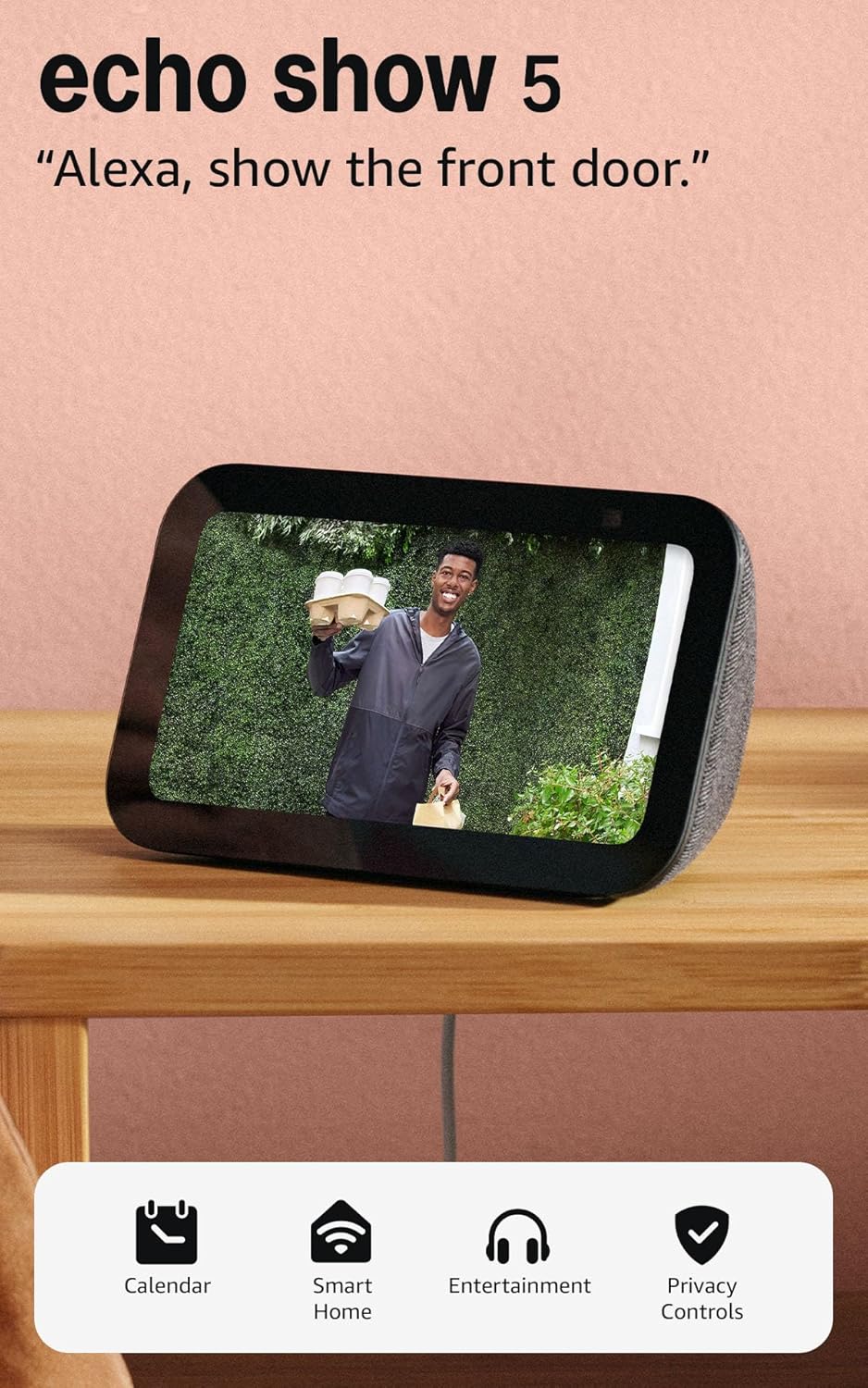
Amazon Echo Show 5
| Display size | 5.5 inches |
|---|---|
| Camera | 2 MP |
| Voice assistant | Alexa |
| Primary uses | Music, video calls, smart home control |
The Echo Show 5 packs a lot of smart-display functionality into a small footprint. You get a 5.5-inch touchscreen for glanceable info like weather, timers, and song titles, plus a 2 MP camera for video calling and Drop In home check-ins. It doubles as a media player with improved bass and clearer vocals compared with earlier generations, streaming music and shows from common services. The device also acts as a smart home hub interface so you can control compatible lights, thermostats, and cameras from the screen or by voice. Privacy features include a physical camera shutter and a mic/camera off button. Practical trade-offs are its modest screen size and basic camera resolution, which are fine for bedside or kitchen use but not for detailed video tasks. For buyers focused on a budget smart display that still covers calls, media, and smart-home control, the Echo Show 5 is a compact, well-rounded choice.
Best for: Buyers who want an affordable, space-saving smart display that reliably handles music, quick video calls, and straightforward smart-home control while prioritizing proven product performance and community feedback.
Less Ideal for: People who need a large-screen display, high-resolution video calls, or a dedicated smart-home hub with advanced on-device processing should consider larger or higher-end models.
- Compact 5.5-inch touchscreen for quick visual info and controls
- Improved audio with deeper bass and clearer vocals for its size
- Built-in 2 MP camera for video calls and Drop In home monitoring
- On-device smart home controls for lights, thermostats, and compatible cameras
- Privacy controls including a physical camera shutter and mic/camera off button
- Small screen and 2 MP camera are not ideal for high-detail video or prolonged viewing
- Does not include advanced on-device processing for some smart-home hubs
Verdict: A compact, budget-friendly smart display that delivers dependable music, video calling, and basic smart-home control in a bedside- or countertop-friendly package.
XIAOMI Mi Smart Speaker

| Connectivity Technology | Bluetooth, Wi-Fi |
|---|---|
| Wireless Technology | Bluetooth, Infrared |
| Speaker Maximum Output Power | 12 watts |
| Number of Microphones | 2 |
The XIAOMI Mi Smart Speaker is a small tabletop smart speaker designed for everyday home use as a voice assistant, music player, and IR remote for legacy appliances. It connects over Wi‑Fi or Bluetooth, supports Google Assistant for voice control, and includes a one‑dot LED display with adaptive brightness that makes status information easy to read. Sound comes from a 1.5‑inch woofer and a stereo output tuned for balanced midrange and clear vocals, and you can pair two units for true stereo or link multiple speakers for synchronized playback across rooms. The unit also has two microphones for far‑field voice pickup and an IR transmitter to let you control TVs and other non‑smart devices by voice. Practical limitations include modest 12 W maximum output that will not fill very large rooms and no waterproofing, so it is best kept away from bathrooms or outdoor use. Setup is typical for smart speakers and the corded power requirement means it needs a nearby outlet.
Best for: Buyers who want an inexpensive, reliable smart speaker that integrates voice control, basic music playback, and the convenience of turning traditional IR appliances into voice‑controllable devices.
Less Ideal for: Audiophiles seeking deep bass or large‑room loudness and people who need a rugged or waterproof speaker for outdoor or bathroom use should look elsewhere.
- Built‑in Google Assistant for hands‑free voice control and smart home commands
- IR transmitter lets you control non‑smart appliances by voice
- Compact tabletop design with adaptive LED display for easy status feedback
- Wi‑Fi and Bluetooth connectivity plus ability to pair multiple units for stereo or whole‑home playback
- 12 W output is modest and may lack bass and headroom in large rooms
- Not water resistant so unsuitable for humid or outdoor locations
Verdict: A budget smart speaker that pairs Google Assistant voice control with IR appliance control, making it a practical choice for buyers who prioritize convenience and everyday smart home features under $100.
Choosing the Right Smart Speaker: Key Factors to Consider
Audio Performance and Room Size
Speaker drivers and enclosure design determine how well a smart speaker fills a space. In smaller rooms, compact speakers can produce satisfying midrange and vocal clarity, but bass will be limited compared with larger units.
Think about where you will use the speaker. A kitchen or bedroom usually benefits from clear mids and intelligible vocals more than deep bass, while a living room may need a speaker that can handle fuller sound at moderate volume. Also consider placement: close to a wall often boosts perceived bass, while an open shelf can yield clearer highs.
Microphone Quality and Wake-Word Responsiveness
A smart speaker is only as useful as its ability to hear you. Microphone arrays, noise-reduction algorithms, and placement affect how reliably the device wakes and interprets commands, especially when music is playing or there's background noise.
If you plan to use voice control across a larger area or while cooking or cleaning, prioritize models with better microphone pickup and far-field voice processing. A physical mute switch can be important for privacy and gives you control over when voice capture is active.
Smart-Home Integration and Assistant Features
Consider which voice assistant and ecosystem the speaker supports because that determines what smart-home devices and services you can control. Native integrations simplify routines, timers, and device groups, while third-party support can add flexibility.
Think about the automations you want to run from the speaker. If voice control of lights, locks, or thermostats is a priority, check that the assistant supports those device types and that the speaker can join multi-device scenes or routines.
Connectivity and Streaming Options
Reliable Wi-Fi and solid Bluetooth streaming make everyday listening smoother. Wi-Fi is necessary for voice assistant features and streaming services, while Bluetooth is handy for direct audio from phones and tablets.
Look for multi-room or group-play features if you plan to expand with additional speakers later. The quality of the Wi-Fi radio and the stability of the streaming software influence dropouts and re-connection speeds, which matter for continuous playback and voice requests.
Controls, Design, and Placement Flexibility
Physical controls, companion apps, and form factor affect how you interact with the speaker. Tactile buttons or touch controls make volume and playback adjustments quick, while an intuitive app simplifies setup and advanced settings.
Size and styling determine where the speaker fits visually and acoustically. If you need portability, look for a design with a rechargeable battery. Otherwise, consider a compact plug-in unit that blends into shelves or countertops without obstructing sightlines.
Privacy and Ongoing Software Support
Privacy settings and the availability of software updates are important for long-term ownership. Firmware updates can add features and security patches, while clear privacy controls let you manage voice data and microphone status.
Check whether the manufacturer provides regular updates and transparent controls such as voice history deletion, local processing options, or an easy hardware mute. These features help maintain both functionality and user trust over time.
How to Match a Smart Speaker to Your Room
Start by assessing the primary listening spot and typical distance from the speaker. For a bedside table or small office, prioritize compact models with clear mids. For an open-plan kitchen or living area, choose a speaker with wider sound dispersion or consider adding a second unit for better coverage.
Placement affects perceived bass and clarity. Placing a speaker near a wall or corner will usually increase low-frequency response but can muddy mids if the surface reflects sound poorly. Elevate the speaker slightly to reduce surface reflections and experiment with orientation to find the most natural-sounding setup.
- Small rooms: aim for clear mids and speech intelligibility
- Open areas: wider dispersion or multiple units improves coverage
- Near reflective surfaces: move speaker away from hard walls for clearer sound
Setting Up Voice Controls and Routines
Spend a few minutes in the companion app linking your streaming services and any smart-home devices you want to control. Creating basic routines for morning and evening can turn a simple speaker into a central automation hub that adjusts lighting and starts music with a single command.
Test wake-word responsiveness from common positions in the room and adjust the speaker placement if voice pickup is inconsistent. Use voice-training or voice recognition features when available to improve accuracy for multiple household members.
- Link accounts and test commands during setup
- Create simple routines for common tasks
- Train voice profiles if the assistant supports it
Maximizing Music Quality on a Budget Speaker
Use high-quality streaming settings in your service app and prefer Wi-Fi streaming when possible to avoid Bluetooth compression. Some speakers include an equalizer in their companion apps; small adjustments to bass and treble can significantly improve perceived clarity.
Place the speaker away from surfaces that cause strong reflections and avoid putting it inside closed cabinets. If you want more bass, adding a second passive or active speaker is usually more effective than relying on extreme equalization.
- Prefer Wi-Fi streaming over Bluetooth for better audio fidelity
- Use the app equalizer to tweak sound to the room
- Avoid closed cabinets and reflective surfaces
Privacy Tips and Managing Voice Data
Familiarize yourself with mute controls and how to delete voice recordings from the companion app. Many speakers provide straightforward options to clear voice history and disable certain voice features if you prefer more limited data collection.
Consider placing the speaker where accidental wake-ups are less likely, such as not directly in front of a couch where TV volume is high. If privacy is a strong concern, check for hardware mute switches and opt for options that offer simple management of recordings.
- Use hardware mute for instant privacy
- Regularly review and delete stored voice recordings
- Limit integrations that unnecessarily expose personal data
Expanding Later: Multi-Room and Stereo Pairing
If you think you might add more speakers later, choose a platform that supports multi-room grouping or stereo pairing. This allows you to start with one affordable unit and scale up, improving coverage and creating synchronized playback across rooms.
Confirm that the chosen platform supports linking multiple devices and that pairing procedures are simple. Consider device placement and network bandwidth if you plan to stream high-quality audio to several speakers simultaneously.
- Verify multi-room and stereo pairing support in the platform
- Plan placement to reduce network congestion
- Start with one speaker and expand when needed
How We Chose the Best Smart Speaker
We focused on attributes that most affect real-world use for smart speakers on a modest budget. Our primary filters included audio performance, voice-assistant responsiveness, connectivity options, smart-home integration, and build and microphone design. Audio performance covered frequency balance, clarity at typical listening volumes, and bass presence relative to the driver size. Voice-assistant responsiveness assessed microphone pickup, wake-word accuracy in noisy rooms, and latency between command and action. Connectivity checks looked at Wi-Fi reliability, Bluetooth streaming quality, and multi-room support. Smart-home integration measured compatibility with common device ecosystems and available voice controls. We also considered physical build, speaker placement flexibility, and privacy features such as mute switches. We excluded products that lacked basic voice-assistant capability or had persistently poor wireless performance. Our shortlist reflects devices that strike a practical balance across these dimensions rather than excelling in a single spec alone.
Our full evaluation process is outlined in our review methodology.
FAQ
Can a smart speaker under $100 sound good for music?
Yes, many budget smart speakers offer clear mids and vocals that are more than adequate for casual listening. Expect limited bass extension and lower maximum volume compared with larger or more expensive models.
Will a cheaper smart speaker hear me across the room?
It depends. Some budget models include far-field microphones and perform well, while others are optimized for close-range use. Check microphone pickup and test wake-word responsiveness in your typical environment.
Are smart speakers under $100 good for smart-home control?
Yes. Most entry-level smart speakers support common voice commands and popular device integrations, making them capable hubs for basic automations and voice control of lights and outlets.
Is Bluetooth enough, or do I need Wi-Fi?
Bluetooth is fine for direct streaming from a phone, but Wi-Fi is required for voice assistant features, multi-room playback, and direct streaming from music services. Wi-Fi generally provides more reliable connections and better audio quality.
How important are software updates for these speakers?
Software updates matter because they add features, fix bugs, and address security issues. Choose a platform with a track record of regular updates to maintain functionality and device security over time.
Final Verdict
When shopping for a smart speaker under $100, prioritize the features that matter most to your daily use: audio clarity for listening, microphone reliability for voice control, and the connectivity and integrations you already use. Expect tradeoffs in bass and maximum volume at lower price points, but many budget models deliver excellent voice control and good mids for speech and background music. Focus on microphone pickup and smart-home compatibility first if voice automation is a priority, or on audio balance and placement if music performance matters more.