
Note: This article contains affiliate links. If you click on these links and make a purchase, we may earn a small commission at no extra cost to you. This helps support our research and content. Read our full affiliate disclosure here.
If you want smarter lighting without spending a lot, choosing the right smart switch on a budget matters. A low-cost switch can still give you remote control, schedules, and basic automation, but cheap options vary widely in reliability, compatibility with existing wiring, and ease of installation. This guide shortlists the top budget smart switches that deliver dependable daily use and sensible features rather than gimmicks. We evaluated setup and connectivity, long-term reliability, and installation requirements to focus on practical choices for most homes. Read on for the picks and the buying guidance you need to pick the best fit.
Top Picks at a Glance
| Best Overall The best all-around choice for most situations | Tapo S505 Smart Light Switch (2-Pack) | 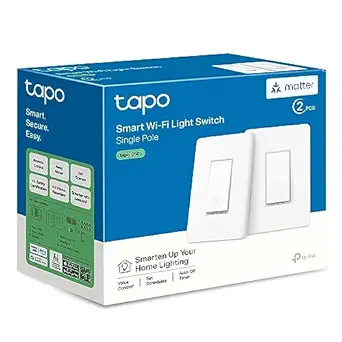 |
| Best Quality Built to a higher standard if you want something more solid | Leviton Decora Smart Switch D315S |  |
| Best Value The sweet spot between price and what you get | TREATLIFE Smart Light Switch SS01S-1 |  |
| Best Budget The cheapest option that still gets the job done reliably | SONOFF BASICR4 Smart Switch |  |
| Top Rated A top-rated pick with lots of positive feedback | SONOFF T6-1C-120MB Smart Wall Touch Switch |  |
| Most Popular A crowd favorite that many people choose with confidence | Kasa Smart HS200 Switch |  |
Tapo S505 Smart Light Switch (2-Pack)

| Connectivity Protocol | Matter, Wi-Fi |
|---|---|
| Control Method | App, Touch, Voice |
| Current Rating | 15 A |
| Operating Voltage | 120 volts |
| Wattage | 600 watts |
The Tapo S505 is a single-pole smart light switch sold as a two-pack that brings Matter compatibility to basic lighting control. It installs in place of a standard wall switch and requires a neutral wire and 2.4 GHz Wi‑Fi; the Tapo app walks you through guided setup while the switches also respond to touch and voice via Siri, Alexa, Google Assistant, and SmartThings. Because the S505 supports Matter, it can operate locally on your LAN for faster response and cross-platform control without relying on a specific cloud. Built-in scheduling, timers, scenes, and multi-admin sharing make it suitable for automating routines and away lighting. The switches are UL certified and use common screw terminals and a 15 A rating for typical household circuits, but they are single-pole only and do not support 3-way wiring. Expect straightforward functionality for smart on/off and automation, with the main limitations being the neutral-wire requirement and lack of multi-location switch support for complex wiring setups.
Best for: Buyers who want a budget-friendly, future-proof smart switch that works across Apple Home, Alexa, Google Home, and Matter ecosystems and who have simple single-pole wiring and a neutral wire available.
Less Ideal for: Homes that need 3-way or multi-location switching or installations without a neutral wire should look for alternative switch types or a qualified electrician for rewiring.
- Matter-certified for cross-platform compatibility and local LAN control
- Straightforward app-guided installation and common screw terminals
- Voice control and app scheduling, timers, scenes, and multi-admin sharing
- UL certified with a 15 A rating suitable for standard residential lighting loads
- Requires a neutral wire so not compatible with older two‑wire switch boxes
- Supports only one-way (single-pole) switching, no 3-way/multi-location support
Verdict: A budget-friendly, Matter-certified smart switch pair that delivers reliable local and voice-controlled lighting for simple single-pole home installations.
Leviton Decora Smart Switch D315S

| Connectivity | 2.4 GHz Wi‑Fi, Matter |
|---|---|
| Load rating | 15A, 1/3 HP |
| Companion support | Wire‑free DAWSC or wired DD0SR |
| App | My Leviton |
The Leviton Decora Smart Switch D315S converts a standard wall switch into a reliable, hub‑free smart switch that is well suited for everyday lighting and small motor loads. It connects directly to 2.4 GHz Wi‑Fi and integrates with the My Leviton app plus Matter for local control through Google Assistant, Alexa, Apple Home, and other platforms. In practice you can create schedules, remotely toggle lights, and add a wire‑free or wired companion for 3‑way/multi‑location setups without major rewiring. Notable hardware points include a reduced product depth for easier installation, a screwless wallplate, an LED locator light, and support for a wide range of bulb and load types up to 15A and 1/3 HP. The switch is straightforward to use for rooms where reliable app and voice control matter, though it does require a neutral wire and lacks built‑in dimming since it is an on/off switch. For buyers prioritizing dependable connectivity, broad platform support, and multi‑location capability at an affordable price, this is a practical pick.
Best for: Buyers who want a dependable, performance‑oriented smart switch that integrates broadly with smart home platforms and handles heavier loads without needing a hub.
Less Ideal for: People who need built‑in dimming functionality or who lack a neutral wire in the switch box should consider other solutions.
- Direct 2.4 GHz Wi‑Fi connection with Matter support for wide smart home compatibility
- Rated for 15A and 1/3 HP so it handles lights, fans, pumps, and small motors
- Hub‑free setup and My Leviton app let you create schedules and control remotely
- Supports wire‑free or wired companion switches for easy multi‑location control
- Requires a neutral wire which may limit installation in older homes
- On/off switch only, not a dimmer so no continuous brightness control
Verdict: Choose this switch if you want a hub‑free, Matter‑ready on/off Decora switch that reliably controls lights and small motors while supporting multi‑location setups.
TREATLIFE Smart Light Switch SS01S-1

| Wattage | 1250 watts |
|---|---|
| Current Rating | 10 A |
| Operating Voltage | 120 volts |
| Connectivity Protocol | Wi-Fi (2.4GHz), Alexa, Google Assistant |
The TREATLIFE SS01S-1 is a budget-friendly single-pole smart on/off switch that replaces a standard wall switch and brings voice and app control to conventional lighting. It requires a neutral wire and connects directly to a 2.4GHz Wi‑Fi network, so no hub is needed; once paired with the TreatLife or Smart Life app you can turn lights on and off remotely, set schedules, and share access. The switch supports voice control through Alexa and Google Assistant and fits standard 1‑gang wall plates, with included wallplate and basic installation hardware. Practical strengths are its straightforward app control, high 1250W electrical rating for heavier loads, and easy retrofit into homes that have a neutral wire. Limitations include no dimming capability, incompatibility with 3‑way circuits, and support for 2.4GHz only which can complicate setup on combined dual‑band routers. For someone outfitting a whole home on a budget it delivers core smart switch features without frills.
Best for: Buyers looking to add reliable, basic smart control to conventional hardwired lights across a home on a tight budget and who have neutral wiring available.
Less Ideal for: Homes that need multi-location 3‑way switching, built-in dimming, or users who rely solely on 5GHz Wi‑Fi networks should look elsewhere.
- No hub required – connects directly to 2.4GHz Wi‑Fi for remote and voice control
- High electrical rating (1250W, 10A) suitable for heavier non-smart lighting loads
- Includes standard wallplate and installation accessories for easy retrofit
- Works with Alexa and Google Assistant for hands-free control
- Requires a neutral wire, so older homes without neutrals may need rewiring
- Not compatible with 3‑way circuits or dimmable bulbs
- Supports only 2.4GHz Wi‑Fi which can cause pairing issues on dual‑band networks
Verdict: An affordable single‑pole smart on/off switch that adds remote and voice control to standard lighting without a hub, ideal for budget-conscious retrofit projects with neutral wiring.
SONOFF BASICR4 Smart Switch

| Current Rating | 10 A |
|---|---|
| Operating Voltage | 120 volts |
| Connectivity Protocol | Wi-Fi |
| Wattage | 2200 watts |
| International Protection Rating | IP65 |
The SONOFF BASICR4 is a small in-wall Wi-Fi smart switch module intended for DIY home automation projects where cost matters. It installs behind a wall switch to give app and remote control via eWeLink and works with Alexa and Google Home for voice commands. Notable features include the upgraded ESP32 chip for improved performance, a built-in temperature sensor for overheat protection, group control, and a gateway-style "eWeLink-Remote" mode that lets you pair S-Mate2 or R5 sub-devices for local two-way control. It supports common lamp types from 3W to 100W and is rated for 10 A at 120 V (2200 W), making it suitable for most household lighting circuits. Practical benefits are straightforward: low cost, compact footprint, and compatibility with mainstream smart-home ecosystems, which makes it easy to add automation without replacing fixtures. Limitations are that it is a DIY module requiring some wiring and a neutral/appropriate installation environment, the controller-focused setup may be less plug-and-play than a finished smart switch product, and its IP65 rating suggests some environmental protection but does not change indoor wiring requirements.
Best for: Buyers on a tight budget who want to add reliable Wi-Fi and voice control to existing light switches and are comfortable with basic electrical wiring and DIY installation.
Less Ideal for: People who prefer a finished, ready-to-install smart switch with a faceplate-friendly design or who cannot or will not perform in-wall wiring should consider alternative plug-and-play options.
- Uses ESP32 chip for improved responsiveness and stability
- Works with eWeLink app, Alexa, and Google Home for voice and remote control
- Built-in temperature sensor provides overheat protection
- Supports grouping and pairing with eWeLink-Remote sub-devices for local two-way control
- Requires DIY wiring and in-wall installation which may be challenging for novices
- Designed for lighting circuits and limited to supported load range (3W–100W)
Verdict: A low-cost, compact DIY Wi‑Fi switch that brings app and voice control to existing lighting circuits while offering useful safety features like overheat detection.
SONOFF T6-1C-120MB Smart Wall Touch Switch

| Connectivity Protocol | Matter, Wi-Fi |
|---|---|
| Control Method | Touch, Voice |
| Current Rating | 10 A |
| Operating Voltage | 240 volts |
The SONOFF T6-1C-120MB is a single‑channel smart touch wall switch designed to replace a standard 1‑way light switch and add app, voice, and Matter control. It connects over 2.4 GHz Wi‑Fi and advertises Matter compatibility so it can integrate with Apple Home, Google Home, and other Matter ecosystems while also supporting native Alexa control. Key user-facing features include a dimmable nighttime LED on the touch button for easy locating in the dark, detachable relay mode to keep automation and remote control active even if the physical panel is pressed, and scheduling/remote control through the cloud. Installation follows typical in‑wall switch wiring and requires a neutral. The switch is rated for 10 A at 240 volts and uses screw terminals for a secure connection. For buyers on a budget who want a reliable smart switch that plays nicely with Matter-capable hubs and provides practical features like LED indicators and remote schedules, this delivers core functionality without extra frills; users should be comfortable with basic electrical wiring and confirm neutral availability before buying.
Best for: Buyers seeking an affordable, dependable smart switch that integrates with Matter and voice assistants and who are comfortable with standard in‑wall wiring.
Less Ideal for: People without a neutral in their switch boxes or those wanting multi‑gang or multi‑load control in a single device.
- Matter and 2.4 GHz Wi‑Fi connectivity for broad smart home integration
- Detachable relay mode preserves app and automation control when the panel is pressed
- Dimmable nighttime LED makes the switch easy to find in the dark
- Screw terminal connections and 10 A rating fit typical residential lighting circuits
- Requires a neutral wire, so it may not fit older homes without neutral in the switch box
Verdict: A budget-friendly, Matter-capable single‑gang smart switch that focuses on dependable remote and voice control for typical residential lighting setups.
Kasa Smart HS200 Switch

| Current Rating | 15 A |
|---|---|
| Operating Voltage | 120 volts |
| Connectivity Protocol | Wi-Fi (2.4 GHz) |
| Control Type | Remote, Scheduled |
| Wattage | 600 watts |
The Kasa Smart HS200 replaces a standard single-pole light switch to give smartphone and voice control without a hub. It connects to 2.4 GHz Wi‑Fi and integrates with the Kasa app for remote on/off, scheduling, away mode, and grouping with other Kasa devices, while voice control works with Amazon Alexa and Google Assistant. Installation requires a neutral wire and basic wiring familiarity, and the app offers step-by-step guidance for setup. The switch is rated for 15 A/120 V and supports up to 600 watts of lighting load, so it handles most household fixtures and fans driven through a single circuit. UL certification and screw terminals for wiring make it a reliable factory-quality replacement, though it does not support 5 GHz networks or multi-way setups without an appropriate add-on. For buyers prioritizing a budget smart upgrade with proven popularity, the HS200 balances easy daily use, scheduling flexibility, and broad voice assistant support with the usual requirement of a neutral connection during install.
Best for: Buyers who want a low-cost, well-reviewed smart upgrade to standard light switches and value voice and app control plus scheduling on a proven platform.
Less Ideal for: Homes without a neutral wire in the switch box or users who need 5 GHz Wi‑Fi or built-in multiway (3-way) switching support should look elsewhere.
- Works with Alexa and Google Assistant for hands-free voice control
- Remote app control plus schedules, timers, and away mode for automation
- UL certified with standard screw terminals for reliable wiring
- Rated 15 A/120 V and supports typical household lighting loads
- Requires a neutral wire so it may not fit older homes without neutral in the box
- Only supports 2.4 GHz Wi‑Fi and is not compatible with 5 GHz networks
Verdict: The HS200 is a budget-friendly, widely used smart switch that delivers dependable app and voice control for standard single-pole lighting circuits.
Choosing the Right Smart Switch on a Budget: Key Factors to Consider
Installation Ease
How easy the switch is to install affects whether you can complete the project yourself or need an electrician. Clear wiring diagrams, labeled terminals, and compact wall-plate-friendly form factors make DIY installs much less stressful. If the switch requires a neutral or special mounting depth, that will complicate some retrofits and may add labor costs.
Also consider whether the switch requires a hub or bridge. Hubless Wi-Fi switches simplify setup for many homeowners but can add network load. If you prefer a hub-based ecosystem, check hub availability and whether the hub is sold separately.
Wiring Compatibility
Budget smart switches vary in their wiring requirements. Some models need a neutral wire to power the switch electronics, while others are designed to work without a neutral using small current draws through the load. Knowing whether your switch box includes a neutral conductor is critical before buying.
Load type and maximum rated current matter as well. Make sure the switch supports the fixture type you have, such as incandescent, LED, or fan loads. Inadequate load ratings can cause flicker or premature failure.
Connectivity Reliability
A cheap switch that frequently drops connection is more frustrating than helpful. Look for switches with stable Wi-Fi or proven hub connections that maintain responsiveness over time. Consider the quality of the mobile app and whether the switch supports local control or depends entirely on cloud services. Local control preserves basic functionality during internet outages.
Also evaluate mesh network behavior for multi-switch homes. Some devices forward traffic for others, while others do not, affecting overall network robustness.
Feature Set
Assess the practical features you will actually use. Core capabilities to prioritize include scheduling, scene support, manual override, and group control. Voice assistant compatibility is useful for hands-free control, but confirm which assistants are supported and whether integration requires cloud linking.
Extra bells like energy monitoring, advanced automation rules, or multi-way support can be helpful, but on a strict budget focus on the features that deliver daily value rather than extras that raise complexity.
Build Quality and Safety
Even on a budget, a smart switch should meet electrical safety standards and have durable components. Check for clear load ratings, surge protection where offered, and robust switch mechanisms that withstand repeated cycles. Materials and quality affect how the product handles heat and contact wear over years of service.
Poorly built switches can introduce electrical hazards or fail early, increasing long-term cost. Favor units with documented certifications and sensible warranty terms.
Neutral Vs No-Neutral Switches
Determine whether the wall boxes you plan to upgrade contain a neutral wire. Many older homes lack a neutral at the switch location, which influences the type of budget smart switch you can install. No-neutral designs work around this limitation but may impose restrictions on load types or require an auxiliary device.
If your box includes a neutral, you have the broadest selection and can choose switches that draw consistent power without relying on small trickle currents through the load. When in doubt, turn off power and test the box or consult an electrician for confirmation.
- No-neutral switches can simplify retrofits in older homes.
- Neutral-required switches typically offer more stable electronics and broader feature support.
- Check load compatibility for LED or low-watt fixtures to avoid flicker.
Local Control and Cloud Dependence
Consider whether the switch supports local control without cloud dependency. Local control preserves basic on/off and schedule functions when your internet is down and avoids potential latency inherent in cloud round-trips. Some budget switches offer local LAN control or integrate with a local hub that processes automations on-site.
Cloud-dependent switches can be simpler to set up and may provide remote access and voice integrations more easily, but they may also require account creation and ongoing cloud service availability.
- Local control increases reliability during outages.
- Cloud features add convenience but may affect privacy and responsiveness.
- Check if automations run locally or require an internet connection.
Multi-Way and 3-Way Wiring Considerations
If your lighting circuits use multi-way setups, make sure the budget switch supports 3-way or 4-way configurations. Some smart switches require a specific companion device or a proprietary master/auxiliary pairing for multi-location control. Read wiring diagrams carefully to confirm compatibility with existing traveler wires.
In retrofit scenarios, replacing a multi-way setup may need additional parts or slight rewiring. Plan for the extra time and verify that the chosen switch includes a compatible auxiliary or can function with a simple non-powered auxiliary in the alternate location.
- Confirm whether a matching auxiliary is required for multi-way installs.
- Traveler wire usage differs by vendor; match wiring diagrams to your box.
- Some budget solutions simulate multi-way behavior rather than replicating true traveler wiring.
Voice Assistant and Ecosystem Fit
Decide which voice assistant or smart home ecosystem you want to use and check compatibility. On a budget, you may accept limited voice functionality, but ensure the switch exposes basic commands and scenes that integrate with your chosen assistant. Some switches offer broad compatibility, while others support only specific assistants or require bridging.
Think about long-term ecosystem plans. If you already use a particular assistant or hub, choose switches that fit into that environment to avoid managing multiple apps and accounts.
- Verify voice commands for on/off, dim levels, and scenes.
- Confirm whether integration requires cloud linking or allows local discovery.
- Ecosystem consistency simplifies automation and reduces app fatigue.
Energy Savings and Scheduling
Smart switches on a budget can still help reduce energy use through schedules and timers. Look for reliable scheduling features that let you set recurring on/off times, vacation modes, and sunset/sunrise-based automations. These basic automations produce tangible savings when used across multiple circuits.
If energy monitoring is important, verify whether the switch reports consumption locally or via the cloud, and whether those reports are sufficiently granular for your needs. Many budget models omit metering to keep costs down.
- Use schedules to avoid lights being left on accidentally.
- Sunset-based automations add convenience without manual setup.
- Energy monitoring is useful but less common in low-cost switches.
How We Chose the Best Smart Switch on a Budget
We prioritized practical, real-world performance when selecting budget smart switches. Our primary filters emphasized installation compatibility, network reliability, and core smart features that matter for everyday lighting use. We favored switches that work with common household wiring, including options that do not require a neutral in retrofit scenarios, while also noting when a neutral is necessary. Connectivity stability was a major factor, with preference for switches that maintain a steady Wi-Fi or hub link rather than those that drop offline frequently. We also looked at the depth of scheduling and automation features available without a paid subscription, and evaluated the clarity of setup instructions for DIY installation. Safety and certifications were non-negotiable; any switch lacking standard electrical approvals or with unclear load ratings was excluded. We excluded products that only expose basic on/off control behind proprietary paywalls or those that required uncommon hubs unless the hub provided clear advantages. Final selections reflect units that balance straightforward installation, dependable network behavior, and useful smart functions for budget-conscious buyers.
Our full evaluation process is outlined in our review methodology.
FAQ
Can a budget smart switch work without a neutral wire?
Often yes. Several budget designs are made to work without a neutral by allowing a small current to pass through the load. However, compatibility depends on your fixture type and wiring. LEDs in particular may flicker with no-neutral solutions, so check the installation notes before buying.
Will a budget smart switch still work if my internet goes out?
That depends. Some switches support local control and will keep schedules and manual operation during an outage. Others rely on cloud services for automations and remote access, which will be unavailable without internet. Choose local-control options if offline reliability is important.
Do I need a hub to use smart switches on a budget?
Not always. Many budget smart switches connect directly to Wi-Fi and do not require a hub. Hub-based systems can offer more reliable mesh networking and local automation, but they add initial complexity. Whether you need a hub depends on your home network and desired features.
Are budget smart switches safe to install in older homes?
They can be, but you must verify load ratings and electrical certifications. Older homes sometimes have limited box depth or missing neutral wires, which affects compatibility. If you are unsure about wiring or box capacity, consult a qualified electrician before installation.
Will smart switches work with dimmable LED bulbs?
Many smart switches support dimmable LEDs, but not all. Confirm the switch explicitly lists LED dimming support and check compatibility with your bulb type. Mismatched combos can produce flicker or limited dimming range.
Final Verdict
When choosing a smart switch on a budget, prioritize installation compatibility and connectivity reliability over feature overload. Confirm whether your wall box has a neutral, verify load and multi-way requirements, and decide if you need local control to ensure consistent operation during outages. Simpler switches with clear wiring diagrams and robust wireless behavior typically deliver the best long-term value. Balance the features you actually plan to use against installation complexity. With attention to wiring needs and connectivity, a budget smart switch can provide dependable lighting control and meaningful convenience without unnecessary extras.