
Note: This article contains affiliate links. If you click on these links and make a purchase, we may earn a small commission at no extra cost to you. This helps support our research and content. Read our full affiliate disclosure here.
If you want smarter lighting without adding extra hardware, a smart light bulb without a hub can modernize rooms quickly. These bulbs connect directly to your phone or home network so you can dim, schedule, and automate lights without managing a separate bridge. Picking the right hub-free bulb matters because wireless stability, voice-platform compatibility, and color or dimming quality directly affect daily use. This guide highlights seven shortlisted smart light bulbs without a hub that stand out for ease of setup, dependable connectivity, and lighting performance. Below you will find the buying factors we used to evaluate options and practical guidance to help you pick the best bulb for each space. Next up are the product summaries and detailed buying guidance.
Top Picks at a Glance
| Best Overall The best all-around choice for most situations | Philips Hue Essential A19 |  |
| Best Quality Built to a higher standard if you want something more solid | LIFX Color A19 1100lm |  |
| Best Value The sweet spot between price and what you get | Lightinginside A19 Smart Bulb |  |
| Best Budget The cheapest option that still gets the job done reliably | Tapo L531E Smart A19 Bulb |  |
| Top Rated A top-rated pick with lots of positive feedback | Govee Smart A19 Light Bulb H6008 |  |
| Most Popular A crowd favorite that many people choose with confidence | Amazon Basics Smart A19 LED Bulb | 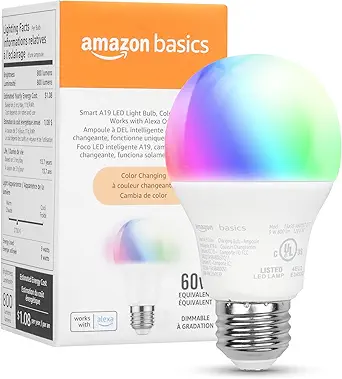 |
| Best Seller A high-volume bestseller chosen again and again | Kasa Smart KL110 A19 Bulb |  |
Philips Hue Essential A19

| Wattage | 8.8 watts |
|---|---|
| Bulb Base | E26 |
| Light Output Maximum | 800 lumens |
| Light Color | Multicolor |
| Control Method | App |
The Philips Hue Essential A19 is a full-color smart LED bulb that brings tunable white and millions of colors to a standard E26 lamp. It is controlled primarily through the Hue app and supports voice control via Alexa, Google Assistant, and Apple Home, and it offers smooth dimming down to 2% and up to 800 lumens of white brightness. In everyday use it works well for mood lighting, reading, and typical room lighting—choose preset scenes or create custom colors for parties, movie nights, or relaxed evenings. Because it is part of the Hue ecosystem it pairs cleanly with other Hue products and can be expanded later by adding a Hue Bridge for advanced features like security integrations and content sync, though the bulb can be used without a hub for basic app and voice control. The bulb draws about 8.8 watts while delivering an estimated 75-watt equivalent output and has a CRI of 80 for reasonable color rendering. If you want reliable color plus broad smart-home compatibility without swapping fixtures, this is a straightforward, easy-to-use option.
Best for: Buyers who want a dependable, easy-to-use color smart bulb that fits standard fixtures and delivers good app and voice control without needing advanced hub features immediately.
Less Ideal for: People who need the absolute highest color fidelity for color-critical tasks or users who want every advanced Hue feature out of the box without adding the Bridge.
- Full color plus tunable white with millions of colors and preset scenes
- Smooth dimming from full brightness down to 2% via the app
- Works with Alexa, Google Assistant, and Apple Home for voice control
- Standard E26 A19 form fits most lamps and fixtures
- Advanced features like content sync and expanded automations require adding a Hue Bridge
Verdict: A reliable, full-color A19 smart bulb that delivers easy app and voice control plus smooth dimming for buyers who want hassle-free smart lighting without immediately needing a hub.
LIFX Color A19 1100lm

| Light Output Maximum | 1100 lumens |
|---|---|
| Wattage | 11.5 watts |
| Bulb Shape Size | A19 |
| Bulb Base | E26 |
| Connectivity Protocol | Wi-Fi |
The LIFX Color A19 is a bright, hub-free smart bulb built for users who want strong output and wide color control. It installs in a standard E26 socket and connects directly to 2.4 GHz Wi‑Fi so you can control brightness, colors, and schedules from the LIFX app or with Alexa, Google Assistant, or Siri. At 1100 lumens it outshines many color A19 bulbs, and the broad color temperature range plus billions of colors makes it useful for both task lighting and immersive scenes for entertainment. The app supports smooth dimming, scheduling, and integrations such as IFTTT, and the rated 25,000-hour life means long-term use with low power draw. On the downside, the bulb is larger than basic A19s and may not fit tight fixtures, and its 80 CRI is adequate but not class-leading for color-critical tasks. Connectivity is Wi‑Fi only, so if you prefer Zigbee or Bluetooth mesh ecosystems you will need a different option.
Best for: Buyers who prioritize bright, hub-free smart lighting and rich color control for living rooms, kitchens, or media spaces where output and app-driven scenes matter most.
Less Ideal for: People who need the highest color accuracy for photography or art, or who prefer alternative mesh protocols like Zigbee or Bluetooth instead of Wi‑Fi.
- High output at 1100 lumens fills living spaces where a 60W equivalent is insufficient
- Broad color range and tunable white for scenes, wake/sleep schedules, and entertainment
- No hub required — connects directly to 2.4 GHz Wi‑Fi and works with Alexa, Google, and Siri
- Smooth dimming and app scheduling plus third‑party integrations like IFTTT
- Larger physical size may not fit compact or recessed fixtures
- 80 CRI is lower than premium bulbs for exact color rendering
Verdict: Choose this bulb if you want one of the brightest hub-free color A19s for strong room lighting plus flexible app and voice control.
Lightinginside A19 Smart Bulb

| Wattage | 9 watts |
|---|---|
| White Brightness | 800 lumens |
| Bulb Shape Size | A19 |
| Bulb Base | E26 |
| Connectivity Protocol | Wi-Fi |
The Lightinginside A19 smart bulb is a 9W LED (60W equivalent) that connects directly to 2.4 GHz Wi‑Fi and Bluetooth so you can control brightness, color temperature and millions of RGB colors from the SmartLife app or with Alexa and Google Assistant. Setup uses a dual-channel BLE+Wi‑Fi chip for faster pairing and the bulb can fall back to local Bluetooth control if Wi‑Fi is unavailable. It supports grouping, schedules, timers and music-sync scenes, plus tunable white from 2700K to 6500K and about 800 lumens of white brightness. Practical benefits include energy savings versus incandescent, a frosted eye-friendly diffuser, and support for common automation routines without a separate hub. Limitations to note are the requirement for a 2.4 GHz network for initial Wi‑Fi pairing and that Apple Home compatibility is not listed, so integration with HomeKit may be limited or unavailable.
Best for: Buyers who want a practical, no-hub smart bulb that delivers reliable app and voice control, flexible color and white tuning, and simple scheduling to reduce energy use and simplify daily lighting.
Less Ideal for: Users who require native Apple Home/HomeKit integration or who only have 5 GHz Wi‑Fi networks without 2.4 GHz access should consider alternatives.
- No hub required — connects directly over 2.4 GHz Wi‑Fi and Bluetooth for remote and local control
- Tunable white plus full RGB gives flexible mood and task lighting in one bulb
- Fast BLE+Wi‑Fi pairing and BLE backup provide reliable local control if Wi‑Fi drops
- Energy efficient 9W LED delivering about 800 lumens (60W equivalent)
- Requires 2.4 GHz Wi‑Fi for initial setup which may not work on 5 GHz‑only networks
- Does not list Apple Home/HomeKit support, limiting native iOS ecosystem integration
Verdict: A practical, energy‑saving A19 smart bulb that gives reliable no‑hub Wi‑Fi and Bluetooth control plus full RGB and tunable white for flexible everyday lighting.
Tapo L531E Smart A19 Bulb

| Light Source Wattage | 9 watts |
|---|---|
| White Brightness | 800 lumens |
| Light Color | RGBW |
| Connectivity Protocol | Wi‑Fi |
| Color Rendering Index | 90 |
The Tapo L531E is a hub-free Wi‑Fi smart A19 bulb that gives you full color and white tuning for everyday lighting and accent scenes. You control it from the Tapo app or with Alexa and Google Assistant, set schedules, save presets, and use Away Mode to simulate occupancy. The bulb delivers about 800 lumens at roughly 9 watts (60W equivalent) with a wide 220° beam and a CRI over 90 for accurate color rendering. Notable extras include energy monitoring in the app and very low standby power. Setup is straightforward over 2.4 GHz Wi‑Fi and the bulb supports full dimming from 1 to 100 percent. Limitations are that it requires a compatible 2.4 GHz network so it will not connect to 5 GHz networks, and advanced integrations depend on the Tapo app rather than an open ecosystem or separate smart-home hub.
Best for: Buyers who want an inexpensive, full‑color smart bulb that works without a hub and can be controlled easily by app or voice for room lighting and mood scenes.
Less Ideal for: People who need 5 GHz Wi‑Fi compatibility, enterprise or highly customized smart‑home integrations, or who prefer bulbs managed through a third‑party hub platform.
- No hub required — connects directly to 2.4 GHz Wi‑Fi for easy setup
- Wide color range with 16 million RGBW hues plus tunable white for versatile scenes
- 800 lumens output with CRI>90 gives bright, accurate lighting
- Energy monitoring and low standby power help track and reduce usage
- Only supports 2.4 GHz Wi‑Fi which can be limiting on some networks
- Requires the Tapo app for most advanced controls and integrations
Verdict: A budget-friendly, hub-free multicolor A19 bulb that delivers bright, tunable light and easy app or voice control for everyday smart lighting.
Govee Smart A19 Light Bulb H6008

| Light Output Maximum | 800 lumens |
|---|---|
| Wattage | 9 watts |
| Bulb Shape Size | A19 |
| Connectivity Protocol | Bluetooth, Wi-Fi |
| Control Method | App, Voice |
The Govee H6008 is an A19 smart LED bulb designed for everyday indoor lighting and mood scenes without requiring a separate hub. It provides up to 800 lumens of white brightness and a full RGBWW color range controlled over 2.4 GHz Wi‑Fi or Bluetooth from the Govee Home app or via voice assistants. Typical use cases include ceiling fixtures, lamps, and decorative or party lighting where you want timed schedules, preset scenes, or music‑synchronized color effects. Notable features include Matter compatibility with major smart assistants, 54 scene modes, sound detection for music sync, and app timers and grouping so multiple bulbs act together. Practical benefits are energy efficiency at 9 watts, good app and voice control flexibility, and built‑in sound sensing for responsive lighting. Limitations are that the music sync requires microphone access on your phone, it only connects to 2.4 GHz networks, and the color rendering index of 80 is middling for tasks that need precise color accuracy.
Best for: Buyers who want a reliable hubless smart bulb that integrates with major voice assistants and offers simple app scheduling, scene control, and music sync for everyday rooms and social spaces.
Less Ideal for: Those needing perfect color accuracy for color‑critical tasks or users who require 5 GHz Wi‑Fi support or hub‑based enterprise setups should look elsewhere.
- Works directly on Wi‑Fi and Bluetooth so no hub is needed
- Wide RGBWW color range with 54 preset scenes for mood lighting
- App and voice control with major smart home platforms including Matter support
- Music sync and sound detection for reactive lighting effects
- Low power draw with about 800 lumens output (9 watts)
- Requires phone microphone for music sync to work reliably
- Only supports 2.4 GHz Wi‑Fi, not 5 GHz
- CRI of 80 may not render colors as accurately as higher‑CRi bulbs
Verdict: A dependable hubless smart A19 bulb that delivers flexible app and voice control, music sync, and good brightness while staying energy efficient.
Amazon Basics Smart A19 LED Bulb

| Wattage | 9 watts |
|---|---|
| Light Output Maximum | 800 lumens |
| Bulb Shape Size | A19 |
| Bulb Base | E26 |
| Network Connectivity | 2.4 GHz Wi-Fi only |
This Amazon Basics Smart A19 LED bulb is a no-hub color-changing replacement for standard A19 fixtures that pairs directly to 2.4 GHz Wi-Fi and works only with Alexa. You install it like a normal bulb, add it in the Alexa app, and then control color (16 presets) and brightness (5% to 100%) with voice commands or routines from anywhere. It is dimmable via app and supports grouping and scheduling for room-level control and automated on/off routines. Practical benefits include straightforward setup, remote control for security or convenience, and energy-efficient 9W operation with an 800-lumen output comparable to a 60W incandescent. Important limitations are Alexa-only compatibility and lack of physical dimmer switch support, and it requires a 2.4 GHz network so dual-band setups may need adjustment. For shoppers who prioritize simple Alexa integration and budget-friendly smart lighting without a hub, this bulb covers the basics reliably, but it is not suitable if you need multi-assistant support or advanced local controls.
Best for: Buyers who want a straightforward, Alexa-centered smart bulb that is easy to set up and control remotely and who value social proof and low risk when choosing common smart-home basics.
Less Ideal for: People who need cross-platform voice assistant support, integration with non-Alexa smart hubs, or bulbs that work with physical dimmer switches should look elsewhere.
- Direct Wi-Fi connection requires no hub and pairs with Alexa via the Alexa app
- Color-changing with 16 presets plus app dimming from 5% to 100%
- Energy-efficient 9W LED producing about 800 lumens (60W equivalent)
- Supports remote control, grouping, and Alexa routines for scheduling
- Works only with Alexa and is not compatible with Google Assistant, Apple HomeKit, or SmartThings
- Requires 2.4 GHz Wi-Fi and will not connect to 5 GHz networks
- Not compatible with physical dimmer switches
Verdict: If you want a budget-friendly, hub-free smart bulb that reliably integrates with Alexa for color, dimming, and routines, this Amazon Basics A19 is a practical pick.
Kasa Smart KL110 A19 Bulb

| Wattage | 9 watts |
|---|---|
| Light Output | 800 lumens |
| Color Temperature | 2700 Kelvin |
| Bulb Base | E26 |
| Connectivity Protocol | Wi‑Fi (2.4 GHz) |
The Kasa Smart KL110 is a single‑color (soft white) A19 LED bulb that replaces a 60W incandescent while offering 800 lumens and full dimming from 1 to 100 percent via the Kasa app or voice assistants. It pairs directly to a home 2.4 GHz Wi‑Fi network so no separate hub is required, and supports scheduling, remote on/off, and scenes for simple automation. Practical benefits include easy setup with the Kasa app, reliable voice control with Alexa or Google Assistant, and a high CRI of 90 for natural-looking whites. With a modest 9W draw and an advertised ~2.9 year operating life, it is energy efficient for everyday indoor use. Limitations are that it is a warm‑white only bulb with no tunable color or color temperature options, and it requires a 2.4 GHz Wi‑Fi network and the companion app for full functionality, which may be an extra step for users who prefer totally local control. The bulb is best used in lamps and fixtures where consistent soft white light and remote/dimmable control are the priority.
Best for: Buyers who want a simple, reliable smart bulb that plugs into existing Wi‑Fi and delivers consistent warm white light with easy app and voice control.
Less Ideal for: Users who need color or tunable white bulbs, or those who require local-only control without any cloud/app dependency.
- Direct Wi‑Fi connection so no hub needed
- Full dimming from 1% to 100% via app or voice
- 800 lumens output for bright room lighting at 9W power
- High CRI (90) for more accurate color rendering
- Works with Alexa and Google Assistant for hands‑free control
- Only fixed soft white (2700K), no tunable white or color options
- Requires a 2.4 GHz Wi‑Fi network and Kasa app for advanced features
Verdict: A straightforward, no‑hub smart warm‑white bulb that delivers bright, dimmable light and dependable app and voice control for buyers who prioritize simplicity and reliability.
Choosing the Right Smart Light Bulb Without a Hub: Key Factors to Consider
Connection Method and Range
How the bulb connects—Wi-Fi, Bluetooth, or Thread—directly affects reliability and control range. Wi-Fi bulbs can be controlled from anywhere on the local network and often from the cloud, but they can tax home networks if many devices are added. Bluetooth bulbs pair directly with a phone and are simple to set up but have limited range and may depend on a nearby smartphone or a compatible bridge for remote access. Thread-based bulbs offer a mesh network with low latency and better range when paired with a compatible border router.
Consider the size of the space and the location of your router or smartphone. Thick walls and long runs can reduce Bluetooth performance, while Wi-Fi bulbs will need solid local network coverage. If you want remote control without additional hardware, choose bulbs that natively support Wi-Fi cloud control. If privacy and local-only control matter, look for bulbs that support local APIs or Bluetooth control without mandatory cloud services.
Voice Assistant and Platform Compatibility
Check which voice assistants and smart-home platforms the bulb supports natively. Native compatibility simplifies setup and provides smoother voice commands and routines. Many hub-free bulbs advertise compatibility with common voice platforms, but implementation varies: some offer full-color control and scene activation, while others limit voice commands to on/off and brightness.
Decide which ecosystem you already use and prioritize bulbs that integrate cleanly with it. If you want automation across multiple device types, favor bulbs that support routines or direct integration rather than relying solely on third-party skills or cloud connections. Also evaluate whether the bulb allows local control through the voice platform to reduce latency and reliance on external servers.
Brightness, Color Range, and Color Accuracy
Bulb lumen output determines how much light you get; color temperature and color gamut determine the mood and fidelity. For general rooms, aim for bulbs with sufficient lumens to replace a 60W to 100W incandescent equivalent. For tasks like reading or kitchen work, brighter bulbs and higher color rendering index values yield clearer, truer colors.
If you want tunable white, ensure the bulb covers a useful temperature range from warm to cool whites. For full-color bulbs, look for wide RGB gamut and good saturation without oversaturation or obvious color shifts. Also consider dimming performance at low levels, since some bulbs flicker or change color balance when dimmed.
Dimming Performance and Compatibility With Existing Fixtures
Not all smart bulbs dim smoothly in every fixture. Electronic dimmer switches or older rotary wall dimmers may not play well with LED driver electronics inside smart bulbs. Some bulbs include internal circuitry to allow smooth dimming without a dedicated smart dimmer, while others expect a neutral, non-dimmed supply and recommend using the native app for dimming.
If you plan to use wall dimmers, check whether you should replace the switch with an always-on switch and use the bulb's app for dimming. Also verify the bulb's physical size and shape to ensure it fits in enclosed fixtures or recessed cans, and confirm the bulb's rated ambient temperature if it will be used in enclosed or high-heat fixtures.
Automation Features and App Usability
The app experience matters for everyday automation. Good apps provide reliable scheduling, geofencing, scenes, and grouping of multiple bulbs. More advanced features include circadian schedules, color presets, and third-party integrations. If you prefer local control and privacy, check whether the device supports local APIs or local-only operation modes.
Look for apps with clear grouping and room features so multiple bulbs act as a single unit. Also consider whether routines can be triggered by other smart devices or only within the app. Stability and responsiveness of the app during configuration and daily use are important, as a buggy app undermines the benefits of smart lighting.
Energy Use and Long-Term Reliability
LED smart bulbs are efficient, but wattage, lumen output, and electronics design affect power consumption and heat. Lower wattage with higher lumens per watt is better for long-term energy savings. Heat management is important because excess heat can reduce lifespan of LED components and internal electronics.
Look for bulbs with good thermal design and a reasonable rated lifetime. Firmware update support adds security and can fix bugs that affect reliability. Consider the expected lifespan relative to warranty terms, and whether the manufacturer provides clear instructions for firmware updates and troubleshooting over time.
Choosing the Right Connection Type
Deciding between Wi-Fi, Bluetooth, and Thread changes how you use the bulb day to day. Wi-Fi offers the broadest remote control and usually allows cloud-based automation, which is convenient for control away from home. Bluetooth is simple and private but better suited to single-room setups or homes where the user is comfortable with local-only control.
Thread provides a low-latency mesh that scales well as you add devices, but it requires a compatible border router to reach cloud services or broader home automation platforms. Match the connection type to your existing network setup and the level of remote control you expect.
- Wi-Fi: Good for remote access and larger rooms; requires stable home network
- Bluetooth: Simple pairing, limited range; often best for single-room or personal use
- Thread: Efficient mesh networking; needs a compatible router for extended features
Practical Setup Tips for a Smooth Install
Prepare your network before installing several bulbs at once. Ensure you have a stable 2.4 GHz Wi-Fi network if bulbs require it, and consider temporarily turning off neighbor or guest networks to avoid interference during pairing. Keep your phone close to the bulb and follow the manufacturer pairing prompts carefully.
Resetting a bulb is often the quickest fix for pairing issues. Also group bulbs by room during setup so workflows and scenes are ready to use. If you plan to use voice control, link that platform before setting up advanced schedules to ensure routines appear correctly.
- Use 2.4 GHz Wi-Fi if required; separate SSIDs can help during setup
- Set up one room at a time and create groups in the app immediately
- Keep firmware updated after pairing to get stability fixes
How to Use Scenes, Routines, and Schedules
Scenes and routines let you tailor lighting to activities like reading, movie nights, or waking up. Create a few essential scenes to simplify daily use and avoid building an unmanageable library of presets. Use schedules for consistent wake and sleep lighting to support daily rhythms.
Combine geofencing and scheduling for reliable automation. For example, a geofence can turn lights off when the last person leaves while schedules handle predictable daily events. Test routines at different times and with voice commands to ensure they trigger reliably.
- Start with 3 to 5 scenes for common activities
- Use schedules for repeatable events and geofencing for occupancy-based automation
- Test each routine after creation and after firmware updates
Placement and Lighting Design Considerations
Think beyond a single bulb: layering light with multiple bulbs, lamps, and ambient sources creates a more flexible environment. Use tunable white bulbs in areas used throughout the day to shift from warm morning lighting to cooler task lighting. For ambient mood, place color bulbs in fixtures where color mixing is visible rather than behind shades that mute effects.
Pay attention to fixture type and bulb shape so you do not lose light to the fixture or create glare. In recessed cans or enclosed fixtures, choose bulbs rated for those conditions to ensure longevity and consistent light output.
- Use tunable whites for multiuse rooms
- Place color bulbs where color is visible and effective
- Match bulb shape and size to the fixture to avoid heat issues
Security and Privacy Basics for Hub-Free Bulbs
Hub-free bulbs often connect directly to your network or rely on cloud services. Protect them by using a strong home Wi-Fi password and isolating IoT devices on a separate network or VLAN when possible. Ensure any account used for bulb control has a strong, unique password and two-factor authentication if supported.
Check whether bulbs support local control or if they require cloud services for basic functions. Devices that allow local control reduce reliance on external servers and often operate with lower latency. Regularly apply firmware updates to address security vulnerabilities and maintain device reliability.
- Use separate IoT network or VLAN for smart bulbs
- Enable strong passwords and two-factor authentication on accounts
- Apply firmware updates promptly to fix security issues
How We Chose the Best Smart Light Bulb Without a Hub
We prioritized options that work without a separate hub and focused on real-world usability. Key evaluation criteria included wireless connectivity stability, setup and onboarding simplicity, lighting quality and color accuracy, feature set for automation and voice control, and energy efficiency and expected runtime. Each candidate was screened for firmware update support and documented compatibility with common smart assistants. We excluded any products that require a proprietary bridge or force a specific paid cloud service to function. Our selection gives weight to practical home use: bulbs that maintain reliable connections on typical home Wi-Fi or direct Bluetooth setups rate higher than those with flaky connectivity. Setup friendliness means clear instructions, minimal steps, and consistent pairing. Lighting quality looks at lumen output, color rendering, and dimming smoothness. Energy efficiency and firmware update capability were also important because long-term reliability and security matter for connected lights. The result is a list of widely applicable, hub-free bulbs suited for most rooms and user preferences.
Our full evaluation process is outlined in our review methodology.
FAQ
Do smart bulbs without a hub work with voice assistants?
Often they do. Many hub-free bulbs provide native integration with popular voice assistants for basic controls like on/off, dimming, and scene activation. The exact feature set depends on the bulb and the assistant, so check compatibility details before buying.
Can I control hub-free bulbs when I am away from home?
It depends. Wi-Fi-enabled bulbs that connect to cloud services generally allow remote access from outside the home. Bluetooth-only bulbs may require a local device or a network bridge for remote control. Verify whether the bulb supports cloud access if remote control matters to you.
Will a smart bulb without a hub work with my existing wall dimmer?
Sometimes, but it varies. Many smart bulbs are designed to be used with the wall switch kept in the on position and dimmed via the app or voice control. Using them with legacy dimmer switches can cause flicker or limit dimming range, so check the manufacturer's guidance for switch compatibility and recommended installation methods.
How many hub-free bulbs can I run on my Wi-Fi network?
The number depends on your router and network configuration. Some routers handle dozens of connected devices fine, while others may struggle. If you plan to add many bulbs, consider segmenting IoT devices on a dedicated Wi-Fi network or using a router rated to support many concurrent connections.
Are hub-free smart bulbs energy efficient compared with standard LEDs?
Yes. Most smart LED bulbs are similarly efficient to non-smart LED equivalents when measured by lumens per watt. However, integrated smart electronics and always-on wireless radios can add a small standby power draw, so review power specifications if absolute energy use is a priority.
Final Verdict
Prioritize reliable connectivity and intuitive control when choosing a smart light bulb without a hub. Decide whether you need remote access, broad voice-assistant support, or simply local Bluetooth control, and match the connection type to how you use rooms. Balance brightness and color needs against dimming compatibility and fixture constraints. Focusing on the practical tradeoffs—network demands, app stability, lighting quality, and long-term firmware support—will help you choose bulbs that integrate smoothly into daily life and deliver the automated lighting behaviors you want.