
Note: This article contains affiliate links. If you click on these links and make a purchase, we may earn a small commission at no extra cost to you. This helps support our research and content. Read our full affiliate disclosure here.
If you want dependable home surveillance without complicated wiring, a Wi-Fi CCTV security camera for home is an efficient choice. These cameras let you monitor entrances, yards, and living spaces with live streams, motion alerts, and cloud or local recordings. Choosing the right camera affects image clarity, how reliably alerts reach your phone, and whether recordings are usable when you need them. This guide covers the top shortlisted options across common home use cases and explains the features that matter most. Read on to find the cameras that fit your setup and monitoring priorities.
Top Picks at a Glance
| Best Overall The best all-around choice for most situations | eufy Indoor Cam E30 |  |
| Best Value The sweet spot between price and what you get | Gianteye 2K Solar Wi‑Fi Camera |  |
| Best Budget The cheapest option that still gets the job done reliably | BECAMSO T1-DF 2K Battery Camera |  |
| Top Rated A top-rated pick with lots of positive feedback | Tapo C500 Dome Security Camera | 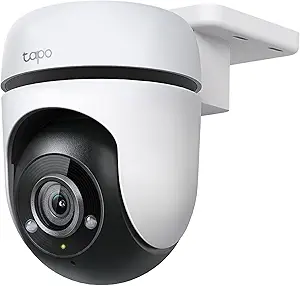 |
| Most Popular A crowd favorite that many people choose with confidence | Blink Outdoor 4 3-Camera Kit |  |
| Best Seller A high-volume bestseller chosen again and again | TP-Link Tapo C100 Indoor Camera |  |
eufy Indoor Cam E30

| Video Capture Resolution | 4k |
|---|---|
| Connectivity Protocol | Wi-Fi (2.4 GHz only) |
| Power Source | Corded Electric |
| Video Encoding | H.265 |
| Night Vision | Night Color (built-in spotlight) |
The eufy Indoor Cam E30 is a wired indoor dome camera designed for continuous home monitoring. It records in 4K and provides a 360 degree panoramic view using pan and tilt so you can scan a room from the app or tap to focus on a specific area. On-device AI distinguishes people, pets and sounds, and will automatically track movement it detects, which is useful for watching active children or pets. The built-in spotlight enables color night vision and can act as a deterrent when motion triggers it. Video is encoded in H.265 and saved locally to an SD card or paired HomeBase, avoiding mandatory subscription fees. Two-way audio and HomeKit/Alexa/Google Assistant support make it usable for remote checks and basic smart-home automations. Important limits to note: HomeKit streams are capped at 1080p and the camera works only on 2.4 GHz Wi-Fi, so placement and network planning matter. The camera is corded only, so it needs a nearby outlet or tidy cable routing for wall mounting.
Best for: Buyers who want a no-subscription indoor camera with high-resolution capture, comprehensive room coverage and smart detection for monitoring family, pets or nurseries while keeping footage local.
Less Ideal for: Users who need battery-powered or truly wireless cameras for areas without easy access to mains power or who require 5 GHz Wi-Fi compatibility.
- High-resolution 4K capture with 360° pan and tilt for complete room coverage
- On-device AI detection and auto-tracking that distinguishes people, pets, and specific sounds
- Built-in spotlight for color night vision and motion-triggered deterrence
- Local storage support and no mandatory monthly subscription fees
- Works with HomeKit, Alexa, and Google Assistant for smart-home integration
- HomeKit support limited to 1080p streaming
- Only supports 2.4 GHz Wi-Fi which can limit placement flexibility
- Requires mains power so not suitable for fully wireless placement
Verdict: Choose the eufy Indoor Cam E30 if you want a subscription-free, high-resolution indoor camera with 360° coverage and reliable on-device AI tracking for home monitoring.
Gianteye 2K Solar Wi‑Fi Camera

| Video Capture Resolution | 2k |
|---|---|
| Night Vision Range | 328 feet |
| Power Source | Solar Powered |
| Connectivity Protocol | Wi-Fi |
| Water Resistance Level | Water Resistant |
This Gianteye camera is built for wire‑free outdoor monitoring: a detachable solar panel keeps the internal battery topped up while the unit streams 2K video over either 2.4GHz or 5GHz Wi‑Fi. The camera pans and tilts for 360 degree coverage, and a built‑in spotlight enables color night vision when motion is triggered, which helps identify people and packages after dark. AI human detection combined with PIR reduces nuisance alerts, and two‑way audio lets you speak to visitors from the app. Recordings can be stored locally on a microSD card or sent to optional cloud storage so you are not locked into a subscription. The IP65 rating and dome form make it suitable for year‑round outdoor use, but expect some setup time to position the solar panel for reliable daytime charging and to optimize Wi‑Fi bands for range versus streaming quality. The camera is a practical, no‑fuss choice if you want battery/solar operation and flexible storage without constant wiring.
Best for: Buyers who prioritize a low‑maintenance, wire‑free outdoor camera that balances solid image quality with flexible storage and easy app control for routine home monitoring.
Less Ideal for: People who need wired, always‑on PoE installations or enterprise features like central NVR management should consider other systems designed for those environments.
- True wireless operation with detachable solar panel and internal battery for continuous outdoor use
- 2K resolution with a smart spotlight for color night vision and clearer low‑light detail
- 360° pan and tilt control for wide coverage from a single camera
- AI human detection plus PIR to reduce false alerts and deliver more relevant notifications
- Dual‑band Wi‑Fi (2.4GHz/5GHz) and flexible local or optional cloud storage
- MicroSD card not included so local recording requires buying compatible storage separately
- Battery performance depends on solar panel placement and sunlight exposure
Verdict: Choose this camera if you want a practical, solar‑powered wireless outdoor camera that delivers 2K video, PTZ coverage, and flexible local or cloud storage without running cables.
BECAMSO T1-DF 2K Battery Camera

| Video Capture Resolution | 1440p |
|---|---|
| Power Source | Battery Powered (5200 mAh) |
| Connectivity Protocol | Wi‑Fi (2.4 GHz) |
| Other Special Features | 2-Way Audio, Night Vision, Weather Proof, PIR Detection |
The BECAMSO T1-DF is a wireless, battery-powered security camera designed for quick outdoor or indoor installation without running cables. It records 2K (1440p) video to MP4, uses a PIR sensor to reduce false alerts, and pushes motion notifications to your phone through the CloudEdge-compatible app. The camera includes two-way audio, a built-in spotlight and siren alarm modes for active deterrence, and IP66 weatherproofing for outdoor use. Its 5200 mAh battery is advertised to last from about 30 to 70 days depending on activity, which makes it convenient for seasonal or hard-to-wire locations. Practical limits include support for 2.4 GHz Wi‑Fi only and no local SD card recording, so longer video retention requires a cloud subscription. Setup and app-based monitoring make it useful for basic home coverage, though power and cloud-dependence are worth considering for continuous, high-frequency recording.
Best for: Buyers who want an inexpensive, easy-to-install outdoor/in‑door camera that captures sharper-than-1080p video and prioritizes battery operation over wired power.
Less Ideal for: Users who need continuous 24/7 local recording, 5 GHz Wi‑Fi support, or fully subscription-free long-term storage should look elsewhere.
- Battery powered with 5200 mAh battery for cable-free installation
- 2K (1440p) video capture for clearer detail than 1080p
- PIR human detection reduces false motion alerts
- Weatherproof IP66 rating suitable for outdoor mounting
- Two-way audio plus spotlight and siren for active deterrence
- Only supports 2.4 GHz Wi‑Fi and cannot use 5 GHz networks
- No local SD card recording option so extended storage needs cloud subscription
Verdict: A budget-friendly, battery-operated 2K camera that delivers easy wireless installation and solid deterrence features for basic home security coverage.
Tapo C500 Dome Security Camera

| Video Capture Resolution | 1080p |
|---|---|
| Frame Rate | 15 frames_per_second |
| Night Vision Range | 30 meters |
| Memory Storage Capacity | 512 GB |
| Connectivity Protocol | Wi-Fi (2.4 GHz) |
The Tapo C500 is a wired outdoor pan/tilt dome camera designed to remove blind spots with 360° horizontal and 130° vertical coverage while streaming 1080p video to your phone. You control pan and tilt from the Tapo app to inspect large areas, and the camera's smart motion tracking follows moving subjects so events stay in frame without needing multiple fixtures. Night vision extends to roughly 98 feet, and two‑way audio plus a customizable sound and light alarm let you communicate or deter visitors remotely. Storage is flexible: record locally to a microSD card (up to 512 GB) or use Tapo Care cloud backup. It requires a 2.4 GHz Wi‑Fi connection and mains power, so it is best for fixed outdoor mounts where a power outlet is available. Notable limits are the 15 fps frame rate, which is lower than higher‑end cameras, and digital zoom only, so very fine distant detail can be limited compared with 2K/4K models. For homeowners wanting a reliable, full‑coverage wired Wi‑Fi camera that focuses on continuous monitoring rather than ultra‑high resolution, the C500 is a practical choice.
Best for: Homeowners who prioritize dependable, wide‑area outdoor coverage and continuous monitoring and prefer a mains‑powered, app‑controlled camera with local storage options.
Less Ideal for: Buyers who need the highest possible resolution or smoother high‑speed footage for forensic detail, or those wanting a battery‑powered installation without access to wired power.
- Pan/tilt delivers 360° horizontal and 130° vertical coverage to eliminate blind spots
- Smart motion tracking automatically follows moving subjects to keep events in frame
- 1080p Full HD video with IR night vision up to about 98 ft for day/night monitoring
- Flexible recording: local microSD storage up to 512 GB or optional cloud service
- Two‑way audio and customizable sound/light alarm for remote communication and deterrence
- Frame rate is 15 fps which can make fast motion appear less smooth
- Requires wired power and 2.4 GHz Wi‑Fi so installation needs a nearby outlet and single‑band network
Verdict: Choose the Tapo C500 if you want a reliable wired outdoor Wi‑Fi camera that removes blind spots with pan/tilt coverage and provides flexible local or cloud recording.
Blink Outdoor 4 3-Camera Kit

| Video resolution | 1080p HD |
|---|---|
| Night vision | Infrared |
| Connectivity | Wireless |
| Included items | 3 cameras, Sync Module Core |
The Blink Outdoor 4 three-camera kit provides an affordable, wireless solution for basic home perimeter monitoring. Each camera streams 1080p live view, supports two-way audio and infrared night vision, and uses included AA Energizer lithium batteries plus the Sync Module Core to deliver up to two years of run time between changes. Setup is straightforward with the Blink app and mounting hardware included, and enhanced dual-zone motion detection reduces irrelevant alerts while optional person detection is available with a subscription. The kit does not include local storage on the Sync Module Core, so recording relies on Blink cloud plans unless you upgrade to a Sync Module XR or Sync Module 2 sold separately to add local backup. Integration with Alexa enables multi-camera live view and voice controls. For buyers wanting an easy-to-install, low-maintenance outdoor camera system that prioritizes long battery life and simple app control, this kit covers the essentials, though reliance on cloud storage may be a drawback for those who prefer built-in local recording out of the box.
Best for: Buyers who want an easy-to-install, battery-powered outdoor camera system that emphasizes long battery life and straightforward app control backed by strong user adoption.
Less Ideal for: Users who need built-in local recording out of the box or who prefer a camera system that includes advanced analytics without a subscription should consider other options.
- Up to two-year battery life with included AA Energizer lithium batteries and Sync Module Core
- 1080p HD live view with infrared night vision and two-way audio for clear day and night monitoring
- Dual-zone enhanced motion detection reduces false alerts
- Includes three cameras, Sync Module Core, mounting kits, and power accessories for quick setup
- Works with Alexa for multi-camera live view and voice control
- Sync Module Core does not provide local storage so cloud subscription is required for saving clips by default
- Advanced person detection requires an optional Blink subscription
Verdict: A budget-friendly, battery-powered outdoor camera kit ideal for buyers who prioritize long battery life and simple, app-driven home monitoring.
TP-Link Tapo C100 Indoor Camera

| Video Capture Resolution | 1080p |
|---|---|
| Wireless Technology | 2.4GHz Wi-Fi |
| Night Vision Range | 30 feet |
| Field Of View | 110 degrees |
| Storage | microSD up to 512 GB / Cloud |
The Tapo C100 is an affordable indoor Wi‑Fi camera built for basic home monitoring and pet or baby checks. It streams 1080p video over 2.4 GHz Wi‑Fi, sends motion and sound alerts to your phone, and supports two‑way audio with a built‑in siren so you can speak to family or deter intruders. Night vision extends up to about 30 feet, and the camera records in H.264/MP4 to a microSD card (up to 512 GB) or to Tapo Care cloud plans for longer retention. Setup is straightforward through the Tapo app and it works with Alexa and Google Assistant for voice viewing on smart displays. The 110 degree field of view and auto focus make framing rooms simple, but the 15 fps frame rate and basic motion detection mean it is optimized for everyday monitoring rather than high‑detail forensic capture. Overall, it is a feature‑complete, entry‑level indoor camera that balances ease of use and useful monitoring features for homeowners who want reliable coverage without complex configuration.
Best for: Buyers who want a straightforward, dependable indoor camera for everyday home monitoring, baby checks, or pet watching and prefer a simple app experience and familiar smart assistant integration.
Less Ideal for: Users who need high frame‑rate or professional‑grade surveillance for forensic detail, or those who require battery power or outdoor weatherproofing.
- 1080p video with night vision up to 30 feet for clear daytime and low‑light monitoring
- Two‑way audio and built‑in siren allow remote communication and basic deterrence
- Supports local microSD recording up to 512 GB plus optional cloud subscription for longer history
- Easy setup and app controls with Alexa and Google Assistant compatibility
- Frame rate is 15 fps which can make fast motion appear less smooth
- Connects only on 2.4 GHz Wi‑Fi, so placement depends on router coverage
Verdict: A reliable, easy‑to‑use indoor 1080p camera that delivers essential home monitoring features with simple setup and smart‑home compatibility.
Choosing the Right Wi-Fi CCTV Security Camera for Home: Key Factors to Consider
Video Resolution and Night Performance
Higher resolution matters because clearer footage makes it easier to identify faces, license plates, and small details. For many home uses, 1080p is the baseline for useful identification; 2K or higher can provide extra detail but increases network and storage demands.
Night performance is equally critical. Infrared illumination, low-light sensors, and image processing determine whether a camera captures usable nighttime footage. Consider a camera's low-light sensitivity and whether it offers color night mode where needed, because dark scenes without good processing often yield grainy, unusable video.
Wireless Connectivity and Range
Wi-Fi signal strength affects live viewing, alert latency, and the reliability of recorded uploads. A camera with strong antenna design, support for 2.4 GHz networks, and robust handling of intermittent Wi-Fi will perform better in larger homes or when placed outdoors.
Placement matters: walls, distance from the router, and interference from other devices can degrade performance. Look for cameras with good wireless standards and features such as dual-band support or the ability to reconnect quickly after outages to maintain continuous coverage.
Motion Detection Accuracy and Alerting
Accurate motion detection reduces false alarms and ensures you only receive alerts for meaningful events. Cameras that use adjustable motion zones, sensitivity settings, or person/vehicle detection are more useful for home monitoring because they can focus on driveways or doorways and ignore tree motion or passing shadows.
Consider how alerts are delivered and whether they include a short clip or snapshot. Faster, clearer alerts help you assess situations quickly, and good detection tuning can limit notification fatigue while preserving important events.
Storage Options and Data Privacy
Storage flexibility affects long-term usability and privacy control. Some cameras offer cloud subscriptions for offsite retention, while others support local storage via microSD cards or network-attached storage. Choose based on how long you need to keep clips and whether you prefer keeping footage under your control.
Also evaluate the camera's encryption and account security features. Secure transmission and account protections are important to prevent unauthorized access to live feeds or stored recordings.
Power, Installation, and Weather Resistance
How you power the camera determines placement options. Hardwired or PoE cameras provide continuous power but require more installation work. Battery-powered units offer flexible placement and no wiring but need periodic recharging or battery swaps.
For outdoor use, check weather resistance ratings and build quality. A durable, weather-rated camera with appropriate mounting hardware will last longer and require less maintenance in exposed installations.
Setting Up a Wi-Fi CCTV Camera for Home
Plan your camera locations before you start. Identify primary coverage zones such as front and back doors, main entryways, and driveways. Position cameras to minimize obstructions and to keep the Wi-Fi signal strength within an acceptable range.
During setup, follow the manufacturer's network guidance: connect to the recommended band, complete any firmware updates, and create a strong account password. Test live view, motion alerts, and playback to confirm everything works before finalizing mounts.
- Test Wi‑Fi signal at each mounting point before permanent installation
- Update firmware and change default account credentials immediately
- Verify night vision and motion zones after mounting
Balancing Cloud and Local Storage
Cloud storage simplifies remote access and offsite retention but usually requires a subscription for longer archives. It also offloads storage management and can make sharing clips easier. Local storage via microSD or a network drive gives you direct control over footage without ongoing fees, but you must manage backups and may lose footage if the camera is stolen.
Decide whether you need continuous recording or event-triggered clips. Continuous recording needs more local or network storage capacity, while event clips reduce storage demands but can miss context around incidents.
- Use event clips for daily monitoring, continuous recording for critical areas
- Encrypt local storage and secure your network to protect footage
- Consider a hybrid approach: local backup plus short-term cloud retention
Protecting Privacy and Securing Your System
Treat your cameras like any networked device. Use unique, strong passwords and enable two-factor authentication if offered. Regularly update firmware to patch security vulnerabilities and review account access logs when available.
Be mindful of where cameras point to avoid recording private neighbor spaces. Use motion zones and privacy masks to limit capture of nonessential areas and reduce privacy concerns while focusing on security-relevant scenes.
- Enable encrypted connections and strong account protections
- Use privacy masks to block out sensitive zones
- Limit shared access and periodically review account permissions
Choosing Between Indoor and Outdoor Models
Indoor cameras can prioritize compact size, two-way audio, and aesthetics. Outdoor cameras emphasize weatherproofing, higher-grade mounts, and stronger night illumination. For porch and yard surveillance, choose units rated for outdoor conditions and with appropriate mounting hardware.
If you need a camera that can be moved seasonally, consider a battery-powered outdoor model. For permanent exterior coverage, use a wired or weatherproof power option to avoid frequent maintenance.
- Select weather-rated enclosures for outdoor placements
- Consider audio requirements for indoor cameras
- Match power options to intended permanence of the installation
Optimizing Motion Alerts and Event Review
Fine-tune sensitivity, object detection, and notification windows to reduce false positives. Many cameras allow area-specific settings and schedules so you can suppress alerts during high-activity periods such as daytime yard use.
When reviewing events, use synchronized timeline views and short pre-roll clips when available. This context helps determine whether an alert requires follow-up or is a nonissue.
- Create activity schedules to limit unnecessary alerts
- Use detection zones to focus on driveways and entryways
- Enable short pre-roll clips to capture the lead-up to an event
How We Chose the Best Wi-Fi CCTV Security Camera for Home
We shortlisted Wi-Fi CCTV security cameras that meet practical performance and usability standards for home monitoring. Key criteria included video resolution and image processing, since clear daytime and low-light footage is essential for identification and evidence. Connectivity reliability and wireless range were evaluated to ensure steady live viewing and timely motion alerts across typical home layouts. Storage flexibility was considered, looking at cloud options, local microSD support, and continuous versus event recording. Power and installation options were reviewed for ease of setup and placement versatility. Motion detection accuracy and smart alert filtering were examined to reduce false alarms while capturing relevant events. We excluded units that lack basic security features such as encrypted data streams or that require proprietary hubs with limited interoperability. The final list emphasizes cameras that balance image quality, dependable wireless performance, flexible storage, and straightforward installation for everyday home security needs.
Our full evaluation process is outlined in our review methodology.
FAQ
Do Wi-Fi CCTV cameras work if the internet goes out?
Often they can continue recording locally to an SD card while the network is down, but remote viewing and cloud uploads stop. Behavior depends on the camera's local storage features and how it handles reconnecting after outages.
Will a Wi‑Fi camera drain my home Wi‑Fi bandwidth?
High-resolution continuous streams can use significant bandwidth, especially during uploads. Event-triggered recording and lower resolution or frame rate settings reduce sustained network load.
Are battery-powered Wi-Fi cameras reliable for long-term outdoor use?
Battery-powered cameras are convenient for flexible placement, but battery life varies with activity and recording settings. For continuous monitoring or high-traffic areas, wired power is usually more reliable.
How do I reduce false motion alerts from wind or pets?
Adjust sensitivity, create motion zones that exclude vegetation, and enable person or vehicle detection if available. Scheduling quiet periods during predictable activity can also cut down on nuisance alerts.
Can I store footage only on my own network instead of using cloud services?
Yes. Many cameras support microSD cards or local network recording to a network-attached storage device. That gives you control over retention without a subscription, though you must manage backups and offsite copies yourself.
Final Verdict
For home security, prioritize clear daytime and nighttime image capture, dependable Wi-Fi connectivity, and flexible storage options that match how you want to access footage. Motion detection accuracy and sensible alerting settings will reduce nuisance notifications and make important events easier to spot. Balance installation needs and power choices against desired placement and maintenance. With these tradeoffs in mind, focus on cameras that meet your coverage needs and offer the connectivity and storage workflow you are comfortable managing.