
Note: This article contains affiliate links. If you click on these links and make a purchase, we may earn a small commission at no extra cost to you. This helps support our research and content. Read our full affiliate disclosure here.
Picking the right Wi-Fi CCTV security camera matters because this device becomes the eyes on your property whenever you are away. The right camera delivers useful video, dependable remote access, and sensible alerting so you can act quickly when something happens. This guide covers six shortlisted Wi-Fi CCTV security cameras that stood out for clarity, connection stability, and practical features for everyday home security. Below we explain the evaluation criteria and what to expect from each pick, so you can match capabilities to the layout and needs of your home.
Top Picks at a Glance
| Best Overall The best all-around choice for most situations | Rraycom W1 4-Pack Security Cameras |  |
| Best Value The sweet spot between price and what you get | Gianteye 2K Solar Wi‑Fi Camera |  |
| Best Budget The cheapest option that still gets the job done reliably | BECAMSO T1-DF 2K Security Camera |  |
| Top Rated A top-rated pick with lots of positive feedback | Tapo C500 Outdoor Pan/Tilt Camera | 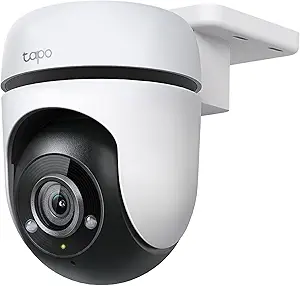 |
| Most Popular A crowd favorite that many people choose with confidence | Kasa Spot Pan Tilt EC71 |  |
| Best Seller A high-volume bestseller chosen again and again | Blink Outdoor 4 3-Camera Kit |  |
Rraycom W1 4-Pack Security Cameras

| Video Capture Resolution | 1440p |
|---|---|
| Night Vision Range | 33 feet |
| Waterproof Rating | IP65 |
| Connectivity Technology | Wireless (2.4G/5G Wi‑Fi) |
| Power Source | Battery Powered |
The Rraycom W1 4-pack is a wireless, battery-powered camera system aimed at straightforward home surveillance and general property monitoring. Each camera streams up to 1440p/2K video over 2.4GHz or 5GHz Wi‑Fi and uses H.265 encoding for efficient footage storage; you can save locally to a microSD card or opt into cloud recording. Setup is simplified with Bluetooth pairing and the O-Kam Pro app, and the cameras support Alexa for voice viewing. In use the system is practical: AI motion detection reduces false alerts, a built-in spotlight and 110dB siren provide active deterrence, and two-way audio lets you speak to visitors or pets. The IP65-rated housings and rechargeable batteries make the units suitable for outdoor mounting, while 120 to 130 degree fields of view and digital zoom help cover broad areas. Limitations to consider are a modest 15 fps frame rate, which can make fast motion less smooth, and some advanced AI features such as expanded bird recognition may require a subscription for full functionality.
Best for: Buyers who want an easy-to-install, battery-powered Wi‑Fi camera system that balances image quality, weatherproofing, and simple smart-home integration for whole-house coverage.
Less Ideal for: Users who need high-frame-rate smoothing for sports or vehicle-speed capture or who prefer a fully local-only system without optional subscription features.
- Dual-band Wi‑Fi (2.4GHz and 5GHz) for more stable streaming and faster connections
- 2K/1440p video with color night vision for clearer day and night detail
- IP65 weatherproofing and rechargeable batteries for flexible indoor or outdoor placement
- Integrated deterrents including a spotlight and 110dB siren plus two-way audio
- Frame rate is limited to 15 fps, so very fast motion may appear less smooth
- Some AI features, like advanced bird recognition and cloud extras, require a subscription
Verdict: A versatile, easy-to-deploy 4‑camera Wi‑Fi system that delivers solid 2K footage, color night vision, and active deterrence for everyday home security.
Gianteye 2K Solar Wi‑Fi Camera

| Video Capture Resolution | 2k |
|---|---|
| Power Source | Solar Powered |
| Night Vision Range | 328 feet |
| Connectivity Protocol | Wi‑Fi |
| Water Resistance Level | Water Resistant |
This outdoor camera is designed for truly wire‑free installs using a detachable solar panel and built‑in backup battery so it can run continuously without a nearby outlet. It records 2K video and uses a built‑in spotlight for full‑color night vision on motion, which helps identify faces and packages after dark. Pan, tilt and zoom controls in the app provide 360° coverage of wide areas, and dual‑band Wi‑Fi (2.4/5 GHz) improves connectivity depending on range or throughput needs. AI human detection and PIR sensing cut down on false alerts, and two‑way audio lets you speak with visitors from the app. Storage is flexible: local microSD recording or optional cloud storage without a forced subscription. The camera is IP65 weather resistant and supports Alexa, making it a pragmatic option for continuous outdoor monitoring, though buyers should plan for sun exposure to keep the solar panel topped up and remember the microSD is not included.
Best for: Buyers who want a low‑maintenance, wireless outdoor camera that prioritizes continuous coverage and clear day/night footage without running cables or constant attention.
Less Ideal for: People with very shaded properties or limited sun exposure where solar charging cannot reliably maintain the camera, or installers who need hardwired PoE or wired power solutions.
- True wireless setup with solar panel and backup battery for continuous outdoor operation
- 2K resolution plus spotlight color night vision for clearer low‑light identification
- 360° pan and tilt controls for wide area coverage from the app
- AI human detection combined with PIR sensor reduces false motion alerts
- Flexible storage: local microSD or optional cloud without forced subscription
- MicroSD card not included so local recording requires a separate purchase
- Solar charging depends on adequate daily sunlight to maintain fully autonomous operation
Verdict: A practical, truly wireless outdoor camera that delivers high‑resolution color night vision and flexible storage for hands‑off home surveillance.
BECAMSO T1-DF 2K Security Camera

| Video Capture Resolution | 1440p |
|---|---|
| Power Source | Battery Powered |
| Connectivity Protocol | Wi-Fi |
| Indoor Outdoor Usage | Indoor, Outdoor |
| Other Special Features of the Product | 2-Way Audio, Night Vision, Portable, Weather Proof |
The BECAMSO T1-DF is a wireless, battery-powered outdoor security camera designed for simple DIY installation and basic home monitoring. It records at 2K/1440p and uses a PIR sensor to trigger alerts for people, pets, or vehicles, sending push notifications to a smartphone via the CloudEdge app and storing short clips in cloud storage. The camera includes a 5200 mAh battery the company says can last several weeks between charges depending on activity, plus IP66 weather protection so it withstands rain and snow. Night monitoring uses a spotlight and siren option to produce color footage after dark and the unit supports two‑way audio for remote interaction. It only supports 2.4 GHz Wi‑Fi and the free cloud playback is limited to very short clips, while SD card storage is not available, so continuous local recording and high-volume footage require a paid cloud plan. For buyers seeking an affordable, easy-to-install Wi‑Fi camera with solid image quality and active deterrence features, this delivers good value with the usual compromises of cheap cloud-dependent cameras.
Best for: Buyers who want an inexpensive, easy-to-install outdoor Wi‑Fi camera that prioritizes image quality and battery convenience over continuous local recording.
Less Ideal for: Users who need 5 GHz Wi‑Fi support, extensive continuous local storage, or enterprise-grade retention and management features.
- 2K (1440p) resolution for clearer detail than 1080p cameras
- Battery powered with a 5200 mAh cell for cable-free placement
- PIR human detection reduces false alerts from non‑human motion
- IP66 rating suitable for outdoor installation in rain or snow
- Integrated spotlight, siren, and two‑way audio for active deterrence
- Only supports 2.4 GHz Wi‑Fi, so it will not connect to 5 GHz networks
- No local SD card recording option; relies on short free cloud clips or paid cloud service
- Free playback is limited to a few seconds without subscription
Verdict: A budget-friendly, battery Wi‑Fi outdoor camera that delivers 2K clarity and active deterrence features for DIY home security setups.
Tapo C500 Outdoor Pan/Tilt Camera

| Video Capture Resolution | 1080p |
|---|---|
| Frame Rate | 15 frames_per_second |
| Night Vision Range | 30 meters |
| Connectivity Protocol | Wi-Fi |
| Memory Storage Capacity | 512 GB |
The Tapo C500 is an outdoor wired pan/tilt security camera designed to eliminate blind spots with 360° horizontal and 130° vertical coverage and remote control from the Tapo app. It records 1080p video at 15 fps, provides IR night vision to about 98 feet, and uses AI person detection plus high-speed motion tracking to follow moving subjects automatically. Setup is via 2.4 GHz Wi‑Fi and the camera supports two-way audio for on-site communication plus a customizable sound and light alarm to deter intruders. You can store footage locally on a microSD card up to 512 GB or opt for the manufacturer cloud subscription. The housing is weather resistant with an IP65 rating and includes mounting hardware for wall installation. Practical limitations are the 15 fps frame rate which can make very fast motion look choppier than higher-frame cameras and the corded power requirement which means a nearby outlet or wiring is necessary; streaming over 2.4 GHz Wi‑Fi may also limit throughput in congested networks. For buyers who prioritize consistent coverage and practical features, the C500 delivers solid day/night surveillance at a modest spec level.
Best for: Buyers who want reliable, continuous outdoor coverage and automated tracking rather than ultra-high resolution, and who value straightforward local storage and weather-resistant construction.
Less Ideal for: Users who need battery- or solar-powered placement flexibility or who require high-frame, high-resolution evidence capture for fast action scenes.
- Pan/tilt delivers full 360° horizontal and wide vertical coverage to remove blind spots
- 1080p Full HD with IR night vision up to about 98 ft for usable day/night footage
- AI person detection and high-speed motion tracking reduce false alerts and keep moving subjects centered
- Supports local microSD storage up to 512 GB plus optional cloud backup for flexible retention
- IP65 weather resistance and included mounting hardware for outdoor installations
- 15 fps frame rate may show less-smooth motion compared with higher-frame cameras
- Requires corded power so placement depends on outlet or wiring access
Verdict: Choose the Tapo C500 when you need dependable, all‑around outdoor surveillance with smart tracking and flexible local storage.
Kasa Spot Pan Tilt EC71

| Video Capture Resolution | 1080p |
|---|---|
| Frame Rate | 15fps |
| Field Of View | 360 degrees |
| Night Vision Range | 30 feet |
| Memory Storage Capacity | 256 GB |
The Kasa Spot Pan Tilt EC71 is an indoor Wi‑Fi security camera built for continuous home monitoring and baby or pet check‑ins. It streams 1080p video at up to 15 fps and uses pan/tilt control to cover a full 360 degrees horizontally and 113 degrees vertically, with a patrol mode that cycles preset viewpoints. Motion and person detection include automatic tracking so the camera follows movement, and optional baby cry detection narrows alerts. Two‑way full‑duplex audio lets you speak and listen in real time, and night vision reaches about 30 feet with a color night mode. Storage is flexible: local MicroSD recording up to 256 GB or optional cloud plans for 30‑day history and extra features. Setup runs through the Kasa app and works with Alexa and Google Assistant for voice viewing. Limitations include a modest 15 fps frame rate for fast action and reliance on 2.4 GHz Wi‑Fi, so placement and network stability affect performance.
Best for: Buyers who prioritize broad indoor coverage, active motion tracking, and simple local storage for monitoring babies, pets, or living spaces while valuing proven user feedback and brand reputation.
Less Ideal for: Users who need high‑speed, professional surveillance footage or who require native 5 GHz Wi‑Fi support and higher frame rates for fast action capture.
- Pan/tilt mechanism provides near 360° horizontal coverage and patrol presets for broad room monitoring
- Motion tracking and person detection produce targeted alerts and follow activity automatically
- Two‑way full‑duplex audio enables natural conversations for pet care or check‑ins
- Flexible storage with local MicroSD support up to 256 GB plus optional 30‑day cloud plans
- Frame rate is limited to 15 fps, which may show motion blur during fast movement
- Requires 2.4 GHz Wi‑Fi, so it may not connect to 5 GHz networks without bridging
Verdict: Choose the EC71 if you want a reliable indoor pan/tilt camera with wide coverage, motion tracking, two‑way talk, and flexible local storage for everyday home monitoring.
Blink Outdoor 4 3-Camera Kit

| Video resolution | 1080p HD |
|---|---|
| Night vision | Infrared |
| Connectivity | Sync Module Core (included) |
| Included batteries | AA Energizer lithium (included) |
The Blink Outdoor 4 three-camera kit provides a simple, battery-powered way to add outdoor video coverage. Each camera streams 1080p live view, supports infrared night vision and two-way audio through the Blink app, and uses enhanced dual-zone motion detection to reduce false alerts. The system includes a Sync Module Core that links the cameras and enables up to two years of battery life using the supplied AA Energizer lithium batteries, making it low-maintenance for long-term outdoor placement. Setup is straightforward via the app and the kit ships with mounts, a USB-C cable, and a power adapter for the hub. Local storage is not included with the Sync Module Core, so recorded clips rely on Blink cloud storage unless you upgrade to a Sync Module XR or Sync Module 2 (sold separately) for local backup. Optional person-detection and longer-term clip retention require a Blink subscription. This kit is a practical pick if you want easy installation, long battery life, and basic cloud recording without hardwiring cameras to power.
Best for: Buyers who prioritize low-maintenance, easy-to-install outdoor cameras and prefer a simple cloud-first system with long battery life and app-based monitoring.
Less Ideal for: Homes that require off-cloud local storage out of the box or advanced on-device analytics without a subscription should consider other solutions.
- Battery-powered cameras with up to two-year battery life reduce maintenance
- 1080p live view with infrared night vision and two-way audio for day/night monitoring
- Enhanced dual-zone motion detection helps focus alerts and reduce false triggers
- Includes Sync Module Core and mounting kits for straightforward multi-camera setup
- Works with Alexa for voice control and multi-camera live view
- Sync Module Core does not provide local storage out of the box so recorded clips default to cloud backup
- Advanced person-detection and longer clip retention require a paid Blink subscription
Verdict: A straightforward, low-maintenance outdoor camera kit with long battery life and simple app-based monitoring for buyers who want easy installation and cloud recording.
Choosing the Right Wi-Fi CCTV Security Camera: Key Factors to Consider
Video Resolution and Low-Light Performance
Higher resolution helps capture identifying detail such as faces and license plates, but effective low-light sensitivity and IR illumination matter more for overnight security. Look for cameras that maintain usable contrast and reduce noise at dusk and night.
Resolution interacts with bandwidth and storage. Even with a high-resolution sensor, poor compression or weak low-light processing can limit usefulness. Consider whether the camera offers adaptive streaming to lower bandwidth at night or when nothing is happening.
Wi-Fi Connectivity and Range
A camera that frequently drops off the network cannot protect your home reliably. Assess the camera's stated Wi-Fi standards and whether it supports both 2.4 GHz for range and 5 GHz for throughput. Antenna design, placement relative to your router, and home construction all influence real-world connectivity.
Also consider whether the camera supports features like auto-reconnect and signal strength indicators in the app. These make it easier to find a stable placement and diagnose intermittent problems without trial-and-error.
Motion Detection Accuracy and Smart Alerts
Good motion detection minimizes false alarms from pets, moving branches, or shadows while reliably flagging human activity. Cameras that offer adjustable motion zones, sensitivity controls, and person/vehicle detection reduce unnecessary notifications and conserve storage.
Smart alerting that lets you customize schedules, notification types, and activity thresholds improves day-to-day usefulness. Also check whether the camera supports event-based clips versus continuous recording to optimize power and storage usage.
Storage Options and Data Privacy
Decide between local storage on microSD or NVR and cloud subscriptions. Local storage avoids recurring fees but may be vulnerable if the camera is stolen. Cloud storage provides offsite backups but may require a subscription and raises privacy considerations.
Look for cameras that encrypt stored footage and offer clear data retention policies. Features like on-device encryption and user-controlled deletion help maintain control over recordings and comply with privacy expectations.
Power, Mounting, and Weather Resistance
Power choices—wired, PoE, or battery—dictate where you can place a camera and how much maintenance it needs. Wired or PoE installations provide continuous power, while battery units allow flexible placement but require recharge or battery replacement.
For outdoor use, confirm the weather resistance rating and the quality of seals around connectors. Mounting options, swivel ranges, and included brackets affect how easily you can aim the camera for optimal coverage.
App Usability and Ecosystem Integration
A responsive, well-designed app makes setup, live view, and event review faster and less frustrating. Look for clearly organized timelines, easy clip export, and reliable push notifications.
Consider whether the camera integrates with other smart home devices or voice assistants you already use. Integration can streamline workflows but may introduce additional account linking and privacy tradeoffs.
Choosing Between Battery and Wired Wi-Fi CCTV Cameras
Battery cameras let you place surveillance where wiring would be difficult, such as eaves or detached structures, but expect periodic battery maintenance. Wired or PoE cameras provide continuous power and are better for long-term, unattended monitoring.
Think about how often you want to access footage and whether recharging batteries fits your routines. For entryways and garages you check often, battery options are convenient. For perimeter coverage and critical entry points, wired cameras reduce the risk of downtime.
- Battery: flexible placement, periodic recharging, easy retrofit.
- Wired/PoE: continuous power, lower maintenance, often higher reliability.
Placement Tips for Effective Coverage
Mount cameras so they capture approach paths and entry points rather than long stretches of empty yard. Aim for a balance between field of view and detail: mounting too high can lose facial detail, while mounting too low invites tampering.
Avoid aiming cameras directly at windows or bright light sources to reduce glare and false detections. Test camera angles during different times of day to confirm coverage and exposure.
- Position for facial capture at common approach heights.
- Use overlapping fields of view for blind-spot reduction.
- Check daytime and nighttime footage to adjust aim and IR coverage.
Network Considerations and Router Settings
Place cameras on a stable network segment and consider a dedicated SSID or VLAN for security devices to limit traffic and increase reliability. If multiple cameras are streaming in high resolution, ensure your router and internet plan can handle the combined upload demand.
Enable WPA2 or stronger encryption and change default credentials during setup. Where possible, choose cameras that support automatic firmware updates or provide clear manual update paths to maintain security.
- Use 2.4 GHz for extended range; 5 GHz for higher throughput when close to the router.
- Monitor upload bandwidth to avoid congestion during peak hours.
Managing Alerts Without Getting Overwhelmed
Fine-tune motion zones, sensitivity, and notification schedules to reduce nuisance alerts. Many apps let you set activity rules by time of day or by detected object type, which helps keep notifications actionable.
Consider using short event clips for quick triage and longer continuous recording only when activity is detected. This approach conserves storage and makes it easier to review incidents.
- Create activity schedules for expected motion patterns.
- Use person or vehicle detection where available to focus alerts.
Maintaining and Troubleshooting Your Camera
Regularly check the camera lens for dirt, insects, or condensation that can degrade image quality. For outdoor units, inspect seals and mounts seasonally to ensure weatherproofing remains intact.
If a camera drops connection, power-cycle it and check signal strength in the app. Repositioning the router or adding a Wi-Fi extender can solve persistent range issues without changing the camera.
- Clean lenses with a soft cloth and mild cleaner as needed.
- Keep firmware up to date to address connectivity and security fixes.
How We Chose the Best Wi-Fi CCTV Security Camera
We focused on real-world performance dimensions that matter for home surveillance with Wi-Fi CCTV security cameras. Primary evaluation criteria included sustained video quality at multiple light levels, connection stability over typical home networks, motion detection accuracy and customizable alerting, and local or cloud storage flexibility. We also scored power options and installation flexibility, since placement and reliable power affect long-term usefulness. Usability factors such as mobile app responsiveness and privacy controls were considered to ensure owners can manage footage and notifications without unnecessary friction. Products were excluded if they lacked basic encryption or did not support either local backup or a secure cloud option. We also filtered out models that required uncommon accessories or proprietary hubs without clear advantages. The resulting shortlist prioritizes dependable image capture, consistent Wi-Fi performance, sensible storage and privacy choices, and straightforward setup and maintenance.
Our full evaluation process is outlined in our review methodology.
FAQ
Do Wi-Fi CCTV security cameras work without internet?
Many Wi-Fi cameras can record locally to an SD card or NVR without internet, but remote live view and cloud backups require an internet connection. Local recording preserves footage even during an outage, but offsite backups need connectivity.
How much bandwidth do Wi-Fi CCTV security cameras use?
Bandwidth depends on resolution, frame rate, and how often the camera streams. Continuous 1080p streams use more upload bandwidth than event-triggered clips. Using adaptive streaming or event-based recording reduces steady upload demands.
Are Wi-Fi CCTV cameras secure from hacking?
Security varies by device. Use strong, unique passwords, enable encryption, and apply firmware updates to reduce risk. Segmenting cameras on a dedicated network and disabling unused services also helps limit exposure.
Can I view my Wi-Fi CCTV camera from multiple devices?
Most cameras support multiple simultaneous viewers via the companion app or web portal, though manufacturers may limit stream count. Check the app features to confirm how many users can access live view and recordings concurrently.
How long will battery-powered Wi-Fi CCTV cameras last between charges?
Battery life varies widely with usage, motion events, recording frequency, and temperature. Typical deployments last weeks to months depending on activity levels and power-saving features used in the camera.
Final Verdict
Prioritize image clarity, reliable connectivity, and sensible alerting when choosing a Wi-Fi CCTV security camera. Decide whether continuous power or flexible placement matters more for your property, and balance local versus cloud storage based on privacy and backup needs. By focusing on motion accuracy, signal stability, and practical installation options, you can select a camera that delivers consistent monitoring without constant maintenance.