
Note: This article contains affiliate links. If you click on these links and make a purchase, we may earn a small commission at no extra cost to you. This helps support our research and content. Read our full affiliate disclosure here.
Choosing the right Wi-Fi outdoor security camera matters because you depend on it to record events, deter intruders, and provide peace of mind around your property. You want cameras that survive weather, capture usable footage at night, and stay connected to your network without constant fuss. This guide shortlists the top Wi-Fi outdoor security cameras on the market and explains the practical differences that matter for real-world use. We evaluated durability, imaging, and connectivity to assemble options that suit common mounting locations and home network setups. Read on to find a camera that fits your priorities and installation constraints.
Top Picks at a Glance
| Best Overall The best all-around choice for most situations | TOAIOHO QB321 3MP Outdoor Camera |  |
| Best Quality Built to a higher standard if you want something more solid | aosu T2 Ultra 4K Dome Camera Kit |  |
| Best Value The sweet spot between price and what you get | HITELLARCAM CB54W 2K Camera |  |
| Best Budget The cheapest option that still gets the job done reliably | VIMTAG 8310 Outdoor Camera |  |
| Top Rated A top-rated pick with lots of positive feedback | WYZE Cam Pan v3 |  |
| Most Popular A crowd favorite that many people choose with confidence | Ring Outdoor Cam (Stick Up Cam) Battery |  |
| Best Seller A high-volume bestseller chosen again and again | WYZE Cam OG |  |
TOAIOHO QB321 3MP Outdoor Camera

| Video Capture Resolution | 3 MP |
|---|---|
| Night Vision Range | 10 meters |
| Waterproof Rating | IP66 |
| Connectivity Technology | Wired |
| Flash Memory Supported Size Maximum | 128 GB |
The TOAIOHO QB321 is an outdoor wired dome camera designed for 24/7 home surveillance with pan/tilt rotation and automatic tracking. It captures 3MP (2K) footage and offers both LED white-light color night vision and IR for clearer nighttime images, while PIR motion detection triggers alerts and short event clips to your phone. The camera supports dual-band Wi‑Fi connectivity and app control via CloudEdge or Cloudplus, plus local microSD or optional cloud storage for continuous recording. Installation is typical wall-mounting with a corded 12V power supply and a 3 meter power cable included. Practical strengths are the wide coverage from 355° pan and 108° tilt, configurable motion sensitivity, and an integrated siren and two-way talk to deter intruders. Trade-offs include needing a wired power feed and potential dependence on local Wi‑Fi stability for remote viewing; some buyers may find setup and network pairing fiddly on weak signals. For a balanced all-round outdoor camera this model gives a strong feature set for basic to midlevel home security needs.
Best for: Buyers who want a feature-rich, all‑around outdoor security camera for general home protection and continuous monitoring without needing enterprise hardware or professional installation.
Less Ideal for: Users who need a battery-powered or completely wireless camera solution or who require ultra-simple plug-and-play setup on unreliable networks.
- 3MP (2K) resolution for clearer daytime video than 1080p
- Pan 355° and tilt 108° plus auto-tracking for near 360° coverage
- Color night vision with white LED plus PIR sensor to reduce false alarms
- Supports local microSD (up to 128 GB) and optional cloud storage for continuous recording
- Dual-band Wi‑Fi and app control for remote viewing and device sharing
- Requires a corded 12V power connection so placement depends on power availability
- Performance and remote access can be affected by unstable Wi‑Fi signals
Verdict: A well-rounded wired outdoor dome camera that combines 2K video, broad PTZ coverage, and color night vision for comprehensive home surveillance.
aosu T2 Ultra 4K Dome Camera Kit
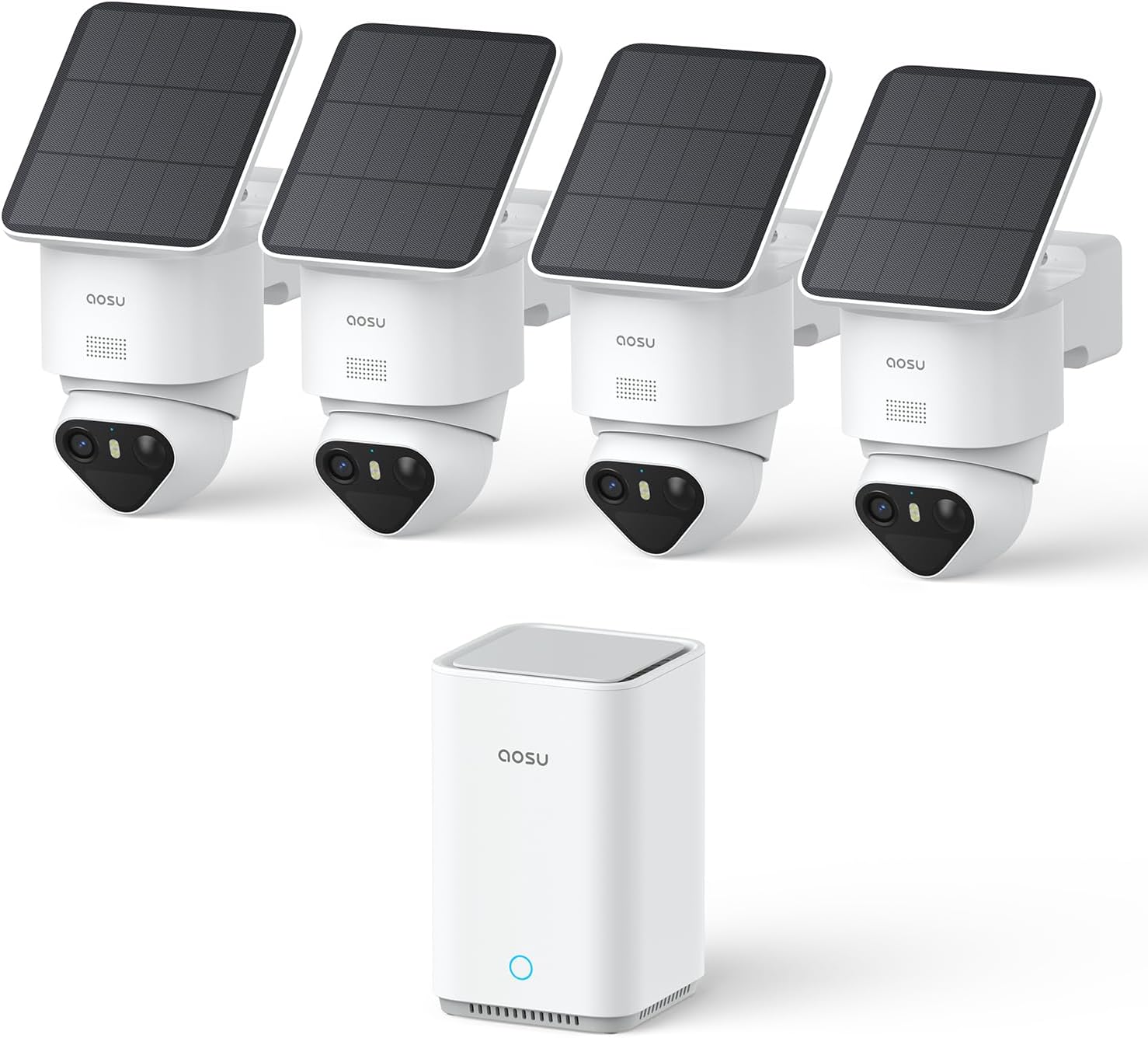
| Video Capture Resolution | 4k |
|---|---|
| Viewing Angle | 360 degrees |
| Optical Zoom | 6 x |
| Flash Memory Installed Size | 32 GB |
| Power Source | Solar Powered |
The aosu T2 Ultra kit is a performance-focused outdoor security system designed to cover an entire property with four 360° pan-tilt dome cameras and a local aosuBase recorder. In real-world use the cameras deliver crisp 4K TrueColor night vision and 6x zoom for identifying details at a distance, while 360° auto-tracking and pan-tilt control eliminate blind spots. Detection uses a triple-sensor setup (radar, PIR, and on-device AI) to reduce false alerts and support person/vehicle/pet classification and Smart Vehicle Guard. Each camera is solar-assisted with a built-in battery for lower maintenance, and the kit includes a preinstalled 32 GB card with expansion up to 1 TB so you can record locally without a subscription. Setup is simplified by pre-pairing cameras with the aosuBase and connecting the base to your router by Ethernet. Expect the benefits of detailed footage and linked multi-camera clips for events, though full 24/7 recording is event-based to save storage and the system relies on the base for networked recording and management.
Best for: Buyers who prioritize high-resolution, reliable detection and whole-property coverage and want a self-contained kit that emphasizes image quality and accurate alerts over cloud subscriptions.
Less Ideal for: Users who need continuous 24/7 cloud recording or who prefer cameras that operate independently without a dedicated local base unit.
- True 4K video with TrueColor night vision for clearer nighttime detail
- 360° pan-tilt with auto-tracking eliminates blind spots and follows motion
- Triple detection (radar + PIR + AI) reduces false alerts and distinguishes people, vehicles, and pets
- Solar-powered cameras with large built-in batteries for low-maintenance operation
- Local encrypted storage included (32 GB) with expansion up to 1 TB and no subscription required
- Event-based recording rather than continuous 24/7 recording to conserve storage
- System depends on the included aosuBase for network management and recording
Verdict: Choose the T2 Ultra kit for high-resolution 4K coverage and advanced triple-sensor AI detection when you want subscription-free local recording and robust whole-property tracking.
HITELLARCAM CB54W 2K Camera

| Video Capture Resolution | 2k (2304) |
|---|---|
| Frame Rate | 30 frames per second |
| Power Source | Battery Powered (5200 mAh) |
| Night Vision Range | 8 meters |
| Weather Resistance Level | Waterproof (IP66) |
The HITELLARCAM CB54W is a wireless outdoor bullet camera built for simple, flexible perimeter monitoring. It records 2K/2304 resolution at 30 fps and uses a built-in spotlight and color night-vision to keep images clear after dark. Setup is app-driven and the camera supports both 2.4 GHz and 5 GHz Wi‑Fi, so placement and connection tend to be straightforward. It runs on a rechargeable 5200 mAh battery with claimed runtime from one to six months depending on motion activity, and it accepts a local SD card while also offering a free cloud storage tier. Useful extras include two-way audio, AI motion detection with instant alerts, a siren/spotlight alarm, and IP66 weather resistance for outdoor use. Expect battery life to vary with recording frequency and temperature, and the free cloud plan limits HD access without paid upgrades. The camera is a practical, no-wires outdoor option if you want higher-than-1080p footage and flexible storage choices but are prepared to manage periodic recharging for active locations.
Best for: Buyers who value easy, wire-free outdoor monitoring and want higher-than-1080p footage with flexible storage and app alerts for everyday home security.
Less Ideal for: People who need continuous 24/7 HD recording without recharging or those who require unlimited free HD cloud storage should consider wired or subscription-focused systems instead.
- 2K (2304) video at 30 fps for clearer detail than 1080p cameras
- Color night vision with built-in spotlight for usable nighttime images
- Dual-band Wi‑Fi (2.4 GHz and 5 GHz) simplifies setup and reduces dropouts
- Rechargeable 5200 mAh battery enables wire-free installation
- Supports local SD storage plus free cloud backup for redundancy
- Battery runtime depends heavily on motion triggers and conditions, so frequent activity will shorten intervals between charges
- Free cloud plan restricts HD access without paid upgrade
Verdict: A practical, battery-powered outdoor camera that delivers 2K color night vision and flexible local/cloud storage for buyers who prioritize easy placement and clear night images.
VIMTAG 8310 Outdoor Camera

| Video Capture Resolution | 1440p |
|---|---|
| Night Vision Range | 33 feet |
| Connectivity Technology | 2.4G & 5G WiFi |
| Waterproof Rating | IP66 |
| Flash Memory Supported Size Maximum | 512 GB |
The VIMTAG 8310 is a plug-in outdoor Wi‑Fi security camera built for everyday home monitoring. It streams 1440p (2.5K) video with a wide viewing angle and digital zoom, sends instant motion and sound alerts, and can trigger a built-in spotlight and siren to draw attention. The camera supports color night vision in low light and records locally to microSD (up to 512 GB) or to the vendor cloud service, and it works on both 2.4GHz and 5GHz Wi‑Fi for more stable connections. Two-way audio lets you speak with visitors or deter intruders. Installation is straightforward with wall or tabletop mounting and the IP66 rating means it tolerates rain and outdoor conditions. Important limitations are that it is corded rather than battery-powered so you need a nearby outlet, and advanced cloud features require a subscription; image processing and app experience can vary with network speed. For the price it delivers a strong feature set for basic outdoor security and everyday monitoring needs.
Best for: Budget-focused buyers who want a capable outdoor camera with good resolution, color night vision, and local recording options without needing professional installation or complex networking.
Less Ideal for: Users who need battery-powered, fully wireless cameras or those who want unrestricted cloud storage and advanced analytics without any subscription fees.
- 2.5K (1440p) live streaming with color night vision for clearer day and night footage
- Dual-band 2.4GHz/5GHz Wi‑Fi support for more reliable wireless connections
- Motion-activated spotlight and siren for active deterrence and instant alerts
- Local microSD recording up to 512 GB plus optional cloud backup
- IP66 weatherproof rating for outdoor use year-round
- Requires a continuous power connection rather than running on battery
- Full-featured cloud storage and some AI detection features require a paid subscription
Verdict: A feature-rich, budget-friendly outdoor camera that delivers 2.5K color night vision, dual‑band Wi‑Fi and local recording for reliable home monitoring.
WYZE Cam Pan v3

| Video Capture Resolution | 1080p |
|---|---|
| Frame Rate | 15fps, 20fps |
| Waterproof Rating | IP65 |
| Zoom Ratio | 8x |
| Connectivity Protocol | Wi-Fi 802.11 b/g/n |
The Wyze Cam Pan v3 is a flexible indoor/outdoor security camera that offers full-room coverage with 360° horizontal pan and 180° tilt, making it useful for porches, garages, nurseries or living rooms. It records 1080p video at up to 20 fps by day with color night vision and an 8x digital zoom for closer inspection of activity. The camera supports motion tracking that follows the largest moving object, two‑way audio for real‑time conversation, a built‑in spotlight and siren for deterrence, and privacy mode to block the view when needed. For storage you can use a microSD card for continuous local recording or opt for Wyze cloud services; it connects over 2.4 GHz Wi‑Fi and requires continuous power. Practical limitations include its digital rather than optical zoom and dependence on a stable 2.4 GHz Wi‑Fi connection and continuous power for reliable remote viewing; distant faces or license plates may be unclear, especially while panning or at night. The IP65 weather resistance and durable polycarbonate body make it a strong choice where reliability in variable weather is a priority.
Best for: Buyers who prioritize a weatherproof, full‑coverage camera that reliably monitors large indoor or outdoor areas and prefers flexible local storage over mandatory subscriptions.
Less Ideal for: Users who need optical zoom or if you plan to place a camera far from mains power or outside reliable 2.4 GHz Wi‑Fi range; also not the best fit where forensic‑level distant detail is required.
- 360° horizontal pan and 180° tilt provide near complete room coverage and customizable patrol waypoints
- Color night vision and up to 20 fps daytime capture improve low‑light visibility compared with basic IR‑only cameras
- IP65 rating and polycarbonate enclosure suited for outdoor exposure to rain and temperature swings
- Supports local microSD recording up to 512GB plus optional cloud backup for flexible storage
- Built‑in two‑way audio, spotlight and siren enable direct interaction and active deterrence
- Requires continuous power and only connects to 2.4 GHz Wi‑Fi, limiting placement where mains power or 2.4 GHz is unavailable
- Zoom is digital, so distant details like license plates or faraway faces are not guaranteed
Verdict: Choose the Wyze Cam Pan v3 when you want a weatherproof, full‑room pan/tilt camera with reliable local recording and practical deterrence features for outdoor or large‑area monitoring.
Ring Outdoor Cam (Stick Up Cam) Battery

| Power | Battery-powered |
|---|---|
| Video | HD |
| Night vision | Color Night Vision |
| Smart home | Works with Alexa |
The Ring Outdoor Cam (Stick Up Cam) Battery is a weather-resistant, battery-powered security camera designed for flexible outdoor placement. It streams HD live view to the Ring app, supports two-way talk so you can hear and speak to visitors, and offers color night vision for clearer night-time images. The camera mounts on a flat surface or wall using the included bracket and can be recharged by swapping the battery pack. Integration with Alexa enables voice notifications and video launch on Echo Show devices, and multiple cameras can be added to cover larger areas. For more advanced features like video history and intelligent alerts you will need a Ring Protect subscription. The unit is straightforward to set up over Wi-Fi and is a practical choice for homeowners who want a versatile, cordless outdoor camera, but ongoing subscription costs are required to access full cloud recording functionality.
Best for: Buyers who want an easy-to-install, cordless outdoor camera they can mount almost anywhere and who value real-time monitoring and Alexa integration backed by broad user adoption.
Less Ideal for: People who need free cloud recording or want local-only storage options should consider alternatives that include on-device recording without subscription requirements.
- Battery-powered for flexible placement without wiring
- HD live view with two-way talk for real-time monitoring and communication
- Color night vision provides clearer nighttime footage than typical monochrome IR
- Works with Alexa for hands-free viewing and voice alerts
- Full video history and intelligent alerts require a paid Ring Protect subscription
Verdict: A flexible, cordless outdoor security camera that delivers HD live view and Alexa integration for buyers who prioritize easy installation and real-time monitoring.
WYZE Cam OG

| Video Capture Resolution | 1080p |
|---|---|
| Night Vision Range | 30 feet |
| Waterproof Rating | IP65 |
| Memory Storage Capacity | 128 GB |
| Connectivity Technology | 2.4GHz, Wi‑Fi, Wired |
The Wyze Cam OG is a compact indoor/outdoor security camera that streams 1080p video and keeps a viewable feed day and night with color night vision and a built‑in spotlight. It mounts to walls and works over 2.4 GHz Wi‑Fi, sending motion and sound alerts to the Wyze app and offering two recording routes: cloud subscriptions for event detection or local microSD storage for continuous local recording. Two‑way audio and auto focus make it useful for checking on kids, pets, or packages, and the IP65 rating means it holds up to rain and outdoor conditions when paired with Wyze's outdoor power adapter for external installs. Practical limitations include the lack of 5 GHz Wi‑Fi support and reliance on Wyze cloud features for advanced person/vehicle/package detection unless you use local storage and the separate subscription for extended cloud history. The camera is powered by a corded connection and supports voice control via Alexa and Google Assistant, making it straightforward for mainstream users to add simple, reliable monitoring around the home.
Best for: Buyers who want an affordable, easy‑to‑set‑up outdoor Wi‑Fi camera that delivers day/night color video and straightforward app notifications without needing professional installation.
Less Ideal for: Those who need 5 GHz Wi‑Fi support, long-term cloud storage without subscriptions, or enterprise-grade analytics should consider other higher‑end options.
- 1080p video with color night vision and built‑in spotlight for clearer nighttime footage
- IP65 weather resistance suitable for outdoor installations when paired with outdoor power adapter
- Two‑way audio and auto focus for clear, usable interactions and monitoring
- Flexible recording options: local microSD storage or cloud recording with Wyze subscriptions
- Simple app alerts and motion/sound notifications with configurable detection zones
- Only supports 2.4 GHz Wi‑Fi, not 5 GHz, which may limit placement on some networks
- Advanced cloud features like person/vehicle/package detection require a paid Wyze subscription
Verdict: A weather‑resistant, easy‑to‑use 1080p camera that gives reliable color night video and simple app alerts for mainstream homeowners seeking straightforward outdoor monitoring.
Choosing the Right Wi-Fi Outdoor Security Camera: Key Factors to Consider
Video Resolution and Night Vision
Higher resolution improves the chance of identifying faces and license plates, especially at a distance. Daytime clarity is important, but the majority of security incidents happen under low light, so infrared or color night-vision performance should factor into your decision.
Consider how compression and frame rate affect recorded detail and bandwidth use. A camera that records at a higher bitrate or uses better low-light sensors will produce more usable evidence. Balance resolution against storage needs and network upload capacity to avoid losing critical footage.
Wireless Connectivity and Range
Wi-Fi signal strength and interference determine whether a camera stays online and reliably uploads clips. Placement at the edge of your network or through exterior walls can severely reduce throughput and increase dropouts.
Look for cameras that support 2.4 GHz for range or dual-band capability for flexibility. Also consider whether the device supports modern Wi-Fi features that improve roaming and throughput. If your router is far from installation points, test signal level or plan for a dedicated extender or mesh node to avoid blind spots.
Power and Installation Flexibility
Power options—battery, wired, or solar-assisted—affect where you can place a camera and how much maintenance it requires. Battery models are simple to install but need periodic charging or swapping. Wired cameras provide continuous power but require routing cable and possibly an outlet or junction box.
Installation difficulty also depends on mounting hardware and software setup. Choose a camera with clear mounting templates and adjustable brackets if you plan to angle views precisely. Confirm whether the camera supports wall, soffit, or pole mounting for your intended spot.
Weatherproofing and Durability
Outdoor cameras must survive rain, sun, and temperature swings without performance loss. Look for IP ratings that indicate protection against water and dust and check stated operating temperature ranges for your climate.
Materials and lens covers matter too. UV-stable plastics and corrosion-resistant metals last longer in coastal or sunny environments. Durable weather seals around cable entries reduce moisture intrusion and false triggers caused by condensation.
Motion Detection and Alerting Controls
Smart motion detection reduces unnecessary alerts by distinguishing humans, vehicles, and other objects. Adjustable detection zones and sensitivity let you tune the camera to ignore street traffic or tree movement while still catching perimeter breaches.
Consider how alerts are delivered and whether the camera supports push notifications, email, or both. Look for options to schedule active monitoring times and integrate with other home systems to automate responses when motion is detected.
Storage, Privacy, and Data Access
Storage approach affects long-term access to footage and recurring costs. Local storage options like microSD or network storage keep video under your control and avoid ongoing fees. Cloud storage simplifies off-site retention but may require subscription plans.
Privacy features such as configurable recording zones, data encryption, and clear deletion controls help protect household privacy. Ensure the camera allows you to limit recordings and manage retention according to your comfort level and local regulations.
Choosing the Right Mount and Field of View
Decide whether you need a wide field of view to cover a porch and yard or a narrower, zoom-capable lens to read license plates. Wide-angle lenses reduce blind spots but can distort faces at close range. Adjustable mounts let you aim the camera to minimize glare and maximize useful coverage.
When planning placement, map common approach paths and sightlines from entry points. Mount higher to avoid tampering but within the sensor's effective range for facial recognition. Use the camera's live view during setup to fine-tune angle and detection zones.
- Higher mounts reduce vandalism but may make facial ID harder.
- Place cameras where lights or reflective surfaces do not blind the sensor.
- Test live view at night to confirm night-vision effectiveness from the chosen position.
Balancing Battery Life and Performance
Battery-powered cameras simplify installation but require tradeoffs in recording frequency and features. Look for models with efficient motion-triggered recording and power-saving scheduling to extend time between charges.
If you need continuous recording or frequent activity capture, wired power or solar-assisted battery systems provide more dependable uptime. Evaluate how often you can realistically recharge or replace batteries given your installation and lifestyle.
- Enable motion-only recording to conserve battery.
- Consider solar panels where sunlight is consistent to reduce maintenance.
- Schedule recordings during expected activity windows to optimize battery use.
Managing Network Load and Bandwidth
Outdoor cameras can consume significant upload bandwidth, especially when multiple cameras stream high-resolution video. If your home internet has limited upstream capacity, lower recording resolution or use event-triggered uploads to avoid saturating the connection.
Prioritize cameras that let you set bitrate, resolution, and clip length to match your network. If continuous monitoring is required, consider local network storage to reduce cloud upload requirements.
- Limit simultaneous high-resolution streams on networks with low upload speeds.
- Use dual-band capability to separate camera traffic from core devices when possible.
- Adjust clip lengths and cooldown timers to reduce redundant uploads after repeated triggers.
Legal and Privacy Considerations
Be mindful of local laws governing audio recording and surveillance. Some areas restrict recording audio or capturing footage of spaces where people expect privacy. Position cameras to avoid peering into neighbors' windows or private areas.
Inform household members about camera locations and configure notification and storage settings to match privacy preferences. Use toggles for audio capture and concise retention policies to minimize unnecessary data collection.
- Disable audio recording where it is not permitted or needed.
- Use privacy masks to block sensitive areas from recording.
- Keep firmware updated to maintain security and privacy safeguards.
Integrations and Smart Home Compatibility
Consider whether the camera works with your existing smart home ecosystem for automations like lights on motion or alarm triggers. Native integrations can simplify workflows and reduce the need for third-party bridging.
Check whether the camera supports standard protocols and whether it offers open APIs or voice assistant compatibility if you plan to build automations. Compatibility affects how easily the camera can become part of a broader security strategy.
- Native motion triggers can automate lights and sirens.
- Open API or RTSP support helps integrate with third-party network video recorders.
- Confirm whether firmware updates are frequent to maintain integration reliability.
How We Chose the Best Wi-Fi Outdoor Security Camera
We focused on real-world reliability and usability when building this list of Wi-Fi outdoor security cameras. Key evaluation criteria included video capture quality and night performance, because clear footage is essential for identification and evidence. We tested network stability and range expectations to ensure cameras maintain a live connection and reliably upload clips on typical home Wi-Fi setups. Weather resistance and build quality were assessed to confirm continuous outdoor operation in rain, sun, and temperature swings. Power options and installation flexibility were considered to match different mounting scenarios and homeowner skills. We also looked at motion detection accuracy and alerting to reduce false alarms and make notifications actionable. Features such as local storage options, cloud policy flexibility, and privacy controls were included as secondary filters. We excluded cameras that rely solely on proprietary hubs or require major home rewiring, and we filtered out products with unclear weather ratings or consistently reported connectivity failures. The result is a list emphasizing durable hardware, dependable wireless performance, and clear imaging—factors that help you choose a camera that will actually work where you need it.
Our full evaluation process is outlined in our review methodology.
FAQ
How far can a Wi‑Fi outdoor security camera be from my router?
Range depends on your router, building materials, and camera antenna design. Most cameras work reliably within 50 to 100 feet with line of sight, but walls and metal siding reduce that range. If signal is weak, place a mesh node or Wi‑Fi extender closer to the installation point.
Do outdoor Wi‑Fi cameras record at night without streetlights?
Many outdoor cameras use infrared illumination or low-light color sensors to capture usable footage in darkness. Infrared provides monochrome images while some advanced sensors deliver color night video under minimal ambient light. Check low-light specs if nighttime identification is a priority.
Are battery-powered outdoor cameras reliable for long-term monitoring?
Battery models are reliable for periodic motion monitoring but require maintenance. Battery life varies with motion frequency, recording quality, and ambient temperature. For continuous recording or high-traffic areas, wired power or solar assistance is usually better.
Can I store footage locally instead of using cloud services?
Yes, many cameras offer local storage via microSD cards or network storage protocols. Local storage keeps data under your control but may not protect footage from theft or damage at the property. Consider combining local and cloud retention if you want redundancy.
How do I reduce false motion alerts from wind or passing cars?
Adjust detection zones, lower sensitivity, and enable human or vehicle recognition features when available. Position the camera to avoid moving foliage in the foreground and set cooldown timers to prevent repeated alerts from the same event.
Final Verdict
Focus first on where you will mount the camera and how it will be powered, as those constraints shape the rest of the decision. Prioritize video and night performance for identification, and make sure your home network can support the camera's upload needs. Balance convenience features like smart integrations against privacy and storage preferences. Ultimately, choose a Wi‑Fi outdoor security camera that matches your installation environment and monitoring goals. Favor models with reliable connectivity, weatherproof construction, and configurable detection so the system works consistently with minimal maintenance.