
Note: This article contains affiliate links. If you click on these links and make a purchase, we may earn a small commission at no extra cost to you. This helps support our research and content. Read our full affiliate disclosure here.
Smart plugs bring basic appliances into modern home automation by letting you control power, schedule operation, and monitor usage from a phone or voice assistant. Choosing the right Wi-Fi smart plug matters because reliability, safety, and accurate energy reporting directly affect convenience and long-term utility savings. This guide shortlists the top Wi-Fi smart plugs across common home uses, from lamps and space heaters to kitchen gadgets. We evaluated connectivity, load handling, ease of setup, and safety features to help you pick the best option for your needs. Read on for quick product summaries and the criteria that went into our selections.
Top Picks at a Glance
| Best Overall The best all-around choice for most situations | TP-Link Tapo Smart Plug Mini P125M (3-Pack) |  |
| Best Value The sweet spot between price and what you get | Amazon Basics Smart Plug 4-Pack |  |
| Best Budget The cheapest option that still gets the job done reliably | GHome Smart WP3 Smart Plug |  |
| Top Rated A top-rated pick with lots of positive feedback | Amazon Smart Plug |  |
| Most Popular A crowd favorite that many people choose with confidence | Kasa Smart Plug HS103P4 | 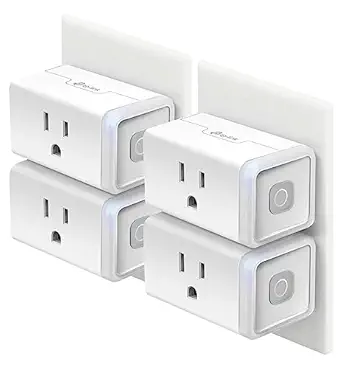 |
| Best Seller A high-volume bestseller chosen again and again | Kasa Smart Plug Mini EP10 | 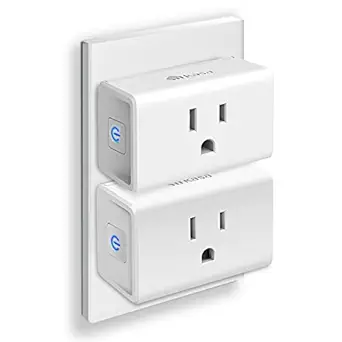 |
TP-Link Tapo Smart Plug Mini P125M (3-Pack)

| Current Rating | 15 A |
|---|---|
| Operating Voltage | 120 volts AC |
| Wattage | 1800 watts |
| Connectivity Protocol | Bluetooth, Matter, Wi-Fi |
| Included Components | 3 x Mini Smart Wi‑Fi Plug P125M, 1 x Quick Start Guide |
The Tapo P125M mini smart plug is a small, UL-certified outlet adapter that lets you control lamps, fans and other appliances remotely via the Tapo app, voice assistants, or Matter-certified controllers. It supports 15 A/1800 W loads and offers scheduling, timers, away mode and remote on/off so you can automate routines or simulate occupancy. Matter and local LAN control improve interoperability with Apple Home, Alexa, Google Home and SmartThings and can keep basic device control working even if the internet drops. Setup is simplified with Bluetooth onboarding and the plug's compact form keeps the second socket on a duplex outlet available. Practical safety touches include flame-retardant material and UL certification. Expect the usual limitations of a mini plug: no energy monitoring or surge protection is listed and Matter requires a compatible hub to pair to non-Tapo ecosystems, so full cross-platform setup may need an extra controller.
Best for: Buyers who want a compact, reliable smart plug that integrates with major smart home platforms and prioritizes simple setup and local Matter interoperability for everyday automation.
Less Ideal for: People who need built-in energy monitoring, surge protection, or a fully cloud-independent setup without any hub dependency should consider other models or power strips with those features.
- Matter compatibility for broader ecosystem interoperability
- Compact design that leaves adjacent outlet usable
- Supports up to 15 A/1800 W for higher-draw appliances
- Scheduling, timers and away mode for automation and energy saving
- Bluetooth onboarding for faster initial setup
- Requires a Matter controller (hub) for ecosystem pairing beyond the Tapo app
- No listed energy monitoring or built-in surge protection
Verdict: A compact, Matter-ready smart plug pack that makes adding reliable app and voice control to lamps and appliances quick and compatible across major smart home platforms.
Amazon Basics Smart Plug 4-Pack

| Connector Type | 2 Pin |
|---|---|
| Plug Type | Type B |
| Amperage | 15 A |
| Included Components | (4) Amazon Basics Smart Indoor Plugs |
| Specification Met | UL |
These Amazon Basics smart plugs let you turn ordinary appliances into voice‑ and app‑controlled devices using 2.4 GHz Wi‑Fi and Alexa integration. Setup can be done through the Alexa app, including an option to link devices to your Alexa account at checkout, and once connected you can schedule outlets, create routines, or control plugs remotely. The compact rectangular design occupies a single outlet so adjacent sockets remain usable, and the plugs are rated for standard Type B outlets at 15 amps for common household loads like lamps, fans, coffee makers, and holiday lights. The pack includes four indoor plugs and the product meets UL specification. Limitations to note: these plugs require the Alexa ecosystem for setup and control, they operate only on 2.4 GHz Wi‑Fi, and they are intended for indoor use only so they are not suited to outdoor or heavy industrial loads.
Best for: Buyers who want a straightforward, budget way to automate lights and everyday appliances within the Alexa ecosystem and prefer practical, easy setup across multiple rooms.
Less Ideal for: People who need hub‑independent cross‑platform control, 5 GHz Wi‑Fi compatibility, outdoor‑rated outlets, or professional heavy‑load switching should consider other options.
- Easy Alexa integration with an option to link devices to your Alexa account during checkout
- Compact single‑outlet form factor that leaves the other socket free
- Remote control and scheduling via the Alexa app for lights and small appliances
- Includes four plugs for multiple rooms or devices and meets UL specification
- Requires Alexa app and account for setup and control
- Works only on 2.4 GHz Wi‑Fi and not compatible with 5 GHz networks
Verdict: A practical, no‑frills four‑pack of Alexa‑native smart plugs that makes automating multiple indoor devices quick and inexpensive.
GHome Smart WP3 Smart Plug

| Current Rating | 10 A |
|---|---|
| Operating Voltage | 120 volts |
| Wattage | 1200 watts |
| Connectivity Protocol | Bluetooth, Wi-Fi |
| Controller Type | Amazon Alexa, Google Assistant, SmartThings |
The GHome Smart WP3 is a budget-minded Wi‑Fi smart plug that connects to a 2.4 GHz network and works with Alexa and Google Assistant via the GHome, Smart Life or Tuya apps. You use it to turn lamps, fans, holiday lights, humidifiers and other small appliances on and off remotely, set schedules, countdowns or randomized timers, and group multiple plugs for one‑tap control. Setup supports Bluetooth or Wi‑Fi to speed pairing, and the unit reports ETL and FCC compliance for safety. Practical benefits include away-mode random timers for security, cycle timers for repeat on/off intervals, and app sharing so family members can control devices. Important limitations are the 10 A / 1200 W rating that restricts it to low‑draw loads and the requirement for a 2.4 GHz Wi‑Fi network only, so it will not join 5 GHz networks or certain mesh setups without a 2.4 GHz band enabled.
Best for: Buyers who want an inexpensive, no‑frills smart plug to add basic remote control and scheduling to lights and small appliances without needing a hub.
Less Ideal for: People who need to control high‑draw devices or who rely on a 5 GHz‑only Wi‑Fi setup should look for a higher‑rated or 5 GHz/multi‑band capable model.
- Simple app and voice control via Alexa and Google Assistant
- Supports schedules, countdowns, random and cycle timers for automation and security
- Quick pairing with Bluetooth or 2.4 GHz Wi‑Fi for easy setup
- ETL and FCC listed for basic safety compliance
- Limited to 10 A / 1200 W loads so not suitable for heavy appliances
- Only works on 2.4 GHz Wi‑Fi which can cause compatibility issues with some modern routers
Verdict: A wallet‑friendly smart plug that delivers reliable app and voice scheduling for lamps and small appliances when you only need basic remote control.
Amazon Smart Plug

| ASIN | B089DR29T6 |
|---|---|
| Price | 24.99 USD |
| Compatibility | Alexa app and compatible Alexa devices |
| Image | https://m.media-amazon.com/images/I/61t5zBS57gL._AC_SL1500_.jpg |
The Amazon Smart Plug turns any standard outlet into a voice- and app-controlled smart outlet by connecting directly to your home Wi‑Fi and Alexa-enabled devices. Setup is simple: plug it in, open the Alexa app, and follow the guided steps to add lights, fans, small appliances, and other devices that use a physical on/off switch. In daily use it supports voice commands, schedules, and Alexa routines so you can automate lights or create timed events like morning coffee. Its compact profile keeps the adjacent outlet usable and it is designed to reconnect automatically after power or Wi‑Fi interruptions, which reduces the need for frequent troubleshooting. The plug is limited to Alexa integration out of the box, so users who need native support for other ecosystems without bridging will find it restrictive, and it is intended for moderate-draw devices rather than heavy appliances. For people who want a no-fuss, reliable smart outlet for lighting and small electronics, this handles the basics very well.
Best for: Buyers who prioritize a dependable, low-maintenance smart outlet that integrates tightly with Alexa and minimizes setup and upkeep.
Less Ideal for: Users who need native support for non-Alexa ecosystems or who plan to control high-power appliances should look for other solutions.
- Easy, hub-free setup using the Alexa app
- Compact design preserves the second outlet
- Supports voice control, schedules, and Alexa routines
- Automatically reconnects after power or Wi‑Fi outages
- Works primarily within the Alexa ecosystem and lacks native multi-ecosystem support
- Not designed for high-current appliances
Verdict: A straightforward, reliable Alexa-first smart plug that makes lights and small devices easy to automate with minimal setup.
Kasa Smart Plug HS103P4

| Current Rating | 15 A |
|---|---|
| Operating Voltage | 120 volts AC |
| Wattage | 1800 watts |
| Connectivity Protocol | Wi-Fi |
| Unit Count | 4 Count |
The Kasa HS103P4 is a basic Wi‑Fi smart plug bundle for adding voice and remote control to lamps, fans, humidifiers and similar small appliances. Each plug connects over 2.4 GHz Wi‑Fi and is managed in the Kasa app, which provides scheduling, countdown timers, grouping and an Away Mode to simulate occupancy. Setup is straightforward: plug in, open the app and follow the guided steps to link the outlet to your home network and voice assistant. The plugs are UL certified and support voice control through Alexa and Google Assistant without a hub, and the 15 A/1800 W rating is suitable for most household loads. Practical benefits include being able to control devices from anywhere, create scenes with other Kasa devices, and view run-time usage to help reduce energy waste. Limitations are that these are basic "Lite" plugs without energy monitoring and they require a 2.4 GHz network only, so homes with 5 GHz-only setups will need router adjustments.
Best for: Buyers who want a reliable, easy way to add voice and remote control to lamps and plug‑in appliances and who value widely used, well-reviewed products with clear safety certification.
Less Ideal for: Users who need per-outlet energy monitoring or who cannot or prefer not to use a 2.4 GHz Wi‑Fi network should consider other options.
- Easy app and voice setup with Alexa and Google Assistant support
- Scheduling, countdown timer and Away Mode for automated control
- UL certified for safety and adequate 15 A/1800 W load rating
- Can be grouped with other Kasa devices for centralized scenes and automation
- No built-in energy monitoring or usage reporting on the hardware itself
- Only supports 2.4 GHz Wi‑Fi, not 5 GHz networks
Verdict: A dependable, easy-to-use 4‑pack smart plug for anyone who wants straightforward voice and remote control with proven safety credentials.
Kasa Smart Plug Mini EP10

| Current Rating | 15 A |
|---|---|
| Operating Voltage | 120 volts AC |
| Connectivity Protocol | Wi-Fi (2.4 GHz) |
| Wattage | 1800 watts |
| Controller Type | Amazon Alexa, Google Assistant |
The Kasa Smart Plug Mini EP10 (2-pack) brings basic smart outlet control to any room without blocking the second socket thanks to its ultra-compact design. You plug each unit into a standard 120V outlet, connect to your 2.4 GHz Wi‑Fi network, and control devices from the Kasa app or by voice with Alexa or Google Assistant. Key features include scheduling, countdown timers, an Away Mode to simulate occupancy, and group control with other Kasa devices, making it useful for lamps, fans, holiday lights, and other small appliances. Safety is a focus: the plugs are UL certified, use flame-retardant polycarbonate, and are rated for a 15A/1800W load. Setup is straightforward for nontechnical users and the app control allows remote on/off when you are away. Limitations are predictable: no energy monitoring and only 2.4 GHz Wi‑Fi is supported, so you cannot track power usage and must ensure your router supports that band. The pack-level bundle is handy for adding smart control to multiple outlets quickly.
Best for: Buyers who want a simple, safe way to add dependable smart control to lamps and small appliances without fiddly installation and who prefer established, easy-to-use apps and voice assistant support.
Less Ideal for: Power users who want energy usage data, 5 GHz Wi‑Fi or Matter compatibility, or those needing the plug to handle heavy-duty appliances beyond typical small loads.
- Ultra-compact form factor that preserves the second outlet
- Works with Alexa and Google Assistant for hands-free voice control
- Easy setup on existing 2.4 GHz Wi‑Fi with Kasa app and remote control
- UL certified design with flame-retardant housing and 15A/1800W rating
- No built-in energy monitoring to track usage
- Only supports 2.4 GHz Wi‑Fi and not 5 GHz or Matter
Verdict: A compact, UL certified smart plug that gives risk-averse buyers reliable remote and voice control for everyday lamps and small appliances.
Choosing the Right Wi-Fi Smart Plug: Key Factors to Consider
Connection Reliability
How stable a smart plug's Wi-Fi connection is will determine whether schedules run and remote commands succeed. A plug that frequently drops from the network creates frustration and may fail to turn critical appliances on or off when you need them.
Look for devices that support common Wi-Fi bands used in homes and that document their recommended router placement. Firmware update policies matter too because ongoing stability fixes and security patches come through those updates.
Load Capacity and Electrical Safety
Smart plugs list a maximum current or wattage they can safely handle. Choosing a plug with insufficient capacity risks overheating, blown fuses, or tripped breakers. For high-draw devices like space heaters or large fans, verify the plug's continuous current rating rather than just short-term peaks.
Safety features such as thermal cutoff, overload protection, and certifications from recognized testing organizations are important. These features lower the chance of failures and are crucial when the plug will control appliances that operate for long periods or unattended.
Energy Monitoring and Reporting
If you want to track consumption or estimate running costs, choose a plug with built-in energy metering. The accuracy of reported watts, amps, and cumulative energy use affects how useful that data is for decisions like scheduling or replacing inefficient appliances.
Some plugs offer only coarse estimates while others provide finer granularity and exportable logs. Consider whether you need real-time power display, historical charts, or CSV export for deeper analysis.
App Functionality and Automation Support
The companion app is the primary interface for scheduling, grouping devices, and building automations. A well-designed app makes routine tasks simple, supports scene creation, and offers reliable remote control. Native support for popular voice assistants and standard smart home ecosystems reduces setup friction.
Look for features such as multi-device groups, conditional automations (time-of-day combined with device state), and shareable access for household members. Also consider whether the app requires an account and what privacy or data-sharing policies it documents.
Physical Design and Outlet Fit
A smart plug's physical size and shape affect how it fits into wall outlets and power strips. Bulky plugs can block adjacent sockets or sit awkwardly on surge protectors. For tight wall box installations, low-profile or slimline designs are preferable.
Also consider whether the plug supports pass-through power for one outlet to remain available, and whether it has indicator lights that are unobtrusive at night.
Setup, Firmware, and Long-Term Support
Initial setup should be straightforward and well-documented, ideally with clear app prompts and a robust troubleshooting section. Beyond setup, the vendor's track record for firmware updates, documented change logs, and responsive support channels affects long-term reliability and security.
Devices that receive regular updates are more likely to remain compatible with evolving router standards and voice platforms. Check whether the manufacturer provides update tools and how they handle end-of-life notifications.
Best Uses for Wi-Fi Smart Plugs
Wi-Fi smart plugs work best with low- to medium-power devices like lamps, coffee makers with simple on/off cycles, holiday lights, and media equipment. They are ideal for automating daily routines such as turn-on times for bedside lamps or scheduled charging windows for small devices.
Avoid using standard smart plugs with high-draw appliances unless the plug is specifically rated for that load. For appliances that cycle on and off rapidly or that draw heavy continuous current, choose plugs with higher load ratings and explicit safety features.
- Lighting and decorative lighting automation
- Small kitchen appliances with simple on/off control
- Aquarium or terrarium lighting and heaters with monitored schedules
- Charge scheduling for phones and small gadgets
Network Setup Tips
Place plugs within reliable Wi-Fi range and avoid dense wall obstructions that can cause intermittent drops. If you have a dual-band router, check whether the plug requires 2.4 GHz and use that band for better range in many cases.
Assign static IPs or reserved DHCP leases to frequently used plugs if your router supports it. This can reduce connection drops caused by IP reassignment and makes troubleshooting easier.
- Use strong Wi-Fi passwords and WPA2 or WPA3 security
- Avoid network isolation features that prevent the plug from reaching update servers
- Label devices clearly in the app so you can identify them during setup
Safety Best Practices
Always match the plug's labeled maximum current and wattage to the appliance you intend to control. For continuous loads such as heaters, choose a plug with an appropriate continuous rating and built-in thermal protection.
Unplug or disable plugs that show discoloration, emit smells, or get unusually hot. Those are signs of electrical stress or failure and should be addressed immediately to reduce fire risk.
- Check for recognized safety certifications on the device
- Keep vents clear and avoid stacking heavy adapters
- Use ground-fault protection where moisture is present
Integrations and Voice Control
If you plan to use voice assistants, confirm the plug supports the desired assistant natively. Native integrations typically offer the most reliable control and allow direct voice commands without intermediate apps.
Look for plugs that support grouping so multiple plugs can be controlled by a single voice command or automation. Consider whether routines and scenes can reference plug state to build more complex behaviors.
- Verify local control versus cloud-only commands for faster response
- Check whether scenes or routines run on-device or require the cloud
- Ensure multi-user access is supported for household control
Placement and Physical Considerations
Decide whether you need a low-profile plug for tight outlet spacing or a plug with pass-through capabilities. Measure the space around outlets if you plan to use multiple adjacent plugs.
Consider LED indicators and whether they can be disabled or dimmed if used in bedrooms. Also think about color and finish if the plug will be visible near furniture.
- Low-profile designs for stacked outlets
- Pass-through outlets retain an open socket
- Indicator lighting that can be turned off
How We Chose the Best Wi-Fi Smart Plug
We focused on real-world factors that determine whether a Wi-Fi smart plug performs reliably in day-to-day home use. Key evaluation dimensions included connection stability on typical home networks, the plug's reported power and energy metering accuracy, and the device's electrical load rating and built-in safety protections. We also prioritized ease of setup and integration with common voice assistants and mobile apps, plus the quality of scheduling and automation features available in-app. Products that failed basic electrical safety marks, lacked clear load ratings, or did not offer secure Wi-Fi connections were excluded. We filtered out devices that rely solely on proprietary hubs or require uncommon networking hardware. Final selections balanced consistent connectivity, adequate current handling, helpful app controls, and transparent safety information. Each candidate was assessed against the same set of practical criteria to ensure apples-to-apples editorial judgment.
Our full evaluation process is outlined in our review methodology.
FAQ
Can I use a Wi-Fi smart plug with a space heater?
It depends on the plug's continuous current rating. Many standard smart plugs are not sized for high-draw heating devices. Always check the plug's wattage and current limits and use models with explicit thermal protection for space heaters.
Do Wi-Fi smart plugs work with mesh networks?
Yes, most Wi-Fi smart plugs work with mesh systems, but placement matters. Make sure the plug connects through a stable local node and that the node provides the band the plug requires. Reserve DHCP addresses for reliable connectivity when possible.
Will a smart plug still work if my internet goes out?
Basic local scheduling may continue if the plug stores schedules locally, but many cloud-dependent features and remote control will be unavailable. Check whether the plug supports local control and can execute rules without cloud connectivity.
How accurate are energy usage readings from smart plugs?
Accuracy varies. Some smart plugs provide coarse estimates suitable for comparative tracking, while others offer finer-grained metering that is close to dedicated energy monitors. If precise billing-level accuracy is required, consider a certified energy meter.
Are Wi-Fi smart plugs secure?
Security depends on firmware quality, encryption standards, and vendor practices. Choose plugs that support WPA2 or WPA3 and that receive regular firmware updates. Avoid exposing device management ports to the public internet.
Final Verdict
When selecting a Wi-Fi smart plug, prioritize connection reliability, a suitable electrical rating, and clear safety features. Decide whether energy monitoring is important to you and choose a plug with metering accuracy that matches your needs. Also factor in app capabilities and integration with voice assistants for the level of automation you want. Balance physical fit, long-term firmware support, and safety certifications when making a choice. By focusing on those core tradeoffs, you can pick a smart plug that reliably automates household devices while minimizing risk and maintenance overhead.