
Note: This article contains affiliate links. If you click on these links and make a purchase, we may earn a small commission at no extra cost to you. This helps support our research and content. Read our full affiliate disclosure here.
If you want basic, dependable home monitoring without overspending, a budget wireless security camera can cover most everyday security needs. You should expect clear daytime footage, usable night vision, and straightforward setup so the system actually gets deployed and used. This guide shortlists six top picks that hit those marks. We focused on real-world performance traits buyers care about, including video clarity, motion detection reliability, ease of installation, and ongoing connectivity. Read on to see which budget wireless security camera features matter most and which setups match common home security priorities.
Top Picks at a Glance
| Best Overall The best all-around choice for most situations | eufy Wired Cam C31 |  |
| Best Quality Built to a higher standard if you want something more solid | Tapo C400 Battery Outdoor Camera |  |
| Best Value The sweet spot between price and what you get | VISION WELL CG6S 2K Security Camera |  |
| Best Budget The cheapest option that still gets the job done reliably | Safemogulix M9 Security Camera |  |
| Top Rated A top-rated pick with lots of positive feedback | wansview Q5 Indoor Camera |  |
| Most Popular A crowd favorite that many people choose with confidence | HITELLARCAM CB54W 2K Camera |  |
eufy Wired Cam C31
| Video Capture Resolution | 1080p |
|---|---|
| Night Vision Range | 20 feet |
| Waterproof Rating | IP66 |
| Flash Memory Supported Size Maximum | 256 GB |
| Frame Rate | 15 frames per second |
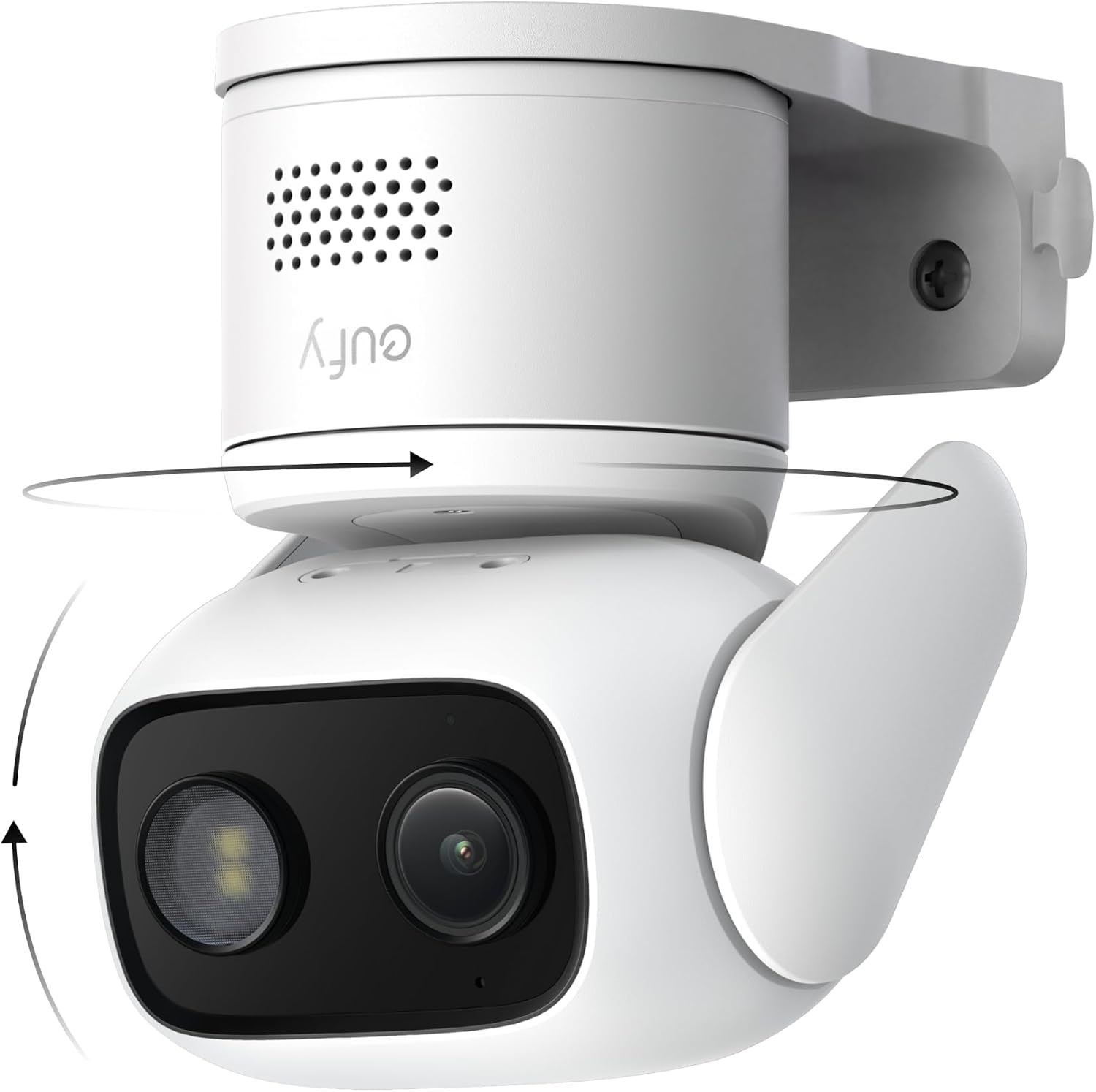
The eufy Wired Cam C31 is a corded dome camera built for continuous home monitoring both indoors and outdoors. It pans and tilts to provide 360 degree coverage and uses AI to detect humans, vehicles, pets, and crying sounds while auto-tracking moving subjects. Color-capable night vision and an f/1.2 BSI sensor let the camera capture more light without a spotlight, which keeps footage more natural after dark. Continuous 24/7 recording is supported by a microSD card (up to 256 GB) or when paired with eufy HomeBase devices, and dual external antennas aim to keep the Wi-Fi connection stable. Practical strengths include app control, H.264 MP4 recording, and IP66 weather protection for exposed installs. Be aware the camera is wired and runs at 1080p/15 fps, so it is not the highest-resolution option and requires a power run for installation; HomeKit is not supported. For buyers prioritizing always-on local recording, wide coverage, and reliable detection on a budget, the C31 is a straightforward choice.
Best for: Buyers who want dependable, always-on local recording and wide single-camera coverage for entryways, yards, or large rooms without paying for cloud subscriptions.
Less Ideal for: Users who need the highest-resolution footage, wireless battery operation, or HomeKit integration should consider other options.
- 360° pan and tilt with AI auto-tracking reduces blind spots so one camera can cover large areas
- PureColor night vision and a bright sensor capture usable color footage in low light without a spotlight
- Supports 24/7 continuous local recording to microSD or HomeBase for no-subscription storage
- IP66 rating and weather-sealed ports make it suitable for outdoor installation
- Dual external antennas and wired power help maintain stable, always-on operation
- 1080p resolution at 15 fps is modest compared with higher-resolution models
- Requires a wired power connection which limits placement flexibility
Verdict: If you want an affordable, always-on wired camera that covers large areas with 360° pan/tilt, local recording, and strong low-light color performance, the eufy C31 is a pragmatic pick.
Tapo C400 Battery Outdoor Camera

| Video Capture Resolution | 1080p |
|---|---|
| Power Source | Battery Powered |
| Night Vision Range | 33 feet |
| Waterproof Rating | IP65 |
| Viewing Angle | 117 degrees |
The Tapo C400 is a wire-free outdoor security camera that delivers 1080p live view, color night vision, and two-way audio in a compact bullet body. It is typically mounted at entry points, driveways, or yards and connects directly to home Wi-Fi without a hub. Notable features include AI person/vehicle detection with customizable activity zones, an adjustable spotlight and alarm tones, and multiple storage choices via microSD or optional cloud subscription. The large rechargeable battery is rated for up to 180 days under light-to-moderate use, which cuts down on maintenance compared with frequently recharged models. Setup and app control are straightforward and it integrates with Alexa and Google Assistant for voice or smart-display streaming. Practical limitations are a modest 15 fps frame rate and lower resolution than 2K/4K models, so fine detail at distance can be limited, and actual battery life will vary with usage and settings. For buyers focused on solid, subscription-free detection and long battery operation, this is a capable budget outdoor option.
Best for: Buyers who want a budget-friendly outdoor camera that prioritizes long battery life and reliable person detection without mandatory cloud subscriptions.
Less Ideal for: Users who need high-resolution or high-frame-rate footage for forensic detail or professional surveillance setups.
- Battery-powered with claimed up to 180-day runtime reduces wiring and frequent charging
- 1080p video with color night vision for clearer nighttime imagery
- AI person and vehicle detection with customizable activity zones to cut false alerts
- Local storage via microSD plus optional cloud for flexible recording choices
- IP65 weather resistance and two-way audio with adjustable spotlight and alarm
- 15 fps frame rate can make motion appear less smooth compared with higher-frame alternatives
- 1080p limits fine detail at long distances compared with higher-resolution cameras
Verdict: Choose the Tapo C400 when you want a low-cost, long‑battery outdoor camera with good person detection and flexible local storage.
VISION WELL CG6S 2K Security Camera

| Connectivity Protocol | Wi-Fi (2.4 GHz only) |
|---|---|
| Power Source | Battery Powered |
| Video Capture Resolution | 2k |
| Waterproof Rating | IP65 |
| Storage Options | Micro SD card up to 128GB or cloud |
The VISION WELL CG6S is a fully wireless outdoor/indoor bullet camera intended for simple home security installs where running power is impractical. It records 2K video, offers both full-color and infrared night vision, and uses AI-enhanced PIR motion detection to classify people, vehicles, pets and packages so alerts are more relevant. Setup uses the Vicohome app over 2.4 GHz Wi-Fi and the camera supports microSD recording or optional cloud storage. Practical on-site features include a rechargeable battery rated for roughly 1 to 5 months per charge depending on use, an IP65 weather rating for year-round outdoor mounting, a built-in spotlight, siren and two-way audio for deterring intruders, and configurable activity zones to reduce nuisance alerts. Trading higher-end constant recording and 5 GHz Wi-Fi compatibility for true wire-free placement, the CG6S is best when you prioritize flexible installation and long battery life; heavy-monitoring households or those needing enterprise features may need a wired or cloud-centric system instead.
Best for: Buyers who need a low-cost, truly wireless outdoor camera they can mount anywhere and who value long battery life, simple app setup and fewer false alerts from AI detection.
Less Ideal for: Users who want continuous high-frame-rate monitoring, 5 GHz Wi-Fi support, or advanced professional video management should consider wired or higher-end cloud systems instead.
- 2K resolution with color night vision for clearer day and night images
- AI PIR detection that distinguishes people, vehicles, pets and packages to cut down false alerts
- Rechargeable battery offering long run times for wire-free placement
- IP65 waterproofing and included mounting bracket for outdoor installs
- Built-in spotlight, siren and two-way audio for active deterrence
- Does not support 5 GHz Wi-Fi which may limit network choice
- 15 FPS video may be less smooth than higher frame-rate cameras
Verdict: A budget-friendly, fully wireless outdoor camera that delivers 2K video and AI motion filtering for flexible, low-maintenance home protection.
Safemogulix M9 Security Camera

| Video Capture Resolution | 1080p |
|---|---|
| Viewing Angle | 120 degrees |
| Power Source | Battery Powered |
| Night Vision Range | 10 meters |
| Connectivity Protocol | Wi-Fi (2.4GHz) |
The Safemogulix M9 is an entry-level wireless bullet camera aimed at simple home surveillance. It records 1080p video at 30 fps and uses a 120 degree wide-angle lens to cover driveways, porches, and yards, and the built-in lithium polymer battery lets you install it without running wires. The camera supports 2.4 GHz Wi‑Fi and pairs with a smartphone app for live view, motion push alerts, and two-way talk, while color night vision and four IR LEDs improve low-light detail. Footage is encoded in H.264 and stored to encrypted cloud storage (subscription required). For buyers on a tight budget, the M9 delivers the core features you need—wireless install, decent daytime footage, and app notifications—though it does not support local SD storage and only works on 2.4 GHz networks, so setup depends on a stable Wi‑Fi connection and a cloud plan for retention. The camera is practical for basic residential monitoring but expects occasional notification tuning and reliance on cloud access for recorded clips.
Best for: Buyers prioritizing an affordable, easy-to-install wireless camera for basic outdoor or porch monitoring who want app alerts and two-way talk without running wires.
Less Ideal for: Users who need local onboard storage, enterprise-grade reliability, or a camera that works on 5 GHz networks should consider other options.
- 1080p video with a 120° wide field of view for broad coverage
- Battery powered for cordless installation and flexible placement
- Color night vision and AI motion detection for better low-light detail and smarter alerts
- Two-way talk and smartphone app control for remote interaction
- No local SD card support so recordings require a paid cloud subscription
- Only supports 2.4 GHz Wi‑Fi which can limit placement on some dual-band networks
Verdict: A budget-friendly cordless 1080p camera that covers wide areas and adds color night vision and app alerts for basic home surveillance.
wansview Q5 Indoor Camera

| Video Capture Resolution | 1296p |
|---|---|
| Effective Video Resolution | 1080 pixels |
| Viewing Angle | 105 degrees |
| Night Vision | Night Color |
| Memory Storage Capacity | 500 GB |
The wansview Q5 is an indoor Wi‑Fi security dome designed for everyday home monitoring where reliability matters. It streams up to 2K (1296p) video with a 105° lens and motorized pan/tilt that covers a full 360° view, and supports 4x digital zoom to inspect details. Installation is typical for a plug-in camera: connect to a 2.4 GHz network and use the Wansview app to set motion alerts, two-way audio, privacy mode, and optional cloud or local TF/SD recording. Night vision uses four IR LEDs for clear black and white images in the dark, and the built-in speaker/mic make checking on pets or talking to visitors straightforward. The camera does not support 5 GHz Wi‑Fi and must remain powered by its cable, so placement depends on available outlets. The app-based alerts and local recording give dependable options for saving clips without a subscription, though some users may prefer an included SD card or native 5 GHz support. For budget-minded shoppers seeking a dependable indoor monitor, the Q5 covers core needs without unnecessary extras.
Best for: Buyers who prioritize dependable, feature-focused indoor monitoring on a budget and want a camera that reliably records locally or to the cloud without extra frills.
Less Ideal for: Users who need a truly wireless battery-powered camera, 5 GHz Wi‑Fi support, or an out-of-box SD card for immediate local recording.
- 2K/1296p video with motorized pan/tilt for broad coverage
- Two-way audio for real-time communication
- Supports local TF/SD card and optional cloud recording
- Motion alerts with short video clips sent to your phone
- Works with Alexa for voice viewing and multi-viewing support
- Only connects to 2.4 GHz Wi‑Fi and requires continuous power via cable
- Micro SD card not included so local recording needs separate purchase
Verdict: A budget-friendly indoor camera that delivers reliable 2K coverage, app alerts, and local recording for straightforward, no-nonsense home monitoring.
HITELLARCAM CB54W 2K Camera

| Video Capture Resolution | 2k |
|---|---|
| Effective Video Resolution | 2304 |
| Frame Rate | 30 frames per second |
| Power Source | Battery Powered |
| Night Vision Range | 8 meters |
The HITELLARCAM CB54W is a battery-powered outdoor bullet camera designed for budget-conscious home security. It records in 2K resolution at 30 fps and uses a built-in spotlight and color night vision to produce recognizable images after dark, while AI motion detection sends instant app alerts. Setup is straightforward through the companion app and the camera supports both 2.4GHz and 5GHz Wi-Fi to reduce dropouts. Two-way audio lets you speak with visitors or delivery drivers, and recordings can be saved to free cloud storage (SD-quality on the free tier) or to a local microSD card for full-resolution clips. The IP66-rated ABS housing handles rain and temperature changes for outdoor mounting, and the rechargeable 5200 mAh battery plus power-saving modes aim for long intervals between charges depending on activity levels. Expect battery life to vary with detection frequency and recording settings, and note that some advanced cloud features may require paid plans for HD storage and longer retention. For a low-cost wireless option this camera delivers useful features with a clear focus on practical, app-driven monitoring.
Best for: Buyers who want a full-featured, low-cost wireless outdoor camera with clear video and easy app setup and who prioritize social proof and risk mitigation when choosing a budget device.
Less Ideal for: Users who need continuous 24/7 HD cloud recording without subscription or those who prefer wired power for guaranteed always-on operation.
- 2K resolution with full-color night vision for clearer daytime and nighttime images
- Supports both free cloud storage and local microSD backup for flexible recording options
- Dual-band Wi-Fi (2.4GHz and 5GHz) for more stable wireless connections
- Rechargeable 5200 mAh battery with power-saving modes for extended runtime
- IP66 weather resistance and ABS enclosure suitable for outdoor mounting
- Battery life depends heavily on motion frequency and recording settings so real-world runtimes can be shorter than advertised
- Free cloud storage limits HD footage to paid plans
Verdict: A budget-friendly outdoor battery camera that delivers 2K color night vision, two-way audio, and both cloud and local storage for reliable everyday monitoring.
Choosing the Right Wireless Security Camera on a Budget: Key Factors to Consider
Video Resolution and Low-Light Performance
Higher resolution improves the chance of identifying faces and details but also increases storage and bandwidth needs. On budget models, 1080p is often the sweet spot for readable daytime footage without excessive data use.
Equally important is low-light and night vision performance. Look for cameras with effective infrared illumination or color night modes that maintain usable detail when lighting is poor. Poor night performance can render a camera practically useless for overnight incidents.
Motion Detection and Alert Reliability
The value of a security camera lies in catching events and notifying you without overwhelming you with false alarms. Evaluate how the camera detects motion, whether it offers adjustable sensitivity zones, and if it has person detection or basic object filters.
Reliable alerting reduces missed events and prevents alert fatigue. Also consider how alerts are delivered and whether snapshots or short clips accompany notifications so you can quickly decide if an alert needs action.
Connectivity and Network Requirements
Wireless security cameras rely on Wi-Fi or similar networks, so signal strength and router placement matter. Budget cameras may have weaker antennas or limited 2.4 GHz support only, influencing range and stability.
Understand your home's network layout and whether the camera location has a strong, consistent signal. Some affordable models handle intermittent connectivity better than others, buffering footage locally until the connection returns.
Power Options and Battery Life
Budget wireless security cameras come in battery-powered or plug-in variants. Battery models offer flexible placement but require recharging or battery swaps. Assess typical battery life in realistic conditions, not just idealized lab numbers.
Consider how the camera conserves power, such as scheduled recording, motion-triggered capture, or low-power standby. If frequent recharging is impractical for your installation spot, prioritize models with longer battery endurance or the ability to run on external power.
Storage, Privacy, and Data Handling
Decide whether you prefer local storage options, cloud plans, or a hybrid approach. Local storage avoids recurring fees but can be lost if the camera is stolen. Cloud options give off-site backups but may involve subscription costs and raise privacy considerations.
Review the camera's approach to encryption, account security, and whether two-factor authentication is available. Even on a budget, devices that protect streams and stored clips are preferable to those that transmit unencrypted data.
Mounting, Durability, and Weather Resistance
Where you place the camera affects what it can see and how long it lasts. Check whether the camera supports flexible mounting angles, and whether included brackets meet your needs or require aftermarket hardware.
For outdoor use, confirm ingress protection ratings and resistance to temperature extremes. Budget seals and housings vary widely, so choose models whose durability matches your local climate and placement exposure.
Wired Vs Battery-Powered Budget Options
Budget wireless security cameras usually fall into two power camps. Wired or plug-in models provide continuous operation and are best where a nearby outlet exists. Battery-powered cameras give placement flexibility but demand periodic charging or battery swaps.
Decide based on where you want coverage and how often you can perform maintenance. For long-term unattended areas, wired power removes the hassle of battery management. For renters or spot coverage, battery models allow quick installation without drilling or electrical work.
- Plug-in: consistent uptime, no recharge downtime
- Battery: install almost anywhere, limited run time between charges
- Solar-ready variations exist to reduce maintenance
Optimizing Placement for Best Coverage
Placement matters more than a few extra pixels of resolution. Mount cameras to capture approach paths, entry points, and high-value zones rather than aiming at empty yard space. Angle the camera slightly downward to reduce glare and improve subject framing.
Avoid placing cameras too close to windows or reflective surfaces that can produce glare, and keep them high enough to prevent tampering yet low enough for useful facial detail. Test a camera's live feed before final mounting to confirm the angle and field of view.
- Prioritize doors, driveways, and main walkways
- Check for obstructions at night from landscaping or moving branches
- Confirm Wi-Fi signal at the final mount location
Managing Storage Without Monthly Fees
If avoiding recurring costs is a priority, choose models that support local microSD storage or an onboard DVR option. Local storage keeps footage in your control but requires a plan for backups if the camera is stolen or damaged.
Another approach is scheduled recording or event-only capture to reduce storage consumption. Even with limited local storage, sensible retention rules and occasional manual downloads can preserve the most important clips without subscription fees.
- Use event-only recording to conserve space
- Regularly archive critical footage off device
- Check maximum supported card size before purchase
Network Setup Tips for Stable Performance
Improve reliability by placing your router or a Wi-Fi extender within a reasonable distance of outdoor mounts. Use the 2.4 GHz band for better range if a camera does not support 5 GHz, but be aware of potential interference in crowded networks.
Assign a stable IP or reserve addresses in the router for cameras to reduce reconnect issues. If multiple cameras are planned, verify your network can handle the combined upload bandwidth for simultaneous streams to avoid dropped frames.
- Prefer wired backhaul for multi-camera systems when possible
- Limit competing high-bandwidth devices on the same band
- Test video stream during peak household usage times
Privacy and Responsible Camera Use
Consider legal and privacy norms when positioning cameras to avoid capturing neighbors' private spaces. Use masking or configurable privacy zones if available to exclude parts of the scene from recording.
Keep firmware up to date and use strong, unique passwords to prevent unauthorized access. If the camera supports local-only storage, that can reduce exposure to third-party cloud breaches but does not eliminate the need for secure network practices.
- Configure privacy zones where possible
- Enable device-level security features like two-factor authentication
- Regularly update firmware to patch security issues
How We Chose the Best Wireless Security Camera on a Budget
We prioritized features and performance that matter most for affordable wireless security cameras. Core criteria included daytime and night video quality, because usable footage is the single most important factor for incident identification. Connectivity and stability were weighted heavily, since an unreliable camera defeats the point of remote monitoring. Detection accuracy and motion alerts were evaluated to reduce false alarms while still catching meaningful events. Power and installation flexibility were considered, covering battery life, wiring options, and mounting ease so the camera can be placed where it is needed. Privacy and data handling capabilities were part of the filter, with a preference for cameras that offer local storage or clear encryption and account security. We excluded devices that require extensive professional installation or that lack basic security features such as encrypted streams or credential-based access. Extremely low-resolution units or models with consistently poor connectivity were also filtered out. The resulting picks balance affordability with practical field performance across the concrete dimensions above.
Our full evaluation process is outlined in our review methodology.
FAQ
Can a budget wireless security camera provide reliable night footage?
Often yes. Many affordable cameras include infrared LEDs or enhanced low-light sensors that produce usable black-and-white night footage. Expect some loss of detail compared with premium models, so prioritize units with proven night-vision specs and real-world sample clips when possible.
Do wireless security cameras require high-speed internet?
Not necessarily. A stable upload speed is more important than raw speed. Single 1080p streams can work on modest connections, but multiple cameras streaming simultaneously will need more upload bandwidth. If your connection is limited, use event-only recording or reduce resolution to lower bandwidth use.
Is local storage better than cloud for budget cameras?
It depends. Local storage avoids subscription costs and keeps footage under your control, but it can be lost if the camera is stolen. Cloud storage provides off-site backups but often requires a paid plan. Consider hybrid strategies if both options are available.
How often will I need to recharge a battery camera?
Battery life varies widely with settings and usage. Motion-heavy environments and frequent notifications shorten runtime. Many budget battery cameras last weeks under moderate use, but expect shorter life if continuous recording or frequent motion-triggered clips are enabled.
Can I install a wireless security camera outdoors myself?
Yes. Most budget wireless cameras are designed for DIY installation with mounting hardware and simple app-guided setup. Ensure the chosen camera has appropriate weather resistance for your location and follow mounting guidance to secure and angle the device properly.
Final Verdict
When shopping for a wireless security camera on a budget, focus on the combination of usable video quality, dependable connectivity, and realistic power options. Expect tradeoffs: lower-cost models may limit resolution, battery life, or advanced detection features, but many still deliver solid deterrence and documentation for everyday needs. Prioritize the factors that match your site and maintenance capacity. If you value continuous monitoring, favor plug-in or long-life battery options with strong network performance. For flexible placement and low upfront cost, battery models with good motion filtering make sense. Choose the configuration that fits your coverage goals and maintenance habits to get reliable home monitoring without overspending.