
Note: This article contains affiliate links. If you click on these links and make a purchase, we may earn a small commission at no extra cost to you. This helps support our research and content. Read our full affiliate disclosure here.
Choosing the right 3D printer for small business use affects how fast you iterate designs, the quality of prototypes, and how much time you spend on maintenance. Small commercial operations need machines that balance consistent print quality, predictable uptime, and a manageable learning curve so staff can focus on product development and short production runs. This guide highlights a shortlist of top 3D printers for small businesses that meet those goals. We evaluated machines across print fidelity, reliability, material flexibility, serviceability, and running cost so you can pick a unit suited to prototyping, short-run manufacturing, or rapid tooling. Read on for practical buying guidance and answers to common shop-floor questions before the product list.
Top Picks at a Glance
| Best Overall The best all-around choice for most situations | Bambu Lab P1S Combo |  |
| Best Quality Built to a higher standard if you want something more solid | QIDI Max4 Combo 3D Printer |  |
| Best Value The sweet spot between price and what you get | Bambu Lab P1S 3D Printer |  |
| Best Budget The cheapest option that still gets the job done reliably | CAIDAQC Portable 3D Printer |  |
| Top Rated A top-rated pick with lots of positive feedback | Creality Ender 3 V3 SE |  |
| Most Popular A crowd favorite that many people choose with confidence | Snapmaker U1 3D Printer |  |
| Best Seller A high-volume bestseller chosen again and again | FLASHFORGE AD5X 3D Printer | 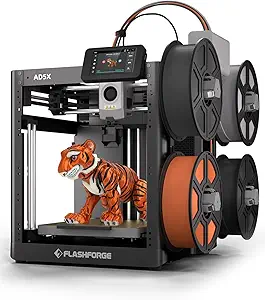 |
Bambu Lab P1S Combo

| Build Volume | 256×256×256 mm³ |
|---|---|
| Max Speed | 500 mm/s |
| Max Acceleration | 20 m/s² |
| Supported Filaments | PLA, PETG, TPU, PVA, PET, ABS, ASA |
| Design | Enclosed |
The Bambu Lab P1S Combo is a CoreXY 3D printer packaged with the AMS multi-spool feeder to enable multicolor and multi-material prints at fast speeds. It is built as an enclosed machine with automatic bed leveling and a direct-drive extruder, which expands reliable compatibility with flexible and engineering filaments and helps keep prints consistent. The combo targets productivity: the P1S advertises very high travel speeds and acceleration for shorter print times, a 256×256×256 mm build volume for mid-size parts, and support for popular materials such as PLA, PETG, TPU and ABS. Setup is described as quick and the included camera facilitates time-lapse monitoring. Important limits to note are that highly reinforced filaments like carbon- or glass-fiber composites are not recommended, and advanced speed tuning and material handling still require some user experience to get repeatable results. For small businesses that need fast, factory-style single-machine multicolor capability, the P1S Combo delivers a strong mix of speed, material flexibility, and automation.
Best for: Small businesses and makers who prioritize fast throughput and multicolor or multi-material capability in a single, relatively turnkey printer for production or rapid prototyping.
Less Ideal for: Operations that need to print heavily reinforced composite filaments or those looking for a purely plug-and-play solution with zero tuning or material expertise.
- High peak speeds and acceleration for faster print turnaround
- Enclosed build and auto bed leveling for more consistent prints with advanced filaments
- Direct-drive extruder improves handling of flexible materials
- AMS feeder enables up to 16-color/multi-material printing workflows
- Reasonable build volume for small production runs
- Not recommended for carbon- or glass-fiber reinforced filaments
- High-speed settings may require tuning to maintain print quality
Verdict: The P1S Combo is a speed-focused, factory-style printer with AMS multicolor capability that makes it a strong choice for small businesses needing faster, multicolor production and prototyping.
QIDI Max4 Combo 3D Printer

| Build volume | 390×390×340 mm |
|---|---|
| Max hotend temperature | 370°C |
| Chamber temperature | ≤65°C |
| Max tool head speed | ≤800 mm/s |
| Supported materials | PLA, PETG, ABS, ASA, TPU, PA, PC, PPS-CF, carbon fiber composites |
The QIDI Max4 Combo is a production-focused desktop 3D printer that combines a 390×390×340 mm build volume with a 370°C hotend and an actively heated chamber up to 65°C to handle engineering-grade materials. It is typically used for large prototypes, tooling, and functional parts in small-batch manufacturing where material strength and dimensional stability matter. Notable features include a full-surface silicone heated bed for even adhesion, closed-loop motors and linear motion for higher precision, dual Z lead screws and anti-backlash hardware for improved layer consistency, and an AI camera that detects failures and pauses prints to save material. Connectivity options are broad with Wi‑Fi, 2.4/5 GHz, Ethernet, QIDI Cloud and USB drive support, and the system supports multi-color expansion via an external QIDI Box. Trade-offs are the printer s physical footprint and shipping weight that require a dedicated workspace, and some accessories such as the Polar Cooler must be purchased separately rather than included. For teams focused on printing durable, high-temp polymers, the Max4 offers a capable, production-ready platform.
Best for: Small businesses and engineers who need a reliable, high-temperature printer for producing large prototypes, tooling, or short production runs with engineering materials and a focus on throughput and part quality.
Less Ideal for: Hobbyists with limited space or buyers who only print small, simple PLA parts and want a compact, plug-and-play machine with minimal setup.
- Very large 390×390×340 mm build volume for single-piece large parts
- 370°C hotend and 65°C heated chamber for printing engineering materials like PC, Nylon, and CF composites
- Closed-loop motors, dual Z lead screws and linear motion systems that improve precision and stability
- AI camera and touchscreen for live monitoring and easier operation
- Multiple connectivity options including 2.4/5 GHz Wi‑Fi, Ethernet, cloud control and USB printing
- Optional accessories such as the Polar Cooler are sold separately
- Large footprint and shipping weight require a dedicated workspace
Verdict: If you need a large-format, high-temperature workhorse that reliably prints engineering-grade materials for small-business production, the QIDI Max4 Combo is built for that role.
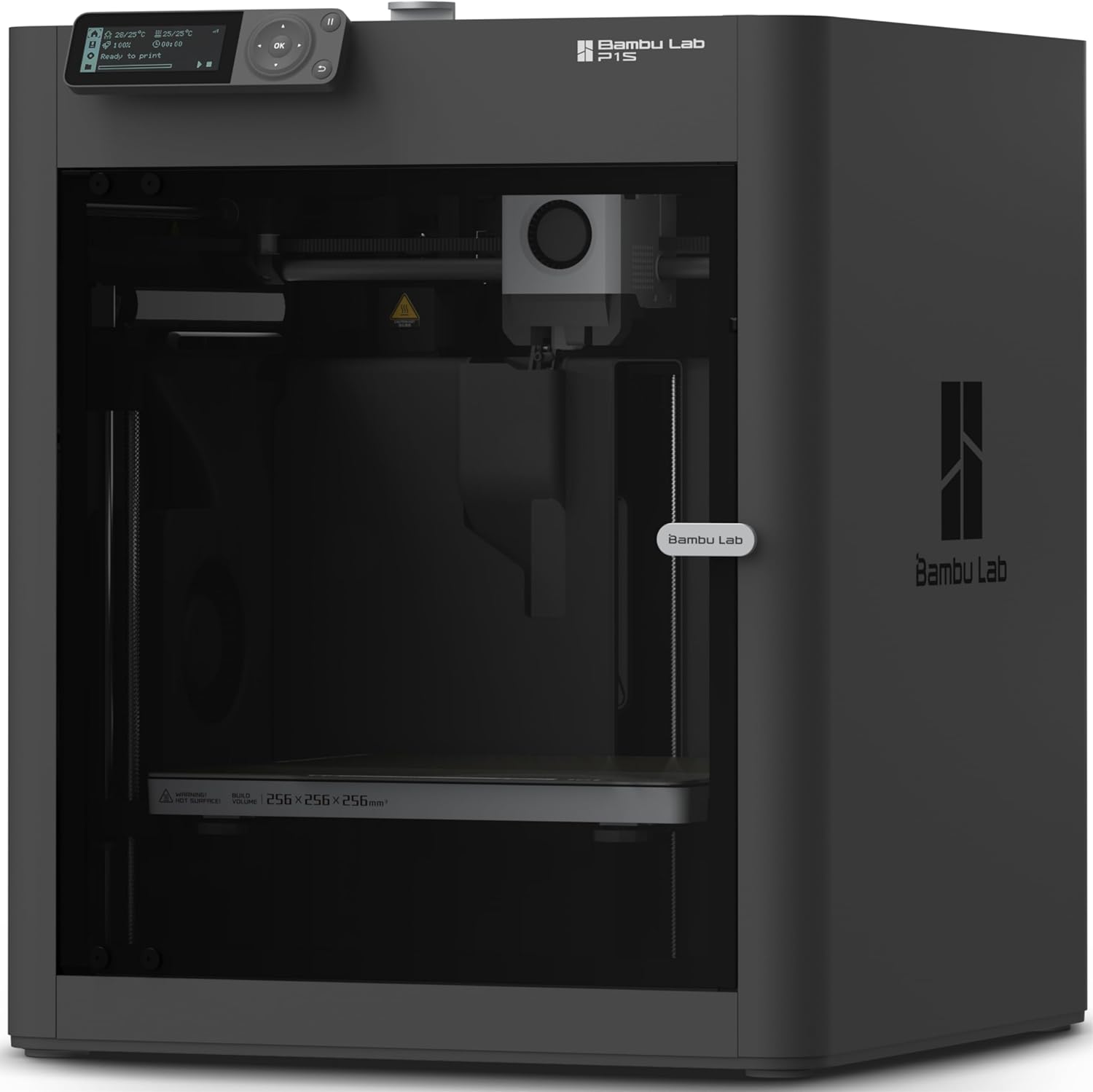
Bambu Lab P1S 3D Printer
| Build Volume | 256×256×256 mm³ |
|---|---|
| Max Speed | 500 mm/s |
| Max Acceleration | 20 m/s² |
| Supported Filaments | PLA, PETG, TPU, PVA, PET, ABS, ASA |
The Bambu Lab P1S is an out-of-the-box CoreXY FDM printer aimed at speed and reliability for small-scale production or prototyping. It ships enclosed, supports a wide range of filaments (PLA, PETG, TPU, PVA, ABS, ASA and more), and includes features that simplify everyday use such as automatic bed leveling and a direct-drive extruder for better flexible filament handling. With top speeds listed up to 500 mm/s and aggressive acceleration, the P1S noticeably shortens print times on medium-size parts while maintaining fine detail when tuned. It also integrates a camera for time-lapse captures and is compatible with Bambu Lab AMS for multi-color or multi-material work. Practical limitations include a build volume constrained to 256×256×256 mm and certain high-performance materials like carbon- or glass-fiber reinforced filaments are not recommended, so very large parts or specialized composite prints will need a different machine. For a small business needing fast turnarounds, consistent prints, and easy setup, the P1S balances speed and usability well.
Best for: Small businesses and makers who prioritize fast, reliable prototyping and short production runs and want a machine that minimizes setup and maintenance time.
Less Ideal for: Operations that need very large build volumes or frequent printing with fiber-reinforced composite filaments should consider a different platform tailored to those materials and sizes.
- High top speed and acceleration for faster part turnaround
- Enclosed CoreXY design improves temperature stability for advanced filaments
- Automatic bed leveling and user-friendly setup reduce downtime
- Direct-drive extruder broadens usable filament types including TPU
- Compatible with AMS for multi-color/multi-material printing
- Build volume limited to 256×256×256 mm for larger production parts
- Not recommended for carbon or glass fiber reinforced filaments
Verdict: Choose the P1S if you need a compact, fast, and easy-to-use printer that delivers quick, consistent prints for small business prototyping and short-run production.
CAIDAQC Portable 3D Printer

| Build volume | 100 x 100 x 100 mm |
|---|---|
| Nozzle size | 0.4 mm |
| Filament diameter | 1.75 mm |
| Included media | 8 GB TF card + reader |
This small FDM 3D printer is aimed at beginners and budget-conscious small-business users who need a portable, no-frills machine for quick prototypes and classroom-style projects. It ships as a modular kit that assembles in about 10–15 minutes with step-by-step video guidance, and includes a 12V Type-C power adapter, 10 m of PLA filament, an 8 GB TF card with Easyware and Cura setup files, and basic tools. The 0.4 mm nozzle and advertised layer resolution of 0.05–0.3 mm can produce decent detail for small parts within the 100×100×100 mm build area, and removable build plate plus TPU compatibility add flexibility for simple flexible parts. Practical limitations are the very small build volume and the lack of a heated bed, which constrains material choices and larger functional prototypes. Expect some bed-leveling fiddling on first prints and limited throughput for production use, but for quick concept models, educational demos, and low-volume prototyping it is a compact, inexpensive option with guided setup resources.
Best for: Small-business makers and educators looking for an affordable, portable printer to produce small prototypes, demos, and classroom projects with minimal initial expense and guided setup.
Less Ideal for: Businesses that need larger build volumes, high throughput, or production-grade materials should consider more capable desktop printers with heated beds and bigger platforms.
- Includes essentials out of the box: power adapter, 10 m PLA filament, TF card with software, and tools.
- Beginner-friendly setup with step-by-step video tutorials and modular assembly.
- Supports both PLA and flexible TPU (1.75 mm) for a wider range of simple parts.
- Removable build plate simplifies part removal for small prints.
- Very small 100×100×100 mm build volume limits part size and batch printing.
- No heated bed, which restricts use of some engineering filaments and can affect adhesion.
Verdict: A compact, low-cost starter FDM printer that lets small businesses and classrooms produce small prototypes quickly with guided setup and included essentials.
Creality Ender 3 V3 SE

| Printing speed | Up to 250 mm/s |
|---|---|
| Acceleration | 2500 mm/s² |
| Build plate | PC spring steel flexible plate |
| Mainboard | 32-bit silent mainboard |
The Ender 3 V3 SE is a small desktop FDM printer designed to get shops printing quickly while reducing common setup headaches. It uses CR Touch and a strain sensor for automated bed leveling and Z-offset so first-layer tuning is simpler, and an auto filament load/unload routine removes a repetitive manual step. The Sprite direct extruder handles PLA, PETG, and flexible filaments more reliably than typical Bowden setups, and a dual Z-axis with reinforced Y-axis shafts improves Z stability for taller parts. A 32-bit silent mainboard and advanced stepper drivers lower noise and give smoother motion at higher speeds, and the spring steel build plate makes model removal straightforward. The unit is relatively compact and assembled in minutes, which helps small teams minimize downtime. Limitations to consider are the modest build volume for larger production pieces and that higher-speed printing may still require tuning to maintain the best surface finish on detailed parts.
Best for: Small businesses that need a reliable, easy-to-operate desktop printer for prototyping and short-run parts while minimizing setup time and maintenance overhead.
Less Ideal for: Companies that require large-format production printing or fully hands-off, industrial-scale throughput should consider larger industrial printers instead.
- Auto bed leveling and strain-sensor Z-offset simplify first-layer calibration
- Sprite direct extruder supports a wide range of filaments including TPU
- Dual Z-axis and robust Y-axis shafts increase mechanical stability and reduce Z wobble
- 32-bit silent mainboard with advanced drivers reduces noise and improves motion control
- One-tap filament load/unload and flexible spring steel build plate speed routine tasks
- Build volume is limited compared with larger production printers
- Maintaining high-quality results at the top end of claimed speeds can require additional tuning
Verdict: A compact, reliability-minded desktop 3D printer that streamlines setup and filament handling for small businesses focused on prototyping and short production runs.
Snapmaker U1 3D Printer

| Build volume | 270 × 270 × 270 mm |
|---|---|
| Max print speed | 500 mm/s |
| Toolheads | 4 independent toolheads with SnapSwap |
| Supported materials | PLA, PVA, TPU, PETG, PCTG, ABS, ASA, PA, PC |
The Snapmaker U1 is a toolchanger CoreXY printer designed for multi-color and mixed-material production without long purge cycles. It ships with four independent toolheads that stay preloaded and preheated, and the SnapSwap mechanism swaps heads in about five seconds, which cuts downtime and reduces filament waste compared with filament-changing systems. The machine uses automatic toolhead offset calibration, vibration compensation, and tuned extrusion to simplify setup and maintain dimensional accuracy across the 270 × 270 × 270 mm build area. A rigid carbon-fiber X-axis and CoreXY motion let it print at high speeds—Snapmaker cites up to 500 mm/s—making it a fit for faster prototyping and small-batch runs. The U1 supports a wide range of filaments including PLA, PETG, TPU and soluble supports, and integrates a touchscreen, remote app control, and Snapmaker Orca slicer for a smoother workflow. Important trade-offs are its 59 lb weight and the added complexity of maintaining multiple hot ends and toolheads compared with single-extruder machines, which can raise servicing and consumable costs in busy shops.
Best for: Small businesses and professional makers who need faster multi-color or mixed-material prototyping and want to reduce material waste while keeping setup and monitoring straightforward.
Less Ideal for: Hobbyists or occasional users who prefer a lightweight, low-maintenance single-extruder printer or who have very limited bench space.
- Four independent toolheads with 5-second SnapSwap changes to enable near-instant multi-color or multi-material prints
- Significantly reduced filament purge and waste versus filament-change systems
- Smart calibration features (toolhead offset, vibration compensation, flow tuning) that reduce manual tuning
- CoreXY with carbon fiber X-axis rails for high-speed, stable printing up to 500 mm/s
- Supports many filament types including TPU and soluble supports for mixed-material functional parts
- Heavier, workshop-style unit that is less portable than desktop printers
- Maintaining multiple toolheads and hot ends adds complexity and potential maintenance cost
Verdict: For small businesses that need fast, low-waste multi-color and mixed-material printing, the U1 delivers production-oriented toolchanging and calibration in a single package.
FLASHFORGE AD5X 3D Printer

| Build volume | 220×220×220 mm |
|---|---|
| Max nozzle temp | 300°C |
| Print speed | 600 mm/s travel |
| Structure | Open Core XY |
| Supported filaments | PLA, ABS, PETG, TPU, CF etc. |
The FLASHFORGE AD5X is a CoreXY desktop printer aimed at speeding up prototyping and small-batch production. It supports up to four-color printing and uses a 300°C direct-drive extruder with quick-detach nozzles in sizes from 0.25 mm to 0.8 mm, so you can swap between fine-detail and fast-fill options. The machine emphasizes ease of use with one-click auto bed leveling, automatic filament feeding/retraction, resume-after-power-loss, and a mobile app for remote monitoring. Its high travel speed (600 mm/s) and strong acceleration make short runs and iterative prints much faster than typical hobby machines, and features like dual-channel cooling and vibration compensation help maintain quality at speed. Important limitations are the open structure rather than a fully enclosed chamber, which can affect temperature-sensitive filaments, and the usual maintenance needs that come with higher-speed systems. For business users prioritizing throughput and color/feature flexibility, the AD5X offers a practical balance of speed, print quality, and user-friendly controls.
Best for: Small-business buyers who need faster prototyping and short production runs and prefer a printer that balances speed with straightforward, mostly automated operation.
Less Ideal for: Operations that require consistently printing high-temperature specialty materials in a fully controlled enclosed chamber or teams that want a no-maintenance appliance-style printer.
- Multi-color printing up to 4 colors for richer prototypes
- High travel speed and acceleration for faster print turnaround
- 300°C direct-drive extruder with quick-detach nozzles for material versatility and fast swaps
- One-click auto bed leveling and automatic filament feed simplify setup and reduce failed prints
- Resume-print and mobile app monitoring add reliability and remote oversight
- Open CoreXY structure is less suitable for heat-sensitive materials that benefit from an enclosure
- Higher-speed operation increases maintenance and tuning compared with low-speed hobby printers
Verdict: Pick the AD5X if you need a fast, multi-color CoreXY printer that speeds up prototyping and small-batch production without a steep learning curve.
Choosing the Right 3D Printer for Small Businesses: Key Factors to Consider
Build Volume and Production Capacity
Build volume determines how large a single part can be printed and how many parts you can nest per job. For small businesses doing short batches, a larger build envelope lets you produce several components in one run, reducing per-part setup time and improving throughput.
Consider realistic job sizes rather than peak dimensions. A printer with a very tall or deep chamber might not offer efficient nesting if the usable XY area is small. Also think about how future growth could change demand; slightly larger capacity can extend the useful life of the machine for evolving projects.
Print Accuracy and Repeatability
Accuracy affects whether printed parts fit together or require rework. Repeatability is about achieving the same dimensions across multiple prints or repeated runs. Small businesses rely on both for prototype verification and short-run production where post-processing time is a cost center.
Check manufacturer specs for layer height, XY resolution, and documented repeatability. Also factor in how calibration routines are handled and whether the printer includes assisted bed leveling or automatic calibration that reduces operator variability.
Material Support and Mechanical Properties
Different applications need different materials: strong engineering plastics, flexible elastomers, and heat-resistant resins each have tradeoffs. Material support determines the range of functional prototypes you can produce in-house without outsourcing.
Evaluate whether the printer accepts third-party filaments or is locked to a proprietary supply. Consider maximum nozzle and chamber temperatures, recommended build surfaces, and compatibility with composites or dissolvable supports if you plan to print assemblies or complex geometries.
Uptime, Maintenance, and Consumables
Operational cost is not just filament. Uptime depends on components like extruders, motion systems, and hot ends. Machines that require frequent adjustments or have hard-to-find consumables increase indirect labor costs and slow projects.
Look for designs with modular wear parts, easy-to-replace nozzles, and accessible service panels. Ask about typical maintenance intervals and what routine tasks your team will perform. Reliable vendor documentation and availability of spare parts can drastically reduce downtime.
Software Ecosystem and Job Management
Software affects how smoothly prints are prepared and tracked. Slicing features, remote monitoring, queue management, and integration with CAD-to-print workflows all matter for shop efficiency. For small businesses, time saved in workflow often outweighs marginal hardware differences.
Prioritize software that supports networked printing, has a well-documented slicing profile library, and offers remote notification or camera monitoring. Consider compatibility with existing file formats and whether the vendor provides APIs or job-queue tools for automation.
Safety, Ventilation, and Workspace Requirements
Some materials emit fumes or require elevated chamber temperatures and enclosed build spaces. For operation in a small commercial space, safety features such as enclosed chambers, HEPA filtration, and thermal cutoff protections are important to protect staff and meet local regulations.
Plan for electrical requirements, ventilation needs, and physical placement. A unit that seems compact on paper may still need clearance for filament spools, maintenance access, and post-processing. Assess whether the machine can be run in your shop environment without special HVAC or facility upgrades.
When to Choose a Higher Throughput Model
If your small business is producing multiple prototypes per week or running short production batches, throughput becomes a primary selection factor. Higher throughput is achieved through larger build volumes, faster layer times, and features that reduce idle operator time such as quick-change nozzles or automatic bed leveling.
Focus on workflow features that enable batching and unattended runs. Networked job queues, reliable filament runout detection, and remote monitoring let you keep a printer productive outside normal working hours.
- Look for spool management and filament sensors to avoid failed prints
- Prioritize machines with proven long-duration stability for overnight runs
- Consider modular hot ends to switch materials with minimal downtime
Balancing Material Flexibility With Process Control
Material flexibility increases the range of parts you can produce but can introduce complexity. Engineering filaments often need higher temperatures, hardened nozzles, and sometimes an enclosed heated chamber to achieve intended mechanical properties.
If you need a mix of rigid and flexible parts, choose a platform known for stable extrusion and wide material profiles. Also plan for proper storage of hygroscopic filaments and post-processing steps that preserve material properties.
- Verify nozzle and bed temperature limits against desired filaments
- Plan for filament drying and closed storage for moisture-sensitive materials
Shop Integration and Workflow Tips
Integrating a 3D printer into a small business shop means more than plugging it in. Establish standard file naming, version control, and print settings documentation so team members can reproduce results. Create maintenance checklists and a spare-parts inventory for common wear items.
Train at least two staff members on routine calibration and troubleshooting so a single absence does not halt projects. Capture successful slicing profiles and inspect first-article prints to set baseline quality standards for future runs.
- Keep a shared folder for validated print profiles and post-processing notes
- Schedule periodic calibration checks and log results to detect drift
Noise, Footprint, and Workspace Placement
Noise and physical footprint are practical concerns in small workspaces. Some printers have louder motion systems or require extra clearance for filament spools and part removal. Consider isolation or placement away from workstations where noise might disrupt concentration.
Measure vertical clearance for door opening and part removal and allow room for ventilation and access panels. If the unit will be near customer areas, noise and enclosure aesthetics may matter.
- Account for extra space for filament storage and post-processing
- Test noise levels during representative print jobs if possible
Scaling From Prototyping to Short-Run Production
Many small businesses start with prototyping and later use the same equipment for short-run production. When planning for scaling, choose a machine that can maintain consistency over many cycles rather than a hobby device optimized for occasional use.
Consider service plans, spare-parts lead times, and whether the vendor ecosystem supports a production cadence. Standardize on printing processes and quality checks to make scaling predictable.
- Document process controls and acceptance criteria for production parts
- Evaluate spare parts availability for the expected production volume
How We Chose the Best 3D Printer for Small Businesses
We prioritized criteria that matter to small businesses running regular prototyping or short production runs. First, print quality and dimensional accuracy were a primary filter because exact fits and repeatable tolerances are common needs in product development and low-volume manufacturing. Second, reliability and uptime were weighted heavily to minimize interruptions to workflows and reduce operator hours spent troubleshooting. Third, material compatibility and ecosystem support were considered so printers can accept engineering filaments and integrate with common post-processing paths. Fourth, ease of maintenance and parts accessibility were evaluated to keep routine service time predictable and inexpensive. Fifth, software and workflow features such as slicing options, network printing, and remote monitoring were assessed for shops that need efficient job management. We excluded hobby-only units with very small build volumes, consumer-focused firmware that lacks commercial controls, and machines with poor documented support for business use. Our shortlist reflects units that balance print capability with serviceability and predictable operating costs. The scoring focused on measurable attributes buyers can verify: resolution and repeatability specs, mean time between failures or documented uptime, spare-parts availability, supported materials, and software/workflow features.
Our full evaluation process is outlined in our review methodology.
FAQ
How do I estimate the running cost per part?
Calculate running cost by summing material usage, electricity for the print cycle and any heated chamber, and amortized consumables such as nozzles and build surfaces. Include labor time for setup and post-processing to get a realistic per-part number.
What maintenance should my team be prepared to perform?
Routine tasks typically include bed leveling or calibration checks, nozzle cleaning or replacements, lubrication of motion components, and firmware updates. Frequency depends on usage but documenting intervals prevents performance drift.
Can I use engineering filaments for functional prototypes?
Often yes, provided the printer supports the required nozzle and bed temperatures and possibly an enclosed heated chamber. Confirm the printer's material specs and be prepared to manage filament drying for hygroscopic materials.
How important is customer support and spare parts availability?
Very important. Fast access to spare parts and clear documentation reduces downtime and keeps production predictable. Prioritize machines with accessible spare components and responsive technical resources.
Should I prioritize ease of use or advanced features?
It depends on staff skill level and production needs. For teams with limited 3D printing experience, ease of use and reliable defaults reduce failure rates. For advanced applications, features like multi-material support and fine-tuned controls may be worth the learning curve.
Final Verdict
Choosing a 3D printer for a small business is about matching capacity to expected throughput while minimizing unplanned downtime. Prioritize print accuracy and repeatability when fit and tolerances matter, and emphasize reliability and parts availability when you need consistent output. Balance material flexibility against the operational complexity your team can support. With clear process controls, spare-parts planning, and validated software workflows, you can confidently select a machine that supports prototyping and short-run production over the long term.