
Note: This article contains affiliate links. If you click on these links and make a purchase, we may earn a small commission at no extra cost to you. This helps support our research and content. Read our full affiliate disclosure here.
Choosing the right Bluetooth smart lock affects daily convenience and home security. The best options make entering and managing access seamless while minimizing battery swaps and connectivity hassles. This guide shortlists seven top Bluetooth smart locks that balance reliability, ease of setup, and practical battery life. We focus on features that matter for real-world use, like locking speed, phone pairing reliability, and backup access methods. Read on for concise evaluations and the criteria we used to pick these top choices.
Top Picks at a Glance
| Best Overall The best all-around choice for most situations | Yale Assure Lock 2 YRD420-BLE |  |
| Best Quality Built to a higher standard if you want something more solid | ULTRALOQ Bolt SE Smart Deadbolt |  |
| Best Value The sweet spot between price and what you get | Ulecoce U68 Fingerprint Deadbolt |  |
| Best Budget The cheapest option that still gets the job done reliably | MOUSETRO Smart Deadbolt ZN-S01 |  |
| Top Rated A top-rated pick with lots of positive feedback | samtechT Smart Lock S |  |
| Most Popular A crowd favorite that many people choose with confidence | Kwikset Aura 942BLE Bluetooth Deadbolt |  |
| Best Seller A high-volume bestseller chosen again and again | Wyze Lock Bolt v2 |  |
Yale Assure Lock 2 YRD420-BLE

| Included components | Deadbolt, DoorSense, Strike plate, mounting plates, 4 AA Batteries, 1 key |
|---|---|
| Additional Features | Auto-Lock, Back-Lit Keypad, Passcode Unlock, Touchscreen, Weather Resistant |
| Lock Type | Touchscreen |
| Control Method | App |
| Controller Type | Android, Apple HomeKit, iOS |
The Yale Assure Lock 2 is a keypad touchscreen deadbolt that replaces a standard mechanical deadbolt for everyday front door use. It supports passcode entry, Auto-Unlock via Bluetooth, and control through the Yale Access app on smartphones and Apple Watch, with DoorSense to auto-lock when the door closes. The matte backlit keypad resists fingerprints and glare, and the unit is ANSI/BHMA Grade 2 certified and IPx5 rated for weather resistance, so it is built for exterior use. Installation is designed for DIY with the supplied strike plate, mounting hardware, and four AA batteries, and the lock can be expanded later with Yale smart modules for Wi‑Fi, Matter, or Z-Wave if you want remote access or different smart home protocols. Expect local Bluetooth control by default and no built-in Wi‑Fi unless you add the module, and some advanced features require the companion app. For buyers who want a reliable, upgradeable Bluetooth smart deadbolt with a clean touchscreen interface, this model is a solid, practical choice.
Best for: Buyers who want a dependable, easy-to-install Bluetooth smart deadbolt that prioritizes secure local access today with the option to add remote capabilities later.
Less Ideal for: People who need out-of-the-box remote or cloud access without buying extra modules or those who prefer a lock with built-in Wi‑Fi or full smart-home integration from day one.
- Multiple access methods: touchscreen keypad, Bluetooth via app, Auto-Unlock, and physical key
- ANSI/BHMA Grade 2 certification and IPx5 rating for reliable security and weather resistance
- DIY-friendly installation with included hardware and batteries
- Upgradeable with optional Wi‑Fi, Matter, or Z-Wave modules so you can add remote access later
- No built-in Wi‑Fi or remote access without purchasing an additional module
- Some advanced features and remote activity tracking require the companion app and optional module
Verdict: A secure, upgradeable Bluetooth touchscreen deadbolt that delivers reliable local keyless entry now and simple remote expansion later.
ULTRALOQ Bolt SE Smart Deadbolt

| Connectivity Protocol | Bluetooth, Matter, Wi-Fi |
|---|---|
| Lock Type | Biometric, Deadbolt, Keypad |
| Additional Features | AI-driven Fingerprint Scanner, Auto Lock, App Remote Control |
| Included Components | 2 Emergency Keys, Installation Kit, User Guide |
| Waterproof Rating | IP65 |
The ULTRALOQ Bolt SE is a performance-focused smart deadbolt that combines a fast AI-driven fingerprint reader with built-in Wi‑Fi and Matter-over-Thread support for remote access and smart home integration. It stores up to 50 fingerprints and 50 passcodes, supports app control and web portal management, and can share temporary or scheduled eKeys for guests. The fingerprint sensor claims unlocks in about 0.3 seconds and the keypad is designed to be glove-friendly and fingerprint-resistant, which helps reliability in everyday use. Thread-powered connectivity extends battery life up to 18 months from four AA batteries while preserving responsiveness, and the lock is rated IP65 for exterior weather resistance. Setup is pitched as a DIY install in roughly 10 minutes and the package includes two mechanical backup keys. Important limitations to note are the Matter-over-Thread features require a compatible Thread border router and the lock only supports 2.4 GHz Wi‑Fi, so placement relative to your router matters for stable remote access.
Best for: Buyers who prioritize fast biometric access and broad smart‑home integration and want a durable, responsive deadbolt that can be managed remotely and shares temporary access easily.
Less Ideal for: People without a compatible Matter/Thread hub or those who cannot position a 2.4 GHz router within recommended range for reliable connectivity should consider simpler or differently connected locks.
- Very fast AI-driven fingerprint reader with up to 50 fingerprints stored
- Built-in Wi‑Fi plus Matter-over-Thread support for wide smart-home integration
- Long battery life up to 18 months using four AA batteries with Thread efficiency
- IP65 weather resistance and ANSI/BHMA certification for exterior durability
- Remote app and web portal control with shareable eKeys and activity history
- Matter-over-Thread features need a compatible Thread border router to work remotely
- Only supports 2.4 GHz Wi‑Fi which may require closer router placement
Verdict: Choose the Bolt SE if you want a high-performance fingerprint deadbolt with fast unlock, robust smart‑home compatibility, and long battery life.
Ulecoce U68 Fingerprint Deadbolt
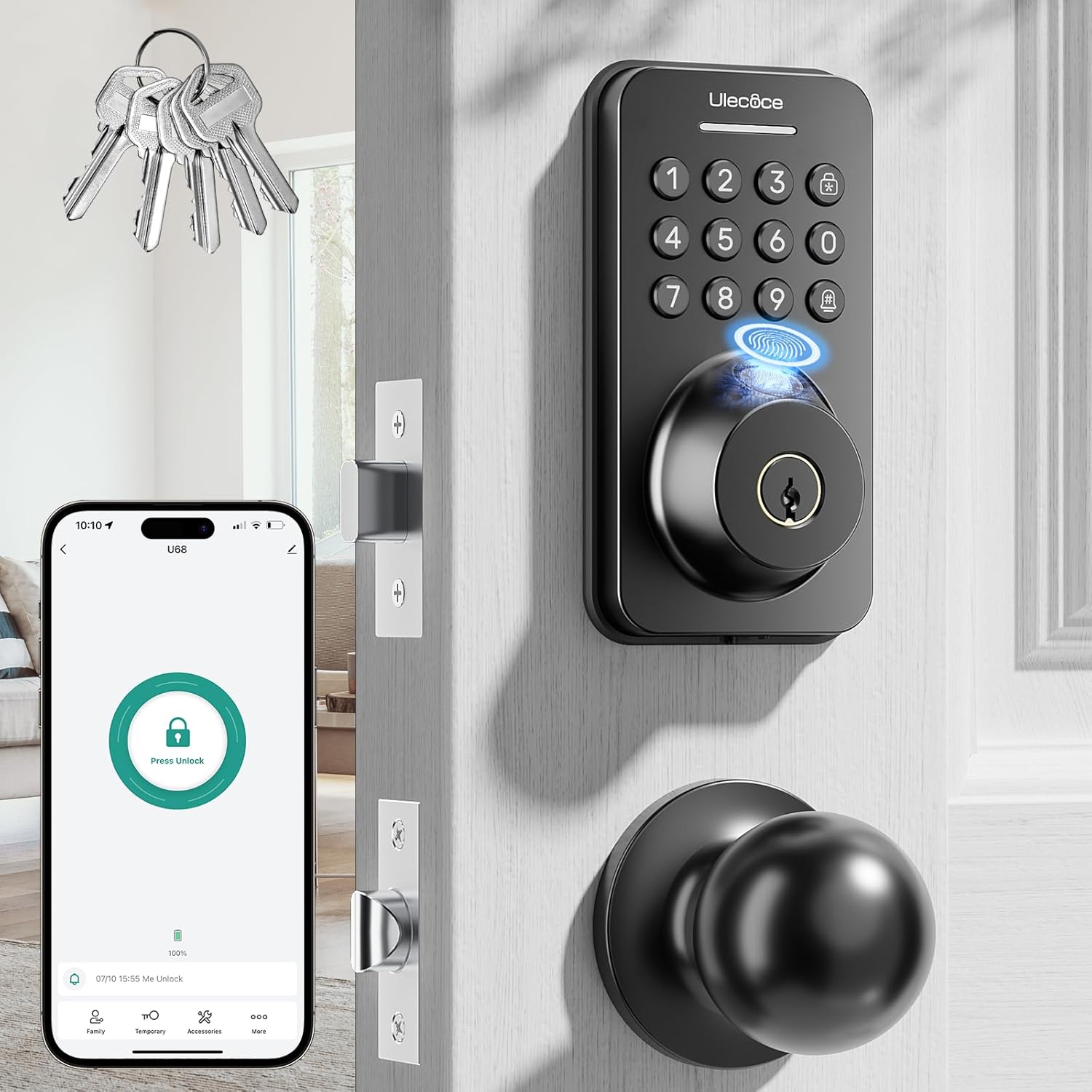
| Unlocking Methods | Fingerprint / App / Code / Key |
|---|---|
| Access Capacity | Up to 512 fingerprints/passcodes |
| Waterproof Level | IP54 |
| Door Thickness Range | 1-3/8''–2'' (35–50mm) |
| Operating Temperature | -4°F to 140°F (-20°C to 60°C) |
The Ulecoce U68 combines fingerprint biometrics, a backlit keypad, Bluetooth app control, and physical keys into a single deadbolt and knob set intended for everyday front or interior door use. In practice it gives fast access with fingerprint recognition (advertised as 0.3s) and supports many user credentials so families and frequent guests can have their own codes or fingerprints. The companion app lets you create temporary or scheduled PINs, view access logs, and unlock within Bluetooth range, and optional integration with a gateway adds remote voice control and alerts. Hardware-wise it is zinc construction with IP54 weather resistance, anti-drill features, and a rechargeable battery system for typical home durability. Installation fits standard US doors and can be completed with a screwdriver. Limits to expect are that fully remote smart-home features require the separate gateway, and Bluetooth range and app responsiveness can vary compared with built-in Wi‑Fi locks. For buyers who want a versatile, practical upgrade from a mechanical deadbolt, the U68 delivers many access options and solid basic smart features at a mainstream value.
Best for: A practical homeowner who wants to replace a mechanical deadbolt with a versatile smart lock that prioritizes convenience, multiple access methods, and straightforward app-based user management.
Less Ideal for: Users who need native built-in Wi‑Fi remote access or seamless smart-home integration without buying an additional gateway should consider other models with built-in Wi‑Fi.
- Multiple unlocking methods including fingerprint, keypad, app, and physical keys for redundancy.
- Stores large number of credentials and supports temporary, scheduled, and one-time PINs for guest access control.
- Backlit keypad and one-touch lock plus customizable auto-lock timing improve day-to-day convenience.
- IP54 rating and anti-drill features increase durability for exterior use in typical weather conditions.
- Rechargeable battery and clear app-based status/logs help manage battery and user permissions without guesswork.
- Full remote control and voice assistant features require purchasing the separate Wi‑Fi gateway.
- Bluetooth/app unlocking range is limited compared with built-in Wi‑Fi models, which may affect remote convenience.
Verdict: A practical, feature-rich Bluetooth fingerprint deadbolt that replaces a mechanical lock with versatile access options and easy app-managed guest control.
MOUSETRO Smart Deadbolt ZN-S01

| Control Method | App, Touch |
|---|---|
| Connectivity Protocol | Bluetooth |
| Lock Type | Combination Lock, Deadbolt, Keypad |
| Included Components | Batteries, Fobs & Keys, Hole Drawing & Manual, Lock Body & Accessories, Smart Door Lock Panels |
The MOUSETRO ZN-S01 is a budget-friendly smart deadbolt that gives you four ways to unlock: passcode, Bluetooth app control, IC key fob, and a physical key. It is designed for everyday front-door use and supports up to 250 access codes, including one-time and permanent codes for guests or short-term rentals. The touchscreen keypad includes anti-peeping input and anti-hacking protections, and convenience features include auto-lock, one-touch locking, privacy and passage modes, and low-battery alerts. Installation is straightforward with only a screwdriver for most standard doors, and the lock runs on four AA batteries with an advertised 8,000 openings per set. The lock uses Bluetooth for local control and can be made remotely controllable only by adding MOUSETRO's WiFi gateway sold separately. Practical limits are typical for budget smart locks: remote access requires extra hardware, and Bluetooth range limits direct app control to nearby. Expect basic materials and finish rather than premium hardware, but the unit covers core smart-lock needs without a high price tag.
Best for: Buyers who want a full-featured Bluetooth smart deadbolt on a tight budget and need flexible guest access for rentals or family use without paying for built-in WiFi.
Less Ideal for: Users who require native remote/cloud control, advanced enterprise integrations, or the highest-grade commercial lock hardware should look at higher-tier models.
- Multiple access methods: keypad, Bluetooth app, IC fob, and mechanical key.
- Supports up to 250 unique access codes with one-time and permanent code options.
- Anti-peeping touchscreen and basic anti-hacking protections for added security.
- Easy DIY installation that fits common door thicknesses using only a screwdriver.
- Requires a separately sold WiFi gateway for true remote control and cloud features.
- Materials and finish are functional rather than premium for high-end security hardware.
Verdict: A cost-conscious Bluetooth smart deadbolt that delivers comprehensive access options and core security features for renters and homeowners who do not need built-in WiFi.
samtechT Smart Lock S

| Lock Type | Biometric, Keypad |
|---|---|
| Connectivity Protocol | Bluetooth, Wi-Fi |
| Controller Type | App, Keypad, Fingerprint, FOB, Code, Voice Control |
| Additional Features | Auto-Lock, One-Touch Lock, Touchscreen, Weather Resistant |
The samtechT Smart Lock S is a keyless deadbolt that offers fingerprint, keypad, FOB, app, code and mechanical key entry for everyday front-door use. It installs on standard US doors with a screwdriver and provides convenience features geared to homes and rentals, including custom timed or one-time codes, up to 150 passcodes, and up to 100 fingerprints stored for quick 0.3 second fingerprint unlocks. The lock includes auto-lock with adjustable delay, anti-peeping keypad input, a privacy mode that disables outside access, and an audible anti-theft alarm for forced-entry attempts. App connectivity delivers unlock history and push alerts, and voice assistant control is available when paired with a gateway. Practical limits to note are reliance on Bluetooth/Wi-Fi for remote features which may need a separate gateway for full voice integration and the usual battery maintenance of electronic locks. For buyers who want a multi-method, rental-friendly smart deadbolt, this model balances security features and straightforward DIY setup.
Best for: Buyers prioritizing a reliable, feature-rich smart deadbolt for homes or rental properties who want strong local authentication options and easy code management.
Less Ideal for: Users who need out-of-the-box cloud voice control without adding a gateway or those unwilling to maintain batteries for an electronic lock.
- Multiple unlock methods including fingerprint, keypad, FOB, app and physical key.
- Stores large numbers of user credentials and fingerprints for family and rental guests.
- Auto-lock, privacy mode and anti-theft alarm enhance day-to-day security.
- App and web portal provide remote management, access history and notifications.
- Full voice control requires pairing with a separate gateway.
- Remote or cloud features depend on Bluetooth/Wi-Fi connectivity and battery power.
Verdict: A dependable, rental-ready smart deadbolt that combines fast fingerprint access and extensive code management for secure, convenient keyless entry.
Kwikset Aura 942BLE Bluetooth Deadbolt

| Controller Type | Android, iOS |
|---|---|
| Control Method | App |
| Connectivity Protocol | Bluetooth |
| Lock Type | Keypad |
The Kwikset Aura 942BLE is a keypad deadbolt that pairs local Bluetooth control with Kwikset's app-based management for everyday keyless entry. You lock and unlock from the touchscreen keypad or from your phone when you are within Bluetooth range, and the app lets you add up to 250 unique user codes, set schedules or one-time codes, and view a simple activity history. The deadbolt offers an optional 30-second auto-lock and a one-touch lock button for quick secure closure, and installs with only a screwdriver—no hard wiring required. Its metal construction and Satin Nickel finish give it a modern look and durable feel, and the built-in SmartKey lets you rekey at the door. Limitations include Bluetooth-only connectivity, so remote access and integration with cloud-based smart home systems require additional bridges or hubs, and advanced notifications are limited to when your phone is nearby. For buyers wanting a reliable, locally controlled smart deadbolt with robust code management and easy installation, the Aura is a practical choice; if you need native remote access or hub-level automation, plan to add a compatible bridge.
Best for: Buyers who prioritize secure, local control and robust code management and want a proven keypad deadbolt that is simple to install and manage from a phone nearby.
Less Ideal for: Users who require native remote access, cloud-based alerts, or direct integration with hub-driven smart home systems should consider a lock with built-in Wi‑Fi or a hub bridge instead.
- Bluetooth app control for lock/unlock and user management within range
- Supports up to 250 unique user codes with scheduling and one-time codes
- Easy screwdriver installation with no hard-wiring required
- SmartKey rekeying lets you change keys at the door without replacing the lock
- No built-in Wi-Fi or cloud access for remote control without an external bridge
- Notifications and activity monitoring work only when your phone is within Bluetooth range
Verdict: Choose the Aura if you want a reliable Bluetooth keypad deadbolt with strong user-code control and easy, no-wires installation.
Wyze Lock Bolt v2

| Lock Type | Biometric, Deadbolt, Keypad |
|---|---|
| Connectivity Protocol | Wi-Fi |
| Additional Features | Auto-Lock |
| Style Name | Fingerprint Smart Lock Bolt v2 |
The Wyze Lock Bolt v2 is a biometric deadbolt designed to simplify front-door access with several entry options: a fast fingerprint scanner, keypad codes, Wi‑Fi app control and physical backup keys. The fingerprint reader uses AI learning to improve recognition speed and accuracy over time, and the tempered glass surface is scratch and smudge resistant. Built-in Wi‑Fi lets you lock and unlock remotely from the Wyze app and integrate with Wyze doorbell video for visual verification. It also offers auto-lock, tamper alarms, IP53 weather resistance and BHMA2 durability for everyday outdoor use. The lock runs on eight AA batteries with up to eight months of typical battery life and includes a USB‑C emergency power option if the batteries die. Setup and daily use are straightforward for non-technical users, though full remote control requires the Wyze app and a network connection, and advanced integrations depend on the Wyze ecosystem.
Best for: Buyers who prioritize secure, easy keyless entry with fast fingerprint unlocking and simple remote control through an app, and who prefer a mainstream, well-supported smart home vendor.
Less Ideal for: People who specifically want a Bluetooth-only lock or who avoid cloud/Wi‑Fi connected devices for privacy or offline-only operation should consider alternate models.
- Fast fingerprint unlocking with AI learning for improved recognition over time
- Multiple access methods: fingerprint, keypad codes, Wyze app control, and physical keys
- Built‑in Wi‑Fi for remote control and integration with Wyze doorbell video
- IP53 weather resistance and BHMA2-rated durability for exterior door use
- USB‑C emergency power and up to eight months of battery life with included AA batteries
- Requires Wyze app and Wi‑Fi for remote features and integrations
- Not Bluetooth-only — relies on Wi‑Fi which may be undesirable for users seeking offline Bluetooth solutions
Verdict: If you want a fast, reliable fingerprint smart deadbolt with remote Wi‑Fi control and multiple backup entry options, the Wyze Lock Bolt v2 is a practical, risk‑averse choice.
Choosing the Right Bluetooth Smart Lock: Key Factors to Consider
Bluetooth Connection Reliability
A stable Bluetooth link determines whether a smart lock performs reliably when you arrive or leave. Interference from nearby networks, phone case materials, and the lock's internal antenna design can all affect pairing and sustained connection.
Choose a lock with robust reconnection behavior and clear documentation about supported Bluetooth versions. Locks that offer automatic re-pairing, clear distance guidelines, and diagnostic indicators reduce the chance of failed unlock attempts during critical moments.
Battery Life and Power Management
Battery longevity affects how often you need to replace or recharge cells and is a major convenience factor. Look for explicit battery life estimates measured in real-world cycles rather than optimistic standby numbers.
Also consider how the lock alerts low battery, whether it supports common battery types, and whether it provides an emergency power option. Good power management lets you avoid surprise lockouts and reduces maintenance frequency.
Physical Installation and Door Compatibility
Not all smart locks fit every door or deadbolt configuration. Measure backset and door thickness and check whether the lock replaces only the interior thumbturn or requires a full cylinder swap. Simpler retrofit designs typically make installation faster and less likely to damage existing hardware.
Mounting stability and alignment affect long-term reliability. Choose designs with clear templates and adjustable fittings to ensure the bolt engages smoothly every time.
Locking Performance and Responsiveness
How quickly a lock responds to a Bluetooth command matters, especially when your hands are full or you are in a hurry. Responsiveness reflects internal motor torque, gearing, and the software handling repeated commands.
Evaluate typical cycle times and whether the lock provides audible or haptic feedback when it completes a cycle. Slower or weak mechanisms can leave the door partially latched, so prioritize solid, consistent actuation.
Access Redundancy and Emergency Options
Even the most reliable electronic system can fail, so multiple access methods are essential. Common redundancies include a physical key override, PIN or keypad backup, and an emergency power terminal for jump-starting depleted batteries.
Consider how easy it is to administer temporary access codes or to revoke permissions. Systems that keep local, offline methods reduce the risk of being locked out if a phone is lost or the Bluetooth radio is unavailable.
Security Features and Firmware Updates
A smart lock should protect both the physical bolt and the digital access channel. Look for clear statements about encryption, authentication, and how the manufacturer delivers firmware updates.
Locks that support secure pairing, periodic firmware patches, and local control options help maintain long-term security. Avoid devices without a documented update path or that rely solely on cloud services for critical security fixes.
Installation Tips and Door Prep
Prep your door before starting to cut installation time and avoid alignment issues. Confirm the deadbolt type and measure backset and door thickness. If your existing deadbolt is unusually deep or the strike plate is worn, address those issues before installing a new smart lock.
Use the included template or a simple cardboard guide to mark screw holes and keep the lock centered. Tighten mounting screws incrementally and test bolt travel by hand to ensure the motor does not bind on initial power-up.
- Check door edge for smooth bolt travel
- Replace worn strike plates for consistent latching
- Keep batteries handy during setup to avoid interruptions
Managing Bluetooth Pairing and Phones
Smart locks pair differently across phone models and operating systems. Start by installing the companion app, enable Bluetooth on your phone, and perform the pairing close to the lock to avoid connection drops. If pairing fails, reboot your phone and retry with the phone screen unlocked.
Many locks support multiple users and guest codes. Establish clear naming in the app for shared access and periodically audit granted permissions to maintain control over who can unlock the door.
- Keep Bluetooth and app permissions enabled
- Re-pair if the lock stops responding after phone OS updates
- Use named profiles to track shared users
Battery Best Practices
Use recommended battery types and keep spare cells accessible. Check for low-battery alerts in both the lock hardware and the app. Some locks allow you to view estimated remaining battery percentage, which helps plan replacements before critical events.
If a lock offers a low-power or vacation mode, use it to extend battery life during extended absences. For emergency situations, know how to supply external power to the lock to unlock it temporarily without changing batteries.
- Rotate batteries annually for high-use households
- Store fresh batteries near the entry for quick replacement
- Test emergency external power procedure once after installation
Administering Users and Temporary Access
Set up clear policies for who receives permanent access versus temporary codes. Temporary codes are useful for contractors or short-term guests and should have automatic expirations where possible. Keep an audit log if the lock provides one to review who entered and when.
For households with frequent visitors, consider code management features that allow batch creation and automatic expiry. This reduces the administrative burden and improves security hygiene.
- Use time-limited codes for service providers
- Remove unused users regularly
- Enable notifications for new access events
Troubleshooting Common Issues
If the lock fails to respond, verify battery level, Bluetooth state on your phone, and that the door is not binding physically. Rebooting the companion app and re-pairing are common fixes. If the motor struggles, check alignment and tighten mounting screws.
For intermittent connectivity, try moving other electronics away from the lock during pairing and ensure the phone is close to the hardware. If problems persist, consult the lock's diagnostic indicators or log in the app to isolate the cause.
- Confirm batteries and physical alignment first
- Re-pair after major phone OS updates
- Use logs to diagnose recurring access failures
How We Chose the Best Bluetooth Smart Lock
We prioritized attributes that directly affect daily security and convenience. First, connection reliability was key because intermittent Bluetooth links can make locks frustrating or insecure. Second, battery life and power management were evaluated since frequent battery changes undermine the benefit of a smart lock. Third, locking and unlocking responsiveness matters for users entering or leaving quickly. Fourth, installation and door compatibility were considered so readers can avoid complex retrofits. Fifth, access redundancy options such as physical keys, PIN codes, or local backups were weighed to reduce lockouts. We excluded devices that require proprietary hubs for basic Bluetooth functionality or that lacked clear battery specifications. Our shortlist favors products with straightforward setup, transparent power and connectivity behavior, and well-documented fallback access methods. These criteria align with the measurable metrics used throughout the guide.
Our full evaluation process is outlined in our review methodology.
FAQ
How long does a Bluetooth smart lock battery usually last?
Battery life varies by usage and motor size but often ranges from several months to over a year. Heavy daily use and frequent motor cycles reduce longevity, so look for clear estimates from manufacturers and low-battery alerts.
Will Bluetooth work through my front door from a short distance?
Bluetooth typically works over short ranges and often functions through a closed door if the phone is nearby. Performance depends on the phone, case materials, and the lock's antenna design, so test in your doorway before relying on automatic unlock.
Can I still use a physical key with a Bluetooth smart lock?
Many designs keep a mechanical keyway or provide a separate override. Check whether the lock replaces only the interior hardware or swaps the cylinder. Mechanical backups are helpful in power-failure scenarios or when a phone is unavailable.
Is Bluetooth secure enough for a smart lock?
Bluetooth can be secure when the device uses modern encryption and secure pairing protocols. Also consider locks that offer local authentication and timely firmware updates. Security depends on implementation, so favor devices with documented protections.
What happens if my phone battery dies and I rely on Bluetooth to unlock?
Good smart locks provide fallback options such as PIN codes, mechanical keys, or an emergency power contact. Confirm what redundant access methods are available before committing to a lock that depends primarily on a phone.
Final Verdict
Prioritize connection reliability, battery management, and clear fallback access when choosing a Bluetooth smart lock. Installation simplicity and consistent locking performance reduce daily friction, while multiple access methods protect against lockouts. Balance the tradeoffs between feature richness and robust basic operation to find a lock that fits your door and routine. With these priorities in mind, you can select a Bluetooth smart lock that delivers secure, convenient entry for everyday life.