
Note: This article contains affiliate links. If you click on these links and make a purchase, we may earn a small commission at no extra cost to you. This helps support our research and content. Read our full affiliate disclosure here.
Upgrading to a keyless smart lock changes how you and your household enter and manage access. You want reliable security, predictable behavior, and an installation that fits your existing deadbolt or door prep. This guide highlights seven shortlisted Keyless Smart Locks that excel at day-to-day reliability, access control options, and straightforward setup. We focus on the features that matter most for home use: authentication methods, encryption and tamper resistance, compatibility with typical door hardware, and how easy the lock is to install and manage. Read on for a practical look at the top picks and the criteria used to select them.
Top Picks at a Glance
| Best Overall The best all-around choice for most situations | ULTRALOQ Bolt SE Smart Deadbolt |  |
| Best Quality Built to a higher standard if you want something more solid | Schlage Encode WiFi Deadbolt |  |
| Best Value The sweet spot between price and what you get | PHILIPS 4200 Series Smart Lock DDL242X-1HW |  |
| Best Budget The cheapest option that still gets the job done reliably | Veise VE001 Keyless Deadbolt |  |
| Top Rated A top-rated pick with lots of positive feedback | LOCKSTAR Smart Door Lock LS-SDL |  |
| Most Popular A crowd favorite that many people choose with confidence | TEEHO TE001 Keyless Deadbolt |  |
| Best Seller A high-volume bestseller chosen again and again | Wyze Lock Bolt v2 |  |
ULTRALOQ Bolt SE Smart Deadbolt

| Connectivity Protocol | Bluetooth, Matter, Wi-Fi |
|---|---|
| Lock Type | Biometric, Deadbolt, Keypad |
| Controller Type | Amazon Alexa, Android, Apple HomeKit, Google Assistant, SmartThings |
| Additional Features | AI-driven Fingerprint Scanner, Auto Lock, App Remote Control |
The ULTRALOQ Bolt SE is a versatile keyless deadbolt that combines a fast AI-driven fingerprint reader, keypad codes, smartphone app control, and Matter-over-Thread compatibility for remote access and smart home integration. It is typically used on front or back doors; installation is DIY-friendly and the manufacturer claims a simple screwdriver install in about 10 minutes with no wiring. Notable features include up to 50 fingerprints and 50 passcodes, built-in Wi‑Fi for direct remote control, Matter support for Apple Home and other ecosystems (requires a Thread border router), IP65 weather resistance, and an advertised 18-month battery life using four AA batteries. In practice the fingerprint unlock is reported to be quick and reliable, the app and web portal let you share temporary or scheduled access, and the deadbolt retains mechanical backup keys. Important limitations are that Matter features need a compatible Thread hub and the lock supports 2.4 GHz Wi‑Fi only, so setup may require positioning your router within range; the door sensor is not included. For a balanced buyer wanting a mix of biometric convenience, remote access, and modern smart-home standards, this model covers most bases.
Best for: Buyers who want a balanced, feature-rich smart deadbolt that offers biometric convenience, remote access, and modern smart-home compatibility without needing professional installation.
Less Ideal for: People who want a completely hub-free Matter setup or who require built-in door sensing and multi-frequency Wi‑Fi support out of the box.
- Fast AI-powered fingerprint reader with up to 50 fingerprints stored
- Built-in Wi‑Fi for remote lock/unlock and access sharing without a hub
- Matter-over-Thread support for native integration with Apple Home and other ecosystems
- IP65 weather resistance and ANSI/BHMA certification for exterior use
- Long battery life (advertised up to 18 months on 4 AA batteries) and mechanical backup keys
- Matter features require a compatible Thread border router, adding setup complexity
- Supports only 2.4 GHz Wi‑Fi which may need closer router placement
- Door sensor not included for automatic closed-state detection
Verdict: A well-rounded smart deadbolt that delivers fast fingerprint access, remote control, and Matter compatibility for buyers who want modern features without professional installation.
Schlage Encode WiFi Deadbolt

| Connectivity Protocol | Bluetooth, Wi-Fi |
|---|---|
| Lock Type | Keypad |
| Controller Type | Amazon Alexa, Google Assistant, Vera |
| Included Components | Installation Hardware, Installation Instructions |
The Schlage Encode is a keypad deadbolt that pairs built-in WiFi with a touchscreen keypad to provide remote control and keyless entry without needing a separate hub. It installs quickly with just a screwdriver and includes the hardware, four AA batteries and a backup key for out-of-the-box setup. In daily use the Schlage Home app lets you lock and unlock remotely, create and manage up to 100 access codes, view an access history, and receive low-battery and entry notifications. The lock also supports voice control through Alexa and Google Assistant and integrates with Ring and Airbnb workflows. Notable security features include an encrypted WiFi connection, a built-in alarm for forced-entry detection, and a fingerprint-resistant touchscreen. Expect typical battery life measured in months rather than years and occasional app or network troubleshooting if your home WiFi is unreliable, and advanced integration requires pairing through the Schlage Home app for full functionality.
Best for: Buyers who prioritize robust, reliable security and remote management for a main entry door and want a professionally graded smart deadbolt that installs without hardwiring.
Less Ideal for: Buyers who need a completely battery-free or mechanical-only lock or those who rely on intermittent or weak WiFi and cannot provide a stable home network.
- Built-in WiFi for remote control with no separate hub required
- Supports up to 100 unique access codes and access history logging
- Certified high BHMA ratings for security, durability and finish
- Built-in alarm detects forced-entry attempts and provides extra protection
- Simple DIY installation with included hardware and batteries
- Battery-powered operation requires periodic AA replacements and offers months, not years, of runtime
- Full voice and third-party integrations depend on pairing through the Schlage Home app and a stable WiFi connection
Verdict: Choose the Schlage Encode if you want a professionally rated, easy-to-install smart deadbolt with built-in WiFi and strong remote access controls.
PHILIPS 4200 Series Smart Lock DDL242X-1HW

| Lock Type | Wifi Lock |
|---|---|
| Controller Type | Amazon Alexa, Google Assistant |
| Control Method | App, Remote, Voice |
| Additional Features | Fingerprint, Passcode Unlock, Remote Unlock, Auto-Lock |
The PHILIPS 4200 Series Smart Lock is a Wi‑Fi deadbolt designed to replace a front door lock and give flexible, keyless access. It supports multiple unlock methods—fingerprint, backlit keypad passcodes, app control, voice via Alexa or Google Assistant, and a physical key—so households can pick the most convenient option. Built‑in Wi‑Fi removes the need for a hub and enables remote locking, real‑time notifications, and access logs; the lock also creates and shares one‑time or scheduled codes for guests and cleaners. Practical features include auto‑lock timing, away mode that restricts entry methods, low battery alerts, and an anti‑peeping password option for PIN security. Installation is screwdriver‑only and fits common door thicknesses, and the unit stores many user codes and fingerprints for families or rentals. Limitations to note are the 2.4 GHz Wi‑Fi requirement and dependence on AA batteries, plus it lacks a door sensor for verifying latch state; buyers should also confirm door prep and cable routing for reliable operation.
Best for: Buyers who want a practical, multiway keyless lock to simplify daily entry, manage guest access remotely, and prioritize straightforward setup and app control.
Less Ideal for: Those needing smart lock features tied to a 5 GHz network, hardwired power, or integrated door‑sensor state monitoring should consider alternatives.
- Multiple unlock methods (fingerprint, keypad, app, voice, key) for flexible daily use
- Built‑in Wi‑Fi enables remote access, real‑time alerts, and access history without an extra hub
- Generous user management with up to 100 passcodes plus one‑time and scheduled codes
- Auto‑lock, away mode, anti‑peeping PIN, and low battery alerts add practical security controls
- Requires a 2.4 GHz Wi‑Fi network and good router proximity for reliable remote control
- Runs on AA batteries so you must monitor and replace batteries periodically
- No door sensor included to confirm whether the door is fully latched
Verdict: Choose this lock if you want a practical, feature‑rich Wi‑Fi deadbolt that simplifies everyday access and remote guest management without needing a hub.
Veise VE001 Keyless Deadbolt

| User codes | Up to 20 PIN codes |
|---|---|
| Water resistance | IP55 |
| Security rating | ANSI/BHMA Grade 3 |
| Power | 4 AA batteries (up to 13 months) |
The Veise VE001 is a keypad deadbolt designed to replace a standard front or back door lock and remove everyday key hassles. You program up to 20 unique PINs, create one-time codes for visitors, and use passage or vacation modes to control access without a phone or Wi‑Fi. The lock offers one-touch locking from inside, a backlit keypad for night use, and anti-peeping input so you can add random digits around the real code for privacy. It runs on four AA batteries with a low-battery indicator and includes two emergency keys for backup. Built from reinforced aluminum alloy to ANSI/BHMA Grade 3, it is rated IP55 for dust and rain resistance and is sized for standard 2-1/8" door holes, making DIY installation straightforward. Trade-offs: it has no wireless or app control, so you cannot manage codes remotely or view logs, and advanced smart integrations are not available. For buyers who want a reliable, standalone keyless option without the complexity of Wi‑Fi hubs, this is a practical, budget-focused choice.
Best for: Buyers who want a straightforward, cost-conscious keyless deadbolt that replaces a standard lock and prioritizes simple PIN management and physical backup options over smart home features.
Less Ideal for: People who need remote control, app-based user management, or integration with smart-home systems should look at Wi‑Fi or hub-compatible smart locks instead.
- Supports up to 20 individual user PINs plus one-time temporary codes for guests
- Backlit keypad and anti-peeping input for secure, visible entry at night
- ANSI/BHMA Grade 3 construction and IP55 rating for basic weather resistance
- One-touch/auto-locking and low-battery indicator with two physical backup keys
- No wireless connectivity or app control for remote access or monitoring
- Limited to standard door preparations and not compatible with mortise or integrated cylinder doors
Verdict: A budget-friendly, standalone keypad deadbolt that delivers reliable keyless entry and solid physical security without any smart-home complexity.
LOCKSTAR Smart Door Lock LS-SDL
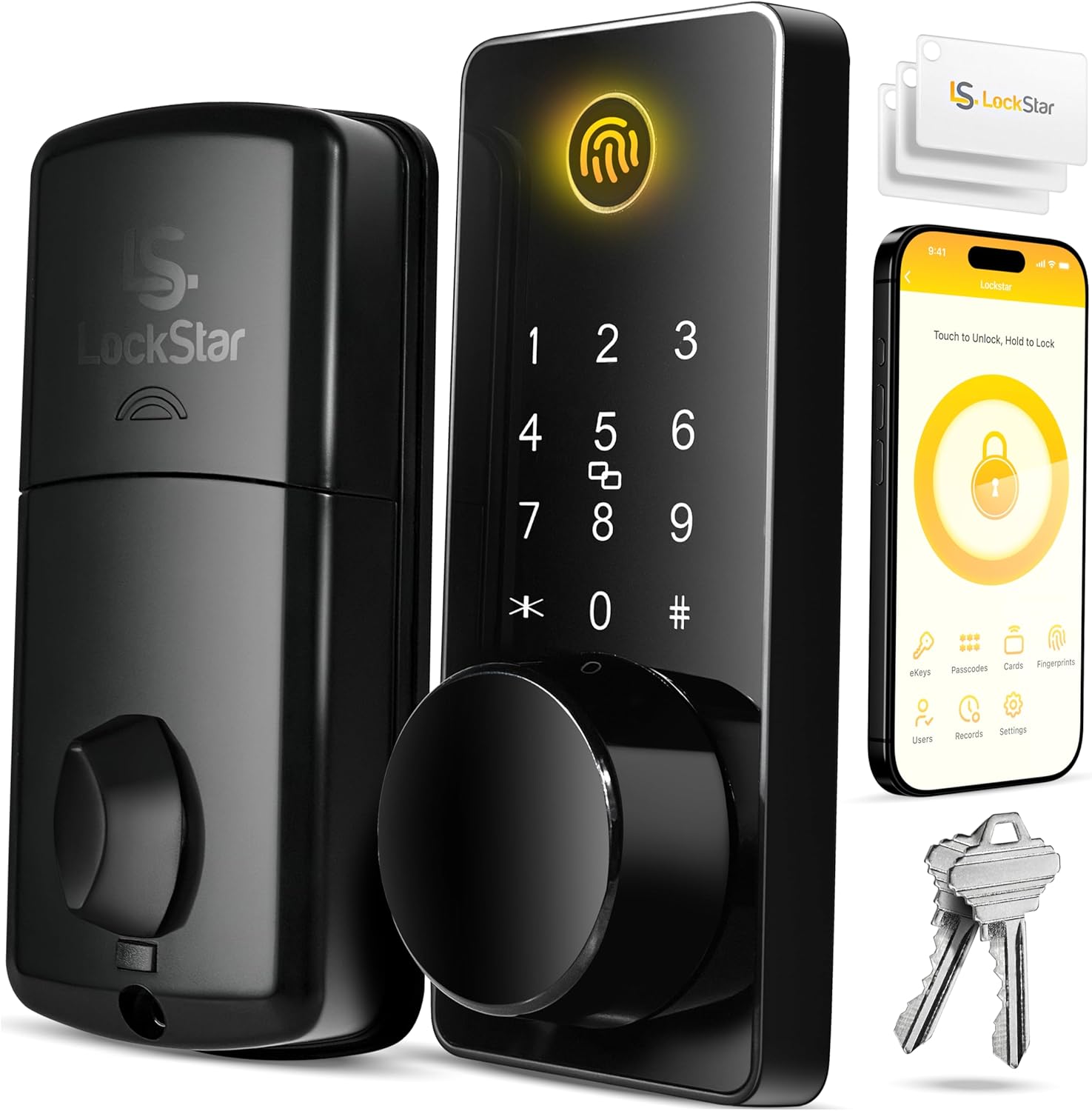
| Lock Type | Keypad |
|---|---|
| Control Method | Touch |
| Connectivity Protocol | Wi-Fi |
| Material Type | Zinc |
| Additional Features | Auto-Lock |
The LOCKSTAR LS-SDL is a versatile keyless deadbolt designed for everyday use and remote access control. It supports multiple entry methods — smartphone app, fingerprint touch ID, keypad code, card fob, and a physical key — and includes a Wi‑Fi gateway so you can receive real-time notifications and view event history from anywhere. The lock auto-locks after closing and installs with basic tools using the included screwdriver and drill piece, making it practical for DIY replacement on standard doors. Its zinc construction and modern rectangular styling are durable enough for regular residential use, and the app-driven access control is useful for rental scenarios or family households that need tracked ingress. Limitations include reliance on the vendor app and Wi‑Fi ecosystem for remote features and the typical need to manage fingerprint and code setup for multiple users, which can add setup time compared with a simple keyed deadbolt.
Best for: Buyers who prioritize a dependable, feature-rich smart deadbolt with remote access and multiple backup entry options for homes or rental properties.
Less Ideal for: People who prefer a purely mechanical lock without reliance on an app or Wi‑Fi or those wanting a zero-setup simple keyed-only deadbolt.
- Multiple entry methods (app, fingerprint, keypad, card fob, physical key) for flexible access
- Built-in Wi‑Fi connectivity with gateway included for real-time notifications and remote control
- Auto-lock feature reduces chances of leaving the door unlocked
- Includes basic installation tools and a drill piece for straightforward DIY fitment
- Remote and app features depend on the vendor ecosystem and Wi‑Fi availability
- Initial setup for fingerprints, codes, and users can be time consuming
Verdict: Choose the LOCKSTAR LS-SDL when you want a reliable, Wi‑Fi smart deadbolt with multiple entry methods and remote event tracking for home or rental security.
TEEHO TE001 Keyless Deadbolt

| Access Codes | 20 |
|---|---|
| Waterproof level | IP54 |
| Lock Type | Combination Lock, Deadbolt, Keypad |
| Power | 4 AA batteries |
| Auto Locking | Adjustable 10–99 seconds (off by default) |
The TEEHO TE001 is a straightforward keypad deadbolt designed to replace a standard deadbolt with a keyless entry option. You program up to 20 PIN codes for family members, create one-time guest codes, and use one-touch locking or an adjustable auto-lock timer for hands-free security. The unit is IP54 rated and built from a metal/aluminum alloy with a solid lock cylinder and back-lit keypad, so it handles rain and a wide range of temperatures for exterior doors. It runs on four AA batteries with a low-battery indicator and claims up to a year of battery life, and the package includes two mechanical SC1 backup keys. Installation follows standard deadbolt prep and the lock can be set to detect left or right handing during reset. Expect simple keypad operation and useful convenience features like anti-peep entry and vacation mode, but no wireless connectivity or app control, so remote access and smart-home integration are not available. This model is a good choice if you want reliable local keypad access without the complexity of Wi-Fi or Bluetooth.
Best for: Buyers who prioritize proven, on-device keypad access and dependable mechanical backup over app features and want a simple, well-reviewed keyless deadbolt for everyday home use.
Less Ideal for: Customers who need remote control, smartphone integration, or centralized smart-home locks should consider a Wi-Fi or Bluetooth enabled model instead.
- Supports up to 20 distinct user PIN codes plus one-time codes for guests
- IP54 weather resistance suitable for exterior doors in rain and cold
- One-touch lock and adjustable auto-lock for quick, hands-free securing
- Low-battery indicator with long claimed battery life on four AA cells
- Includes two backup mechanical SC1 keys and standard deadbolt hardware
- No wireless connectivity or app control for remote unlocking or status monitoring
- ANSI Grade 3 security level is entry-level compared with higher grade deadbolts
Verdict: A reliable, weather-resistant keypad deadbolt that gives many users simple, local keyless access and mechanical backup without any smart-home complexity.
Wyze Lock Bolt v2

| Connectivity Protocol | Wi‑Fi |
|---|---|
| Lock Type | Biometric, Deadbolt, Keypad |
| Additional Features | Auto-Lock |
| Style Name | Fingerprint Smart Lock Bolt v2 |
The Wyze Lock Bolt v2 is a fingerprint-first smart deadbolt designed for everyday front-door use. It unlocks quickly with an AI-learning fingerprint scanner that adapts over time, and also supports up to 50 keypad codes, app control over built-in Wi‑Fi, voice assistants, and a physical backup key. Practical features include auto-lock, tamper alarms, IP53 weather resistance for outdoor use, and a USB‑C port for emergency power if the batteries run out. Setup and daily control happen through the Wyze mobile app, and pairing with a Wyze video doorbell lets you unlock from the live feed after visual verification. The lock runs on AA batteries rated for up to eight months, so routine battery checks are still needed, and full Wi‑Fi functionality depends on your home network. For buyers who prioritize simple, fast biometric access plus remote control without added hubs, this lock balances convenience, weather durability, and multiple fail-safes in one package.
Best for: Buyers who want a straightforward, low-friction keyless lock that emphasizes fast biometric access and remote control while keeping setup and management simple.
Less Ideal for: Those seeking an entirely battery-free solution or people who prefer a lock that operates without any dependence on home Wi‑Fi or cloud services.
- Fast AI-learning fingerprint scanner for quick, improving recognition
- Built-in Wi‑Fi lets you control and monitor remotely without a separate hub
- Multiple entry options: fingerprint, keypad codes, app, physical key, and USB‑C emergency power
- Weather-resistant (IP53) and BHMA2-rated for durability
- Auto-lock and tamper alarms add passive security protections
- Requires periodic battery replacement despite long-rated battery life
- Full feature set depends on a reliable home Wi‑Fi connection
Verdict: Choose the Wyze Lock Bolt v2 if you want fast, adaptive fingerprint access plus Wi‑Fi remote control and multiple reliable backup entry methods.
Choosing the Right Keyless Smart Lock: Key Factors to Consider
Authentication Methods
How people unlock the door directly affects convenience and security. Multiple authentication options such as PIN pads, Bluetooth or Wi-Fi app access, and proximity/keycard choices let you match access to different household needs. For families, temporary PINs and scheduled codes let guests or service providers in only when needed.
Consider whether the lock supports multiple independent codes, whether codes are easy to create and delete in the app, and whether there is a secure fallback if a phone is lost. The choice of authentication method also influences power use and how the lock behaves when connectivity is flaky.
Security & Encryption
A keyless lock must protect against digital and physical attacks. Look for explicit encryption standards and secure firmware update mechanisms. Local safeguards like anti-tamper switches, alarm triggers for excessive code attempts, and hardened bolt interfaces matter as much as wireless protection.
Pay attention to how the lock handles failed authentication, whether it provides automatic relock, and whether administrative operations require separate authentication. The presence of a mechanical override is useful, but it should not undermine the electronic protections.
Installation Compatibility
Most buyers install keyless locks themselves on existing doors and deadbolts. Compatibility with common backset measurements, door thickness ranges, and standard bore holes impacts whether the lock will fit without additional modifications. Simpler retrofit designs reuse your existing deadbolt hardware and reduce installation time.
Also consider whether the lock requires a separate bridge or hub for remote access, and whether that hub needs an outlet near the door. Clear, tool-minimal installation and accessible documentation reduce the chance of improper mounting that can cause operation issues later.
Battery Life and Power Options
Battery reliability determines day-to-day convenience and emergency readiness. Locks with efficient power management and clear low-battery alerts reduce the chance of unexpected lockouts. Consider how many batteries the unit needs, the type (disposable versus rechargeable), and whether it supports a temporary external power option for emergency access.
Also evaluate whether features like Wi-Fi standby or frequent cloud synchronization significantly reduce battery life, and whether the lock offers configurable power-saving modes to extend runtime without compromising notifications.
Management and Admin Controls
How you manage users, view access history, and set schedules determines the lock's usefulness for multi-person households. App interfaces should make creating and revoking codes quick and provide clear logs of recent activity. For frequent guest access, look for scheduling capabilities and one-time code generation.
Administrative controls should separate owner-level functions from standard user permissions. Reliable notification settings for lock/unlock events and failed attempts help you stay informed about unusual activity without constant checking.
Durability and Weather Resistance
Since most locks are exposed to the elements, material quality and weather sealing affect longevity and consistent operation. Look for corrosion-resistant finishes on external components and rated ingress protection for areas prone to moisture. Mechanical robustness in the bolt and strike plate reduces wear from repeated use.
Durability also includes how well the keypad and electronics withstand temperature swings and sun exposure. A lock that fails in harsh conditions creates both security and convenience problems, so prioritize units designed for the climate where the lock will be installed.
Types of Keyless Smart Lock Architectures
Keyless smart locks generally fall into two architecture families: standalone units that store credentials locally and connected systems that use a hub or cloud service for remote access. Standalone designs focus on local authentication and often perform faster for daily unlocking because they do not rely on an internet connection.
Connected systems add conveniences such as remote unlocking, push notifications, and integration with other home automation. The tradeoff is additional power use and a dependency on the hub or network for full functionality. Choose the architecture that matches how often you need remote access versus the desire for greater battery life and simpler failure modes.
- Standalone: local control, simpler power profile, fewer remote features
- Connected with bridge: remote access and notifications, higher power use
- Bluetooth-only: phone proximity unlocking without continuous Wi-Fi drain
Preparing Your Door for a Keyless Smart Lock
Before buying, measure the door thickness, backset, and the diameter of the bore hole. These measurements determine whether a lock will fit without drilling or shimming. Also inspect the strike plate and alignment of the deadbolt; poorly aligned hardware causes binding and wear.
If your door has weather strips or heavy thresholds, account for clearance when the deadbolt extends. Having basic tools on hand and a helper to hold the door or template during installation makes the process faster and reduces the chance of misalignment.
- Measure door thickness and backset
- Check bore hole size and alignment
- Inspect strike plate and latch engagement
Connectivity and Smart-Home Integration
Decide which smart-home ecosystem you want the lock to work with and whether local integrations or cloud-based automations are more important. Some setups offer local standards for automations that continue to work even if your internet is down. Others rely on cloud services for remote features.
If you use voice assistants or automation routines, confirm whether the lock exposes the right triggers and whether it supports secure, authenticated control. Consider whether adding a bridge or hub is acceptable in exchange for broader integration.
- Local integrations remain functional during outages
- Cloud integrations enable remote access and notifications
- Bridges expand compatibility but add installation and power considerations
Everyday Maintenance and Troubleshooting Tips
Routine checks such as replacing batteries before they run out, keeping the bolt and strike plate clean, and ensuring firmware is up to date reduce unexpected problems. Test your admin credentials and a backup mechanical override periodically so you know what to do if the primary system fails.
If the lock starts showing intermittent behavior, inspect the battery contacts and mounting screws for loosening. For connectivity issues, rebooting the bridge or verifying Wi-Fi credentials often resolves the problem; for persistent problems follow manufacturer-recommended diagnostics steps in the manual.
- Replace batteries at first low-battery alert
- Keep bolt and strike plate free of debris
- Periodically test backup mechanical override and admin access
Managing Guest Access and Temporary Codes
Use time-limited codes and scheduled access to control short-term entry without sharing permanent credentials. Many systems allow one-time codes for service providers or recurring schedules for regular visitors. Keep a clear naming or labeling convention in the app to track who each code belongs to.
When a code is no longer needed, revoke it promptly and verify the access log to ensure the code was used only as intended. For frequent guest turnover, choose a system with quick code creation and clear expiration features to reduce administrative overhead.
- Create one-time or time-limited codes for visitors
- Label codes clearly for easy management
- Revoke unused codes and monitor access logs
How We Chose the Best Keyless Smart Lock
We shortlisted Keyless Smart Locks using criteria that reflect real-world use and safety. We prioritized documented security features such as encryption standards and local fail-safes, verified compatibility with standard deadbolts and door preparations, and evaluated installation complexity for typical DIY homeowners. Usability factors included the range of access methods (PIN codes, mobile app, proximity), clarity of admin controls, and the quality of audit and access logs. We also considered power and battery life expectations under normal use, the availability of local mechanical overrides, and the durability of external components against weather and tampering. Connectivity choices and smart-home integration options were examined for practical convenience rather than breadth of protocol support. Excluded from consideration were units that lack basic tamper protections, obscure or unsupported firmware update paths, or products that require professional-only installation for standard doors. Our selections balance security, everyday usability, installation effort, and long-term maintainability.
Our full evaluation process is outlined in our review methodology.
FAQ
Will a keyless smart lock work with my existing deadbolt?
Often a keyless smart lock is designed to retrofit over a standard deadbolt and reuse the interior mechanics. Verify the lock's compatibility with your door's backset and bore measurements. If measurements match, most installations do not require replacing the existing deadbolt.
What happens if the batteries die?
Most keyless locks provide clear low-battery alerts well before complete failure and include a mechanical override for emergency entry. Some models offer a temporary external power contact so you can power the lock briefly to regain access. Regular battery checks prevent unexpected lockouts.
Are keyless smart locks vulnerable to hacking?
Digital locks can be targeted, but units that use strong encryption, secure update paths, and good local authentication practices reduce that risk. Choose locks that specify their security measures and provide regular firmware updates to address discovered vulnerabilities.
Can I share temporary access with guests?
Yes. Most systems support temporary, scheduled, or one-time codes and often let you manage those from a mobile app. Proper labeling and timely revocation help ensure temporary access does not become a long-term security exposure.
Do keyless smart locks work during power outages?
Because most units run on batteries, they continue functioning during mains power outages. Connected features that rely on a bridge or cloud service may be unavailable, but local authentication methods typically remain usable.
Final Verdict
Choosing the right keyless smart lock requires balancing security, convenience, and how the device will be used day to day. Prioritize strong authentication and encryption, straightforward installation on your door, and a power plan that matches your tolerance for maintenance. Think through admin controls and guest access workflows to ensure the lock fits your household routines. If you value remote control and notifications, accept the tradeoff of slightly higher power use and a possible hub. If battery life and simple reliability are more important, prefer locally focused designs. Use the criteria above to match a lock to your priorities and reduce surprises after installation.