
Note: This article contains affiliate links. If you click on these links and make a purchase, we may earn a small commission at no extra cost to you. This helps support our research and content. Read our full affiliate disclosure here.
If you want straightforward home automation without relying on cloud services, Bluetooth Smart Plugs let you control lights and small appliances directly from your phone. Picking the right Bluetooth smart plug matters because connection reliability, how the device pairs with phones, and ongoing power handling affect daily convenience and safety. This guide lists the top shortlisted Bluetooth smart plugs we considered for typical home use. We evaluated connectivity stability, setup simplicity, build and electrical safety, and integration options to help you find a dependable plug for local automation. Read on for the key tradeoffs and what to expect from each pick.
Top Picks at a Glance
| Best Quality Built to a higher standard if you want something more solid | D-Link PM-01M Smart Plug |  |
| Best Value The sweet spot between price and what you get | DAYBETTER Smart Plug FCZ040 |  |
| Best Budget The cheapest option that still gets the job done reliably | KinClean Smart Plug KC03 | 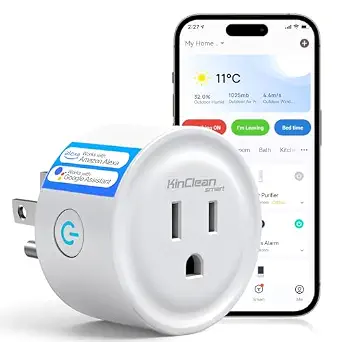 |
| Top Rated A top-rated pick with lots of positive feedback | SwitchBot Plug Mini |  |
| Most Popular A crowd favorite that many people choose with confidence | Shelly Plug US Gen4 |  |
D-Link PM-01M Smart Plug

| Voltage | 120 volts |
|---|---|
| Amperage | 15 A |
| Connector Type | Plug in |
| Plug Type | Type B |
The D-Link PM-01M is a compact smart plug designed to give remote and automated control of lamps, fans, and small appliances on standard 120V household circuits. It pairs via Bluetooth for quick setup then uses your Wi‑Fi network for remote access and integrates with Matter-certified platforms so it works with Alexa, Google Assistant, and Apple Home. The AQUILA PRO AI app provides scheduling, real-time power usage monitoring, and configurable over‑usage alerts so you can track energy consumption and receive notifications if a device draws too much power. The low-profile design is meant to avoid blocking adjacent outlets and the UL94‑V0 flame‑retardant construction plus built‑in surge protection add safety. Limitations include the 15A/1800W upper limit, which keeps it suitable for small appliances rather than high‑draw devices, and reliance on the vendor app for advanced features and alerts.
Best for: Buyers who prioritize reliable smart home performance and want precise energy monitoring and cross-platform compatibility to optimize device scheduling and power use.
Less Ideal for: People who need to power high-draw appliances or who prefer local-only solutions without reliance on a vendor app and cloud services.
- Matter certification for broad ecosystem compatibility with Alexa, Google Assistant, and Apple Home
- Bluetooth-assisted setup plus Wi‑Fi remote control for easy installation and away‑from‑home access
- Built‑in energy monitoring and configurable over‑usage alerts via the AQUILA PRO AI app
- Compact, low‑profile shape that is designed not to block neighboring outlets
- Safety-minded construction with UL94‑V0 flame‑retardant material and surge protection
- 15A/1800W rating limits use to small appliances and prevents heavy loads like space heaters or large air conditioners
- Advanced automation and alerting depend on the D-Link AQUILA PRO AI app and cloud services
Verdict: Choose the D-Link PM-01M when you want a compact, Matter-certified smart plug with Bluetooth setup and real-time energy monitoring for dependable performance in a North American smart home.
DAYBETTER Smart Plug FCZ040

| Current Rating | 15 A |
|---|---|
| Operating Voltage | 120 volts |
| Connectivity Protocol | Bluetooth, Wi-Fi |
| Wattage | 1800 watts |
| Compatible Devices | Alexa, Google Home |
The DAYBETTER Smart Plug FCZ040 is a compact 4-pack of app-controlled outlet adapters that connect via Bluetooth and 2.4 GHz Wi‑Fi to the DAYBETTER app and work with Alexa and Google Assistant. You use them like a normal plug-in outlet but gain remote on/off control, countdown timers, and recurring schedules so lamps, humidifiers, or pet feeders can run automatically. The plugs are ETL and FCC certified and rated for 15 A/1800 W so they handle most small appliances, and the small footprint is designed to avoid blocking adjacent outlets. Setup is straightforward through the app using Bluetooth for pairing and Wi‑Fi for control, though they do not support 5 GHz networks and are not compatible with Tuya/Smartlife/Home Assistant. Practical buyers will appreciate the scheduling, voice control, and ability to switch devices from anywhere, while those needing broader smart-home platform integration or 5 GHz support should look elsewhere.
Best for: Buyers who want simple, reliable smart outlets to automate lamps and small appliances and prioritize easy app setup, voice control, and scheduling over deep platform integration.
Less Ideal for: Users who need integration with broader smart‑home ecosystems or require 5 GHz Wi‑Fi support and local Home Assistant compatibility should consider other options.
- Supports Alexa and Google Assistant for voice control
- App-based on/off, timers, and recurring schedules for automation
- Rated 15 A / 1800 W, suitable for most household appliances
- Compact design intended to avoid blocking adjacent outlets
- Certified to ETL and FCC safety standards
- Does not support 5 GHz Wi‑Fi networks
- Not compatible with Tuya, Smartlife, Magic Home, or Home Assistant
Verdict: A straightforward, app‑controlled Bluetooth/Wi‑Fi smart plug pack that delivers easy scheduling and voice control for everyday devices.
KinClean Smart Plug KC03

| Network | 2.4GHz Wi‑Fi |
|---|---|
| App | Smart Life/Tuya |
| Voice Assistants | Alexa, Google Assistant |
| Certifications | FCC, ETL |
The KinClean Smart Plug KC03 turns a regular outlet into a remotely controllable socket using the Smart Life/Tuya app and works with Alexa and Google Assistant for voice control. It is typically used to schedule or remotely switch lamps, fans, humidifiers and other small appliances; the built-in timer and scheduling features make it useful for routines like morning wakeups or turning devices off at night. The plug uses 2.4GHz Wi‑Fi for better wall penetration and supports grouping and multi-account device sharing for basic family control. Setup is plug-and-play and the compact housing is designed not to block the second outlet. On the downside it requires a 2.4GHz network only and lacks advanced energy-monitoring telemetry, so buyers wanting power-usage data or dual-band support should look elsewhere. For straightforward remote on/off scheduling and voice control on a tight budget, it delivers practical smart functionality.
Best for: Buyers seeking an inexpensive, no-frills smart outlet to add remote on/off, timers, and voice control to lamps and small appliances.
Less Ideal for: Users who need energy monitoring, dual-band Wi‑Fi, or advanced automation features should consider higher-end smart plugs.
- Works with Alexa and Google Assistant for hands-free voice control
- App-based remote control and scheduling via Smart Life/Tuya
- Compact design that should not block the second outlet
- Uses 2.4GHz band for improved wall penetration and stable connectivity
- Only supports 2.4GHz Wi‑Fi, not 5GHz or dual-band
- No built-in energy usage monitoring or advanced metering
Verdict: A budget-friendly smart plug that adds reliable remote control, scheduling, and voice assistant support for basic home automation needs.
SwitchBot Plug Mini

| Amperage | 15 A |
|---|---|
| Connector Type | Plug in |
| Plug Type | Type A/B |
| Specification Met | UL, cUL |
The SwitchBot Plug Mini is a compact smart outlet that lets you turn appliances on and off remotely, schedule timers, and track real-time energy use through the SwitchBot app. It supports 2.4 GHz Wi‑Fi for setup and then offers Bluetooth as a fallback so controls remain available if your network falters, and the unit is ETL listed with overload protection and a fire-resistant cover for safer operation. Energy monitoring updates every second and stores usage graphs you can export, which is useful for spotting when long-cycle appliances finish or for trimming phantom load. The plug's small footprint is designed not to block the second outlet, and the app integrates with voice assistants and smart home platforms for hands-free control. Limitations include the requirement to add the device on a 2.4 GHz network during setup and that advanced automations rely on the SwitchBot ecosystem or companion hub for broader cloud-based scenes.
Best for: Buyers who prioritize dependable local control and safety will appreciate a plug that falls back to Bluetooth when Wi‑Fi is unreliable and offers continuous energy monitoring for practical oversight.
Less Ideal for: Users who need instant cloud-only automations across multiple brands without using additional SwitchBot devices or a hub should consider alternatives with broader native cloud integrations.
- Dual connectivity: 2.4 GHz Wi‑Fi setup with Bluetooth fallback for continued local control
- Real-time energy monitoring with per-second updates and exportable usage graphs
- ETL listed with overload protection and fire-resistant housing for improved safety
- Compact design that minimizes blocking of adjacent outlet space
- Works with voice assistants and integrates into SwitchBot app and ecosystem
- Must be added to the app on a 2.4 GHz Wi‑Fi network for initial setup
- Advanced cloud automations may require additional SwitchBot devices or a hub
Verdict: Choose the SwitchBot Plug Mini when you want a small, safety-focused smart plug that keeps working locally via Bluetooth if your Wi‑Fi goes down while giving real‑time energy data.
Shelly Plug US Gen4

| Amperage | 15 A |
|---|---|
| Wattage | 1800 watts |
| Total Power Outlets | 1 |
| Specification Met | RoHS, UL |
The Shelly Plug US Gen4 is a multi-protocol smart outlet designed for everyday appliance control and energy monitoring. It pairs via Wi‑Fi, Bluetooth, Zigbee or Matter and exposes on-device power metering so you can track consumption and set schedules or timers from the Shelly app or compatible ecosystems. The unit is UL listed and supports up to 15 A / 1800 W, making it suitable for most small appliances, lamps, and entertainment gear, and it includes a protective socket cover and a multicolor LED for quick status at a glance. Advanced users will appreciate local automation options, MQTT/UDP support, and 8 MB onboard memory for more complex flows without cloud dependence. The plug is compact but single-outlet only, and heavy loads near the 15 A limit will require attention; it also assumes some comfort with network setup if you want to use non-basic features. For buyers who value flexible connectivity and built-in energy insights, this plug offers a robust, safety-certified option for smart home integration.
Best for: Buyers who want a safety-certified, multi-protocol smart plug that gives reliable energy monitoring and flexible local control across HomeKit, Alexa, Google, or DIY automation setups.
Less Ideal for: People who need multi-outlet control in a single unit or who plan to run high-current appliances full time from the plug.
- Matter-certified with Wi‑Fi, Bluetooth, and Zigbee for broad ecosystem compatibility
- Built-in power metering provides per-device energy monitoring and usage feedback
- UL listed for safety and includes a protective socket cover for child safety
- Supports local automations and MQTT/UDP for advanced, hub-free control
- Single outlet limits use where multiple devices need independent control
- 15 A / 1800 W rating restricts use with high-draw appliances near the limit
Verdict: Choose the Shelly Plug US Gen4 if you want a safety-certified smart plug with Matter and multi-protocol connectivity plus built-in energy monitoring for reliable, flexible home automation.
Choosing the Right Bluetooth Smart Plug: Key Factors to Consider
Bluetooth Range And Signal Robustness
Bluetooth range determines where you can reliably control the plug from within your home. Walls, floors, and competing wireless traffic reduce effective range, so a plug that documents Bluetooth version and expected indoor range helps you set realistic placement. If you plan to control plugs from a different floor or through multiple walls, prioritize models with stronger signal performance.
Signal robustness also affects how often the plug needs re-pairing or manual resets. A plug with solid reconnection behavior and clear diagnostics in its app saves time and reduces frustration when occasional interference occurs.
Setup Workflow And Pairing
Setup should be quick and predictable. Look for plugs that offer a clear pairing mode, straightforward app prompts, and compatibility with both iOS and Android pairing flows. A smooth initial setup minimizes fuss and makes it easier to add multiple units to the same household.
Consider whether the app supports local-only pairing or requires account creation. For users who prefer local control, avoid plugs that force cloud registration just to turn a device on or off. Documentation and in-app guidance are important for less technical household members.
Electrical Ratings And Safety Features
Check the maximum supported current and wattage to ensure the plug can handle the intended load. Lamps and chargers typically draw little power, but space heaters, air fryers, and some kitchen appliances can exceed the plug's rating and create hazards.
Thermal protection, surge resistance, and certifications matter too. A plug with overcurrent protection or temperature monitoring reduces risk during extended use. Clear labeling of voltage, frequency, and maximum amperage helps you match the plug to your appliances safely.
App Functionality And Local Control Options
The control app is the day-to-day interface with your plug, so responsiveness, scheduling, and local automation features are important. A good app offers accurate state feedback, simple scheduling, and quick manual overrides.
If you need routines or timers that run without your phone present, prioritize plugs that support locally hosted schedules. Also consider whether the app provides logs or status indicators so you can troubleshoot intermittent connectivity without guessing.
Physical Size And Outlet Compatibility
Physical design affects whether a plug will block adjacent outlets or fit into power strips and tight wall locations. Low-profile or streamlined plugs are easier to place behind furniture or in compact power strips.
Also consider plug orientation, weight, and whether the unit includes a physical on/off button. A tactile switch lets anyone in the home operate the plug without opening an app, which is useful for guests or quick manual control.
Firmware Updates And Maintenance
Ongoing maintenance matters for security and reliability. Check whether the manufacturer provides firmware updates that can be applied locally or through the app. Regular updates address connectivity quirks and security issues.
Also consider how updates are delivered and whether the process requires active intervention. Automatic or well-documented update flows reduce the chance that a plug remains on outdated software that could affect performance or safety.
Local Automation Versus Cloud Dependence
Bluetooth smart plugs are commonly valued for local control, which keeps simple on/off and scheduling functions within your home network. Local automation reduces latency and avoids reliance on an external server for basic operations.
If maintaining functionality during internet outages is important, verify that the plug supports schedules and manual control without an active cloud connection. Some apps provide hybrid models where cloud features are optional, while others require an account for even basic switching.
- Local schedules run even if your internet goes down
- Cloud features may enable voice assistants or remote access but can introduce latency
- Hybrid apps often let you choose the balance between local and cloud control
Placement Tips To Maximize Bluetooth Performance
Place plugs where the controlling phone or hub has a clear line of sight when possible. Metal appliances, masonry walls, and large electronics can degrade Bluetooth performance. Small shifts in placement can significantly improve responsiveness.
If you have coverage dead zones, add intermediate Bluetooth-enabled devices that act as relays where supported, or relocate higher-traffic smart devices to improve mesh strength.
- Avoid placing the plug behind metal-backed furniture
- Keep distance from large microwaves or routers if interference appears
- Test control responsiveness from the typical location you will operate the plug
Safety Practices For Using Smart Plugs
Always match the plug's electrical rating to the appliance you intend to control. Continuous loads should not exceed the plug's maximum current rating, and resistive heating appliances often draw more power than expected.
Unplug or disable smart plugs when using high-current kitchen devices or anything not explicitly supported by the plug's documentation. Regularly inspect plugs for heat or discoloration and replace units that exhibit abnormal behavior.
- Do not use standard smart plugs with high-wattage heating appliances unless rated
- Allow airflow around the plug to prevent heat buildup
- Check certifications and look for built-in thermal protection when available
Integrations And Voice Control Options
Many Bluetooth smart plugs offer optional integrations with voice platforms or local smart-home hubs. If voice control is a priority, confirm the plug supports the specific voice path you prefer and whether that path uses local or cloud services.
Integration choices influence latency and reliability. Local integrations tend to be faster and function without internet access, while cloud-based connections enable remote control but may add delay.
- Confirm whether voice control requires cloud account linking
- Test basic voice commands for reliability before deploying across multiple rooms
- Consider whether the plug can be discovered by third-party smart-home hubs if needed
Managing Multiple Plugs And Grouping
If you plan to deploy several plugs, look for apps that support grouping and bulk management. Grouping lets you control multiple outlets with a single tap or schedule, which is especially useful for multi-light setups or room-level control.
Consistency in setup workflows and clear naming conventions within the app reduce confusion and make automation rules easier to maintain over time.
- Use meaningful names and room tags for each plug
- Check whether the app supports scenes or routines across multiple devices
- Ensure bulk firmware updates are feasible for larger deployments
How We Chose the Best Bluetooth Smart Plug
We shortlisted devices that prioritize stable local Bluetooth connections, clear setup flows, and safe electrical design. Our selection process favored plugs that document signal range and Bluetooth version, include robust pairing and reconnection behavior, and provide reliable manual controls such as a physical on/off button. Concrete evaluation criteria included connection reliability under everyday home conditions, setup and pairing simplicity, electrical and thermal safety features, ongoing control options (app responsiveness and schedules), and physical design such as footprint and outlet blocking. We excluded devices that rely solely on cloud servers for basic on/off control or that lack clear safety information in their documentation. We also filtered out plugs that do not support common home power loads or lack routine firmware update paths. The final list reflects devices suitable for typical household circuits and typical loads like lamps, fans, and small appliances. Each pick meets minimum expectations for safe continuous operation and straightforward local control.
Our full evaluation process is outlined in our review methodology.
FAQ
Can Bluetooth smart plugs work without an internet connection?
Often yes. Many Bluetooth smart plugs support local control and scheduled automation that operate without internet access. Some features like remote control or cloud-based voice assistants will be unavailable without a connection.
How far away can I control a Bluetooth smart plug?
Range depends on the plug's Bluetooth version and home layout. Typical indoor ranges are shorter than open-air specifications due to walls and interference, so real-world control is usually a few rooms away rather than across an entire house.
Are Bluetooth smart plugs safe for heaters and kettles?
It depends on the plug's electrical rating. High-wattage resistive appliances often exceed the safe continuous load for many smart plugs. Check the maximum amperage and wattage and avoid using plugs with appliances that draw more than the rated limits.
Will Bluetooth smart plugs drain my phone battery?
No. Bluetooth control is generally lightweight. Occasional use and background app connections have minimal impact on modern phone battery life. Keeping the controlling app well-optimized and avoiding constant polling reduces any noticeable drain.
Can multiple phones control the same Bluetooth plug?
Often multiple authorized devices can control the same plug, but behavior varies. Some apps require shared account credentials or explicit device sharing features to allow control from more than one phone.
Final Verdict
Prioritize a Bluetooth smart plug that matches the electrical load you plan to control, offers clear local-control behavior, and has a reliable, easy setup experience. Tradeoffs typically involve balancing stronger Bluetooth performance and physical design against app features and cloud conveniences. For most users looking for dependable local automation, focus first on connection reliability, electrical safety, and app scheduling capability to ensure consistent day-to-day operation. With those priorities in mind, you can confidently choose a plug that fits your room layout and control preferences while keeping safety and maintenance needs manageable.