
Note: This article contains affiliate links. If you click on these links and make a purchase, we may earn a small commission at no extra cost to you. This helps support our research and content. Read our full affiliate disclosure here.
If you want to add smart control to lamps, small appliances, or holiday lighting without losing the second outlet, mini smart plugs are the fastest route. You need devices that are compact, connect reliably to your home network, and support the automation features you use most. This guide shortlists the top mini smart plugs that earned our attention for compact form factor, dependable connectivity, and straightforward setup. Below we explain the practical differences that matter for everyday use and the evaluation criteria we applied to make the selection.
Top Picks at a Glance
| Best Overall The best all-around choice for most situations | Tapo Mini Smart Plug P125M |  |
| Best Quality Built to a higher standard if you want something more solid | Leviton Decora Smart Plug D215P | 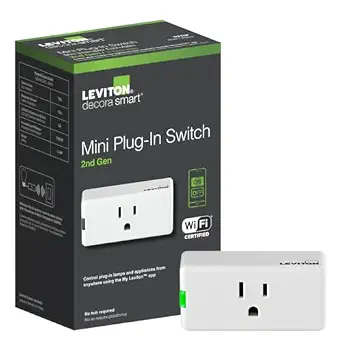 |
| Best Value The sweet spot between price and what you get | Govee Smart Plug H5083 |  |
| Best Budget The cheapest option that still gets the job done reliably | GHome Smart Plug WP3 |  |
| Top Rated A top-rated pick with lots of positive feedback | Amazon Smart Plug |  |
| Most Popular A crowd favorite that many people choose with confidence | Kasa Smart Plug Mini EP10 | 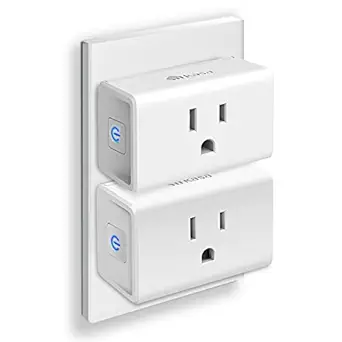 |
| Best Seller A high-volume bestseller chosen again and again | Amazon Basics Smart Plug 4-Pack |  |
Tapo Mini Smart Plug P125M

| Current Rating | 15 A |
|---|---|
| Operating Voltage | 120 volts AC |
| Connectivity Protocol | Bluetooth, Matter, Wi‑Fi |
| Wattage | 1800 watts |
| Unit Count | 3 Count |
The Tapo Mini Smart Plug P125M is a small Wi‑Fi and Matter‑certified outlet adapter intended to give lamps, fans, and other plug‑in devices basic smart control. It pairs via Bluetooth onboarding to the Tapo app for quick setup, then offers scheduling, timers, away mode and voice control through Apple Home, Alexa, Google Home or SmartThings. Matter support enables local LAN control and better cross‑brand interoperability, so certified hubs and other Matter devices can operate even if your internet is down. The plug is purposely compact so it does not block the second outlet and is UL‑tested with flame‑retardant materials for safety. Practical limits include a 15A/1800W maximum load, so it is meant for typical household electronics rather than heavy appliances, and it requires a Matter controller (hub) for Matter pairing. For someone building a tidy, interoperable smart home with basic automation needs this plug is a sensible, easy-to-install choice.
Best for: Buyers who want a small, reliable smart plug to add lamps and small electronics to a cohesive, cross‑platform smart home and who value easy setup and local control.
Less Ideal for: Users needing to switch heavy appliances or devices above 1800W or those who prefer hub‑free Matter operation without adding a compatible controller.
- Matter certification for cross‑brand interoperability and local LAN control
- Compact footprint that leaves the second outlet usable
- Easy Bluetooth onboarding and full app scheduling and timers
- Voice control support across Apple Home, Alexa, Google Home and SmartThings
- UL tested flame‑retardant construction and 2‑year manufacturer warranty
- Requires a Matter controller (hub) to use Matter features
- 15A/1800W rating limits use with high‑draw appliances
Verdict: A compact, Matter‑ready mini smart plug that makes adding reliable, cross‑platform control to lamps and small devices quick and simple.
Leviton Decora Smart Plug D215P

| Current Rating | 15 A |
|---|---|
| Operating Voltage | 120 volts |
| Connectivity Protocol | Matter, Wi-Fi |
| Wattage | 1500 watts |
| Control Method | App, Push Button, Remote, Voice |
The Leviton Decora Smart Plug D215P is a compact plug‑in switch that turns standard 120V outlets into remotely controllable on/off points using the My Leviton app, voice assistants, or Matter-enabled platforms after updating firmware. It is typically used to automate lamps, holiday lighting, small appliances, and electronics, and it can be scheduled or grouped into scenes for whole‑home lighting control. Notable features include 2.4 GHz Wi‑Fi connectivity with optional Matter support, manual push‑button control on the device, and compatibility with Alexa, Google Assistant, and Apple Siri. The plug supports a broad range of loads—from LED/CFL bulbs to incandescent and motor loads—making it versatile for many household devices. Practical benefits are easy installation with no hub required, remote scheduling and scenes via the My Leviton app, and the ability to add wire‑free companion switches for multi‑location control. Limitations include operation on 2.4 GHz only, which may require router configuration on some networks, and a 1500W rating that restricts very high‑power appliances.
Best for: Buyers who want a reliable, performance-focused mini smart plug to add responsive app and voice control to lamps and small appliances and who plan to integrate devices into schedules or scenes.
Less Ideal for: People who need dual‑band Wi‑Fi support, want to control heavy-duty appliances, or require a plug rated above 1500W should look elsewhere.
- Works with Alexa, Google Assistant, and Apple Siri and can join Matter-equipped platforms after firmware update
- No hub required—connects directly to 2.4 GHz Wi‑Fi for remote control and scheduling
- Compact Decora-style plug simplifies adding smart control to lamps, holiday lights, and small appliances
- Supports a variety of load types including LED/CFL, incandescent, magnetic ballasts, and motor loads
- Operates only on 2.4 GHz Wi‑Fi which may be incompatible with some router setups
- 1500W maximum limits use with very high‑power appliances
Verdict: Choose this Decora‑style mini plug if you want a compact, no‑hub smart outlet with robust app and voice control and Matter compatibility for dependable home automation.
Govee Smart Plug H5083

| Voltage | 120 volts |
|---|---|
| Amperage | 10 A |
| Plug Type | Type B |
| Connection | 2.4 GHz WiFi and Bluetooth |
The Govee Smart Plug H5083 is a small hub‑free outlet adapter that connects to 2.4 GHz Wi‑Fi or Bluetooth so you can control lamps, fans, and other low‑power devices by voice or from the Govee Home app. It supports scheduling, a 24‑hour timer, group control for switching several plugs at once, and automatic reconnection after outages, which makes it useful for lights, holiday displays, or routine appliances. The plug is ETL and FCC certified and includes overload protection and basic safety safeguards, and its compact shape is designed not to block adjacent sockets. Practical limits: it is rated for 10A/120V (about 1100W) so it is not intended for heavy loads like space heaters, and it only works on 2.4 GHz Wi‑Fi networks. Setup is straightforward through the app and it works with Alexa and Google Assistant for voice control, making this a convenient, space-saving option for adding basic smart control to rooms without a hub.
Best for: Buyers who want a compact, no‑hub smart outlet to automate lights and small appliances and who prioritize easy setup, voice control, and scheduling to simplify everyday routines.
Less Ideal for: People needing smart control for heavy electrical loads or who require 5 GHz Wi‑Fi compatibility should look for higher‑capacity or dual‑band alternatives.
- Compact design that avoids blocking neighboring outlets
- Works with Alexa and Google Assistant for voice control
- Supports schedules, 24‑hour timer, and group control via the Govee app
- Connects via 2.4 GHz Wi‑Fi or Bluetooth and auto reconnects after outages
- ETL and FCC certified with overload protection
- Rated 10A/1100W so not suitable for high‑draw appliances
- Only compatible with 2.4 GHz Wi‑Fi, no 5 GHz support
Verdict: A compact, hub‑free smart plug that delivers reliable voice and app control plus scheduling for lights and small appliances in everyday rooms.
GHome Smart Plug WP3

| Current Rating | 10 A |
|---|---|
| Wattage | 1200 watts |
| Operating Voltage | 120 volts |
| Connectivity Protocol | Bluetooth, Wi-Fi |
| Specification Met | ETL, FCC |
The GHome Smart Plug WP3 is a small plug-in outlet that adds remote and voice control to ordinary devices using the 2.4 GHz Wi‑Fi band. You set it up in the GHome, Smart Life, or Tuya app, then create schedules, countdowns, or cycle timers to automate lamps, fans, holiday lights, or other low-power appliances. It supports group control and sharing so multiple plugs can be controlled together, and it works with Alexa and Google Assistant after you configure the plug through the app. The unit is ETL and FCC listed and rated for 10 A / 1200 W, which covers most lighting and small appliance uses but is not suitable for heavier loads. The plug is tiny, fits discreetly on an outlet, and offers basic scene and away-mode features to simulate occupancy. Expect a 2.4 GHz–only setup requirement and occasional need to troubleshoot router congestion on crowded networks, but for everyday scheduling and voice switching this plug does the job on a budget.
Best for: Buyers who need an inexpensive, space-saving smart outlet to add timers and voice control to lamps and small appliances and who prioritize easy app-based automation over heavy-load capability.
Less Ideal for: People who need to control high-power devices like space heaters or heavy kitchen appliances or who require a plug that works on 5 GHz networks or with native cloudless voice integration.
- Compact plug-in design that stays discreet on an outlet
- Works with Alexa and Google Assistant via the vendor app
- Supports schedules, countdowns, cycle timers and random away mode
- Works with common smart-home apps (GHome, Smart Life, Tuya) for remote control and sharing
- ETL and FCC listed for basic safety compliance
- Rated 10 A / 1200 W so not suitable for high-draw appliances
- Requires 2.4 GHz Wi‑Fi only and may need router adjustment in congested networks
Verdict: A pocket-friendly mini smart plug that delivers reliable app scheduling and voice control for lamps and small appliances on a budget.
Amazon Smart Plug

| ASIN | B089DR29T6 |
|---|---|
| Compatible with | Alexa devices |
| Setup | Alexa app, no hub required |
The Amazon Smart Plug turns any standard outlet into a voice‑controlled smart outlet using the Alexa app and compatible Alexa devices. Setup is straightforward: plug it in, open the Alexa app and follow the prompts to get connected without a separate hub. In daily use it controls lamps, fans, coffee makers and other devices with physical on/off switches, and supports schedules, timers and Alexa routines so you can automate lights or appliances. The compact housing leaves the second outlet accessible, and the plug is designed to reconnect automatically after Wi‑Fi or power interruptions for consistent operation. The main limitation is platform lock‑in to Alexa since it relies on the Alexa app and compatible devices, and it does not expose advanced third‑party integrations or local control protocols some tech users prefer.
Best for: Buyers who prioritize dependable, no‑fuss smart outlets that reliably reconnect and integrate seamlessly with Alexa for everyday automation.
Less Ideal for: Anyone seeking platform-agnostic smart plugs or local network control and integrations outside the Alexa ecosystem should consider alternatives.
- Simple, hub‑free setup through the Alexa app
- Works with Alexa voice commands and routines for easy automation
- Compact design keeps the second outlet usable
- Automatically reconnects after power or Wi‑Fi outages for reliable operation
- Requires the Alexa ecosystem and app for setup and control
- No advanced third‑party or local control protocol support
Verdict: Choose this compact plug if you want a fuss‑free, reliably reconnecting smart outlet that works directly with Alexa and schedules.
Kasa Smart Plug Mini EP10

| Current Rating | 15 A |
|---|---|
| Operating Voltage | 120 volts AC |
| Wattage | 1800 watts |
| Connectivity Protocol | Wi‑Fi (2.4 GHz) |
| Certification | UL |
The Kasa Smart Plug Mini EP10 (2‑pack) brings smart control to standard outlets with an emphasis on compact size and safety. You plug them into a 2.4 GHz home network, pair them with the Kasa app, and control lights, fans, humidifiers, and other small appliances from anywhere or with Alexa and Google voice commands. The ultra‑compact housing is designed not to block the second outlet, and built‑in scheduling, timers, away mode, and group control make it easy to automate routines and save energy. It is UL certified and uses flame‑retardant materials with nickel‑plated pins for reliable connections and a 15 A/1800 W load rating suitable for most household devices. Setup is straightforward for typical smartphone users and the 2‑pack helps outfit multiple rooms quickly. The plug only supports 2.4 GHz Wi‑Fi and does not include energy monitoring, so buyers wanting power-usage stats or dual‑band/Matter connectivity will need a different model.
Best for: Buyers who prioritize a small, reliable smart plug with proven safety credentials and easy app or voice control for everyday lamps and small appliances.
Less Ideal for: People who need energy usage monitoring, 5 GHz or Matter compatibility, or advanced power‑management features.
- Very compact design that preserves the second outlet on a standard wall socket
- UL certified with flame‑retardant shell and durable contact materials for safer operation
- Works with Alexa and Google Assistant for hands‑free voice control
- Remote app control plus schedules, timers, away mode, and group control for practical automation
- Supports only 2.4 GHz Wi‑Fi and lacks energy‑monitoring features
Verdict: Choose the EP10 if you want an ultra‑compact, UL‑certified smart plug that makes lamp and small-appliance automation simple and safe.
Amazon Basics Smart Plug 4-Pack

| Plug Type | Type B |
|---|---|
| Amperage | 15 A |
| Connector Type | 2 Pin |
| Unit Count | 4 Count |
| Specification Met | UL |
These Amazon Basics smart plugs give basic smart control to ordinary appliances by letting you switch devices on and off with Alexa voice commands or the Alexa app. They are compact so each plug occupies a single outlet and are typically used to automate lamps, fans, holiday lights, kettles and similar plug-in gear. Setup is aimed at Alexa users and can be completed in minutes either through the Alexa app or by linking the device to your Alexa account at checkout, and scheduling and routines are managed in-app without a separate hub or third-party software. The plugs run on 2.4 GHz Wi‑Fi and meet UL specification, and the four-pack provides multiple locations of control out of the box. Limitations include reliance on Alexa for first-class integration and no mention of third-party smart assistant support or local LAN-only control, so users wanting broader voice platform compatibility or hub-based setups should look elsewhere.
Best for: Buyers who prefer a low-risk, straightforward smart-plug that integrates directly with Alexa and lets them add app or voice control to everyday appliances quickly and reliably.
Less Ideal for: People who need cross-platform voice support, local-only smart home control, or multi-band Wi‑Fi and hub-based integrations should consider other options.
- Compact design fits one outlet without blocking the neighbor socket
- Simple Alexa-first setup with no separate hub required
- Controlled remotely and schedulable via Alexa app for automation
- Sold in a four-pack to outfit multiple rooms immediately
- Requires Alexa ecosystem for setup and best functionality
- Operates on 2.4 GHz Wi‑Fi only with no stated multi-band or local-hub options
Verdict: A practical, no-frills four-pack of compact smart plugs that makes it easy to add Alexa-controlled automation to multiple outlets with minimal setup.
Choosing the Right Mini Smart Plug: Key Factors to Consider
Physical Size and Outlet Clearance
A genuine mini smart plug must be small enough to leave the adjacent outlet usable. Measure clearance in both width and height relative to a standard duplex outlet, and check whether the plug sits flat or protrudes outward. Tight spacing behind decorative plates or near lamps with wide plugs can still cause issues, so consider the plug's reported dimensions.
Physical size also affects heat dissipation. Smaller housings have less internal air volume, so ensure the plug has adequate ventilation and a conservative power rating for continuous loads.
Wireless Stability and Range
Most mini smart plugs rely on Wi-Fi. Look for plugs that support 2.4 GHz networks, and note stated range or mesh compatibility. A stable connection reduces dropped automations and keeps voice control responsive. If your home has weak Wi-Fi, prioritize plugs known to reconnect quickly after outages or that work well with your mesh system.
Check whether the plug requires a hub. Hubless Wi-Fi plugs simplify setup but depend entirely on your router. Hub-based systems can offer greater range and device density but add setup complexity and cost.
Power Rating and Load Type
Mini smart plugs have maximum current and wattage ratings. Match the plug rating to intended loads. Lamps, fans, and phone chargers are usually safe, but avoid using mini plugs with high-draw appliances like space heaters or full-size coffee makers unless the rating explicitly allows it.
Look for safety certifications and features such as overload protection, UL listing, or thermal cutoff. Reliable power handling ensures safe long-term operation and reduces the chance of nuisance trips or hazards.
Integration With Voice Assistants and Automation
Consider how the plug communicates with your smart home system. Native voice-assistant support makes simple commands easier, while compatibility with common automation platforms enables scenes, schedules, and conditional triggers. Check whether the plug exposes device-level details such as energy monitoring or only basic on/off control.
Some plugs offer cloud-only control, while others provide local control for faster responses and better privacy. Decide which model fits your preference for speed, privacy, and the complexity of routines you plan to build.
Setup Process and App Experience
A clear, well-designed app reduces time-to-first-use and limits frustration. Look for one-step onboarding, clear device naming, and straightforward scheduling or scene creation. Apps that support firmware updates and maintain a changelog are preferable since updates improve security and reliability.
Also consider whether the app requires an account. Account-based systems enable cloud features and remote access but mean your device relies on vendor services. If you prefer local network control, prioritize plugs that advertise local APIs or integrate with platforms that support local access.
Energy Monitoring and Additional Features
Some mini plugs include energy monitoring, useful for tracking power-hungry devices and spotting phantom loads. While this increases usefulness, it can also raise cost and either slightly enlarge the plug or require more frequent firmware updates.
Other useful extras are away-mode scheduling, timers, and support for multi-device grouping. Decide whether extra features justify any tradeoffs in size or complexity for your setup.
Where Mini Smart Plugs Work Best
Mini smart plugs excel in areas where outlet space is limited but simple automation is desired. They are ideal for bedside lamps, table lamps, floor fans, and holiday lighting that do not require high current. Because they occupy one outlet while leaving the other free, they keep a room functional without permanent rewiring or new hardware.
Use them in living rooms, bedrooms, and dens where aesthetics and outlet access matter. For kitchens and laundry rooms where appliances draw more power, check the plug's rating carefully before deployment.
- Ideal: lamps, chargers, smart lighting that draws low current
- Not ideal: high-draw heaters, large kitchen appliances, window air conditioners
Mesh Wi-Fi and Placement Tips
Placement affects connectivity more than most buyers expect. Place plugs within a reliable signal area; walls, large appliances, and metal stud framing can reduce range. If you use a mesh router, position a mesh node on the same circuit area so the plug can maintain a direct, stable connection.
Avoid concealing plugs behind furniture or in fully enclosed cabinets unless they are rated for such use and have good signal performance.
- Test signal strength before installation by using a phone in the intended spot
- Prefer plugs that reconnect automatically after power or network interruptions
Security and Privacy Considerations
Smart plugs are networked endpoints, so firmware updates and secure credentials are important. Choose plugs from vendors that provide timely updates and use encrypted connections. If you are concerned about cloud dependency, consider plugs that offer local control or that work with automation hubs which keep traffic on your network.
Change default account passwords, use a separate IoT network if available, and monitor device behavior after updates to catch unusual activity.
- Enable two-factor authentication on associated accounts when supported
- Keep firmware up to date and check vendor changelogs periodically
Using Mini Plugs in Automation Routines
Mini smart plugs can be part of schedules, sunset/sunrise rules, and occupancy-based automations. Grouping multiple plugs into a scene lets you control several lamps or devices simultaneously with a single command. If energy monitoring is available, use it to trigger automations based on usage thresholds.
Design routines that include fail-safes such as default off timers for devices that should not stay powered indefinitely.
- Create scenes for common activities such as movie night or bedtime
- Use timers to limit run time of devices left unattended
Troubleshooting Common Issues
If a mini plug drops offline, start by power-cycling the plug and checking router logs or LED status indicators. Verify that your Wi-Fi network is on the supported band and that SSID or password changes did not disrupt connectivity.
For intermittent problems, test the plug on a different outlet closer to the router or mesh node to isolate whether the issue is network or device-related. Keep the manufacturer app available for diagnostics and firmware updates.
- Power-cycle the plug and router before deeper troubleshooting
- Move the plug to a known-good outlet to test network issues
How We Chose the Best Mini Smart Plug
We focused on compact smart plugs designed to fit in standard duplex outlets without blocking the neighboring receptacle. Selection favored products with consistent wireless connectivity, straightforward setup, and practical power handling for common household loads like lamps, fans, and small kitchen appliances. We prioritized plug form factor and physical footprint, since a true mini plug must not obstruct adjacent outlets when installed. Security and ongoing firmware support were also considered, looking for devices that use current Wi-Fi standards or reliable smart-home protocols. Our filters excluded large, multi-outlet units, outdoor-rated plugs, and devices intended only for high-current appliances. We also excluded products that require proprietary hubs unless that hub is commonly used in home automation setups. Key dimensions we evaluated across contenders included wireless connection stability, app and voice assistant integration, physical size and outlet clearance, rated current and safety features, and setup simplicity. These criteria determine daily reliability and how seamlessly a plug will fit into common outlet setups.
Our full evaluation process is outlined in our review methodology.
FAQ
Can I use a mini smart plug with a lamp or fan?
Often yes. Mini smart plugs are typically rated for lamps and fans, which draw modest current. Confirm the plug's maximum current rating and avoid high-heat or inductive loads unless the specification explicitly permits them.
Do mini smart plugs work with voice assistants?
Many mini smart plugs integrate with popular voice assistants to support basic on/off and routine commands. Support varies by device, so check compatibility for the assistant you use and whether any additional setup or account linking is required.
Will a mini smart plug block the second outlet?
A true mini smart plug should not block the adjacent outlet, but sizes vary. Review the plug dimensions and user images to ensure the design fits your outlet spacing and faceplate style.
Are mini smart plugs secure on my home network?
Security depends on the vendor and configuration. Use strong, unique account credentials, keep firmware current, and, if possible, place IoT devices on a separate network. Prefer devices that use encrypted connections and provide regular updates.
Can I use mini plugs outdoors or in wet areas?
Usually not. Most mini smart plugs are designed for indoor use only. For outdoor or wet locations, choose devices specifically rated for outdoor use with appropriate ingress protection.
Final Verdict
Mini smart plugs are a practical way to add automation where outlet space is limited. Prioritize compact footprint and reliable wireless connection first, then confirm the power rating and integration features that match how you plan to use the device. Security and firmware support are important long-term considerations. Focus on the tradeoffs between extra features and size. If you need energy monitoring or advanced automation, accept slightly larger hardware. If outlet clearance is the priority, choose the smallest device with the required power rating and proven connectivity for confident everyday use.