
Note: This article contains affiliate links. If you click on these links and make a purchase, we may earn a small commission at no extra cost to you. This helps support our research and content. Read our full affiliate disclosure here.
If you regularly preserve documents, photos, or craft projects, picking the right Cold Laminator matters more than you might expect. The right unit delivers consistent, clear seals without heat, handles a variety of pouch sizes, and makes finishing tasks quick and repeatable. This guide covers seven shortlisted Cold Laminators chosen for home and small office use, emphasizing reliability, user-friendly operation, and final lamination quality. Below you will find concise criteria used to evaluate each option plus practical buying advice to match a machine to how you work. Follow on for the product list and detailed selection guidance.
Top Picks at a Glance
| Best Overall The best all-around choice for most situations | Qfun 13-Inch Laminator |  |
| Best Quality Built to a higher standard if you want something more solid | IntXanth 63" Cold Laminator |  |
| Best Value The sweet spot between price and what you get | Crenova 13-Inch Laminator |  |
| Best Budget The cheapest option that still gets the job done reliably | MYKLLIFF 9-Inch Laminator |  |
| Top Rated A top-rated pick with lots of positive feedback | Elysine 13 Inch Laminator |  |
| Most Popular A crowd favorite that many people choose with confidence | Buyounger 9-Inch Laminator |  |
| Best Seller A high-volume bestseller chosen again and again | Crenova A4 Laminator |  |
Qfun 13-Inch Laminator
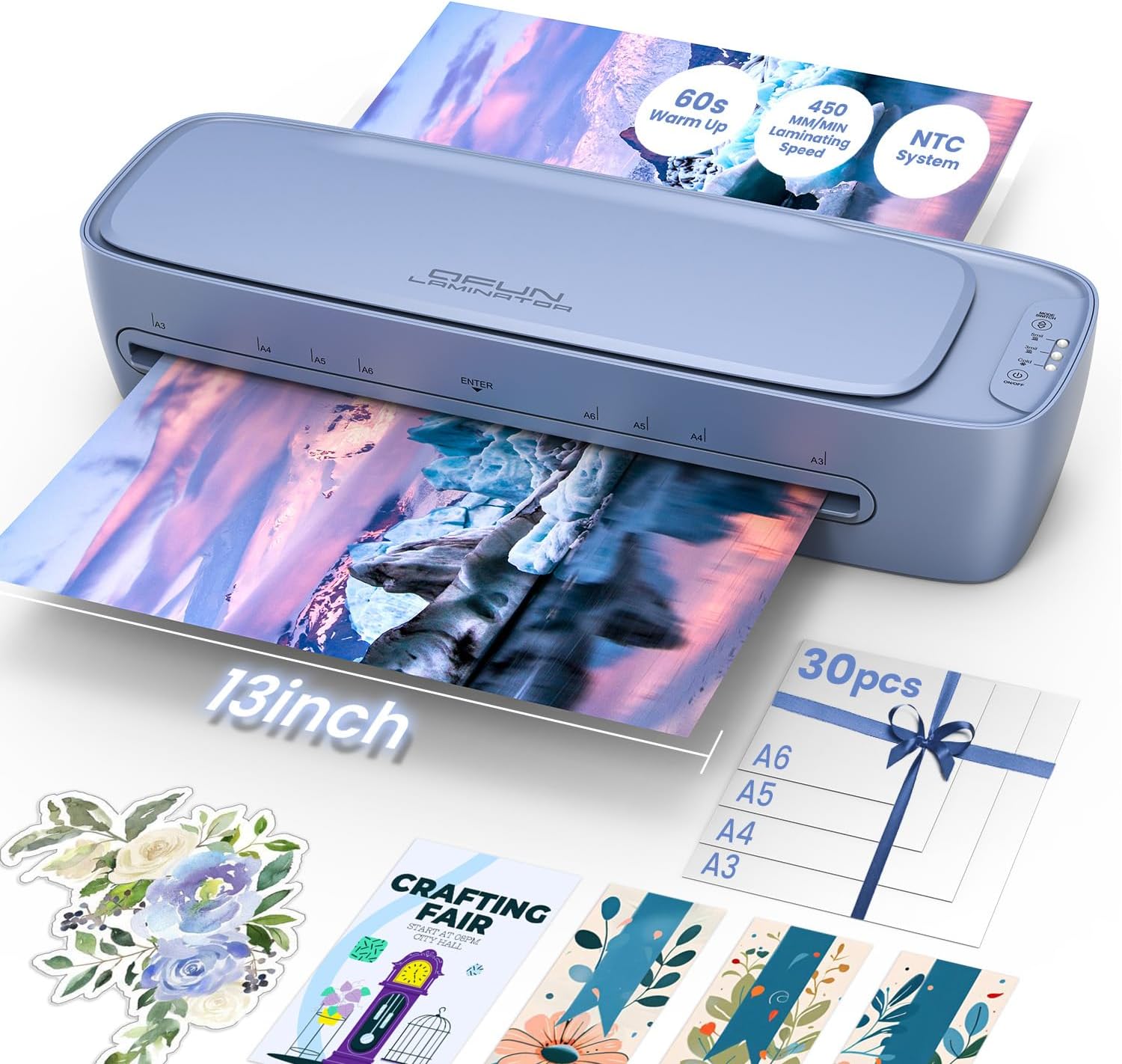
| Warm Up Time | 60s |
|---|---|
| Number of Rollers | 2 |
| Unit Count | 30 Count |
The Qfun 13-inch laminator handles A3/11×17 projects and smaller documents using either thermal or cold pressure lamination, making it useful for posters, certificates, photos, and craft items. It heats in about 60 seconds and runs at a relatively fast 450 mm/min speed, while an NTC temperature control chip plus a dual-roller system aims to reduce bubbles and wrinkles for smoother results. The unit includes built-in storage and a set of accessories — a cutter, corner rounder, hole punch, binder rings and 30 three-mil pouches — so you can start laminating right away. Practical safety features include an ABS quick-release to clear jams and an auto shutoff for energy savings. On the cold-lamination side, it supports pressure-based bonding for heat-sensitive items but requires self-adhesive pouches, which are not included. The machine is lightweight and compact for desktop use, though heavy-volume shops may prefer a larger, higher-capacity device. For mixed home, school, and small-business tasks it balances speed, convenience, and useful extras in one tidy package.
Best for: Buyers who want a versatile, ready-to-use laminator for school projects, classroom handouts, home crafts, and small office tasks where both heat and cold options are useful.
Less Ideal for: Large print shops or high-volume commercial users needing continuous heavy-duty throughput should consider enterprise-grade laminators instead.
- Supports both hot and cold lamination for a wider range of materials
- 60-second warm-up and 450 mm/min speed for quick throughput
- Includes starter accessories and 30 laminating pouches for out-of-box use
- Dual-roller system and NTC temperature control help minimize bubbles and wrinkles
- ABS quick-release and auto shutoff add safety and jam recovery
- Cold lamination requires separate self-adhesive pouches which are not included
- Not designed for very high-volume commercial use
Verdict: A compact, fast 13-inch laminator with hot and cold modes and included starter accessories that suits classrooms, crafters, and small offices seeking an all-around machine for mixed projects.
IntXanth 63" Cold Laminator

| Number of Rollers | 2 |
|---|---|
| Power Supply Voltage | 110V |
| Maximum Working Width | 63 inches |
| Maximum Working Thickness | 1 inch |
| Laminating Speed | 0-6 m/min |
This IntXanth 63" cold laminator is a heavy-duty, production-oriented machine designed for large-format cold lamination up to 63 inches wide and 1 inch thick. It operates in electric or manual modes, and its variable speed drive (0–6 m/min) plus foot pedal option helps match throughput to material and operator skill. Practical features include a soft rubber roller to reduce bubbles, a paper core holder for film handling, an electric control panel for precise operation, and an automatic synchronous backing paper collection system that keeps long runs tidy. Mobility is aided by a caster-equipped stand with two locks so the unit can be moved and secured in a shop. This model is built for consistent, professional output but is a sizable workshop piece that requires floor space and a 110V power feed; it is a cold-only laminator so it cannot be used for heat-activated films. The included emergency stop improves safety during high-volume use.
Best for: Buyers who need a production-capable cold laminator for wide-format prints, signs, or displays and prioritize consistent, high-throughput performance in a shop environment.
Less Ideal for: Casual or home users who lack floor space or who need hot/thermal lamination capabilities should consider smaller or heat-capable alternatives.
- Full 63" working width for wide-format graphics and signage
- Electric/manual dual modes plus foot pedal give flexible production control
- Automatic backing paper collection streamlines long runs
- Soft rubber rollers promote bubble-free laminating
- Lockable casters make the heavy unit mobile and stable once positioned
- Cold-only operation so it cannot laminate heat-activated films
- Large footprint and heavy weight require a dedicated workspace
Verdict: Choose this machine when you need a robust, production-ready cold laminator that handles full 63" wide prints with automated backing collection for efficient shop workflows.
Crenova 13-Inch Laminator

| Number of Rollers | 2 |
|---|---|
| Speed | 320 |
The Crenova 13-inch laminator is a versatile desktop unit that handles both hot and cold lamination for documents, photos, and craft projects. It warms up quickly (about 90 seconds) and runs at speeds up to 355 mm/min using a dual-roller system to deliver consistent heat and pressure for glossy, bubble-free results in thermal mode, while a dedicated cold mode protects heat-sensitive materials. The touchscreen makes mode and thickness selection straightforward, and the machine offers four thermal thickness settings plus a foil option for decorative finishes. Safety and convenience features include an NTC temperature control, a 30-minute auto shutoff, and an ABS jam-release lever that helps clear misfeeds without disassembly. For practical everyday use it suits home office tasks, school projects, and occasional craft laminating, though its feature set and size are aimed at light to medium workloads rather than heavy commercial production.
Best for: Buyers looking for a reliable all-in-one laminator for home, classroom, or small office use who value easy controls, quick setup, and both hot and cold lamination options.
Less Ideal for: Businesses or users who need high-volume, continuous commercial laminating should choose a heavy-duty, production-grade machine instead.
- Supports both hot and cold lamination for heat-sensitive materials
- Fast warm-up (about 90 seconds) and up to 355 mm/min operating speed
- Dual-roller design for consistent, bubble-free laminating finish
- Touchscreen controls and multiple thickness modes for easy setup
- ABS jam-release lever simplifies clearing misfeeds
- Designed for light to medium use, not intended for high-volume commercial work
- No bundled pouches or accessory pack included in the standard package
Verdict: A compact, user-friendly laminator that delivers quick hot and cold laminating with easy touchscreen controls and a handy jam-release for home and small office projects.
MYKLLIFF 9-Inch Laminator

| Number of Rollers | 1 |
|---|
This 9-inch MYKLLIFF laminator is a small, budget-friendly machine for basic document protection and craft projects. It offers hot and cold modes so you can laminate standard documents and use self-adhesive sheets for heat-sensitive items, and it reaches operating temperature in about three minutes to reduce wait time. The unit includes a jam-release lever to clear stuck pouches without damaging papers and runs quietly, which is convenient in classrooms or home offices. Its compact footprint makes it easy to store or carry between locations, and the package appears to include basic accessories for immediate use. Because it is a single-roller, entry-level device, it handles typical pouches (recommended 3–4.5 mil) rather than heavy-duty laminating tasks, and very thick or oversized items may not feed smoothly. For routine laminating of photos, certificates, labels, and classroom materials, this machine delivers the core functions at a low cost, but it is not built for high-volume or heavy commercial use.
Best for: Buyers looking for an affordable, compact laminator for occasional home, classroom, or craft use who prioritize simple operation and cold-mode capability for delicate items.
Less Ideal for: People who need industrial throughput, heavy-duty finishing, or wide-format laminating should consider a more robust, higher-capacity machine.
- Hot and cold modes let you laminate heat-safe items and use self-adhesive sheets for heat-sensitive materials
- Quick 3-minute warm-up reduces idle time between jobs
- ABS jam-release lever lets you clear stuck pouches without damaging documents
- Compact, lightweight design is easy to store and transport
- Single-roller, entry-level design is not suited for heavy or continuous commercial use
- Recommended pouch thickness range limits use with very thin or very thick laminating pouches
Verdict: A low-cost, compact laminator that gives home and classroom users both hot and cold lamination options with quick warm-up and easy jam release.
Elysine 13 Inch Laminator

| Speed | 17.72 feet_per_minute |
|---|---|
| Number of Rollers | 2 |
This Elysine 13-inch laminator is a full kit built for frequent home, school, or small-office use and supports both hot and cold lamination up to 11×17 inches. It ships with a paper cutter, corner rounder, hole punch, binder rings, and 30 pouches stored in an onboard compartment so you can start laminating right away. The unit warms up in about 60 seconds and runs at roughly 450 mm/min, so short jobs and batches finish quickly, while the dual-roller design and NTC temperature control aim to reduce wrinkles and bubbles for consistent results. Cold mode lets you laminate heat-sensitive items when used with self-adhesive pouches, and the ABS jam-release button plus a 45-minute auto-shutoff increase safety and reduce the risk of damaged documents. The machine is practical and easy to operate with one-touch controls, but cold lamination requires special pouches sold separately and heavy-duty or very thick materials may not be supported by the included pouch thickness range.
Best for: Buyers who prioritize a reliable, ready-to-use laminator with consistent results and straightforward controls for school, home projects, or small office batches.
Less Ideal for: People needing industrial throughput or support for very heavy-duty, extra-thick pouches should consider commercial-grade laminators instead.
- Supports hot and cold lamination for heat-sensitive and regular items
- 13-inch feed handles up to 11×17-inch (A3) documents
- Fast 60-second warm-up and 450 mm/min lamination speed for quick jobs
- Dual-roller with NTC temperature control reduces wrinkles and bubbles
- Built-in accessory compartment and starter kit of tools and pouches
- Cold mode requires separately purchased self-adhesive pouches
- May not accept very thick or specialty pouches beyond 3mil and 5mil
Verdict: Choose this kit-style 13-inch laminator if you want a dependable, fast warm-up machine that delivers consistent hot and cold lamination for everyday office, school, and home needs.
Buyounger 9-Inch Laminator
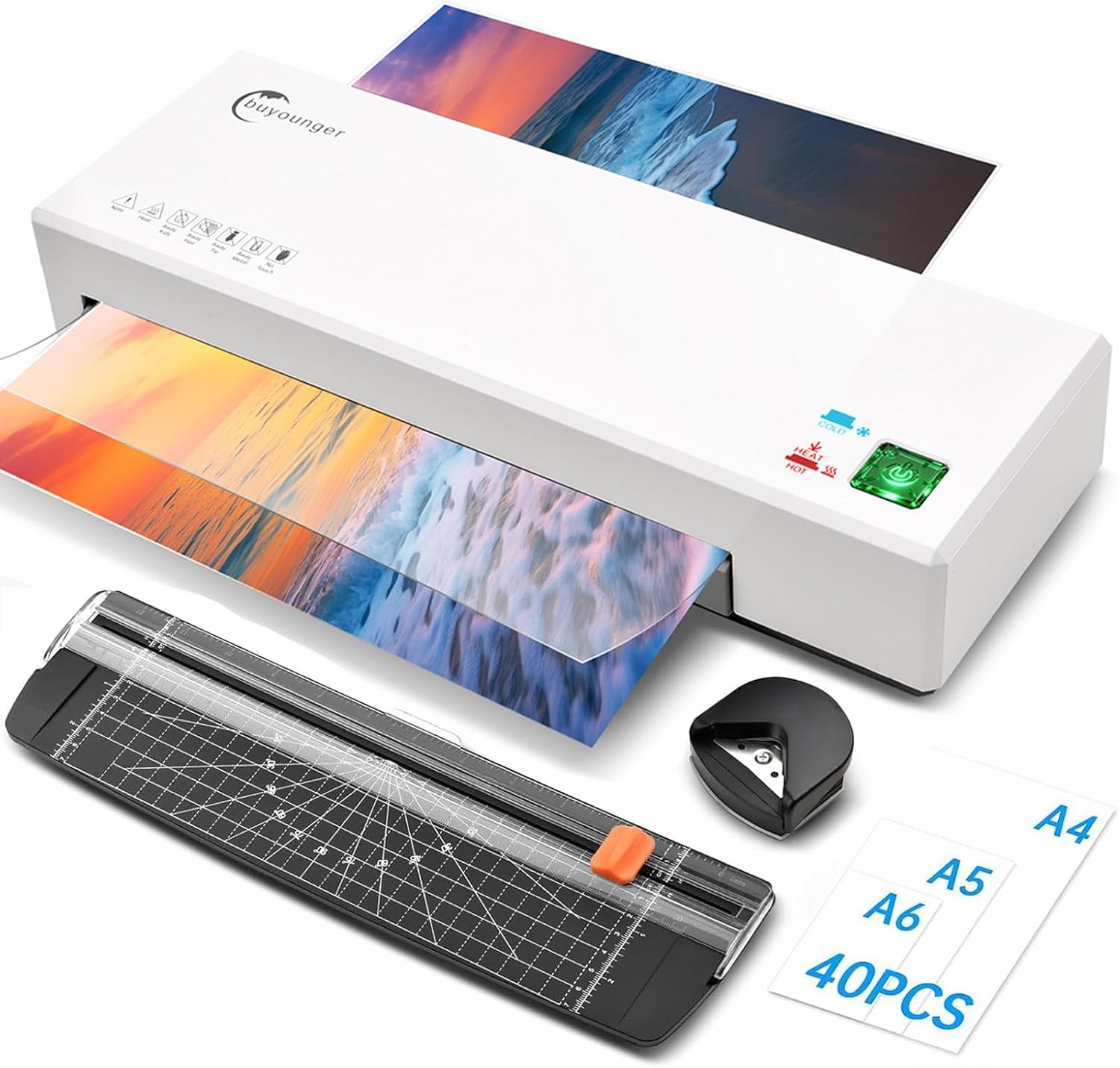
| Warm Up Time | 1 min |
|---|---|
| Roller System | 2 rollers |
| Laminating Speed | 340 mm/min |
| Pouch Thickness Compatibility | 3-5 mil |
| Max Width | 9 Inch |
This Buyounger 9-inch laminator is a small thermal and cold laminator aimed at home, school, and light office tasks. It accepts up to 9-inch wide pouches and heats up in about a minute, using two heated rollers to deliver wrinkle-free laminates at a stated speed of 340 mm/min. The unit includes 40 pouches, a paper cutter, and a corner rounder so you can trim and finish documents right away, and the ABS jam-release button helps clear stuck pouches without forcing them through. Cold mode supports heat-sensitive items when used with self-adhesive cold pouches. Practical benefits include fast warm-up, quiet operation, and simple controls that make it easy to laminate photos, signs, flashcards, and small craft projects. Limitations are its A4/A5/A6 maximum width and lightweight build, which mean it is not intended for high-volume commercial use or larger formats; cold laminating requires separate self-adhesive pouches that are not included.
Best for: Buyers who want an affordable, easy-to-use laminator for home, classroom, or small office projects and who value fast warm-up and simple jam recovery.
Less Ideal for: People who need wide-format laminating, industrial-level throughput, or a machine built for continuous heavy-duty use should look at larger desktop or commercial laminators.
- Quick 1-minute warm-up gets jobs started fast
- Dual thermal and cold modes for heat-sensitive materials
- Includes 40 pouches plus cutter and corner rounder for immediate use
- ABS jam-release button makes clearing jams simple and protects documents
- Two-roller system delivers smooth, wrinkle-free laminates at 340 mm/min
- Maximum 9-inch width limits it to A4/A5/A6 and smaller projects
- Cold laminating requires separate self-adhesive pouches which are not supplied
- Not designed for heavy commercial or high-volume laminating
Verdict: A compact, budget-friendly laminator that delivers quick, reliable thermal and cold laminating for home and classroom use.
Crenova A4 Laminator

| Warm Up Time | 1 minute |
|---|---|
| Speed | 320 rpm |
| Number of Rollers | 2 |
The Crenova A4 Laminator is a small, easy-to-use thermal laminator designed for occasional home, school, or light office jobs. It accepts A4/9-inch pouches and offers hot and cold modes, letting you laminate photos, certificates, ID cards, menus, and craft pieces without specialty training. The unit reaches operating temperature in about one minute and runs on two rollers at roughly 320 rpm for consistent, bubble-reduced results; a simple single-switch control makes operation straightforward. It is portable and compact, so it tucks onto a desk or shelf and is simple to store between uses. Practical limitations include its compact throat, which restricts you to A4/9-inch width pouches, and the basic control set that lacks fine temperature or thickness adjustments found on larger machines. The machine also requires manual jam clearing using the ABS lever if a pouch sticks. For buyers seeking a small, reliable laminator for routine cold- and hot-lamination tasks, this delivers predictable, user-friendly performance.
Best for: Buyers who want a straightforward, low-effort laminator for occasional home, school, or light office use and prioritize ease of use and predictable results.
Less Ideal for: People who need to laminate large-format items, heavy-duty volumes, or require precise temperature and thickness control for specialty pouches.
- Fast warm-up time of about one minute gets jobs started quickly
- Hot and cold modes handle heat-sensitive items and standard thermal lamination
- Compact, lightweight design is easy to store and move
- Simple one-button/switch operation is beginner-friendly
- Limited to A4/9-inch width pouches so larger documents cannot be laminated
- No advanced controls for temperature or pouch thickness adjustments
Verdict: If you need a compact, user-friendly laminator for routine A4 lamination and occasional cold jobs, this Crenova unit is a reliable, low-friction choice.
Choosing the Right Cold Laminator: Key Factors to Consider
Seal Uniformity and Clarity
A cold laminator's primary job is to create an even, transparent seal that preserves the look and readability of the document. Inconsistent pressure or poorly matched pouch material can produce bubbles, wrinkles, or cloudiness. You should expect a machine to deliver consistent clarity across the entire sheet so graphics and text remain crisp.
Uniform sealing matters for archival prints, teaching materials, and any laminated item you expect to handle frequently. If you plan to laminate photos or detailed graphics, prioritize a unit known for even pressure and low optical distortion.
Sheet Handling and Ease of Use
How a machine feeds and aligns pouches determines how often you get perfect results on the first try. Look for easy alignment guides, a flat feeding path, and a mechanism that grips pouches without skewing them. Simpler controls reduce user error and speed up repetitive tasks.
For occasional users, an intuitive feed and clear status indicators reduce setup time. For classroom or small office use, consider machines that help prevent jams and allow simple recovery if a pouch is misfed.
Pouch Size and Thickness Compatibility
Cold laminators vary in the range of pouch sizes and material thicknesses they accept. Some handle only standard letter sizes; others accept wide or custom sizes and thicker pouch laminates. Choose a unit that supports the document sizes you use most often and the pouch thickness that matches your durability needs.
Thicker pouches offer stronger protection but require a mechanism able to apply adequate uniform pressure. Confirming compatibility ahead of purchase reduces frustration and widens the range of projects you can finish.
Throughput and Speed
Speed matters when you have multiple items to laminate. Throughput is determined by how quickly a machine can accept a pouch and apply consistent pressure without manual intervention. Faster machines are useful for bulk classroom prep or office tasks; slower but steadier machines may be a better fit for occasional home users.
Also consider how long the machine takes to recover from a jam and how easy it is to remove finished work. A balance of steady speed and reliable handling usually serves most buyers best.
Maintenance and Reliability
Cold laminators typically require less maintenance than heated units, but rollers, feed mechanisms, and guides can still wear or collect adhesive residue. Durable construction and replaceable parts extend useful life. Evaluate how simple routine cleaning is and whether the machine design exposes rollers for occasional maintenance.
Reliable units reduce downtime in classrooms or small offices and lower the total cost of ownership by avoiding frequent repairs or replacements.
Safety and Ergonomics
Because cold laminators work without heat, they avoid burn risk, but safety still matters. Look for features such as finger-safe feed openings, stable bases that resist tipping, and clear on/off controls. Ergonomic details like easy-access release levers and low-effort feeding reduce hand strain during repetitive use.
Good ergonomics also speed up workflow and reduce accidental damage to documents during the lamination process.
Cold Lamination Vs Heat Lamination
Cold lamination uses pressure-sensitive films instead of heat to seal materials. That makes it safer for heat-sensitive originals like certain photo papers, heat-sensitive inks, and some craft materials. Cold methods also avoid the risk of heat distortion and are often preferred when you need to laminate items that cannot tolerate elevated temperatures.
Because cold laminators rely on adhesive-backed pouches, the choice of pouch material and the machine's pressure system determine final results more than thermal performance. Understanding that tradeoff helps you match pouch type and machine capability to your item's sensitivity and expected handling.
- Ideal for heat-sensitive documents and materials
- Avoids thermal warping or color shifts
- Depends on consistent pressure and pouch adhesion for clarity
Choosing Pouch Materials
Not all laminating pouches are the same. They differ in thickness, finish, and adhesive formulation. Thicker pouches increase rigidity and tear resistance but require stronger pressure. Matte or glossy finishes affect glare and color perception, so pick a finish that suits viewing conditions.
If you will laminate photos or detailed graphics, select pouches rated for photo-safe use and low optical distortion. For frequently handled ID cards, thicker, more rigid pouches improve edge protection and longevity.
- Thickness impacts rigidity and required machine pressure
- Finish choice affects glare and color appearance
- Photo-safe formulations reduce risk of image degradation
Maintenance Tips to Keep Results Consistent
Even though cold laminators do not use heat, debris and adhesive residue can accumulate on rollers and guides. Clean rollers periodically with recommended non-abrasive cleaners and follow any instructions for removing stuck pouches safely. Regular cleaning maintains seal uniformity and reduces jams.
Store pouches flat and in original packaging when possible; curled or bent pouches feed poorly and increase the chance of misalignment. If the machine has replaceable rollers or a detachable feed tray, learn how to access these parts before you need them.
- Clean rollers regularly with non-abrasive solutions
- Store pouches flat to prevent feeding issues
- Follow manufacturer guidance for replacing worn parts
Common Problems and How to Avoid Them
Bubbles, wrinkles, and skewed seals are the most common lamination issues. To avoid them, use correctly sized pouches, feed documents straight, and ensure the pouch is centered before engagement. If bubbles appear, many cold lamination systems offer a slow feed or re-roll option to smooth the film.
Frequent jams often indicate a feeding alignment problem or damaged pouches. Check pouch edges for creases and keep the feed path clear of debris. If you need to laminate oddly shaped or very small items, consider using backing boards or carrier sheets recommended for the machine.
- Center documents and check pouch edges before feeding
- Use carrier sheets for small or irregular items
- If bubbles occur, re-roll slowly where possible
Best Practices for Classroom and Small Office Use
In higher-volume settings, plan workflow to batch similar sizes and pouch thicknesses together. This reduces setup changes and feed errors. Label completed items or use a staging tray to allow time for adhesive to settle before stacking.
Train multiple users on basic alignment and jam recovery procedures to minimize downtime. For shared equipment, keep a small maintenance kit with a cleaning cloth, mild cleaner, and spare pouches to avoid delays.
- Batch similar tasks to improve throughput
- Provide simple training on alignment and jam recovery
- Keep a maintenance kit on hand
How We Chose the Best Cold Laminator
We focused on practical, repeatable performance metrics that matter to people using cold laminators in home, classroom, and small office settings. Our selection filtered for machines that consistently produce secure seals without heat and that handle common pouch thicknesses and document sizes. Evaluation criteria included ease of sheet feeding and alignment, seal uniformity and clarity, compatibility with pouch sizes and thicknesses, speed and throughput for typical home or small office workloads, and durability of the feed and roller mechanisms. Excluded were hobbyist tools that require complex jigs, units intended only for industrial high-volume lamination, and any device that relied on heat to form the seal. We also considered maintenance needs and the availability of clear user controls. The final picks balance straightforward operation, consistent lamination results, and mechanical robustness for everyday non-industrial use.
Our full evaluation process is outlined in our review methodology.
FAQ
Can I laminate photos with a cold laminator?
Often yes. Cold lamination is suitable for many photo papers, especially when heat could damage inks or coatings. Use pouches specified as photo-safe and test with a single print first to confirm adhesion and optical clarity.
What pouch thickness should I choose for ID cards?
Usually thicker pouches provide the rigidity and edge protection needed for ID cards. Look for pouches designed for card thicknesses and ensure the machine accepts that thickness to avoid feeding problems.
How do I remove bubbles after laminating?
Small bubbles sometimes smooth out if you run the laminated sheet through a slow re-roll feature if the machine has one. Otherwise, try gently pressing with a soft cloth from the center outward to reduce trapped air. Larger bubbles may require re-lamination with a fresh pouch.
Are cold laminators safe for kids to use?
Yes, cold laminators eliminate burn risk associated with heated rollers, making them safer for supervised classroom use. However, standard safety precautions still apply, such as keeping fingers away from feed openings and supervising younger children during operation.
Do cold laminators require special cleaning?
Maintenance is generally simple. Use non-abrasive cleaners and soft cloths to remove adhesive residue from rollers when needed. Avoid solvents not recommended by the manufacturer and perform routine checks for debris in the feed path.
Final Verdict
When choosing a cold laminator, prioritize machines that deliver consistent seal uniformity and handle the pouch sizes and thicknesses you use most. Balance throughput needs with user-friendly feeding and alignment features, and consider build quality if the unit will see frequent classroom or small office use. Tradeoffs are common: higher throughput and heavier-duty handling often mean a larger footprint and slightly more maintenance. Choose the machine that best matches how often you laminate and the types of items you protect to get reliable, long-lasting results.