
Note: This article contains affiliate links. If you click on these links and make a purchase, we may earn a small commission at no extra cost to you. This helps support our research and content. Read our full affiliate disclosure here.
If you handle mostly text documents and need a small, efficient device, a compact monochrome printer keeps your workspace tidy while delivering dependable output. These printers are optimized for black-and-white printing, which reduces ink or toner complexity and often lowers ongoing costs. In this guide we shortlist six strong options focused on speed, running cost, and footprint so you can pick the right match for your home office or small business. Below you will find our top picks and clear evaluation criteria so you can compare duty cycle, connectivity, and ease of maintenance at a glance.
Top Picks at a Glance
| Best Overall The best all-around choice for most situations | Xerox B230 Monochrome Printer |  |
| Best Value The sweet spot between price and what you get | HP LaserJet M209dw |  |
| Best Budget The cheapest option that still gets the job done reliably | Canon imageCLASS LBP6030w |  |
| Top Rated A top-rated pick with lots of positive feedback | HP LaserJet Pro M15w |  |
| Most Popular A crowd favorite that many people choose with confidence | Brother HL-L2350DW Compact Laser Printer |  |
| Best Seller A high-volume bestseller chosen again and again | Brother DCP-L2640DW |  |
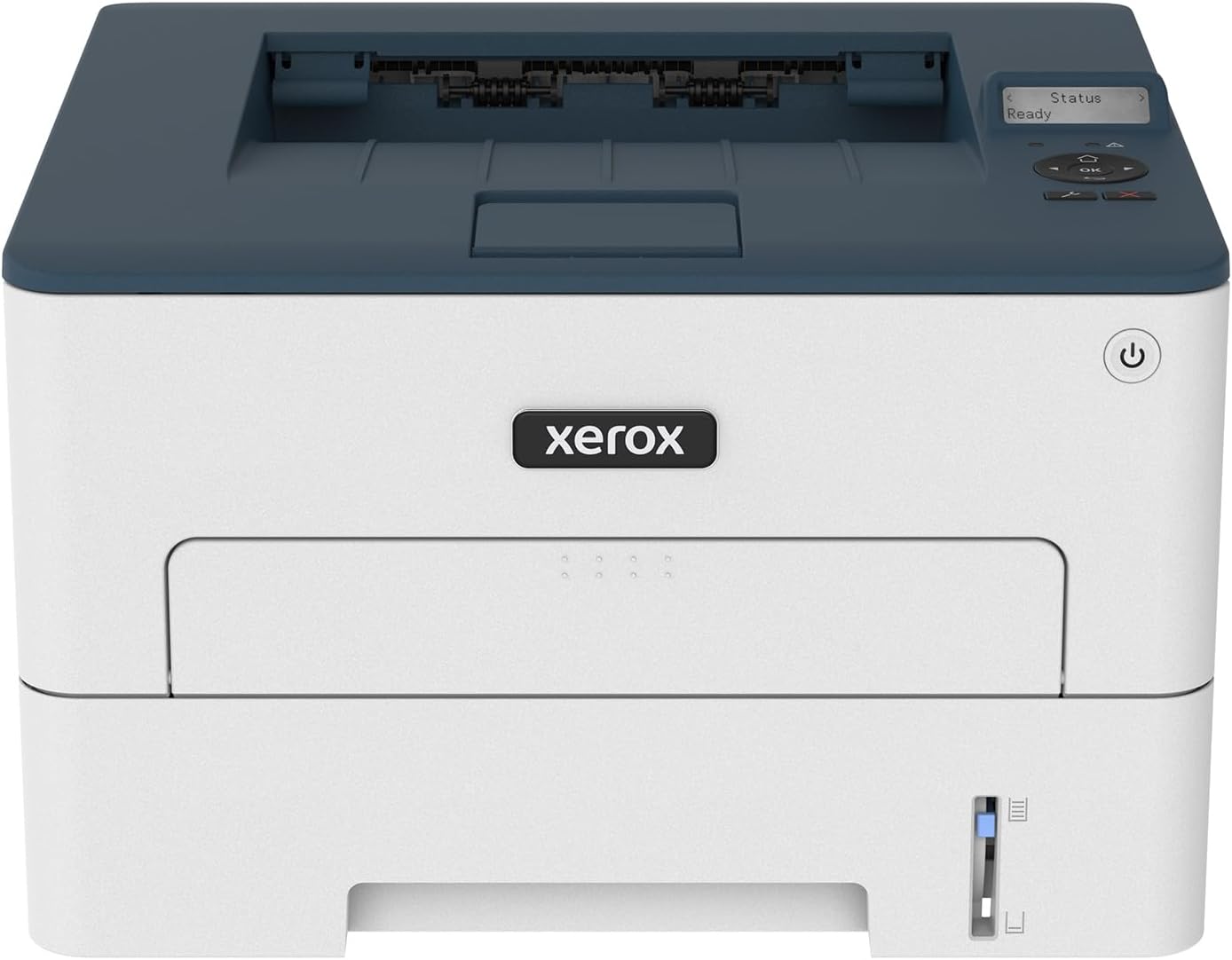
Xerox B230 Monochrome Printer
| Printer Type | Laser |
|---|---|
| Maximum Copy Speed Black and White | 36 pages_per_minute |
| Maximum Sheet Capacity | 250 |
| Duplex | Automatic |
| Printer Connectivity Type | USB, Wi-Fi |
The Xerox B230 is a compact black-and-white laser printer built for small workgroups and home offices that need reliable, fast document printing without a big footprint. It prints up to 36 pages per minute, offers automatic two-sided printing, and holds up to 250 sheets in its standard tray, which keeps routine tasks uninterrupted. Built-in Wi-Fi with Wi‑Fi Direct and support for AirPrint, Mopria and Chromebook printing make mobile and desktop printing straightforward, and the 1 GHz dual-core processor with 256 MB memory helps feed short to moderate print jobs quickly. The two-line LCD and Ethernet port add simple local control and network reliability for a small office. On the downside, this is a single-function monochrome device so it does not scan or copy, and its built-in memory and feature set are aimed at light to medium monthly volumes rather than heavy production environments. For buyers prioritizing compact size, speed, and straightforward wireless printing, the B230 delivers a practical, no-frills solution.
Best for: Buyers who want a compact, reliable monochrome printer for a home office or small team that values speed, simple wireless setup, and straightforward document printing.
Less Ideal for: Users who need multifunction capabilities, high-volume production printing, or advanced on-device finishing should consider different models.
- Fast monochrome printing up to 36 ppm for quick document output
- Automatic duplex printing reduces paper use and manual handling
- Built-in Wi‑Fi, Wi‑Fi Direct and mobile printing support for AirPrint and Mopria
- 250-sheet standard paper capacity keeps daily jobs from frequent refills
- Print-only device with no scanning or copying functions
Verdict: A fast, space-saving monochrome laser that trims paper waste and delivers reliable wireless printing for small offices and home workstations.
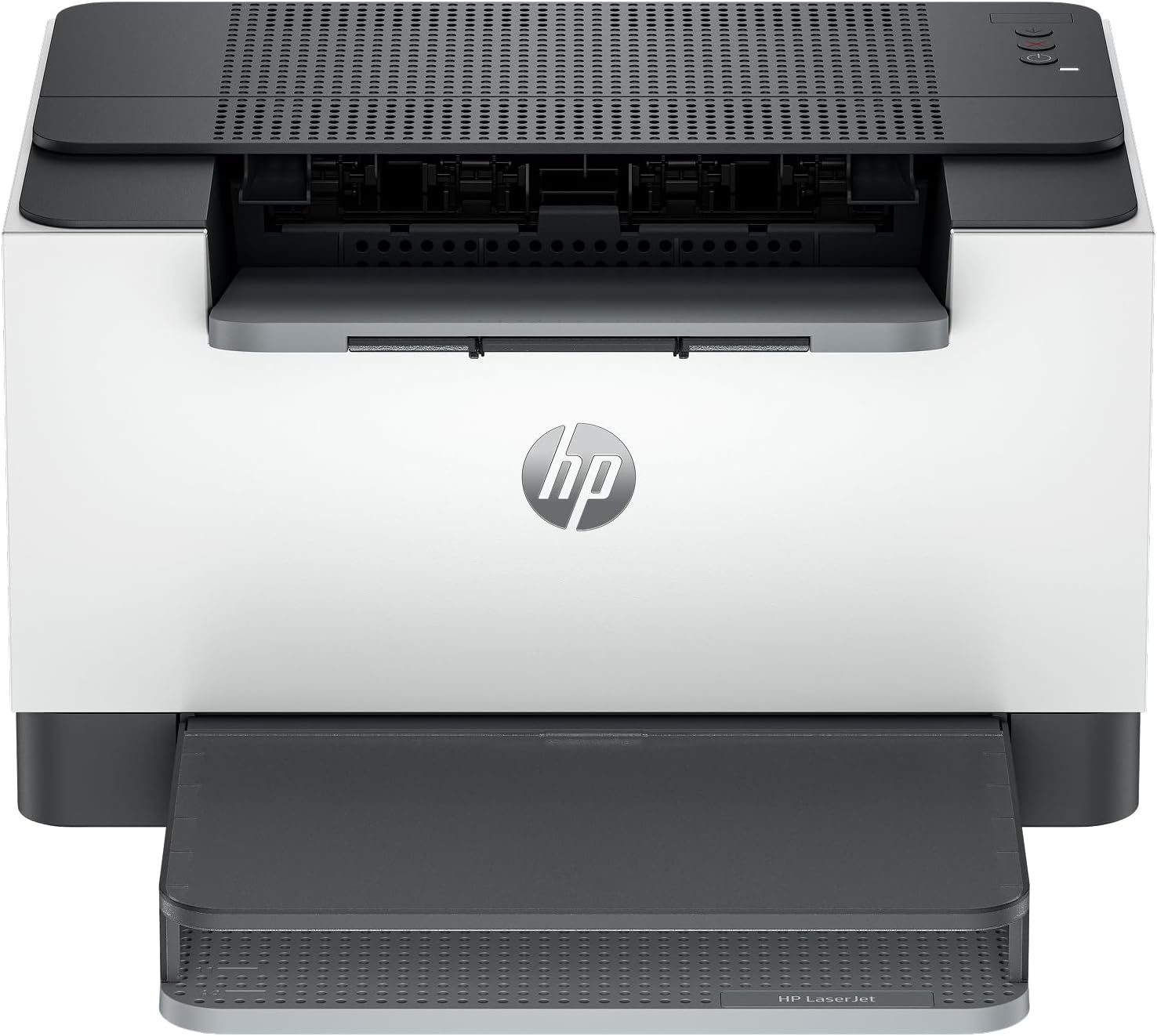
HP LaserJet M209dw
| Print speed (mono) | Up to 30 ppm single-sided, up to 19 ipm two-sided |
|---|---|
| Connectivity | Dual-band Wi-Fi, mobile printing |
| Recommended users | Best for 1-5 people |
| Instant Ink | Eligible |
The HP LaserJet M209dw is a compact monochrome laser printer geared to small office or home-office users who need reliable black-and-white output. It prints single-sided up to 30 ppm and handles automatic two-sided printing at a lower but still competitive speed, which keeps document workflows moving. Setup is straightforward thanks to dual-band Wi-Fi with a self-reset feature that helps recover from common connectivity hiccups, and mobile printing support makes it easy to send jobs from phones or tablets. Built-in security features help protect the device from network attacks, a useful confidence point if the printer sits on a shared network. The unit is optimized for light to moderate daily volumes—best for 1 to 5 users—and is Instant Ink eligible for those who want a managed supply option. Limitations are typical for its class: it only prints in black and white and lacks advanced finishing features, and it is sized and spec'd for small teams rather than heavy production use.
Best for: Buyers who want a compact, reliable monochrome laser for a small team or home office and prioritize fast black-and-white output, simple wireless setup, and network security.
Less Ideal for: Users who need color printing, high monthly volumes, or integrated finishing like stapling and large paper trays should consider other options.
- Fast single-sided black-and-white printing up to 30 ppm
- Automatic two-sided printing for reduced paper use
- Dual-band Wi-Fi with self-reset simplifies wireless setup and reliability
- Built-in security features to protect the device on a network
- Mobile printing support for printing from phones and tablets
- Monochrome only, no color printing capability
- Not intended for high-volume production or advanced finishing tasks
Verdict: A compact, fast monochrome laser built for small teams that need dependable black-and-white printing with simple wireless setup and strong security.
Canon imageCLASS LBP6030w

| Printer Type | Laser |
|---|---|
| Printer Connectivity Type | Wi-Fi |
| B&W Pages per Minute | 19 pages_per_minute |
| Compatible Cartridge | Canon Genuine Toner 125 (1,600 page yield) |
| Maximum Sheet Capacity | 150 |
The Canon imageCLASS LBP6030w is a compact black-and-white laser printer designed for personal and small home-office use. It prints up to 19 pages per minute with an initial page out in about 8 seconds, and supports Wi-Fi so you can print from laptops and compatible mobile devices without a cable. The single-tray design holds up to 150 sheets, and it uses Canon Genuine Toner 125 cartridges rated at about 1,600 pages, which keeps running costs predictable. Practical benefits include a small footprint that fits on tight desks, low idle power draw in Energy Saver mode, and straightforward app-based control. Important limitations are the lack of automatic duplexing and that it is print-only, so there is no scanning or copying built in; the monochrome output and basic feature set mean it is not suited for color jobs or advanced office workflows. Setup can be quick on modern routers but may require driver steps on some systems. For buyers wanting a simple, reliable compact laser focused on everyday black-and-white printing, this model delivers the essentials.
Best for: Buyers seeking an affordable, space-saving monochrome laser for basic home or small-office printing who prioritize speed and simple wireless setup over multifunction features.
Less Ideal for: Users who need color printing, automatic two-sided printing, or combined scanning/copying functions should consider a different multifunction or color model.
- Compact footprint that fits small desks and tight spaces
- Wireless connectivity for printing from laptops and mobile devices
- Fast black-and-white output up to 19 ppm with quick first page time
- Uses Canon Genuine Toner 125 with a predictable page yield
- No automatic duplexing, so double-sided printing must be manual
- Print-only design with no scanner or copier functionality
Verdict: A budget-friendly, compact monochrome laser that delivers fast, reliable black-and-white prints for small spaces and basic home-office needs.
HP LaserJet Pro M15w

| Printer Type | Laser |
|---|---|
| Print Speed | Up to 19 ppm |
| Print Resolution | 600 x 600 dpi |
| Connectivity | USB, Wi-Fi |
| Maximum Sheet Capacity | 150 |
The HP LaserJet Pro M15w is a tiny, no-frills monochrome laser printer aimed at 1–3 users who need reliable everyday black-and-white prints. It prints up to 19 ppm with a first page out in about 8 seconds and supports USB, Wi-Fi and Wi‑Fi Direct for mobile and cloud printing via the HP Smart app. Its compact footprint and HP Auto-On/Auto-Off tech make it easy to tuck into a small desk or home office and save power when idle. The printer handles standard media sizes up to letter and a 150-sheet input capacity for moderate monthly volumes under 1,000 pages. Expect crisp 600 x 600 dpi text and 1200 dpi copy resolution, but no automatic duplexing or color printing. Another practical consideration is HP's dynamic security that requires original HP cartridges with compatible chips, which affects third-party toner use. For buyers who need a compact, fast, and dependable monochrome printer for routine documents, this M15w balances footprint and performance well.
Best for: Someone who prioritizes a small, dependable monochrome printer for routine document printing and values simple mobile/cloud printing and low idle power use.
Less Ideal for: Users who need automatic two-sided printing, high-volume production beyond about 1,000 pages per month, or color printing should look at larger or differently featured models.
- Very compact footprint that fits small desks and tight spaces
- Fast black-and-white printing up to 19 pages per minute with quick first-page output
- Wireless printing with Wi‑Fi, Wi‑Fi Direct and HP Smart app for mobile and cloud printing
- Low power features including HP Auto-On/Auto-Off to reduce energy use
- Handles common paper types and a 150-sheet input for moderate home or small office workloads
- No automatic duplex (two-sided) printing
- Requires original HP cartridges with compatible chips which prevents use of some third-party toners
Verdict: If you need a small, energy-conscious monochrome laser that reliably handles everyday documents and mobile printing, the HP M15w is a practical compact choice.
Brother HL-L2350DW Compact Laser Printer

| Printer Type | Laser |
|---|---|
| Print Speed | 32 pages_per_minute |
| Duplex | Automatic |
| Maximum Media Size | 8.5 x 14 inch |
| Maximum Sheet Capacity | 250 |
The Brother HL-L2350DW is a straightforward compact monochrome laser printer built for steady everyday printing in a home or small office. It prints up to 32 pages per minute and supports automatic two-sided printing to cut paper use, while a 250-sheet input helps reduce refills during typical workloads. Connectivity includes built-in wireless plus USB so you can print from PCs, laptops, and mobile devices on the same network. The unit ships with a starter toner and a long-life drum, and Brother offers an optional toner subscription for hands-off replenishment. Practical strengths are predictable laser text quality, simple setup, and small footprint that fits tight desks. Limitations include no color printing or scanning and a single paper tray, so it is not a fit for users who need multifunction features or heavy paper handling in one device.
Best for: Buyers who prioritize reliable, fast black-and-white printing from a compact machine and who value proven performance backed by many user reviews.
Less Ideal for: Users who need a multifunction device, color printing, or advanced paper handling and finishing options should look elsewhere.
- Fast monochrome output up to 32 ppm for high-volume text jobs
- Automatic duplexing reduces paper use and manual refeeding
- 250-sheet paper capacity lowers refills for small office workloads
- Wireless and USB connectivity allow printing from PCs and mobile devices
- Includes starter toner and long-life drum for immediate use
- Print-only device with no scanning or color capability
- Single tray limits mixed-media or multiple paper source workflows
Verdict: Choose the HL-L2350DW when you want a compact, fast, and dependable monochrome laser printer for everyday home or small office text printing.
Brother DCP-L2640DW

| Printer Type | Laser |
|---|---|
| B&W Pages per Minute | 36 pages_per_minute |
| Auto Document Feeder Capacity | 50 pages |
| Maximum Sheet Capacity | 250 |
| Printer Connectivity Type | Ethernet, USB, Wi-Fi |
The Brother DCP-L2640DW is a small-footprint monochrome laser multifunction built for busy home offices and small workgroups. It reliably produces crisp black-and-white pages at up to 36 ppm, supports automatic duplex printing, and handles multi-page scan and copy jobs with a 50-sheet auto document feeder and flatbed scanner. Connectivity is flexible: dual-band Wi-Fi, Ethernet, and USB let you share the printer across devices or connect directly, and the Brother Mobile Connect app simplifies mobile printing and managing supplies. The 250-sheet input tray reduces how often you refill paper and Toner Save Mode plus eligibility for Brother Refresh subscription help control running costs. Expect solid print quality for text and office documents, quick first-page times, and straightforward setup, but note it is strictly monochrome so it is not suitable for color output and its LCD is a basic display versus touchscreens on higher-end models. Overall, this model emphasizes dependable speed and simple fleet-style features in a compact package.
Best for: Buyers who want a compact, dependable monochrome MFP for routine office documents and value straightforward setup, reliable network sharing, and consistent text output.
Less Ideal for: Users who need color printing or a touchscreen-driven interface for advanced on-device workflows should consider color or higher-end MFPs instead.
- Fast monochrome printing up to 36 pages per minute for high-volume jobs
- 50-sheet auto document feeder and flatbed scanner speed multi-page scanning and copying
- Dual-band Wi-Fi plus Ethernet and USB provide flexible, secure connectivity
- 250-sheet paper tray lowers refills for frequent printing
- Automatic duplex printing and Toner Save Mode help reduce operating costs
- Monochrome only, so it cannot print or scan in color
- Basic LCD and control interface lacks a larger color touchscreen found on some competitors
Verdict: A no-nonsense compact monochrome MFP that delivers fast, reliable black-and-white prints and simple networked sharing for risk-averse small offices.
Choosing the Right Compact Monochrome Printer: Key Factors to Consider
Print Speed and Duty Cycle
Print speed affects how quickly single jobs and back-to-back documents finish, which matters when you regularly print multi-page reports or meeting packets.
Duty cycle ratings indicate the maximum monthly pages a printer is designed to handle. Choosing a device with a duty cycle comfortably above your average monthly volume reduces wear and the chance of premature component failure.
Running Cost and Toner Yield
Toner yield and the cost per page determine long-term operating expenses. A lower upfront price can be offset by expensive cartridges, so compare yield figures and consider high-yield consumables when available.
Also evaluate how simple it is to replace toner and whether the printer accepts third-party replacement cartridges if you plan to lower consumable costs. Look for published pages-per-cartridge metrics to estimate monthly spend accurately.
Physical Size and Installation Space
Compact printers are chosen to save desk or shelf space. Check the device dimensions and required clearance for paper trays and door access to ensure it fits your intended spot.
Think about placement relative to ventilation and power. A model that is technically compact but requires extra clearance for paper-handling or frequent maintenance may not suit cramped work areas.
Connectivity and Network Integration
Where and how you print shapes connectivity needs. Wired Ethernet is useful for steady shared access in small offices. USB remains the simplest option for a single workstation.
Wireless features or mobile printing can speed ad-hoc jobs from phones and laptops, but verify support for the platforms you use. Also check for basic network security features if the printer will be accessible to multiple users.
Output Quality and Paper Handling
Monochrome printers are primarily judged on sharp text reproduction and consistent line art. Look for specs or documentation about DPI and recommended paper types to ensure crisp results for documents and forms.
Paper handling options such as multipurpose trays, automatic document feeders on multifunction variants, and paper capacity affect workflow. For frequent multi-page print jobs, higher input capacity reduces the need for frequent refills.
Maintenance and Reliability
Ease of replacing toner, clearing paper jams, and accessing serviceable parts reduces downtime. Check how consumables are loaded and whether routine tasks can be performed without moving the unit.
Durability is tied to build quality and component ratings. For small offices with steady print volumes, prioritize models with straightforward service procedures and clear support documentation.
When a Compact Monochrome Printer Is the Right Choice
Choose a compact monochrome printer when your workload consists mainly of black-and-white documents such as invoices, reports, legal forms, or plain text correspondence. These machines prioritize speed, cost efficiency, and a smaller footprint compared with color or photo-oriented printers.
They are especially well suited for single-user desks, small shared workstations, and home offices where space and ongoing expenses matter more than color capability.
- Lower consumable complexity with single toner supply
- Typically faster first-page-out and higher text clarity
- Smaller footprint for tight workspaces
Setting Realistic Expectations for Speed and Quality
Manufacturers publish pages-per-minute and DPI figures, but actual performance depends on job complexity and network conditions. For text-heavy print jobs, expect near-spec speeds, while complex PDFs with embedded fonts may print more slowly.
Quality for monochrome printers focuses on legible text and strong contrast rather than photographic fidelity. If you need precise grayscale images, verify sample output or technical documentation before committing.
- Simple text prints usually meet rated speeds
- Complex layouts or high-resolution PDFs can slow throughput
- Monochrome is optimized for sharp text and line art
Space-Saving Placement and Ventilation Tips
Measure the intended placement and leave room for paper trays to open and for toner replacement access. Some compact models require minimal clearance while others need more overhead or front access. Position the unit near a stable surface to avoid vibration during printing.
Ensure adequate ventilation around the device to prevent heat buildup during heavier print runs. Avoid enclosed cabinets unless the space is specifically designed for active equipment and provides airflow.
- Leave clearance for trays and access panels
- Avoid cramped, unventilated enclosures during heavy use
- Place on a stable, level surface to prevent misfeeds
Network Setup and Security Basics
For shared environments, a wired Ethernet connection gives consistent performance and simpler central access. Wireless is convenient for mobile devices but add network authentication and a strong password to reduce unauthorized use.
Keep firmware up to date to address security patches and improvements. Configure user access and consider enabling basic logging if the printer handles sensitive documents.
- Use wired connections for stable shared access
- Enable wireless security and update firmware regularly
- Restrict network access when handling sensitive material
Estimating Ongoing Operating Costs
Calculate cost per page using toner yield and cartridge price. High-yield cartridges and economy modes can significantly reduce per-page expense for heavy users. Factor in occasional maintenance parts like fusers or rollers when estimating long-term ownership costs.
Also consider electricity usage for continuous readiness versus power-cycling behavior. Some compact models include sleep modes that reduce standby consumption and slightly lower operating expenses over time.
- Compare toner yield to your monthly volume
- Include occasional maintenance parts in cost estimates
- Check for energy-saving features to reduce standby consumption
How We Chose the Best Compact Monochrome Printer
We focused on attributes that matter most when buying a compact monochrome printer for home or small office use. Key evaluation points included print speed under typical office workloads, pages-per-minute in real-world document printing, and the rated monthly duty cycle to ensure the model can handle expected job volumes. We assessed running cost using toner yield and manufacturer-yield metrics to gauge ongoing expenses. Physical footprint and weight were considered to ensure the printers fit tight workspaces. Connectivity options were evaluated for flexibility, including wired Ethernet, USB, and mobile printing support for laptop and smartphone workflows. Finally, ease of maintenance and consumables access were examined to minimize downtime and service hassles. We excluded multifunction devices that significantly increase size or add color printheads, and models primarily targeted at photo or color printing. We favored compact units engineered for monochrome document throughput and shortlisted products that meet the usage, duty cycle, and connectivity thresholds above.
Our full evaluation process is outlined in our review methodology.
FAQ
How do I estimate the monthly toner cost for a compact monochrome printer?
Divide the toner cartridge's stated page yield by the cartridge price to get cost per page, then multiply that by your average monthly pages. Consider high-yield cartridges to reduce cost per page for heavier use.
Is a compact monochrome printer suitable for occasional color needs?
No. Compact monochrome printers only print in black and white. If you occasionally need color, a separate color-capable device or a multifunction color model is necessary.
Can I use third-party toner cartridges with compact monochrome printers?
Often third-party cartridges are available and can lower costs, but compatibility and yield vary. Using non-original consumables may affect print quality and could impact warranty terms depending on the manufacturer.
How important is a printer's duty cycle for a small office?
Duty cycle indicates the number of pages a printer is designed to handle monthly. For a small office, choose a model with a duty cycle comfortably above your expected monthly print volume to avoid excessive wear.
What connectivity options should I prioritize for a shared desk printer?
Prioritize wired Ethernet for stable shared access. Include USB for direct workstation connections and wireless or mobile printing if team members need ad-hoc printing from phones or laptops.
Final Verdict
A compact monochrome printer is a practical choice when text speed, low running cost, and a small footprint are top priorities. Balance print speed and duty cycle against the expected monthly volume, then factor in toner yield, maintenance ease, and connectivity to match your workflow. Prioritize a model whose duty cycle and toner economics align with your regular usage. That approach ensures dependable output, minimal downtime, and predictable operating costs for home or small-office document printing.