
Note: This article contains affiliate links. If you click on these links and make a purchase, we may earn a small commission at no extra cost to you. This helps support our research and content. Read our full affiliate disclosure here.
If you run a small apparel or merchandise business, picking the right DTF printer for small businesses affects product quality, turnaround time, and margins. You need a machine that delivers reliable color and adhesion without complex maintenance or a steep learning curve. This guide shortlists the top DTF printers suited to small-scale production, emphasizing factors that matter day to day: print fidelity, transfer durability, and workflow efficiency. Below are our top picks and an explanation of how we evaluated each unit so you can match features to your production goals.
Top Picks at a Glance
| Best Overall The best all-around choice for most situations | PLK A3 DTF Printer S13 |  |
| Best Quality Built to a higher standard if you want something more solid | DXZ 14-Inch DTF Printer |  |
| Best Value The sweet spot between price and what you get | PUNEHOD R1390 DTF Printer |  |
| Best Budget The cheapest option that still gets the job done reliably | Carbcolords A4 DTF Printer Starter Bundle |  |
| Top Rated A top-rated pick with lots of positive feedback | MZK A3 Pro F1080 DTF Printer |  |
| Most Popular A crowd favorite that many people choose with confidence | SENORTIAN A3 DTF Printer |  |
| Best Seller A high-volume bestseller chosen again and again | Lancelot M1630 Pro DTF Printer |  |
PLK A3 DTF Printer S13

| Print resolution | 2880×1440 dpi |
|---|---|
| Printhead | XP600 |
| Print size | 13 inches/33 cm |
| Included consumables | 100m A3 film, 6×250ml inks, 500g powder |
This PLK A3 DTF Printer S13 bundle is a ready-to-run solution for small businesses and home studios that need on-demand garment transfers. The system pairs an A3 XP600 printhead DTF printer with an integrated shaker dryer for powder application and a film cutter, so you can print, powder, dry, and trim transfers without sourcing separate equipment. It offers double the speed of some L-series competitors and a high 2880×1440 dpi resolution, which produces sharp, vibrant prints. The printer's automatic white-ink circulation and stirring help reduce head clogs and lower maintenance interruptions, and the 4.5-inch touchscreen simplifies job setup. Package extras include a 100m film roll, starter inks and powder, and a smoke purifier to keep the workspace cleaner. Limitations to note are Windows-only software support and the physical size and weight that make it more of a dedicated workstation than a portable device; professional setup and occasional maintenance are still required to keep printheads healthy. For small production runs this bundle speeds workflow by combining key steps into one package.
Best for: Small business owners and serious hobbyists who need a compact, end-to-end DTF transfer workflow that reduces equipment juggling and speeds production for on-demand or short-run garment printing.
Less Ideal for: Users who require Mac-native software, ultra-compact portable setups, or completely hands-off, maintenance-free printing should consider other solutions.
- Complete workflow bundle including printer, shaker dryer, film cutter, and starter consumables
- High-resolution output (2880×1440 dpi) for sharp, vibrant transfers
- XP600 printhead with double-speed performance for faster throughput
- Automatic white ink circulation and stirring to reduce settling and clogs
- Included smoke purifier and touchscreen control simplify operation and maintain a cleaner workspace
- Software only supports Windows 7/10/11, no Mac compatibility
- Large, heavy unit intended for a dedicated workspace rather than casual portable use
Verdict: This all-in-one A3 DTF bundle is ideal for small businesses that want a fast, high-resolution, workflow-ready system that gets transfers printed, powdered, dried, and cut with minimal additional equipment.
DXZ 14-Inch DTF Printer

| Printhead | F1080 |
|---|---|
| Max print width | 14 inches |
| Max resolution | 2880×1440 DPI |
| Top speed | up to 500 mm/s |
| Ink bundle | Two-year supply (5×250ml + 500g powder) |
The DXZ 14-Inch DTF Printer is a production-focused garment transfer printer built to handle a range of fabric types with professional results. It uses a single F1080 printhead capable of very high-resolution output and fast line speeds, which suits high-volume T-shirt and apparel runs. Practical features include a true 14-inch print width for full-size transfers, a white ink management system to keep opacity consistent, a precision film cutter, and an air suction plus heating system to reduce curl and speed drying. The printer also emphasizes low-maintenance uptime with automatic moisturizing, scheduled nozzle cleaning, one-click print-to-bake, and a 24/7 auto-maintenance routine that helps prevent clogs during long idle periods. DXZ bundles a substantial two-year ink supply, which lowers initial consumable costs. Important limitations are the printer's weight and footprint, which make it better for a dedicated studio than a home hobby desk, and the reliance on the vendor for specialized service or parts if issues arise. For businesses needing fast, consistent DTF output, the DXZ is built around throughput and reliability.
Best for: Small business owners and production studios focused on high daily throughput and consistent, professional garment transfers who prioritize speed, color accuracy, and low-maintenance operation.
Less Ideal for: Hobbyists or very small operations with limited space or infrequent printing who need a compact, lightweight desktop solution.
- High-resolution F1080 printhead with up to 2880×1440 DPI for sharp, detailed prints
- True 14-inch print width supports full-size transfers without splicing
- Automated maintenance features including auto-moisturizing, scheduled cleaning, and white ink circulation to reduce downtime
- Integrated vacuum and heating system holds media flat and speeds drying to reduce smudging and curling
- Two-year ink supply included reduces early consumable costs and keeps production moving
- Large and heavy unit that requires a dedicated workspace and stable support surface
- Specialized maintenance or parts likely require vendor or pro service for complex issues
Verdict: Choose the DXZ 14-Inch DTF Printer when you need high-speed, full-width DTF production with automated maintenance and a generous ink package to keep a small apparel business running.
PUNEHOD R1390 DTF Printer

| Maximum Media Size | A3 |
|---|---|
| Print Resolution | 2880 x 1440 |
| Ink Supply Mode | CISS |
| Printing Color | CMYK+WW |
| Connectivity | USB, Ethernet |
The PUNEHOD R1390 is an A3-format DTF printer kit built for small businesses that need on-demand custom apparel and accessory printing. It prints CMYK plus dual white, uses a continuous ink supply (CISS) and a white ink circulation, mixing and filtering system to reduce clogging, and supports up to 13-inch print width with RIP software included. The bundle also bundles an A3 oven, 100m of PET film, inks, transfer powder and tutorial resources so you can start producing transfers without sourcing parts separately. Practical benefits include high printed resolution up to 2880 x 1440 dpi and a reel-friendly feed for longer PET rolls that reduces interruptions during batch runs. Expect manual duplex and basic USB/ethernet connectivity rather than networked cloud features, and plan for setup time and some learning on color management and curing to get consistent results. For a small shop wanting a ready-to-run DTF solution with white-ink reliability baked in, this package covers most starter needs while keeping operation and maintenance largely in-house.
Best for: Small business owners and makers who prioritize a turnkey DTF workflow and reliable white-ink handling to produce on-demand apparel and accessory transfers.
Less Ideal for: Large-volume industrial shops that need fully automated, high-throughput production lines or centralized networked print management.
- Includes oven, 100m PET film, inks, powder and RIP software so you can start printing immediately
- White ink circulation, stirring and filtering system reduces clogging and maintenance downtime
- Supports A3/13" width with high resolution up to 2880 x 1440 dpi for detailed transfers
- Reel upgrade and cutting device allow continuous printing from long PET rolls for small-batch efficiency
- Connectivity is limited to USB and basic Ethernet without advanced network/cloud features
- Manual duplex and hands-on setup mean a learning curve for color management and curing
Verdict: A complete A3 DTF starter bundle with white-ink circulation and included oven that gets a small print business producing transfers quickly.
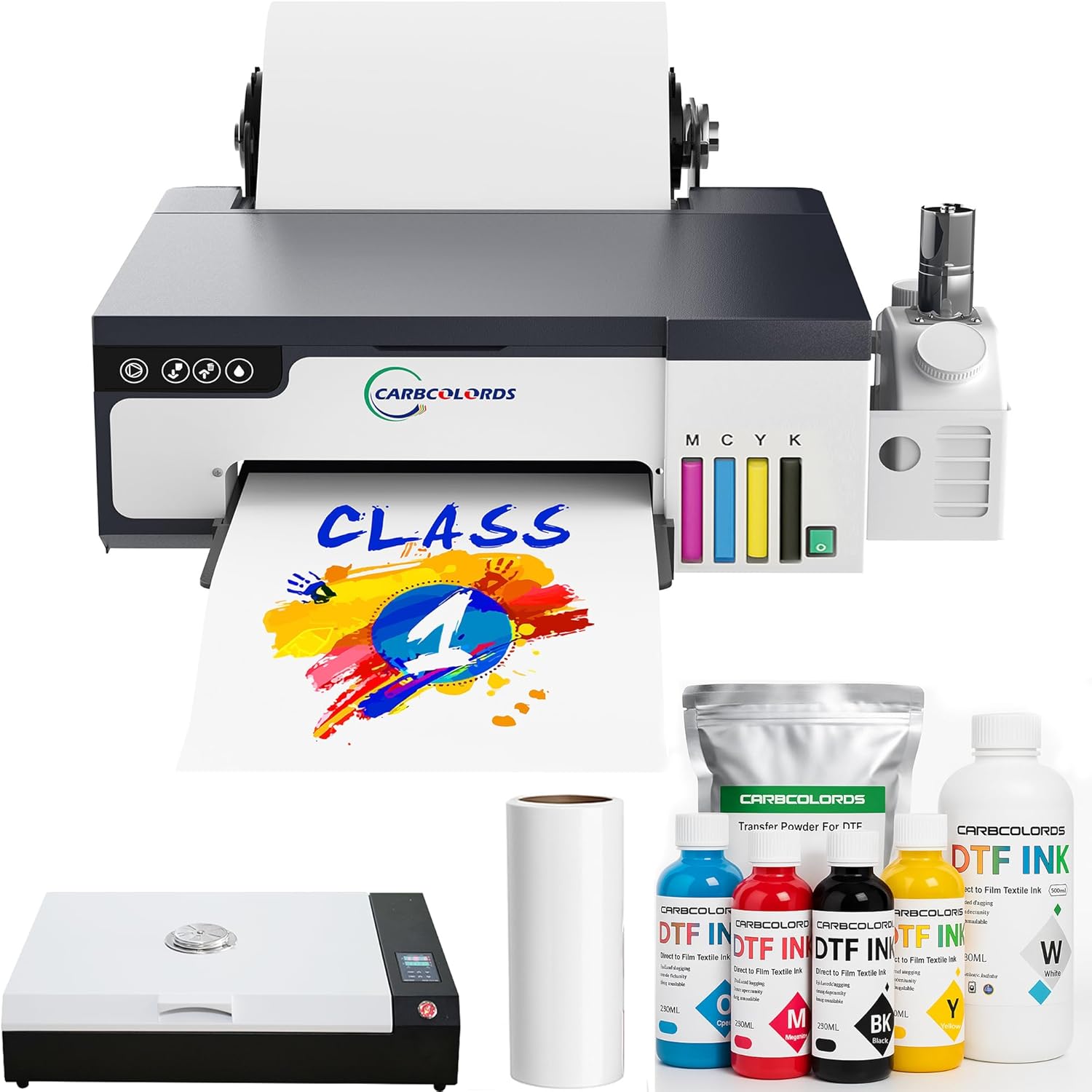
Carbcolords A4 DTF Printer Starter Bundle
| Printer Type | Inkjet |
|---|---|
| Ink Color | Cyan, Magenta, Yellow, Black, White |
| Maximum Media Size | 8.3 x 11.8 inch |
| Printer Connectivity Type | USB |
| Resolution | 2440 x 2440 |
This starter bundle packages an A4 XP600 DTF printer with a curing oven and consumables into a single kit aimed at home studios and micro businesses. You load roll film or A4 sheets, print full-color artwork with CMYK plus white using the built-in white ink mixing system, apply DTF powder, and cure transfers in the included oven before heat pressing onto garments. Notable features include the XP600 printhead for sharper output, a roll feeder that handles up to 8.27-inch film to reduce changeovers, and a white-ink mixing system that helps prevent settling during daily use. The bundle is practical for testing designs, producing logos and chest prints, and running small orders without sourcing parts separately. Expect modest print speeds (around 3 ppm listed) and a learning curve for color management and powder/curing steps compared with turnkey commercial production systems. The USB-only interface and compact A4 format keep the footprint small but limit automation and larger-format work. For budget-minded sellers who need an all-in-one entry path into DTF, this kit covers the full workflow in a space-saving package.
Best for: Small-business operators and craft sellers launching low-volume custom apparel lines who prioritize an affordable, compact all-in-one setup to learn DTF and fulfill small orders.
Less Ideal for: High-volume print shops or users who need wide-format capability, fast throughput, or fully networked production workflows.
- Complete starter kit with printer, A3 oven, inks, roll film and powder included
- XP600 printhead for detailed, vibrant prints
- White ink mixing system reduces clogging and maintenance for daily use
- Roll feeder supports up to 8.27-inch film to streamline small-batch runs
- Listed print speed is relatively slow compared with production-grade DTF machines
- USB-only connectivity limits networked or remote workflow integration
Verdict: If you want an affordable, space-saving all-in-one DTF workflow to start a small apparel business, this bundle provides the printer, oven and consumables to get producing quickly.
MZK A3 Pro F1080 DTF Printer

| Printer Type | self-cleaning Inkjet |
|---|---|
| Maximum print Resolution Color | 2880×1440 dpi |
| Printer Connectivity Type | USB |
| Ink Color | cyan, magenta, yellow, black, white |
| Maximum Media Size | 13 x 41 inches |
The MZK A3 Pro F1080 is a DTF printer built for small businesses and side hustles that need steady, repeatable production. It uses an upgraded F1080 (XP600 Gen2) printhead and a 33cm A3+ film width to deliver up to 2880×1440 dpi output and driven color via ICC curves and variable droplet technology, which helps produce crisp details on transfers. The printer emphasizes uptime with an intelligent timed cleaning system, continuous white-ink circulation, a 3-in-1 anti-clog design, and one-click ink extraction to reduce manual maintenance. A 5-inch LED touchscreen and a higher-performance motherboard simplify daily tasks and support longer run times, and the bundle includes starter ink, film, powder, and a moisturizing solution so you can begin printing immediately. Practical limits: connectivity is USB-only, macOS is not supported by the included software, and true throughput depends on media setup despite the claimed sheet-per-minute rates. For shops that prioritize consistent print quality and reduced nozzle downtime, this unit targets reliable, production-oriented use rather than casual or mobile printing.
Best for: Small apparel shops and makers who need a production-capable DTF printer that reduces downtime through automated maintenance and consistent white-ink handling.
Less Ideal for: People who require networked printing, macOS support, or a truly portable solution should consider other models with Ethernet/Wi-Fi and broader OS compatibility.
- High maximum print resolution (2880×1440 dpi) for detailed transfers
- Automatic timed cleaning and white-ink circulation to minimize nozzle clogging
- Includes starter consumables (ink, film, powder, moisturizing solution) for immediate setup
- 5-inch touchscreen and upgraded motherboard streamline operation and 24/7 runs
- USB-only connectivity limits networked workflows
- Software supports Windows only, no macOS compatibility
Verdict: Choose this printer if you want a production-focused A3 DTF machine built to keep printheads healthy and deliver high-resolution transfers with minimal manual maintenance.
SENORTIAN A3 DTF Printer

| Printer Type | DTF |
|---|---|
| Maximum Media Size | A3 |
| Resolution | 1440 x 1440 dpi |
| Ink Color | Cyan,Magenta,Yellow,Black,White |
| Printer Connectivity Type | USB |
The SENORTIAN A3 DTF Printer bundle is a small-business oriented direct-to-film system designed to print transfers for dark and light fabrics without pretreatment. It uses an L1800-style printhead and a multi-color ink set plus a dedicated white ink circulation and agitation system to reduce white ink settling and keep the white base consistent on dark garments. The printer accepts both roll and sheet media up to A3 size and pairs with a bundled oven for curing, which streamlines moving from print to finished transfer. Connectivity is USB and control is Windows-only via app/software, so you will need a Windows PC and basic familiarity with driver/software setup. Practical benefits include high stated resolution for detailed graphics, straightforward roll feeding for small runs, and the bundled oven for end-to-end transfers. Important limitations are the Windows-only support, USB-only connectivity, and the 102 lb weight and footprint that require a dedicated, stable workspace and occasional head maintenance if idle for several days. For a small workshop selling printed apparel, this bundle offers a capable entry-level production path provided you accept the platform and space needs.
Best for: Small-business owners or hobby entrepreneurs who want an affordable, end-to-end DTF workflow for custom apparel and small batch runs and who prioritize reliable white ink performance and on-site curing.
Less Ideal for: Users who need macOS or wireless/network printing, full production-scale throughput without a dedicated room, or those wanting a plug-and-play solution with minimal maintenance.
- Dedicated white ink circulation and agitation to reduce sedimentation and produce consistent white bases on dark garments
- Supports roll and sheet feeding for flexible job types and small production runs
- Bundled oven included to cure transfers without sourcing separate curing equipment
- High maximum resolution claims for detailed prints
- Simple USB connectivity and Windows app control for straightforward local setup
- No Mac or network/Wi‑Fi support; requires a Windows PC and USB connection
- Bundle is heavy and sizable, needing a stable workspace
- Manufacturer recommends daily power-on and periodic head cleaning if unused for several days
Verdict: A practical A3 DTF bundle for small apparel businesses that need consistent white-ink transfers and on-site curing, provided you can run it from a Windows PC and a dedicated workspace.
Lancelot M1630 Pro DTF Printer

| Printer Type | DTF |
|---|---|
| Resolution | 720 x 1440 |
| Ink Color | CMYK |
| Maximum Media Size | 13 x 19 inches |
| Printer Connectivity Type | USB |
The Lancelot M1630 Pro bundle packages an A3+ DTF printer with accessories to create a compact print-to-cure station for small apparel runs. The XP600 printhead and 720 x 1440 dpi resolution produce detailed, vibrant transfers, while the bundle's powder shaker and dryer let you powder and cure prints in a continuous workflow. Built-in features such as white ink circulation, auto-cleaning, and a Holiday Mode reduce the risk of clogged nozzles after idle periods, which is helpful for intermittent production. The package also includes a mobile workstation and a preloaded Windows laptop to centralize file management and make setup more turnkey. Practical limits include simplex printing only and USB-only connectivity, so you should plan for a single-station setup rather than networked production, and the warranty for the printhead is limited. For a small shop that needs an all-in-one starter station and values reduced maintenance, this bundle covers the major steps from printing to curing in one kit.
Best for: Small apparel or custom-print businesses that want a ready-to-run A3+ DTF station with reduced maintenance needs and a turnkey workflow.
Less Ideal for: Operations that need networked multi-user printing, high-volume industrial throughput, or extended factory warranties should consider more production-focused systems.
- XP600 printhead with up to 720 x 1440 dpi for sharp, vivid transfers
- Bundle includes powder shaker and dryer to handle powdering and curing in-line
- White ink circulation, auto-cleaning, and Holiday Mode reduce clogging after idle periods
- Includes mobile workstation and preloaded laptop to simplify setup and workflow
- Connectivity is limited to USB, which restricts multi-user or networked printing
- Printhead warranty coverage is short at three months
Verdict: This all-in-one A3+ DTF bundle is a practical turnkey choice for small apparel shops that want high-detail transfers with features that minimize maintenance and downtime.
Choosing the Right DTF Printer for Small Businesses: Key Factors to Consider
Print Quality and Color Management
Print quality determines how well artwork translates to fabric, which affects perceived value and customer satisfaction. For small businesses, consistent color matching matters when fulfilling repeat orders or brand-specific pieces. Look for stable droplet placement, good resolution options, and compatibility with RIP software that provides ICC or custom profiling.
Also consider white-ink performance and opacity, since many transfers rely on a reliable white underbase. Uneven white laydown or poor opacity can make colors look washed out on darker garments, increasing rework and wasted material.
Throughput and Production Speed
Speed matters when you need to fulfill batches quickly. Assess manufacturer speed claims at realistic print settings rather than maximum theoretical dpi. For small businesses, a machine that balances decent dpi with faster throughput often delivers better real-world value than a slow, ultra-high-resolution unit.
Consider how the printer handles continuous runs, whether it requires frequent operator intervention for media changes, and the expected cooling or curing times that add to total cycle time.
Reliability and Ease of Maintenance
Downtime translates directly to lost revenue for a small shop. Prefer printers with sturdy construction, accessible service points, and predictable maintenance routines. Check how easy it is to clean printheads, replace consumables, and perform routine tasks without specialist tools.
Also evaluate the availability of replacement parts and the clarity of maintenance documentation. Machines that require complex or frequent technician visits are usually a poor fit for limited-budget operations.
Consumables and Ongoing Costs
Operating costs include ink consumption, powder usage, transfer film quality, and replacement parts. Small businesses should estimate cost per transfer at typical run lengths and designs, not just theoretical ink yields.
Factor in the shelf life and storage needs for inks and powders, and whether consumables are available in economically sized packaging. Lower upfront cost machines can still be expensive to run if consumables are inefficient or require frequent replacement.
Workflow Compatibility and Software
A printer that does not integrate with your existing design and production workflow creates friction. Verify RIP compatibility, ease of color profile import, and whether the printer supports industry-standard file formats.
Also consider job queuing, batch handling, and whether the printer supports automation features like preset profiles for common garments. Good software can save significant operator time and reduce mistakes.
Footprint and Environmental Requirements
Shop space and environmental controls affect where a printer can be installed and how it performs. Measure the machine footprint, including clearance for loading and maintenance, to ensure it fits without disrupting other operations.
Consider ventilation needs, power requirements, and the machine's sensitivity to temperature or humidity. Some DTF workflows require dedicated curing areas or extraction for powder overspray, which impacts layout and daily operations.
Setting Up a Small DTF Production Line
Plan your workspace to separate printing, powdering, curing, and finishing. A small, linear workflow reduces handling time and minimizes contamination between steps.
Start with a stable table or stand for the printer, a dedicated powdering station with controlled application, and a curing area sized for the largest garments you expect to process. Keep consumables and replacement parts organized and labeled for quick changeovers.
- Allocate space for drying or curing racks to avoid stacking wet transfers.
- Ensure adequate ventilation near the powdering and curing areas.
- Plan for a waste bin and cleaning supplies to manage excess powder and film scraps.
Managing Color Consistency Across Runs
Establish a color workflow that includes regular color profile checks and test prints. Use a consistent RIP setup and standardized ink profiles to reduce variation between runs.
Record environmental conditions such as temperature and humidity when you profile the machine. Small shifts in the shop environment can affect ink behavior and white laydown, so repeatability matters.
- Create a small set of go-to profiles for common fabric types.
- Print a short verification chart at shift start to confirm color and registration before a production run.
Practical Maintenance Tips for Small Shops
Develop a simple maintenance checklist that operators can follow daily or weekly. Include head-clean cycles, nozzle checks, and consumable inspections to catch issues early.
Schedule deeper maintenance during slow periods to avoid disrupting peak production. Keep a minimal stock of wear items like wipers, filters, and spare nozzles to shorten downtime.
- Train at least two people on basic service tasks to prevent single-operator bottlenecks.
- Document recurring issues and the fixes applied to build a shop-specific troubleshooting guide.
Costing Jobs and Pricing Transfers
Calculate cost per transfer by adding ink and powder usage, film and backing, labor time, and machine amortization for the period you expect to use the printer. Use sample runs to get realistic figures rather than relying on manufacturer estimates.
Factor in scrap rates for first-time prints and adjustments. Pricing should reflect both material and labor overhead so you maintain a sustainable margin as volumes change.
- Track actual consumable use on a per-job basis for the first several months to refine estimates.
- Adjust pricing for complex artwork that raises ink consumption or requires more finishing time.
Scaling From Side Hustle to Full-Time Production
When deciding to scale, focus on workflow bottlenecks before buying additional machines. Often curing capacity, powdering throughput, or staff training limit output before printer capacity does.
Plan for incremental investment in automation or additional finishing equipment as order volume grows. Maintain flexibility so you can reconfigure the floor plan without major disruption.
- Monitor lead times and order queues to identify when to expand.
- Consider outsourcing occasional large runs while you scale internal capacity.
How We Chose the Best DTF Printer for Small Businesses
We screened available DTF printers with small-business production in mind, prioritizing capabilities that matter in frequent short runs and limited-shop environments. First, we evaluated print quality using resolution potential, color profiling support, and ink droplet control to ensure transfers reproduce artwork reliably across fabric types. Second, we considered workflow and throughput by examining native print speed at practical resolutions, curing and powdering integration, and how easily a machine fits into a one- or two-operator process. Third, we assessed reliability and serviceability by reviewing construction, common maintenance tasks, and how straightforward consumable replacement is. Fourth, we reviewed software and connectivity for RIP compatibility, color management tools, and simple job queuing. Finally, we checked running-cost drivers such as ink efficiency, powder usage, and media waste. We excluded industrial-scale production machines and hobbyist desktop units that lack commercial-grade consumables or workflow features. The result is a list of machines that balance print fidelity, uptime, manageable operating costs, and straightforward shop integration.
Our full evaluation process is outlined in our review methodology.
FAQ
What size DTF printer is right for a small business?
Choose a size that matches your typical artwork dimensions and batch sizes. Wider beds let you print larger designs or multiple transfers at once, but they require more floor space and may be slower for small, single-piece runs.
How often should I replace consumables like ink and powder?
Replacement frequency depends on volume and the types of designs you print. High-coverage prints use more ink and powder, so track usage over several runs and stock consumables to avoid downtime. Some inks also have recommended shelf lives and storage conditions.
Do DTF printers need special ventilation or environmental control?
Good ventilation is recommended near powdering and curing areas to manage overspray and heat. Stable temperature and moderate humidity help maintain consistent print performance and reduce issues with ink drying or powder adhesion.
Can I use standard RIP software with a DTF printer?
Many DTF printers work with common RIP packages, but compatibility and feature support vary. Confirm support for white channel management, underbase control, and ICC profiling to ensure reliable color and white-ink behavior.
How long does a typical DTF transfer last on garments?
Durability depends on ink chemistry, powder adhesion, curing quality, and fabric type. Properly printed and cured transfers can last through many washes, but testing with your chosen materials and processes provides the best estimate for longevity.
Final Verdict
For small businesses, the best DTF printer balances consistent print quality, manageable operating costs, and straightforward maintenance. Prioritize machines that fit your typical job sizes and integrate with your workflow to keep turnaround times predictable. Remember that software, consumable availability, and serviceability often matter as much as headline specs. Focus on measurable criteria such as color accuracy, uptime, and cost per transfer to decide confidently when selecting a printer for short-run production.