
Note: This article contains affiliate links. If you click on these links and make a purchase, we may earn a small commission at no extra cost to you. This helps support our research and content. Read our full affiliate disclosure here.
Choosing the right DVR security camera changes how you monitor and protect your home. A well-matched DVR system captures clear daytime and nighttime footage, stores recordings reliably, and integrates with your home network so you can review events quickly. This guide presents six shortlisted options that represent strong choices across common installation scenarios, from doorways and driveways to interior rooms. Below you will find straightforward explanations of the strengths and tradeoffs that matter most for DVR camera buyers, plus practical buying factors and answers to common questions. Use this guide to focus on the features that affect long-term reliability and day-to-day usefulness.
Top Picks at a Glance
| Best Overall The best all-around choice for most situations | TIGERSECU 8-Channel DVR 2TB |  |
| Best Value The sweet spot between price and what you get | ZOSI 8-Channel 1080P DVR |  |
| Best Budget The cheapest option that still gets the job done reliably | Lapetus 4-Channel 5-in-1 DVR |  |
| Top Rated A top-rated pick with lots of positive feedback | ANNKE 8CH 3K Lite DVR Kit |  |
| Most Popular A crowd favorite that many people choose with confidence | ZOSI 8CH 3K Lite DVR Security Kit |  |
| Best Seller A high-volume bestseller chosen again and again | ANNKE 8-Channel 3K Lite DVR |  |
TIGERSECU 8-Channel DVR 2TB

| Number of Channels | 8 |
|---|---|
| Hard-Drive Size | 2 TB |
| Memory Storage Capacity | 16 TB |
| Wattage | 36 watts |
| Video Input | AHD, CVBS, HDCVI, HDTVI, IP |
The TIGERSECU 8-channel DVR is a hybrid recorder designed for small businesses and homes that need flexible camera support and local storage. It records up to eight channels of video and accepts AHD, CVBS, HDCVI, HDTVI and select IP cameras, plus RS485 PTZ control for motorized cameras. The unit ships with a pre-installed 2TB surveillance-grade HDD and can be configured to use motion detection to extend recording time or reduce storage use. Setup is aided by a bundled remote and USB mouse, and remote viewing is available via TIGERSECU mobile apps and CMS software on PC and Mac with no subscription required. Notable features include four audio-input channels for recording sound, multiple monitor outputs (HD, VGA, CVBS), and a passive heat-sink cooling design that keeps the unit quiet. Limitations to consider: it does not support 4K/8MP cameras and some third-party IP models may require compatibility checks, and continuous high-resolution recording will fill the included 2TB drive relatively quickly without additional storage planning.
Best for: Buyers who want a versatile, locally recorded surveillance solution for a home or small business and value easy remote access without ongoing fees.
Less Ideal for: Users who need 4K/8MP camera support, enterprise-scale multi-site deployments, or those who prefer fully cloud-based recording and management.
- Hybrid 6-in-1 compatibility with AHD/TVI/CVI/CVBS and select IP cameras
- Pre-installed 2TB surveillance HDD for immediate local recording
- RS485 port for PTZ camera control
- Remote viewing via mobile app and desktop CMS without monthly fees
- Four audio input channels and multiple monitor outputs
- Does not support 4K/8MP cameras
- Some third-party IP cameras may need compatibility verification
Verdict: A flexible, no-subscription 8-channel DVR with a pre-installed 2TB drive that suits most home and small-business surveillance needs.
ZOSI 8-Channel 1080P DVR

| Number of Channels | 8 |
|---|---|
| Compatible Devices | Camera, Personal Computers, Smartphone |
| Video Input | BNC, HDMI, USB, VGA |
| Media Format Digital Video | HDD |
| Wattage | 24 watt-hours |
The ZOSI 8-channel 1080P DVR is a wired hybrid 4-in-1 recorder for analog HD cameras that brings AI-powered human and vehicle detection to a basic surveillance setup. It accepts up to eight 720p/1080p cameras over BNC, records in efficient H.265+ to reduce storage use, and offers multiple recording modes including 24/7 continuous, scheduled, motion-triggered, and recycled recording. Remote viewing is available through the ZOSI Smart App and the unit exposes HDMI/VGA outputs for local monitoring. The DVR does not include a hard drive or cameras, so you must install a 3.5-inch SATA drive (recommended 500GB–2TB) and pair it with compatible wired cameras; it is not compatible with Wi‑Fi, IP, or PoE cameras. Useful features include customizable detection zones and basic RCA audio input, but setup requires some hardware assembly and firmware/app updates for reliable remote access. This is a cost-conscious option for buyers who want straightforward, local-recording surveillance with AI alerts rather than cloud-first smart camera systems.
Best for: Buyers who want a practical, budget-focused DVR to build a wired, locally recorded security system and who prefer reducing false alerts with AI detection over cloud services.
Less Ideal for: People who need an out-of-the-box wireless or IP-based system, cloud-native features, or a plug-and-play kit that includes cameras and storage.
- Supports up to 8 wired HD-TVI/AHD/CVI/CVBS cameras for broad coverage
- H.265+ compression reduces storage and bandwidth needs
- Built-in AI human and vehicle detection to cut false alerts
- Multiple recording modes and customizable detection zones for flexible operation
- Remote viewing via ZOSI Smart App and HDMI/VGA local output
- Does not include hard drive or cameras, requiring separate purchases and installation
- Not compatible with IP, Wi‑Fi, or PoE cameras, limiting future upgrade paths
Verdict: A cost-effective wired DVR for users who want local 8-channel recording with AI human/vehicle detection to reduce false alarms.
Lapetus 4-Channel 5-in-1 DVR
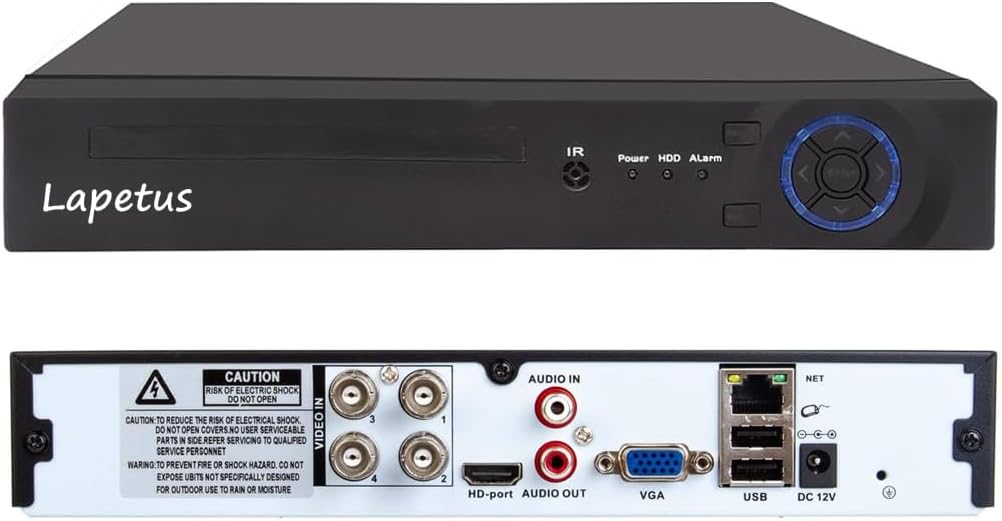
| Number of Channels | 4 |
|---|---|
| Video Input | AHD, CVBS, HDCVI, HDTVI, IP |
| Connectivity Technology | HDMI, VGA |
| Media Format Digital Video | HDD |
| Audio Input | BNC |
This Lapetus 4-channel 5-in-1 DVR is a budget-friendly standalone recorder for small home or shop surveillance setups. It accepts AHD, TVI, CVI, CVBS (analog) and wired IP cameras and outputs video via HDMI or VGA, letting you reuse older analog cameras or add wired IP cameras through a network switch. The unit records in H.264 with dual-stream support and can trigger recording on motion to conserve HDD space, though you must supply and install your own hard drive. Setup includes easy P2P remote viewing via a QR code and the XMEYE app for smartphone or PC access. Practical limits are that it does not support wireless IP cameras without additional hardware and mixing camera types may require switching DVR modes. For the price it packs solid compatibility and basic remote features, but expect a plain interface and the need to add a compatible HDD and possibly a switch for IP cameras.
Best for: Buyers on a tight budget who want a simple, flexible recorder to repurpose analog cameras or add wired IP cameras for small property monitoring and remote viewing.
Less Ideal for: Users who need native wireless camera support, enterprise-grade features, or plug-and-play IP camera integration at scale should look at higher-end NVR solutions.
- Supports five video formats (AHD, TVI, CVI, CVBS analog, wired IP) for reuse of existing cameras
- Motion-triggered recording to save HDD space
- HDMI and VGA outputs for direct monitor connection
- Easy P2P remote viewing with QR scan and XMEYE app
- Requires user-supplied HDD and possible network switch for wired IP cameras
- No native support for wireless IP cameras without extra hardware
- Basic interface and limited advanced features compared with higher-end DVRs
Verdict: If you want an affordable, no-frills DVR that lets you reuse analog cameras and add wired IP cameras for basic motion-triggered recording and remote viewing, this is a practical choice.
ANNKE 8CH 3K Lite DVR Kit

| Connectivity Technology | Wired |
|---|---|
| Video Capture Resolution | 3K |
| Number of Channels | 8 |
| Memory Storage Capacity | 1 TB |
| Other Special Features of the Product | Human Detection |
This ANNKE kit bundles an 8-channel H.265+ DVR with four 2MP bullet cameras and a 1TB HDD to deliver around-the-clock wired surveillance for a small property. The DVR records true 1080P and can accept higher-resolution 3K/5MP cameras at lower frame rates, while H.265+ compression stretches storage so the included 1TB can retain longer footage without frequent overwrites. Cameras use a dual-light design that switches between IR and color night vision for clearer nighttime images up to roughly 66 to 100 feet depending on mode, and IP67 weatherproofing makes outdoor mounting straightforward. AI human/vehicle detection and targeted motion zones cut down false alerts and speed up searching in the ANNKE Vision app, and the system works locally without Internet for continuous recording. Expect some setup work running BNC and power cables and configuring detection areas, and the live feed frame rates for higher resolutions are lower than 1080P, so extremely smooth high-res video is limited. For buyers prioritizing a dependable, expandable wired DVR with local storage and smart alerts, this kit is a practical choice.
Best for: Buyers who want a reliable, locally recorded wired DVR system with preinstalled storage and smart motion filtering for dependable home or small-business monitoring.
Less Ideal for: People who need a completely wireless, plug-and-play camera solution or who prioritize the highest-frame-rate live viewing at 3K/5MP resolutions.
- Complete wired system with DVR and preinstalled 1TB HDD for immediate 24/7 recording
- H.265+ compression extends recording time and reduces bandwidth use
- Dual-light cameras provide both IR and full-color night vision for clearer night images
- AI human/vehicle detection and configurable detection zones reduce false alerts
- IP67 weatherproof rating suitable for outdoor installation
- Higher-resolution live viewing runs at lower frame rates than 1080P, limiting smoothness at 3K/5MP
- Requires running BNC and power cabling which adds installation time and effort
Verdict: A dependable wired DVR kit with preinstalled 1TB storage and AI motion filtering that delivers solid local recording and reliable night visibility.
ZOSI 8CH 3K Lite DVR Security Kit

| Connectivity Technology | Wired |
|---|---|
| Video Capture Resolution | 1080p |
| Number of Channels | 8 |
| Memory Storage Capacity | 1 TB |
| Night Vision Range | 80 feet |
The ZOSI 8CH 3K Lite is a wired DVR security system designed for straightforward home or small business surveillance. It bundles an H.265+ 8-channel DVR with four weatherproof 1080p bullet cameras that connect over BNC coax and receive power via the included power splitter, which makes installation a traditional plug-and-play wired setup. The DVR supports continuous 24/7 recording, event/schedule recording, and local export via USB, while the H.265+ codec reduces storage needs so the 1TB drive keeps footage longer. AI human and vehicle detection helps cut down false alerts and the ZOSI Smart app enables remote live view and push notifications when internet is available. Cameras offer up to about 80 feet of night vision in total darkness and a 90 degree viewing angle. Expect the usual wired trade-offs: installation requires routing cables and a network connection for remote viewing, and the cameras do not include built-in microphones. For buyers who prioritize local storage, reliable wired recording, and smarter motion alerts, this kit is a solid, no-subscription option.
Best for: Buyers who want a reliable, locally recorded wired security system with intelligent detection and prefer avoiding ongoing subscription fees.
Less Ideal for: Users who need a completely wireless plug-and-play solution or who require integrated audio recording and on-device two-way talk.
- Includes H.265+ DVR with 1TB security-grade hard drive for long local recording
- AI human/vehicle detection reduces false motion alerts
- Weatherproof cameras with up to 80 ft night vision for low-light monitoring
- Supports remote viewing via app and local export through USB
- Wired cameras require running BNC and power cables during installation
- No built-in microphone so audio recording is not available
Verdict: A dependable wired DVR kit that gives local, subscription-free recording plus AI detection to cut false alerts, ideal for buyers focused on proven performance and evidence retention.
ANNKE 8-Channel 3K Lite DVR

| Number of Channels | 8 |
|---|---|
| Memory Storage Capacity | 10 TB |
| Media Format Digital Video | H.265+, H.264 |
| Video Input | AHD, CVI, CVBS, IP Input |
| Connectivity Technology | HDMI, USB, VGA |
This ANNKE 8-channel 3K Lite DVR is a hybrid recorder that combines DVR and NVR features to work with analog cameras and up to two IP cameras, making it a flexible option for home or small-business surveillance. Setup is straightforward: connect cameras and a monitor via HDMI or VGA, add a 2.5" or 3.5" SATA hard drive (the unit ships without one), and configure recording modes and motion detection. H.265+ compression reduces file sizes and extends recording time before automatic overwrite, while built-in human and vehicle detection helps cut down false motion alerts from animals or wind. Remote viewing is supported through the ANNKE Vision app and common browsers when the unit is networked. Security features include encrypted protocols and multi-language menus, which make administration easier and more private. The main limitations are the lack of a included hard drive and that advanced features work best with ANNKE cameras, so buyers who want a fully bundled, plug-and-play kit should plan for additional purchases.
Best for: Buyers who want a stable, privacy-focused DVR with flexible camera compatibility and efficient storage management for home or small-business monitoring and who prefer a system they can configure and expand over time.
Less Ideal for: Users seeking a complete, out-of-the-box camera kit with preinstalled storage and fully plug-and-play operation should consider bundled systems instead.
- Hybrid 5-in-1 input supports AHD, TVI, CVI, CVBS and 2 IP cameras for flexible camera choices
- H.265+ compression saves storage and extends recording time compared with H.264
- Human and vehicle detection reduces false motion alerts
- Supports up to 10TB SATA hard drive for long local retention and has automatic overwrite
- Remote access via ANNKE Vision app and major web browsers for live view and playback
- No hard drive included, so storage must be purchased separately
- Some advanced features are optimized for use with ANNKE cameras
Verdict: Choose this DVR if you want a configurable, encryption-minded recorder that stretches storage with H.265+ and filters out nuisance alerts for reliable home or small-business monitoring.
Choosing the Right DVR Security Camera: Key Factors to Consider
Video Resolution and Low-Light Performance
Higher resolution cameras capture more detail, which helps identify faces, license plates, and other important clues. Resolution matters most at typical viewing distances for home surveillance, so consider how much detail you need for your entrances and driveway.
Low-light ability is equally important because many incidents occur at night. Look for cameras with good infrared illumination, low-light sensors, or image-processing features that reduce noise. Better low-light performance reduces the chance of unusable footage and lowers your need for supplemental exterior lighting.
Recording Reliability and Retention
A DVR system is only useful when it reliably records and retains footage. Consider how the system handles continuous recording versus event-triggered recording, and whether it gracefully prevents data loss during power interruptions or storage saturation.
Retention policies and overwrite behavior are important. Systems that let you set retention windows, pre-event buffering, and manual lock-to-keep clips give you control over how long critical footage is preserved. Verify the DVR supports diagnostic checks or health indicators so you can spot recording failures early.
Storage Capacity and Management
Storage capacity determines how much footage you can keep before older files are deleted. Higher-capacity drives extend archival time for continuous recording, while efficient compression and configurable recording schedules help maximize usable retention.
Also look for convenient management tools: scheduled backups, export options for specific clips, and the ability to replace drives without losing configuration. Support for external drives or NAS expansion can be useful if you expect to archive long-term footage.
Installation and Power Requirements
Installation complexity affects cost and where you can place cameras. Some DVR cameras use separate power supplies for each camera, while others use centralized power via the recorder. Consider whether you prefer Power over Coax, PoE, or individual adapters, and how that choice affects cable runs and placement.
Mounting options, weatherproof ratings, and included hardware also matter. Systems that provide clear documentation, simple mounting templates, and flexible cabling options make installations faster and reduce the chance of misaligned or loose cameras.
Motion Detection, Alerts, and False-Positive Reduction
Smart motion detection reduces time spent reviewing irrelevant footage. Look for adjustable sensitivity, configurable detection zones, and support for basic analytics such as object filtering or line crossing alerts.
Good systems let you tune notifications to the times and places you care about, and they include cooldown or delay settings to avoid repeated alerts from the same event. Reducing false positives saves storage and keeps alerts meaningful.
Build Quality and Weather Resistance
Cameras spend years outdoors exposed to weather, temperature swings, and occasional impact. Weather-resistant housings, corrosion-resistant connectors, and secure camera mounts help ensure consistent operation.
Materials and sealing affect longevity. For outdoor installations, confirm the camera has an appropriate IP rating and that cable entry points are protected. Durable components reduce maintenance and the need for premature replacement.
Selecting the Right Camera Count and Placement
More cameras do not always equal better security. Placement determines coverage quality: focus on sightlines that capture faces and license plates rather than redundant angles. Start with entries, driveways, and common access points and add cameras where you need different viewing angles or longer-range coverage.
- Map intended fields of view on a simple house diagram
- Place cameras high enough to avoid tampering but angled to capture faces
- Use wider-angle lenses for close-in areas and telephoto coverage for long driveways
Wiring Options: Coax, PoE, and Power Choices
DVR systems traditionally use coax cabling, but options vary. Coax-based setups are familiar and reliable for long cable runs. PoE systems simplify power and data over a single cable, reducing separate power supplies and potentially simplifying installation. Consider your existing cabling and whether new runs are feasible for the locations you need to cover.
- Coax is robust for long runs and can often use existing infrastructure
- PoE streamlines installation by delivering power and data together
- Verify cable type and distance limits to avoid signal loss
Managing Footage: Playback, Export, and Review Workflows
Day-to-day usefulness depends on how easy it is to find and export the clips you need. Look for DVR systems with intuitive timeline interfaces, thumbnail summaries of events, and reliable export formats for sharing with authorities or archiving locally. Good timestamping and synchronized multi-camera playback speed investigations.
- Prefer systems that support common video codecs and straightforward export tools
- Check for multi-channel synchronized playback to correlate events
- Ensure timestamps are accurate and configurable for your time zone
Remote Access and Network Security
Remote viewing is convenient but introduces security considerations. Use systems that support encrypted connections and strong user authentication. When enabling remote access, change default passwords, restrict accounts to necessary permissions, and use network segmentation if possible to avoid exposing the DVR directly to the internet.
- Enable firmware updates and review update policies regularly
- Limit remote access to secure channels and verified apps
- Use unique passwords and consider two-factor authentication if available
Routine Maintenance and Health Checks
Regular maintenance keeps a DVR system reliable. Schedule periodic checks of recording status, camera alignment, lens cleanliness, and drive health indicators. Replace failing drives proactively and verify backups after major events or firmware upgrades.
- Inspect housings and seals annually for outdoor cameras
- Clean lenses gently to avoid scratching optics
- Test playback and export workflows after significant firmware updates
How We Chose the Best DVR Security Camera
We started by focusing on features that materially affect real-world surveillance performance and long-term ownership for DVR Security Cameras. Primary filters included durable video capture (daylight and low-light performance), reliable local recording and storage management, and straightforward installation for typical home setups. We prioritized systems with robust motion detection controls and flexible camera placement options to reduce false alerts and ensure useful coverage. Further evaluation considered connectivity and integration with common home networking setups, ease of playback and export of footage, and power delivery options that affect installation complexity. We excluded systems that lacked clear local recording paths or required proprietary cloud-only playback. Our shortlist emphasizes practical durability, clear video under varied lighting, and storage features that let owners keep and retrieve footage when it matters.
Our full evaluation process is outlined in our review methodology.
FAQ
How much storage do I need for continuous recording?
Storage needs depend on resolution, frame rate, compression, and number of cameras. Higher resolution and frame rates consume more space. Estimate by calculating per-camera bitrate then multiplying by hours per day and retention days. Many owners choose event-only recording or lower frame rates overnight to stretch storage.
Can I mix different camera resolutions on one DVR?
Most DVRs support mixed resolutions across channels, but check the recorder's total processing and storage limits. Mixing resolutions can be useful to prioritize high detail for critical areas while using lower resolution for secondary spots.
What is the best way to reduce false motion alerts?
Adjust sensitivity, create detection zones that exclude busy streets or tree areas, and set appropriate schedules. Some systems offer basic analytics to ignore small animals or moving foliage. Combining zone setup with sensible sensitivity reduces nuisance alerts.
How do I maintain reliable night-time images?
Position cameras to avoid direct glare from streetlights and install them to minimize backlighting. Use cameras with adequate IR range for the scene distance and consider supplemental lighting if detail at long ranges is necessary. Periodically clean lenses and housings to prevent image degradation.
Is professional installation necessary for DVR systems?
Professional installation is helpful for complex runs, multi-story homes, or when accessing tight crawl spaces. However, many homeowners can install DVR systems if they are comfortable with basic wiring, mounting, and network setup. Clear documentation and pre-made cable kits simplify DIY installs.
Final Verdict
Prioritize reliable recording behavior and clear video where it matters most. Balance camera count with strategic placement so each unit captures meaningful evidence rather than redundant footage. Consider storage strategy and motion filtering early to avoid unnecessary data retention and false alerts. Ultimately, choose a DVR system that matches your installation skills, supports the storage and playback features you need, and provides straightforward maintenance. That approach gives you dependable home surveillance and the confidence that recorded events will be available when they are needed.