
Note: This article contains affiliate links. If you click on these links and make a purchase, we may earn a small commission at no extra cost to you. This helps support our research and content. Read our full affiliate disclosure here.
Picking the right indoor smart plug makes everyday devices easier to control and can cut energy waste. Whether you want voice control, scheduled automation, or remote access, the right smart plug will integrate with your home network and routines without adding hassle. This guide highlights seven shortlisted indoor smart plugs that stood out for connectivity, safety, and real-world usability. We evaluated ease of setup, connectivity reliability, automation capability, and safety features to help you choose the best fit for your living space. Read on to see the practical tradeoffs that matter when adding smart outlets to your home.
Top Picks at a Glance
| Best Overall The best all-around choice for most situations | Govee Smart Plug H5083 4-Pack |  |
| Best Quality Built to a higher standard if you want something more solid | Leviton Decora Smart Plug D215P-1RW | 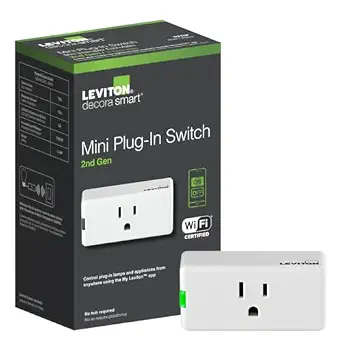 |
| Best Value The sweet spot between price and what you get | Kasa Smart Plug HS103 (2-Pack) |  |
| Best Budget The cheapest option that still gets the job done reliably | Globe Electric Smart Plug Mini 1-Outlet |  |
| Top Rated A top-rated pick with lots of positive feedback | Philips Hue Smart Plug |  |
| Most Popular A crowd favorite that many people choose with confidence | Amazon Smart Plug |  |
| Best Seller A high-volume bestseller chosen again and again | Kasa Smart Plug Mini EP10 | 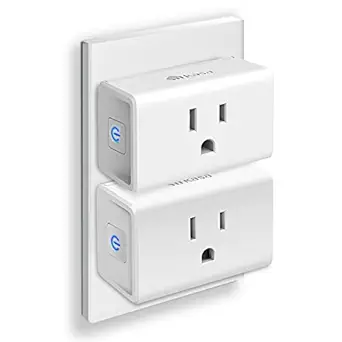 |
Govee Smart Plug H5083 4-Pack

| Voltage | 120 volts |
|---|---|
| Amperage | 11 A |
| Plug Type | Type B |
| Number of Items | 4 |
The Govee Smart Plug H5083 4-Pack turns ordinary outlets into voice- and app-controlled sockets using 2.4 GHz Wi‑Fi or Bluetooth, so you can control lights and small appliances from anywhere with the Govee Home app or with Alexa and Google Assistant. Setup is straightforward through the app and the plugs support schedules, 24-hour timers, and grouping so multiple outlets can be toggled together for routines or energy savings. The compact, low-profile housing is designed not to block adjacent sockets and the plugs include overload protection and ETL certification for basic safety. Practical limits: they are rated for 10 A/1200 W so they are best for lamps, fans, chargers and similar loads rather than heavy appliances, and they only work on 2.4 GHz Wi‑Fi networks. For a buyer wanting reliable basic automation in multiple rooms, these are a convenient, space-saving option that covers common smart plug tasks without needing a separate hub.
Best for: Buyers who want an easy, reliable way to add voice control and scheduling to lamps, chargers, and small appliances across several rooms without a hub.
Less Ideal for: People who need to control high-power devices or require 5 GHz Wi‑Fi support or advanced energy monitoring features.
- Works with Alexa and Google Assistant for voice control
- Supports schedules, 24-hour timers, and group control via the Govee Home app
- Compact design that minimizes blocking adjacent outlets
- ETL certified with overload protection for safer operation
- Limited to 2.4 GHz Wi‑Fi and Bluetooth so not compatible with 5 GHz networks
- 10 A/1200 W rating makes it unsuitable for high-draw appliances
Verdict: A compact, no-hub 4-pack that delivers dependable voice control and scheduling for everyday lights and small devices.
Leviton Decora Smart Plug D215P-1RW

| Current Rating | 15 A |
|---|---|
| Operating Voltage | 120 volts |
| Connectivity Protocol | Matter, Wi-Fi |
| Wattage | 1500 watts |
| Control Method | App, Push Button, Remote, Voice |
The Leviton Decora Smart Plug (2nd Gen) is a plug‑in on/off switch that brings voice, app, and scheduled control to lamps, holiday lights, and small appliances without a hub. It connects over 2.4 GHz Wi‑Fi and integrates with My Leviton for schedules, scenes, and firmware updates that add Matter support for broader smart‑home platforms. The built-in button gives manual control and the plug supports wire‑free multi‑location switching when paired with Leviton's companion switch, which is useful for accessibility or three‑way style control without wiring. Electrical ratings cover common load types including incandescent, LED/CFL, magnetic ballasts, and motor loads up to the specified amps and watts, making it suitable for a wide range of household devices. Because it is a compact Decora form factor designed for standard, AFCI, and GFCI outlets, it fits in typical indoor rooms but will occupy one outlet. If you need advanced energy monitoring or a smaller ultra-compact profile, look elsewhere, but for reliable app and voice control with strong brand support this unit performs as a straightforward smart plug solution.
Best for: Buyers who prioritize reliable voice and app control for a variety of household loads and want a proven, manufacturer‑backed smart plug that integrates with major smart‑home ecosystems.
Less Ideal for: Users who need built‑in energy usage stats, ultra-compact plugs to preserve both outlet positions, or specialized commercial-grade switching should consider other options.
- Works with Alexa, Google Assistant, and Apple Siri and adds Matter support via firmware
- No hub required and controlled remotely via the My Leviton app with scheduling and scenes
- Supports a wide range of loads (incandescent, LED/CFL, magnetic ballast, motors) with clear current and wattage ratings
- Manual on/off button and optional wire-free companion switch for multi-location control
- Does not include energy monitoring or power metering features
- Larger Decora-style plug may block the adjacent outlet on some receptacles
Verdict: Choose this Leviton Decora smart plug when you want robust hub‑free voice and app control with Matter compatibility and support for a wide range of household loads.
Kasa Smart Plug HS103 (2-Pack)

| Amperage | 15 A |
|---|---|
| Connector Type | Plug In |
| Plug Type | Type B |
| Number of Items | 2 |
The Kasa HS103 2-pack turns ordinary outlets into controllable smart plugs using 2.4 GHz Wi‑Fi and the Kasa app, with support for Alexa and Google Assistant voice control. You plug one in, connect it through the app, and then schedule lights, set countdown timers, or group plugs for one-touch routines; the side button provides a manual override. The app also reports run time so you can see usage patterns and enable Away Mode to simulate occupancy. Practical touches include a compact footprint that avoids blocking adjacent outlets and UL certification for safety. Limitations to note are that it requires a 2.4 GHz network and does not include energy monitoring, so you cannot track real-time power draw with this model. For straightforward remote on/off, automated schedules, and voice control in a small, reliable package, the HS103 delivers predictable performance for everyday smart-home tasks.
Best for: Buyers who want a fuss-free way to add reliable remote and voice control to lamps and small appliances and prioritize easy setup, scheduling, and compact hardware.
Less Ideal for: Shoppers who need per-outlet energy monitoring, 5 GHz Wi‑Fi compatibility, or industrial/heavy-load appliance control should look elsewhere.
- Simple setup over 2.4 GHz Wi‑Fi with guided app instructions
- Voice control compatibility with Alexa and Google Assistant
- Compact design that is unlikely to block neighboring outlets
- Scheduling, countdown timer, and Away Mode for automated control
- UL certified for residential safety
- No built-in energy monitoring or real-time power measurement
- Requires a 2.4 GHz Wi‑Fi network and will not work on 5 GHz-only networks
Verdict: A compact, UL‑certified smart plug pair that gives easy remote control, scheduling, and voice commands for everyday home devices.
Globe Electric Smart Plug Mini 1-Outlet

| Voltage | 125 volts |
|---|---|
| Wattage | 1800 watts |
| Power Source | Corded Electric |
| Certification | Compatible With 2.4 Ghz and 5 Ghz Wi-fi Networks, Google Assistant, Amazon Alexa, and Siri |
The Globe Electric Smart Plug Mini turns a standard outlet into a controllable smart outlet using the Globe Suite app and your home Wi-Fi. It is designed for simple everyday automation like scheduling lamps, holiday lights, or small appliances and supports voice control through Google Assistant, Amazon Alexa, and Siri. The plug's compact shape preserves the second socket on a typical wall outlet so you can keep another device plugged in, and grouping and timer features let you sync or automate multiple plugs from the app. Setup requires a 2.4 GHz connection during pairing and the app handles schedules and grouping from anywhere. Practical limitations include a single grounded outlet per unit and an 1800 watt/125 volt rating that restricts use to lower-power devices, and the feature set is basic compared with premium smart plugs that offer energy monitoring or stronger third-party integrations. For straightforward, low-cost automation of lamps and small electronics this plug is an easy, compact choice.
Best for: Buyers wanting an inexpensive, no-fuss way to automate lamps and small appliances who prioritize simplicity and basic scheduling over advanced features.
Less Ideal for: People who need to monitor energy use, control high-wattage appliances, or require advanced smart-home integrations should look for a different model.
- Compact form factor leaves the adjacent wall outlet usable
- Works with Google Assistant, Amazon Alexa, and Siri for voice control
- App-based scheduling and grouping for remote automation
- No hub required, connects directly via home Wi-Fi
- Single grounded outlet limits control to one device per plug
- No built-in energy monitoring or advanced power reporting
Verdict: A compact, budget-friendly smart plug that adds basic remote scheduling and voice control to lamps and small devices without needing a hub.
Philips Hue Smart Plug

| Voltage | 120 volts |
|---|---|
| Connector Type | Blade |
| Number Of Wires | 3 |
| Plug Type | Type B |
The Philips Hue Smart Plug turns a regular lamp or non-smart light into a controllable smart light using Bluetooth or a Hue Bridge. Plug it into a standard Type B outlet, connect your lamp, and control power from the Hue app or with voice assistants like Alexa and Google Assistant; connecting a Hue Bridge adds automations, out-of-home control, and Matter compatibility. Its compact white housing is designed to avoid blocking adjacent outlets and blends into home decor, while the simple setup works well for instant local control via Bluetooth. Because it is part of the Hue ecosystem, it benefits from the brand's secure connectivity and reliable Bridge-managed network when you scale to multiple devices. The main limitations are that advanced features require the separate Hue Bridge and that the plug is single-outlet and intended for indoor use only, so it is not a replacement for multi-outlet smart strips or outdoor-rated modules.
Best for: Buyers who prioritize a reliable, well-supported smart-home ecosystem and want a compact indoor plug that integrates seamlessly with Hue for stable, long-term control.
Less Ideal for: People who need multi-outlet control, built-in energy monitoring, or an outdoor-rated smart plug should look at other specialized options.
- Simple plug-and-play setup with Bluetooth for instant control
- Works with Hue Bridge to enable automations, remote access, and Matter compatibility
- Compact design that does not block neighboring outlets
- Voice control via Alexa and Google Assistant when configured
- Part of Hue ecosystem with secure, stable Bridge-managed connectivity
- Advanced features like remote control and automations require purchasing a Hue Bridge
- Single outlet device with no built-in energy monitoring
Verdict: Choose this smart plug if you want a compact, dependable indoor plug that integrates reliably with the Philips Hue ecosystem for long-term smart-home control.
Amazon Smart Plug

| ASIN | B089DR29T6 |
|---|---|
| Brand | Amazon |
| Connectivity | Wi‑Fi |
The Amazon Smart Plug turns a regular outlet into a voice‑controlled, schedulable outlet using the Alexa app and a compatible Alexa device. Setup is straightforward: plug it in, follow the Alexa app prompts, and the plug appears as a controllable device for lights, fans, coffee makers, and other appliances with a physical on/off switch. Its compact form keeps the adjacent outlet usable and it supports routines and timers for automation like lights on/off or triggering devices when you arrive home. The plug automatically reconnects after power or Wi‑Fi interruptions, so devices resume their scheduled behavior without repeated setup. Limitations include reliance on Alexa for full functionality and no native support for non-Wi‑Fi ecosystems or local control if the cloud is unavailable, so it is best used within an Alexa-centered smart home.
Best for: Buyers who prioritize proven, easy-to-configure smart home devices and want reliable Alexa voice control and scheduling for everyday plugs.
Less Ideal for: People who want platform-agnostic smart plugs, local-only control, or who do not use Alexa should consider alternatives.
- Simple, hub-free setup through the Alexa app
- Compact design leaves the second outlet free
- Works with Alexa routines and timers for automation
- Automatically reconnects after power or Wi‑Fi outages
- Requires Alexa ecosystem for full functionality
- No offline or local-control option if cloud services are down
Verdict: Choose this smart plug if you want a simple, compact way to add dependable Alexa voice control and scheduling to ordinary outlets.
Kasa Smart Plug Mini EP10

| Current Rating | 15 A |
|---|---|
| Wattage | 1800 watts |
| Connectivity Protocol | Wi-Fi (2.4 GHz) |
| Control Type | on/off, scheduling |
| Controller Type | Amazon Alexa, Google Assistant |
The Kasa Smart Plug Mini EP10 (2-pack) turns ordinary outlets into scheduleable, voice‑controlled outlets using your existing 2.4 GHz Wi‑Fi network and the Kasa app. Its ultra-compact housing is designed to avoid blocking the second receptacle, making it practical for lamps, fans, holiday lights, and other small appliances. Setup is straightforward: plug in, connect to the app, and grant access to Alexa or Google Assistant for hands‑free control. Built-in schedules, timers, and an Away Mode let you automate devices for energy savings and basic home security. The plugs are UL certified and rated for a 15 A / 1800 W load, so they cover most common household uses while meeting safety standards. Limitations include the requirement for 2.4 GHz Wi‑Fi only and no energy‑monitoring feature, so users who want power tracking or dual‑band support will need a different model. For buyers who prioritize a compact, reliable smart outlet from a known brand, these deliver sensible, everyday smart home functionality.
Best for: A cautious buyer who wants a simple, reliable way to add voice control and schedules to lamps and small appliances without complex setup or hub hardware.
Less Ideal for: Power‑monitoring enthusiasts, users who need 5 GHz Wi‑Fi compatibility, or those planning to control high‑draw appliances beyond common household loads.
- Very compact design that typically leaves the second outlet usable
- Works with Alexa and Google Assistant for voice control
- App-based remote control and scheduling for automation
- UL certified with flame‑retardant housing and 15 A / 1800 W rating
- Only connects to 2.4 GHz Wi‑Fi, no 5 GHz support
- No built-in energy monitoring or usage reporting
Verdict: A compact, UL‑certified smart plug 2‑pack that adds dependable remote and voice control to everyday household devices with minimal setup.
Choosing the Right Indoor Smart Plug: Key Factors to Consider
Connectivity and Network Compatibility
Check whether a smart plug uses Wi-Fi, Bluetooth, or a mesh protocol like Zigbee or Z-Wave. Each protocol affects range, latency, and the need for a hub. Wi-Fi plugs connect directly to most home routers but can be prone to interference on crowded bands and will add more devices to your router's client list.
If you plan to control plugs from a distance or integrate many devices, prefer solutions with stable 2.4 GHz Wi-Fi support or a mesh protocol that scales better. Also consider whether the plug supports WPA2/WPA3 security and whether the vendor documents network requirements clearly.
Ease of Setup and App Experience
A plug that is simple to install and configure reduces frustration and increases adoption. Look for products with clear step-by-step onboarding, intuitive mobile apps, and straightforward pairing flows. Automatic firmware updates and well-documented troubleshooting steps are significant bonuses for nontechnical users.
App features matter too. Basic scheduling, timers, and group controls are essential. If you rely on voice assistants, verify the app exposes switches and scenes in a way that makes voice integration simple and reliable.
Safety Ratings and Electrical Limits
Smart plugs must handle the electrical load of the devices you plan to connect. Check maximum amperage and wattage ratings to avoid overloading. Built-in protections such as overload cutoff, thermal shutdown, and surge suppression improve safety for both the plug and the appliance.
Also confirm that the product has recognized safety certifications and clear instructions about suitable loads. For high-draw appliances, smart plugs without appropriate ratings should be avoided to reduce fire risk and device damage.
Automation Features and Ecosystem Integration
Consider how the plug fits into your existing smart home ecosystem. Native support for common voice assistants, hubless automations, scene creation, and the ability to trigger other devices are all valuable. Some plugs offer advanced rules like sunrise/sunset actions, conditional automations, or energy-threshold triggers.
If you already use a particular ecosystem, prioritize plugs that provide deep integration instead of limited third-party adapters. For multi-device setups, support for grouping and simultaneous controls saves time and simplifies daily routines.
Physical Design and Outlet Layout
The plug's size and shape affect how it fits into wall outlets and whether it blocks adjacent sockets. Slim or pass-through designs preserve access to the second outlet on a duplex receptacle, while large brick-style plugs may obstruct neighboring plugs.
Also check whether the plug has an always-on pass-through outlet or retains grounding. Physical durability, button placement for manual control, and LED indicators for status are useful design details that influence everyday use.
Energy Monitoring and Reporting
Energy-tracking features help quantify usage and identify devices that consume excessive power. Look for per-device consumption reporting, historical usage charts, and exportable data if you want long-term analysis. Real-time power readouts can also enable smart automations based on load thresholds.
Keep in mind that accuracy varies between vendors, and energy monitoring is most valuable when it is easy to access through the app and integrates with home dashboards or automation platforms.
How Smart Plugs Fit Into Home Automation
Indoor smart plugs are one of the simplest ways to bring legacy appliances into automation. They let you switch lamps, fans, small kitchen devices, and holiday lights on and off remotely, schedule operations, and include those devices in scenes without rewiring.
Use smart plugs to add presence-based automation, energy-based rules, or time-based routines. Because they sit between the outlet and appliance, they are ideal for devices that are manually switched but do not require dimming or granular control.
- Great for lights, fans, humidifiers, and small appliances
- Not suitable for hardwired or permanently installed fixtures
- Use with devices that are safe to interrupt power without data loss
Common Installation Steps
Installing an indoor smart plug typically involves plugging the device into a receptacle, pairing it via a vendor app, and configuring network credentials. Most apps guide you through Wi-Fi setup, firmware updates, and naming the device for voice assistants.
After initial configuration, you should test local control, scheduling, and remote access. If the plug supports grouping, add similar devices to a group for simultaneous control. Also verify any power reporting or safety alerts are enabled in the app.
- Pick a location with reliable Wi-Fi or mesh coverage
- Confirm device ratings before connecting high-draw appliances
- Name devices clearly for voice and automation routines
Security and Privacy Considerations
Smart plugs join your home network and can potentially expose information about when devices are used. Choose plugs with documented security practices, such as encrypted communications and authenticated cloud access. Keep firmware updated to address vulnerabilities.
Consider creating a separate IoT network or VLAN for smart home devices to limit exposure to primary computers and phones. Also review the vendor's privacy policy to understand what usage data is collected and how it is retained.
- Use strong Wi-Fi encryption and unique passwords
- Segment IoT devices on a separate network when possible
- Monitor firmware updates and security advisories
When to Use Energy-Monitoring Plugs
If you want to measure appliance-level consumption or identify standby power drain, choose plugs with energy monitoring. These provide immediate feedback on usage patterns and can inform decisions about replacing inefficient devices or changing habits.
For automations that depend on power draw, energy-aware plugs enable rules like turning off a device when it drops below a set wattage or alerting you to unexpected usage spikes. However, do not rely on monitoring for critical metering without understanding the device's accuracy limits.
- Best for identifying high-consumption devices
- Useful when combined with scheduling to reduce standby power
- Check reporting granularity and historical retention
Troubleshooting Connectivity Issues
Connectivity problems are the most common annoyance with smart plugs. Start by verifying your router's 2.4 GHz band is active if the plug requires it, and ensure the plug is within range. Rebooting the router and the plug often resolves transient issues.
If problems persist, factory reset the plug and redo the setup. Check for firmware updates and consult the vendor's help resources for logs or diagnostic tools. For mesh networks, make sure the plug is within a stable node's coverage area.
- Confirm Wi-Fi band and password are correct
- Reduce interference by moving other electronics away
- Use a wired uplink or stronger mesh node for distant outlets
How We Chose the Best Indoor Smart Plug
We focused on practical, user-facing attributes that matter day to day when adding indoor smart plugs to a home automation setup. Core evaluation criteria included wireless connectivity stability and protocol support, because a plug that drops off the network undermines automation. We measured setup simplicity and mobile app clarity to reflect how quickly typical users can get a device running and integrated into schedules or voice assistants. Safety and electrical specs were examined, including maximum load rating, built-in surge protection, and thermal safeguards, since these determine which appliances are safe to connect. Energy monitoring and reporting were considered for buyers who want usage insights or cost tracking. Finally, we assessed automation features and compatibility with common smart home ecosystems to ensure the plugs can be used in scenes and routines. We excluded outdoor-rated devices, industrial or hardwired modules, and smart power strips with integrated features that change how the device is used. Products that lacked basic safety ratings or clearly documented electrical limits were also filtered out. The remaining picks represent reliable, well-documented indoor smart plugs that balance connectivity, safety, and daily usability.
Our full evaluation process is outlined in our review methodology.
FAQ
Can I use an indoor smart plug with a space heater?
Often it depends on the plug's electrical rating. Many indoor smart plugs are not rated for high-current resistive loads like space heaters. Always check the maximum amperage and wattage, and use only plugs that explicitly list compatibility with high-draw appliances.
Do indoor smart plugs need a hub to work?
It depends on the protocol. Wi-Fi plugs typically do not require a hub, while Zigbee or Z-Wave devices usually need a compatible hub or bridge. Your existing smart home ecosystem and desired scale of deployment will influence the best choice.
Will a smart plug work if my internet is down?
Basic local controls often still work if the plug supports local network commands, but cloud-dependent features and remote access will not. Check whether the plug supports local automation and voice control without a cloud connection.
Are energy monitoring readings accurate enough for billing?
Energy monitoring in indoor smart plugs is usually accurate enough for spotting trends and relative comparisons but is not certified for utility billing. Use monitored data for insights and decisions rather than exact billing calculations.
How do I prevent a smart plug from blocking the other outlet?
Choose a slim or pass-through design when you need both sockets accessible. Also consider orientation and the wall plate layout; some plugs are designed to sit vertically to preserve the adjacent outlet.
Final Verdict
Focus first on the network and electrical requirements that match how you intend to use smart plugs. Prioritize connectivity reliability and safety ratings for any device you will run continuously or that draws significant power. If you want insight into energy consumption or automation based on load, choose a plug with dependable monitoring and clear reporting. Balance physical design, app usability, and ecosystem integration against the number of devices you plan to add. By matching a plug's protocol, load rating, and automation features to your household routines, you can add useful, low-friction automation that saves time and energy without creating maintenance headaches.