
Note: This article contains affiliate links. If you click on these links and make a purchase, we may earn a small commission at no extra cost to you. This helps support our research and content. Read our full affiliate disclosure here.
If you want to track how much electricity individual devices draw and cut needless energy waste, a smart plug with energy monitoring is a simple, high-impact upgrade. These plugs let you see real-time and historical power draw for lamps, entertainment gear, chargers, and small appliances so you can identify culprits and schedule or automate shutoffs. This guide shortlists the top options for household use, focusing on measurement accuracy, setup simplicity, and integration with common smart-home systems. Below you will find the best picks, plus the decision criteria we used to evaluate them and practical tips for using energy-monitoring plugs effectively.
Top Picks at a Glance
| Best Overall The best all-around choice for most situations | Govee Smart Plug H5086 |  |
| Best Quality Built to a higher standard if you want something more solid | Eve Energy (Matter) Smart Plug 2-Pack |  |
| Best Value The sweet spot between price and what you get | TP-Link Tapo P115 Smart Plug | 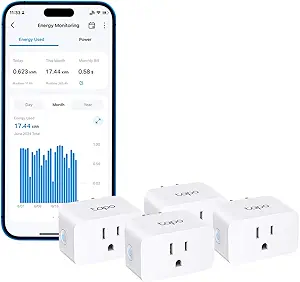 |
| Best Budget The cheapest option that still gets the job done reliably | SONOFF S31 Smart Plug |  |
| Top Rated A top-rated pick with lots of positive feedback | YoLink Smart Energy Plug YS6614 |  |
| Most Popular A crowd favorite that many people choose with confidence | Kasa Smart Plug Mini KP115 |  |
| Best Seller A high-volume bestseller chosen again and again | TP-Link Tapo P110M Smart Plug |  |
Govee Smart Plug H5086

| Current Rating | 15 A |
|---|---|
| Operating Voltage | 120 volts AC |
| Wattage | 1800 watts |
| Connectivity Protocol | Wi‑Fi |
| Controller Type | Amazon Alexa, Google Assistant, IFTTT |
The Govee Smart Plug H5086 is a single‑outlet plug sold in a 4‑pack that brings remote and voice control plus energy monitoring to standard AC devices. You set it up on the Govee Home app over 2.4 GHz Wi‑Fi (Bluetooth available for local control), then create schedules, group controls, or trigger voice commands via Alexa or Google Assistant. The standout feature is the real‑time energy metering — the app shows power, current, and voltage with daily, weekly, monthly and up to one year of history so you can spot waste and track appliance usage. With a 15A/1800W rating it can handle heavier loads like coffee makers or space heaters that lower‑rated plugs cannot. The unit is ETL and FCC certified and built with fire‑resistant materials for safer use. Limitations to note: it only supports 2.4 GHz Wi‑Fi (no 5G) and is a single outlet per plug so bulking many devices requires multiple units or a power strip solution; physical size may block adjacent outlets depending on your wall plate layout.
Best for: Buyers who want a reliable, safety‑certified smart plug that can monitor energy and handle heavier appliances while offering voice and app control for everyday automation.
Less Ideal for: People who need multi‑outlet control from a single unit or who rely exclusively on 5 GHz Wi‑Fi networks for smart home devices should consider other options.
- Real‑time energy monitoring with historical views (daily/weekly/monthly/up to 1 year).
- 15A/1800W rating suitable for higher‑power appliances like coffee makers and some space heaters.
- Works with Alexa and Google Assistant and supports app, voice, and touch control for flexible operation.
- No‑hub required Wi‑Fi connectivity with optional Bluetooth for local control.
- ETL and FCC certifications and fire‑resistant materials for improved safety.
- Requires 2.4 GHz Wi‑Fi and does not support 5 GHz networks.
- Single outlet design means multiple plugs are needed to control several devices at one location.
Verdict: Choose the Govee H5086 when you want hands‑free voice control plus real‑time energy monitoring and a 15A rating for heavier plug‑in appliances.
Eve Energy (Matter) Smart Plug 2-Pack

| Operation Mode | ON-OFF |
|---|---|
| Current Rating | 15 A |
| Operating Voltage | 120 volts_of_alternating_current |
| Connectivity Protocol | Wi-Fi |
The Eve Energy (Matter) 2-pack is a privacy-focused smart plug that turns lamps and appliances on and off from an app or voice assistant while measuring energy use. It supports Matter over Thread for cross-platform control and works with Alexa, Siri, Google Assistant and SmartThings when you have the appropriate hub, and setup is quick through the platform app. The plugs report real-time power consumption and are UL certified, which makes them useful for tracking energy draw and spotting inefficient devices. Because they use Thread for local communication, they can improve responsiveness and reliability within a Thread network but do require a compatible hub or Thread border router to unlock that functionality. The units are rated for standard 120V circuits and 15A loads, so they handle most household lamps and small appliances but are not for high-current loads. Eve emphasizes local operation and no cloud dependency, which is excellent for privacy-minded users but means some cloud-based conveniences are intentionally absent.
Best for: Buyers who prioritize accurate energy monitoring and responsive local control and who already use or plan to run a Thread/Matter-capable smart home ecosystem.
Less Ideal for: People who need to control high-draw appliances or who want a plug that works independently without any hub or platform bridge.
- Matter and Thread support for cross-platform, low-latency control
- Built-in power meter for real-time energy monitoring
- UL and cULus certification for electrical safety
- Local-first design with no Eve cloud for stronger privacy
- Quick setup via app and voice assistants once a compatible hub is available
- Requires a compatible platform hub or Thread border router to access full Matter/Thread benefits
- Not suitable for high-current appliances beyond 15 A
Verdict: Choose the Eve Energy 2-pack if you want a privacy-first, Matter-enabled smart plug that gives reliable local control and built-in energy monitoring for performance-focused smart homes.
TP-Link Tapo P115 Smart Plug

| Current Rating | 15 A |
|---|---|
| Operating Voltage | 110 volts AC |
| Connectivity Protocol | Wi‑Fi (2.4 GHz) |
| Wattage | 1800 watts |
| Controller Type | Alexa, Google Assistant, SmartThings |
The Tapo P115 is a compact Wi‑Fi smart plug designed to give you remote and voice control plus basic energy monitoring. You use the Tapo app to schedule outlets, run away mode, set power thresholds for automatic shutoff, and view simple charts of energy use to estimate costs. It supports voice control through Alexa and Google Assistant and keeps local control so basic functions work even if the cloud is unavailable. The unit is rated 15 A/1800 W and uses 2.4 GHz Wi‑Fi, and its small footprint is intended to avoid blocking adjacent sockets. Practical features include smart charge guard to stop charging at a set low threshold and auto‑off protection when consumption exceeds a set limit. Limitations are that it is a 2.4 GHz only device and it does not list Matter support for this model, and energy reporting is best for general tracking rather than professional-grade metering.
Best for: Buyers who want straightforward energy visibility and routine automation to reduce household power costs and simplify daily schedules, and who prefer easy setup and voice control.
Less Ideal for: Users who need enterprise‑grade energy analytics, dual‑band or Matter connectivity, or advanced industrial power monitoring should look elsewhere.
- Built‑in energy monitoring with app charts for tracking consumption and estimating bills
- App scheduling, away mode, and smart actions for automating routines
- Voice control via Alexa and Google Assistant for hands‑free operation
- Compact design minimizes blocking adjacent outlets and fits standard sockets
- 2.4 GHz Wi‑Fi only which may limit network placement options
- Energy monitoring is consumer‑grade and not a substitute for precision metering
Verdict: A compact, app‑driven smart plug that adds practical energy monitoring and automation to help lower household power use.
SONOFF S31 Smart Plug

| Voltage | 120 V AC |
|---|---|
| Amperage | 15 A |
| Max power | 1800W |
| Safety certification | ETL, FCC, RoHS |
The SONOFF S31 is a plug‑in Wi‑Fi smart outlet that monitors real-time power, current and voltage while letting you control devices from the eWeLink app or with voice assistants. It is typically used to automate lamps, holiday lighting, space heaters and other plugged appliances you want to schedule or track for energy costs. Setup is simple: plug it in, add the device to eWeLink on a 2.4 GHz network, and create schedules, scenes or share control with family. Notable features include 100 days of energy history, overload protection with adjustable thresholds, LAN control when your router is offline, and compatibility with Alexa, Google Home and IFTTT. Practical benefits are straightforward energy tracking to spot costly devices and reliable scheduling to automate routines. Limitations include 2.4 GHz Wi‑Fi only and a compact plug form that may block adjacent outlets depending on your receptacle layout, and the app ecosystem can feel basic compared with higher-end platforms.
Best for: Buyers who want an affordable smart plug that also provides actionable energy-use data to reduce standby waste and schedule appliances without needing advanced home automation features.
Less Ideal for: Users who need 5 GHz Wi‑Fi support, a very small low-profile plug for crowded outlets, or a more polished enterprise-grade smart home platform.
- Real-time energy monitoring with 100 days of usage history and cost tracking
- High 15A rating supports heavier loads up to 1800W
- Works with eWeLink app plus Alexa, Google Home and IFTTT integration
- Overload protection and ETL/FCC/ROHS safety certifications
- Requires 2.4 GHz Wi‑Fi only and will not connect to 5 GHz networks
- Bulky plug body can obstruct the second outlet on some duplex receptacles
Verdict: A budget-friendly smart plug that combines reliable scheduling and voice control with true energy monitoring so you can identify and cut wasted power use.
YoLink Smart Energy Plug YS6614
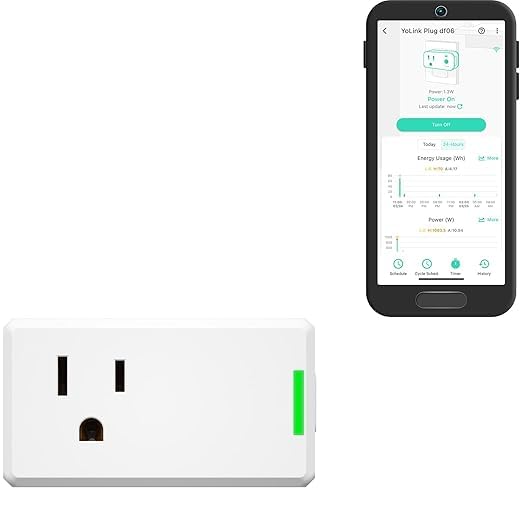
| Current Rating | 15 A |
|---|---|
| Operating Voltage | 120 volts |
| Wattage | 1800 watts |
| Connectivity Protocol | LoRa |
| Specification Met | ETL |
The YoLink Smart Energy Plug YS6614 is a plug‑in module designed to control and monitor high‑load appliances from the YoLink app. You set schedules, cycle timers, or manual on/off commands and view live wattage and exportable energy reports to track consumption. It uses YoLink's long‑range LoRa link through a required YoLink Hub, which extends reliable control across large properties and enables device‑to‑device automation even when the internet is down. Built‑in overload and overheat protection automatically cuts power to protect connected equipment, and compatibility with Alexa, Google, IFTTT, and Home Assistant lets you include the plug in broader automations. The unit is rated for 15 A and 1800 W, so it fits dehumidifiers, pumps, fans, and many heaters that stay within that limit. The main limitations are the hub requirement for full remote features and that it is a single‑outlet plug without terminals or multi‑outlet options, so you will need one per appliance and the hub to unlock cloud and scheduling benefits.
Best for: Buyers who prioritize dependable, long‑range smart control and want accurate energy monitoring for high‑draw appliances across a larger property where reliability and safety matter.
Less Ideal for: People who need plugless or multi‑outlet solutions or who prefer standalone Wi‑Fi plugs without any hub dependency.
- Handles high‑power loads up to 15 A so it works with dehumidifiers, pumps, and larger fans
- Real‑time energy monitoring with exportable historical reports for consumption analysis
- Long LoRa range via YoLink Hub for reliable control across larger properties
- Built‑in overload and overheat protection to help safeguard appliances
- Integrates with Alexa, Google, IFTTT, and Home Assistant for flexible automations
- Requires a YoLink Hub for remote access, scheduling, and full feature set
- Single outlet plug form factor means one device controlled per plug
Verdict: Choose this plug if you need reliable long‑range smart control and detailed, exportable energy monitoring for high‑power appliances.
Kasa Smart Plug Mini KP115

| Current Rating | 15 A |
|---|---|
| Operating Voltage | 120 volts AC |
| Connectivity Protocol | Wi‑Fi |
| Wattage | 1800 watts |
| Controller Type | Amazon Alexa, Google Assistant, IFTTT, vera |
The Kasa Smart Plug Mini KP115 is a plug‑in Wi‑Fi smart outlet that adds remote and voice control plus energy monitoring to lamps, fans, space heaters, and other plug‑in devices. You set it up on 2.4 GHz Wi‑Fi through the Kasa app, then create schedules, timers, and Smart Actions or tie the plug into groups with other Kasa devices. The energy monitoring shows consumption per outlet so you can track usage and spot energy hogs, and the smaller footprint helps keep the adjacent socket available. It works with Alexa and Google Assistant and supports Away Mode to randomly switch loads for added security. Practical limits include the 15 A / 1800 W rating, which rules out some high‑draw appliances, and reliance on the Kasa app and home Wi‑Fi for full functionality. The KP115 is UL listed and includes basic safety features like overheating protection and a child safety sliding cover, making it sensible for everyday smart‑home control and routine energy tracking.
Best for: Buyers who want a compact, app‑driven smart plug that provides measurable energy use and easy voice control and who value reliable safety certifications and peer-reviewed brand reputation.
Less Ideal for: People needing to control heavy appliances like large space heaters or window AC units or those who prefer local‑only (no cloud) smart home setups.
- Built‑in energy monitoring for per‑outlet consumption tracking
- Compact size leaves adjacent outlet usable
- Works with Alexa and Google Assistant for voice control
- Supports schedules, timers, Smart Actions, and remote control via the Kasa app
- UL listed with overheating protection and a child safety cover
- Limited to 15 A / 1800 W so not suitable for very high‑power appliances
- Requires 2.4 GHz Wi‑Fi and app ecosystem for full feature set
Verdict: Choose the KP115 when you want a compact, safety‑certified smart plug that adds voice control and real energy monitoring to everyday devices.
TP-Link Tapo P110M Smart Plug
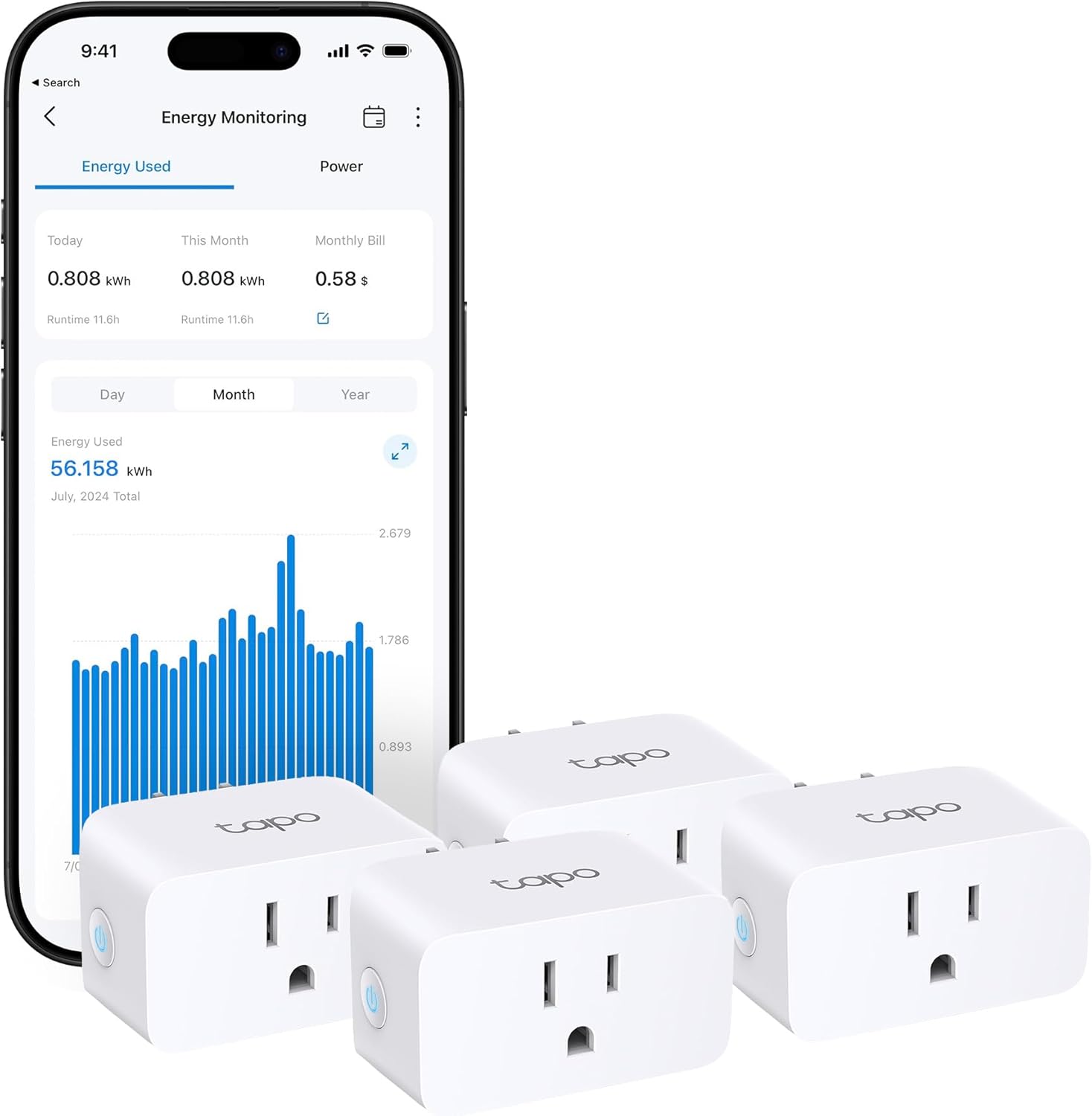
| Current Rating | 15 A |
|---|---|
| Wattage | 1800 watts |
| Connectivity Protocol | Matter, Wi-Fi |
| Control Type | remote, voice, scheduling |
| Unit Count | 4 Count |
The Tapo P110M is a compact smart plug that lets you control outlets from the Tapo app, with Matter and 2.4 GHz Wi‑Fi compatibility for voice and platform integration. It records energy use and visualizes consumption so you can estimate bills and schedule high‑draw devices to run during off‑peak periods. Safety functions include user‑set power thresholds that cut power to prevent overcharging or to shut off when draw exceeds limits, and local control keeps basic functionality even if the internet is down. Setup is straightforward through the app and the small form factor reduces the chance of blocking adjacent outlets. Practical limits include a 15 A/1800 W maximum, so it is not suitable for heavy mains appliances, and Matter requires compatible controllers for cross‑brand features; advanced users may want more granular export options for energy data. For everyday room devices, lamps, chargers, and small appliances this plug simplifies scheduling and helps identify power hogs while adding an extra safety layer.
Best for: Buyers who prioritize reliable, easy‑to‑use smart plugs with clear energy tracking and extra safety safeguards for everyday appliances and lighting.
Less Ideal for: Users needing smart control for heavy duty appliances or those who require advanced, exportable energy analytics should look for higher‑capacity or specialist energy‑monitoring solutions.
- Matter certification for broad smart home interoperability
- Built‑in energy monitoring with visualized statistics and bill estimates
- Customizable power thresholds and automatic cutoff for safety
- Compact design that avoids blocking neighboring outlets
- Works with voice assistants and supports remote plus local control
- 15 A / 1800 W limit prevents use with high‑power appliances
- Energy data export options are not specified for advanced analysis
Verdict: Choose the Tapo P110M when you want a worry‑reducing, Matter‑compatible smart plug that provides clear energy monitoring and built‑in safety for everyday devices.
Choosing the Right Smart Plug with Energy Monitoring: Key Factors to Consider
Measurement Accuracy and Resolution
How precisely a smart plug reports power matters because small devices and standby loads can be easy to misread. Look at whether the manufacturer publishes accuracy specs and the resolution of reported measurements. Higher resolution and lower error margins will give you more reliable instant-watt readings and cumulative kilowatt-hour totals, which is important when tracking low-power items or calculating projected energy savings.
Also consider sampling rate and whether the device averages readings over time. Faster sampling captures brief spikes and motor startup currents better, while slower averaging can smooth data but hide short-duration events. Accurate billing-style cumulative totals are essential if you intend to use the data to inform energy-saving changes or calculate costs.
App Reporting and Historical Data
The companion app is where you will interpret energy data, so its clarity and export options matter. Good apps display both instantaneous power and historical trends by hour, day, week, and month, and offer cost-estimation tools using your utility rate. An app that lets you export CSVs or integrates with a more advanced energy dashboard is helpful for deeper analysis.
Also check whether the app provides alerts, thresholds, or automated actions based on consumption. Visual cues and clear graphs make it easier to spot abnormal draws and to decide which devices to modify or schedule.
Connectivity and Smart-Home Integration
A smart plug is more useful when it plays well with your existing smart-home setup. Verify whether the plug uses Wi-Fi, Zigbee, Z-Wave, or another protocol and whether it supports local control, cloud control, or both. Native integrations with voice assistants and common hubs streamline automation and let you include energy data in routines.
Local control improves privacy and responsiveness; cloud-only devices may add features but can fail when internet access is down. If you rely on a particular ecosystem, choose a plug that explicitly supports it to avoid extra bridging hardware or complex workarounds.
Rated Load, Safety Features, and Build
Smart plugs must safely handle the devices you plan to monitor. Check the maximum continuous current and wattage rating and ensure it suits items like heaters, space heaters, or high-current appliances when applicable. For most lamp and electronics use, standard ratings are sufficient, but avoid using household plugs rated for low loads on high-draw equipment.
Look for thermal protection, flame-retardant housings, and certifications that indicate the device has been tested for safety. A compact, well-ventilated design reduces heat buildup when monitoring medium-power loads.
Physical Design and Outlet Footprint
The shape and size of a smart plug affect where you can place it. Bulky plugs may block adjacent outlets on a duplex wall plate or fit poorly behind furniture. If you need to monitor devices in tight spaces or stacked power strips, choose a low-profile plug or one with an angled design.
Consider whether a pass-through outlet is beneficial for maintaining access to the same wall receptacle. The plug's position and orientation can also influence signal strength, so plan placement to keep reliable connectivity.
Data Privacy and Cloud Dependence
Some smart plugs send all usage data to cloud services, while others store it locally or provide optional cloud features. Privacy-conscious buyers should confirm the vendor's data handling practices and whether local APIs or LAN control are available. Devices that allow local querying of energy metrics enable custom dashboards without routing personal usage data to remote servers.
Cloud features often add conveniences like remote access and multi-device syncing, but they can introduce latency and reliance on the vendor's uptime. Balance privacy preferences against the automation and remote-control benefits you need.
How Energy Monitoring Helps Cut Standby Power
Many household devices draw small amounts of power even when not actively in use. Energy-monitoring smart plugs make those losses visible by reporting standby watts and cumulative consumption. Once you can see which devices consistently draw power, you can create schedules, set automations to fully power down items, or replace inefficient equipment.
Tracking standby loads is especially useful for media centers, phone chargers, and network gear. Small watts add up across multiple devices, and monitoring helps prioritize the most impactful changes.
- Identify phantom loads by viewing instantaneous wattage
- Use historical data to estimate monthly costs
- Automate shutoff outside of active hours to save energy
Using Energy Data to Inform Upgrades
Beyond simple shutdowns, energy-monitoring plugs help you decide when to upgrade appliances. If a device shows unusually high idle consumption or repeated spikes, it may be a candidate for replacement with a more efficient model. Monitoring also reveals whether replacement or behavior change will yield meaningful savings.
Collect a week or month of baseline data before committing to upgrades so seasonal or usage-pattern anomalies do not skew your interpretation.
- Compare baseline consumption across similar devices
- Look for repeated peak events that indicate inefficient operation
- Estimate payback time for upgrades using recorded kWh data
Placement Tips and Best Practices
Place smart plugs directly between the wall receptacle and the device you want to monitor. Avoid daisy-chaining multiple power strips after the plug because extra connectors can cause measurement inaccuracies and safety concerns. If you need to monitor a power strip, consider measuring at the strip's main input rather than individual outlets.
Ensure the plug is in a location with good Wi-Fi or hub connectivity and not obstructed by large metal furniture. Periodically compare the plug's reported totals to a known-good meter or your utility bill to confirm plausibility.
- Monitor one major device per plug for clear attribution
- Avoid high-current loads unless the plug is explicitly rated for them
- Keep firmware updated to ensure accurate reporting and security
Integrating Energy Metrics Into Automations
Energy data can trigger automations that reduce waste. For example, set routines to cut power when consumption exceeds a threshold, or create notifications when a device exceeds expected daily usage. Some systems allow energy-based triggers that can shut off charging stations after a target kWh is reached.
Use energy-aware automations carefully to avoid unintended interruptions. Add delays or confirmation steps for devices that should not be powered off abruptly, such as devices with active saves or spinning disks.
- Create thresholds to detect abnormal draw
- Use cumulative kWh to limit charging cycles
- Combine occupancy sensors with energy triggers for context-aware control
Troubleshooting Common Measurement Issues
If reported usage seems off, start by checking connection stability and firmware version. Intermittent Wi-Fi can cause gaps in reported data or apparent drops in cumulative totals. Rebooting the plug or relocating it temporarily can help verify whether signal strength is affecting readings.
Also verify that the monitored device's load profile is within the plug's rated range. Devices with large motor starts or inductive loads can produce short high-current spikes that some plugs may clip or average, which affects peak reporting. If needed, use an inline meter for verification.
- Ensure the plug is rated for the device's startup current
- Compare short-term readings to a reference meter when possible
- Check for app or firmware updates that address measurement bugs
How We Chose the Best Smart Plug with Energy Monitoring
We prioritized technical accuracy and real-world usability when selecting the seven smart plugs included here. Primary factors included power measurement accuracy across typical household loads, the resolution and sampling rate of energy data, and whether the device reports both instantaneous watts and cumulative kilowatt-hours. We also evaluated setup and app ergonomics, including how quickly a plug connects to a network, how clearly it displays historical usage, and whether it supports local LAN control or requires cloud-only access. Reliability and safety were critical filters: we favored plugs with consistent connection stability, proper thermal protection, and clear maximum load ratings suitable for common devices. Integration was another consideration; we looked for devices that work well with major smart-home ecosystems and support scheduling and automation rules. Finally, we considered physical design constraints such as footprint and pass-through availability for power strips. We excluded products that lacked any energy reporting, devices that do not disclose measurement methodology, and plugs rated only for specialized commercial voltages. Our picks reflect a balance of measurement fidelity, daily convenience, and safety for typical residential use.
Our full evaluation process is outlined in our review methodology.
FAQ
Can a smart plug accurately measure small standby loads?
Many smart plugs are designed to measure low-watt standby consumption, but accuracy varies. Look for published accuracy specs and higher-resolution readings when tracking small loads, and allow for some measurement error when interpreting tiny watt values.
Will energy-monitoring plugs work without internet access?
Some plugs support local control and will continue to report data on a local network, while others require cloud connectivity. If offline operation is important, choose a device that explicitly supports LAN control or local-sensing features.
Are smart plugs safe for monitoring heaters or high-draw appliances?
Most consumer smart plugs are not intended for high-draw appliances like space heaters or large kitchen appliances. Always check the maximum continuous current and wattage rating and avoid using plugs on loads that exceed those specifications to prevent overheating and safety hazards.
How often do smart plugs update energy readings?
Update frequency depends on the device and firmware. Some report near real-time instantaneous watts every second, while others sample and average over longer intervals. Faster sampling provides more detail but may use more bandwidth and battery in hub-based systems.
Can I export energy data for deeper analysis?
Some vendor apps allow CSV export or provide APIs for third-party dashboards. If exporting data is a priority, check for explicit export features or API access before choosing a plug.
Final Verdict
Smart plugs with energy monitoring are a low-effort way to make household electricity use visible and actionable. Prioritize measurement accuracy, clear app reporting, and safe load ratings to ensure the readings you rely on are trustworthy. Balance cloud convenience against local-control and privacy needs, and place plugs where they will get reliable connectivity and accurate load attribution. With clear energy data you can confidently target the highest-impact savings and set automations that reduce waste without disrupting daily routines.