
Note: This article contains affiliate links. If you click on these links and make a purchase, we may earn a small commission at no extra cost to you. This helps support our research and content. Read our full affiliate disclosure here.
If you run a workshop, manufacturing line, or prototyping studio, choosing the right industrial 3D printer changes how quickly and reliably you get parts. You want a machine that delivers repeatable precision across long runs, supports the materials you need, and fits into your production workflow without constant tinkering. This guide presents seven shortlisted industrial 3D printers considered the top options for high-volume and mixed-material applications. We evaluated each choice against durability, throughput, material compatibility, and ease of integration so you can match a machine to your production goals. Read on to understand the evaluation criteria and pick the right printer for your operation.
Top Picks at a Glance
| Best Overall The best all-around choice for most situations | QIDI Max4 Combo |  |
| Best Quality Built to a higher standard if you want something more solid | Original Prusa XL 5-Toolhead |  |
| Best Value The sweet spot between price and what you get | Creality K2 Plus Combo |  |
| Best Budget The cheapest option that still gets the job done reliably | FLASHFORGE Adventurer 5M Pro |  |
| Top Rated A top-rated pick with lots of positive feedback | Original Prusa CORE One+ kit |  |
| Most Popular A crowd favorite that many people choose with confidence | Bambu Lab P1S |  |
| Best Seller A high-volume bestseller chosen again and again | FLASHFORGE AD5X 3D Printer |  |
QIDI Max4 Combo

| Build volume | 390×390×340 mm |
|---|---|
| Hotend max temperature | 370°C |
| Chamber temperature | ≤65°C |
| Max tool head speed | ≤800 mm/s |
| Bed heating | Full-surface silicone heated bed |
The QIDI Max4 Combo is a purpose-built industrial/prosumer 3D printer with a 390×390×340 mm build area, a 370°C-capable hotend, and an actively heated chamber up to 65°C to stabilize prints of engineering materials. It is typically used for large prototypes, tooling, and parts in materials such as PC, Nylon, and carbon-fiber composites that need high nozzle and chamber temperatures to avoid warping. Notable features include closed-loop motors for faster, more stable motion (tool head up to 800 mm/s), a full-surface silicone heated bed for uniform first-layer adhesion, dual Z lead screws for vertical stability, and an integrated AI camera that watches prints and pauses on detected failures. The printer supports multiple networking options including Wi-Fi, Ethernet, and cloud control, and it can be expanded for multi-color/multi-material workflows with an optional module. Trade-offs are its industrial footprint and likely higher setup and material costs compared with desktop hobby machines, plus the Polar Cooler accessory is sold separately for optimal cooling in some workflows.
Best for: Engineers, small-scale manufacturers, and advanced makers who need a single machine that can print large, high-temperature parts in engineering-grade materials and value remote monitoring and speed.
Less Ideal for: Casual hobbyists or users with limited workspace who only need occasional PLA prints or prefer a lower-cost, simpler desktop printer.
- Very large 390×390×340 mm build volume suitable for one-piece large parts and prototypes
- 370°C hotend plus 65°C heated chamber enables printing engineering materials like PC, Nylon, and carbon-fiber composites
- Closed-loop motors, dual Z lead screws, and silicone heated bed improve speed, precision, and first-layer adhesion
- Built-in AI camera and multiple connectivity options (Wi-Fi, Ethernet, cloud, USB) for monitoring and remote control
- Expandable for multi-color and multi-material printing with optional QIDI BOX and filament management
- Large physical footprint and weight make it less suitable for small workspaces
- Polar Cooler is not included and must be purchased separately for some cooling workflows
- Higher complexity and material costs compared with consumer desktop printers
Verdict: Buy this if you need a large-format, industrial-capable printer that reliably handles high-temperature engineering materials and fast, stable production prints.
Original Prusa XL 5-Toolhead

| Build volume | 14.17 × 14.17 × 14.17 inches |
|---|---|
| Toolheads | Up to 5 |
| Controller | 32-bit embedded platform |
| Included accessories | Satin print sheet and 1 kg Prusament PLA |
The Original Prusa XL 5-Toolhead is a professional CoreXY 3D printer built for multi-material and full-color prototyping. It uses a next-generation Nextruder with a loadcell sensor and embedded 32-bit electronics to enable fast, accurate prints and reliable first-layer adhesion across a segmented heated bed, even when swapping between up to five toolheads. Typical use cases include complex functional prototypes, color or multi-material visual models, and small-batch parts where tool changes are frequent. Practical benefits include improved material efficiency through smart tool management, steady high-speed motion thanks to input shaper and pressure advance, and tight integration with Prusa software and the Printables ecosystem. The printer ships ready-to-print with a Satin sheet and a 1 kg PLA spool, and it can be run offline or via Prusa Connect. Expect a large, heavy machine that requires some assembly for transport-packed components and a professional workspace that can handle its size and weight, but the platform delivers industrial-style flexibility for advanced multi-material work.
Best for: Design and engineering teams or advanced makers who need a high-performance, multi-material printer for industrial prototyping and full-color visual models and prioritize print speed, precision, and flexible material workflows.
Less Ideal for: Hobbyists or casual users who lack workspace capacity or do not need multi-tool or large-format capabilities should consider simpler, smaller printers instead.
- Five-tool multi-material system enables up to five materials or colors in a single print
- Nextruder with loadcell sensor improves first-layer consistency across the whole bed
- Embedded 32-bit platform supports Input Shaper and Pressure Advance for faster, cleaner prints
- Segmented heated bed reduces warping and improves energy efficiency on large prints
- Large footprint and heavy weight require dedicated space and handling
- Some fragile parts are shipped separately and need user assembly after delivery
Verdict: Choose the Prusa XL 5-Toolhead when you need an industrial-grade, multi-tool system that delivers fast, precise multi-material and full-color prototyping.
Creality K2 Plus Combo
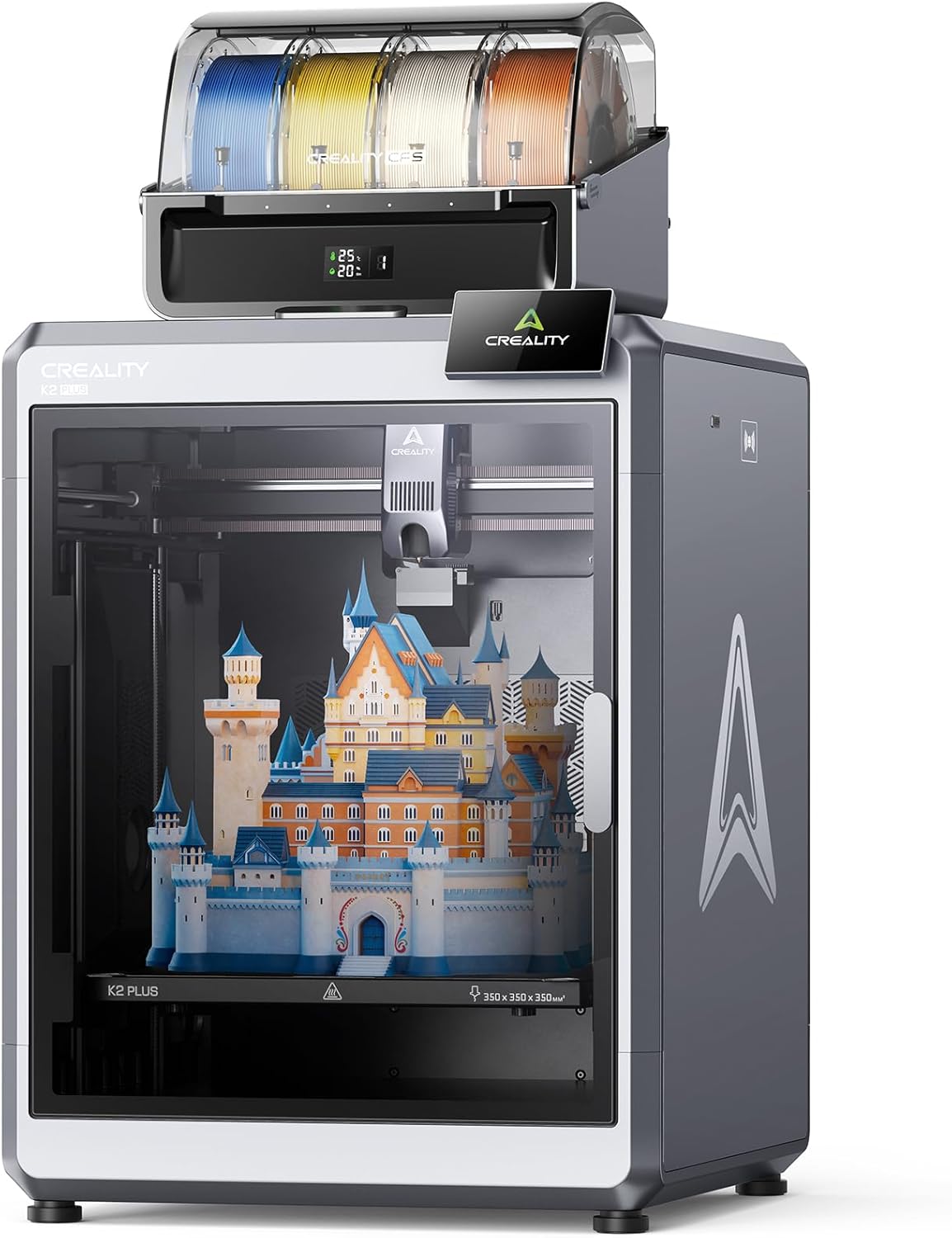
| Build volume | 350×350×350 mm |
|---|---|
| Max nozzle temperature | 350°C |
| Printing speed | Up to 600 mm/s |
| Integrated system | CFS multi-color filament system |
The Creality K2 Plus Combo is a large build-volume FDM printer aimed at faster, multi-color production runs. It uses Creality's CFS multi-feeder system to mix up to 16 colors with automatic filament identification and relay, and a next-gen direct drive extruder with high-flow capability to support higher print rates. The machine pairs a sizable 350 × 350 × 350 mm printable area with step-servo motors that enable top speeds claimed up to 600 mm/s and aggressive acceleration for shorter print times on large parts. Dual AI cameras and 18 sensors provide live monitoring and filament management to reduce failed prints and simplify long jobs, while a heated chamber and hardened high-temp nozzle let you run engineering filaments up to 350°C. The rigid die-cast Matrix frame and dual Z-axis help keep tall prints steady. Expect a professional-level desktop experience better suited to experienced users or small production shops because the printer is feature-rich and physically substantial, and full performance will depend on tuning slicer settings and filament choices.
Best for: Small production shops, advanced hobbyists, and engineers who prioritize larger build volume, multi-color capability, and automated monitoring to increase throughput and reduce post-processing.
Less Ideal for: Casual hobbyists or first-time 3D printer buyers who want a compact, plug-and-play machine with minimal setup and tuning.
- Large 350×350×350 mm build volume for big parts and batch prints
- Multi-color CFS system with automatic filament selection and relay
- High-speed step-servo motion system with up to 600 mm/s peak speed and high acceleration
- Heated chamber and hardened nozzle support high-temperature engineering filaments
- Dual AI cameras and extensive sensors for automated monitoring and failure detection
- Physically heavy and complex, making setup and placement more demanding
- Real-world top speeds require careful tuning and appropriate slicer profiles
Verdict: If you need a large-format, production-capable desktop printer with multi-color automation and high-speed motion, the K2 Plus Combo delivers those capabilities for shops and power users.
FLASHFORGE Adventurer 5M Pro

| Build Volume | 220 x 220 x 220 mm |
|---|---|
| Max Nozzle Temp | 280°C |
| Travel Speed | 600 mm/s |
| Acceleration | 20,000 mm/s² |
| Platform | Double-sided PEI Platform |
The Flashforge Adventurer 5M Pro is a Core XY, enclosed desktop 3D printer built for faster turnarounds while retaining reasonable print quality. It uses an all-metal direct-drive extruder rated to 280°C with multiple nozzle sizes (0.25–0.8 mm), so you can shift between fine detail and high-flow prints, and it supports common engineering filaments including PLA, ABS, PETG, ASA, TPU and carbon-fiber blends. The kit includes a double-sided PEI platform for easier part removal, one-button pressure-based auto leveling to cut setup time, and an internal camera plus app control for remote monitoring. Measured travel speeds and acceleration are high (600 mm/s and 20,000 mm/s²), which shortens print times on suitably tuned profiles but also means you will need to tune cooling and acceleration settings to avoid ringing on detailed parts. The enclosed metal frame helps with higher-temperature materials, yet the machine's size and domestic focus make it better suited to small-batch industrial tasks or rapid prototyping rather than full-scale production. Setup claims are straightforward, but expect some calibration and maintenance (nozzle cleaning, firmware/slicer adjustments) to hit peak speeds reliably.
Best for: Small teams or individual makers who need faster prototyping and occasional engineering-material prints on a budget-minded industrial 3D printer.
Less Ideal for: Large-scale manufacturing or users who need very large build volumes or a turnkey, production-line printer without any tuning or maintenance.
- Core XY all-metal frame for stable high-speed motion
- 280°C all-metal direct extruder that accepts engineering filaments
- Multiple nozzle sizes for balancing speed and detail
- One-button pressure-based auto leveling and removable PEI platform simplify setup and part removal
- App control and built-in camera for remote monitoring
- Very high travel/acceleration requires careful tuning to avoid print artifacts
- Build volume is limited to desktop-sized 220×220×220 mm for larger industrial parts
Verdict: Choose the Adventurer 5M Pro when you want a compact, budget-conscious industrial-style printer that prioritizes high-speed prototyping with broad material support.
Original Prusa CORE One+ kit

| Build Volume | 250 x 220 x 270 mm |
|---|---|
| Layer height | 0.05-0.30 mm |
| Filament diameter | 1.75 mm |
| Max nozzle temperature | 290 °C / 554 °F |
| Max chamber temperature | 55 °C / 131 °F |
The Original Prusa CORE One+ kit is a DIY assembled, enclosed CoreXY printer aimed at delivering fast, repeatable results for shops and serious hobbyists. You build the machine from a photographed step-by-step guide which typically takes 15–20 hours and gives strong familiarity with maintenance. Its all-steel exoskeleton, Nextruder direct-drive system with 360° cooling, high-flow 0.4 mm nozzle and Trinamic drivers are tuned with factory print profiles and input shaping to push higher speeds while maintaining dimensional accuracy. The compact chamber reaches up to 55°C and active ventilation plus dual filament sensors let you print PLA, PETG and advanced materials like ASA, ABS, PC and nylons with reduced warping. Practical benefits include robust factory-tuned slicer profiles via PrusaSlicer, offline operation for secure environments, and easy serviceability with widely available parts. Limitations are the time investment to assemble the kit and the learning curve to fully exploit advanced-material settings compared with plug-and-play desktop printers.
Best for: Buyers who prioritize long-term reliability and serviceability and who are willing to assemble and tune a robust machine for consistent, production-style results.
Less Ideal for: People who need a ready-to-run, out-of-box consumer printer or those unwilling to spend time on assembly and calibration.
- Sturdy all-steel exoskeleton for long-term stability and low vibration
- Factory-tuned PrusaSlicer profiles and input shaping for reliable high-speed prints
- Enclosed chamber with active temperature control for printing advanced materials up to 55°C
- Nextruder direct-drive with 360° cooling and high-flow nozzle for improved overhangs and material compatibility
- Offline-capable design and removable Wi‑Fi for secure, private operation
- Requires 15–20 hours of DIY assembly which adds upfront time before first prints
- Not a true plug-and-play solution for users wanting minimal setup and immediate printing
Verdict: Choose the CORE One+ kit if you want a durable, factory-profiled CoreXY printer you can assemble and maintain for reliable, high-speed production printing.
Bambu Lab P1S

| Build Volume | 256×256×256 mm³ |
|---|---|
| Max Speed | 500 mm/s |
| Max Acceleration | 20 m/s² |
| Supported Filaments | PLA, PETG, TPU, PVA, PET, ABS, ASA; capable: PA, PC |
The Bambu Lab P1S is a ready-to-use enclosed CoreXY FDM printer aimed at users who want high speed without sacrificing quality. It offers true high-speed motion (advertised up to 500 mm/s with high acceleration) and a 256×256×256 mm build volume that fits many small-to-medium parts, plus a direct-drive extruder that broadens material compatibility to PLA, PETG, TPU, PVA and some engineering plastics. The enclosed body and automatic bed leveling help stabilize prints with temperature-sensitive filaments and reduce fiddly tuning for beginners. It integrates with Bambu Lab software and MakerWorld model library for a more guided workflow, and an onboard camera enables time-lapse capture. Limitations include a moderate build volume for larger industrial parts and noted non-recommendation of carbon or glass-fiber reinforced filaments, so specialized high-strength composites are outside its sweet spot. For teams valuing fast iteration, reliable prints out of the box, and a curated ecosystem, the P1S is a strong industrial-oriented desktop choice.
Best for: Buyers seeking a reliable, speedy desktop industrial 3D printer that minimizes setup and produces consistent results with common engineering filaments while benefiting from a curated software ecosystem.
Less Ideal for: Users who must print large-format parts or require reinforced composite materials should look at larger-format or specialty composite-capable machines instead.
- High top speeds and acceleration for fast print turnaround
- Enclosed CoreXY design improves thermal stability for advanced filaments
- Direct-drive extruder expands usable filament types including TPU and PETG
- Automatic bed leveling and guided setup reduce initial calibration time
- Integrated ecosystem with MakerWorld library and camera for easier workflow
- Build volume is modest for larger industrial parts
- Not recommended for carbon or glass-fiber reinforced filaments
Verdict: Choose the P1S when you need a fast, enclosed desktop 3D printer that delivers reliable, out-of-the-box prints and a guided software ecosystem for industrial-style workflows.
FLASHFORGE AD5X 3D Printer

| Build volume | 220 x 220 x 220 mm |
|---|---|
| Max nozzle temperature | 300°C |
| Structure | Open, Core XY |
| Travel speed | 600 mm/s |
| Supported filaments | PLA/ABS/PETG/TPU/CF |
The FLASHFORGE AD5X is a CoreXY desktop 3D printer built for speed and repeatable results in small-scale industrial or prototyping settings. It supports up to four-color printing and an automatic filament feed/retract system to simplify multi-material jobs, while one-click auto leveling and a resume-print function reduce failed prints from bed misalignment or power interruptions. Mechanically the AD5X aims for high throughput with quoted travel speeds up to 600 mm/s and high acceleration, and practical touches like a 300°C direct-drive extruder and quick-detach nozzle make material swaps and maintenance faster. You can choose nozzle sizes from 0.25 mm to 0.8 mm to trade resolution for print time depending on the job. On the downside, the unit is an open-frame CoreXY so it does not provide an enclosed heated chamber for high-temperature materials by default, and advanced tuning is still required to fully exploit the high-speed settings for consistent print quality. For risk-averse buyers the AD5X offers a lot of automation and safety nets that lower the learning curve while delivering industrial-style speed.
Best for: Engineers and small production teams who need a fast, feature-rich desktop printer that minimizes setup failures and accelerates prototyping or short-run production.
Less Ideal for: Users who require an enclosed chamber for consistent high-temperature printing or those who prefer a turn-key printer that never needs tuning.
- Supports up to 4-color simultaneous printing for more complex parts without post-painting
- One-click auto bed leveling and automatic filament feed/retract reduce setup errors
- High travel speed (up to 600 mm/s) and strong acceleration for faster throughput
- 300°C direct-drive extruder and quick-detach nozzles simplify material changes and maintenance
- Open CoreXY design lacks an enclosed heated chamber for reliably printing some high-temperature materials
- High-speed performance will require careful tuning to maintain consistent print quality
Verdict: Choose the AD5X if you want an automated, high-speed CoreXY printer that speeds up prototyping and short-run multicolor production.
Choosing the Right Industrial 3D Printer: Key Factors to Consider
Build Volume and Scalability
Build volume directly determines the maximum part size and how many components you can nest per build. Larger volumes let you produce multiple parts in a single run, which improves per-part throughput and lowers handling time.
Scalability matters when production needs grow. Consider whether the platform supports modular expansion, pallet systems, or vendor-upgrade paths that let you increase capacity without replacing the entire machine.
Material Compatibility and Supply Chain
Material compatibility affects functional performance, post-processing needs, and long-term part durability. For industrial use, ensure the printer supports engineering-grade thermoplastics, filled compounds, or thermoset resins you require for end-use parts.
Also check the vendor and third-party supply ecosystem for feedstock availability, shelf-life requirements, and handling constraints. Consistent material supply and documented print profiles reduce setup time and variability across production runs.
Throughput and Job Scheduling
Throughput is a function of print speed, part packing efficiency, and time spent on setup and post-processing. Faster single-part speeds help, but real-world output depends on how many parts you can fit in the build volume and how quickly you can prepare subsequent jobs.
Consider queue management, remote job submission, and features that minimize idle time between builds. Automated part removal, pallet swap systems, or camera-verified builds can significantly increase effective production capacity.
Dimensional Accuracy and Repeatability
High dimensional accuracy ensures printed parts meet tolerance requirements without excessive post-machining. Repeatability means those tolerances are maintained across hundreds or thousands of parts, which is essential for assemblies and interchangeable components.
Look for machines with rigid mechanical structures, robust motion systems, and validated calibration routines. Specifications for layer resolution, positional accuracy, and thermal control give a realistic sense of achievable tolerances.
Serviceability, Maintenance, and Support
Downtime is costly in production settings, so consider how quickly the printer can be serviced and how easy routine maintenance tasks are. Accessible components, clear diagnostic tools, and replaceable wear items cut repair time.
Also evaluate the availability of local service networks, documented maintenance intervals, and whether the system supports remote diagnostics or firmware updates that reduce on-site technician visits.
Integration with Production Workflow
An industrial printer must fit into your existing processes, including software toolchains, inspection, and finishing operations. Native file and slicing compatibility, API access, and enterprise connectivity options streamline automation.
Assess how well the printer works with inventory systems, scheduling software, and quality control equipment. Features that enable traceability, job logging, and operator permissions help maintain consistent output and regulatory compliance.
Materials and Part Performance
Understand the mechanical and thermal demands of the parts you plan to print before selecting a machine. Not all industrial printers process the same range of polymers or composite feedstocks, and material choice directly impacts properties like tensile strength, heat resistance, and chemical compatibility.
For functional end-use components, prioritize platforms with validated print profiles for engineering materials and documented post-processing guidelines. Also factor in the availability of certified material batches and any required storage or handling procedures.
- Check tensile, impact, and elongation properties for target materials
- Confirm thermal deflection temperature for high-heat applications
- Review recommended post-processing methods to achieve specified surface finish or mechanical properties
Workflow and Factory Floor Integration
Look beyond single-print performance and examine the operational workflow. Automated job queuing, remote monitoring, and networked control let operators manage multiple machines efficiently. Machines that support standard network protocols and APIs are easier to integrate with job-tracking and ERP systems.
Consider physical integration too. Enclosure size, power and ventilation needs, and floor loading affect placement and utility provisioning. Plan for part removal, finishing stations, and inspection areas to avoid bottlenecks.
- Prioritize models with robust remote management and logging
- Verify power and environmental requirements before installation
- Plan workflow around post-processing steps to prevent production delays
Calibration, Quality Control, and Validation
Consistent quality requires repeatable calibration and in-process monitoring. Built-in sensors, bed-leveling routines, and closed-loop controls all contribute to more predictable outcomes. Traceable machine logs and build records help with root-cause analysis when issues arise.
Adopt a validation protocol that includes test coupons, dimensional checks, and mechanical testing when qualifying a machine for production. Regularly scheduled calibrations and preventive maintenance preserve accuracy over the machine's service life.
- Use standardized test parts to verify dimensional consistency
- Leverage onboard or external inspection tools for batch verification
- Keep logs of machine parameters and material batches for traceability
Safety, Ventilation, and Environmental Controls
Industrial 3D printing can involve high temperatures, fine particulates, or volatile chemicals depending on the process and materials. An enclosed build area, proper filtration, and controlled exhaust are important for operator safety and consistent part quality.
Environmental control also affects repeatability. Humidity, ambient temperature, and particulate load in the workspace can change print outcomes, particularly with hygroscopic materials. Evaluate whether the machine provides active environmental controls or requires a conditioned room.
- Confirm ventilation and filtration meet your facility standards
- Consider conditioned enclosures for moisture-sensitive materials
- Ensure safety interlocks and accessible emergency stops are provided
Total Cost of Ownership and Consumables
Upfront price is only part of the decision. Consumables, maintenance parts, and required tooling can drive operating costs. Consider how often wear items need replacement and whether consumables come in industrial packaging to reduce handling.
Evaluate the machine's energy consumption, expected service intervals, and typical technician time required for upkeep. A slightly more expensive platform with lower downtime and cheaper consumables can be more economical over the lifecycle.
- Estimate annual consumable spend based on expected print volume
- Check availability of maintenance kits and replacement parts
- Factor in energy use and planned preventive maintenance costs
How We Chose the Best Industrial 3D Printer
We filtered candidates by performance metrics and real-world production requirements to create a practical shortlist of industrial 3D printers suitable for continuous use. First, we required machines to offer large usable build volume and maintain dimensional accuracy across repeated prints. Next, thermal and mechanical stability under extended cycles was a must to ensure uptime in production environments. Material support was also a core filter: we prioritized platforms that handle engineering-grade polymers, composites, or high-temperature materials relevant to functional parts. We evaluated throughput using measured print speed and part-per-hour potential, while also considering workflow-friendly software and connectivity. Serviceability and maintenance access were part of the selection, since easy field servicing reduces downtime. Finally, safety features and enclosure design influenced inclusion for shops that require controlled atmospheric conditions. We excluded hobby or bench-top systems that lack industrial-grade components, consumer-oriented electronics, or insufficient material options. The criteria above align with the scoring metrics used in individual product cards.
Our full evaluation process is outlined in our review methodology.
FAQ
What build volume do I need for production parts?
Build volume depends on the size and quantity of parts you plan to produce. If you print many small parts, a larger bed for nesting improves throughput. For single large components, choose a machine with enough single-part capacity and consider whether pallet or modular systems are available to expand effective build area.
Can industrial printers handle engineering-grade materials reliably?
Many industrial printers are designed for engineering materials, but reliability hinges on validated print profiles and proper thermal management. Look for platforms with manufacturer or third-party-tested settings for the specific polymers or composites you intend to use.
How important is uptime versus peak speed?
Uptime is often more valuable than occasional peak speed because consistent output reduces schedule variability. Machines with slightly lower top speeds but robust thermal control, easy maintenance, and remote diagnostics typically deliver higher effective throughput in production.
What maintenance should I plan for regular operation?
Expect routine tasks like nozzle or extruder inspection, bed calibration, and lubrication of motion components. Depending on the technology, filter replacements and chamber cleaning may also be required. Scheduling preventive maintenance and keeping spare wear parts on hand minimizes downtime.
Do I need an enclosed or conditioned room for an industrial 3D printer?
Some materials and processes benefit from enclosed, temperature-controlled environments to prevent warping and ensure repeatable mechanical properties. If you plan to use hygroscopic or high-temperature materials, a conditioned enclosure or dedicated room is advisable.
Final Verdict
For industrial 3D printers, prioritize the factors that most directly influence your production goals: build volume for part packing, material support for functional requirements, and serviceability to maximize uptime. Balance throughput against repeatability and choose platforms that integrate into your existing workflow with reliable software and monitoring. Focus on the tradeoffs between speed, long-term reliability, and operating costs. Machines with robust maintenance support and validated material workflows usually provide the most predictable results in a production environment. Use the evaluation criteria here to match a printer to your output targets and technical requirements.