
Note: This article contains affiliate links. If you click on these links and make a purchase, we may earn a small commission at no extra cost to you. This helps support our research and content. Read our full affiliate disclosure here.
If you need a compact printer that fits on a small desk, travels easily, or handles occasional mobile printing, a mini printer can be the right choice. Picking the best mini printer matters because small form factor often trades off speed, paper handling, and connectivity in ways that affect everyday use. This guide shortlists seven top mini printers under $500 and explains the practical strengths and tradeoffs for small-office and home-office setups. We evaluated durability, print quality, and connectivity to help you match a small footprint with the features you actually need. Read on to see the top options and the criteria we used to evaluate them.
Top Picks at a Glance
| Best Overall The best all-around choice for most situations | Canon IVY 2 Mini Photo Printer |  |
| Best Quality Built to a higher standard if you want something more solid | Canon SELPHY CP1500 |  |
| Best Value The sweet spot between price and what you get | TATTMUSE A285M Portable Thermal Printer |  |
| Best Budget The cheapest option that still gets the job done reliably | XenGro Mini Sticker Printer AHM2 |  |
| Top Rated A top-rated pick with lots of positive feedback | Fujifilm INSTAX Mini Link 3 |  |
| Most Popular A crowd favorite that many people choose with confidence | KODAK Step Instant Photo Printer |  |
| Best Seller A high-volume bestseller chosen again and again | Nelko PP01 Photo Printer |  |
Canon IVY 2 Mini Photo Printer

| Printer Type | Zink Technology |
|---|---|
| Print media | Glossy photo paper |
| Maximum Media Size | 2 x 3 in |
| Maximum Sheet Capacity | 10 |
| Connectivity | Bluetooth |
The Canon IVY 2 is a compact, battery-powered ZINK photo printer for printing 2×3-inch peel-and-stick photos directly from a smartphone or tablet using the Canon Mini Print app and Bluetooth 5.0. It uses zero-ink ZINK paper, so prints are simple to load and produce instant glossy stickers without cartridges, and the included smart sheet helps align the paper. Canon says image processing improves skin tones, contrast, and sharpness compared with earlier IVY models, and the app adds filters, frames, stickers, and collage layouts for quick customization. The unit charges by USB‑C and reaches a full charge quickly, so it is convenient for on-the-go use, though print speed and throughput are slow; expect around 50 seconds per initial print and a 10-sheet capacity before reloading. Resolution is modest at 313×512 dpi, which is fine for casual snapshots but not for high-detail enlargements. Bluetooth-only connectivity keeps setup simple but limits wired printing workflows. Overall, it is an easy-to-use portable printer for fun instant prints and crafts, with predictable limits in speed and resolution.
Best for: Buyers who want a portable, easy-to-use mini printer for casual photos, crafts, and on-the-go sticker prints and who prioritize convenience and app-based creative tools over professional image quality.
Less Ideal for: Photographers or users who need high-resolution prints, fast batch printing, or larger print sizes should look at more capable photo printers instead.
- Zero-ink ZINK printing means no cartridges to replace and straightforward paper loading
- Peel-and-stick 2×3-inch glossy prints for decorating, scrapbooks, and quick keepsakes
- Bluetooth 5.0 and Canon Mini Print app offer easy mobile connectivity and creative editing tools
- USB-C fast charging and pocketable size make it convenient for travel and events
- Low native resolution and slow per-print time limit photographic detail and throughput
- Small 10-sheet capacity requires frequent reloading for larger print sessions
Verdict: Choose the IVY 2 if you want a truly portable, no-ink mini printer that makes quick 2×3 peel-and-stick photos with easy app customization.
Canon SELPHY CP1500
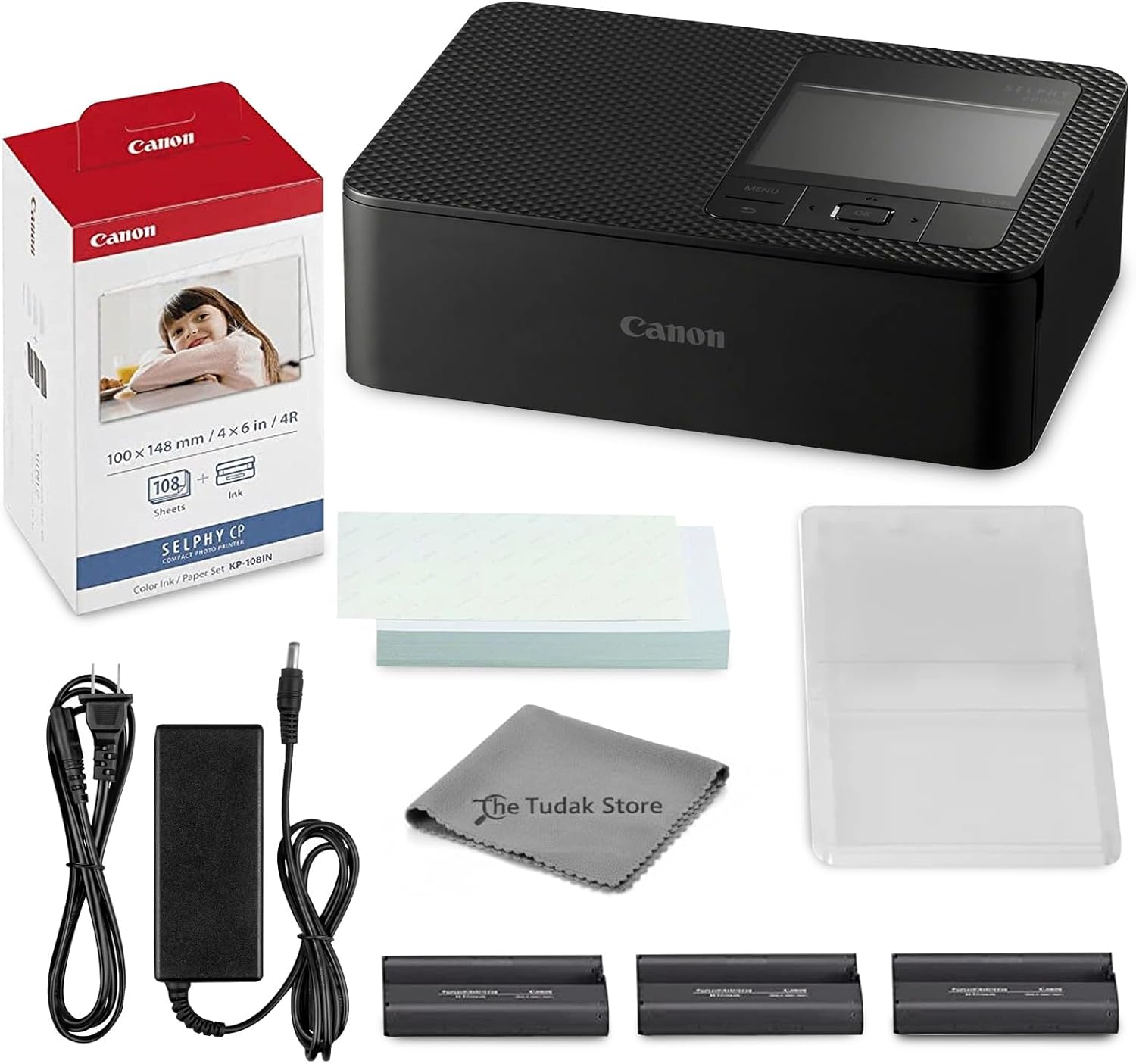
| Printer Type | Dye Sublimation |
|---|---|
| Maximum Media Size | 4×6 inches |
| Maximum Sheet Capacity | 108 |
| Printer Connectivity Type | Wi-Fi |
| Resolution | 1200 x 1200 |
The Canon SELPHY CP1500 is a portable dye-sublimation photo printer kit designed to produce durable 4×6 prints from phones, tablets, or PCs over Wi‑Fi. It arrives as a complete bundle with 108 sheets of KP-108 glossy paper, three color ink cartridges, and a cleaning cloth so you can start printing right away. The dye-sub engine yields smooth gradients and vibrant, water- and fingerprint-resistant photos that work well for events, scrapbooks, and casual at-home photo labs. Setup is straightforward using the app and the compact footprint makes it easy to tuck on a desk or bring to gatherings. Limitations include single-sided 4×6 output only and a fixed sheet capacity, so it is not a replacement for general document printing or larger photo formats. Speed is tuned for quality rather than high-volume throughput, making it best for bursts of prints rather than continuous heavy use.
Best for: Buyers who prioritize print quality and convenience for small batches of 4×6 photos and want a ready-to-use, wireless unit for events, scrapbooking, or gifts.
Less Ideal for: Users who need multi-page document printing, larger photo sizes, or high daily print volumes should consider a different printer type.
- Dye-sublimation printing produces lab-like, water- and fingerprint-resistant 4×6 photos
- Bundle includes 108 sheets of KP-108 paper and three color ink cartridges for immediate use
- Built-in Wi‑Fi and companion app allow direct printing from smartphones, tablets, and PCs
- Compact, portable design fits easily on a desk or for travel
- Prints are limited to 4×6 size and simplex only
- Not suited for high-volume or faster document-style printing
Verdict: Choose the SELPHY CP1500 if you want a compact, wireless kit that delivers lab-quality 4×6 prints right out of the box.
TATTMUSE A285M Portable Thermal Printer

| Printer Type | Thermal |
|---|---|
| Printer Connectivity Type | Bluetooth, USB |
| Maximum Media Size | 8.5 x 11 inch |
| B&W Pages per Minute | 7 |
| Wattage | 11.1 watt-hours |
The TATTMUSE A285M is a lightweight, rechargeable thermal printer designed for on-the-go monochrome printing of receipts, invoices, boarding passes and single-sheet documents. It pairs with phones and tablets over Bluetooth for mobile printing and uses a USB‑C connection with a driver for laptop or PC use, so it works well as a travel or field printer. A285M supports multiple thermal paper widths including US Letter and A4, prints at about 7 ppm with up to 203 dpi effective resolution, and requires no ink or ribbons which keeps running costs low. The built‑in paper bin and support for rolls or single sheets make loading flexible, and the battery capacity is sized for portable use. Limitations include black‑and‑white only output and a dependency on thermal paper exclusively, so it cannot print on regular copy paper or produce color documents; laptop printing also needs a driver installation. For buyers who need occasional full‑page monochrome prints away from an office, it delivers a compact, low‑maintenance solution.
Best for: Buyers who prioritize a compact, low‑maintenance mobile printer for printing receipts, invoices, boarding passes, and occasional full‑page monochrome documents while traveling or working in the field.
Less Ideal for: Users who need color printing, standard copy‑paper support, or a primary desktop printer for high‑volume office work should look for a different model.
- Inkless thermal printing eliminates ink, toner, and ribbon maintenance
- Bluetooth pairing for phones and tablets enables quick mobile printing
- Supports multiple thermal paper sizes up to US Letter/A4 for full‑page prints
- Built‑in paper bin and roll/sheet support simplifies media handling
- Compact, rechargeable design is lightweight and travel friendly
- Prints only in black and white and only on thermal paper
- Laptops and desktops require a driver and USB connection rather than Bluetooth
Verdict: A285M is the practical choice for travelers and field workers who want a compact, inkless thermal printer that delivers full‑page monochrome prints without ongoing ink costs.
XenGro Mini Sticker Printer AHM2

| Printer Type | Thermal |
|---|---|
| Resolution | 203 x 203 dpi |
| Printer Connectivity Type | Bluetooth |
| B&W Pages per Minute | 10 pages_per_minute |
| Maximum Media Size | 3 x 4 inches |
The XenGro AHM2 is a pocket-sized thermal sticker printer that links to your phone over Bluetooth and prints monochrome stickers, labels, notes, and small photos at 203 dpi. It ships with four paper rolls and a USB-C cable and uses inkless thermal technology so there are no cartridges to refill. The companion app provides templates, OCR text recognition, basic editing and quick reconnect behavior for fast on-the-go printing, and a built-in serrated cutter makes tearing neat labels easy. Print speed is modest at about 10 black-and-white pages per minute, which is fine for individual labels, study flashcards, and journaling but not for bulk office jobs. Its maximum media size is small, intended for 3 x 4 inch content, and image detail is limited by the 203 dpi resolution and monochrome output. For everyday organization, student notes, and craft projects the AHM2 is convenient and low-maintenance; for larger-format or color photo work you will need a different printer.
Best for: Buyers on a budget who want a lightweight, easy-to-use device for labels, study notes, journaling, and small craft prints that work straight from a phone.
Less Ideal for: Users who need high-resolution photo prints, color printing, or high-volume document output should choose a larger dedicated printer instead.
- Portable, pocket-sized design with USB-C charging for easy carry
- Inkless thermal printing requires no cartridges or toner
- Includes four paper rolls so you can print out of the box
- Simple Bluetooth app with templates, OCR, and basic editing tools
- Built-in serrated cutter for clean label tears
- Monochrome-only 203 dpi output limits photo detail and color work
- Small maximum media size and single-sheet capacity restricts large or bulk printing
Verdict: A compact, budget-friendly inkless thermal printer that delivers easy, on-the-go label and note printing from your phone.
Fujifilm INSTAX Mini Link 3

| Printer Type | Zink Technology |
|---|---|
| Maximum print Resolution Color | 600 dpi |
| Maximum Media Size | 2 x 3 inches |
| Printer Connectivity Type | Bluetooth |
| Hardware Interface | USB Type C |
The Fujifilm INSTAX Mini Link 3 is a pocketable smartphone printer designed to turn phone photos into 2 x 3 inch glossy instant prints. It pairs over Bluetooth 5.1 with the INSTAX Mini Link app on Android or iOS, where you can add filters, text, frames, and AR-style effects before printing. The unit uses Zink technology and produces 600 dpi color output on Fujifilm glossy instant film, and it accepts the included 20-exposure film pack so you can print right away. Its USB-C port handles charging and the lightweight design makes it easy to bring to parties, events, or casual photo sessions. The printer is print-only, so there is no scanning or copying, and prints are small by design, which suits social and creative uses rather than archival photo enlargement. Practical benefits include quick, on-the-spot physical photos and app-driven creative controls, while limitations are the single small print size and the ongoing cost of proprietary instant film.
Best for: Buyers who want a reliable, party-ready printer for quick physical keepsakes and creative app-driven prints from a smartphone.
Less Ideal for: Those needing larger format prints, multifunction office printers, or professional archival-quality prints should look elsewhere.
- Compact, lightweight design makes it easy to carry to events
- Bluetooth 5.1 connectivity and INSTAX app let you edit and add AR effects before printing
- 600 dpi color output on glossy instant film for clear small prints
- Includes a 20-exposure film pack and USB-C cable to start printing immediately
- Prints are limited to 2 x 3 inches, not suitable for larger prints
- Print-only device with no scanning or copy functions
Verdict: A dependable, portable smartphone printer for people who want fast, fun 2 x 3 instant photos and easy app-based customization.
KODAK Step Instant Photo Printer
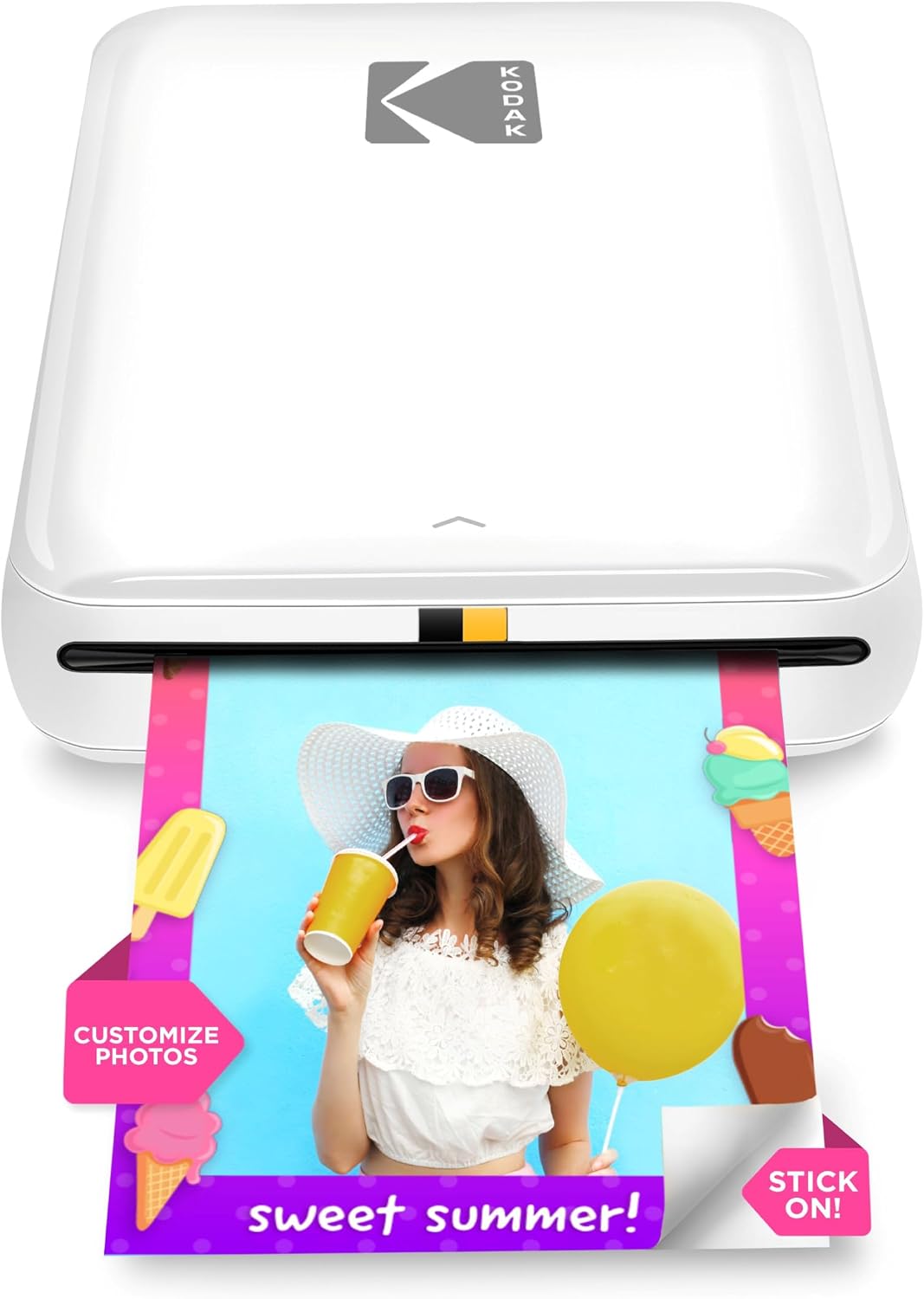
| Print media | 2×3 inches glossy ZINK paper |
|---|---|
| Connectivity | Bluetooth, NFC |
| Resolution | 313 x 400 dpi (color) |
| Battery life | Up to 25 prints per charge |
| Maximum sheet capacity | 10 |
The KODAK Step is a compact, battery-powered mobile printer that uses ZINK zero-ink technology to produce 2×3 sticky-backed color photos directly from your smartphone via Bluetooth or NFC. You set up the KODAK Step Prints app on your phone, choose or edit an image with filters, stickers, or collages, then tap print for a protected 2×3 print in about a minute. Its rechargeable battery is rated for roughly 25 prints per charge and the included starter pack and simple paper loading make it easy to start printing right away. The lack of ink cartridges keeps running maintenance straightforward, but image resolution and color depth are modest compared with desktop photo printers, and paper cost can add up if you print frequently. The unit is genuinely portable and a good match for casual snapshots, crafts, and event giveaways, but not for large-format or high-fidelity photographic archiving.
Best for: Buyers who prioritize a proven, easy-to-use portable printer for parties, crafts, and social sharing and who want a product with strong user feedback and straightforward app-driven editing.
Less Ideal for: People needing large prints, professional-grade color accuracy, or high-volume printing workflows should consider traditional photo printers instead.
- True pocketable size with built-in rechargeable battery for on-the-go printing
- ZINK zero-ink prints are peel-and-stick and resistant to smudges, water, and tears
- Wireless pairing via Bluetooth or NFC and an app with editing, collage, and sticker tools
- No ink cartridges to replace, simplifying maintenance
- Prints are small 2×3 inches with modest resolution compared to higher-end photo printers
- Approximate print speed and battery capacity limit throughput to casual use (about 25 prints per charge)
Verdict: If you want a lightweight, reliable pocket printer for quick, sticky-backed 2×3 photos at events or for crafts, the KODAK Step is a practical, well-supported choice.
Nelko PP01 Photo Printer

| Printer Type | Inkjet |
|---|---|
| Print media | Glossy photo paper |
| Paper Size | 52x90mm (2×3") |
| Resolution | 600 x 600 DPI |
| Printer Connectivity Type | Bluetooth |
The Nelko PP01 is a compact Bluetooth inkjet designed for quick 2×3 sticky-back prints from iOS or Android phones using the Nelko app. You load 2×3 photo paper, install a color cartridge, pair over Bluetooth and print edited images from the app, which offers frames, filters, collage and basic AI touch-ups. Prints are produced at 600 DPI and deliver vivid, adhesive-backed photos suitable for scrapbooks, planners, party favors and on-the-go mementos; a single cartridge claims up to roughly 80 prints. The unit is genuinely pocketable and charges via USB. Practical limitations are the small 2×3 output size, a modest print speed (about one color page per minute) and reliance on the proprietary app and cartridges, which means ongoing consumable purchases and occasional head-clean cycles to avoid clogging if left idle. For everyday instant snapshots and craft projects the PP01 is convenient, but it is not intended as a replacement for larger photo printers or high-volume work.
Best for: Buyers who want an easy, low-risk way to make instant small prints for scrapbooks, gifts, and travel journals and value a straightforward Bluetooth workflow and app editing tools.
Less Ideal for: If you need larger prints, fast throughput, or a device for high-volume professional photo production, look at full-size photo printers instead.
- Truly portable pocket-sized design for on-the-go printing
- Bluetooth smartphone pairing with a feature-rich app for editing and layouts
- High 600 DPI resolution for sharp 2×3 color prints
- Produces adhesive-backed, smudge- and tear-resistant photos ready for scrapbooks
- Includes starter media and a USB charging cable out of the box
- Prints are limited to small 2×3 size so not suitable for larger photos
- Print speed is slow at about one page per minute, so batch jobs take time
- Requires proprietary ink cartridges and paper which adds ongoing costs
Verdict: A compact, app-driven 2×3 inkjet that makes high-resolution sticky-back prints easily when you want instant keepsakes without complex setup.
Choosing the Right Mini Printer: Key Factors to Consider
Print Quality
Print quality determines how usable the output will be for documents, graphics, and occasional photos. Look at stated resolution and sample output for text sharpness and color fidelity. For most small-office needs, readable text and clean graphics at standard fonts are essential, while higher DPI and better color rendering matter if you occasionally print images or marketing materials.
Variations in print technology affect results. Dye-based inks often produce more vivid photos but can be less durable than pigment inks for archival documents. Laser-based mini printers usually deliver crisp black text and lower smudging risk, while inkjet models may offer more versatile color reproduction.
Connectivity Options
How the printer connects will affect day-to-day convenience. Wireless standards like Wi-Fi let multiple devices print without cables, while Bluetooth and direct mobile-printing protocols enable quick on-the-go printing from phones and tablets. Some models also provide USB or wired Ethernet for stable office setups.
Consider compatibility with your usual devices and whether you need features such as AirPrint, Mopria, or a proprietary mobile app. Reliable connectivity reduces printing friction and prevents repeated troubleshooting that undoes the benefit of a compact device.
Paper Handling and Capacity
Mini printers typically trade away large paper trays to remain compact, so check the input capacity and supported paper sizes. If you print frequently, a small tray will mean more frequent refills and potentially slower workflows. Also verify whether the printer supports photo paper, envelopes, labels, or other media you plan to use.
Look for easy paper-loading mechanisms and clear paper-path design to minimize jams. Removable or multi-purpose trays add flexibility without increasing footprint too much, which is valuable in a constrained workspace.
Portability and Power
Portability is a core reason to choose a mini printer, so weight, dimensions, and power options are critical. Some mini printers are designed to run on battery power, which is useful for events, pop-up workstations, or travel. Others require AC power but still pack into a small bag for transport.
Durable casing and secure paper covers matter if you plan to move the device frequently. Also consider how easily you can set up and tear down the printer in different locations to avoid connectivity or mounting hassles when working outside your primary desk.
Operating Cost and Consumables
Long-term cost depends on ink or toner yield, cartridge pricing, and the ease of replacing consumables. A low upfront price can be offset by expensive cartridges, or by printers that require proprietary consumables with limited availability. Check manufacturer-stated page yield and look for compatible high-yield options when budgeting.
Maintenance tasks such as head cleaning cycles or drum replacement can add time and expense. For occasional users, lower daily use cost may be less important than cartridge shelf life and the availability of affordable replacement cartridges.
Speed and Performance
Print speed affects productivity, especially if you print batches of documents. Mini printers often have modest pages-per-minute ratings compared with full-size models, so assess speed in the context of your expected usage. Single-page response time for quick prints can be as important as steady-state speed for heavier jobs.
Also consider the printer's first-page-out time and how it handles complex print jobs with mixed graphics and text. Slower processors or limited memory can bottleneck printing from mobile devices or complicated layouts.
When a Mini Printer Is the Right Choice
Mini printers are best when footprint, portability, and occasional printing needs outweigh high volume demands. They work well on small desks, in dorm rooms, or for mobile professionals who need quick prints without lugging a full-size machine. These devices are typically optimized for lower monthly page volumes and for users who value convenience over continuous throughput.
If you mostly print short documents, receipts, labels, or occasional photos, a mini printer can provide sufficient quality and simpler setup. For steady daily high-volume workflows, however, a larger office printer will usually offer better capacity and lower per-page costs.
- Good for light to moderate home-office printing
- Best when portability and compact size matter
- Not ideal for high-volume daily printing
Setting Up a Mini Printer in a Small Workspace
Plan the physical placement to allow paper feeding and access to cartridges without removing the unit from the shelf. Measure the footprint including any open paper trays so you avoid cramped installations. Positioning near a reliable Wi-Fi network or a device you use most often reduces connectivity headaches.
Cable management and power access are common practical issues. If you have limited outlets, consider a model with efficient power usage or battery operation. Keep spare cartridges and small media nearby to reduce interruptions when the small input tray runs low.
- Leave space for tray extension and maintenance access
- Keep spare consumables within easy reach
- Prefer models with straightforward cable and wireless setup
Mobile Printing and Phone Integration
If you plan to print from a phone or tablet, verify support for native mobile protocols or dedicated apps. Native protocols like platform-specific printing standards provide a one-step workflow, while vendor apps offer more control over print settings and maintenance tasks.
Consider how often you will print from mobile devices. For occasional mobile use, Bluetooth or direct Wi-Fi may be sufficient. For regular mobile-first workflows, look for robust app support and clear instructions for pairing and troubleshooting.
- Check for AirPrint or platform-specific protocols
- Look for clear mobile app controls and updates
- Test pairing steps before final placement
Photo Printing on a Mini Printer
Some mini printers offer respectable photo output, but they usually require special photo paper and may be slower for high-resolution images. If occasional photo printing is important, prioritize models with higher DPI and good color handling rather than defaulting to the smallest possible unit.
Also factor in the cost and availability of compatible photo paper and any special cartridges required for photo modes. A compact photo-capable mini printer can be a great supplement for hobbyist prints and small albums.
- Use dedicated photo paper for best results
- Expect slower print times for high-resolution images
- Confirm color profiles and print modes in the app
Maintaining a Mini Printer
Regular maintenance keeps a small printer reliable. Routine tasks include replacing cartridges before they run completely dry, occasional head cleaning if prints show streaks, and updating firmware for connectivity fixes. Because parts are compact, small printers can be more sensitive to mishandling during maintenance, so follow published cleaning steps carefully.
Store spare cartridges and media in a controlled environment to prevent drying or curling. If your mini printer sees infrequent use, run a short print once a week to keep ink circulating and avoid clogging.
- Run periodic maintenance prints to prevent clogs
- Store consumables properly to extend shelf life
- Follow the manufacturer's cleaning steps for compact parts
How We Chose the Best Mini Printer
We concentrated on factors that matter most for buyers who want a compact, capable printer without stepping into full-size office machines. Our selection criteria prioritized actual usability in small spaces and on the go. We assessed print quality across black-and-white and color output, focusing on resolution and clarity for everyday documents and occasional photos. Connectivity options were evaluated for reliability and flexibility, including Wi-Fi, Bluetooth, and mobile printing protocols. Paper handling and media support considered maximum sheet capacity, acceptable paper sizes, and any special media like labels or photo paper. Build quality and portability examined chassis durability, weight, and power options such as AC only or battery support. Finally, running cost indicators such as ink or toner yield and replacement ease were considered to estimate ongoing ownership effort. We excluded large-format and full-size office printers that do not fit the compact footprint expected of mini printers, as well as specialty industrial devices. Products that lacked basic wireless connectivity or accepted standard paper sizes were deprioritized. The outcome is a shortlist of compact printers that balance print quality, connectivity, and manageable running costs for under $500 buyers.
Our full evaluation process is outlined in our review methodology.
FAQ
Are mini printers good for printing photos?
Mini printers can produce decent photos if they support high DPI and use compatible photo paper. Expect slower print speeds and the need for specific consumables, so prioritize models that list photo paper support and higher resolution when photo quality matters.
Can I use a mini printer with multiple devices?
Yes. Many mini printers offer Wi-Fi, Bluetooth, or mobile printing protocols that let multiple devices connect. Check for reliable wireless performance and supported protocols to ensure smooth sharing across phones, tablets, and laptops.
How often will I need to replace ink or toner in a mini printer?
Replacement frequency depends on your print volume and the cartridge yield. For light home use, cartridges may last months, while more frequent printing can deplete them faster. Look at stated page yields and consider high-yield options to reduce refill frequency.
Do mini printers work without a dedicated AC outlet?
Some mini printers include battery operation or offer optional batteries, which allows use away from an AC outlet. Many compact models still require AC power, so confirm the power options if you plan to use the device in mobile or off-grid scenarios.
Will a mini printer handle envelopes or labels?
Some mini printers support envelopes and label rolls, but capacity and feed mechanisms vary. Verify the supported media list and loading method to ensure reliable feeding of nonstandard media in a small form factor.
Final Verdict
Choosing the right mini printer under $500 comes down to balancing print quality, connectivity, and how often you plan to print. Prioritize the connectivity features and paper handling that match your daily workflow, and weigh operating costs if you expect frequent use. For portable setups, give extra weight to power options and build quality. With those tradeoffs in mind, you can confidently select a compact printer that fits your space and printing habits.