
Note: This article contains affiliate links. If you click on these links and make a purchase, we may earn a small commission at no extra cost to you. This helps support our research and content. Read our full affiliate disclosure here.
Tile floors demand a cleaning solution that removes grit without scratching grout or leaving streaks. A Robot Vacuum for Tile Floors can save time by handling daily debris pickup while protecting tile finishes and grout lines. This guide collects seven shortlisted robot vacuums that fit tile-first households, focusing on real-world concerns like suction across hard surfaces, brush and wheel design that avoids scuffing, and navigation systems that prevent missed zones. Below you'll find our top picks plus clear criteria we used to evaluate them so you can choose the right automated cleaner for your tile areas. Read on for the factors that matter most and practical tips for use and upkeep.
Top Picks at a Glance
| Best Overall The best all-around choice for most situations | ILIFE A30 Pro |  |
| Best Quality Built to a higher standard if you want something more solid | dreame Matrix10 Ultra |  |
| Best Value The sweet spot between price and what you get | roborock Q7 L5 Robot Vacuum |  |
| Best Budget The cheapest option that still gets the job done reliably | ILIFE V2 Robot Vacuum |  |
| Top Rated A top-rated pick with lots of positive feedback | iRobot Roomba 105 Combo |  |
| Most Popular A crowd favorite that many people choose with confidence | ROPVACNIC S1 Robot Vacuum |  |
| Best Seller A high-volume bestseller chosen again and again | roborock Q10 S5+ |  |
ILIFE A30 Pro

| Max suction | 10000 Pa |
|---|---|
| Battery life | 150 minutes |
| Filter type | Hepa |
| Dust bag capacity | 2.5 liters |
| Control | App, remote, voice |
The ILIFE A30 Pro is a robot vacuum designed to handle routine vacuuming and light mopping on hard floors and low-pile carpet. It uses LiDAR mapping to build accurate floor plans and supports multi-floor maps, no-go zones, scheduling, and app control plus voice and remote commands. The unit pairs a roller brush with up to four suction levels including a 10000Pa Max mode for deeper pickup and a combined 200ml dust/water module that lets it vacuum and mop in one pass. A notable convenience is the self-emptying base that holds 2.5L dust bags and supplies several weeks of hands-free runs between bag changes. In real use it shines on tile because LiDAR navigation keeps systematic coverage and the mop function reduces dust streaks; heavy wet mopping is not its focus given the small water capacity. Expect solid pet hair pickup and long single-run runtime, but plan to replace bags and perform occasional brush and filter maintenance to keep peak suction and mapping performance.
Best for: Buyers who want a low-maintenance daily cleaner for tile and mixed floors that prioritizes reliable navigation, app scheduling, and hands-off dust disposal.
Less Ideal for: If you need heavy-duty wet mopping, large water capacity, or very long continuous mopping sessions, a dedicated mop system would be a better choice.
- LiDAR navigation enables accurate mapping and efficient systematic cleaning.
- Self-emptying base with 2.5L bags reduces how often you must empty the robot.
- High maximum suction (up to 10000Pa) improves pickup on tile grout and pet hair.
- Combined vacuum-and-mop module lets the robot vacuum and mop in a single pass for faster cleaning.
- Water tank and mop reservoir are small, so it is not suited for heavy wet mopping sessions.
- Max suction modes likely reduce runtime and increase noise compared with quieter modes.
Verdict: For tile floors, the A30 Pro delivers reliable mapped cleaning and hands-free emptying so you get regular, low-effort maintenance with good pickup and light mopping in one pass.
dreame Matrix10 Ultra

| Battery Life | 180 minutes |
|---|---|
| Suction | 30,000Pa |
| Control Method | App, Remote, Voice |
| Surface Recommendation | Wood, Marble, Tile |
| Form Factor | round |
The dreame Matrix10 Ultra is a premium robot vacuum designed for deep cleaning hard floors and carpets while minimizing hands-on maintenance. It combines high 30,000Pa suction with a dual brush and HyperStream detangling system to pull hair and debris from tile grout and rugs, while onboard sensors and OmniSight navigation map rooms and avoid over 240 obstacle types. The Multi-Mop Switching Dock and three-solution compartment let the robot switch mop pads and apply floor-specific cleaning solutions automatically, and the PowerDock handles refilling, mop drying, and a 212°F ThermoHub self-cleaning cycle to reduce odors. It climbs modest steps and thresholds and raises the mop on carpets so rugs stay dry. Real-world benefits include thorough tile cleaning without frequent manual mop changes and strong pet-hair pickup, plus long runtimes for larger homes. Limitations to consider are the need for 2.4 GHz Wi-Fi for app features, its premium size and complexity which add setup and maintenance steps, and that advanced functions are aimed at users comfortable with an automated dock-centric system.
Best for: Buyers who prioritize strong performance on hard floors and pet hair and want automated mop management to keep tile surfaces cleaner with minimal manual mop handling.
Less Ideal for: Buyers who prefer simple, compact robot cleaners without a large dock footprint or those who need only basic vacuuming without advanced automated mop and self-clean cycles.
- Very strong 30,000Pa suction effective on tile grout and pet hair
- OmniSight navigation with 3D obstacle avoidance reduces collisions and missed spots
- Multi-Mop Switching Dock automates mop changes and uses three floor-specific solutions
- PowerDock with ThermoHub provides mop drying and high-temp self-cleaning to limit odors
- Long battery life up to 180 minutes for extended cleaning runs
- Requires 2.4GHz Wi-Fi for smart features which may limit connectivity in some homes
- Large, complex dock system increases setup footprint and may need periodic maintenance
- Premium feature set and performance come with higher purchase and servicing expectations
Verdict: If you want top-tier tile cleaning with powerful suction and an automated dock that handles mop switching and self-cleaning, the Matrix10 Ultra delivers the most hands-off deep clean experience.
roborock Q7 L5 Robot Vacuum

| Suction | 8,000 Pa |
|---|---|
| Navigation | LiDAR |
| Battery life | 150 minutes |
| Water tank capacity | 270 ml |
| Filter type | Washable |
The roborock Q7 L5 is a LiDAR-guided robot vacuum that vacuums and mops in a single run, using an integrated 270 ml water tank and up to 8,000 Pa suction to handle dust and pet hair on hard floors and low‑pile carpet. It maps rooms with multi-floor support and quick mapping so you can set scheduled cleans, no-go zones, and targeted room runs from the Roborock app or with voice assistants. Practical features include a dual anti-tangle brush system that reduces hair wrap, carpet boost that increases suction where needed, washable filters, and a child lock. For hardwood floors the precise navigation and along-floor-direction cleaning reduce repeated passes and the electronic water control offers three water levels to avoid over-wetting. Limitations to note are the combined dustbin/water-tank design which means you cannot refill water without handling the combo unit, and the robot requires a 2.4 GHz Wi‑Fi connection for full app features.
Best for: Buyers who prioritize reliable, predictable cleaning on hardwood and want a robot that follows precise maps, runs on a schedule, and minimizes hair-related maintenance.
Less Ideal for: People who need separate, large-capacity water or dust tanks for long runs without handling the unit frequently or who cannot provide a 2.4 GHz Wi‑Fi network.
- LiDAR mapping and multi-floor mapping for accurate, efficient coverage
- Strong 8,000 Pa suction with carpet boost for better pickup of dust and pet hair
- Dual anti-tangle brushes minimize hair wrap and maintenance
- Electronic water tank with three water levels lets you control mop moisture
- App control plus Alexa and Google Home compatibility for scheduled, hands-free operation
- Integrated dustbin and water tank is a single combo part, which adds steps when refilling or emptying
- Requires 2.4 GHz Wi‑Fi for app connectivity, which may need router changes for some homes
Verdict: A strong‑suction, LiDAR‑mapped vacuum‑and‑mop that reliably cleans hardwood with low hair maintenance and smart app controls.
ILIFE V2 Robot Vacuum

| Battery Life | 120 minutes |
|---|---|
| Capacity | 300 ml |
| Filter Type | Sponge |
| Control Method | Remote |
| Noise Level | 69 db |
The ILIFE V2 is an entry-level robot vacuum built to keep hardwood and other hard floors tidy without a lot of fuss. Its 2.99-inch slim body fits under low furniture while a tangle-free suction port and sponge filter make it practical for homes with pet hair. You can run scheduled cleanings, switch between auto, spot and edge modes, or start jobs with the included remote control or the single-button on the unit. A 300 ml dustbin and up to 120 minutes of runtime let it cover medium rooms on one charge, and it will automatically return to the dock when the battery is low. Noise is noticeable at 69 dB and there is only one power level, so it lacks adjustable suction or app-based controls, but for straightforward floor maintenance on hardwood and low-pile carpet the V2 delivers solid value at an affordable price.
Best for: Buyers who want an affordable, no-frills robot to maintain hardwood and low-pile carpet cleanliness with simple controls and scheduled runs.
Less Ideal for: Those who need strong adjustable suction, smart app control, or advanced mapping for large or complex homes should consider higher-end models.
- Slim 2.99-inch profile cleans under low furniture
- Tangle-free suction port suited for pet hair
- 120 minutes runtime with automatic return-to-dock
- Multiple cleaning modes (auto, spot, edge) and simple remote control
- Single power level limits suction control for heavier debris
- No smartphone app or advanced navigation features
Verdict: A low-cost, slim robot vacuum that reliably maintains hardwood floors and handles pet hair for budget-focused buyers.
iRobot Roomba 105 Combo

| Surface Recommendation | Carpet & Hard Floor |
|---|---|
| Battery Life | 100 minutes |
| Controller Type | App Control, Button Control, Voice Control |
| Other Special Features of the Product | LiDAR Navigation, Self-Emptying, Simultaneous Vacuuming & Mopping, Smart Mapping |
The Roomba 105 Combo pairs LiDAR-based mapping with simultaneous vacuuming and mopping to keep tile and hard floors routinely maintained with minimal intervention. It uses a multi-stage cleaning system—powerful suction, an edge-sweeping brush, and a reusable microfiber mop pad with a micro-pump that meters water or solution—to pick up dirt, sweep edges, and scrub high-traffic spots when SmartScrub is enabled. ClearView LiDAR builds maps for efficient coverage and obstacle avoidance, and the AutoEmpty dock captures up to 75 days of debris so you rarely touch dust. You control routines via the iRobot Home app, buttons, or voice assistants and can schedule room-by-room cleans and set keep-out zones. Limitations to note are a 100-minute battery runtime that may require mid-cycle recharges in larger homes and the robot's reliance on specific app mapping rather than advanced 3D room recognition. For tile floors the mop pad and controlled water delivery work well, but heavier wet cleaning tasks still need occasional manual attention.
Best for: Buyers who prioritize dependable, low-maintenance cleaning for tile and hard floors and want a robot that reliably maps rooms, empties itself, and handles regular vacuuming plus light mopping with minimal oversight.
Less Ideal for: If you need a robot to deep-clean large homes in a single run or to replace intensive manual mopping, choose a unit with longer runtime or a more aggressive scrubbing system.
- ClearView LiDAR mapping for reliable coverage and obstacle avoidance on tiled layouts
- AutoEmpty dock holds up to 75 days of debris for low-maintenance operation
- Combined vacuum and controlled mopping with SmartScrub for deeper cleaning of spills and grime on tile
- Edge-sweeping brush improves cleaning along baseboards and in corners
- App, touch, and voice controls plus scheduling and keep-out zones for easy, hands-off use
- 100-minute battery life may be short for very large homes without a recharge during cleaning
- Mop is a microfiber pad that cleans well for routine soil but is not a replacement for heavy manual scrubbing
Verdict: Choose the Roomba 105 Combo if you want a reliable, hands-off robot that maps precisely, self-empties for months, and maintains tile floors with combined vacuuming and controlled mopping.
ROPVACNIC S1 Robot Vacuum
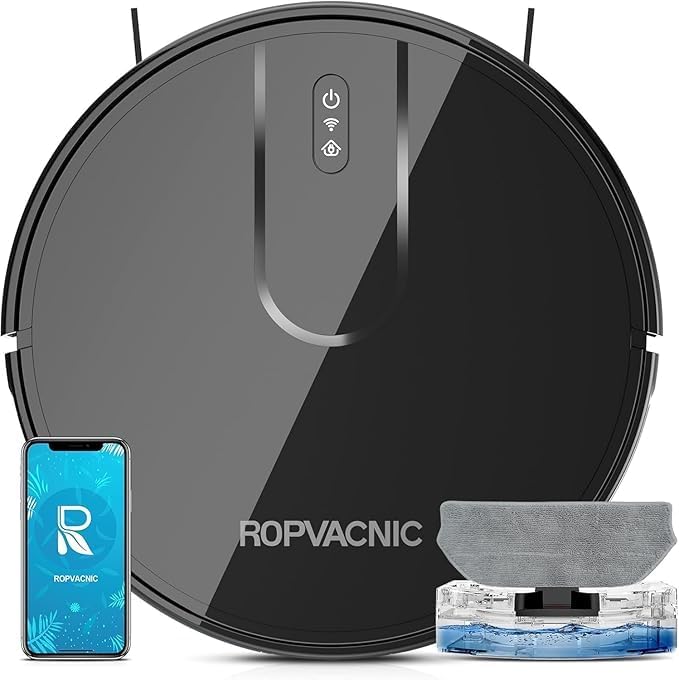
| Suction power | 5200Pa |
|---|---|
| Battery life | 120 minutes |
| Form factor | round |
| Surface recommendation | Hardwood Floors, Low Pile Carpets |
| Filter type | Multi-layer Optimized High-Efficiency Filtration |
The ROPVACNIC S1 is a compact robot vacuum that combines suction and electronically controlled mopping to keep tile and other hard floors clear of dust and light stains. You control it via the app, remote, touch controls, or voice assistants to start scheduled runs, change cleaning modes, or adjust the mopping water level across four intensity settings. On the floor it uses a 3-point cleaning system with dual rotating side brushes and a no-entanglement design aimed at pet hair, while a 5200Pa motor tackles crumbs and debris; the low 2.99" profile helps it reach under low furniture. It returns to its charging base automatically when battery is low and can run up to about 120 minutes per charge, making it suitable for medium to larger rooms. Practical limitations include reliance on the app and smart features for full personalization and that its electric mopping is best for light soiling rather than heavy scrubbing; tile grouts or sticky spills may still need spot treatment by hand.
Best for: Buyers who want a hands-off solution to keep tile floors tidy with scheduled, app- or voice-controlled vacuuming and light mopping, especially in homes with pets seeking reliable real-world performance backed by user feedback.
Less Ideal for: People who need a robot to deep-scrub grout, handle heavy sticky spills, or who prefer a purely manual mop system for intensive floor cleaning.
- Combined vacuum and electronically controlled mopping with four water levels for tailored cleaning
- High 5200Pa suction and a 3-point cleaning system for effective debris pickup on tile
- Long 120-minute battery life and automatic return-to-dock for extended coverage
- Low 2.99" profile improves access under furniture and tight spaces
- No-entanglement design and dual side brushes help with pet hair pickup
- Electric mopping is designed for light cleaning and may not remove heavy stains or sticky messes
- Advanced features require app or smart-home setup to access full personalization
Verdict: For tile floors, the ROPVACNIC S1 is a practical, pet-friendly robot that delivers strong suction and reachable mopping performance for regular maintenance and hands-off scheduled cleaning.
roborock Q10 S5+

| Maximum Suction | 10,000Pa |
|---|---|
| Battery Life | 150 minutes |
| Capacity | 2.7 liters |
| Filter Type | Washable |
| Control Method | App, Voice |
The roborock Q10 S5+ combines powerful suction, LiDAR mapping, and a sonic mopping module to handle daily floor care with minimal intervention. It navigates using 360° LiDAR for accurate multi-level maps and lets you set no-go zones and cleaning schedules from the Roborock app or with voice commands. For tile floors the VibraRise 2.0 mopping system scrubs with high-frequency vibration and the auto-lift feature keeps carpets dry by raising the mop module and boosting suction automatically when ultrasonic sensors detect rugs. The included 2.7 L self-emptying dock holds dust for weeks, reducing maintenance for busy households and pet owners. ReactiveTech obstacle avoidance and a dual anti-tangle brush system help it move through clutter without frequent brush cleaning, though noise around 65 dB and a large unit footprint may be noticeable in small rooms. Battery runtime supports long runs and app controls let you fine-tune suction and mopping intensity, making this a practical pick for hands-off tile cleaning with strong stain removal and automated upkeep.
Best for: Buyers who prefer a low-maintenance, reliable robot that handles both vacuuming and serious mopping on tile and accepts occasional noise and a larger dock footprint in exchange for hands-off operation.
Less Ideal for: People who need an ultra-quiet or very compact robot for extremely tight rooms or who plan to use only light spot cleaning without mapping features should consider other models.
- High 10,000 Pa suction for deep cleaning on tile and grout
- VibraRise 2.0 sonic mopping scrubs stains and lifts on carpets automatically
- 2.7 L self-emptying dock enables long periods of maintenance-free use
- LiDAR-based mapping with multi-level maps and precise no-go zone setup
- Dual anti-tangle design and obstacle avoidance reduce manual intervention
- Reported noise level around 65 dB can be noticeable during operation
- Large physical footprint may be awkward in very tight spaces
Verdict: If you want hands-off, deep cleaning and powerful sonic mopping on tile with reliable mapping and a long self-emptying interval, the Q10 S5+ delivers.
Choosing the Right Robot Vacuum for Tile Floors: Key Factors to Consider
Suction Power Suited to Tile
Tile cleaning relies on suction more than brush agitation. Higher suction helps pick up fine dust, pet hair, and grit lodged in grout lines. However, raw suction numbers do not tell the whole story. The combination of suction with brush type and airflow path determines how much debris is removed from flat tile and shallow grout.
Look for models with adjustable suction so you can dial power up for heavy debris zones and back down for quiet daily runs. Consistent suction across the dust bin fill cycle also matters; some systems taper power as the bin fills, reducing effectiveness on larger jobs.
Brush and Wheel Design
Brushes and wheels contact tile directly and can either help lift debris or risk scuffing. Soft rubberized rollers or bristle designs that minimize abrasion are preferable to stiff, aggressive brushes on finished tile. Side brushes should sweep debris toward the intake without scattering it across grout lines.
Wheel materials and suspension also affect how the robot moves over grout ridges. Softer, well-cushioned wheels reduce noise and prevent scraping along grout edges. Avoid designs with large exposed hard plastic edges that could mark delicate tile finishes over time.
Navigation and Coverage Strategy
Efficient navigation reduces missed spots and limits repeated passes that waste battery and may streak damp debris across tile. Mapping systems that create room maps let the vacuum clean methodically and return to unfinished zones. Look for features like edge-following or dedicated corner-cleaning passes to address debris along grout lines.
Robots that can set no-go lines or virtual boundaries help prevent unnecessary travel onto sensitive surfaces or rugs. Reliable cliff and obstacle detection keep the vacuum from getting stuck on thresholds or low furniture legs that are common around tiled rooms.
Battery Life Relative to Room Size
Tile rooms can be large and open, so battery runtime is a practical concern. Longer runtime means fewer mid-job recharge interruptions and more consistent cleaning coverage. Consider the typical size of your tiled areas and choose a robot with runtime that comfortably handles that footprint in a single cycle.
Some models offer intelligent recharge-and-resume behavior that finishes jobs after recharging. That is helpful for very large floor plans but adds complexity to scheduling and pattern consistency when cleaning tile, since repeated passes may redeposit loose grit if not managed.
Filtration and Dust-Bin Accessibility
Tile cleaning often churns up fine dust and allergens that remain airborne until captured. A capable filter and an easy-to-empty dust bin reduce maintenance and indoor dust. HEPA or high-efficiency filters are beneficial in homes with allergy concerns, but filter access and replacement cost also matter.
Bins that are simple to remove and empty without dust clouds make routine upkeep quicker. If a robot uses washable filters, confirm drying times and replacement intervals to avoid running with degraded filtration.
Maintenance and Tangle Resistance
Tile surfaces still accumulate hair, string, and debris that can wrap on brush components. Brush systems designed to resist tangles or that are simple to clean reduce time spent on maintenance. Pay attention to how often brushes need attention and how easy it is to remove trapped debris.
Also consider sensor cleaning and wheel upkeep. Dust build-up on cliff sensors or wheel wells can impair navigation over time, so straightforward access to these parts extends reliable operation on tile floors.
Preparing Tile Floors for Robot Cleaning
Before deploying a robot vacuum, clear loose obstacles like small rugs, cords, and low objects that can trap the unit. Sweep or pick up large debris that could clog the intake so the robot focuses on fine dirt and hair that is best handled by its suction system.
Check grout condition and remove large stuck-on residues manually; this prevents the robot from smearing sticky spots across tile. If you use floor treatments or sealants, ensure they are fully cured and compatible with automated cleaning to avoid streaking.
- Remove small rugs and doormats from the cleaning zone
- Pick up cords, toys, and pet bowls
- Spot-clean sticky spots before running the robot
- Confirm floor treatments are fully cured
Setting Up Zones and Schedules
Use mapping and virtual boundary features to define specific tile areas and keep the robot out of places where it could get stuck. Schedule daytime or overnight runs depending on noise tolerance and activity patterns to keep tile consistently free of debris.
For homes with mixed flooring, create separate cleaning zones and tailor suction and brush settings for each. Running lower suction on sensitive tile zones reduces streaking while higher settings can be used on high-traffic or grit-prone areas.
- Create separate zones for tiled rooms and adjust modes accordingly
- Schedule frequent short runs instead of infrequent long cleans
- Set no-go zones around fragile areas or cluttered thresholds
Dealing with Grout Lines and Edge Cleaning
Grout traps dirt differently than flat tile. Aim for robots that combine edge-sweeping brushes with strong intake near edges to pull debris out of shallow grooves. Running the robot along edges more frequently helps prevent accumulation in grout.
If grout is particularly deep or textured, occasional manual brushing or a targeted handheld vacuum will complement the robot's routine maintenance and keep grout looking its best.
- Run edge-focused cycles weekly for grout-heavy areas
- Use side-brush-friendly paths to funnel debris into the intake
- Supplement with manual cleaning for deep or stained grout
Maintenance Schedule for Tile-Focused Use
Regular maintenance keeps performance consistent on tile. Empty the dust bin after each run if you have pets or heavy foot traffic. Inspect brushes and wheels weekly for trapped hair or grit and clean sensors monthly to maintain navigation accuracy.
Replace filters on the schedule recommended by the manufacturer or sooner if you notice diminished suction. Keep spare filters and a lightweight hand tool on hand to minimize downtime between maintenance tasks.
- Empty bin after heavy-use runs
- Check brushes and wheels weekly
- Clean sensors monthly
- Stock spare filters and replacement parts
Noise and Activity Considerations on Tile
Tile can amplify motor and wheel noise compared with carpet. If household members are sensitive to noise, choose models with quieter operation modes and schedule runs when the home is less occupied. Soft wheel materials and lower RPM modes reduce both sound and the risk of scuffing.
For homes with sleeping children or remote work, consider running the robot on a lower-power, quieter cycle that still maintains daily debris control and reserve intense cleaning for weekly deep cycles.
- Prefer softer wheel compounds to reduce noise
- Use quiet modes during daytime occupancy
- Reserve high-suction modes for periodic deep cleaning
How We Chose the Best Robot Vacuum for Tile Floors
We prioritized features that matter for tile floors and everyday household use. Key evaluation criteria included suction performance on hard surfaces, brush and wheel design to avoid scratching or scattering debris, navigation and mapping accuracy to cover rooms efficiently, and battery life relative to typical tile room sizes. We also considered filtration and dust-bin access for households concerned about dust and allergens, plus ease of maintenance to keep brushes and sensors tile-safe over time. Products were excluded if they lacked clear hard-floor performance details, had brush systems known to tangle excessively, or offered only nominal navigation without mapping. We favored models with documented tile handling features such as adjustable suction modes, hard-floor-specific brush rolls or rubberized contacts, and navigation that minimizes repeated passes. The final list balances practical daily-cleaning capability, long-term upkeep, and design elements that protect tile and grout.
Our full evaluation process is outlined in our review methodology.
FAQ
Can a robot vacuum damage tile or grout?
Most modern robots are designed for hard floors and use soft wheels and appropriate brush types to avoid scratching. Damage is uncommon but possible if abrasive debris is dragged across tile or if the robot has exposed hard plastic edges. Regularly inspect wheels and remove grit to minimize risk.
How often should I run a robot vacuum on tile floors?
Frequency depends on traffic and pets. For moderate traffic, daily or every-other-day short runs keep dust and grit from accumulating. Heavier traffic or pet hair may need daily runs. Periodic deeper cleaning with a higher-power mode helps manage embedded debris.
Will a robot vacuum clean grout lines effectively?
Robots remove surface dirt from grout but are limited for deep or heavily stained grout lines. Edge brushes and strong suction help pull debris from shallow grout, but deep cleaning still benefits from occasional manual scrubbing or specialized grout tools.
Do robot vacuums work on wet or recently mopped tile?
Most robot vacuums are not designed for wet surfaces and should not be run on recently mopped floors. Moisture can damage internal components and cause dirt to smear. Ensure floors are dry before scheduling a robot run.
How do I prevent a robot vacuum from getting stuck on thresholds?
Use virtual boundaries or no-go lines to keep the robot away from tricky thresholds. Also, check wheel height and clearance specs to ensure the model can cross small transitions common in tiled homes. Lighter thresholds or ramp strips can help as well.
Final Verdict
Choosing a Robot Vacuum for Tile Floors comes down to balancing suction performance, gentle contact with tile surfaces, and reliable navigation. Prioritize models with adjustable suction, soft brush and wheel materials, and mapping features that let you define tile zones and avoid problem areas. Regular maintenance of brushes, wheels, and filters keeps performance consistent and protects tile finishes. Focus on the tradeoffs that matter most for your home: quieter operation and gentler brushes versus higher suction for heavy grit, and mapping sophistication versus simple, robust cleaning routines. With the right priorities, a robot vacuum can significantly reduce daily upkeep and keep tile looking clean with minimal manual effort.