
Note: This article contains affiliate links. If you click on these links and make a purchase, we may earn a small commission at no extra cost to you. This helps support our research and content. Read our full affiliate disclosure here.
If you need a Robot Vacuum for Multiple Floors, picking the right model makes daily upkeep far easier. Multi-level homes create special demands: machines must transition between surfaces, remember separate floor plans, and maintain suction on both rugs and hard floors. A poor choice means repeated manual passes or constant remapping. This guide covers seven shortlisted options optimized for multi-floor use. We evaluate mapping and navigation, suction and cleaning performance, battery life and recharge behavior, and how well each vacuum handles transitions and multi-level setups. Read on to see which features matter most for keeping every floor in your home consistently clean.
Top Picks at a Glance
| Best Overall The best all-around choice for most situations | iRobot Roomba 105 Vac |  |
| Best Quality Built to a higher standard if you want something more solid | roborock Saros 20 |  |
| Best Value The sweet spot between price and what you get | ILIFE A30 Pro |  |
| Best Budget The cheapest option that still gets the job done reliably | ILIFE V2 Robot Vacuum |  |
| Top Rated A top-rated pick with lots of positive feedback | Bagotte G6 Robot Vacuum |  |
| Most Popular A crowd favorite that many people choose with confidence | roborock Q10 S5+ |  |
| Best Seller A high-volume bestseller chosen again and again | eufy C28 Robot Vacuum |  |
iRobot Roomba 105 Vac
| Battery Life | 200 minutes |
|---|---|
| Surface Recommendation | Carpet & Hard Floor |
| Other Special Features | Anti-Fall, Dirt Detection Sensor, Eco Mode, Edge Cleaning, LiDAR Navigation |
| Control Method | App, Push Button, Voice |
| Capacity | 0.1 gallons |
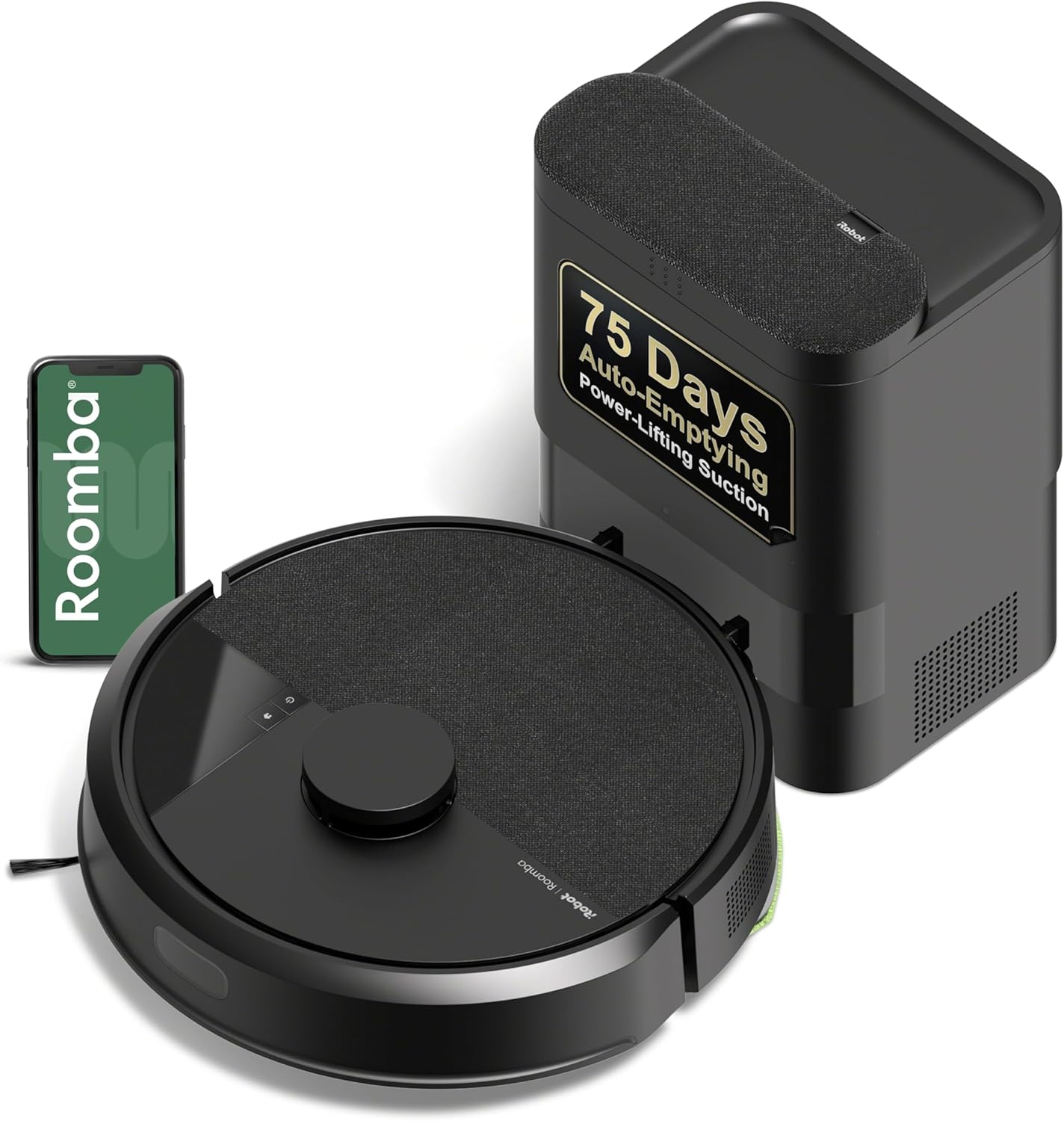
The Roomba 105 Vac with AutoEmpty dock is a practical robot vacuum for routine cleaning of carpets and hard floors. It uses ClearView LiDAR to map rooms for neat-row navigation and supports custom schedules, targeted spot cleans, and keep-out zones via the iRobot Home app or voice assistants. The three-stage cleaning system combines a multi-surface brush, an edge-sweeping brush, and power-lifting suction designed to pull dust from carpet and edges, while the AutoEmpty dock holds debris in a replaceable bag for up to 75 days to reduce hands-on maintenance. Battery life is listed at 200 minutes, which helps it cover multiple rooms or floors during a session, and basic upkeep involves occasional filter and brush cleaning. Limitations include a smaller onboard dust capacity and reliance on a 2.4 GHz Wi-Fi network for setup, and while LiDAR mapping is efficient, this model does not include advanced obstacle recognition features found on higher-end Roomba units. For everyday cleaning across mixed floor types it delivers convenient, low-effort results.
Best for: Buyers who want a dependable, hands-off vacuuming solution for mixed floors that emphasizes consistent coverage and minimal emptying chores.
Less Ideal for: People who need integrated mopping, the most advanced obstacle avoidance, or those who prefer a model with dual-band Wi-Fi support and premium navigation features.
- AutoEmpty dock holds up to 75 days of debris for low-maintenance operation
- ClearView LiDAR mapping enables systematic, neat-row navigation and room mapping
- 70x power-lifting suction plus multi-surface and edge brushes improve pickup on carpets and edges
- App, button, and voice control offer flexible scheduling and targeted cleaning
- Requires 2.4 GHz Wi-Fi for setup and operation which may limit some network setups
- Lacks the advanced obstacle recognition and mopping features of higher-end models
Verdict: Choose this Roomba if you want reliable, low-touch cleaning across multiple floors with LiDAR mapping and an AutoEmpty dock that drastically reduces manual emptying.
roborock Saros 20

| Suction | 36,000 Pa |
|---|---|
| Battery Life | 180 minutes |
| Filter Type | Washable Filter |
| Noise Level | 55 db |
| Power Source | Battery Powered |
The roborock Saros 20 is built for heavy-duty floor care across multiple floor types, combining a 36,000 Pa digital motor with adaptive lift and slim clearance to clean carpets, hard floors, and under furniture. It uses StarSight AI navigation with 3D ToF sensors and an RGB camera to map rooms and avoid more than 300 obstacles while SmartPlan scheduling lets the app learn routines. The AdaptiLift chassis raises the robot to cross double-layer thresholds up to 3.46 inches and the slim 3.13-inch profile helps it reach under low furniture. The included RockDock automates mop washing with 212°F hot water, hot-air drying, self-clean cycles, and extended auto-emptying for long hands-free stretches. Practical benefits include strong suction for deeply embedded dirt and a dual anti-tangle system for pet hair, plus targeted edge and corner cleaning via an extendable FlexiArm. Limits to note are the product size and weight relative to smaller vacuums and that full hands-free operation depends on using the supplied multifunctional dock and app features.
Best for: Buyers who prioritize top-tier performance across multiple floor types and want an autonomous system that handles deep cleaning, heavy pet hair, and frequent hands-free maintenance with smart scheduling.
Less Ideal for: People who need a very small, lightweight robot for tight spaces or who prefer a basic, no-app vacuum without an automated dock and advanced smart features.
- Very high suction (36,000 Pa) for deep cleaning and pet hair removal
- AdaptiLift chassis crosses tall thresholds and adapts to uneven floors
- Advanced StarSight AI navigation with 3D ToF and RGB camera reduces missed spots
- RockDock automates mop washing, hot-water cleaning, drying, and extended auto-emptying
- Slim profile reaches under low furniture and FlexiArm improves edge and corner cleaning
- Large and relatively heavy compared with compact robot vacuums
- Full hands-free features require using the RockDock and app ecosystem
Verdict: Choose the Saros 20 if you want a performance-focused, multi-floor robot that combines extreme suction, adaptive threshold crossing, and a fully automated dock for low-maintenance deep cleaning.
ILIFE A30 Pro

| Max suction | 10000Pa |
|---|---|
| Battery life | 150 minutes |
| Dust capacity (base bags) | 2.5 liters |
| Filter type | Hepa |
| Control | App, Voice, Remote |
The ILIFE A30 Pro is a LiDAR-guided robot vacuum that vacuums and mops while automatically emptying into replaceable dust bags, which greatly reduces hands-on maintenance. In typical use it maps rooms, follows planned routes, and can be controlled or scheduled from the ILIFEClean app or with voice and remote control; you can set no-go zones and run room-specific cleanings. Notable features include a 10000Pa max suction setting with four power levels, a 2-in-1 integrated dust and water module for simultaneous vacuuming and mopping, and a self-emptying base that accepts 2.5L bags for long intervals between full disposals. The LiDAR navigation and multi-floor mapping mean the A30 Pro covers areas efficiently and avoids many obstacles, and its 150-minute runtime handles larger sessions. Trade-offs are that the mop system is basic (no advanced scrubbing) and the robot requires 2.4GHz Wi-Fi for app features, so full smart control depends on your network; replacement dust bags are also an ongoing consumable to factor in.
Best for: Buyers who want a low-maintenance robot that maps multiple floors, cleans both hard floors and carpets, and minimizes daily interaction through self-emptying operation.
Less Ideal for: People who need heavy-duty wet cleaning or deep stain removal, or those without consistent 2.4GHz Wi-Fi access for smart features.
- LiDAR navigation with multi-floor mapping delivers consistent coverage and reliable room mapping
- Self-emptying station with 2.5L dust bags reduces how often you need to touch the dustbin
- Very strong max suction (up to 10000Pa) and four power levels for tailoring performance
- Integrated vacuum-and-mop design lets it clean floors and mop simultaneously
- App, voice and remote controls provide scheduling, no-go zones, and room-specific cleaning
- Mopping is basic and lacks advanced agitation, so it is best for light mopping rather than deep stains
- App features require a 2.4GHz Wi-Fi network which limits connectivity options
Verdict: Choose the ILIFE A30 Pro if you want a mapped, multi-floor capable robot that vacuums and mops while dramatically reducing hands-on maintenance with a self-emptying base.
ILIFE V2 Robot Vacuum

| Battery Life | 120 minutes |
|---|---|
| Capacity | 300 ml |
| Filter Type | Sponge |
| Control Method | Remote |
| Noise Level | 69 db |
The ILIFE V2 is an entry-level robot vacuum built to keep hardwood and other hard floors tidy without a lot of fuss. Its 2.99-inch slim body fits under low furniture while a tangle-free suction port and sponge filter make it practical for homes with pet hair. You can run scheduled cleanings, switch between auto, spot and edge modes, or start jobs with the included remote control or the single-button on the unit. A 300 ml dustbin and up to 120 minutes of runtime let it cover medium rooms on one charge, and it will automatically return to the dock when the battery is low. Noise is noticeable at 69 dB and there is only one power level, so it lacks adjustable suction or app-based controls, but for straightforward floor maintenance on hardwood and low-pile carpet the V2 delivers solid value at an affordable price.
Best for: Buyers who want an affordable, no-frills robot to maintain hardwood and low-pile carpet cleanliness with simple controls and scheduled runs.
Less Ideal for: Those who need strong adjustable suction, smart app control, or advanced mapping for large or complex homes should consider higher-end models.
- Slim 2.99-inch profile cleans under low furniture
- Tangle-free suction port suited for pet hair
- 120 minutes runtime with automatic return-to-dock
- Multiple cleaning modes (auto, spot, edge) and simple remote control
- Single power level limits suction control for heavier debris
- No smartphone app or advanced navigation features
Verdict: A low-cost, slim robot vacuum that reliably maintains hardwood floors and handles pet hair for budget-focused buyers.
Bagotte G6 Robot Vacuum

| Maximum Suction | 6000Pa |
|---|---|
| Navigation | 360° LiDAR |
| Battery Life | 120 minutes |
| Filter Type | H13 |
| Capacity | 300 ml |
The Bagotte G6 is a robot vacuum and mop that uses 360° LiDAR mapping to build accurate home maps and plan efficient cleaning routes, making it suitable for multi-room and multi-floor routines. It combines sweeping, vacuuming and mopping in one pass and reports up to 6000Pa suction for pulling pet hair and embedded dirt from hard floors and low-pile carpet. The G6 supports app control, a physical remote, and voice assistants, and lets you set virtual no-go zones so it avoids restricted areas during scheduled runs. A 2.4G WiFi connection and a claimed 120-minute runtime let it cover larger areas between charges, and the included H13 filters and multiple brushes help with routine maintenance. Practical limits are typical for combo units: the 300 ml water tank means more frequent refills for heavy mopping, and performance on high-pile carpet will be less thorough than on hard floors. For households that prioritize dependable mapping, scheduled whole-home cleans, and hands-off operation, the G6 is a capable value pick.
Best for: Buyers who want a reliable, map-driven robot that can handle scheduled whole-home cleaning across multiple floors and minimize daily maintenance work.
Less Ideal for: Homes that need heavy-duty deep-cleaning of high-pile carpet or those that require long continuous mopping without frequent refills should consider alternate solutions.
- 360° LiDAR navigation creates precise maps and supports virtual no-go zones
- High suction power (6000Pa) for picking up pet hair and embedded dirt
- Multiple control options: app, remote, and voice assistant integration
- Long claimed runtime (120 minutes) suitable for larger areas
- Includes H13 filter and spare brushes for routine maintenance
- 300 ml water tank is small for extended mopping sessions
- Less effective on deep or high-pile carpet compared with dedicated upright vacuums
Verdict: If you want dependable, map-accurate floor cleaning with strong suction and flexible controls across multiple floors, the Bagotte G6 is a practical, hands-off choice.
roborock Q10 S5+

| Battery Life | 150 minutes |
|---|---|
| Capacity | 2.7 liters |
| Filter Type | Washable |
| Maximum Suction | 10,000 Pa |
| Noise Level | 65 db |
The roborock Q10 S5+ combines a 2.7 L self-emptying dock, 10,000 Pa suction, and VibraRise 2.0 sonic mopping to handle both vacuuming and wet cleaning across multiple floors. It uses 360° LiDAR mapping and multi-level maps so it plans efficient routes, supports no-go zones, and lifts the mop automatically when carpets are detected. ReactiveTech obstacle avoidance and dual anti-tangle brushes help it move through cluttered rooms and pick up pet hair with fewer jams. The washable filter and app controls let you schedule cleanings, set emptying modes, and trigger voice commands through Alexa or Google Home. Runtime is long enough for large areas and the large dust bag reduces maintenance to weeks rather than days. Expect practical limits: noise around 65 dB in active use, occasional navigation hesitation in very tight spaces, and true performance depends on floor transitions and home layout. For buyers focused on set-and-forget multi-floor cleaning, the Q10 S5+ delivers convenience and powerful suction with few day-to-day hassles.
Best for: Buyers who want a low-maintenance, set-and-forget robot that can handle vacuuming and mopping across multiple floors and reduce hands-on upkeep.
Less Ideal for: People who need ultra-quiet overnight cleaning or who have extremely cramped, irregular floor plans requiring manual spot cleaning.
- Large 2.7 L auto-empty dock supports up to 70 days of hands-free cleaning
- High 10,000 Pa suction for lifting embedded dirt and pet hair
- LiDAR 360° navigation with multi-level mapping and no-go zones for multi-floor use
- VibraRise 2.0 sonic mopping with auto mop lift preserves carpets while mopping
- App, voice, and scheduled controls including adjustable emptying and mopping modes
- Operational noise around 65 dB may be noticeable during runs
- Navigation can hesitate in very tight or highly cluttered areas
- Maximum suction spec listed inconsistently as 10 meters in one field which may confuse buyers
Verdict: The Q10 S5+ is a powerful, low-maintenance choice for households that need reliable multi-floor vacuuming and sonic mopping with long intervals between emptying.
eufy C28 Robot Vacuum

| Suction Power | 15,000 Pa |
|---|---|
| Battery Life | 140 minutes |
| Dust Capacity (station) | 3 liters |
| Filter Type | Washable |
| Control Method | App, Push Button, Voice |
The eufy C28 is a robot vacuum and mop designed for hands-off multi-room cleaning across hard floors and low-pile carpets. It uses LiDAR navigation to map rooms while avoiding small obstacles without cameras, and an Auto-Lift mop that raises when crossing short carpets. The HydroJet 28cm roller spins and self-washes while mopping, and the Omni Station automatically empties dust into a 3L container, hot-dries the mop at about 50°C, and collects wastewater to reduce maintenance for roughly 75 days. Suction is rated at 15,000 Pa, which helps pick up pet hair and debris, and the DuoSpiral brush aims to prevent hair tangles. App and voice controls let you schedule cleans, set maps, and adjust suction. Trade-offs include a relatively large base unit and a heavier overall system compared with single-function robot vacuums, and the complex station increases upfront footprint and setup. For buyers who want near-fully automated vacuuming and mopping across multiple floors in a privacy-conscious package, the C28 delivers strong convenience and cleaning power.
Best for: Buyers who prioritize low-maintenance, automated floor care across hard floors and short-pile carpets and who prefer privacy-preserving navigation over camera-based units.
Less Ideal for: People with very tight spaces or minimal storage where the large all-in-one station cannot fit, or those who want a simple lightweight robot without an external base station.
- All-in-one station auto-empties dust, auto-washes and hot-dries the mop, and collects wastewater for long hands-free intervals
- LiDAR navigation maps rooms and avoids obstacles without using cameras for privacy protection
- HydroJet self-cleaning roller mop provides continuous scrubbing and scraper-assisted debris removal while mopping
- 15,000 Pa suction and DuoSpiral brush handle pet hair and boost carpet pickup compared with basic models
- App and voice control allow scheduling, mapping, and suction adjustments for tailored cleaning
- Omni Station adds significant footprint and increases overall system weight compared with standalone robots
- Complex station and mop system may require periodic replacement parts and occasional maintenance despite automation
Verdict: If you want near hands-free multi-room vacuuming and mopping with privacy-safe LiDAR navigation, the eufy C28 delivers powerful suction and an automated all-in-one station that drastically reduces routine maintenance.
Choosing the Right Robot Vacuum for Multiple Floors: Key Factors to Consider
Mapping and Multi-Map Storage
Accurate mapping matters because a robot that remembers each floor saves you time and prevents repeated remapping. Multiple-map storage lets the vacuum keep separate layouts for upstairs and downstairs so it can resume scheduled jobs on the correct floor without manual intervention.
Also consider how maps are created and edited. Some systems allow quick no-fuss map saving when you carry the robot between levels. Look for features like named maps, room editing, and no-go zones so you can tailor cleaning by floor and avoid areas such as stairwells.
Suction Power and Brush Design
Suction strength determines how well the vacuum lifts dirt from carpet fibers and collects debris on hard floors. Brush roll design affects hair wrap and edge pickup, which is important if you have pets or long-haired residents.
Evaluate the balance between raw suction and brush configuration. High suction with poor brush geometry can still miss debris along baseboards or in corners. Consider models with adjustable suction levels or carpet boost modes that automatically increase power on thicker flooring.
Battery Capacity and Recharge Behavior
Battery life dictates how much area a robot can cover before returning to its base. For multi-floor homes, the ability to resume a job after recharging is critical so the vacuum can finish a large cleaning cycle without you intervening.
Pay attention to run times at typical power settings rather than advertised maximums. Fast recharge times and intelligent return-to-dock behavior reduce downtime between runs. Some robots will recharge and resume cleaning where they left off, which is especially helpful on larger floors.
Transition Performance and Obstacle Clearance
Multi-floor homes have thresholds, rugs, and occasionally uneven surfaces. A robot that stalls on thresholds or struggles over high-pile rugs will need frequent human assistance. Look for clearance height and wheel design that let the unit cross small ledges and move between floor types reliably.
Also consider edge and corner cleaning performance. Good side brushes and low-profile chassis improve baseboard pickup. If your floors have many door sills, verify the robot's recommended maximum step height to ensure smooth passes between rooms.
Map Editing, Scheduling, and Zone Control
Having multiple floors is only useful if you can schedule and control cleaning by map. Zone controls let you target high-traffic areas on a single floor without running an entire-level job. Scheduling flexibility becomes valuable when different floors require cleaning at different cadences.
Assess the mobile app or onboard controls for ease of room naming, creating custom cleaning zones, and setting no-go areas. Robust app features reduce the need for physical intervention and let you automate multi-floor maintenance.
Maintenance Needs and Replacement Parts
Robots that are easy to service stay operational with less hassle. Simple access to dustbins, washable filters, and detachable brushes shortens routine maintenance time. Frequent part replacements or hard-to-find filters increase ongoing ownership friction.
Check how straightforward brush and filter removal are, and whether consumables are commonly available. Consider maintenance frequency for households with pets or heavy foot traffic, since that increases brush and filter wear.
Setting Up a Robot Vacuum for Multiple Floors
Plan how you will move the robot between floors. Many multi-floor workflows involve carrying the vacuum upstairs and initiating a new map or selecting a saved map within the app. Before creating maps, clear obvious obstacles and run an initial learning pass so the robot can quickly generate an accurate floor plan.
Label maps and rooms immediately after map creation. Doing so makes future scheduling and zone targeting faster and reduces the chance of running the wrong map when you set a job. If your robot supports virtual walls or no-go zones, place those during the first setup pass to prevent the unit from approaching stairs or fragile items.
- Run a short exploratory clean to generate the initial map.
- Name each map clearly, for example "Upstairs" and "Main Floor."
- Create no-go zones near staircases and fragile areas.
Common Multi-Floor Challenges and How to Avoid Them
Stalling on thresholds and getting stuck under low furniture are common problems in multi-floor setups. Test the robot on your typical high-pile areas and thresholds before relying on scheduled runs. Adjust door sweeps or add gentle ramps where thresholds repeatedly block the robot.
Battery drain mid-job can leave parts of a floor uncleaned. If a robot does not reliably resume cleaning after charging, break larger jobs into room-level schedules or run higher-power cleans only when you can supervise to ensure completion.
- Test troublesome thresholds manually and consider simple door ramp solutions.
- Use room-by-room scheduling to avoid unfinished runs on large floors.
- Keep the charging base against a wall with ample clearance for easy docking.
Maintenance Tips to Keep Performance Consistent
Set a regular maintenance routine to preserve suction and navigation. Empty the dustbin after heavy runs, clean hair from brush rolls weekly if you have pets, and check filters regularly. A clean sensor array and wheels help the robot maintain map accuracy and avoid navigation errors.
Keep spare consumables on hand to reduce downtime. When replacing brushes or filters, choose manufacturer-recommended parts that match original specifications to maintain performance and fit.
- Remove hair from the main brush at least once a week in pet households.
- Wash or replace filters as recommended to maintain airflow.
- Wipe cliff and wall sensors monthly to prevent mapping drift.
Optimizing Cleaning Schedules Across Floors
Stagger schedules for different floors to minimize charging conflicts and ensure each level gets adequate attention. For instance, set daytime runs for high-traffic floors and evening runs for quieter areas. If your robot stores multiple maps, set distinct schedules per map so it only runs the relevant floor when positioned there.
Use zone cleaning for targeted maintenance between full-level cleans. Short, frequent spot cleans in high-traffic areas help maintain an even level of cleanliness without running the vacuum across an entire floor.
- Assign different cleaning days for each floor to avoid overlap.
- Use spot or zone cleans for quick maintenance in entryways and kitchens.
- Enable quiet or low-power modes for night-time or low-noise requirements.
When to Consider Professional Maintenance
If navigation errors or persistent failures occur after routine checks, professional servicing can diagnose wheel alignment, battery degradation, or sensor issues. This is worth considering when a robot repeatedly fails to dock or shows erratic map behavior despite cleaned sensors and updated firmware.
Professional checks can also help when battery run times decline substantially from initial values. Replacing the battery or servicing internal components may restore reliable multi-floor operation more cost-effectively than replacing the entire unit.
- Seek service for repeated docking failures or navigation inconsistencies.
- Consider battery service if run times fall sharply compared with early performance.
- Use authorized service channels for component replacements to protect warranties.
How We Chose the Best Robot Vacuum for Multiple Floors
We prioritized features that directly affect multi-level cleaning performance. Mapping and navigation reliability was a core filter because accurate, persistent floor plans let a robot cover each level without retracing steps. We required support for multiple map storage or clear workflows for remapping when moving between floors. Suction and brush design were evaluated to ensure consistent debris pickup across carpet pile heights and hard floors. Battery capacity and recharge behavior were included to assess how well a vacuum can finish larger or several-area cleanings before pausing to recharge. Transition handling and edge cleaning also mattered because door thresholds and stairways are common multi-floor obstacles. Durability and ease of maintenance were considered so that replacement parts and simple upkeep keep long-term operation predictable. Noise level and app or voice controls were additional filters for households where nighttime cleaning or hands-off scheduling matters. We excluded models that lack explicit multi-map support or have known navigation limitations that prevent reliable use across separate floors.
Our full evaluation process is outlined in our review methodology.
FAQ
Can a robot vacuum clean multiple floors without remapping each time?
Many modern robots support multi-map storage so you can create and save separate layouts for each floor. If a model supports this feature, you can select the appropriate saved map when you move the robot between floors and avoid full remapping.
Will thresholds or door sills stop a robot vacuum between floors?
It depends on the robot's clearance and wheel design. Low thresholds and shallow rugs are usually fine, but higher door sills can block a unit. Test thresholds during setup and consider small ramps or removing high obstacles for reliable transitions.
How often do I need to clean brushes and filters in a multi-floor household?
Frequency depends on traffic and pets. In households with pets, clean brush rolls weekly and check filters every one to two weeks. For lighter traffic, monthly checks may suffice. Regular maintenance keeps suction and mapping performance consistent.
Can a robot vacuum resume a large cleaning job after recharging?
Some robots can return to their dock, recharge, and resume where they left off. This resume capability is helpful on large floors. Confirm the resume-after-charge feature before relying on long, uninterrupted jobs in big homes.
Is it better to schedule full-floor cleans or room-by-room runs for multi-floor homes?
Both approaches work depending on your floor size and robot capability. Full-floor cleans are convenient if the robot has sufficient battery and reliable resume behavior. Room-by-room schedules reduce the risk of unfinished jobs and let you prioritize high-traffic areas more frequently.
Final Verdict
Picking a Robot Vacuum for Multiple Floors means balancing mapping reliability, consistent suction, and practical maintenance. Prioritize models that store multiple maps, clean well across surface types, and either have enough battery to finish a level or can reliably recharge and resume. Weigh the tradeoffs between raw suction and brush design, and plan for simple maintenance to keep navigation and pickup steady. With the right features and a clear setup routine, you can automate regular cleaning across every floor with minimal intervention.