
Note: This article contains affiliate links. If you click on these links and make a purchase, we may earn a small commission at no extra cost to you. This helps support our research and content. Read our full affiliate disclosure here.
A smart speaker with a screen combines voice control, visual feedback, and media playback into one countertop device. Choosing the right model matters because screen size, camera options, and audio quality change how you interact with video calls, recipe instructions, and smart-home controls. This guide shortlists the top models in the category and evaluates them across the features that matter most for daily use. We'll look at display usability, speaker performance, privacy features, and platform compatibility to help you pick a device that fits how you live and use connected home tech.
Top Picks at a Glance
| Best Overall The best all-around choice for most situations | NeoBoomBox Smart Portable Speaker |  |
| Best Quality Built to a higher standard if you want something more solid | eufy Smart Display E10 |  |
| Best Value The sweet spot between price and what you get | Google Nest Hub Max |  |
| Top Rated A top-rated pick with lots of positive feedback | WiiM Sound SPK001 |  |
| Most Popular A crowd favorite that many people choose with confidence | Amazon Echo Hub 8" |  |
| Best Seller A high-volume bestseller chosen again and again | Amazon Echo Show 5 |  |
NeoBoomBox Smart Portable Speaker

| Display | 10.1" touchscreen |
|---|---|
| Operating System | Android 13 |
| Power | Battery Powered |
| Wattage | 80W |
| Connectivity | Bluetooth, Wi‑Fi, AUX, USB, HDMI |
The NeoBoomBox combines a large 10.1" Android 13 touchscreen with an 80W stereo audio system to create a portable entertainment hub for home and outdoor use. You can stream YouTube, Netflix and Spotify over Wi‑Fi, browse apps directly on the display, or pair a phone via Bluetooth; built-in HDMI, USB, AUX, microphone and guitar inputs expand it into a karaoke unit or practice amp. In real use the touchscreen interface makes queueing media and controlling apps easier than using a phone, and the 80W output produces room-filling sound with noticeable bass for parties and small gatherings. The unit is battery powered for mobility and the listed 8–9 hour runtime is enough for day trips, though heavy streaming at high volume will shorten that. The boombox is fairly large and at-home oriented rather than pocket portable, but its handle and durable ABS body make it straightforward to move between rooms or outdoor spots. If you want an all-in-one speaker with a full Android touchscreen and versatile inputs, this model delivers a practical, party-ready package.
Best for: Buyers who want a single device that functions as a streaming tablet and powerful party speaker with karaoke and instrument inputs for casual home, patio, or outdoor gatherings.
Less Ideal for: People seeking a compact travel speaker or long all-day battery for multi-day trips should look at smaller, lighter portable speakers or dedicated battery-focused models.
- 10.1" Android 13 touchscreen for native apps and direct streaming
- 80W stereo output provides loud, room-filling sound with strong bass
- Multiple inputs including mic, guitar, HDMI, USB and AUX for karaoke and instruments
- Battery powered with an 8–9 hour runtime for portable use
- Large footprint makes it less convenient for truly portable, lightweight travel
- Battery life will vary with volume and streaming use and may be shorter under heavy load
Verdict: Choose the NeoBoomBox if you want a single portable unit that pairs a full Android touchscreen with loud 80W sound and built-in karaoke and instrument inputs.
eufy Smart Display E10

| Screen | 8" HD display |
|---|---|
| Storage | Built-in 64 GB (expandable up to 512 GB) |
| Wi‑Fi | 2.4G/5GHz Wi‑Fi 6 compatible |
| Included components | Adapter, charging station, Type-C cable, wall mount |
The eufy Smart Display E10 is an 8-inch touchscreen hub meant to sit on a counter or mount on a wall and act as a central control point for eufy Security devices. It displays up to four live camera feeds on one screen, provides instant hands-free door alerts and voice prompts when a doorbell rings or motion is detected, and offers one-touch arm and disarm and an emergency alert button for quick responses. Local storage (built-in 64 GB with expansion up to 512 GB) caches event videos for near-instant playback without cloud buffering, and Wi-Fi 6 support improves stream stability. The unit is rechargeable and portable with a charging dock and includes a simple interface that suits both tech-savvy users and family members. Limitations include the lack of third-party device compatibility and no current app management from the eufy app, so this works best as part of a full eufy system rather than a universal smart-display replacement.
Best for: Buyers who want a high-performance security-focused smart display as part of a full eufy camera and doorbell setup and prioritize instant, local playback and multi-camera monitoring.
Less Ideal for: Users looking for a general-purpose smart display that integrates with third-party devices, voice assistants, or existing smart-home ecosystems should consider other options.
- Shows four simultaneous live feeds for broad property visibility on one 8-inch screen
- Local 64 GB storage with up to 512 GB expansion enables instant playback without cloud buffering
- Dedicated physical emergency alert button and one-touch arm/disarm simplify quick responses
- Wi-Fi 6 compatibility improves streaming speed and connection stability
- Does not support third-party devices or smart home ecosystems
- Cannot currently be managed through the eufy mobile app
Verdict: If you run a performance-focused eufy security setup and need instant local playback plus multi-camera visibility, the E10 is a strong central display choice.
Google Nest Hub Max

| Screen Size | 10 inches |
|---|---|
| Display Resolution Maximum | 1280 x 800 pixels |
| Display Type | LCD |
| Video Capture Resolution | 1080p |
| Speaker Description | Stereo speaker system with a 30W subwoofer, total power output of 50W |
The Google Nest Hub Max is a 10-inch smart display designed to serve as a central hub for smart-home control, video calling, and media consumption. It pairs a touchscreen interface with Google Assistant voice control and a front-facing 6.5 MP Nest Cam so you can make video calls, monitor rooms, and use gesture or touch controls. The display is bright enough for viewing recipes, streaming videos, and showing photos, while the built-in stereo speakers and 30W subwoofer deliver fuller sound than most small smart displays. It integrates tightly with other Google smart-home devices and Android-compatible services, making setup and routines straightforward. Limitations include a 1280 x 800 LCD resolution that is adequate but not class-leading, and privacy-conscious users may want to weigh the always-present camera and cloud features. For users prioritizing easy smart-home management and better audio from a countertop display, the Nest Hub Max is a practical, all-in-one option.
Best for: Buyers who want a single countertop device to manage a Google-based smart home, make video calls, and play music with better-than-average onboard audio.
Less Ideal for: Users seeking the highest-resolution display or those who prefer a camera-free smart display for privacy reasons.
- Large 10-inch touchscreen for clear visuals and easy control
- Integrated 6.5 MP front camera for video calls and room monitoring
- Stereo speaker system with 30W subwoofer provides stronger audio than most smart displays
- Deep integration with Google Assistant and other Google smart-home devices
- 1280 x 800 LCD resolution is modest compared with higher-resolution displays
- Always-on camera and cloud features may concern privacy-focused users
Verdict: Choose the Nest Hub Max if you want a practical, Google-centric smart display that combines a large touchscreen, good onboard audio, and a built-in camera for video and home monitoring.
WiiM Sound SPK001

| Peak Power | 100 W total |
|---|---|
| Drivers | 4" woofer + dual 1" tweeters |
| Hi-Res Support | Up to 24-bit/192 kHz |
| Wireless | Wi‑Fi 6E, Bluetooth 5.3 |
| Inputs | Ethernet, 3.5mm Aux |
The WiiM Sound is a feature-rich smart speaker that pairs a small round touchscreen with Hi-Res playback and room-correction tools for reliable everyday listening. It delivers up to 100W peak output from a 4" woofer and dual 1" tweeters, supports 24-bit/192 kHz files, and offers on-device Quick EQ plus advanced app equalization for different inputs. Setup uses the WiiM Home app over Wi‑Fi or Ethernet and the built-in AI RoomFit tuning adapts the speaker to room placement quickly, making it easier to get consistent sound without fiddling. The touchscreen and included voice remote let you control playback without pulling out your phone, and broad streaming support (Google Cast, Spotify/TIDAL/Qobuz Connect, Alexa Cast, DLNA, Roon) plus Bluetooth 5.3 and a 3.5mm aux provide flexible sources. Trade-offs are its compact cabinet limits true deep bass unless paired with a sub and full Alexa functionality may depend on account/setup choices, but for a compact living room or bedside speaker it offers solid, dependable performance and straightforward controls geared toward daily use.
Best for: Buyers who prioritize dependable, easy-to-use smart speakers with a screen and consistent, room‑adapted sound for everyday listening and multi-room setups.
Less Ideal for: Users who need deep, punchy bass from a single small speaker or who want a weatherproof speaker for outdoor use.
- Hi‑Res playback up to 24‑bit/192 kHz for detailed music reproduction
- AI RoomFit room correction simplifies tuning for consistent sound in different rooms
- 1.8" touch display and included voice remote provide quick on-device control
- Multiple wired and wireless inputs (Wi‑Fi 6E, Bluetooth 5.3, Ethernet, 3.5mm aux) and wide streaming service support
- Compact design with 100W peak output yields lively, room‑filling sound for its size
- Compact enclosure limits low‑end extension without adding a subwoofer
- Not water resistant so it is not suited for outdoor or wet environments
Verdict: A compact touchscreen smart speaker that delivers dependable, room‑corrected Hi‑Res sound and easy local control, ideal for buyers who want consistent everyday performance.
Amazon Echo Hub 8"

| Display size | 8 in |
|---|---|
| Connectivity | Wi-Fi, Bluetooth, Zigbee, Matter, Thread, Sidewalk |
| Power options | AC outlet or Power-over-Ethernet (adapter sold separately) |
The Echo Hub is a dedicated smart home control panel built around an 8-inch touchscreen and Alexa voice control to manage lights, locks, cameras, routines, and media from a single place. You customize a dashboard of device tiles, resize sections, and create voice or on-screen routines so families can quickly arm security, view camera clips, and control commonly used devices. The hub includes a built-in smart home protocol stack with Wi‑Fi, Bluetooth, Zigbee, Matter, Thread, and Sidewalk so compatible devices pair directly without extra bridges, and it supports Ring camera summaries and searching with an Alexa+ and compatible subscription. Installation is flexible — it can be wall mounted, used on a stand, or powered via PoE with separate accessories — and the interface prioritizes quick access for everyday household tasks. Privacy controls include a mic-off button and layered protections, and the unit uses recycled materials in its construction. Limitations are subscription-dependent camera features and the need to buy some mounting or network accessories separately for certain installations.
Best for: Buyers who want a visible, family-friendly smart home command center that simplifies daily device control and camera monitoring with a customizable touchscreen and voice control.
Less Ideal for: People who prefer purely mobile control via phones or who do not want to rely on subscription services for camera features should consider other solutions.
- Centralized touchscreen dashboard for quick control of devices and routines
- Supports multiple smart home protocols including Zigbee, Matter, Thread, and Sidewalk for broad device compatibility
- Integrates Ring camera summaries and voice-searchable footage with Alexa+ subscription
- Flexible mounting options including wall mount, tabletop stand, and PoE support through adapters
- Physical mic-off control and multiple privacy layers plus recyclable materials in construction
- Advanced camera features require a paid Ring/Alexa+ subscription
- Wall-mounting or PoE may require purchasing separate accessories
Verdict: Choose the Echo Hub if you want a dedicated, wall-mountable touchscreen hub that brings voice, on-screen controls, and broad smart home protocol support into one family-friendly control center.
Amazon Echo Show 5
| Display size | 5.5 inches |
|---|---|
| Camera | 2 MP |
| Price from | 89.99 USD |
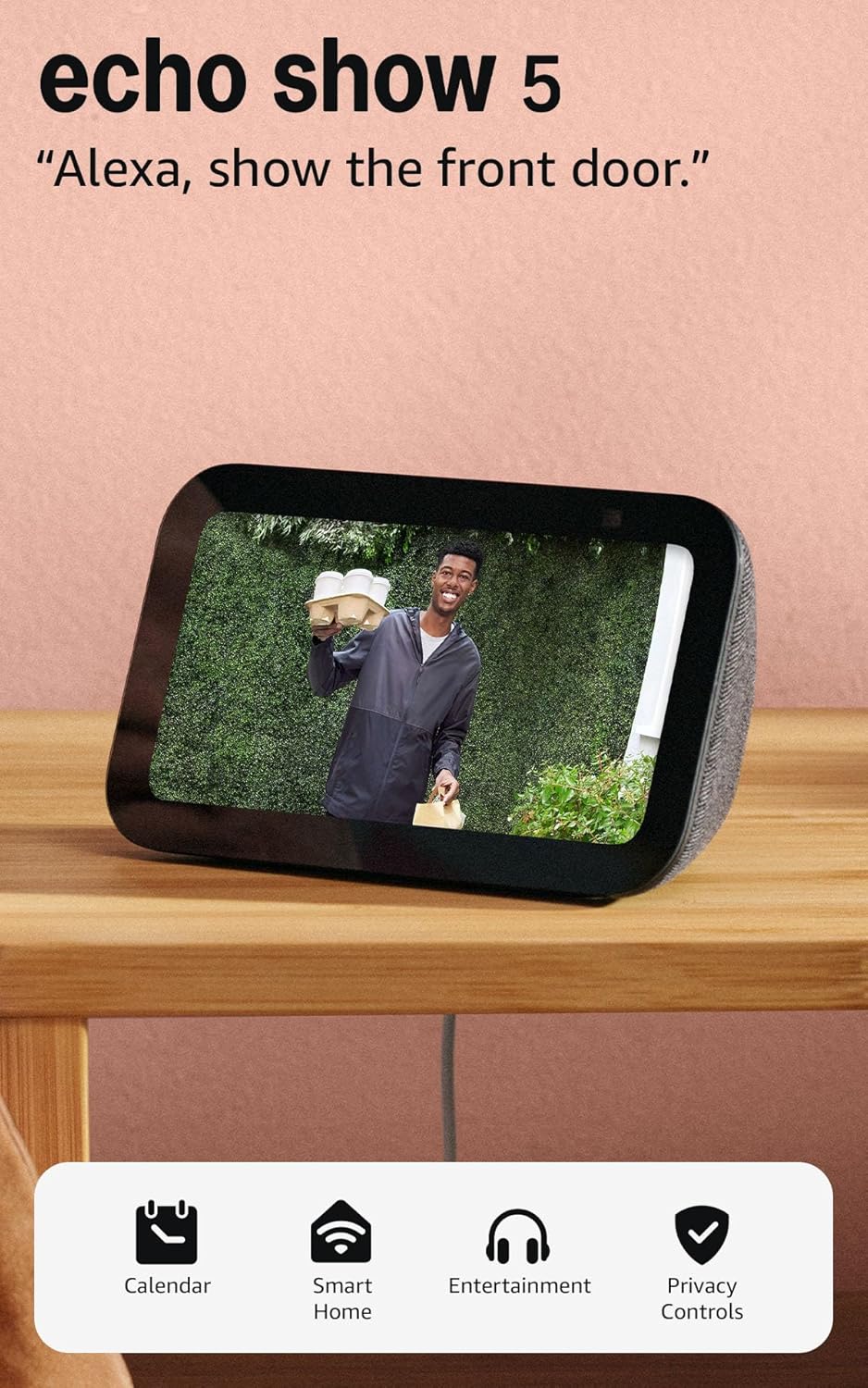
The Echo Show 5 packs a helpful combination of display, speaker, and Alexa smarts into a small bedside- or countertop-friendly package. You get a 5.5-inch screen for glanceable information like weather, timers, and song titles, plus a 2 MP camera for video calls and Drop In; when not in use the display can show a rotating photo slideshow. Sound is noticeably better than previous small Echoes with deeper bass and clearer vocals, so it handles music, podcasts, and short videos well for its size. The device also works as a smart-home hub controller for compatible lights, plugs, and thermostats, and includes straightforward privacy controls such as a microphone/camera off button and a physical camera shutter. Sustainability touches like recycled fabric and aluminum are present, and set up is typical for Alexa devices. The main compromises are its small screen and modest camera resolution compared with larger smart displays, so it is best for rooms where space is limited or for secondary display duties rather than primary home video viewing.
Best for: Buyers who want a reliable, easy-to-use smart display for bedrooms or small rooms that prioritizes privacy controls and simple smart-home control.
Less Ideal for: People who want a primary media hub or high-quality video conferencing with a large screen and higher-resolution camera should consider larger smart displays.
- Compact 5.5-inch display for glanceable info and photo slideshow
- Improved speaker with deeper bass and clearer vocals for its size
- Built-in Alexa lets you control compatible smart home devices and stream services
- Privacy features include microphone/camera off button and physical camera shutter
- Small display and 2 MP camera limit video-call and media viewing quality compared with larger smart displays
Verdict: A compact, privacy-minded smart display that gives reliable Alexa functionality and better-than-before sound for small rooms.
Choosing the Right Smart Speaker with a Screen: Key Factors to Consider
Display Size and Resolution
Screen size and resolution determine how comfortably you can read recipes, watch short clips, or view video calls from typical countertop or tabletop distances. Larger, higher-resolution displays make text and small UI elements easier to read without leaning in, which matters when you are cooking or moving around a room.
Also consider screen aspect ratio and tilt. A taller display is often better for lists, timers, and vertical video, while a wider screen improves video-call framing and media playback. Touch responsiveness and glare resistance affect real-world usability under kitchen lights or near windows.
Audio Quality and Speaker Configuration
A smart speaker with a screen should also be a capable audio device for music, podcasts, and clear voice responses. Look at driver count and whether the device has a dedicated tweeter and woofer for clearer mids and bass. Speaker placement and passive radiators influence room fill and clarity at moderate listening volumes.
Consider how the speaker sounds for both media playback and voice prompts. Devices that prioritize voice clarity will make hands-free interactions feel snappier, while richer audio helps if you plan to use the device for music in a kitchen or small living area.
Voice Assistant Performance
Responsiveness to wake words and the accuracy of voice recognition are central to a hands-free experience. Microphone array quality, noise-canceling pickup, and on-device processing affect how reliably the device hears commands from across a room or when background noise, like a running blender, is present.
Also think about the assistant's visual responses. Some tasks are faster when results appear on the screen rather than being spoken, so evaluate how the voice assistant uses the display for follow-up actions, contextual prompts, or multimodal controls.
Smart-Home and Ecosystem Compatibility
A device's usefulness increases when it integrates smoothly with the smart devices in your home. Check supported protocols, available skills or routines, and how the screen surfaces controls for lights, thermostats, cameras, and locks. The ability to create and trigger routines from the device or show camera feeds quickly is especially valuable on a screen-equipped unit.
Consider whether the device can act as a control hub or if it mainly proxies commands to a cloud service. Local control and broad device support reduce latency and improve reliability for common home tasks.
Privacy Controls and Camera Options
Devices with screens often include cameras for video calls and gesture controls, so privacy controls are important. Physical camera shutters, microphone mute buttons, and visible indicators for camera or mic activity provide reassurance. Look for clear settings that limit what data is sent to the cloud and options to manage stored voice or video clips.
Camera placement and resolution affect video-call framing and how well the device crops or tracks a person in a room. If you plan to use the camera frequently, choose a device that balances image quality with robust privacy features.
Placement, Power, and Connectivity
Think about where you will place the device. Countertop and bedside use have different height and viewing-angle needs. Power supply and cable management matter if you want a tidy setup, and some devices require a nearby outlet due to short cords. Evaluate Wi-Fi band support and Bluetooth options if you plan to stream directly from phones or connect external speakers.
Also confirm the device's network requirements and whether it supports both 2.4 GHz and 5 GHz bands for stable streaming and smart-home control across larger homes.
How a Screen Changes the Smart-Speaker Experience
A built-in screen transforms a voice assistant into a more visual, interactive companion. Visual feedback speeds up common tasks such as following a recipe step, checking a shopping list, or answering a quick how-to question without listening to long spoken replies.
Screens also make communication features like video calls and photo displays more natural. For many users, the combined visual and voice interface reduces friction for multitasking in busy rooms.
- Visual timers and step-by-step recipes
- Instant access to camera feeds and smart-home controls
- Text and graphical context for complex commands
Setting Up for Best Audio and Video
Position the device where the screen is easily visible from common activity zones and the microphone array is not blocked. Avoid placing the speaker inside cabinets or behind large objects that muffle sound or obstruct the camera.
Adjust brightness and display timeout to match ambient lighting so notifications and video calls remain visible without washing out the image. Test voice pickup from typical standing and seated positions to ensure the device reliably hears wake words during real use.
- Place at eye level for comfortable viewing
- Keep 6 to 12 inches of clearance around the back for ventilation
- Test microphone pickup in the busiest household locations
Privacy Best Practices
Treat devices with cameras like any other connected camera. Use physical shutters or built-in covers when the camera is not in use. Enable microphone mute quickly when privacy is needed and verify visual indicators are functioning so you can tell at a glance when sensors are active.
Review account settings for voice and video clip retention. Many assistants offer controls to automatically delete recordings after a set period or to opt out of cloud storage entirely. Keep firmware up to date to maintain security fixes.
- Use physical camera covers if available
- Enable automatic deletion of stored clips where supported
- Regularly check app permissions and network access
Using the Device as a Smart-Home Hub
A screen-equipped smart speaker can streamline daily routines by showing grouped controls and automations. Setting up shortcut tiles for common scenes or routines reduces the number of voice commands required to control multiple devices.
Look for devices that surface camera feeds, doorbell alerts, and routine triggers directly on the home screen so you can act instantly without opening a separate app.
- Create shortcut tiles for frequently used scenes
- Use on-screen widgets for quick camera access
- Group related devices into single routines for one-touch control
Media and Video: What to Expect
Do not expect a smart speaker screen to replace a TV, but it can handle short-form video, streaming clips, and casual viewing. Evaluate color accuracy and viewing angles if you plan to watch cooking videos or news segments while working nearby.
Check how the device handles audio during video playback. Some models automatically shift output to a paired speaker or improve stereo separation when available, which matters if you value better music playback.
- Best for short-form video and background viewing
- Check how brightness and sound adapt to different content types
- Consider pairing options for improved audio when needed
How We Chose the Best Smart Speaker with a Screen
We selected devices that deliver a practical blend of display usability, voice assistant responsiveness, and reliable audio for typical home scenarios. Primary filters required a built-in screen and integrated voice assistant capabilities for hands-free control. We prioritized screen legibility at conversational viewing distances, touch responsiveness, and support for common visual tasks such as video calling, recipe steps, and streaming video or visual search results. Audio performance was measured by loudness, clarity, and how well the speaker handles voice responses and media playback in a kitchen or living room setting. We also weighed privacy controls and camera options, including physical covers and local-processing features where available. Excluded items included basic smart speakers without displays and niche devices focused only on commercial or industrial signage. Our evaluation emphasized real-world usability over novelty features, so devices with poor display ergonomics, unreliable voice wake performance, or inadequate speaker output were not shortlisted. The scoring focused on concrete, comparable dimensions: display quality, audio performance, voice responsiveness, connectivity and smart-home integration, and privacy controls.
Our full evaluation process is outlined in our review methodology.
FAQ
Can a smart speaker with a screen handle video calls?
Yes, most screen-equipped smart speakers support video calls using the built-in camera and display. Call quality depends on camera resolution, microphone pickup, and network bandwidth, so placement and a reliable Wi-Fi connection help ensure clearer calls.
Are the cameras and microphones secure by default?
Security varies by device, but many offer physical shutters, mute buttons, and indicators that show when sensors are active. It is wise to confirm privacy settings and enable features like automatic deletion of recordings when available.
Will the screen drain more power than a regular smart speaker?
Yes, devices with displays generally consume more power than audio-only models, especially at higher brightness levels. Many devices include display timeout settings and adaptive brightness to reduce energy use when the screen is not needed.
Can I stream music and still use the screen for controls?
Often you can. Most devices allow media playback while simultaneously showing controls, queues, or related visual content on the screen. Some platforms also support background audio while displaying other apps or widgets.
How do I improve voice recognition in noisy rooms?
Place the device away from major noise sources, keep the microphones unobstructed, and test different distances to find the best pickup. Some devices offer noise-reduction settings or multi-mic arrays that improve performance in loud environments.
Final Verdict
Prioritize the features that match how you will use a smart speaker with a screen. If you plan to rely on video calls and recipe steps, favor larger, higher-resolution displays and cameras with reliable framing. If audio and music playback matter more, place greater weight on speaker configuration and clarity. Balance voice responsiveness and privacy controls against ecosystem compatibility to ensure the device fits your smart-home setup. By focusing on display usability, audio performance, voice pickup, and clear privacy options, you can choose a device that feels integrated and helpful in everyday home life.