
Note: This article contains affiliate links. If you click on these links and make a purchase, we may earn a small commission at no extra cost to you. This helps support our research and content. Read our full affiliate disclosure here.
If you rely on a mini split heat pump for heating and cooling, the right smart thermostat can add remote control, scheduling, and efficiency gains without compromising performance. You want a controller that communicates cleanly with the mini split system, supports the control modes you use, and gives clear, dependable temperature control for daily comfort. This guide shortlists the top smart thermostats for mini split systems and explains the practical criteria that mattered in our selection. We evaluated compatibility, control options, installation approach, and user features to identify the best overall picks. Read on for the features that make a good mini split thermostat and to find the unit that matches your workflow and system type.
Top Picks at a Glance
| Best Overall The best all-around choice for most situations | Cielo Breez Max BM101WA |  |
| Best Quality Built to a higher standard if you want something more solid | ecobee Smart Thermostat Premium |  |
| Best Value The sweet spot between price and what you get | Cielo Breez Eco Smart AC Controller |  |
| Top Rated A top-rated pick with lots of positive feedback | Sensibo Sky Smart AC Controller |  |
| Most Popular A crowd favorite that many people choose with confidence | ecobee Smart Thermostat Essential |  |
| Best Seller A high-volume bestseller chosen again and again | Google Nest Thermostat |  |
Cielo Breez Max BM101WA
| Controller Type | Touch Screen, App Control, Alexa, Google Assistant, Siri Shortcuts, IFTTT, SmartThings, Home Assistant |
|---|---|
| Connectivity Technology | Wi‑Fi |
| Power Source | USB Powered |
| Display Type | LCD |
| Mounting Type | Wall Mount |
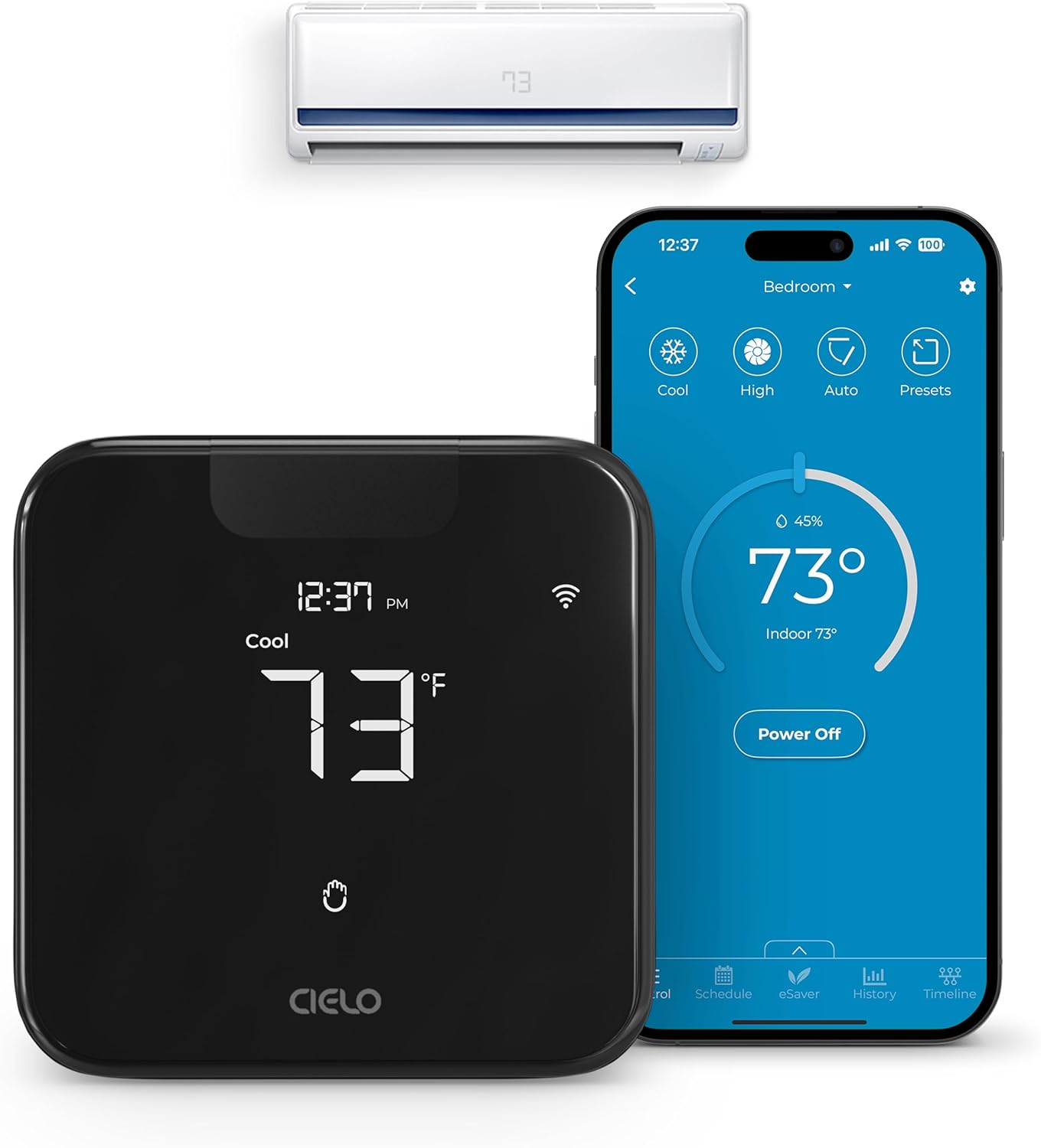
The Cielo Breez Max is a dedicated smart AC controller that converts mini‑splits, window, and portable units with IR remotes into a networked thermostat you can control from the device or the free app. Installation is DIY friendly and the unit supports wall or table mounting and USB power, while an auto‑detection algorithm claims compatibility with thousands of AC models. Key practical features include AI‑based Comfy Max to avoid overcooling/overheating, weekly scheduling and presets that run even if Wi‑Fi drops, geofencing, usage history, and air filter notifications for routine maintenance. It also integrates with Alexa, Google Assistant, Siri Shortcuts, SmartThings, IFTTT, and Home Assistant for voice and home‑automation routines. The LCD and touch controls let you use the unit like a small thermostat without a phone. Limitations to note are the reliance on an IR line of sight to the indoor unit and 2.4 GHz Wi‑Fi only, which can restrict placement and network options in some homes, and the need to verify compatibility for less common AC models. For buyers who want a thermostat‑style smart upgrade for room ACs, Breez Max offers a robust feature set and strong automation controls.
Best for: Buyers who want a full featured, thermostat‑style smart upgrade for a single room or zone AC and value automation, scheduling, and broad smart home integration.
Less Ideal for: Users who need a wired OEM replacement thermostat for a central HVAC system or who cannot position a device with clear IR line of sight to their indoor unit.
- Works with mini‑split, window, and portable ACs that use IR remotes, expanding smart control to many room units.
- AI Comfy Max and presets help prevent overcooling or overheating while improving efficiency.
- Weekly scheduling and geofencing let the unit run automated routines even without constant app control.
- Integrates with major smart home platforms and voice assistants for routines and voice control.
- On‑device LCD and touch controls provide thermostat‑like local control without the app.
- Requires line‑of‑sight IR to the indoor AC, which can limit where the controller is placed.
- Only supports 2.4 GHz Wi‑Fi, so it will not connect to 5 GHz networks.
Verdict: A feature‑rich smart controller that turns mini‑splits and room ACs into thermostat‑style, automatable units with strong smart home integration.
ecobee Smart Thermostat Premium

| Controller Type | Amazon Alexa, Android, Apple HomeKit, Google Assistant, iOS |
|---|---|
| Voltage | 24 volts |
| Connectivity Protocol | Wi-Fi |
| Number of Batteries | 1 Lithium Ion batteries required. (included) |
The ecobee Smart Thermostat Premium is a high-end smart thermostat that manages heating and cooling with voice control, app access, and occupancy-aware automation. It installs on standard 24VAC systems and includes a Power Extender Kit for homes without a C-wire, plus a SmartSensor to reduce hot and cold spots. The Premium adds a built-in air quality monitor, radar-based occupancy sensing for better presence detection, and a speaker with either Siri or Alexa onboard so the thermostat doubles as a smart speaker. Typical use is hands-free climate control via schedules, geofencing, or room-based sensors to focus comfort where it matters. Practical benefits include energy savings features, live doorbell view when paired with ecobee doorbell products, and clear in-unit alerts for poor air quality and filter changes. Limitations to note: compatibility favors 24VAC HVAC systems so confirm mini-split support with ecobee's compatibility checker, and the advanced feature set and price point may exceed the needs of users who only want basic temperature control.
Best for: Buyers who prioritize intelligent, occupant-focused climate control and want an all-in-one thermostat that combines voice control, air-quality monitoring, and room sensors for more precise comfort management.
Less Ideal for: Anyone who needs a simple, low-cost temperature controller or who has a mini-split system type not listed as compatible should consider simpler controllers or a solution confirmed for their exact mini-split model.
- Built-in Alexa or Siri voice assistant and speaker for hands-free control and media playback.
- Included SmartSensor helps manage hot and cold spots by sensing occupancy and room temperature.
- Built-in air quality monitor provides alerts and filter change reminders for better home health.
- Power Extender Kit and trim kit included simplify DIY installs on systems without a C-wire.
- Not guaranteed compatible with all mini-split systems; check ecobee’s compatibility tool before buying.
- Advanced features and premium metal design increase cost and complexity compared with basic thermostats.
Verdict: For performance-minded buyers who want voice control, room sensors, and built-in air quality and occupancy sensing in one premium thermostat, the ecobee Smart Thermostat Premium delivers a highly capable, feature-packed solution.
Cielo Breez Eco Smart AC Controller

| Compatible AC Types | MiniSplit, Window, Portable AC |
|---|---|
| Display Type | LED |
| Power Option | 5V Adapter |
| Mounting Options | Table Stand / Wall Mounting Kit |
The Cielo Breez Eco attaches in front of any AC that uses an IR remote and gives phone, voice, and web control plus local on/off operation. Installation is DIY friendly — it comes with a table stand and wall‑mount kit and the app claims automatic remote detection to pair quickly. Onboard temperature and humidity sensors let the device make automated decisions and feed data to the Cielo Home app, which supports weekly schedules, geofencing, usage history, and temperature/humidity triggers including a Comfy mode for tighter comfort control. It also integrates with Alexa, Google Assistant, Siri Shortcuts, SmartThings and IFTTT for broader home automation. Practical benefits include remote power and mode control to avoid wasted runtime and the ability to see usage history to tune energy savings. Limitations are typical for IR controllers: the unit needs line of sight to the AC and placement within 6–12 feet, and advanced HVAC diagnostics available on OEM thermostats are not supported here.
Best for: Buyers who want to optimize comfort and run time on a mini‑split or window AC without rewiring or professional installation and who prioritize automation and measurable energy savings.
Less Ideal for: Homes that need wired, factory‑grade thermostat control, multi‑zone integration at the system level, or where the controller cannot be placed within line of sight of the AC unit.
- Adds Wi‑Fi and voice control to mini‑split, window, and portable ACs with IR remotes
- Built‑in temperature and humidity sensors for local automation and triggers
- App features include 7‑day scheduling, geofencing, usage history and energy‑saving modes
- Easy DIY setup with table stand and wall‑mount kit and automatic remote detection
- Works with major smart platforms including Alexa, Google, Siri Shortcuts, SmartThings and IFTTT
- Requires clear line of sight and close placement to the AC for reliable IR control
- Does not provide the low‑level diagnostics or wired control options of a factory thermostat
Verdict: If you want a practical, no‑rewire way to add scheduling, geofencing, and sensor‑based automation to an IR‑controlled mini‑split or window AC, the Cielo Breez Eco is a strong, easy install choice.
Sensibo Sky Smart AC Controller

| Control Method | App, Remote, Voice |
|---|---|
| Controller Type | App Control |
| Operating Mode | Cooling |
| Included Components | 1 x Sensibo Sky Device, 1 x Power Supply |
| Wi‑Fi Support | 2.4GHz only |
The Sensibo Sky is a small plug‑in controller that gives remote‑controlled ACs and mini‑split heat pumps smart features through a companion app and voice assistants. You mount the device in line of sight of the indoor unit, connect it to 2.4 GHz Wi‑Fi, pair or select your AC remote in the app, and then use schedules, geofencing, and climate react humidity‑aware setpoints to maintain comfort. It supports app, remote, and voice control and includes a simple power supply for wall mounting. The practical benefits are straightforward: remote on/off and scheduling, automatic pre‑cooling when you arrive, and finer control over humidity and temperature that can reduce cooling waste. Limitations include the need for a direct line of sight to the AC and 2.4 GHz Wi‑Fi only, and very basic physical controls on the unit itself, so the app is required for most advanced functions.
Best for: Buyers who prioritize dependable, proven smart control for existing mini‑split or window AC units and want reliable scheduling, geofencing, and humidity‑aware automation without replacing the HVAC system.
Less Ideal for: People who need a wired, sensor‑based thermostat replacement or who cannot place a device within clear line of sight of the indoor unit.
- Adds app and voice control to remote‑controlled ACs and mini‑splits
- Supports geofencing, 7‑day scheduling and conditional automation
- Climate React uses temperature and humidity for more comfortable setpoints
- Small, wall‑mounted plug‑in design is unobtrusive and easy to install
- Works with common smart assistants for hands‑free control
- Requires direct line of sight to the indoor unit for reliable IR control
- Only connects to 2.4 GHz Wi‑Fi which may require router adjustment
Verdict: A compact, reliability‑focused way to add dependable smart schedules, geofencing, and humidity‑aware control to a mini‑split or window AC without swapping the system.
ecobee Smart Thermostat Essential

| Controller Type | Amazon Alexa, Android, Apple HomeKit, Google Assistant, iOS |
|---|---|
| Connectivity Technology | Wi-Fi |
| Power Source | Battery Powered |
| Display Type | LCD |
| Mounting Type | Wall Mount |
The ecobee Smart Thermostat Essential is a compact Wi‑Fi thermostat that gives remote control via the ecobee app and works with Alexa, Google Assistant, and HomeKit. It installs on a wall plate and uses a touch LCD for basic local control, while the app and voice integrations let you change temperature, set schedules, and check energy usage from anywhere. Built-in eco+ features like schedule assistant and time‑of‑use adjustments aim to reduce heating and cooling costs, and the unit supports most 24 VAC HVAC equipment; a Power Extender Kit is available for systems without a C‑wire. Practical benefits include simple DIY setup for compatible systems, clear touch controls, and energy reporting that helps spot savings opportunities. Important limitations are that it lacks the advanced sensors and air‑quality monitoring of higher‑end models and compatibility with line‑voltage or millivolt systems is not supported, so you must verify system fit before buying.
Best for: Buyers who want a straightforward, app‑enabled thermostat that pairs with major smart home systems and prioritizes easy setup and energy savings.
Less Ideal for: People who need advanced sensing, built‑in air quality monitoring, or compatibility with non‑24VAC HVAC systems should look elsewhere.
- Works with Alexa, Google Assistant, and Apple HomeKit for voice control and automation
- Wi‑Fi app control lets you adjust temperature and schedules remotely
- Built‑in eco+ features and energy reports help reduce heating and cooling costs
- Simple touchscreen and clear interface make local operation easy
- Does not support line‑voltage, millivolt, or 0‑10VDC systems
- Fewer built‑in sensors and air‑quality features than premium ecobee models
Verdict: A budget‑minded smart thermostat that delivers app and voice control plus energy‑saving features for compatible 24VAC systems.
Google Nest Thermostat

| Connectivity Technology | Bluetooth, Wi-Fi |
|---|---|
| Power Source | Battery Powered |
| Display Type | LCD |
| Control Type | Remote Control, Voice Control |
| Number of Batteries | 2 A batteries required (included) |
The Google Nest Thermostat is a compact smart thermostat intended to replace a standard wall thermostat and provide app and voice control for home heating and cooling. It pairs with the Google Home app for remote adjustments, uses Wi‑Fi and Bluetooth for connectivity, and supports voice assistants for hands-free control. Key conveniences include Quick Schedule programming in the app, Savings Finder suggestions to reduce energy use, and HVAC monitoring that can send alerts if the system behaves unusually. The unit is battery powered and designed to install in about 30 minutes for many homes, and it can operate without a dedicated C wire in most setups. Practical limitations for this use case are that compatibility varies across HVAC types and some mini split systems require specific interfaces or wiring; buyers should run the Nest Compatibility Checker before assuming it will work with a particular mini split. The thermostat is easy to use and integrates well into a Google-centered smart home, but its usefulness depends on confirming system compatibility beforehand.
Best for: Homeowners who prioritize a low-friction, app-driven smart thermostat that integrates with Google Home and value energy-saving automation but want a straightforward, proven product.
Less Ideal for: People with nonstandard mini split systems or installers who need a thermostat that explicitly supports a specific proprietary mini split interface should seek a model confirmed compatible with their equipment.
- Remote control via Google Home app lets you change temperature from anywhere
- Works with voice assistants for hands-free control
- Savings Finder and Eco Temperature features help reduce energy use
- Designed for simple DIY installation and usually works without a C wire
- Includes HVAC monitoring that can alert you to possible system issues
- Compatibility is not universal and some HVAC or mini split systems may not be supported
- Battery powered design may require attention to battery replacement over time
Verdict: Choose the Nest Thermostat if you want an easy-to-install, Google-integrated smart thermostat that offers remote control and energy-saving features, provided you confirm compatibility with your mini split system.
Choosing the Right Smart Thermostat for Mini Split: Key Factors to Consider
Communication Method
Mini split systems use different methods to receive commands, including infrared control, wired dry-contact inputs, or direct digital protocols. Confirming the communication method matters because a thermostat must send the right type of signal for the indoor unit to interpret commands correctly.
If your thermostat uses an IR adapter, check line-of-sight and placement constraints. Wired dry-contact solutions are often simpler for wall-mount replacements but require compatible relay inputs on the indoor unit. Some smart thermostats rely on intermediate gateways to translate signals; that adds installation steps and potential points of failure.
Supported Modes and Fan Control
Mini split units commonly support modes such as heat, cool, auto, and fan-only, plus variable fan speeds. A thermostat that maps to these modes accurately prevents mode mismatch and maintains comfort.
Fan control is important when you want specific airflow or dehumidification behavior. If a thermostat cannot command the same fan speed steps as the indoor unit, you may lose fine-grained control or create situations where the system runs inefficiently.
Scheduling and Automation
Effective scheduling is one of the main benefits of a smart thermostat. Look for weekly schedules, multiple setpoint presets, and geofencing or presence-based triggers if you want automated energy savings.
Automation integrations with voice assistants or home automation hubs can extend convenience, but reliability of the scheduling engine and cloud services matters more for everyday use. A thermostat with local scheduling or fallback behavior ensures predictable control even if connectivity is interrupted.
Installation Complexity
Installation can range from straightforward thermostat swaps to multi-component projects with gateways, IR blasters, or relay wiring. Understand what tools, wiring, and technical skills are required before you start.
If you are replacing a controller on an existing wall plate, confirm that the new thermostat supports the same mounting pattern and wire types. For systems requiring external adapters, plan for mounting location so communication lines remain short and accessible.
App Experience and Remote Access
A well-designed mobile app makes daily adjustments and scheduling simple. Look for apps with clear temperature and mode controls, easy schedule editing, and reliable push notifications.
Remote access reliability affects how often you can adjust settings away from home. If cloud services are used, check whether the thermostat provides local control fallbacks and how the vendor handles firmware updates and data privacy.
Safety, Overrides, and Fail-Safe Behavior
Thermostats should preserve critical protective behaviors such as minimum off-times to prevent short-cycling, proper defrost sequencing for heat pump operation, and temperature limits to avoid equipment damage.
Check whether the thermostat supports manual overrides and failsafe default modes. In the event of communication errors, predictable fallback behavior prevents unintended equipment strain and preserves occupant comfort.
How Mini Split Thermostats Talk to the Indoor Unit
Mini split controllers can use infrared, relay/dry-contact switching, or digital protocols. Infrared units emulate the hand-held remote, which is flexible but needs a clear transmission path. Relay-based controllers simply close or open circuits to simulate button presses and are often robust and easy to wire when the indoor unit offers compatible inputs.
Digital or proprietary interfaces can offer the most complete feature set but may require model-specific adapters or gateways. Understanding the communication approach for your system reduces the risk of buying a controller that cannot exercise the mini split's full functionality.
- Infrared: Good for non-invasive installs but needs line-of-sight.
- Dry-contact relays: Reliable for direct command emulation when supported.
- Digital gateways: Offer richer control but add complexity and potential compatibility constraints.
Wiring and Mounting Considerations
Many smart thermostats for mini splits are designed for wall mounting in place of a remote or dedicated wall controller. Verify the mounting footprint and whether a trim plate or adapter is needed. Also confirm whether your mini split uses a simple 2- or 3-wire connection, an RJ-style connector, or a proprietary cable.
If an external gateway or IR blaster is required, plan locations that keep wiring neat and maintain good signal paths. For apartment or rental installations where invasive wiring is not allowed, IR or wireless gateway solutions can be preferable.
- Measure existing controller footprint before purchase.
- Plan wiring paths and check accessibility to indoor unit connectors.
- Consider non-invasive IR solutions when drilling is restricted.
Practical Scheduling Tips for Comfort and Savings
Set realistic setpoint ranges for occupied and unoccupied periods rather than extreme swings. Frequent large temperature changes can increase runtime and reduce efficiency. Use setbacks during predictable absences and avoid aggressive overnight setbacks that force long recovery cycles.
Stagger schedules across zones if you control multiple mini split heads to prevent simultaneous high loads. Use temporary hold features when plans change so the system returns to standard schedules automatically.
- Prefer modest setbacks of 2 to 4 degrees for best balance of savings and comfort.
- Use geo-fencing cautiously; test how quickly the thermostat reacts on entry/exit.
- Leverage multi-setpoint day schedules for different occupancy patterns.
Connectivity and Smart Home Integration
Decide whether you need local-only control or cloud-based remote access. Local control reduces reliance on external services but may limit remote convenience. If you plan to integrate the thermostat with a home automation system, verify supported protocols such as Wi-Fi, MQTT, or common smart-home ecosystems.
Consider how firmware updates are handled and whether the vendor provides documented APIs or integrations. Secure network setup and regular updates reduce the risk of connectivity or security issues.
- Check for local control options if privacy or reliability is a priority.
- Confirm compatibility with the home automation ecosystem you use.
- Review update policies and security features before committing.
Maintenance and Troubleshooting
Regular checks after installation help ensure the thermostat and mini split interact correctly. Monitor for short-cycling, incorrect mode changes, or unexpected fan behavior during the first few weeks of operation and adjust settings accordingly.
Document wiring and configuration settings for future troubleshooting or technician visits. If you encounter persistent communication errors, review gateway placement, signal paths, and firmware versions before replacing hardware.
- Log initial behavior for the first two weeks to spot issues early.
- Keep a record of app and firmware versions when reporting problems.
- Test fallback behavior by simulating network outages.
How We Chose the Best Smart Thermostat for Mini Split
We focused on products that provide reliable electronic control of mini split systems while preserving the unit's modes and safety features. Selection prioritized thermostats with documented support for common mini split communication methods, including infrared, wired dry-contact, and proprietary indoor-unit protocols where applicable. We favored devices that offer robust scheduling and remote control options because consistent setpoint management and zone schedules are the main drivers of real-world energy savings. Other important filters included ease of installation for DIY-capable owners, clear wiring or pairing guides for technicians, and well-designed mobile apps or web interfaces for remote adjustments. We also considered whether thermostats maintain safe defrost and backup modes, and how they handle fan and mode transitions to avoid short-cycling. We excluded devices that only support generic HVAC staging without explicit mini split compatibility or that require extensive gateway hardware with unclear support. The shortlist reflects products that meet at least three core criteria: proven communication method for mini splits, scheduling and remote-control depth, and straightforward installation documentation.
Our full evaluation process is outlined in our review methodology.
FAQ
Can a smart thermostat control any mini split?
Often it depends on the mini split's control interface. Some thermostats use IR or dry-contact relays that work with many models, while others require a gateway for proprietary digital protocols. Verify the communication method your indoor unit supports before choosing a thermostat.
Do I need a professional to install a smart thermostat on a mini split?
Installation complexity varies. Simple wall-mounted replacements using IR or relay inputs can be DIY for those comfortable with basic wiring. Systems requiring gateways, proprietary cables, or integration with the indoor unit's control board are better handled by a technician.
Will a smart thermostat save energy on a mini split?
Smart scheduling, geofencing, and proper setback strategies can reduce runtime and energy use. Actual savings depend on occupancy patterns, thermostat programming, and how efficiently the mini split recovers from setbacks.
What happens if the thermostat loses connectivity?
Most smart thermostats retain local schedule operation or default to a safe setpoint when cloud access is lost. The exact fallback behavior depends on the device; confirm that the thermostat supports local control or predictable fail-safe modes.
Can a thermostat damage my mini split?
A properly designed thermostat will preserve protective features such as minimum off times and defrost sequences. Problems arise when a controller cannot command the correct mode or fan speeds, so ensuring compatibility and correct wiring reduces risk of equipment strain.
Final Verdict
When selecting a smart thermostat for a mini split, prioritize compatibility with your indoor unit's control method, clear mapping of modes and fan speeds, and reliable scheduling or automation features. Installation complexity and app reliability are practical considerations that affect long-term satisfaction and convenience. Balance feature needs against installation requirements and fail-safe behavior. Choose a thermostat that gives you the control features you use most while maintaining protective functions for the mini split to ensure comfort, reliability, and efficient operation.