
Note: This article contains affiliate links. If you click on these links and make a purchase, we may earn a small commission at no extra cost to you. This helps support our research and content. Read our full affiliate disclosure here.
Choosing the right smart AC thermostat changes how you manage home cooling. A good unit improves comfort by holding set temperatures, reduces wasted runtime, and integrates with your home network so adjustments are simple from anywhere. This guide shortlists the top smart AC thermostats for typical home setups and evaluates each by how well it controls temperature, connects to your systems, and fits into everyday life. We focus on practical installation and daily use factors that matter to homeowners and renters alike. Below are our top picks, followed by clear buying guidance and answers to common questions.
Top Picks at a Glance
| Best Overall The best all-around choice for most situations | ecobee Smart Thermostat Enhanced |  |
| Best Quality Built to a higher standard if you want something more solid | Google Nest Learning Thermostat 4th Gen |  |
| Best Value The sweet spot between price and what you get | Honeywell Home Smart Color Thermostat RTH9585WF |  |
| Best Budget The cheapest option that still gets the job done reliably | WenzhiIoT WiFi Smart AC Controller |  |
| Top Rated A top-rated pick with lots of positive feedback | ecobee Smart Thermostat Premium |  |
| Most Popular A crowd favorite that many people choose with confidence | Google Nest Thermostat |  |
| Best Seller A high-volume bestseller chosen again and again | Sensi Lite Smart Thermostat ST25 | 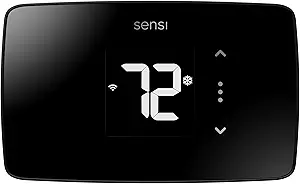 |
ecobee Smart Thermostat Enhanced

| Connectivity Technology | Wi‑Fi |
|---|---|
| Power Source | Corded Electric |
| Voltage | 24 volts |
| Display Type | LCD |
| Screen Size | 4 inches |
The ecobee Smart Thermostat Enhanced is a hardwired Wi‑Fi thermostat designed to reduce heating and cooling costs while giving remote and voice control. It uses built‑in radar occupancy sensing and learning software to adjust temperature automatically when people are home or away, and it supports voice assistants and Apple HomeKit for hands‑free control. The unit includes a power extender kit and trim plate for easier DIY installation on many 24 VAC systems, and the 4‑inch LCD and app control make schedules and adjustments straightforward. Notable practical benefits are the automatic eco+ features that suggest energy-saving changes and the ability to add remote sensors to balance temperature by room. Limitations are that it is intended for compatible 24 VAC HVAC systems only and requires wiring or the included PEK in homes without a C wire, and advanced features depend on a stable Wi‑Fi connection and occasional app updates.
Best for: Buyers who want a smart, energy‑focused thermostat that automates comfort across a typical home and integrates with voice assistants and home platforms.
Less Ideal for: Homes that use line‑voltage or nonstandard HVAC controls, or buyers who need a battery‑only, wireless thermostat without hardwiring.
- Built‑in radar occupancy sensing for room‑aware temperature adjustments
- Dual‑band Wi‑Fi and app control for remote scheduling and voice integration
- Includes Power Extender Kit and mounting hardware for DIY installation on many systems
- Energy‑saving eco+ features that learn preferences and suggest savings
- Compatible only with low‑voltage 24 VAC HVAC systems; not for line‑voltage setups
- Advanced automation relies on Wi‑Fi and the companion app for full functionality
Verdict: A feature‑rich smart thermostat that automates comfort and energy savings for typical 24 VAC HVAC homes while offering easy DIY installation and broad smart home integration.
Google Nest Learning Thermostat 4th Gen

| Connectivity Technology | Wi-Fi |
|---|---|
| Power Source | Battery Powered |
| Voltage | 24 volts |
| Display Type | Touchscreen |
| Included Components | Nest Temperature Sensor (2nd gen) |
The Nest Learning Thermostat (4th gen) is a smart, learning thermostat that automates temperature control to reduce energy use while keeping rooms comfortable. It installs on most 24V HVAC systems and pairs with the included Nest Temperature Sensor so you can target hot or cold spots rather than relying on a single room reading. The thermostat learns your routines and suggests schedule tweaks in the Google Home app, and Dynamic Farsight plus a larger touchscreen make status and controls easy to see across the room. It supports voice assistants, app control, Matter integration, and system health alerts that can warn of HVAC issues. Practical benefits include Adaptive Eco, which uses outdoor conditions to avoid unnecessary heating or cooling, and Energy Shift for cleaner energy timing. Limitations are typical of smart thermostats: advanced features require the Google Home app and cloud services, and some niche HVAC setups may need a professional or the compatibility checker to confirm support. Installation is designed for DIY in about 40 minutes for compatible systems.
Best for: Buyers who prioritize energy-efficient performance and automated temperature control for whole‑home comfort and want a thermostat that actively learns and optimizes system runtime.
Less Ideal for: People who need a purely local, offline thermostat or those unwilling to use a companion app and cloud services for advanced features.
- Learns your schedule and suggests energy-saving temperature changes
- Includes a Nest Temperature Sensor to manage hot and cold spots
- Large, bright touchscreen with Dynamic Farsight for easy status viewing from across the room
- Works with Google Home, voice assistants, Matter, and remote app control
- System Health Monitor and alerts help catch HVAC issues early
- Full feature set depends on Google Home app and cloud connectivity
- May require checking compatibility or professional help for atypical HVAC wiring
Verdict: Choose the Nest Learning Thermostat 4th Gen if you want a performance-focused smart thermostat that learns your routine and actively optimizes heating and cooling to save energy.
Honeywell Home Smart Color Thermostat RTH9585WF

| Connectivity Technology | Wi-Fi |
|---|---|
| Controller Type | Touch Screen, Voice |
| Power Source | AC Power Supply |
| Display Type | LED |
| Specification Met | Energy Star |
The Honeywell Home Smart Color Thermostat is a wall‑mounted, Wi‑Fi programmable thermostat that replaces a conventional low‑voltage heating and cooling controller and brings remote and voice control to a home HVAC system. It is typically used to set daily schedules, monitor local weather, and make temperature changes from the bright color touchscreen or the mobile app. Notable features include a customizable full‑color display, Smart Response Technology that learns comfort preferences, Energy Star reporting and intelligent alerts for filter and humidity maintenance, plus compatibility with Alexa and Google Home. Practical benefits include easier scheduling and the ability to adjust temperature on the go, which can help trim utility use and participate in utility demand response programs. Important limitations are that it requires a C‑wire and only supports low‑voltage systems, so it will not work with line‑voltage electric baseboard heating without additional hardware. DIY installation is possible but users should verify wire compatibility before purchase.
Best for: Buyers who want a connected, energy‑focused thermostat that simplifies scheduling and remote control while fitting into a typical low‑voltage forced‑air or heat pump system.
Less Ideal for: Homes that use line‑voltage electric baseboard heating or any setup without an available C‑wire should look at thermostats designed for high‑voltage systems or add a compatible power adapter.
- Customizable full‑color touchscreen for easy reading and matching decor
- Wi‑Fi and app control plus Alexa and Google Home voice integration
- Smart Response Technology learns preferences to help maintain comfort
- Energy Star certification with energy reports and utility program compatibility
- Installation designed for DIY users with included mounting hardware and wire labels
- Requires a C‑wire and only supports low‑voltage HVAC systems, excluding standard line‑voltage baseboard heat
- May need verification of system compatibility for some older or specialized heating setups
Verdict: Choose this thermostat if you want a DIY‑friendly, Energy Star smart thermostat with a customizable color touchscreen and robust remote and voice control features.
WenzhiIoT WiFi Smart AC Controller

| Controller Type | mobile app, voice control |
|---|---|
| Connectivity Technology | Wi-Fi |
| Power Source | USB Powered |
| Display Type | digital |
| Control Method | App, Voice |
This compact Wi‑Fi controller lets you turn most IR‑controlled window, portable, and mini‑split air conditioners into a smart AC without replacing the unit. You set it up on 2.4 GHz Wi‑Fi, pair it with the Tuya/Smart Life app for remote control and scheduling, or connect to Alexa and Google Home for voice commands. Built-in temperature and humidity sensors report real-time conditions to the app so you can create automated scenes and 7‑day weekly schedules that save energy by running the AC only when needed. The controller is USB powered and mounts on a wall or sits on the included stand, and a learning mode copies commands from your original remote for broad compatibility. Expect straightforward basic smart features and easy installation, but note it only works with ACs that accept infrared remotes and requires a stable 2.4 GHz Wi‑Fi network for remote access and cloud services.
Best for: Buyers who want an inexpensive way to add smart controls, schedules, and voice commands to an existing IR remote air conditioner without buying a new smart unit.
Less Ideal for: People whose air conditioners use non‑IR controls or who need local, non‑cloud thermostat integration for advanced HVAC systems.
- Adds app and voice control to IR‑enabled ACs without replacing the unit
- Built‑in temperature and humidity sensors for real‑time monitoring and automation
- Supports 7‑day scheduling to automate comfort and reduce energy use
- Universal IR learning covers most AC brands and copies existing remote commands
- Requires the AC to support IR remote control, so it is not compatible with all units
- Depends on 2.4 GHz Wi‑Fi and cloud app for full remote features
Verdict: A budget-friendly way to make an IR remote air conditioner smart with app scheduling, voice control, and temperature/humidity monitoring.
ecobee Smart Thermostat Premium

| Power Source | Battery Powered |
|---|---|
| Voltage | 24 volts |
| Connectivity Protocol | Wi-Fi |
| Display Type | LCD |
| Number of Batteries | 1 Lithium Ion |
The ecobee Smart Thermostat Premium is a full‑featured smart thermostat designed to optimize home comfort while cutting HVAC costs. It replaces a standard wall thermostat and connects to your network via dual‑band Wi‑Fi to deliver app control, voice control through built‑in Alexa or Siri, and integrations with Google Home and HomeKit. Notable hardware includes a large LCD display, metal trim, a SmartSensor to prioritize a specific room, a built‑in air quality monitor that issues alerts and filter reminders, and radar occupancy sensing for presence detection. Installation is supported for most 24VAC systems and the box includes a Power Extender Kit to help where a C‑wire is absent. In use, it automates savings with eco+ features and can show live view from an ecobee doorbell, making it useful for combined comfort and basic home monitoring. The main practical limits are the dependence on your HVAC wiring for full functionality and the need for an Apple home hub to enable Siri; advanced features also work best through the ecobee app and cloud services.
Best for: Buyers who prioritize a reliable, well‑integrated smart thermostat that actively manages comfort and air quality while fitting into existing smart home platforms and reducing HVAC run time.
Less Ideal for: Homes with line‑voltage or uncommon millivolt HVAC systems, or users who need a purely offline thermostat with no cloud‑dependent features.
- Built‑in voice assistants (Alexa or Siri) and compatibility with major smart home platforms for hands‑free control
- Includes SmartSensor to reduce hot and cold spots and improve comfort where it matters
- Integrated air quality monitor with alerts and filter reminders to help maintain home air health
- Dual‑band Wi‑Fi and app control for remote scheduling, geofencing, and energy‑saving automation
- Power Extender Kit and trim kit included to simplify DIY installation on many systems
- Some advanced features require an internet account and app/cloud connectivity
- Siri requires an Apple home hub to enable voice control via HomeKit
Verdict: A dependable, feature‑rich smart thermostat that combines voice control, air quality monitoring, and a room sensor to cut HVAC waste and keep key rooms comfortable.
Google Nest Thermostat

| Connectivity Technology | Bluetooth, Wi-Fi |
|---|---|
| Power Source | Battery Powered |
| Display Type | LCD |
| Control Type | Remote Control, Voice Control |
The Google Nest Thermostat is a smart, programmable Wi‑Fi thermostat designed to make temperature control simple for everyday homes. It pairs with the Google Home app so you can change temperature remotely, create schedules, and accept suggested savings from the Savings Finder feature. The device supports voice control through Google Assistant and other Matter-certified assistants and can send HVAC alerts if it detects potential issues. Installation is intended for DIY and typically takes about 30 minutes, and the unit is designed to work without a C wire in most systems though some setups may still need one or a power accessory. The display is a compact 2‑inch LCD and the thermostat is battery powered with two AA batteries included. Practical benefits include remote scheduling, automatic Eco temperature when the house is empty, and integration with other Google smart home devices, while limitations include dependent features like voice control and alerts requiring working Wi‑Fi and that some HVAC systems may require additional power wiring or professional help.
Best for: Buyers who prioritize easy-to-use smart home integration and want a straightforward, app-driven thermostat that helps lower energy use without high-end pricing.
Less Ideal for: Homes with unusual HVAC setups that need 110/120V wiring or users who need extensive local controls and advanced HVAC diagnostics beyond basic alerts.
- Remote control and scheduling through the Google Home app for adjustments from anywhere
- Works with Google Assistant and Matter-certified voice assistants for hands-free control
- Savings Finder and Eco Temperature features help reduce energy use automatically
- Designed for DIY installation and compatible with most HVAC systems without a C wire
- Some systems require a C wire or power accessory, adding installation complexity for those homes
- Advanced features like alerts and voice control need reliable Wi‑Fi and a compatible smart device
Verdict: Choose the Nest Thermostat if you want an affordable, easy-to-install smart thermostat that adds app control, voice commands, and basic energy-saving automation to your home.
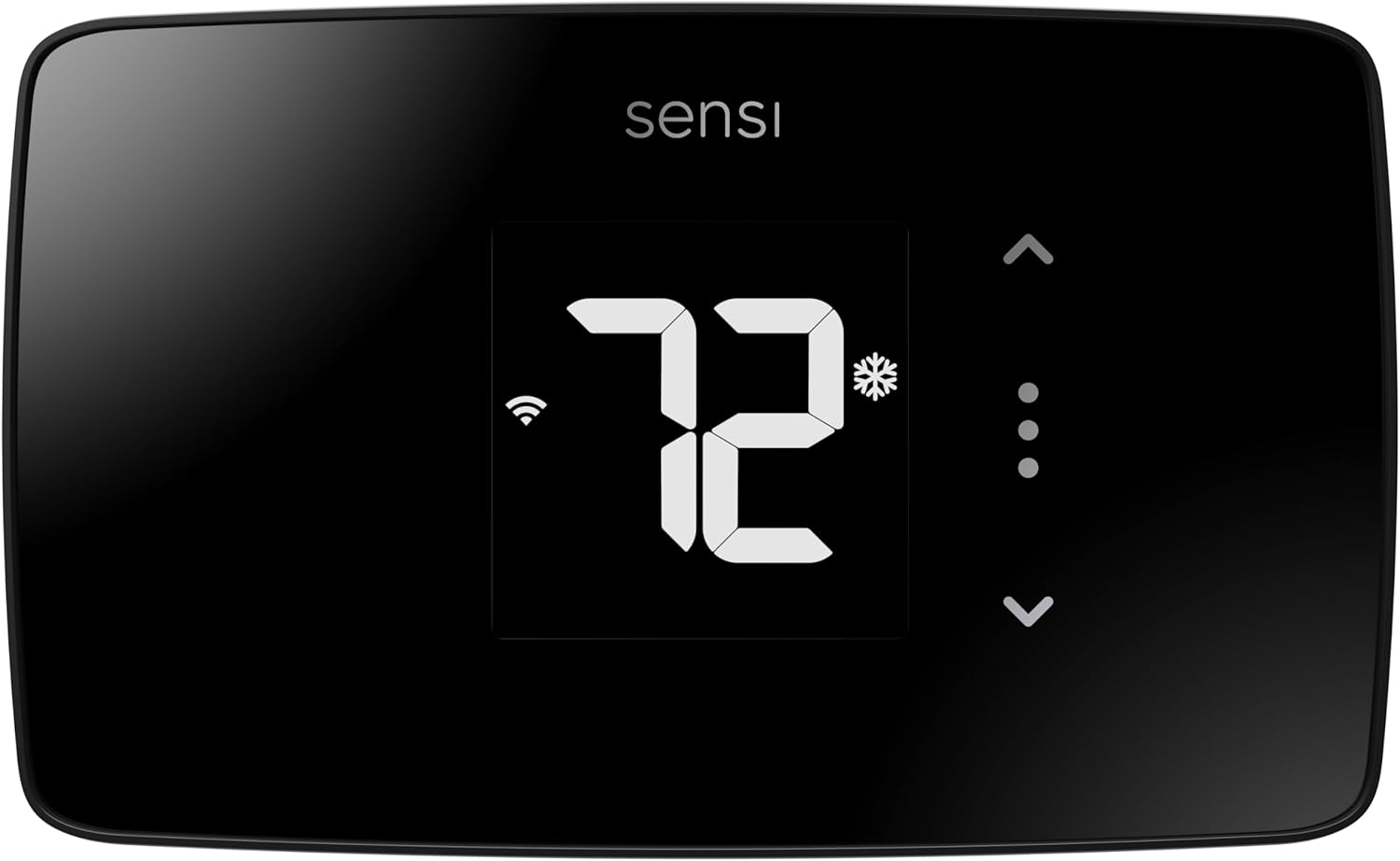
Sensi Lite Smart Thermostat ST25
| Connectivity Technology | Wi‑Fi (2.4 GHz) |
|---|---|
| Control Method | App, Touch, Voice |
| Power Source | Battery or C‑wire |
| Number of Batteries | 2 AAA (included) |
| Specification Met | Energy Star |
The Sensi Lite is a straightforward smart thermostat aimed at making HVAC control simpler without extra complexity. It connects to 2.4 GHz Wi‑Fi and pairs with the Sensi mobile app to let you change temperature, run schedules, and check usage from anywhere, plus it supports voice control via Alexa and Google Assistant. Installation is designed for DIYers with a built-in level, included mounting hardware and wire labels, and most systems do not require a common wire though some heat-only or heat/cool systems do. The LCD touch display and battery or C‑wire power options keep setup flexible. Notable benefits include Energy Star certification and features like geofencing and usage reports to help trim HVAC costs. Limitations are its basic feature set compared with premium models — there is no color touchscreen, advanced learning algorithms, or dual‑band Wi‑Fi support — so buyers looking for high customization or multi‑zone control may need a higher-end unit.
Best for: Buyers who want a reliable, no-frills smart thermostat that is easy to install themselves and focuses on straightforward app control and energy savings.
Less Ideal for: Users who want advanced learning routines, a color touchscreen, or extensive multi‑zone and professional HVAC integrations should consider higher‑end models.
- Easy DIY installation with included hardware and a built-in level
- Works with Alexa and Google Assistant for voice control
- Top-rated mobile app provides remote control, scheduling and usage reports
- Energy Star certified and includes energy‑saving features like geofencing
- Requires 2.4 GHz Wi‑Fi only, no dual‑band support
- Basic LCD interface and limited advanced features compared with premium smart thermostats
Verdict: Choose the Sensi Lite if you want an easy DIY smart thermostat that delivers solid app control and measurable energy savings without unnecessary complexity.
Choosing the Right Smart Ac Thermostat: Key Factors to Consider
Temperature Sensing and Accuracy
Accurate sensing determines how well the thermostat maintains your chosen setpoint. A thermostat with precise sensors and reliable averaging reduces short cycling and avoids the common problem of overshooting cooling. Consider where the sensor is located relative to room drafts and direct sunlight, because placement affects readings.
If the thermostat supports external or remote sensors, that can improve comfort in homes with uneven temperature zones. Accuracy influences both comfort and energy use, so prioritize units with documented sensor performance and options for calibration.
Connectivity and Remote Controls
Smart features are only useful when the thermostat stays connected. Look for robust Wi-Fi performance and support for local network control or cloud services depending on your privacy and reliability preferences. A well-designed app with schedules, geofencing, and manual override matters for daily convenience.
Check whether the thermostat supports the home automation platforms you already use and whether it offers OTA updates for ongoing improvements. Reliable remote control reduces unnecessary trips to the wall unit and makes seasonal schedule changes simpler.
Installation Requirements and Compatibility
Thermostat wiring varies across homes, and some smart AC thermostats need a common wire or specific terminal layout. Verify compatibility with your HVAC control signals and whether adapter options exist. Units that offer simple wiring diagrams, clear labeling, and optional adapters reduce installation time and installer costs.
Also consider mounting style and physical footprint. A slim profile that covers old wall paint or holes can make retrofit installs cleaner. If you are not comfortable with wiring, choose a model that supports professional installation or has comprehensive support resources.
Energy Monitoring and Reporting
Energy reporting helps you understand how much cooling runtime corresponds to your comfort settings. Thermostats that log system runtime, estimate energy use, or provide comparative reports can encourage more efficient behavior. Look for clear, actionable reports rather than raw data dumps.
Some thermostats include scheduling summaries and seasonal comparisons that help identify opportunities to reduce runtime. If savings are a goal, choose devices that combine accurate runtime logging with straightforward suggestions for schedule tweaks.
Control Interface and Daily Use
Daily usability is shaped by both the physical interface and the mobile app. A responsive touchscreen, clearly marked buttons, or a tactile dial make local adjustments faster. The app should present schedules, overrides, and current status with minimal taps.
Consider whether the unit supports quick hold options, temporary temperature changes, and user profiles for different occupants. Smooth daily interactions increase the likelihood that the thermostat will be used as intended.
Automation and Integration
Integration with other smart devices enables automation that can enhance comfort and efficiency. Features like geofencing, presence-based adjustments, or coordination with humidifiers and ventilation systems let the thermostat act proactively. Check which automation ecosystems are supported and whether local rules can run without cloud dependence.
If you rely on voice assistants or broader home automation scenes, confirm that the thermostat exposes the control points you need. Better integrations reduce manual adjustments and enable richer energy-saving strategies.
Installation Tips for Smooth Setup
Prepare a photo of your current thermostat wiring before removing the old unit so you can reference terminal labels during installation. Turn off breaker power to the HVAC system to avoid short circuits while handling wires. Confirm whether your system requires a common wire and, if so, whether an adapter or pro wiring is necessary.
Mount the thermostat level and away from direct sunlight, drafts, or heat sources that may skew readings. After wiring and power-up, let the thermostat run through at least one full cooling cycle to confirm the sensor readings and control behavior are stable.
- Label each wire when removing the old thermostat
- Keep the unit away from windows and vents
- Run initial calibration or sensor checks if available
Balancing Comfort and Efficiency
Small adjustments to setpoints and schedules can yield noticeable runtime reductions without sacrificing comfort. Use staggered setpoints during sleeping and away times to reduce compressor starts while keeping living areas comfortable when needed. Gradual temperature ramps can prevent overshoot and reduce short cycling that increases wear on equipment.
Leverage scheduling features and temporary holds for irregular days. When you use automation like geofencing, set gentle setbacks rather than aggressive swings to avoid bringing the house back to temperature too quickly.
- Start with modest setbacks to find the comfort/savings balance
- Use schedule presets as a baseline and tweak from real-world results
- Avoid very large temperature swings that force long recovery runs
Using Multiple Sensors and Zoned Sensing
Remote and auxiliary sensors help correct for temperature differences between rooms. Place sensors in representative living spaces rather than near windows or doors. When a thermostat supports averaging or prioritized sensors, choose the mode that matches how you use the home.
Keep in mind that adding sensors may change system behavior; test different sensor placements and averaging methods to find the best outcome for comfort and efficiency.
- Place sensors in commonly used rooms for best comfort
- Avoid placing sensors in direct sunlight or near vents
- Test sensor modes and adjust prioritization as needed
Privacy and Local Control Considerations
Decide whether you prefer cloud-based features or local control. Cloud services offer convenient remote access and integrations but can depend on vendor servers. Local control can be more private and reliable during internet outages, but may restrict some remote conveniences.
Review update policies and data handling statements to understand how telemetry and usage data are processed. Opt for devices that let you control what data is shared if privacy is a priority.
- Check whether remote features work without a vendor cloud
- Understand firmware update procedures and their impact
- Limit data sharing where configurable in the app
When to Call a Pro
If your HVAC wiring is nonstandard, you encounter multi-stage or proprietary control signals, or if the system has combined controls for heating and cooling, consult a licensed technician. Complex systems may require professional wiring or configuration to ensure safe operation.
Professional installers can also verify compatibility, set advanced staging and fan controls, and ensure that the thermostat is configured to optimize both comfort and equipment longevity.
- Nonstandard wiring or missing common wire
- Multi-stage compressors or auxiliary controls
- Need for advanced staging and fan control setup
How We Chose the Best Smart Ac Thermostat
We selected smart AC thermostats based on performance and real-world usability. Our filters prioritized accurate temperature sensing and responsive control because consistent setpoint maintenance directly affects comfort and runtime. Connectivity was evaluated for both reliability and supported protocols, since stable remote access and local control reduce user frustration. Installation flexibility was a key filter: we favored designs that work with common HVAC wiring and straightforward mounting so homeowners can complete installation without special tools. Energy monitoring and runtime reporting were included as measurable features that help owners track cooling usage. Interface quality and local controls were assessed for clarity and ease of use, recognizing that a touchscreen or well-designed app reduces daily friction. We excluded devices that require uncommon wiring or third-party gateways for basic operation. Products missing essential connectivity or reporting features were not considered. The final list represents thermostats that meet the above dimensions and are broadly applicable to typical residential AC systems.
Our full evaluation process is outlined in our review methodology.
FAQ
Do I need a C wire for a smart AC thermostat?
Often a common wire is required for continuous power to a smart AC thermostat. Some models include battery backup or power-stealing modes, but these can be less reliable. Check your control board or existing thermostat wiring to confirm whether a C wire is present.
Will a smart AC thermostat save me money on cooling bills?
It depends on usage patterns and how you configure schedules. Smart features like precise scheduling, geofencing, and runtime reports can reduce wasted cooling hours, but savings vary by home, insulation, and climate.
Can I control the thermostat if my internet goes out?
Many thermostats retain local control via the on-device interface and will continue to operate on schedules without internet. Remote control through a phone or cloud services usually requires connectivity, so plan for local access if outages are a concern.
Are remote sensors worth adding for an AC thermostat?
Remote sensors are useful in homes with uneven temperatures or high-traffic rooms. They can improve comfort by basing control on occupied zones rather than the thermostat location. Their value will depend on how well you place sensors and whether the thermostat supports sensor averaging.
How often should I update the thermostat firmware?
Update frequency varies, but applying firmware updates when released is recommended to maintain security and feature improvements. Review release notes and schedule updates when usage is low to avoid interrupting cooling during peak times.
Final Verdict
Prioritize accurate temperature sensing and reliable connectivity when choosing a smart AC thermostat. Installation compatibility and energy reporting are the next most important considerations because they affect both ease of setup and long-term utility. Balance daily usability against advanced automation features based on how hands-on you want to be. If you value straightforward setup and consistent control, focus on models with flexible wiring options and clear local controls. If automation and energy insights are a priority, choose units with robust reporting and integration capabilities. Use the factors above to match a thermostat to your home and usage patterns so you get both comfort and efficiency.