
Note: This article contains affiliate links. If you click on these links and make a purchase, we may earn a small commission at no extra cost to you. This helps support our research and content. Read our full affiliate disclosure here.
If humidity fluctuates in your home, a thermostat with humidity control can make a big difference in comfort, energy use, and mildew prevention. The right unit gives you precise temperature control while also measuring and reacting to indoor moisture levels, which helps maintain consistent conditions across seasons. This guide shortlists the top thermostats with humidity control and explains the practical features that matter for everyday use. Read on for the key criteria we evaluated, from sensor accuracy to installation and smart features, so you can pick the best option for your home.
Top Picks at a Glance
| Best Overall The best all-around choice for most situations | Emerson Big Blue 1F95-1291 |  |
| Best Quality Built to a higher standard if you want something more solid | Honeywell Home X8S Smart Thermostat |  |
| Best Value The sweet spot between price and what you get | Aprilaire 8920W Thermostat |  |
| Best Budget The cheapest option that still gets the job done reliably | Honeywell Home X2P RTH20B |  |
| Top Rated A top-rated pick with lots of positive feedback | Venstar T7900 Thermostat |  |
Emerson Big Blue 1F95-1291

| Controller Type | Touch |
|---|---|
| Temperature Control Type | digital |
| Display Type | touchscreen |
| Screen Size | 12 inches |
| Connectivity Protocol | Wi-Fi |
The Emerson Big Blue 1F95-1291 is a touchscreen programmable thermostat designed to give homeowners clear controls for temperature and humidity management. It installs in place of standard thermostats and provides a large 12-inch touchscreen for setting schedules, adjusting temperature, and viewing humidity readings. Built-in Wi-Fi lets you connect the thermostat to a network for remote access and basic smart control, while the unit supports universal staging and heat pump systems so it fits a wide range of HVAC setups. The sizeable touchscreen is easy to read from across a room, which simplifies daily use and scheduling. Practical benefits include on-device humidity control and digital temperature accuracy that can help stabilize indoor comfort and reduce cycling. Important limitations are that advanced smart features and ecosystem integrations are not detailed here, and buyers should confirm compatibility with their exact HVAC wiring before purchase. The Emerson is best-suited to buyers who want a straightforward, large-display thermostat with humidity monitoring rather than a heavily cloud-integrated smart hub.
Best for: Homeowners who want a clear, easy-to-read thermostat that combines temperature scheduling with built-in humidity control and basic Wi-Fi access for remote adjustments.
Less Ideal for: People seeking deep third-party smart-home integration, extensive cloud features, or a thermostat tailored to highly specialized HVAC configurations should consider alternatives.
- Large 12-inch touchscreen for clear, easy control and scheduling
- Wi-Fi connectivity enables remote access and basic smart features
- Universal staging and heat pump support fits many HVAC systems
- On-device humidity control to help maintain indoor comfort
- Marketing or advanced integration details are limited in the listing so smart ecosystem features may be minimal
- Buyers must verify wiring compatibility for their specific HVAC system before installation
Verdict: Choose the Emerson Big Blue if you want a large, easy-to-use touchscreen thermostat that adds humidity control and basic Wi-Fi connectivity for reliable everyday comfort.
Honeywell Home X8S Smart Thermostat

| Connectivity Technology | Wi‑Fi |
|---|---|
| Power Source | Hardwired |
| Screen Size | 5 inches |
| Controller Type | Touchscreen |
| Control Type | App Control |
The Honeywell Home X8S is a Wi‑Fi smart thermostat designed to give precise temperature and humidity control while fitting into modern smart homes. It installs as a hardwired wall unit and pairs with the included wireless room sensor to prioritize comfort in specific rooms or bedrooms; the sensor is battery powered and offers flexible placement up to about 200 feet away. The 5" customizable touchscreen provides clear local control, while remote adjustments and scheduling are available through the First Alert app and via Matter, Alexa, Google Assistant, or Apple Home integration. Notable features include doorbell camera streaming and intercom support for compatible video doorbells, ENERGY STAR energy‑saving modes, and built‑in humidity and ventilation controls for managing indoor air quality when used with additional HVAC accessories. Limitations to consider are the need for a C‑wire or the included adapter voucher, and the product does not support electric baseboard heat; full IAQ benefits may require extra equipment. For performance‑minded users this thermostat focuses on precise zoning and smart integrations rather than ultra‑simple plug‑and‑play installs.
Best for: Buyers who prioritize precise comfort and humidity control across rooms and want a thermostat that integrates with modern smart home ecosystems.
Less Ideal for: People with electric baseboard heat systems or those who need a no‑wires, ultra‑simple battery‑only install should consider other options.
- Includes wireless room sensor for room‑level temperature control and prioritization.
- Matter certification and broad voice assistant support enable reliable smart home integration.
- Built‑in humidity and ventilation controls help manage indoor air quality when paired with compatible HVAC accessories.
- Customizable 5" touchscreen and app control make schedules and setpoints easy to view and change.
- Requires a C‑wire or adapter voucher for power in many homes.
- Does not support electric baseboard heating systems.
Verdict: Choose the X8S if you want room‑level temperature and humidity control plus strong smart home and voice assistant compatibility for precise performance.
Aprilaire 8920W Thermostat

| Connectivity Technology | Wi-Fi |
|---|---|
| Screen Size | 7.01 inches |
| Control Type | App Control, Touchpad Control |
| Power Source | Ac/dc |
| Wattage | 10 watts |
The Aprilaire 8920W is a wall‑mounted, Wi‑Fi programmable thermostat built to handle both temperature and whole‑home indoor air quality tasks. It provides a 7‑inch color touchscreen for local control plus an app interface for remote scheduling and monitoring, and it integrates directly with AprilAire humidifiers, dehumidifiers, and air purifiers to automate humidity and air cleaning. Key features include multi‑stage heating and cooling control, auto changeover, filter indicators, outdoor sensor support, and voice compatibility with Alexa and Google Assistant. In practice the 8920W simplifies HVAC and IAQ management by centralizing controls and offering auto‑away and vacation modes to reduce energy use when you are out. Installation requires the included equipment control module and typical HVAC wiring, and advanced IAQ integration is most useful if you already have or plan AprilAire equipment. The touchscreen and app make daily adjustments straightforward, while the system's focus on whole‑house humidity and air cleaning is the main advantage for homes concerned about air quality. Expect a somewhat higher setup complexity than a basic programmable thermostat but clear benefits for managing humidity and filtration across a central HVAC system.
Best for: Buyers who want centralized control of temperature plus whole‑house humidity and air cleaning and who prioritize energy‑aware scheduling and automation over plug‑and‑play simplicity.
Less Ideal for: Those looking for a very simple, DIY thermostat replacement for a single‑stage system or buyers without plans to add or use whole‑house IAQ equipment should consider simpler alternatives.
- Integrates with AprilAire humidifiers, dehumidifiers and air purifiers for automated IAQ control
- Large 7‑inch color touchscreen plus mobile app and voice assistant support for convenient control
- Multi‑stage heating and cooling with auto changeover and outdoor sensor support
- Includes equipment control module and outdoor temperature sensor for centralized system management
- More complex installation and setup compared with basic programmable thermostats
- Full IAQ benefits require compatible AprilAire whole‑house equipment
Verdict: Choose the 8920W if you need a touchscreen Wi‑Fi thermostat that centralizes temperature, humidity and air cleaning control for an AprilAire whole‑house system.
Honeywell Home X2P RTH20B

| Temperature Control Type | Programmable |
|---|---|
| Power Source | Battery Powered |
| Display Type | LCD |
| Number of Batteries | 2 AA batteries required. |
| Scheduling | 5-2 day scheduling or non-programmable option |
The Honeywell Home X2P (RTH20B) is a straightforward programmable thermostat targeted at single-stage heating and cooling systems. It provides 5-2 day scheduling plus non-programmable options, a large backlit LCD for easy reading, and simple touchpad controls for everyday adjustments. The unit can remind you to change air filters and offers basic indoor humidity monitoring in its settings, making it relevant for buyers who want some humidity awareness without a smart platform. Installation is typical for battery-powered thermostats and the UWP wall plate option simplifies mounting and future upgrades. Limitations include its focus on single-stage systems and lack of advanced smart features or integrated WiFi controls on this model, so it is not suited to homes needing remote control, multi-stage equipment handling, or detailed humidity automation.
Best for: Buyers on a tight budget who want a reliable, easy-to-use programmable thermostat with a clear display and basic humidity awareness for a single-stage home HVAC system.
Less Ideal for: Homes that need remote control, advanced humidity automation, or support for multi-stage heating and cooling should choose a smart or multi-stage compatible thermostat instead.
- 5-2 day scheduling with a non-programmable option for simple routines
- Large backlit LCD and touchpad control for easy daily use
- Change filter reminders and basic indoor humidity monitoring
- Battery powered with an easy UWP wall plate install for quick replacement
- Not WiFi enabled so no remote access or smart-home integration
- Designed for single-stage 1H/1C systems only, not for multi-stage HVAC
Verdict: Choose this thermostat if you need an affordable, no-frills programmable unit with clear display and basic humidity awareness for a single-stage HVAC system.
Venstar T7900 Thermostat
| Connectivity Technology | Wi‑Fi |
|---|---|
| Control Method | App |
| Power Source | Electric |
| Voltage | 24 volts |
| Display Type | touchscreen |
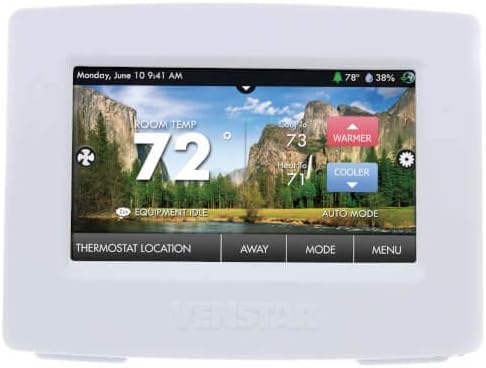
The Venstar T7900 is a touchscreen, Wi‑Fi enabled programmable thermostat designed to control temperature and humidity from the wall or via an app. It pairs with home networks for remote control and supports voice commands through Alexa, making routine adjustments and schedules simple without touching the unit. The 4‑inch color touch display provides clear feedback and the unit includes a temperature sensor for basic local sensing; its 24‑volt electric power fits typical HVAC systems. Practical benefits include app-based scheduling, humidity control for homes that need moisture management, and a modern touch interface that replaces older mechanical thermostats. Limitations are straightforward: it is a single-zone controller without advanced multi-sensor zoning built in, and the feature set is focused on core HVAC and humidifier control rather than extensive smart‑home automation or learning algorithms. Installers should confirm compatibility with a given HVAC wiring setup before buying.
Best for: Buyers who prioritize a dependable, straightforward replacement thermostat that gives remote access and humidity control without complex setup or advanced automation.
Less Ideal for: Homeowners who want adaptive learning thermostats, multi‑zone integration, or extensive smart‑home automation capabilities should look elsewhere.
- Built‑in Wi‑Fi for remote app control and scheduling
- Integrated humidity control for managing home moisture
- 4‑inch touchscreen with clear touch controls
- Compatible with Alexa voice control for hands‑free adjustments
- No built‑in learning or advanced automation features
- Designed for single‑zone control rather than multi‑zone systems
Verdict: Choose the Venstar T7900 when you want a reliable, app‑accessible thermostat that adds humidity control and voice support without unnecessary complexity.
Choosing the Right Thermostat with Humidity Control: Key Factors to Consider
Humidity Sensor Accuracy
A thermostat's humidity sensor quality directly affects how well the system maintains target moisture levels. Accurate sensors will detect small percentage changes and trigger humidifiers or dehumidifiers at the intended setpoints. Poor or lagging sensors can cause overshoot, leaving you with sticky, clammy rooms or overly dry air.
When evaluating accuracy, consider stated sensor tolerances and whether the thermostat reports humidity in real time or averages readings. For homes with specific humidity needs, tighter accuracy and faster sampling reduce cycling and improve comfort.
Installation and Wiring Requirements
Thermostats with humidity control vary in wiring needs and compatibility with existing HVAC systems. Some require a dedicated C wire or specific terminals for humidifier/dehumidifier control, while others support battery operation but with limited humidity control features. Ensure the thermostat's terminal layout matches your furnace, A/C, and any humidity-control equipment.
Also evaluate whether the device supports common HVAC configurations like heat pump systems, multistage heating/cooling, or separate whole-house humidifiers. Simpler wiring and clear installation guides reduce installation time and the need for professional help.
Control and Automation Features
How a thermostat lets you control humidity matters for convenience and energy use. Useful features include humidity setpoints, humidity-based schedules, and integration with temperature control to avoid conflicting commands. Advanced automation can adjust humidity based on outdoor conditions, time of day, or occupancy.
Look for programmable setpoints, vacation modes, and rules that prevent the system from fighting itself. For example, a thermostat that staggers humidifier and HVAC cycles can maintain comfort without excessive runtime.
Compatibility With Humidification Equipment
If you plan to control a whole-house humidifier or dehumidifier, compatibility is crucial. Some thermostats provide dedicated humidifier/dehumidifier outputs, while others rely on third-party modules or only offer humidity reporting without direct control. Match the thermostat's control outputs and relay types to your existing humidity equipment requirements.
Also verify whether the thermostat supports external sensors or multiple-zone setups if your home has uneven humidity distribution. Proper compatibility prevents installation problems and ensures the humidity device operates as intended.
User Interface and App Experience
Daily satisfaction depends on how easy it is to view and change humidity settings. Clear local displays that show both temperature and humidity let you check conditions at a glance. Mobile apps and web interfaces should present humidity graphs, alerts, and easy-to-configure schedules.
Consider whether the app offers useful alerts for high or low humidity, is responsive to remote adjustments, and whether firmware updates are provided for feature improvements. A user-friendly interface shortens the learning curve and reduces configuration errors.
Reliability and Long-Term Support
Thermostats are long-term devices, so reliability and manufacturer support matter. Durable sensors and well-designed relays reduce the chance of premature failure, and regular firmware updates can improve integration and fix bugs. Good documentation and clear troubleshooting guidance make it easier to resolve issues without professional service.
Check whether the thermostat has a history of firmware maintenance and whether the manufacturer provides clear instructions for common installation scenarios. Reliable construction and ongoing support lower lifecycle costs and downtime.
How Humidity Control Changes Home Comfort
Controlling humidity affects perceived temperature, air quality, and building health. At higher humidity levels, rooms feel warmer and can feel stuffy. Lower humidity can cause dry skin, respiratory irritation, and static electricity. A thermostat that actively manages humidity helps maintain a comfortable balance without overcooling or overheating.
Beyond comfort, proper humidity control reduces the risk of mold growth and protects wood floors, furniture, and artwork from moisture-related damage. A thermostat that coordinates HVAC cycles with humidifier or dehumidifier operation can limit prolonged high-moisture periods and prevent unnecessary energy use.
- Maintains consistent perceived comfort without constant thermostat adjustments
- Helps prevent mold and moisture damage in susceptible areas
- Reduces conditions that can aggravate allergies and respiratory issues
Wiring Scenarios and What They Mean
Before selecting a thermostat, inspect the wiring at your current thermostat location. Look for a C wire, common power, and dedicated terminals for humidity equipment if present. Many modern units need a C wire for full connectivity and to run sensors reliably.
If you have a whole-house humidifier or dehumidifier, identify its control type. Some systems require simple relay contacts while others use voltage-specific terminals. Knowing your wiring scenario ahead of time reduces surprises during installation and helps you pick a thermostat with the right connector set.
- C wire presence enables continuous power for sensors and Wi-Fi
- Dedicated humidifier/dehumidifier terminals simplify direct control
- Heat pump and multistage systems need compatible terminal mapping
Using Schedules and Rules to Keep Humidity Stable
Schedules let you raise or lower humidity targets at predictable times, like reducing humidity during hot afternoons or increasing it overnight in dry months. Rules and interlocks prevent the system from calling both humidifier and dehumidifier at once, which would waste energy and confuse control logic.
Advanced setups can combine occupancy sensing and outdoor weather data so the thermostat only runs humidity equipment when it will have a meaningful effect. This reduces runtime and can improve comfort while limiting wear on humidification hardware.
- Program night and day humidity targets to match comfort preferences
- Use interlocks to avoid conflicting commands to humidifiers and dehumidifiers
- Consider occupancy or outdoor-condition triggers for smarter operation
Placement and Additional Sensors
Where you place the thermostat affects humidity readings. Hallways or drafty spots can give misleading values. For homes with uneven humidity, consider thermostats that support remote or multiple sensors to capture conditions in basements, bathrooms, or other critical areas.
Remote humidity sensors can improve control in problem rooms and reduce cycling that results from relying on a single, poorly placed sensor. Confirm that the thermostat supports external sensors and check any restrictions on sensor count or placement.
- Avoid direct sunlight, near vents, or next to doors for accurate readings
- Use additional sensors in rooms prone to humidity swings
- Ensure the thermostat supports external sensor wiring or wireless sensors
Maintenance Tips for Long-Term Humidity Control
Routine maintenance keeps both the thermostat and humidity equipment working reliably. Replace humidifier pads and clean dehumidifier coils per the equipment manufacturer's schedule. Keep vents and return grilles clear so airflow is stable and sensors read representative air.
Verify sensor readings periodically against a handheld hygrometer to detect drift. Apply firmware updates and review system alerts to catch configuration or connectivity problems early.
- Replace consumables on humidifiers and clean dehumidifier coils regularly
- Check thermostat sensor accuracy with a handheld hygrometer from time to time
- Install firmware updates and monitor system alerts for early issue detection
How We Chose the Best Thermostat with Humidity Control
We focused on features and attributes that directly affect day-to-day humidity and temperature control. Primary evaluation criteria included sensor accuracy and responsiveness, which determines how reliably a thermostat reports and reacts to indoor humidity changes. Installation and wiring flexibility were essential, because many homes have different HVAC wiring setups and not every thermostat supports all configurations. Control options and automation were assessed for clarity and effectiveness, covering local controls, scheduling, and remote access. Integration and compatibility with common HVAC systems and with humidification or dehumidification equipment was another key filter. Finally, durability and user interface quality were considered to ensure long-term, frustration-free operation. We excluded units that do not report indoor humidity levels or that only estimate humidity indirectly. Models lacking basic scheduling or that require proprietary ecosystems without standard connectivity options were also filtered out. The resulting shortlist prioritizes thermostats that deliver accurate humidity reporting, flexible installation, clear controls, and reliable integration with humidity-modifying equipment.
Our full evaluation process is outlined in our review methodology.
FAQ
Do I need a thermostat that directly controls my humidifier or is reporting enough?
Direct control simplifies operation and ensures the humidifier only runs when the thermostat calls for it. Reporting-only thermostats give useful data but require separate control hardware or manual management for automatic operation.
How accurate are thermostat humidity sensors compared with standalone hygrometers?
Many thermostat sensors are accurate enough for general home comfort, but standalone hygrometers designed for measurement tasks often have tighter tolerances. For critical monitoring, compare readings and calibrate or use external sensors if available.
Will a humidity-control thermostat work with a heat pump?
Some thermostats support heat pumps and include humidity control features, but compatibility varies. Check that the thermostat's terminal mapping and control logic are suited to your heat pump configuration before installation.
Can a thermostat prevent mold by keeping humidity low?
A thermostat that actively controls humidity can reduce conditions that favor mold, but it is one part of a broader moisture management strategy. Addressing sources of moisture, ventilation, and building envelope issues is also important.
How often should I check or recalibrate the humidity sensor?
Check sensor readings against a reliable hygrometer every few months or if indoor conditions seem inconsistent. Recalibration or replacement is only needed if readings drift significantly from reference measurements.
Final Verdict
Prioritize thermostats that combine reliable humidity sensing with clear control logic and wiring compatibility for your HVAC and humidification equipment. Balance the convenience of automatic humidifier or dehumidifier control against installation complexity and the need for external sensors. In most homes, accuracy, wiring flexibility, and a user-friendly interface are the biggest determinants of long-term satisfaction. Choose a unit that matches your system's wiring and that offers the level of automation you want. That approach minimizes hassles and gives the best chance of steady, comfortable indoor humidity over time.