
Note: This article contains affiliate links. If you click on these links and make a purchase, we may earn a small commission at no extra cost to you. This helps support our research and content. Read our full affiliate disclosure here.
Choosing a thermostat with remote sensors can make a meaningful difference in home comfort and energy use. Remote sensors let you measure temperature and occupancy in multiple rooms so the system responds to where people actually are rather than the thermostat's single location. That helps eliminate hot and cold spots, reduces runtime waste, and can improve comfort in commonly used living areas. This guide highlights our top shortlisted thermostats with remote sensors for typical homes, explaining why each made the list and what to expect from installation, sensor placement, and daily operation. We evaluate accuracy, wireless range, smart features, and ease of setup to help you pick the right option for your needs.
Top Picks at a Glance
| Best Overall The best all-around choice for most situations | Honeywell Home T9 Smart Thermostat |  |
| Best Quality Built to a higher standard if you want something more solid | ecobee Smart Thermostat Premium Bundle |  |
| Best Value The sweet spot between price and what you get | LUX TQX Smart Thermostat |  |
| Best Budget The cheapest option that still gets the job done reliably | MoesGo Programmable WiFi Thermostat |  |
| Top Rated A top-rated pick with lots of positive feedback | ecobee Smart Thermostat Premium |  |
| Most Popular A crowd favorite that many people choose with confidence | Google Nest Thermostat E |  |
| Best Seller A high-volume bestseller chosen again and again | Google Nest Learning Thermostat (4th Gen) |  |
Honeywell Home T9 Smart Thermostat

| Connectivity Technology | Wi-Fi |
|---|---|
| Control Method | Voice |
| Display Type | LCD |
| Power Source | Corded Electric |
| Included Components | Thermostat, Mounting Hardware, Sensor |
The Honeywell Home T9 pairs a color touchscreen thermostat with a battery-powered Smart Room Sensor to bring room-level temperature and humidity awareness to a home HVAC system. Install the wall-mounted T9, connect it to the Honeywell Home (Resideo) app and Wi‑Fi, and you can set room priorities, view multi-room temps on the thermostat or phone, and use geofencing to switch between home and away modes automatically. The included sensor detects occupancy and helps the thermostat focus heating or cooling where people are, while additional sensors (sold separately) extend coverage up to about 200 feet. Practical benefits include built-in voice control compatibility with Alexa, Google Assistant, Apple HomeKit and SmartThings, monthly energy reports, and an easy guided install with a C-wire adapter included for homes without a C-wire. Important limitations: it requires compatible HVAC wiring (C-wire or the adapter) and does not support electric baseboard heat, and full multi-room functionality depends on buying extra sensors for larger homes.
Best for: Buyers who want a balanced smart thermostat that improves home comfort by focusing on occupied rooms and offers easy remote control without chasing the cheapest or most feature-heavy option.
Less Ideal for: Homes that rely on electric baseboard heat or owners who need a tech-free, basic programmable thermostat.
- Smart Room Sensor lets the system prioritize occupied rooms for targeted comfort
- Works with major voice assistants and the Honeywell Home app for remote control
- Auto Home/Away using geofencing and monthly energy reports help lower runtime
- Includes a power adapter alternative to a C-wire for easier installations
- Does not support electric baseboard heating systems
- Full multi-room benefits require purchasing additional sensors
Verdict: Choose the T9 if you want a dependable smart thermostat that uses remote sensors to prioritize comfort where people actually are and offers broad smart home integration.
ecobee Smart Thermostat Premium Bundle

| Connectivity Technology | Wi‑Fi |
|---|---|
| Power Source | Hardwired |
| Temperature Control Type | Heating, Cooling |
| Mounting Type | Wall Mount |
| Included Components | Smart Thermostat, SmartSensor for Doors and Windows 2‑Pack |
The ecobee Comfort and Security Bundle pairs the Smart Thermostat Premium with two SmartSensor door/window sensors to deliver room‑level temperature control plus motion and entry alerts when used with ecobee's security subscription. The thermostat mounts on the wall, connects over Wi‑Fi, and includes built‑in voice assistant support and a speaker so you can control HVAC, set timers, and get notifications hands‑free. SmartSensor acts as both a temperature sensor and a motion/contact detector, helping the thermostat reduce hot and cold spots by adjusting the system based on occupancy and remote room readings. The package also provides smoke alarm sound detection and door/window open alerts when the subscription is active, and the thermostat includes an air quality monitor and Energy Star efficiency claims that support lower heating and cooling usage. Installation is DIY‑friendly with a power extender kit and trim kit included, but advanced security features require an ecobee Smart Security subscription to unlock full remote alerting and automated arming behaviors.
Best for: Buyers who want precise temperature control across rooms plus integrated occupancy sensing and are willing to use or evaluate a subscription for enhanced security alerts.
Less Ideal for: People who want a purely free, standalone security system or who do not want any subscription tied to motion or entry alerts.
- Includes Smart Thermostat Premium plus door/window SmartSensors for room‑level temperature and entry monitoring
- Built‑in voice assistant and speaker for hands‑free control and local voice commands
- SmartSensor improves comfort by sensing occupancy and adjusting heating/cooling to reduce hot or cold spots
- Air quality monitoring and smoke‑alarm sound detection provide additional safety and maintenance alerts
- Includes Power Extender Kit and trim kit for easier DIY installation on most systems
- Advanced security notifications and some motion/arming features require a paid ecobee Smart Security subscription
- Not all security features work standalone without pairing to other ecobee devices or subscribing
Verdict: Choose this bundle if you want a top‑tier smart thermostat with remote sensors that improve comfort and add integrated entry/motion monitoring when paired with ecobee’s security services.
LUX TQX Smart Thermostat
| Connectivity Technology | Bluetooth, Matter, WiFi, Zigbee |
|---|---|
| Power Source | System Power C-Wire |
| Controller Type | Amazon Alexa, Android, Apple HomeKit, Google Assistant, iOS |
| Number of Batteries | 2 CR2 batteries required (included) |
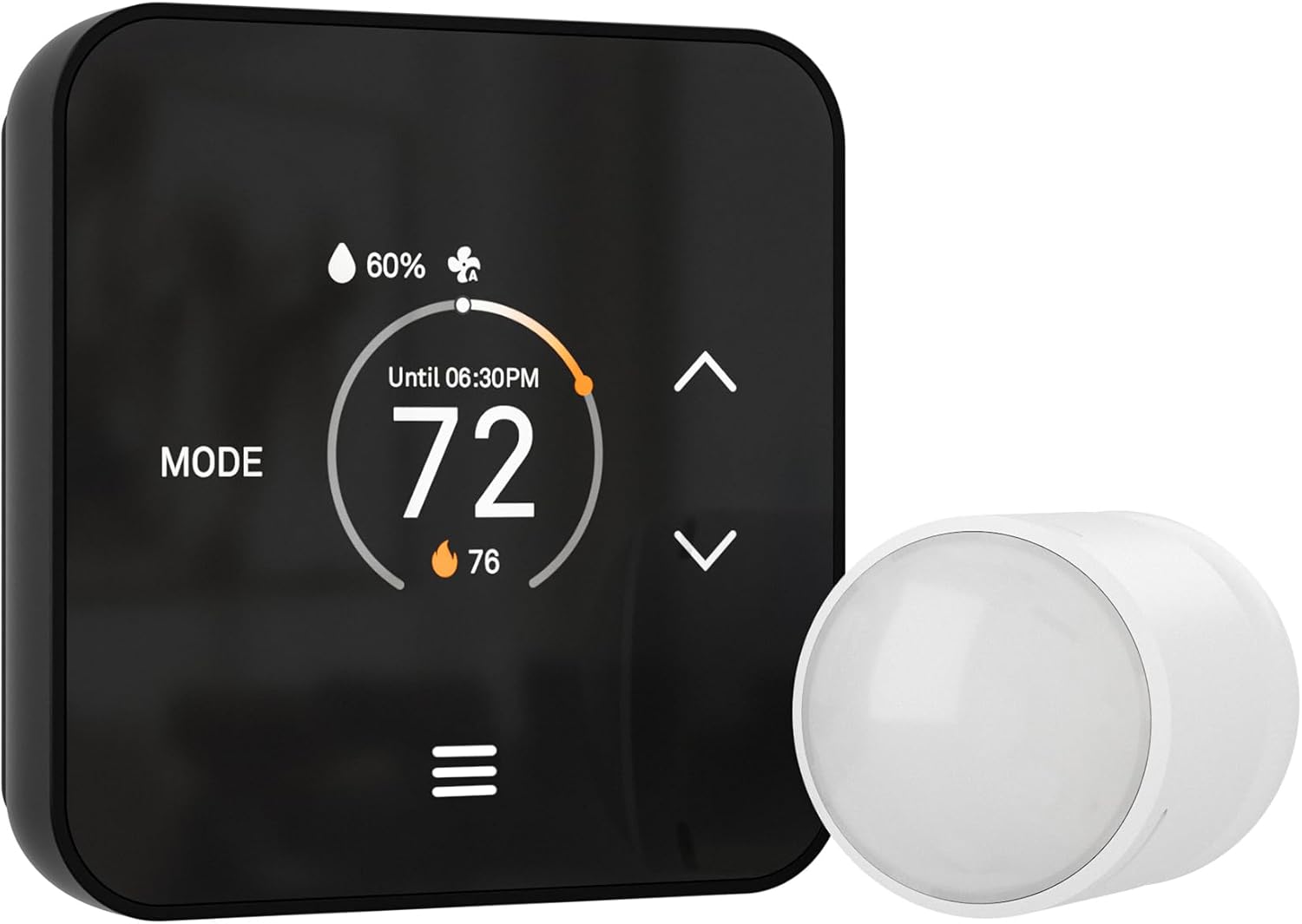
The LUX TQX Smart Thermostat is a wall-mounted, Wi‑Fi and Matter-capable thermostat designed to integrate with existing smart-home ecosystems and add whole-house sensing. It pairs with the included occupancy sensor and supports up to five remote sensors to combine room temperature and occupancy data for a single optimized home temperature schedule, and it can create auto-schedules by learning routines. Setup is intended to be simple for Matter users since the device connects through a Matter-enabled speaker or controller rather than forcing a separate app or login, and the included Lux Power Bridge helps where a C-wire is unavailable. The bright LED display uses a light and proximity sensor to wake and adjust brightness, and keypad lockout with PIN protects settings. Trade-offs include the fact that sensor data is aggregated to adjust overall system temperature rather than controlling individual rooms independently, and installation requires compatibility with 24 VAC HVAC systems and conventional/heat pump configurations.
Best for: Buyers who want a sensor-forward smart thermostat that optimizes whole-home comfort through occupancy-aware scheduling and works within a Matter smart-home setup.
Less Ideal for: Homes that need independent, zone-level control of individual rooms or systems that run on 120V/240V line voltage should look elsewhere.
- Matter over Wi‑Fi plus Bluetooth and Zigbee for broad smart-home integration
- Supports up to 5 remote sensors to combine occupancy and temperature across rooms
- Auto-scheduling that learns routines to save energy without manual programming
- Includes Lux Power Bridge to provide system power when a C-wire is not present
- Aggregates sensor data for whole-house adjustments rather than offering true room-by-room control
- Requires a compatible 24 VAC HVAC system and is not suitable for line-voltage systems
Verdict: Choose the TQX if you want a Matter-native thermostat that uses multiple remote sensors to optimize whole-house comfort and energy use without needing a separate app.
MoesGo Programmable WiFi Thermostat

| Connectivity Technology | Wi-Fi |
|---|---|
| Controller Type | Amazon Alexa, Google Assistant, Google Home |
| Power Source | Hardwired |
| Temperature Control Type | Programmable |
| Included Components | C-wire adapter, temperature sensor |
This MoesGo thermostat is a budget-friendly smart thermostat that pairs Wi‑Fi remote control, voice control, and a supplied remote temperature sensor to give more accurate, room-focused comfort. It installs as a hardwired wall unit and includes a C-wire adapter to help when a dedicated C-wire is absent, and supports both conventional and heat pump systems. The 7-day programmable schedule and four modes let you automate temperature for wake, away, home and sleep, while the Smart Life/Tuya app enables remote adjustments from your phone. The included sensor can average readings with the main unit and optionally operate on a timer to track occupancy for better comfort where people are actually located. Practical limits are that it requires 2.4 GHz Wi‑Fi and certain wiring (R, Y, G and W or a 3-wire minimum) so very old or high-voltage systems are incompatible, and the display and menus are straightforward but not as polished as premium brands. For buyers who want a remote-sensor capable smart thermostat without a high price tag, this delivers most key features.
Best for: Homeowners looking for an affordable smart thermostat that includes a remote sensor and remote/voice control to improve comfort room-by-room without paying for premium models.
Less Ideal for: Homes with heating-only or high-voltage systems or users who want the most polished app and touchscreen experience available.
- Includes a remote temperature sensor to better measure room temperature and occupancy
- C-wire adapter supplied to help install on systems lacking a dedicated C-wire
- Works with 2.4 GHz Wi‑Fi and integrates with Alexa and Google Assistant for voice and remote control
- 7-day programmable schedule with four modes for automated comfort and energy savings
- Not compatible with heating-only or high-voltage (120–240V) systems
- Requires 2.4 GHz Wi‑Fi and specific wiring which may exclude very old setups
- Interface and display are basic compared with higher-end smart thermostats
Verdict: If you want an inexpensive smart thermostat that ships with a remote sensor and basic voice and app control, this MoesGo model gives those features without a big premium.
ecobee Smart Thermostat Premium

| Connectivity Protocol | Wi-Fi |
|---|---|
| Controller Type | Amazon Alexa, Android, Apple HomeKit, Google Assistant, iOS |
| Power Source | Battery Powered |
| Voltage | 24 volts |
| Number of Batteries | 1 Lithium Ion battery (included) |
The ecobee Smart Thermostat Premium is a feature-rich smart thermostat designed to improve comfort and save energy while monitoring home air quality. It controls heating and cooling via app or on-unit buttons, connects to dual-band Wi-Fi, and includes an ecobee SmartSensor to detect temperature in another room and reduce hot or cold spots. Built-in Alexa or Siri lets you use voice commands and the speaker can play music or provide notifications, while radar occupancy sensing and geofencing help the thermostat learn when rooms are occupied. The unit also offers live view integration with an ecobee doorbell camera, smoke alarm alerts, and an included Power Extender Kit for installations without a C-wire. Practical benefits include improved zone comfort from the remote sensor, automated energy savings, and a clear, large display in a premium metal housing. Important limitations are that compatibility should be checked for nonstandard HVAC systems and some advanced voice or HomeKit features require an Apple home hub for full functionality.
Best for: Homeowners who prioritize a reliable, full-featured smart thermostat that actively balances comfort across rooms using remote sensors and automated presence detection.
Less Ideal for: Homes with uncommon HVAC wiring standards like line-voltage or millivolt systems or buyers who need a very basic, no-frills thermostat.
- Includes a SmartSensor to remotely measure room temperature and reduce hot/cold spots
- Built-in Alexa and Siri for hands-free voice control and a speaker for media
- Built-in air quality monitor with alerts and filter reminders
- Radar occupancy sensing and geofencing improve automated scheduling and presence detection
- Power Extender Kit and trim plate included to simplify DIY installs on homes without a C-wire
- Some integrations require an Apple home hub for full Siri/HomeKit functionality
- Not compatible with certain line-voltage, millivolt, or 0-10V systems
Verdict: Choose this thermostat when you want a dependable, sensor-driven smart thermostat that improves comfort and energy savings while providing built-in voice assistants and air quality monitoring.
Google Nest Thermostat E

| Connectivity Technology | Wi‑Fi |
|---|---|
| Control Method | Voice |
| Power Source | Battery Powered |
| Display Type | LCD |
| Number of Batteries | 1 Lithium Ion (included) |
The Nest Thermostat E is a simple smart thermostat designed to keep rooms comfortable while helping reduce energy use. It connects to Wi‑Fi and pairs with the included Nest Temperature Sensor so you can prioritize a specific room's temperature from the Nest app or by voice using Google Assistant or Alexa. The thermostat supports auto‑scheduling and Home/Away Assist to lower HVAC runtime when no one is home, and the sensor lets the system trigger heating or cooling based on the sensor location rather than the thermostat's wall location. Installation is intended to be straightforward and the unit runs on a single lithium ion battery with a clear LCD interface and button controls. Expect practical benefits like remote adjustments, basic energy history and the Nest Leaf guidance for more efficient settings, but be aware that savings vary with usage and home systems and the E model is deliberately simpler than higher‑end Nest models so it lacks some advanced display and scheduling options.
Best for: Buyers who prioritize easy setup, remote control, and room‑specific temperature sensing backed by established product reviews and proven energy features.
Less Ideal for: Users who want the most advanced thermostat features, customizable large color displays, or extensive professional HVAC integrations.
- Includes Nest Temperature Sensor for remote room temperature sensing
- Wi‑Fi connectivity with app and voice control via Google Assistant and Alexa
- Auto‑Scheduling and Home/Away Assist reduce unnecessary HVAC run time
- Easy wall‑mount installation with included hardware and simple LCD/button controls
- Simpler feature set than premium Nest models, with fewer advanced scheduling and display options
Verdict: Choose this bundle if you want a straightforward smart thermostat with a remote sensor for reliable room‑level control and easy remote operation.
Google Nest Learning Thermostat (4th Gen)

| Connectivity Technology | Wi‑Fi |
|---|---|
| Power Source | Battery Powered |
| Display Type | Touchscreen |
| Voltage | 24 volts |
| Included Components | Nest Temperature Sensor (2nd gen) |
The Nest Learning Thermostat (4th gen) is a premium smart thermostat that learns your preferred temperatures and suggests schedule tweaks to reduce heating and cooling use. It installs on most 24V HVAC systems and includes a Nest Temperature Sensor (2nd gen) to help manage hot and cold spots in specific rooms. You control it from the large touchscreen or remotely through the Google Home app and voice assistants, and features like Dynamic Farsight, Auto Away, Adaptive Eco, and Smart Ventilation aim to improve comfort and efficiency. The system also provides System Health alerts to warn you about potential HVAC issues and can shift energy use to cleaner or cheaper times with Nest Renew. Setup is intended to be user-friendly with step-by-step app guidance, but full compatibility with all systems should be checked before purchase and some advanced features work best with a stable Wi-Fi connection and the Google ecosystem.
Best for: Buyers who want a reliable, feature-rich smart thermostat with room-sensor support and easy remote control, and who prefer a straightforward install with guided app setup and energy-saving automation.
Less Ideal for: People who avoid cloud-dependent ecosystems or those with nonstandard HVAC wiring who are unwilling to check compatibility or consult a professional should consider simpler or specialist thermostats instead.
- Includes a Nest Temperature Sensor to control temperature in a separate room or hot spot.
- Learns routines and suggests schedule adjustments to help reduce energy use.
- Large, easy-to-read display with Dynamic Farsight for status at a distance.
- Works with Google Home app and major voice assistants for remote control and voice commands.
- System Health monitoring and alerts help detect HVAC issues early.
- Some advanced energy features and integrations work best within the Google ecosystem and require a reliable Wi-Fi connection.
- Not all HVAC setups are fully compatible; buyers should verify 24V system compatibility and wiring before installation.
Verdict: If you want a smart, easy-to-use thermostat that includes a remote sensor to manage hot and cold spots and helps lower energy use, the Nest Learning Thermostat (4th gen) is a top practical choice.
Choosing the Right Thermostat with Remote Sensors: Key Factors to Consider
Sensor Accuracy and Calibration
Accurate temperature sensing is the primary purpose of remote sensors. Small variances between sensor readings and actual room temperature can lead to overcooling or overheating, so choose sensors with documented temperature tolerance and consistent reporting. Look for sensors that report to the thermostat in close-to-real time and that offer calibration options when readings are offset.
Calibration matters because rooms can have microclimates from sunlight, vents, or appliance heat. A sensor that you can recalibrate or adjust in the thermostat settings lets you correct for placement bias without moving the sensor repeatedly.
Wireless Range and Signal Reliability
Wireless sensors must maintain a steady connection to the thermostat across typical home distances and through walls or floors. Check the stated range and favor systems that use robust radio protocols or mesh-style networking for better penetration and fewer dropouts. Think about where sensors will live: bedrooms, living rooms, or finished basements often require at least moderate wall-penetration capability.
Signal reliability also affects installation flexibility. If sensors lose connection frequently, the thermostat may fall back to a single-location reading, negating the benefit of multiple sensors. Consider whether extenders or repeaters are needed for larger homes and whether the system supports them.
How the Thermostat Uses Multiple Sensors
Thermostats differ in how they process multiple sensor inputs. Some average readings from all sensors, others prioritize a specified sensor or room, and some offer a 'follow-me' mode that heats or cools based on occupancy detected by the most recently active sensor. Choose the behavior that matches your goals: averaging can smooth temperature swings across rooms, while prioritizing occupied rooms maximizes perceived comfort.
Also check limits on the number of supported sensors and whether they can be renamed or grouped. Flexible grouping and scheduling let you create zones without rewiring HVAC ducts.
Installation Requirements and HVAC Compatibility
Thermostat installation varies from simple battery-powered swaps to devices that require a common wire or professional wiring changes. Verify whether the thermostat needs a C-wire or supports power stealing for your heating and cooling system. If you have a heat pump, multi-stage furnace, or another nonstandard setup, confirm that the thermostat supports the control wiring and sensor inputs your system requires.
Installation complexity also covers where sensors are placed. Battery-powered wall or table sensors are easiest to deploy, while wired sensors need planning and possibly conduit or professional routing. Factor in whether you will install sensors yourself or hire a technician.
Battery Life and Long-Term Maintenance
Most remote sensors run on batteries, so their longevity and ease of replacement are practical concerns. Longer battery life reduces maintenance and the risk of unexpected sensor failures. Look for sensors that use common battery types, report low-battery alerts reliably, and have accessible compartments for quick replacement.
Durability matters if a sensor will be placed in high-traffic areas or rooms with variable humidity. Sensors with simple, durable housings and stable mounting options will last longer and continue to provide accurate data.
Placement Options and Physical Design
Sensor design affects where you can place it and how well it measures room conditions. Wall-mounted sensors emulate thermostat placement, while tabletop sensors are easier to reposition and often include occupancy detection for follow-me features. Some sensors combine temperature and occupancy sensing, which can improve comfort when paired with smart scheduling.
Consider visibility and aesthetics too, since sensors are visible in living spaces. Slim, low-profile designs and neutral colors are easier to integrate into home decor without drawing attention.
How Remote Sensors Improve Home Comfort
Remote sensors allow the thermostat to respond to conditions in multiple rooms rather than relying solely on the main unit's location. This reduces persistent hot or cold spots, which makes common areas more comfortable without repeatedly adjusting the thermostat.
When sensors are used for occupancy-aware control, the system can focus heating or cooling on rooms where people actually are. That delivers a more sensible comfort profile and can reduce runtime compared with a single-location thermostat that tries to satisfy the coldest room.
- Reduces temperature variance across frequently used rooms
- Enables occupancy-driven setpoint adjustments
- Helps prevent over-conditioning of unused spaces
Best Practices for Sensor Placement
Place sensors where they reflect typical room conditions: about hip height on interior walls away from direct sunlight, vents, or appliances. Avoid corners, narrow alcoves, and locations directly adjacent to HVAC registers.
If you use sensors to manage occupied rooms, put at least one in living areas and bedrooms. For larger open-plan spaces, distribute sensors evenly so averaging or priority modes capture representative conditions.
- Mount on an interior wall at 4 to 5 feet height
- Keep at least a few feet from supply vents and windows
- Use multiple sensors in open-plan areas to avoid skewed averages
Integrating Sensors with Smart Home Systems
Many thermostats with remote sensors offer integrations with voice assistants and smart home platforms. When supported, sensor data can be used by automations to trigger scenes, adjust ventilation, or coordinate with other connected devices.
Verify integration depth before relying on automations. Some systems expose raw sensor temperature and occupancy status, while others limit access to averaged or derived information. Choose a platform that provides the sensor-level data you need for custom automations.
- Use sensor occupancy for adaptive lighting or fan control
- Confirm whether sensor data is visible in your smart home dashboard
- Ensure local control options exist if cloud services are interrupted
Troubleshooting Common Sensor Problems
If a sensor frequently disconnects, first check battery level and reposition it closer to the thermostat to test range. Walls, floors, and metal appliances can block RF signals, so moving the sensor even a few feet can restore connectivity.
Inconsistent readings often stem from placement near heat sources or drafts. Rehome the sensor to a more representative location and use any available calibration feature to fine-tune its output.
- Check battery status and replace with fresh cells
- Temporarily move the thermostat or sensor to validate range
- Use calibration settings if sensor consistently reads high or low
When to Use Averaging Vs Occupancy Priority
Averaging works well for homes where you want an even temperature across multiple rooms. It smooths differences so no single room drives system runtime excessively. This is a good default in households where multiple rooms are in use at the same time.
Occupancy priority or follow-me modes are better when you mostly occupy one or two rooms at a time. Those modes reduce conditioning for empty rooms and can improve perceived comfort in the active space, though they may allow other rooms to drift farther from the setpoint.
- Choose averaging for simultaneous multi-room use
- Choose occupancy priority for focused comfort in active areas
- Combine modes with schedules to balance comfort and efficiency
How We Chose the Best Thermostat with Remote Sensors
We shortlisted thermostats that support external or wireless sensors and then filtered based on practical, measurable criteria that matter to home users. Primary criteria included sensor temperature accuracy and consistency, because reliable readings are essential for room-level comfort. We also evaluated wireless range and connectivity stability so sensors can report data reliably from typical room distances and through interior walls. Smart integration and scheduling came next, focusing on systems that accept multi-sensor inputs for zoning, averaging, or follow-me modes. Installation complexity and compatibility with common HVAC wiring and power profiles were assessed to ensure most homeowners or installers could fit the device without major system changes. Finally, battery life and sensor build quality were considered because frequent battery swaps or fragile sensors reduce long-term usefulness. We excluded devices that only advertise compatibility but lack independent sensor reporting or require proprietary, hard-to-find accessories. We also set aside thermostats that do not provide clear sensor placement guidance or limit the number of supported remote sensors below a practical threshold. The result is a list of well-rounded options that balance accuracy, connectivity, and real-world usability.
Our full evaluation process is outlined in our review methodology.
FAQ
How many remote sensors do I need for typical coverage?
It depends on home size and layout. For a small house, two to three sensors often cover common areas and main bedrooms. Larger homes or open-plan layouts may need more sensors to avoid skewed averages or blind spots.
Will remote sensors work through interior walls?
Most wireless sensors can transmit through standard interior walls, but performance varies with building materials and distance. Test placement and consider repeaters or repositioning if you encounter frequent disconnects.
Can I use remote sensors to control multiple zones?
Remote sensors can help create virtual zones by grouping sensor readings or prioritizing occupied rooms, but they do not replace dedicated zone dampers or multiple thermostats for true ducted zoning. They are best for improving comfort within a single HVAC zone.
How often do remote sensor batteries need replacing?
Battery life varies by model and reporting frequency. Many sensors last months to a couple of years under normal use. Systems that poll more frequently or use occupancy detection may reduce battery life, so look for low-battery alerts.
Are wired sensors better than wireless?
Wired sensors eliminate wireless dropouts and battery maintenance but require planning and potentially professional installation. Wireless sensors offer flexibility and easier placement, which suits most retrofit situations.
Final Verdict
Thermostats with remote sensors are a practical way to improve comfort and reduce unnecessary runtime without major HVAC changes. Prioritize sensor accuracy, reliable wireless coverage, and a multi-sensor strategy that matches how you use rooms. Consider installation needs and battery maintenance as part of your long-term plan. By focusing on these tradeoffs, you can choose a system that delivers noticeably better room-level comfort and more responsive heating and cooling control.