
Note: This article contains affiliate links. If you click on these links and make a purchase, we may earn a small commission at no extra cost to you. This helps support our research and content. Read our full affiliate disclosure here.
Handling more than one entry point can stretch a single doorbell system beyond its limits. If you need to monitor front and back doors or side and garage entries, the right video doorbell setup keeps motion detection accurate, notifications organized, and recording reliable across locations. This guide spotlights seven shortlisted video doorbells chosen for their ability to serve multiple doors, focusing on camera field of view, alert routing, and multi-device management. Below you will find the top picks for different home layouts and installation preferences, along with the buying factors we used to evaluate them and practical guidance for multi-door use.
Top Picks at a Glance
| Best Overall The best all-around choice for most situations | eufy Security Video Doorbell E340 |  |
| Best Quality Built to a higher standard if you want something more solid | Arlo Video Doorbell (2nd Gen) |  |
| Best Value The sweet spot between price and what you get | Wyze Battery Video Doorbell |  |
| Best Budget The cheapest option that still gets the job done reliably | Orbitell M52 Doorbell Camera |  |
| Top Rated A top-rated pick with lots of positive feedback | CBAOOO 2K Wireless Doorbell Camera |  |
| Most Popular A crowd favorite that many people choose with confidence | Blink Video Doorbell |  |
| Best Seller A high-volume bestseller chosen again and again | Ring Battery Doorbell 2K |  |
eufy Security Video Doorbell E340

| Video Capture Resolution | 2k |
|---|---|
| Viewing Angle | 160 degrees |
| Power Source | Battery Powered and Wired |
| Night Vision Range | 16 feet |
| Memory Storage Capacity | 128 GB |
The eufy Security Video Doorbell E340 combines a primary front camera and a downward camera to give a head-to-toe view plus a clear look at packages, recording in 2K resolution to capture detail at the doorstep. It can run on the included removable battery or be wired to a 16–24V supply for continuous power, and it stores footage locally on built-in 8GB eMMC with expandable storage options so you avoid monthly fees. The unit supports 2.4 GHz Wi‑Fi, two-way talk, AI motion and package detection, color night vision up to about 16 feet, and integration with Alexa and Google Assistant. The dual-camera layout is useful when you need coverage of multiple doors or wide entry areas, and the swappable battery simplifies maintenance for seasonal installs. Limitations include no HomeKit support and only 2.4 GHz Wi‑Fi compatibility, which may restrict some modern network setups, and local storage means you should plan for backup if you want offsite clips.
Best for: Buyers who want comprehensive doorstep coverage across multiple entrances and prefer a no-subscription solution with flexible power options and local storage.
Less Ideal for: Users who require HomeKit integration, 5 GHz Wi‑Fi support, or cloud-based recording as their primary storage method.
- Dual cameras provide both head-to-toe visitor view and a package-focused downward angle
- 2K video capture for clearer identification of faces and deliveries
- Local 8GB eMMC storage with no subscription requirement
- Battery or wired power gives flexible installation and quick battery swaps
- Color night vision and AI motion/package alerts improve detection accuracy
- Supports only 2.4 GHz Wi‑Fi, not 5 GHz
- Does not support Apple HomeKit
Verdict: Choose the E340 when you want flexible wired or battery installs and dual-camera 2K coverage for multiple doors without paying ongoing subscription fees.
Arlo Video Doorbell (2nd Gen)

| Video Capture Resolution | 1440p |
|---|---|
| Effective Video Resolution | 1944 pixels |
| Field Of View | 180 degrees |
| Night Vision Range | 25 feet |
| Power Source | Battery Powered |
The Arlo Video Doorbell (2nd Gen) is a front-door security camera designed to give a full head-to-toe view with 2K resolution and a 180-degree field of view. It mounts at the door, connects over 2.4 GHz Wi‑Fi, and can run wire-free on its rechargeable battery or be trickle-charged by existing doorbell wiring for continuous power. In daily use it sends motion and package alerts to your phone, supports two-way audio for speaking with visitors, and includes night vision plus a built-in siren for active deterrence. The camera records at 30 fps in MP4/MPEG-4 and supports basic live streaming and local notifications without a subscription; Arlo Secure adds AI-backed person, vehicle, and package detection with cloud history. Practical strengths are the wide head-to-toe framing for multiple-door coverage and the IP65 rating for reliable outdoor use, while buyers should note advanced features and extended cloud storage require a paid plan after the included trial.
Best for: Buyers who prioritize clear, wide-angle video coverage for front-door monitoring and want flexible installation options that can cover multiple entry points with a single camera type.
Less Ideal for: Users who need unlimited local storage or full-featured AI detections without subscribing to a cloud plan should consider alternatives with on-device recording or free cloud storage.
- 2K resolution and 180° field of view capture head-to-toe activity and packages.
- Flexible power: rechargeable battery or wired trickle charge for continuous operation.
- IP65 weather resistance for outdoor use in rain and varying temperatures.
- Built-in motion and package detection with phone alerts reduces unnecessary notifications.
- Advanced AI detections and long-term cloud storage require a paid Arlo Secure plan after the trial.
Verdict: Choose this doorbell when you need wide, high-resolution head-to-toe coverage and flexible wired or battery power for monitoring multiple exterior doors.
Wyze Battery Video Doorbell

| Video Capture Resolution | 1536p |
|---|---|
| Video Capture Format | MP4 |
| Night Vision | Night Color |
| Power Source | Battery Powered |
| Flash Memory Supported Size Maximum | 256 GB |
The Wyze Battery Video Doorbell is a flexible porch camera that records 1536×1536 HD video with an ultra-wide 150°×150° head-to-toe view and color night vision for clearer low-light footage. It can run wire-free on its rechargeable USB-C battery for up to six months between charges or be hardwired for continuous power and 24/7 local recording with a microSD card. Setup is simple with Bluetooth-assisted configuration and included mounting hardware and corner plate for optimized sightlines. The doorbell offers two-way audio with auto-responses, smart motion and package notifications, voice deterrence prompts, and local microSD storage up to 256 GB plus optional cloud storage via subscription. Practical features for multi-door homes include compatibility with Wyze chime accessories and integrations with Alexa, Google Assistant, and IFTTT. Expect typical battery maintenance if you prefer wire-free placement and that some advanced cloud features require a subscription. The wide field of view and clear daytime and night imaging make it well suited to monitoring entries and deliveries across multiple doors when paired with other units.
Best for: Buyers who want a budget-friendly, flexible doorbell that balances clear imaging and wide coverage with simple installation and options for local storage or hardwiring across multiple entry points.
Less Ideal for: Users who need entirely hands-off cloud storage included without subscriptions or those who cannot periodically recharge a battery-powered camera and refuse hardwiring.
- 1536×1536 HD resolution for clearer detail than standard 1080p doorbells
- 150°×150° ultra-wide field of view captures head-to-toe and packages at the doorstep
- Wire-free or hardwired power gives installation flexibility and optional continuous recording
- Color night vision and a starlight sensor improve low-light image quality
- Supports local microSD storage up to 256 GB so you can avoid mandatory subscriptions
- Battery operation requires periodic recharging if not hardwired
- Some advanced cloud features such as extended history require a paid subscription
Verdict: A versatile, wide‑angle battery doorbell that delivers clearer-than-1080p video and flexible power options ideal for covering multiple entryways.
Orbitell M52 Doorbell Camera
| Connectivity Technology | Wi-Fi (2.4GHz only) |
|---|---|
| Effective Video Resolution | 1080p |
| Night Vision | Night color |
| Indoor Outdoor Usage | Indoor, Outdoor |
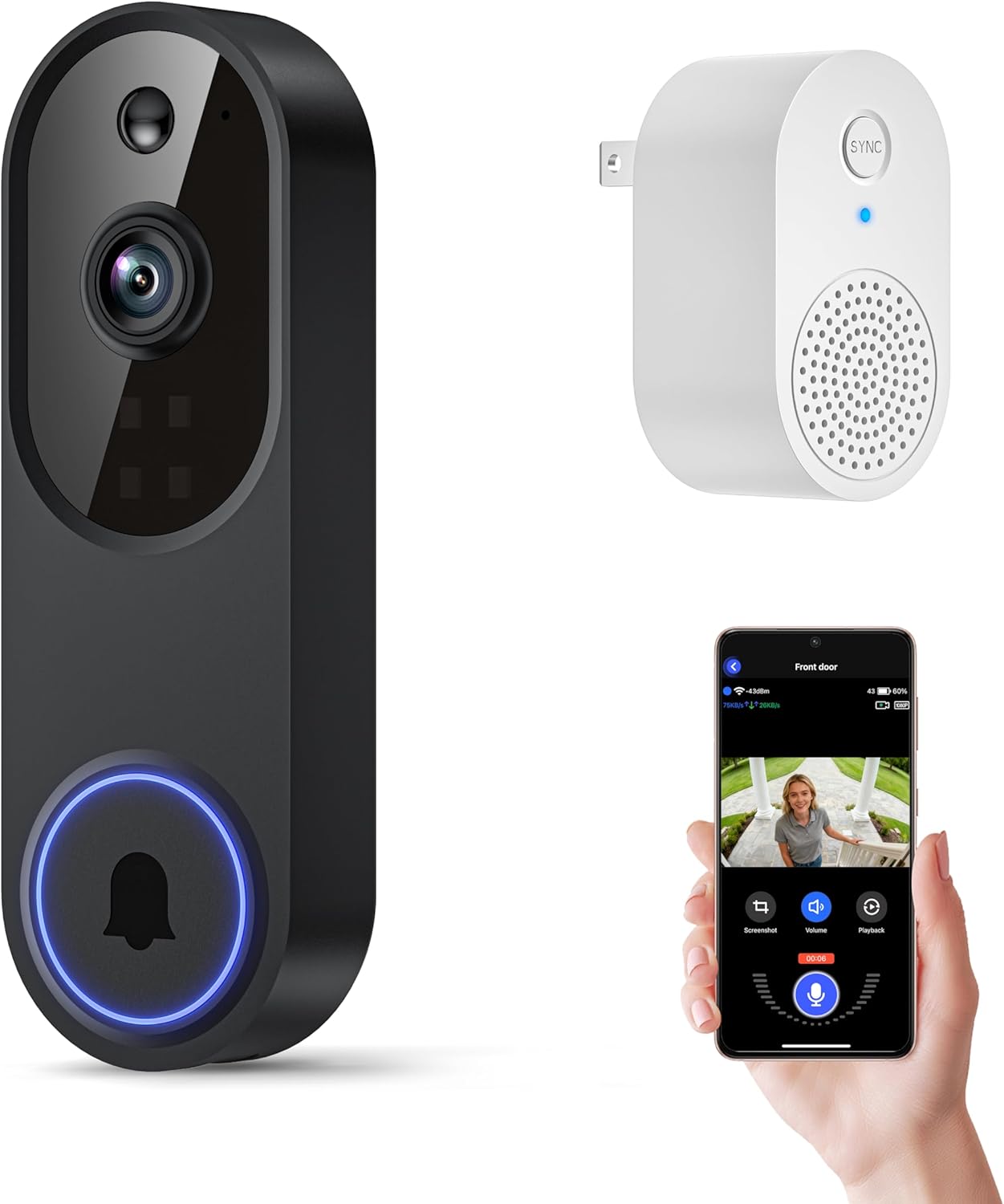
The Orbitell M52 is a battery‑powered wireless doorbell camera designed to monitor a single entry using 2.4GHz Wi‑Fi. It captures 1080p video, sends instant motion alerts to a smartphone, and offers two‑way audio so you can speak with visitors from the app. The camera uses AI to prioritize person detections over animals or vehicles, and its infrared LEDs plus an advanced sensor deliver usable night color footage in low light. The unit is IP65 rated for outdoor use and supports encrypted cloud recording and pre‑capture for subscribers. Setup requires charging the built‑in battery via micro‑USB before first use and pairing to a 2.4GHz network, and the manufacturer recommends placing the doorbell within roughly 33 feet of your router for reliable connection. Limitations to note are the lack of local SD recording and incompatibility with 5GHz Wi‑Fi, which means you must rely on the cloud plan for video history and ensure your network has a dedicated 2.4GHz SSID.
Best for: Buyers who need an inexpensive, standalone doorbell camera for monitoring one entrance and who prioritize simple app alerts and two‑way audio over local storage or multi‑band Wi‑Fi support.
Less Ideal for: Homes that rely on 5GHz‑only Wi‑Fi or users who want local SD recording or integrated multi‑door systems should consider other options.
- 1080p live video with AI person detection to reduce false alerts
- Two‑way audio for real‑time conversation at the door
- Night color vision and infrared LEDs for usable low‑light footage
- Weather‑resistant IP65 build for year‑round outdoor use
- Only works on 2.4GHz Wi‑Fi and must be within about 33 feet of the router
- No local SD card recording; video history requires a cloud subscription
Verdict: A budget‑friendly wireless doorbell camera that delivers 1080p video, two‑way audio, and AI alerts for simple, single‑door monitoring when you use 2.4GHz Wi‑Fi.
CBAOOO 2K Wireless Doorbell Camera

| Power Source | Battery Powered |
|---|---|
| Battery Power | 4500 milliamp_hours |
| Video Capture Resolution | 2k |
| Connectivity Protocol | Wi-Fi (2.4GHz) |
| Waterproof Rating | IP65 |
This CBAOOO doorbell camera is a battery-powered, 2K-resolution video doorbell designed for outdoor home surveillance and multi-door setups. It connects to 2.4 GHz Wi-Fi and delivers 2K live video at about 15 fps with H.264 encoding, plus digital zoom for closer views. The unit uses motion-triggered smart human detection to cut down false alerts and sends mobile push notifications, while two-way audio lets you speak with visitors remotely. It runs on a 4500 mAh rechargeable battery that the manufacturer rates for up to 40 days standby between charges, and the IP65 rating means it tolerates rain and dust for outdoor mounting. The camera supports encrypted cloud storage behind a subscription for playback and backup, and includes both screw and 3M adhesive mounting options to suit permanent or renter-friendly installs. On the down side, the modest 15 fps and 10-foot night-vision range limit fine motion detail and long-range low-light visibility, and the device requires 2.4 GHz Wi-Fi only, which may constrain network placement in some homes.
Best for: Buyers who prioritize dependable, low-maintenance outdoor monitoring across multiple doors and want long battery life, simple wireless setup, and weatherproof hardware.
Less Ideal for: People who need high-frame-rate video for detailed motion analysis or long-range night surveillance should consider cameras with higher fps and stronger night vision.
- 2K video capture with H.264 encoding for clearer day footage and efficient bandwidth use
- Smart human detection reduces false alerts and sends instant motion notifications
- Long 4500 mAh battery with up to 40 days standby lowers recharging frequency
- IP65 weatherproofing and both screw and 3M adhesive mounts for flexible outdoor installation
- Frame rate is 15 fps, which can make fast motion look less smooth
- Night vision is limited to about 10 feet, reducing useful low-light range
Verdict: Choose this camera when you need a weatherproof, low-maintenance 2K doorbell with long battery life and reliable motion detection for monitoring multiple exterior doors.
Blink Video Doorbell

| Battery | Three AA Energizer lithium batteries (included) |
|---|---|
| Field of view | Head-to-toe HD |
| Night vision | Infrared night vision |
| Compatibility | Works with Alexa |
The Blink Video Doorbell is a second-generation, battery-first smart doorbell designed for easy installation and long unattended operation. It records a tall head-to-toe HD field of view with infrared night vision and supports two-way talk through the Blink app, so you can see and speak with visitors or delivery drivers from anywhere. The doorbell runs on three included AA Energizer lithium batteries and claims up to two years of battery life with a Blink Sync Module (sold separately), which makes it practical for locations where wiring is difficult. Setup is straightforward: mount wire-free or connect to existing doorbell wiring to trigger in-home chimes. Video clips can be saved via a Blink subscription for person detection and stitched Moments, and the doorbell integrates with Alexa for basic voice control. Important limits are that the Sync Module is not included and the fuller person-detection/cloud features require a paid plan, so ongoing costs and adding a module should be considered when deploying multiple units around a property.
Best for: Buyers who want a low-maintenance, easy-to-install doorbell for securing multiple entry points and who prioritize long battery life and straightforward app interaction backed by broad customer adoption.
Less Ideal for: Users who need fully-featured local storage, want all advanced detection features without a subscription, or prefer an all-included hubless ecosystem.
- Long battery life up to two years on included AA Energizer lithium batteries with Sync Module
- Head-to-toe HD field of view with infrared night vision for clearer coverage of door and porch
- Simple wire-free installation with option to connect to existing doorbell wiring
- Two-way talk and app alerts let you interact with visitors remotely
- Alexa integration for basic voice control and smart-home convenience
- Sync Module required for the advertised two-year battery claim and is sold separately
- Advanced features like person detection and stitched Moments need a paid Blink subscription
- Limited included local hardware for in-home chime when installed wire-free
Verdict: Choose this Blink doorbell when you need a simple, long‑running battery video doorbell that is quick to install and reliable across multiple doors.
Ring Battery Doorbell 2K

| Video resolution | Retinal 2K |
|---|---|
| Zoom | Up to 6x Enhanced Zoom |
| Communication | Two-Way Talk |
| Recharge | Removable battery with USB-C |
The Ring Battery Doorbell 2K is a battery-powered doorbell camera designed for straightforward home monitoring across one or more entrances. It captures higher-resolution Retinal 2K video with a wide field of view and up to 6x enhanced zoom, which helps when you need to see faces or package details from a distance. Live View and two-way talk let you check who's at the door and speak to visitors in real time, while motion alerts push notifications to your phone. The unit is removable for on-device USB-C recharging using the included removal tool, avoiding frequent wiring work. For multi-door setups you can add multiple Ring units to a single account and view feeds from the app, though advanced features like cloud video history and AI-powered event labeling require a Ring Protect subscription. Practical limitations include reliance on battery power between charges and dependence on cloud services for extended history and some smart detection features.
Best for: Buyers who prioritize clear video, simple wireless installation, and reliable basic alerts for monitoring multiple entrances without running new wiring.
Less Ideal for: People who need continuous local-only recording or extended cloud history without a subscription should consider wired models or systems with included local storage.
- Retinal 2K video quality with wide-angle view for clearer footage
- Up to 6x enhanced zoom to inspect distant details like faces or packages
- Two-way talk and Live View for real-time interaction
- Removable battery with USB-C recharging for easy maintenance
- Motion alerts that send real-time notifications to your phone
- Full video history and some AI features require a paid Ring Protect subscription
- Battery-powered operation means periodic recharging is necessary
Verdict: A convenient battery doorbell that delivers sharp 2K video and easy USB-C recharging, making it a safe choice for monitoring multiple doors with minimal installation.
Choosing the Right Video Doorbell for Multiple Doors: Key Factors to Consider
Camera Field Of View And Angle
A wide and adjustable field of view matters because multiple entrances often sit at different orientations and distances. A camera with a broader horizontal and vertical angle can cover a porch and approaching walkway at once, reducing blind spots and the need for extra units.
Adjustable angle or digital tilting helps you point the sensor at specific thresholds when you cannot mount close to every entry. Consider how much of the approach you need to see — packages on the side steps versus visitors at the door — and choose a model whose optics match those priorities.
Multi‑Door Notification And Zone Management
How the system organizes alerts is crucial when monitoring multiple doors. Look for per-door notification settings so you can send different alerts for the front entry versus a side or garage door. This lets you filter out less critical events or route notifications to different household members.
Detection zones and sensitivity controls help prevent nuisance alerts from driveways, trees, or passing pedestrians. When a device can tag events by entrance and allow custom rules for each zone, it becomes far easier to manage daily traffic and important events across multiple access points.
Network Performance And Reliability
A multi-door setup increases the amount of data the network carries, particularly if several cameras record in high resolution. Stable Wi-Fi or wired connections reduce dropped alerts and recording gaps that can leave entrances unmonitored.
Evaluate the device's supported connection options, dual-band Wi-Fi support, and ability to operate on mesh networks. Some systems offer local buffering during brief network interruptions; that feature is helpful in maintaining continuous coverage between doors.
Recording, Storage, And Retention Policies
Multiple doors mean more recorded events and greater storage demand. Check whether a device supports local storage, cloud plans, or a hybrid approach and what retention policies apply. Local storage can avoid subscription costs but may be limited in capacity and vulnerable to theft.
Cloud storage simplifies access and longer retention but typically involves recurring fees and privacy tradeoffs. Also review whether the system can tag and store clips per entrance so you can quickly find footage tied to a specific door.
Power And Installation Flexibility
Installation constraints vary by door location. Hardwired options provide continuous power for high-traffic entrances, while battery-powered models allow placement where wiring is unavailable. For multiple doors, mixing power types is common, so check whether the brand supports both modes in a unified system.
Consider mounting hardware, the ability to add extenders or chimes, and whether the unit fits typical doorframes. Easier installation reduces upfront effort when deploying units at several locations around a property.
Privacy Controls And User Access
With more entrances under surveillance, privacy and access control become more important. Look for granular user permissions that let you share live view or clip access with specific household members without exposing every camera.
Encryption, two-factor authentication, and clear data handling policies reduce the risk of unauthorized access. Devices that let you schedule recording or disable cameras for specific times give added privacy for sensitive areas of the home.
Planning A Multi‑Door Layout
Start by mapping each entrance and noting sightlines, typical approaches, and lighting conditions. Identify which doors need continuous coverage and which ones require motion-triggered recording only. This short planning step helps prioritize camera placement and feature needs before you choose a system.
If a single device could reasonably cover two nearby entrances, verify that the field of view and resolution will still capture identifying details at the expected distances. Otherwise, plan for separate units with independent mounts and notification rules.
- Sketch property entrances and expected approach paths
- Note mounting options and available power at each door
- Mark potential sources of false triggers like trees or street traffic
Wiring, Power, And Mounting Considerations
Decide whether to use battery or hardwired models at each location. High-traffic doors generally benefit from hardwired power to avoid frequent battery swaps. Battery units are better for outbuildings or locations where running wire is impractical.
Also account for mounting height and angle to maintain consistent detection zones. Use included angle adapters or third-party mounts if needed to aim the camera at the main approach rather than the ground or sky. Weatherproofing and secure fasteners are essential for external doors.
- Use hardwired power for continuous monitoring at primary entrances
- Reserve battery-powered units for secondary or remote doors
- Select mounts that allow precise aiming and stable positioning
Setting Up Notifications And User Profiles
Configure per-door notification rules so that each entrance sends appropriately prioritized alerts. Assign household members or caretakers to different doors and tailor alert frequency to reduce notification fatigue.
Use user profiles and access tiers to control who can view live feeds, download clips, or change settings. If the app supports it, create schedules that silence notifications during expected low-activity windows.
- Set separate notification priorities for front, back, and side doors
- Create user profiles with tailored permissions
- Establish quiet hours or schedule-based recording rules
Optimizing Detection Zones And False‑Alarm Reduction
Fine-tune motion zones to focus on doorways or package drop areas and exclude driveways or sidewalks that generate nuisance alerts. Lower sensitivity combined with smaller, focused zones often produces fewer false positives than broad detection settings.
If pets or regular foot traffic are unavoidable, look for systems with human-only detection or adjustable thresholds to discern people from background motion. Regularly review event logs and adjust zones as seasonal foliage or lighting changes.
- Draw narrow detection zones around thresholds and package areas
- Use human-only detection when available
- Review and tweak zones periodically to respond to environment changes
Scaling A System Over Time
Plan for growth by selecting a platform that supports additional cameras without complex reconfiguration. A consistent app and unified account make it easier to add new doors and maintain per-door rules.
Consider whether the system allows mixing wired and wireless units and if adding devices increases cloud storage needs or subscription tiers. Scalable systems let you start with one or two doors and expand coverage as needed without replacing the base infrastructure.
- Choose platforms that support adding multiple units easily
- Check how adding cameras affects storage and subscription needs
- Prefer systems with unified app management across devices
How We Chose the Best Video Doorbell for Multiple Doors
Our selection focused on features and performance that matter when one system must cover multiple entry points. We prioritized camera field of view and adjustable detection zones so a single unit can monitor wide approaches or specific thresholds. We evaluated multi-door management capabilities such as multi-device linking, per-door notifications, and user profiles to ensure alerts are relevant to each entrance. Network and app reliability were another filter, since split coverage increases network load and the chance of delayed alerts. We also considered storage flexibility, including local and cloud options, because multi-door setups generate more footage. Installation options and wiring versus battery operation were weighed for difficulty and placement freedom. Finally, privacy and security features such as encryption and user access controls were required. We excluded devices that lack per-door event configuration, have severely limited field of view, or offer no practical way to separate notifications by entrance. Our list favors systems that provide concrete tools for managing multiple doors rather than one-size-fits-all single-door designs.
Our full evaluation process is outlined in our review methodology.
FAQ
Can one video doorbell realistically cover two nearby doors?
Often yes, if the entrances are close and within the camera's field of view. Confirm the device's horizontal and vertical angles and check sample footage distances to ensure identifiers like faces or packages remain clear at typical approach ranges.
Should I mix wired and battery units for multiple doors?
Mixing power types is common. Use hardwired units where continuous operation is needed and batteries for doors without wiring. Ensure the system or app supports mixed deployments under one account for simplified management.
How do I avoid getting too many false alerts from multiple cameras?
Use focused detection zones, lower sensitivity where appropriate, and enable features like human-only detection. Per-door alert rules that filter low-priority events help reduce notification overload.
Will multi-door setups need more storage or bandwidth?
Yes. More doors produce more recordings and higher bandwidth usage, especially at higher resolutions. Look for local storage options, configurable clip lengths, and cloud plans that scale with camera count to manage storage needs.
Can I give different household members access to different doors?
Many systems provide per-user permissions or camera-level access settings so you can restrict which doors a person can view or control. Check for profiles and guest access features in the platform documentation.
Final Verdict
For homes with multiple entrances, prioritize systems that separate events and notifications by door, offer adjustable detection zones, and provide robust storage options. Balance installation convenience and power choices against the need for continuous coverage at primary access points. The right setup reduces false alerts, keeps footage organized by entrance, and scales as you add more doors. Focus on per-door management, stable connections, and practical storage to choose confidently for multiple-entrance monitoring needs.